
Dive MCP sunucusu
Dive, ChatGPT, Anthropic ve Ollama gibi LLM'leri yerel ve bulut tabanlı model entegrasyonlarına bağlayan bir masaüstü MCP host uygulamasıdır.
Ayrıca bilinen adı OpenAgentPlatform/Dive
- Yıldızlar
- 1.824
- Araçlar
- —
- İndirmeler, 30 gün
- —
- En son sürüm
- —
- Son commit
- 31 Tem 2026
- Lisans
- MIT
Dive MCP nedir?
Dive bir MCP sunucusudur. Dive, ChatGPT, Anthropic ve Ollama gibi LLM'leri yerel ve bulut tabanlı model entegrasyonlarına bağlayan bir masaüstü MCP host uygulamasıdır.
Özet, projenin README dosyasından oluşturuldu
Dive MCP sunucusu hakkında
Dive, büyük dil modellerini tek bir masaüstü arayüzünden yerel ve bulut tabanlı araçlara bağlamayı geliştiriciler ve yapay zeka meraklıları için mümkün kılar. Bu açık kaynaklı host uygulaması Windows, macOS ve Linux üzerinde çalışarak kullanıcıların ChatGPT, Anthropic ve Ollama modellerini çeşitli Model Context Protocol entegrasyonlarına bağlamasına olanak tanır. Farklı sunucu mimarileriyle uyumluluk sağlamak için hem stdio hem de SSE modlarını destekler.
Kullanıcılar, birden fazla API anahtarını yönetmek ve modeller arasında geçiş yapmak için özel bir model_settings.json dosyası aracılığıyla kurulumlarını yapılandırabilirler. Uygulama; bir Dosya Yöneticisi, komut yürütme için Bash ve web istekleri için Fetch gibi yerleşik araçlar sunar. Daha basit bir deneyim arayanlar için OAP Cloud entegrasyonu, manuel Python veya Docker kurulumuna gerek duymadan yönetilen sunuculara tek tıkla erişim sağlar. Yazılım, işletim sistemine ve kullanıcı tercihine göre farklı performans profilleri sunan hem Electron hem de Tauri sürümlerinde mevcuttur.
Projenin README dosyasından alınmıştır. Her kullanım durumu, oradaki bir alıntı ile kontrol edilir.
Otomatik kontroller
Çalıştırıldı 14 Kas 2026Tam rapor →Henüz doğrulanmadı. Bir sunucunun 80 puana, ciddi bir bulgu olmamasına ve kontrol edebilmemiz için yeterli veriye ihtiyacı vardır. Kontroller nasıl çalışır · Daha fazla puan için nelerin düzeltileceği

- Kaynak deposu bağlantılı ve erişilebiliropenagentplatform/dive is public and reachablegithub.com/openagentplatform/dive ↗Geçti
- Paket, bu depoyu kaynağı olarak gösteriyorKontrol edilmedi
- Derleme kökeni (Sigstore onayı)Kontrol edilmedi
- Açık kaynak lisansı (OSI)MITspdx.org/licenses/MIT.html ↗Geçti
- Son bir yıl içinde commit veya sürüm mevcutLast commit or release 2026-07-31github.com/openagentplatform/dive ↗Geçti
- OpenSSF ScorecardKontrol edilmedi
- Paket adı popüler bir pakete yakın değilKontrol edilmedi
- Pakette veya bağımlılıklarında kritik uyarı yokKontrol edilmedi
- Modele yönelik gizli talimat yok0 tool descriptions and the README read; no override phrases, credential paths or hidden charactersGeçti
- Yıkıcı araçlar etiketlenmişKontrol edilmedi
- Uzak uç nokta MCP el sıkışmasına yanıt veriyorKontrol edilmedi









Dive is an open-source MCP Host Desktop Application that seamlessly integrates with any LLMs supporting function calling capabilities. ✨
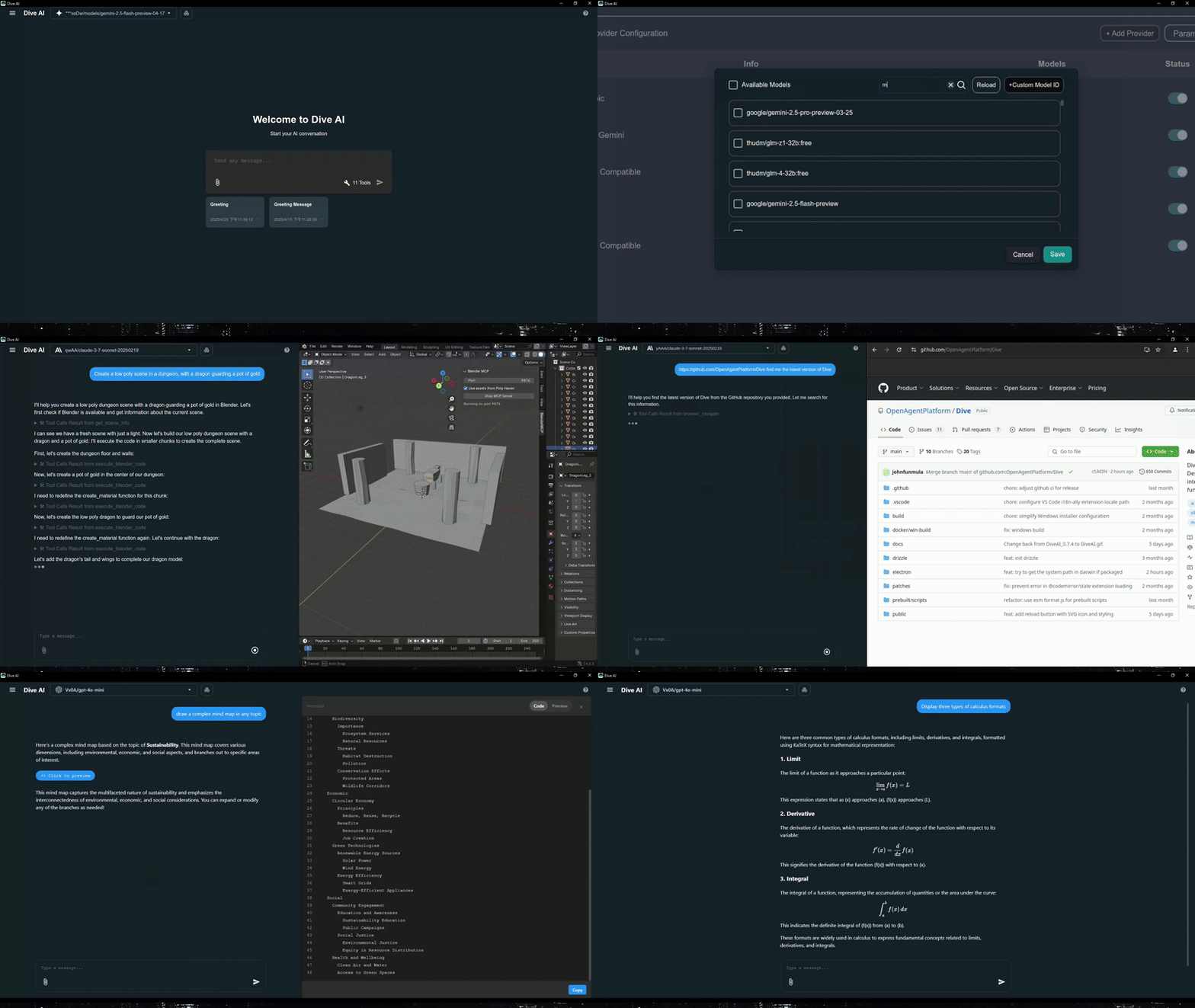
Features 🎯
- 🌐 Universal LLM Support: Compatible with ChatGPT, Anthropic, Ollama and OpenAI-compatible models
- 💻 Cross-Platform: Available for Windows, MacOS, and Linux
- 🔄 Model Context Protocol: Enabling seamless MCP AI agent integration on both stdio and SSE mode
- ☁️ OAP Cloud Integration: One-click access to managed MCP servers via OAPHub.ai - eliminates complex local deployments
- 🏗️ Dual Architecture: Modern Tauri version alongside traditional Electron version for optimal performance
- 🌍 Multi-Language Support: Supports 24+ languages including English, Traditional Chinese, Simplified Chinese, Spanish, Japanese, Korean, German, French, Italian, Portuguese, Russian, Thai, Vietnamese, Filipino, Indonesian, Polish, Turkish, Ukrainian, Swedish, Norwegian, Finnish, and Lao
- ⚙️ Advanced API Management: Multiple API keys and model switching support with
model_settings.json - 🛠️ Granular Tool Control: Enable/disable individual MCP tools for precise customization
- 💡 Custom Instructions: Personalized system prompts for tailored AI behavior
- ⌨️ Keyboard Shortcuts: Comprehensive hotkey support for efficient navigation and operations (rename, settings, reload, new chat, etc.)
- 📝 Chat Draft Saving: Automatically saves chat input drafts to prevent data loss
- 🔄 Auto-Update Mechanism: Automatically checks for and installs the latest application updates
- 🔐 MCP Server Authentication: Added support for MCP server authentication
⚠️ Note: This feature is currently unstable and may require frequent re-authorization
- 🛠️ Built-in Local Tools: Pre-configured tools available out of the box - Fetch (web requests), File Manager (read/write files), and Bash (command execution)
- 🤖 MCP Server Installer Agent: Intelligent agent that helps you install and configure MCP servers automatically
- 🔔 Multiple Elicitation Support: Handle multiple MCP elicitation requests simultaneously in the UI
- 📁 @ File Path Search: Extended @ keyword in chat input to search file paths
Recent updates(2026/02/26) - v0.14.0+ 🎉
- 🛠️ Skills & Slash Commands: Support skills and more slash commands
- 🔍 Chat History Search: Support chat history search
Platform Availability
| Platform | Electron | Tauri |
|---|---|---|
| Windows | ✅ | ✅ |
| macOS | ✅ | 🔜 |
| Linux | ✅ | ✅ |
Migration Note: Existing local MCP/LLM configurations remain fully supported. OAP integration is additive and does not affect current workflows.
Download and Install ⬇️
Get the latest version of Dive:

Windows users: 🪟
Choose between two architectures:
- Tauri Version (Recommended): Smaller installer (<30MB), modern architecture
- Electron Version: Traditional architecture, fully stable
- Python and Node.js environments will be downloaded automatically after launching
MacOS users: 🍎
- Electron Version: Download the .dmg version
- You need to install Python and Node.js (with npx uvx) environments yourself
- Follow the installation prompts to complete setup
Linux users: 🐧
Choose between two architectures:
- Tauri Version: Modern architecture with smaller installer size
- Electron Version (Recommended): Traditional architecture with .AppImage format
- You need to install Python and Node.js (with npx uvx) environments yourself
- For Ubuntu/Debian users:
- You may need to add
--no-sandboxparameter - Or modify system settings to allow sandbox
- Run
chmod +xto make the AppImage executable
- You may need to add
- For Arch users:
- If you are using Arch Linux, you can install dive using an AUR helper. For example:
paru -S dive-ai
- If you are using Arch Linux, you can install dive using an AUR helper. For example:
MCP Setup Options
For more detailed instructions, please see MCP Servers Setup.
The easiest way to get started! Access enterprise-grade MCP tools instantly:
- Sign up at OAPHub.ai
- Connect to Dive using one-click deep links or configuration files
- Enjoy managed MCP servers with zero setup - no Python, Docker, or complex dependencies required
Benefits:
- ✅ Zero configuration needed
- ✅ Cross-platform compatibility
- ✅ Enterprise-grade reliability
- ✅ Automatic updates and maintenance
Build 🛠️
See BUILD.md for more details.
Contributing 🤝
We welcome contributions from the community! Here's how you can help:
Development Setup
- Fork the repository
- Clone your fork:
git clone https://github.com/YOUR_USERNAME/Dive.git - Install dependencies:
npm install - Start development:
npm run dev(Electron) orcargo tauri dev(Tauri) - Make your changes and test thoroughly
- Submit a pull request
License 📄
Dive is open-source software licensed under the MIT License.
Connect With Us 🌐
- 💬 Join our Discord
- 🐦 Follow us on Twitter/X Reddit Thread
- ⭐ Star us on GitHub
- 🐛 Report issues on our Issue Tracker
Dive MCP soruları
Dive hangi LLM'leri destekler?
Dive; ChatGPT, Anthropic, Ollama ve function calling destekleyen diğer OpenAI uyumlu modellerle çalışır.
Dive'ı hangi platformlarda çalıştırabilirim?
Dive; hem Electron hem de Tauri sürümleriyle Windows, macOS ve Linux üzerinde çalışır.
Dive, MCP server kimlik doğrulamasını destekliyor mu?
Evet, Dive MCP server kimlik doğrulamasını destekler; ancak bu özellik şu an için kararsız olarak işaretlenmiştir ve sık sık yeniden yetkilendirme gerektirebilir.
Dive hangi yerleşik araçları içerir?
Dive; web isteklerini çekmek, dosyaları yönetmek ve bash komutlarını çalıştırmak için yerel araçlarla birlikte gelir.