
Yapay zeka ajanlarının GitHub depolarını araştırmasına, sorunları analiz etmesine, kod bağlamını kontrol etmesine ve yerel bir SQLite araştırma külliyatı kullanarak değişiklikleri doğrulamasına olanak tanır.
Ayrıca bilinen adı morluto/gitcontribute
- Yıldızlar
- 36
- Araçlar
- —
- İndirmeler, 30 gün
- —
- En son sürüm
- 3.0.2
- Son commit
- 14 Eyl 2026
- Lisans
- MIT
GitContribute MCP nedir?
GitContribute bir MCP sunucusudur. Yapay zeka ajanlarının GitHub depolarını araştırmasına, sorunları analiz etmesine, kod bağlamını kontrol etmesine ve yerel bir SQLite araştırma külliyatı kullanarak değişiklikleri doğrulamasına olanak tanır.
Özet, projenin README dosyasından oluşturuldu
GitContribute MCP sunucusu hakkında
GitContribute, kodlama ajanlarının GitHub depolarına yüksek kaliteli katkılar hazırlayabilmeleri için bir araştırma çalışma alanı sağlar. Geliştiricilerin ve yapay zeka ajanlarının bir sorunu bulmaktan doğrulanmış bir pull request hazırlamaya kadar olan süreci yönetmelerine yardımcı olan bir MCP server, CLI veya terminal UI olarak çalışır. Sistem; depo kılavuzlarını, tartışmaları ve kod bağlamını yerel bir SQLite külliyatına senkronize ederek sürekli ağ çağrıları yapmadan çevrimdışı araştırma ve inceleme yapılmasına imkan tanır.
Kullanıcılar ortamı Node.js veya Go kullanarak kurarlar ve araç, kimlik doğrulama için GitHub CLI ile entegre olabilir. Birçok otomasyon aracının aksine, GitHub'a doğrudan asla yazma yapmaz. Bunun yerine kanıt toplama, çakışan çalışmaların kontrol edilmesi ve test veya benchmark gibi yerel doğrulama komutlarının çalıştırılmasına odaklanır. Bu sayede, önerilen değişikliklerin kaydedilmiş gözlemlerle desteklenmesi ve bir insan nihai taslağı incelemeden önce bir temel (baseline) ile test edilmesi sağlanır.
Neler yapabilirsiniz
- 1Uygun katkı görevlerini belirlemeAjanın, belirli bir depodaki açık sorunları kapsamlarına ve koordinasyon risklerine göre bulmasını ve sıralamasını isteyin.
- 2Derinlemesine sorun araştırması yapmaAjanın, sorunu ve ilgili kod bağlamını özetlemek için belirli bir sorun numarasını araştırmasını talimatlandırın.
- 3Mükerrer çalışmalara karşı doğrulamaBir sorunun başka pull request'ler veya raporlar tarafından halihazırda ele alınıp alınmadığını kontrol etmesini isteyin.
- 4Kod değişikliklerini yerel olarak doğrulamaAjanın, aday bir değişikliği mevcut temel ile karşılaştırmak için onaylanmış test komutlarını çalıştırmasını sağlayın.
Projenin README dosyasından alınmıştır. Her kullanım durumu, oradaki bir alıntı ile kontrol edilir.
GitContribute MCP nasıl yüklenir
Biçimler 10 Kas 2026 tarihinde doğrulandıCursor'a ekleGoose'a ekleGitContribute MCP'yi Claude Code içine yükleyin
$ claude mcp add gitcontribute -- npx -y gitcontributeGitContribute MCP'yi Cursor içine yükleyin
~/.cursor/mcp.json
{
  "mcpServers": {
    "gitcontribute": {
      "command": "npx",
      "args": [
        "-y",
        "gitcontribute"
      ]
    }
  }
}GitContribute MCP'yi VS Code içine yükleyin
.vscode/mcp.json
{
  "servers": {
    "gitcontribute": {
      "type": "stdio",
      "command": "npx",
      "args": [
        "-y",
        "gitcontribute"
      ]
    }
  }
}GitContribute MCP'yi VS Code CLI içine yükleyin
$ code --add-mcp '{"name":"gitcontribute","type":"stdio","command":"npx","args":["-y","gitcontribute"]}'GitContribute MCP'yi Claude Desktop içine yükleyin
claude_desktop_config.json
{
  "mcpServers": {
    "gitcontribute": {
      "command": "npx",
      "args": [
        "-y",
        "gitcontribute"
      ]
    }
  }
}GitContribute MCP'yi Codex içine yükleyin
$ codex mcp add gitcontribute -- npx -y gitcontributeGitContribute MCP'yi Codex config.toml içine yükleyin
~/.codex/config.toml
[mcp_servers.gitcontribute]
command = "npx"
args = ["-y", "gitcontribute"]
GitContribute MCP'yi Gemini CLI içine yükleyin
$ gemini mcp add -s user gitcontribute npx -- -y gitcontributeGitContribute MCP'yi Gemini settings.json içine yükleyin
~/.gemini/settings.json
{
  "mcpServers": {
    "gitcontribute": {
      "command": "npx",
      "args": [
        "-y",
        "gitcontribute"
      ]
    }
  }
}Otomatik kontroller
Çalıştırıldı 14 Kas 2026Tam rapor →Otomatik kontrollerimizden geçti. Bu bir güvenlik denetimi değildir: kodu okuyun ve sunucuya ihtiyaç duyduğu en dar erişimi verin. Kontroller nasıl çalışır

- Kaynak deposu bağlantılı ve erişilebilirmorluto/gitcontribute is public and reachablegithub.com/morluto/gitcontribute ↗Geçti
- Paket, bu depoyu kaynağı olarak gösteriyorgitcontribute names morluto/gitcontribute as sourcenpmjs.com/package/gitcontribute ↗Geçti
- Derleme kökeni (Sigstore onayı)Sigstore attestation for gitcontributenpmjs.com/package/gitcontribute/v/3.0.2#provenance ↗Geçti
- Açık kaynak lisansı (OSI)MITspdx.org/licenses/MIT.html ↗Geçti
- Son bir yıl içinde commit veya sürüm mevcutLast commit or release 2026-09-14github.com/morluto/gitcontribute ↗Geçti
- OpenSSF ScorecardKontrol edilmedi
- Paket adı popüler bir pakete yakın değilNo popular package one edit away from gitcontributeGeçti
- Pakette veya bağımlılıklarında kritik uyarı yok1 resolved dependencies checked; no critical advisoryosv.dev ↗Geçti
- Modele yönelik gizli talimat yok0 tool descriptions and the README read; no override phrases, credential paths or hidden charactersGeçti
- Yıkıcı araçlar etiketlenmişKontrol edilmedi
- Uzak uç nokta MCP el sıkışmasına yanıt veriyorKontrol edilmedi
GitContribute
Contribution research for agents: check repository guidance, related work, code context, and validation before writing a patch.



Quick start · Workflow · CLI · MCP · Safety · Documentation
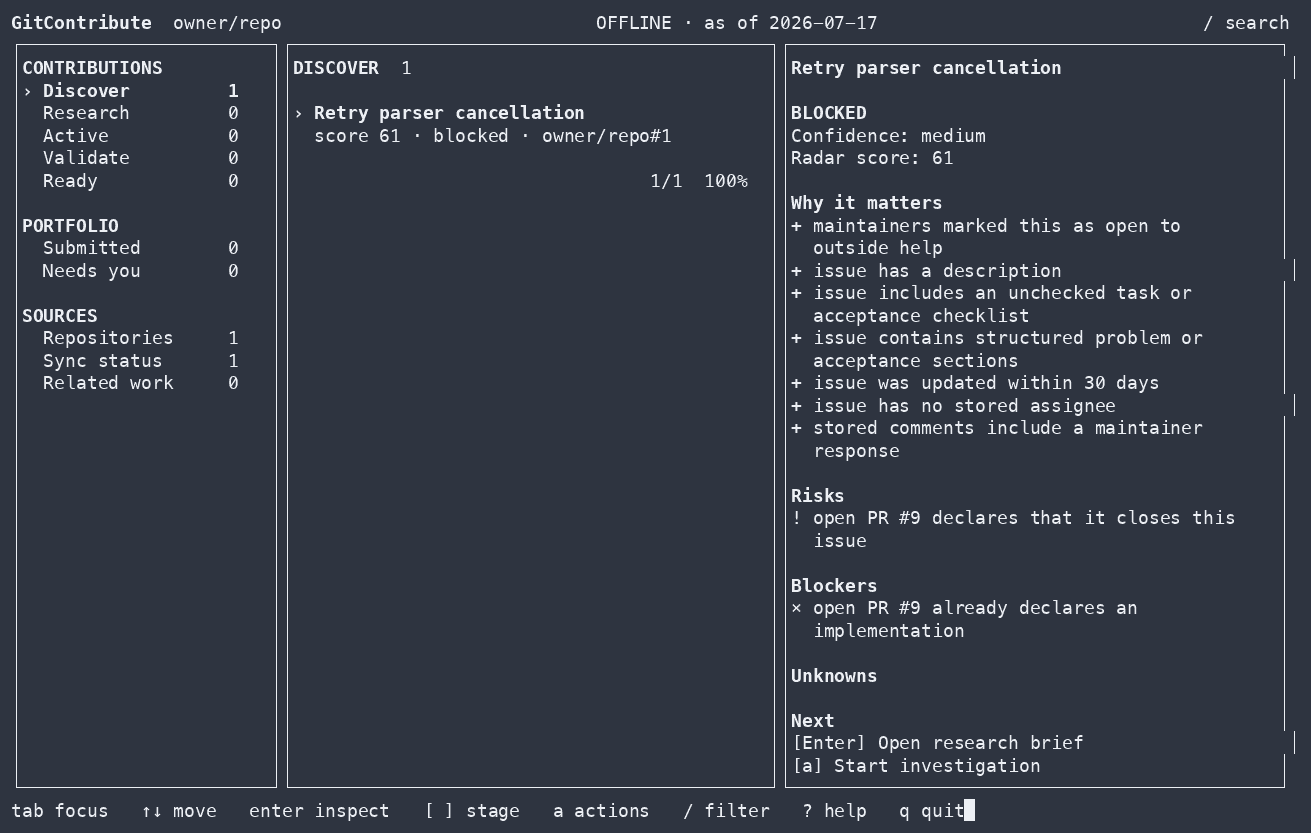
gitcontribute is available as a CLI, terminal UI, and MCP server for coding
agents.
GitHub can show you open issues. It cannot tell you whether an issue is still relevant, already being implemented, appropriate for an outside contributor, or supported by enough evidence to work on safely.
GitContribute collects repository guidance, related issues and pull requests, code context, accepted contribution patterns, and validation results in a local SQLite corpus. Results identify missing or stale coverage.
find work -> understand it -> check competing work -> prove the change -> prepare the handoff
[!IMPORTANT] GitContribute never writes to GitHub. It prepares local research and drafts for you to review.
Quick start
Run the guided setup with Node.js 18 or newer:
npx --yes gitcontribute@latest setup
Choose MCP to use GitContribute from a supported coding agent, CLI for the terminal and TUI, or Both. The wizard shows every planned change before applying it. Adding a repository during setup does not contact GitHub or start a sync.
After setup, start with a repository or an exact issue:
| Task | Coding agent | CLI |
|---|---|---|
| Find candidates | Find contribution candidates in owner/repo. Rank them by contribution fit, evidence, scope, and coordination risk. |
gitcontribute archive sync owner/repogitcontribute radar owner/repo --limit 10 |
| Research an issue | Investigate owner/repo#42. Check guidance, discussion, code, prior fixes, competing work, and missing evidence. |
gitcontribute archive sync owner/repo --numbers 42gitcontribute research brief issue:owner/repo#42 |
Results include source references, coverage gaps, and suggested next steps.
Install a persistent command:
npm install --global gitcontribute@latest
gitcontribute setup
Pin GitContribute to a project:
npm install --save-dev gitcontribute
npm exec -- gitcontribute setup --mode mcp --codex --token-source none --yes
Build from source with Go 1.26 or newer:
go install github.com/morluto/gitcontribute/cmd/gitcontribute@latest
Native npm binaries are included for macOS ARM64/x64, Linux ARM64/x64, and
Windows x64. You also need git. The gh CLI is optional and can provide
authentication through gh auth token.
Contribution workflow
1. Find a candidate
Search a repository or rank its open issues by available evidence, scope, risks, blockers, and signs that maintainer coordination is needed.
Find contribution candidates in golang/go. Exclude issues with active
implementation work and explain why each remaining candidate is worth
investigating.
The ranking only covers stored observations. Results report incomplete coverage.
2. Research an issue
Build a research brief from the issue, repository guidance, discussion, linked work, indexed code, and historical contributions. Extracted maintainer text and checkboxes are not presented as complete acceptance criteria.
Investigate issue owner/repo#42. Summarize the confirmed problem, likely scope,
relevant code, maintainer guidance, and open questions.
3. Check related work
Look for duplicate reports, linked pull requests, closing relationships, and semantically overlapping work before investing in an implementation.
Check whether owner/repo#42 has duplicate reports or competing implementation
work. Tell me what you checked and identify any missing coverage.
Incomplete coverage is reported instead of being treated as proof that no competing work exists. In the MCP workflow, follow the returned typed recovery action, poll the durable job, and reread the affected exact thread or repository before drawing that conclusion.
4. Validate a change
Record a reproduction, test, benchmark, or other validation and compare the unmodified baseline with a candidate. Validation commands run only after explicit approval.
Validate my candidate change against the baseline. Run the approved checks,
record both results, and explain whether the evidence supports the change.
Stored runs include the command, outcome, timing, and available process metrics.
5. Prepare a draft
Create a local issue, pull-request, or review draft tied to the research and validation evidence already collected.
Prepare a pull-request draft for this contribution. Tie its claims to the
recorded evidence, include the validation results, and do not post anything.
Draft revisions retain their exact rendered bytes and provenance.
Interfaces and storage
GitContribute stores repositories, threads, code snapshots, investigations, evidence, validation results, and contribution outcomes in SQLite. Network access is explicit; once information has been synced, corpus search and inspection work offline.
 GitHub read APIs                  Local checkout
       |                                |
       | explicit sync / hydrate        | explicit index / acquire
       v                                v
  +------------------------------------------------+
  |              Local SQLite corpus               |
  | observations · coverage · evidence · outcomes  |
  +------------------------+-----------------------+
                           | offline reads
                 +---------+---------+
                 v                   v
              CLI / TUI          Coding agents
The CLI and MCP server use the same application services and side-effect boundaries.
CLI
The CLI exposes the same workflow without requiring an MCP client:
# Sync repository context and current threads
gitcontribute archive sync-context owner/repo
gitcontribute archive sync owner/repo

# Find and inspect contribution candidates
gitcontribute radar owner/repo --limit 10
gitcontribute research brief issue:owner/repo#42

# Search stored threads and indexed code
gitcontribute search threads "connection timeout" --repo owner/repo
gitcontribute search code "context.WithTimeout" --repo owner/repo
For implementation work:
gitcontribute investigation start-thread issue:owner/repo#42 --json
gitcontribute workspace create <investigation-id>
gitcontribute validation define --kind=test --command="go test ./..." \
  --working-dir=/path/to/workspace <investigation-id>
gitcontribute validation run <validation-id> --kind=base --execute
gitcontribute validation run <validation-id> --kind=candidate --execute
gitcontribute validation compare <base-run-id> <candidate-run-id>
gitcontribute readiness opportunity <opportunity-id>
gitcontribute prepare pr --approach="Bound retries with context" \
  --workspace <workspace-id> <opportunity-id>
Run gitcontribute --help or gitcontribute <command> --help for the complete
command and flag reference. Most non-interactive commands accept --json;
machine-readable output goes to stdout and progress goes to stderr.
Launch the local TUI with:
gitcontribute tui
MCP
The MCP server advertises one unified catalog. Hosts such as Codex and Claude Code can discover large MCP catalogs with native tool search, so setup does not ask users to choose permanent capability profiles.
gitcontribute setup --mode mcp --codex --token-source none --yes
gitcontribute setup --mode mcp --all-clients --token-source none --yes
To start the stdio server directly:
gitcontribute mcp serve --transport=stdio
Add --read-only to remove tools that permit network access, local writes, or
execution. See MCP catalog and composition for capability
boundaries, snapshot recovery, resource handoffs, and common tool sequences.
GitHub users are stored as first-class actors. Live discovery records identity only; profile, social-account, organization, pinned-item, repository, and contribution facts are synchronized independently. See the actor corpus for the data and freshness model.
Side-effect boundaries
GitContribute separates corpus reads, GitHub reads, local writes, process execution, and external mutation.
| Operation | Network | Local write | Runs a process | GitHub write |
|---|---|---|---|---|
| Search and inspect stored research | No | No | No | No |
| Record investigations and evidence | No | Yes | No | No |
| Sync or hydrate GitHub context | Yes | Yes | No | No |
| Acquire and index code | Yes | Yes | git only |
No |
| Run an explicitly approved validation | No by default | Yes | Yes | No |
- Corpus reads never fetch data.
- Crawling and indexing never execute repository-controlled code.
- Explicit validation commands run on your host with your user permissions.
- GitContribute has no GitHub mutation capability.
- There is no hosted corpus or product telemetry.
See Architecture for the complete boundary definitions.
Documentation
- Onboarding and configuration
- MCP catalog and composition
- Actor corpus
- Architecture and side-effect boundaries
- Operational runbooks
- Security policy
- Contributing
Storage
GitContribute follows platform conventions:
| Platform | Configuration | Data |
|---|---|---|
| Linux | $XDG_CONFIG_HOME/gitcontribute or ~/.config/gitcontribute |
$XDG_DATA_HOME/gitcontribute or ~/.local/share/gitcontribute |
| macOS | ~/Library/Application Support/gitcontribute |
~/Library/Application Support/gitcontribute/Data |
| Windows | %APPDATA%\gitcontribute |
%LOCALAPPDATA%\gitcontribute\Data |
The default corpus is gitcontribute.db in the data directory. Run
gitcontribute metadata or gitcontribute doctor --json to inspect the local
setup.
Platform support
Linux and macOS are the primary development and test targets. Windows builds
are tested in CI and use the standard %APPDATA% and %LOCALAPPDATA%
locations.
Development
make verify
go run ./cmd/gitcontribute --help
Before changing package boundaries or side effects, read docs/architecture.md. See CONTRIBUTING.md for the repository workflow.
GitContribute MCP soruları
GitContribute MCP'yi Claude Code'a nasıl eklerim?
Terminalinizde claude mcp add gitcontribute -- npx -y gitcontribute komutunu çalıştırın. Her projede kullanılabilir olması için --scope user ekleyin.
GitContribute MCP'yi Cursor'a nasıl eklerim?
~/.cursor/mcp.json dosyasını açın ve yukarıdaki yükleme bölümünde gösterilen Cursor yapılandırmasını kullanarak sunucuyu mcpServers altına ekleyin.
GitContribute GitHub'a veri yazar mı?
Hayır, GitContribute asla GitHub'a yazma işlemi yapmaz; yalnızca yerel araştırmaları ve taslakları incelemeniz için hazırlar.
Araştırma verileri nasıl saklanır?
Tüm depo verileri, incelemeler ve doğrulama sonuçları yerel bir SQLite külliyatında saklanır.
GitContribute'u çevrimdışı kullanabilir miyim?
Evet, bilgiler yerel külliyata senkronize edildikten sonra, verileri arama ve inceleme işlemleri çevrimdışı olarak çalışır.