
Kaynak kodu; dosyalar, semboller, referanslar ve bağımlılıklardan oluşan çözümlenmiş bir haritaya dönüştürerek kodlama ajanları için yapısal bağlam sağlar.
Ayrıca bilinen adı lzehrung/codegraph, @lzehrung/codegraph
- Yıldızlar
- 9
- Araçlar
- —
- İndirmeler, 30 gün
- —
- En son sürüm
- —
- Son commit
- 13 Kas 2026
- Lisans
- MIT
codegraph MCP nedir?
codegraph bir MCP sunucusudur. Kaynak kodu; dosyalar, semboller, referanslar ve bağımlılıklardan oluşan çözümlenmiş bir haritaya dönüştürerek kodlama ajanları için yapısal bağlam sağlar.
Özet, projenin README dosyasından oluşturuldu
codegraph MCP sunucusu hakkında
codegraph, kodlama ajanlarına bir arama sonuçları koleksiyonu yerine bir deponun yapısal haritasını sunar. Kaynak ağacını; dosyalar, semboller, referanslar ve bağımlılıklar içeren çözümlenmiş bir haritaya dönüştürerek AI istemcilerine derin bir yapısal bağlam kazandırır. Bu sayede bir ajan, dizinleri listelemekle veya arama terimleri tahmin etmekle vakit kaybetmeden, bileşenlerin nasıl bağlandığını ve belirli bir değişikliğin neleri bozabileceğini anlayabilir.
Geliştiriciler bunu yerel bir CLI veya bir TypeScript kütüphanesi olarak kullanabilirler. Node.js 22.16 veya daha yeni bir sürüm gerektirir; ancak npm bulunmayan ortamlar için standalone yükleyiciler mevcuttur. Araç, dosyalar arası depo haritasını tamamlamak için metin araması ve derleyicilerle birlikte çalışır. Değişiklikleri incelemek için codegraph review, bağımlılık analizi için codegraph deps ve uygulama detayları ile ilgili testleri bulmak için codegraph explore gibi özel komutlar sağlar.
Neler yapabilirsiniz
- 1Değişiklik etkisini değerlendirmeBir ajan, kod değişikliğinden sonra hangi testlerin çalıştırılması gerektiğini veya nelerin bozulabileceğini belirleyebilir.
- 2Semantik refactoring yapmaBelirli bir sembolün nerede kullanıldığını tespit edebilir veya bir yeniden adlandırma işleminin etki alanını görebilirsiniz.
- 3Depo sağlığını analiz etmeKod tekrarlarını belirleyebilir veya yüksek bağlantı sayıları nedeniyle kritik noktalar (hotspots) haline gelen dosyaları bulabilirsiniz.
Projenin README dosyasından alınmıştır. Her kullanım durumu, oradaki bir alıntı ile kontrol edilir.
codegraph MCP nasıl yüklenir
Biçimler 10 Kas 2026 tarihinde doğrulandıCursor'a ekleGoose'a eklecodegraph MCP'yi Claude Code içine yükleyin
$ claude mcp add codegraph -- npx -y @lzehrung/codegraphcodegraph MCP'yi Cursor içine yükleyin
~/.cursor/mcp.json
{
  "mcpServers": {
    "codegraph": {
      "command": "npx",
      "args": [
        "-y",
        "@lzehrung/codegraph"
      ]
    }
  }
}codegraph MCP'yi VS Code içine yükleyin
.vscode/mcp.json
{
  "servers": {
    "codegraph": {
      "type": "stdio",
      "command": "npx",
      "args": [
        "-y",
        "@lzehrung/codegraph"
      ]
    }
  }
}codegraph MCP'yi VS Code CLI içine yükleyin
$ code --add-mcp '{"name":"codegraph","type":"stdio","command":"npx","args":["-y","@lzehrung/codegraph"]}'codegraph MCP'yi Claude Desktop içine yükleyin
claude_desktop_config.json
{
  "mcpServers": {
    "codegraph": {
      "command": "npx",
      "args": [
        "-y",
        "@lzehrung/codegraph"
      ]
    }
  }
}codegraph MCP'yi Codex içine yükleyin
$ codex mcp add codegraph -- npx -y @lzehrung/codegraphcodegraph MCP'yi Codex config.toml içine yükleyin
~/.codex/config.toml
[mcp_servers.codegraph]
command = "npx"
args = ["-y", "@lzehrung/codegraph"]
codegraph MCP'yi Gemini CLI içine yükleyin
$ gemini mcp add -s user codegraph npx -- -y @lzehrung/codegraphcodegraph MCP'yi Gemini settings.json içine yükleyin
~/.gemini/settings.json
{
  "mcpServers": {
    "codegraph": {
      "command": "npx",
      "args": [
        "-y",
        "@lzehrung/codegraph"
      ]
    }
  }
}Otomatik kontroller
Çalıştırıldı 14 Kas 2026Tam rapor →Otomatik kontrollerimizden geçti. Bu bir güvenlik denetimi değildir: kodu okuyun ve sunucuya ihtiyaç duyduğu en dar erişimi verin. Kontroller nasıl çalışır

- Kaynak deposu bağlantılı ve erişilebilirlzehrung/codegraph is public and reachablegithub.com/lzehrung/codegraph ↗Geçti
- Paket, bu depoyu kaynağı olarak gösteriyor@lzehrung/codegraph names lzehrung/codegraph as sourcenpmjs.com/package/@lzehrung/codegraph ↗Geçti
- Derleme kökeni (Sigstore onayı)Sigstore attestation for @lzehrung/codegraphnpmjs.com/package/@lzehrung/codegraph/v/3.2.1#provenance ↗Geçti
- Açık kaynak lisansı (OSI)MITspdx.org/licenses/MIT.html ↗Geçti
- Son bir yıl içinde commit veya sürüm mevcutLast commit or release 2026-11-13github.com/lzehrung/codegraph ↗Geçti
- OpenSSF ScorecardKontrol edilmedi
- Paket adı popüler bir pakete yakın değilNo popular package one edit away from @lzehrung/codegraphGeçti
- Pakette veya bağımlılıklarında kritik uyarı yokKontrol edilmedi
- Modele yönelik gizli talimat yok0 tool descriptions and the README read; no override phrases, credential paths or hidden charactersGeçti
- Yıkıcı araçlar etiketlenmişKontrol edilmedi
- Uzak uç nokta MCP el sıkışmasına yanıt veriyorKontrol edilmedi
codegraph
Give your coding agent a map of the repository, not a pile of search results.
codegraph is a local CLI and TypeScript library that turns a source tree into a resolved map of files, symbols, references, and dependencies. Ask where an implementation lives, how components connect, what a change can break, or which tests are relevant, then get bounded source evidence and copyable next steps.
codegraph is not an AST, a compiler, or a linter. People can use codegraph review and codegraph deps to inspect changes and dependencies without an agent.
Without structural context, an agent burns early turns listing directories, guessing search terms, opening candidate files, and reconstructing relationships. codegraph does that discovery once so the context window can stay focused on the problem.
With Node.js 22.16 or newer, install from npm:
npm install -g @lzehrung/codegraph
codegraph doctor
codegraph install
codegraph explore "build review report" --root .
No Node.js or npm? The standalone installers download a self-contained bundle with Node.js, the CLI, and the matching native runtime:
irm https://github.com/lzehrung/codegraph/releases/latest/download/install.ps1 | iex
curl -fsSL https://github.com/lzehrung/codegraph/releases/latest/download/install.sh | sh
Use codegraph alongside text search and compilers: text search finds exact strings, compilers prove language behavior, and codegraph fills in the cross-file repository map between them. See Installation for npm, standalone, and source-checkout paths.
Table of contents
- Changelog
- What you can do
- Try it
- A useful first five minutes
- Visualize a graph
- What the output looks like
- Why codegraph
- Why not just grep or an LSP?
- Agent setup
- Language support
- Using as a library
- How it works
- Limits and tradeoffs
- Documentation
- Development
What you can do
| Job | Question | Start here | What comes back |
|---|---|---|---|
| Review | What could this change break? | codegraph review |
Changed symbols, risks, and candidate tests |
| Review | Which tests should I run? | codegraph affected --base HEAD --head WORKTREE --quiet |
Test paths from changed files and reverse dependencies |
| Review | Where should I start reading for a topic? | codegraph explore "<terms>" --root . |
Top search hits with their source, dependents, and candidate tests |
| Refactor | Where is this symbol used? | codegraph refs src/file.ts:10:5 |
Semantic references and coverage |
| Refactor | What depends on this file? | codegraph rdeps src/file.ts --json |
Reverse dependencies |
| Refactor | What evidence supports a change? | codegraph refactor-plan <symbol-target> |
Read-only evidence; no code changes |
| Refactor | Where would a rename apply? | codegraph rename-preview <symbol-target> <new-name> |
Read-only edits and conflicts; no code changes |
| Quality | Which files have the most connections? | codegraph hotspots ./src --limit 20 |
Fan-in and fan-out ranking |
| Quality | Where is code duplicated? | codegraph duplicates ./src --min-confidence medium |
Ranked duplicate groups |
| Docs | Which public symbols exist? | codegraph apisurface |
Exported API symbols |
| Docs | Which exports have no indexed docstring? | codegraph apisurface --undocumented |
Locations; partial coverage names unchecked files |
| Docs | Are Markdown links broken? | codegraph links --root . |
Broken local links with ranges; external URLs skipped |
CLI output is readable by default. Use --json for structured fields and omission counts.
Try it
See Installation for npm, standalone, and source-checkout steps.
A useful first five minutes
Do not begin by generating every possible report. Start with the question you actually have.
Understand an unfamiliar repo
# Map the repository before selecting a target
codegraph orient --root . --budget small

# Search a concrete term (the query is lexical: use the words that appear in code)
codegraph search "build review report" --json

# explore: search, then bundle the top hits with source, dependents, and candidate tests
codegraph explore "build review report" --root .

# Follow a returned target
codegraph explain src/review.ts
codegraph deps src/review.ts --json
codegraph refs src/review.ts:215:23
Review local changes
# Compact reviewer handoff for staged and unstaged tracked changes
codegraph review

# Broader blast-radius map when the summary needs expansion
codegraph impact --base HEAD --head WORKTREE

# Deterministic affected-test paths for focused validation
codegraph affected --base HEAD --head WORKTREE --quiet
Use --head STAGED to compare HEAD with the index, or use refs such as --base origin/main --head HEAD for a branch review.
Inspect repository health
codegraph inspect ./src --limit 20
codegraph cycles --sort priority
codegraph unresolved
codegraph apisurface
codegraph duplicates ./src --min-confidence medium --limit 20
codegraph drift ./src --base origin/main --head HEAD --graph-edges summary --public-api removals

# Validate local Markdown links offline (exit 1 on broken links)
codegraph links --root .
Export the model
codegraph graph --root . ./src --json --output codegraph.json
codegraph graph --root . ./src --mermaid --output graph.mmd
codegraph graph --root . ./src --dot --output graph.dot
codegraph graph --root . ./src --sqlite codegraph.sqlite
Visualize a graph
The packaged viewer is a human-facing graph UI; agents should use graph JSON, SQLite, MCP, or --json instead. Its command is codegraph viewer [--root <root>] [--graph <root-confined-json>] [--host <host>] [--port <0-65535>] [--open] [--print-url]; the root defaults to the current directory.
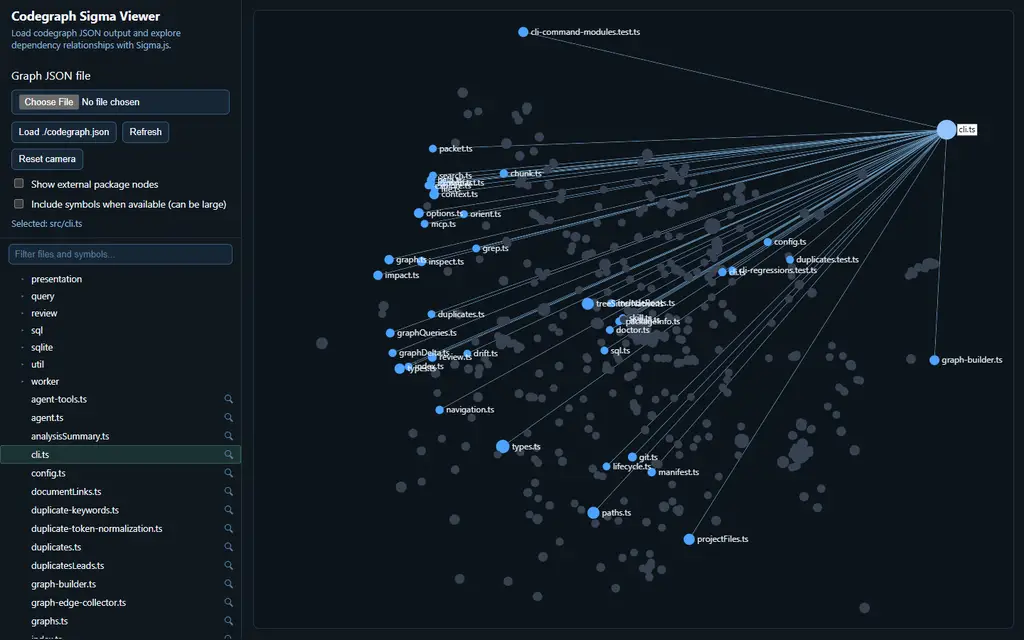
codegraph viewer --root . --open
codegraph viewer --root . --graph codegraph-out/graph.json --open
codegraph viewer --root . --port 4173 --print-url
The default host is 127.0.0.1 and the default port is 4173. Without --graph, each UI load or reload builds a current graph projection through the automatically validated .codegraph/cache/index-v1 index; init, index, and an exported JSON file are not prerequisites. An explicit --graph serves that root-confined snapshot through the same /graph.json route, while --print-url only prints the deterministic URL and exits.
The UI loads Sigma, Graphology, and ForceAtlas2 from bundled src/viewer/vendor/ assets, so the viewer stays offline and self-contained once codegraph is installed.
What the output looks like
Because ranking and counts change with the working tree, this abbreviated explore excerpt shows the stable response structure rather than snapshot-specific totals:
Anchors
- buildReviewReport [symbol] src/review.ts
- src/cli/help.ts:1 [chunk] src/cli/help.ts
- ReviewPreset [symbol] src/review.ts

Relevant source
- buildReviewReport is defined in src/review.ts.
- References, dependencies, and dependents are summarized here.

Blast radius
- src/review.ts: src/index.ts, src/cli/review.ts, src/mcp/server.ts, ...

Candidate tests
- tests/agent-explain.test.ts
- tests/agent-explore.test.ts
- tests/agent-packet.test.ts

Follow-ups
- codegraph file src/review.ts
- codegraph refs src/review.ts:215:23

Limits
- anchors, packets, paths, blast radius, reverse dependencies, and candidate tests

Recommended next: codegraph file src/review.ts
Real output includes counts, copyable follow-ups, and the limits that applied; --json adds the omission counts.
A worktree review is optimized for a different job:
Review Summary
==============
Status: ok
Files changed: 5
Symbols changed: 22
Candidate tests: 1 (high: 1, medium: 0, low: 0)
Risk: high (80)
Signals: exported-symbols-changed, many-symbols-changed
Structured output carries the underlying changed files, symbols, graph edges, reasons, diagnostics, snippets, and candidate-test confidence.
Why codegraph
Spend context on the problem, not repository discovery
explore runs one search and bundles bounded context around the top hits: source, dependency paths, dependents, candidate tests, and next commands. It is a reading starting point, only as good as the search terms. MCP omits source by default.
Ground the next action
Results include source paths, symbol ranges, stable handles, rank reasons, graph relationships, confidence, and omission counts. An agent can inspect why something ranked, jump to the definition or references, and continue from an exact target instead of treating a fuzzy match as an answer.
Trust the answer, or know why not
Definitions, references, and call edges come from scopes, imports, packages, and receivers proven from source, not from name matching alone. When codegraph cannot prove a target, it returns not_found or reports referenceCoverage as partial with a reason instead of guessing. An agent can act on a complete result and fall back to text search or a compiler for the rest; complete covers every candidate known to the index, not unknown dynamic loading. See the refs coverage contract and the language parity matrix for per-language support and tested limits.
Reuse one map from discovery through review
Search, navigation, dependency analysis, impact, and review reuse the same graph and semantic index. A target found during discovery can flow directly into explain, refs, deps, impact analysis, and candidate-test selection.
Work across the repository an agent actually has
One repository model can include source code, SQL, workspace packages, documentation links, stylesheets, templates, and single-file components. Capability claims stay language-specific, so graph support is not presented as full compiler or language-server parity.
Keep the evidence local and reusable
codegraph runs locally as a CLI, library, or MCP server. Humans get readable output; agents and programs can keep structured JSON, stable handles, warm sessions, SQLite data, or graph exports without parsing display text.
Why not just grep or an LSP?
codegraph complements both.
- Use text search for exact strings, logs, config keys, and prose.
- Use a compiler or language server when you need compiler-grade type analysis, overload resolution, dynamic dispatch, or editor refactors.
- Use codegraph when the question crosses files, languages, dependency edges, a git diff, or an agent context boundary.
The distinction is evidence shape, not a claim that one tool replaces the others.
Agent setup
Run codegraph install on an interactive terminal to detect supported clients, preview the changes, and confirm once. Use --all when you want the full current catalog without detection:
codegraph install
codegraph install --target codex,claude --dry-run
codegraph install --target codex,claude --yes
codegraph install --all --dry-run
codegraph install --all --yes
codegraph install --print-config codex
Supported target ids are codex, claude, cursor, gemini, opencode, omp, kilo, and agents. Interactive writes default to no; noninteractive writes require --yes.
For a skill without MCP configuration:
codegraph skill install --agent codex
codegraph skill install --agent claude
codegraph skill install --agent cursor
See Agent workflows for exploration strategy, warm sessions, streaming, review loops, and tool wrappers. Default stdio MCP clients share one compatible project owner's index, workers and watcher. Use codegraph server status --root . --json and codegraph server stop --root . to inspect or stop it; use an explicit workspace when launching from a directory of repositories. See MCP for server and client configuration.
Language support
Shared source-language indexing and navigation: JavaScript, TypeScript, Python, PHP, Go, Java, C#, Ruby, Rust, Kotlin, Swift, Zig, C, and C++.
SQL: statement chunking, object symbols, common DDL/DML and CTE facts, SQL-to-SQL edges, and object-level navigation. codegraph does not claim column-definition resolution.
Terraform: module-directory symbols, dependency edges to local module sources, and navigation for var, local, module, data source, and resource references, including module outputs and call arguments.
Graph-first formats: HTML, Astro, Handlebars, Markdown, MDX, reStructuredText, AsciiDoc, CSS, SCSS, and Less have narrower graph or chunking support.
Single-file components: Vue and Svelte script blocks participate in dependency graphs and chunking; semantic navigation is narrower.
See Language parity for the capability matrix and Scenario catalog for the fixtures behind those claims.
Using as a library
Install @lzehrung/codegraph-core when you need the library without the CLI, MCP server, installer, or viewer.
import { buildProjectIndex, getHotspots } from "@lzehrung/codegraph-core";

const index = await buildProjectIndex(process.cwd());
console.log(getHotspots(index.graph, { limit: 10 }));
See the Library API reference for navigation, review, agent sessions, and artifacts.
How it works
codegraph follows a single analysis pipeline:
- Discover supported files under the selected project and include roots.
- Parse source languages with Tree-sitter and extract imports, exports, definitions, bindings, and scopes.
- Resolve module specifiers to project files or explicit external nodes.
- Build forward and reverse dependency indexes plus a semantic symbol index.
- Reuse those indexes for navigation, exploration, impact, review, and exports.
Disk caching avoids repository-wide source reads on exact warm text-search hits. How it works covers caching, native failure reporting, and performance choices.
Limits and tradeoffs
The honest boundaries matter:
- codegraph is not a compiler or type checker. Reflection, generated code, macros, overload behavior, and dynamic dispatch can be missed. When a result would need expression type inference, overload ranking beyond arity, or build-system membership, codegraph reports
not_foundorpartialcoverage rather than a guessed target. - Precise navigation depends on successful native parsing and language queries. A missing native addon is an error; run
codegraph doctorto diagnose it. Files over the native size limit are skipped with asourceTooLargereport, and failed native queries are reported asqueryFailurewithout regex recovery. Document and stylesheet graph-only extraction remains supported. - Call-compatibility findings are conservative review leads, not compiler diagnostics.
- Duplicate matches and candidate tests are ranked leads that still require human or agent judgment.
- The checked
explorebenchmark is a bounded evidence-retrieval benchmark, not a universal performance claim. - The fixture test matrix and language parity docs show what codegraph has actually been tested against by language and operation; absence there means untested, not guaranteed.
Mitigations are explicit too:
- The repository keeps real-language fixtures and native parity suites for definitions, references, dependencies, chunking, and MCP.
- A generated fixture test matrix shows real
tests/languages/*.test.tsstatus and test counts per language, with no hand-authored goldens involved. - Structured output keeps freshness, confidence, and omission counts visible instead of pretending unsupported cases were resolved.
Run codegraph doctor to confirm the active runtime. Use --report on graph, index, search, inspect, or review commands when backend and cache behavior need to be auditable.
Development
npm install
npm run build
npm run check
Use the narrowest relevant test while iterating. npm run check is the pre-commit baseline for formatting, lint, build, and tests; native workspace changes also require npm run build:native and npm run test:native.
codegraph is MIT licensed.
codegraph MCP soruları
codegraph MCP'yi Claude Code'a nasıl eklerim?
Terminalinizde claude mcp add codegraph -- npx -y @lzehrung/codegraph komutunu çalıştırın. Her projede kullanılabilir olması için --scope user ekleyin.
codegraph MCP'yi Cursor'a nasıl eklerim?
~/.cursor/mcp.json dosyasını açın ve yukarıdaki yükleme bölümünde gösterilen Cursor yapılandırmasını kullanarak sunucuyu mcpServers altına ekleyin.
codegraph ne değildir?
Bir AST, derleyici veya linter değildir.
codegraph'ı Node.js veya npm olmadan kullanabilir miyim?
Evet, Node.js, CLI ve ilgili yerel çalışma zamanını (runtime) içeren bağımsız paketleri indiren standalone yükleyiciler mevcuttur.
codegraph kodumu değiştirir mi?
Hayır, refactor-plan ve rename-preview gibi araçlar, gerçek kod değişiklikleri yapmadan yalnızca salt okunur kanıtlar ve düzenleme önizlemeleri sunar.