
AI agent'ların Android APK ve DEX dosyalarını SQL kullanarak sorgulamasını; sınıfları, metodları, stringleri ve smali kodlarını analiz etmesini sağlar.
Ayrıca bilinen adı LSPosed/dexsql-release, dexsql-release
- Yıldızlar
- 308
- Araçlar
- —
- İndirmeler, 30 gün
- —
- En son sürüm
- 0.1.1
- Son commit
- 25 Eki 2026
- Lisans
- —
DexSQL MCP nedir?
DexSQL bir MCP sunucusudur. AI agent'ların Android APK ve DEX dosyalarını SQL kullanarak sorgulamasını; sınıfları, metodları, stringleri ve smali kodlarını analiz etmesini sağlar.
Özet, projenin README dosyasından oluşturuldu
DexSQL MCP sunucusu hakkında
DexSQL, AI agent'ların Android APK ve DEX dosyaları üzerinde SQL kullanarak yapılandırılmış analizler yapmasına olanak tanır. Kullanıcıların komut satırı veya bir MCP bağlantısı aracılığıyla sınıflar, metodlar, stringler ve smali kodu gibi belirli öğeleri sorgulamasını sağlar. Bu araç, manuel inceleme yapmadan Android binary dosyalarından kesin veriler çıkarması gereken geliştiriciler ve güvenlik araştırmacıları için tasarlanmıştır.
Server yerel olarak çalışır ve Claude Desktop veya Codex gibi AI istemcilerine stdio MCP üzerinden bağlanır. Skills CLI kullanılarak veya macOS, Linux veya Windows üzerinde executable'ın manuel yapılandırılmasıyla kurulabilir. DEX dosyalarını doğrudan okuduğu ve yüklenen veri setlerini yeniden kullandığı için düşük bellek ayak izi korur ve tekrarlanan sorgular için düşük gecikme süresi sağlar. Kullanıcılar, bir APK yolu belirterek ve çağrı referanslarını veya belirli string değerlerini bulmak için SQL komutları çalıştırarak araçla etkileşime girebilirler.
Neler yapabilirsiniz
- 1Metod çağrı ilişkilerini analiz edinBir AI agent, hangi metodların belirli bir log mesajına referans verdiğini tespit edebilir; çağırıcıları ve smali kodunu geri getirebilir.
- 2Belirli API uç noktalarını arayınBir geliştirici, bir APK içindeki belirli bir URL stringini içeren tüm metodları bulmak için SQL sorgusu kullanabilir.
- 3Üçüncü taraf lisans bilgilerini çıkarınBir uygulamadaki tüm lisans bildirimlerini tek bir dosyaya çekmek için komut satırını kullanabilirsiniz.
- 4Çoklu dosya binary analizi gerçekleştirinAraç, input flag'ini tekrarlayarak aynı anda birden fazla DEX dosyasını sorgulamaya olanak tanır.
Projenin README dosyasından alınmıştır. Her kullanım durumu, oradaki bir alıntı ile kontrol edilir.
Otomatik kontroller
Çalıştırıldı 12 Kas 2026Tam rapor →Henüz doğrulanmadı. Bir sunucunun 80 puana, ciddi bir bulgu olmamasına ve kontrol edebilmemiz için yeterli veriye ihtiyacı vardır. Kontroller nasıl çalışır · Daha fazla puan için nelerin düzeltileceği

- Kaynak deposu bağlantılı ve erişilebilirGeçti
- Açık kaynak lisansı (OSI)No licenseBulgu
- Son bir yıl içinde commit veya sürüm mevcutGeçti
- Paket adı popüler bir pakete yakın değilKontrol edilmedi
- Uzak uç nokta HTTPS kullanıyorKontrol edilmedi
- Yıkıcı araçlar etiketlenmişKontrol edilmedi
- Modele yönelik gizli talimat yokGeçti
- Pakette veya bağımlılıklarında kritik uyarı yokKontrol edilmedi
DexSQL

English | 简体中文
SQL for Android binaries.
Query classes, methods, strings, and call references in APK and DEX files. Connect it to an AI agent through MCP, or use it from the command line.
Playground · Documentation · Download · Install skill · Benchmarks
Why DexSQL?
AI agents can combine signatures, strings and call relationships in one SQL query across DEX files, returning just the structured results they need. Queries can be generated, refined and saved in scripts for reuse.
DexSQL reads DEX directly and reuses loaded datasets, supporting repeated queries with low latency and a small memory footprint. See the benchmarks for measurements.
The built-in MCP server connects directly to agents, with no GUI required.
flowchart LR
    A["AI client"] -->|stdio MCP| D["DexSQL"]
    D --> F["APK / DEX"]
    A -->|stdio MCP| P["JADX-MCP · Python"]
    P -->|HTTP| J["JADX GUI + plugin · JVM"]
    J --> F
Use with an AI agent
DexSQL is listed in the official MCP Registry as org.lsposed/dexsql. Clients that install servers from the registry can add it directly, and Claude Desktop can open the dexsql.mcpb bundle from Releases. The bundle covers macOS, x86_64 Linux and x86_64 Windows; on other platforms, use the skill or manual setup below.
Install the setup skill with the Skills CLI:
npx skills add LSPosed/dexsql-release --skill install-dexsql
Then ask your agent to use install-dexsql to install DexSQL and configure its MCP connection. In Codex, invoke it as $install-dexsql.
The skill downloads a compatible binary from Releases, verifies its SHA-256 checksum, adds the MCP configuration, and checks the connection. It can also use a local executable. The command above installs the skill; the agent performs the actual setup when you invoke it.
Open Releases and choose the executable or archive that matches your operating system and CPU architecture. Check the selected release's assets and notes for availability and system requirements. Extract the archive if needed, then rename the executable to dexsql.exe on Windows or dexsql on macOS/Linux. On macOS/Linux, run chmod +x /path/to/dexsql.
Save LICENSE and LICENSE-AUXILIARY from the same Release alongside the executable, then register its absolute path. For Codex:
codex mcp add dexsql -- /absolute/path/to/dexsql mcp
For clients that use mcpServers JSON:
{
  "mcpServers": {
    "dexsql": {
      "command": "/absolute/path/to/dexsql",
      "args": ["mcp"]
    }
  }
}
On Windows, use dexsql.exe and escape backslashes in JSON, for example "D:\\Tools\\dexsql.exe". Reload the client's MCP connection if needed. See the Codex MCP documentation for client settings.
Once connected, try:
Open
/path/to/app.apk. Find methods referencing this log message, list their callers, and show the relevant Smali.
The server provides its schema and documentation through MCP resources. APK parsing runs locally and leaves the input unchanged. The AI client's settings determine which results are sent to its model.
Performance
A real MCP session
An AI agent analyzed Douyin 40.7.0 (343 MiB, 56 DEX files) through the DexSQL MCP server. We replayed its analysis goals on DexSQL 0.1.1 and six other tools: rasc (the Rust implementation of ASC), DexDec, ddc, the JADX API, garlic and droidsaw.
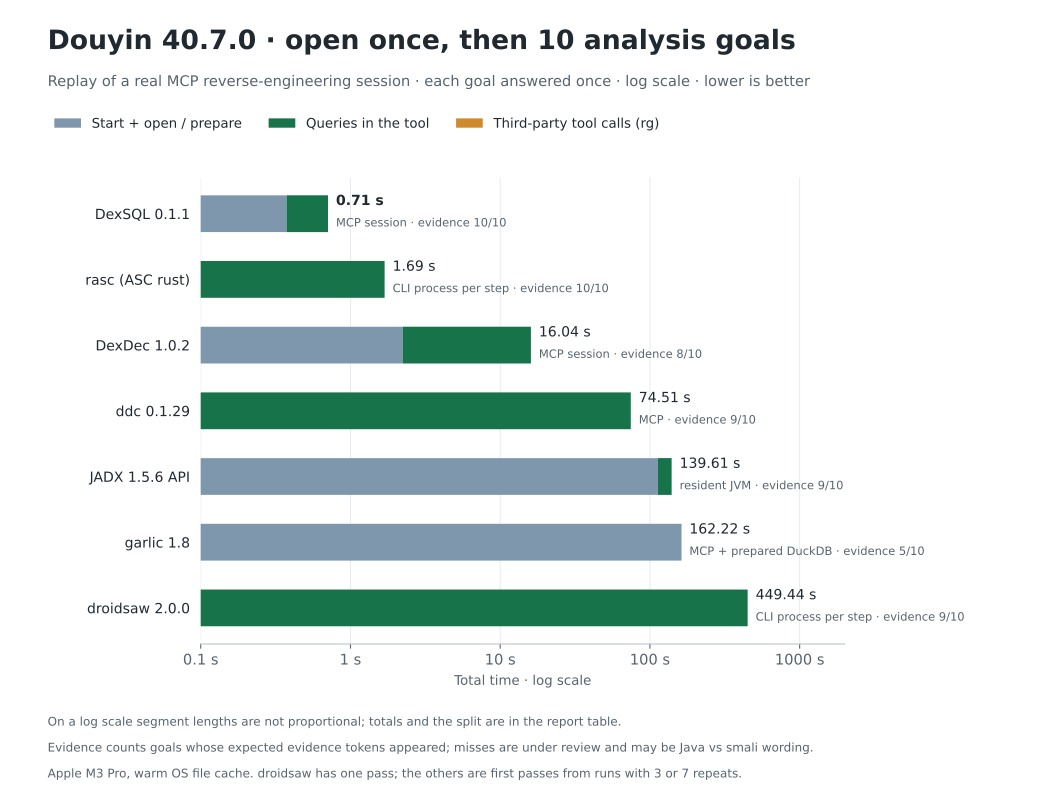
Opening the APK once and answering 10 goals took 0.71 s with DexSQL, 1.69 s with rasc, 16 s with DexDec and from 75 s to 449 s with the others. DexSQL pays 0.38 s to open the APK once per session; rasc has no open but rereads the APK in every step, so a session with a single question finishes sooner with rasc. Some tools did not show all expected evidence; those misses are still under review. See the replay report for every goal, each tool's interface, the method and the harness.
Fixed queries on QQ
Eight queries run against the same QQ 9.3.55 APK, about 372 MiB: class and method lookup, string references, direct and two-hop callers, and compound predicates. The comparison includes JADX, zinja-coder's JADX-MCP, ASC, DexDec, ddc, garlic, and droidsaw.
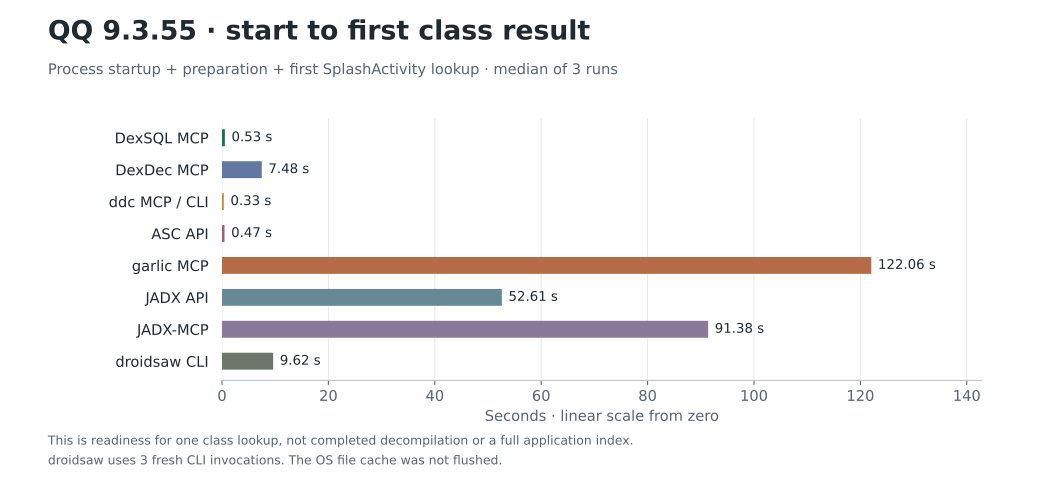
Startup time includes process launch, loading and preparation, and the first exact class lookup; values are medians of three runs. The OS file cache was not flushed.
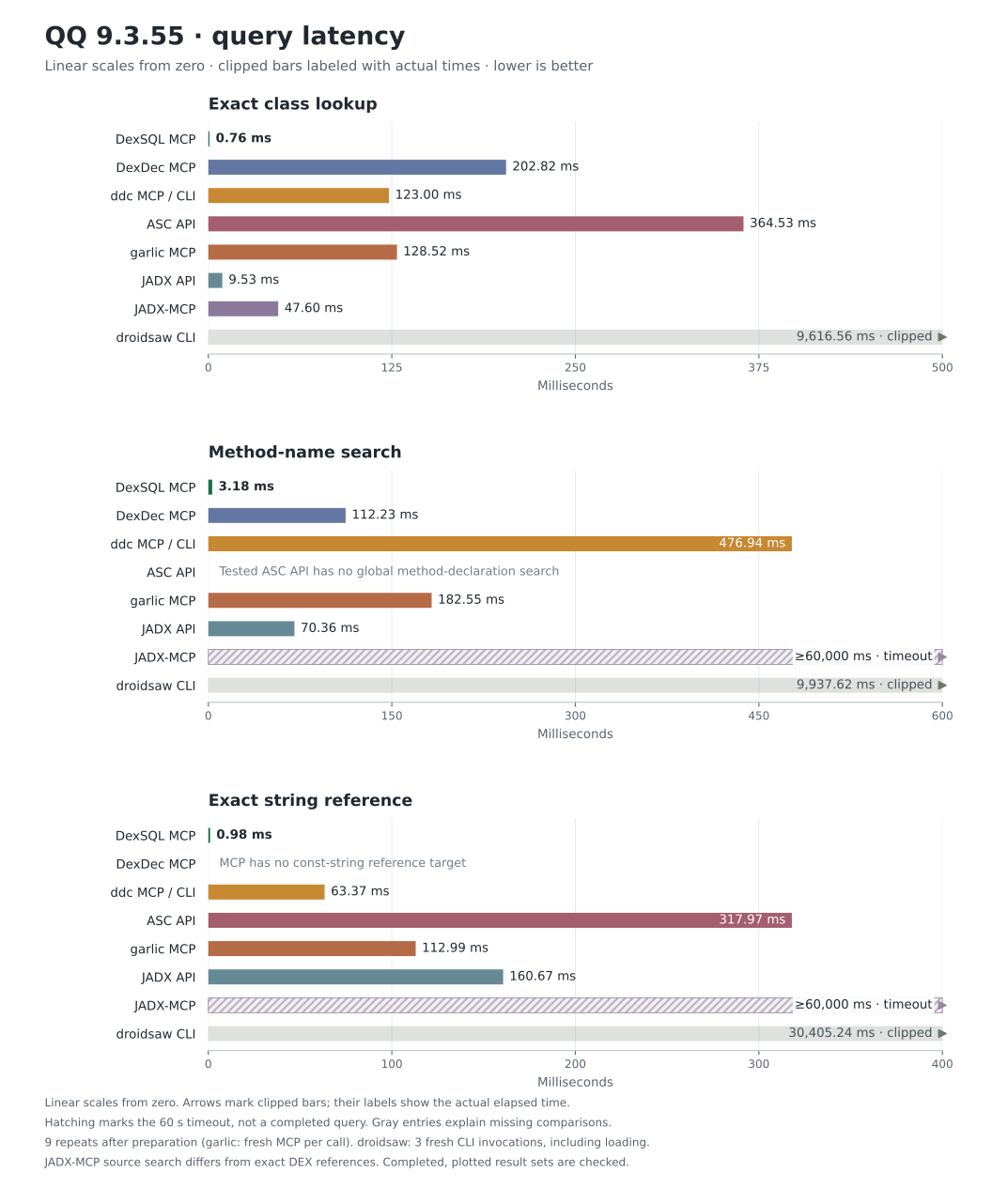
Queries use the median of nine repeats across three prepared workflows. garlic restarts MCP for each call; that cost is included. droidsaw CLI uses three separate invocations, each including loading. Each query uses one linear chart starting at zero. Bars exceeding the axis limit are clipped, marked with an arrow and labeled with their actual time. Hatched bars mean the query did not finish within 60 seconds. Gray entries explain missing comparisons.
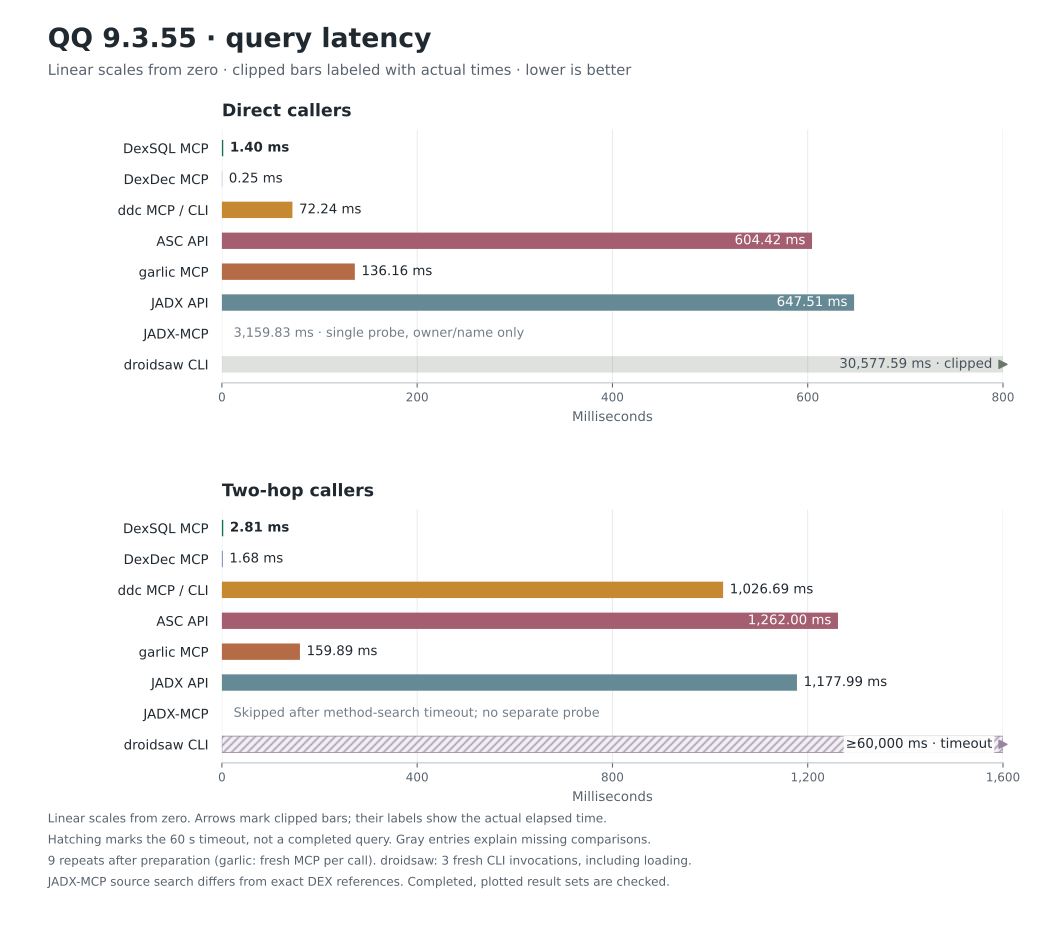
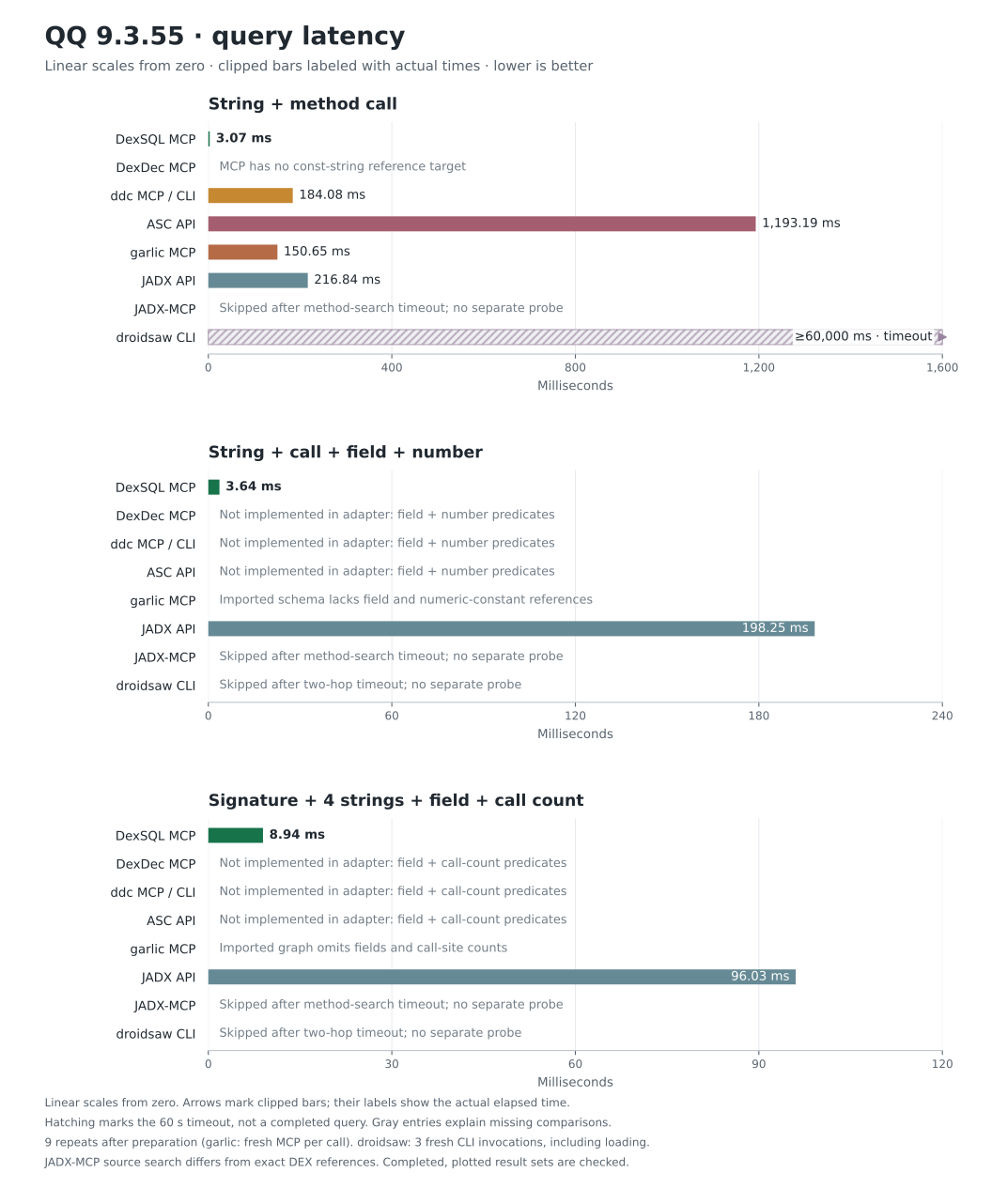
Direct and two-hop queries return 15 and 16 methods. Each compound query returns one method. Every completed, plotted result set is checked. The JADX native adapter reads metadata and DEX instructions directly; it does not decompile the whole APK to find references.
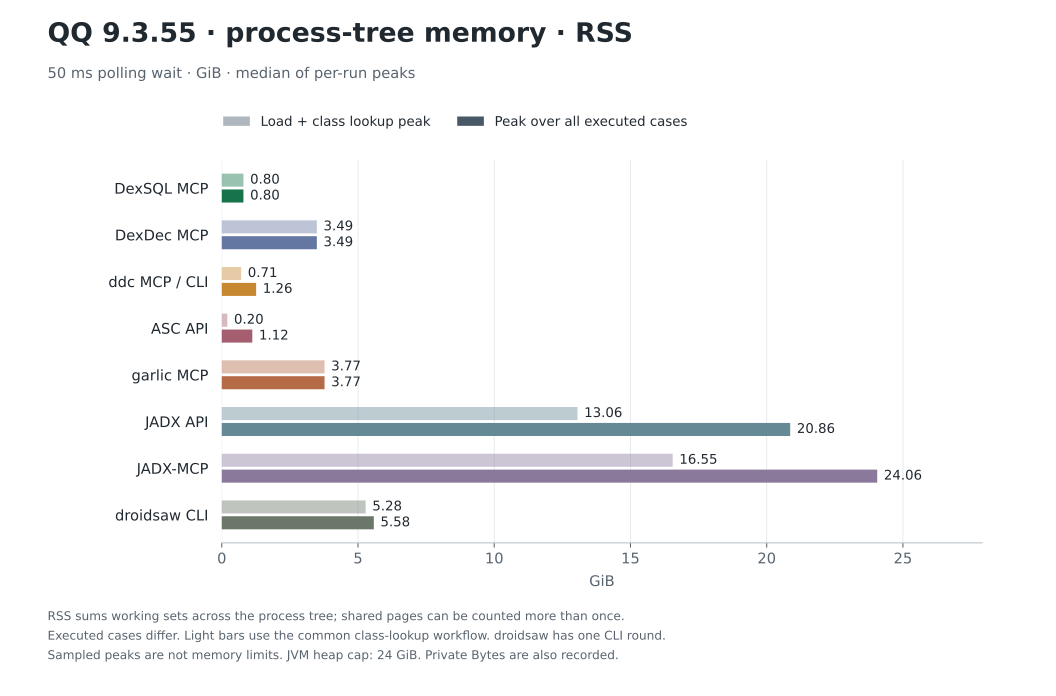
Memory uses a 50 ms polling wait across the whole process tree. Light bars cover the common load-and-class-lookup workflow; dark bars cover each tool's executed cases. Summed RSS can count shared pages more than once. Private committed memory and the footprint at readiness are also recorded.
DexDec's reference cache makes its repeated caller query faster than DexSQL in this run. droidsaw's MCP rejects the input under its fixed parse budget, so its CLI is plotted. See the report for first-query and preparation times, interface differences, SQL, result hashes and reproduction scripts.
CLI
dexsql query --input app.apk --sql "SELECT DISTINCT method FROM method_strings WHERE value = 'https://api.example.com'"
dexsql query --input app.apk --interactive
dexsql extract licenses --output THIRD_PARTY_NOTICES
dexsql --help
Repeat --input to query multiple files together. The same executable provides the CLI and MCP server.
License
DexSQL is closed-source software from LSPosed, licensed under the DexSQL Binary License 1.0. Personal and commercial use, integration, and binary redistribution are free under its terms.
The public installation skill, benchmark materials, and documentation use the MIT License.
Third-party materials retain their own licenses. Run dexsql extract licenses to view their notices.
DexSQL MCP soruları
DexSQL kullanarak bir APK dosyasında neleri sorgulayabilirim?
APK ve DEX dosyaları içindeki sınıfları, metodları, stringleri ve çağrı referanslarını SQL kullanarak sorgulayabilirsiniz.
DexSQL orijinal APK dosyalarını değiştirir mi?
Hayır, APK ayrıştırma işlemi yerel olarak çalışır ve girdi dosyalarını değiştirmez.
DexSQL'i komut satırından kullanabilir miyim?
Evet, aynı executable hem MCP server hem de sorgu çalıştırmak ve lisansları çıkarmak için bir komut satırı arayüzü sağlar.