
Element Node MCP sunucusu
Commit 14 Eki 2026Yapay zeka ajanlarının, Elementor tarzı bir editör aracılığıyla manuel düzenlemeyi destekleyen görsel bir CMS üzerinden tüm web sitelerini oluşturmasına ve yönetmesine olanak tanır.
Ayrıca bilinen adı LorenzArtik/element-node, element-node-mcp
- Yıldızlar
- 0
- Araçlar
- —
- İndirmeler, 30 gün
- —
- En son sürüm
- —
- Son commit
- 14 Eki 2026
- Lisans
- AGPL-3.0
Element Node MCP nedir?
Element Node bir MCP sunucusudur. Yapay zeka ajanlarının, Elementor tarzı bir editör aracılığıyla manuel düzenlemeyi destekleyen görsel bir CMS üzerinden tüm web sitelerini oluşturmasına ve yönetmesine olanak tanır.
Özet, projenin README dosyasından oluşturuldu
Element Node MCP sunucusu hakkında
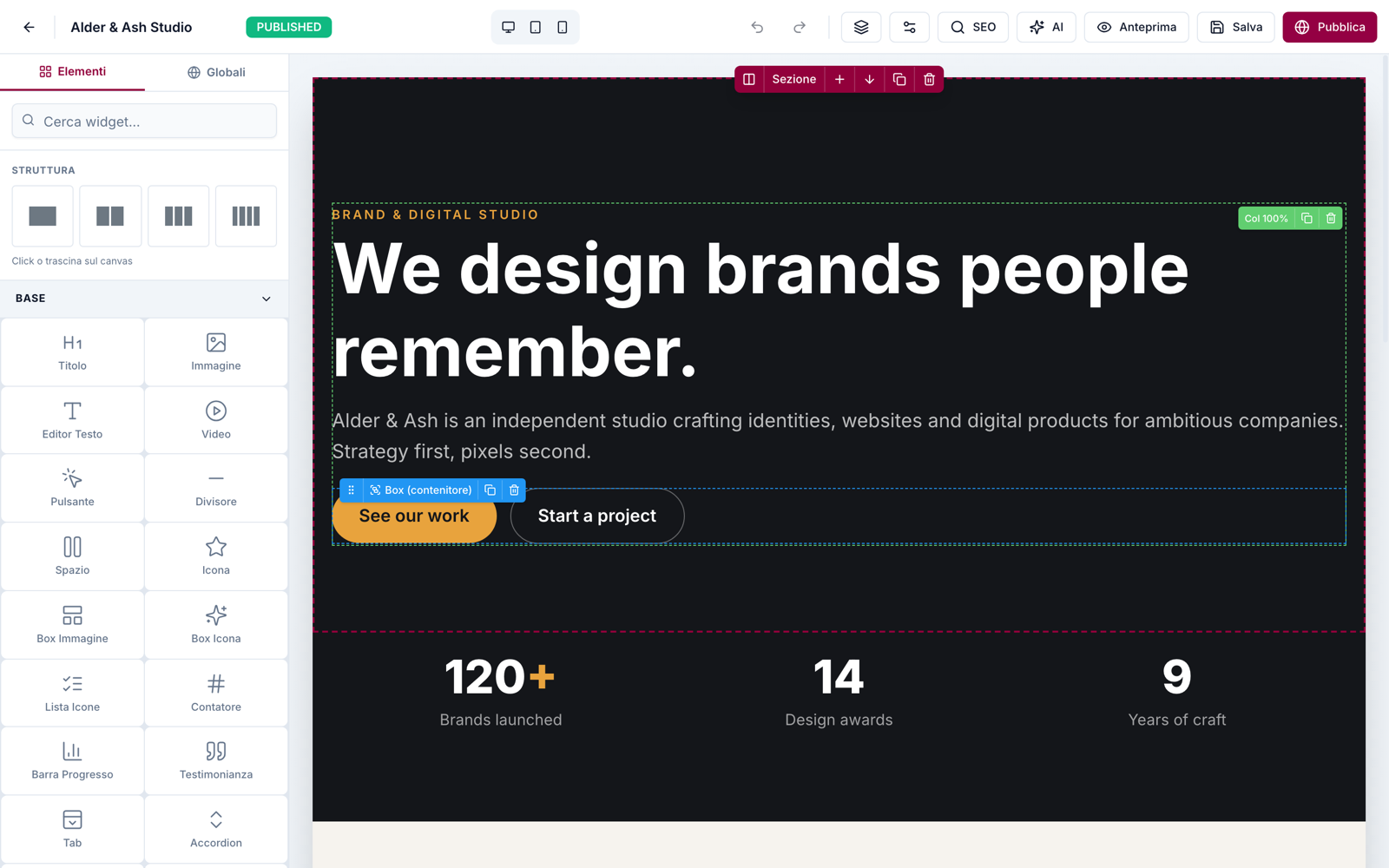
Element Node, yapay zeka ajanlarının web siteleri inşa etmesi ve yönetmesi için tasarlanmış, self-hosted bir görsel içerik yönetim sistemidir. Ajanların özetlerden veya klonlamalardan yola çıkarak tüm siteleri oluşturabileceği bir platform sunmak için Next.js 15, Prisma ve MySQL yığınını kullanır. Ajan ilk oluşturma işlemini tamamladıktan sonra, teknik bilgisi olmayan kullanıcılar, sürükle ve bırak özelliklerine sahip üç panelli bir arayüz sunan Elementor tarzı görsel bir editör kullanarak süreci devralabilir.
Geliştiriciler, Cursor ve Windsurf gibi istemcilerle uyumlu bir MCP server aracılığıyla veya resmi Claude Code skill kullanarak sisteme bağlanabilirler. Server; sayfaları, temaları, medyayı ve tam Site Blueprint içe/dışa aktarma işlemlerini yönetmek için araçlar sağlar. Node.js 20 veya üzeri bir sürüm çalıştıran yerel veya uzak bir sunucu ile MySQL veya MariaDB veritabanı gerektirir. Kullanıcılar ayrıca, site içe aktarma veya dışa aktarma gibi belirli kapsamlar için Bearer API anahtarlarını kullanarak bir REST API üzerinden sistemle etkileşime girebilirler.
Neler yapabilirsiniz
- 1Otomatik web sitesi oluşturmaBir yapay zeka ajanı, basit bir metin özetinden veya mevcut bir siteyi klonlayarak eksiksiz bir web sitesi oluşturabilir.
- 2Görsel içerik iyileştirmeTeknik bilgisi olmayan bir müşteri, ajan işini bitirdikten sonra sürükle ve bırak arayüzünü kullanarak web sitesi bölümlerini manuel olarak düzenleyebilir.
- 3Site blueprint taşımaGeliştiriciler, JSON içe ve dışa aktarma işlevlerini kullanarak tüm web sitesi yapılarını farklı örnekler arasında taşıyabilirler.
- 4Görsel doğruluk kontrolüBir ajan, doğruluğu sağlamak için bir ekran görüntüsü ile oluşturulan site arasında görsel karşılaştırmalar yapabilir.
Projenin README dosyasından alınmıştır. Her kullanım durumu, oradaki bir alıntı ile kontrol edilir.
Element Node MCP nasıl yüklenir
Biçimler 10 Kas 2026 tarihinde doğrulandıCursor'a ekleGoose'a ekleElement Node MCP'yi Claude Code içine yükleyin
$ claude mcp add element-node -- npx -y element-node-mcpElement Node MCP'yi Cursor içine yükleyin
~/.cursor/mcp.json
{
  "mcpServers": {
    "element-node": {
      "command": "npx",
      "args": [
        "-y",
        "element-node-mcp"
      ]
    }
  }
}Element Node MCP'yi VS Code içine yükleyin
.vscode/mcp.json
{
  "servers": {
    "element-node": {
      "type": "stdio",
      "command": "npx",
      "args": [
        "-y",
        "element-node-mcp"
      ]
    }
  }
}Element Node MCP'yi VS Code CLI içine yükleyin
$ code --add-mcp '{"name":"element-node","type":"stdio","command":"npx","args":["-y","element-node-mcp"]}'Element Node MCP'yi Claude Desktop içine yükleyin
claude_desktop_config.json
{
  "mcpServers": {
    "element-node": {
      "command": "npx",
      "args": [
        "-y",
        "element-node-mcp"
      ]
    }
  }
}Element Node MCP'yi Codex içine yükleyin
$ codex mcp add element-node -- npx -y element-node-mcpElement Node MCP'yi Codex config.toml içine yükleyin
~/.codex/config.toml
[mcp_servers.element-node]
command = "npx"
args = ["-y", "element-node-mcp"]
Element Node MCP'yi Gemini CLI içine yükleyin
$ gemini mcp add -s user element-node npx -- -y element-node-mcpElement Node MCP'yi Gemini settings.json içine yükleyin
~/.gemini/settings.json
{
  "mcpServers": {
    "element-node": {
      "command": "npx",
      "args": [
        "-y",
        "element-node-mcp"
      ]
    }
  }
}Otomatik kontroller
Çalıştırıldı 15 Kas 2026Tam rapor →Henüz doğrulanmadı. Bir sunucunun 80 puana, ciddi bir bulgu olmamasına ve kontrol edebilmemiz için yeterli veriye ihtiyacı vardır. Kontroller nasıl çalışır · Daha fazla puan için nelerin düzeltileceği

- Kaynak deposu bağlantılı ve erişilebilirlorenzartik/element-node is public and reachablegithub.com/lorenzartik/element-node ↗Geçti
- Paket, bu depoyu kaynağı olarak gösteriyorelement-node-mcp names lorenzartik/element-node as sourcenpmjs.com/package/element-node-mcp ↗Geçti
- Derleme kökeni (Sigstore onayı)No build attestation published for this releaseKontrol edilmedi
- Açık kaynak lisansı (OSI)AGPL-3.0spdx.org/licenses/AGPL-3.0.html ↗Geçti
- Son bir yıl içinde commit veya sürüm mevcutLast commit or release 2026-10-14github.com/lorenzartik/element-node ↗Geçti
- OpenSSF ScorecardKontrol edilmedi
- Paket adı popüler bir pakete yakın değilNo popular package one edit away from element-node-mcpGeçti
- Pakette veya bağımlılıklarında kritik uyarı yokKontrol edilmedi
- Modele yönelik gizli talimat yok0 tool descriptions and the README read; no override phrases, credential paths or hidden charactersGeçti
- Yıkıcı araçlar etiketlenmişKontrol edilmedi
- Uzak uç nokta MCP el sıkışmasına yanıt veriyorKontrol edilmedi
Element Node
The AI-agent CMS your clients can still edit visually.
Element Node is an open-source visual CMS built on Next.js 15 + Prisma/MySQL. AI agents build entire sites on it — through the official Claude Code skill or the MCP server (Cursor, Windsurf, any MCP client) — and after the agent is done, the site stays in an Elementor-style visual editor that a non-technical client can safely use. Self-hosted: your server, your data.
🇮🇹 Documentazione in italiano: elementnode.cloud/it/docs

Quickstart
bash <(curl -fsSL https://elementnode.cloud/install.sh)
Requirements: Node.js ≥ 20, MySQL/MariaDB. The installer clones the repo, installs dependencies, creates .env and the DB schema, builds, and leaves you at the /install wizard (admin user, site, AI).
Non-interactive mode (for AI agents / provisioning): export DB_NAME, DB_USER, DB_PASS, SITE_URL (optional DB_HOST, DB_PORT) before running — no prompts. For Plesk see PLESK_DEPLOY.md.
One-prompt setup: the entire path — server, CMS, skill and first site — can be driven by a single prompt pasted into Claude Code. Template: elementnode.cloud/it/docs#prompt
Built for AI agents
| Integration | For | What it does |
|---|---|---|
| Official skill | Claude Code / Codex | Builds entire sites: from a brief, or pixel-perfect clones of existing sites verified by a visual-comparison agent (screenshot → diff → fix, until convergence) |
| MCP server | Cursor, Windsurf, any MCP client | Pages, theme, media, full Site Blueprint import/export, always-fresh widget docs |
| REST API | Anything else | Bearer API keys with scopes (site.import, site.export, …) |
Real production numbers (agent build time, human review on top): a 24-page WordPress migration in ~1 hour · a complete bilingual site in half a day · a React SPA cloned at 95/100 automated visual fidelity in ~2 hours. See showcase.
What's in the box
- Visual editor — 3-panel Elementor-style UI: widget library · canvas · properties. Drag & drop, inline text editing, undo/redo, revisions, responsive preview, style controls (spacing, borders, shadows, gradients)
- 51 native widgets — heading, text, button, image, video, icon-box, counters, tabs, accordion, gallery, contact form, posts grid, marquee, nav drawer, nested boxes…
- Theme blocks — global header/footer with display conditions + priority (per-URL-prefix → native multilingual sites)
- Content — pages (nested slugs), posts, custom post types + taxonomies, redirects, popups
- Forms — reusable form entities, submissions in DB, SMTP/Brevo delivery, GDPR consent fields
- Privacy — native cookie consent banner (variants per language, click-to-load embeds), site access modes (public / password / maintenance) with automatic noindex
- AI built in (bring your own Anthropic key) — editor chat that generates and edits sections, one-click SEO (title/description/keyword in the page's language)
- SEO — per-page meta, OG image, sitemap, robots, SEO score panel
- Media — local uploads, sharp-optimized thumbnails (WebP/AVIF), lazy loading
- Ops — 1-click self-update from the panel (with automatic pre-update DB backup), multi-user roles, API keys, health endpoint
- Performance — React Server Components, standalone output, HTTP cache + ISR. No plugin ecosystem needed: it's all native
Stack
Next.js 15 (App Router, standalone output) · Prisma + MySQL · NextAuth v5 · Tailwind · @dnd-kit · TipTap · sharp · Anthropic Claude (optional, BYO key)
Architecture notes
- Public pages render through
PageRenderer(RSC) with a responsive core (columns stack under 768px, opt-out per column) - Content is a JSON tree: sections → columns → widgets (see skill/element-node-builder/references/widget-reference.md)
- Site Blueprint import/export moves whole sites as JSON (merge or replace)
- License validation is fail-open: the CMS works without a license — a license activates managed updates, security patches and support (pricing)
License
- CMS core: AGPL-3.0 — free to use, self-host and modify. Building and running your own sites (or client sites) carries no obligations; the AGPL kicks in only if you modify the CMS and offer it to others as a service.
- Claude Code skill and MCP server: MIT — integrate freely.
Managed updates, security patches, priority support and the white-label agency tier are commercial: elementnode.cloud/en/pricing. For commercial licensing outside AGPL terms, get in touch.
Element Node MCP soruları
Element Node MCP'yi Claude Code'a nasıl eklerim?
Terminalinizde claude mcp add element-node -- npx -y element-node-mcp komutunu çalıştırın. Her projede kullanılabilir olması için --scope user ekleyin.
Element Node MCP'yi Cursor'a nasıl eklerim?
~/.cursor/mcp.json dosyasını açın ve yukarıdaki yükleme bölümünde gösterilen Cursor yapılandırmasını kullanarak sunucuyu mcpServers altına ekleyin.
Kendi sunucumda barındırabilir miyim?
Evet, kendi sunucunuzu ve verilerinizi kontrol edebildiğiniz self-hosted bir çözümdür.
Hangi teknolojilerle geliştirildi?
CMS; Next.js 15, Prisma, MySQL, NextAuth v5, Tailwind, @dnd-kit, TipTap ve sharp kullanılarak oluşturulmuştur.
CMS'nin çalışması için bir lisans gerekiyor mu?
CMS çekirdeği AGPL-3.0 lisansına sahiptir ve lisans gerektirmeden çalışır; lisans sadece yönetilen güncellemeleri, güvenlik yamalarını ve desteği etkinleştirmek için gereklidir.