
Kodlama ajanlarının aralıklı test hatalarını yeniden üretmesini, yeniden üretim girdilerini en aza indirmesini ve kod düzeltmelerini ampirik kanıtlarla doğrulamasını sağlar.
Ayrıca bilinen adı LBarimi/FailTrace
- Yıldızlar
- 0
- Araçlar
- —
- İndirmeler, 30 gün
- —
- En son sürüm
- 1.5.0
- Son commit
- 7 Eyl 2026
- Lisans
- MIT
FailTrace MCP nedir?
FailTrace bir MCP sunucusudur. Kodlama ajanlarının aralıklı test hatalarını yeniden üretmesini, yeniden üretim girdilerini en aza indirmesini ve kod düzeltmelerini ampirik kanıtlarla doğrulamasını sağlar.
Özet, projenin README dosyasından oluşturuldu
FailTrace MCP sunucusu hakkında
FailTrace, kodlama ajanlarının hata ayıklama için ampirik kanıtlar oluşturarak aralıklı test hatalarını yönetmelerine olanak tanır. Yerel bir stdio MCP server veya CLI aracılığıyla çalışarak geliştiricilerin başarısız bir temel çizgi yakalamasına, yeniden üretim girdilerini en aza indirmesine ve kod yamalarını doğrulamasına imkan tanır. Araç, makinenizde Node.js 22.12+ ve npm kullanarak yerel olarak çalışır; bu da işlev görmesi için harici bir AI API'sine, hesaba veya telemetriye ihtiyaç duymadığı anlamına gelir.
Ajanlar; regresyon arama, minimizasyon ve doğrulama dahil olmak üzere inceleme yaşam döngüsünü yönetmek için yedi özel MCP aracını kullanabilir. Sistem, birden fazla deneme boyunca hata imzalarını ve inceleme kanıtlarını takip eder. Mevcut test koşucularını ve assertion yapılarını destekler; NUnit ve Unity EditMode testleri için özel desteğe sahiptir. Veri şişmesini önlemek için server, saklanan stdout ve stderr miktarını deneme başına 16 MiB, çalıştırma veya minimizasyon işlemi başına ise 256 MiB ile sınırlandırır.
Neler yapabilirsiniz
- 1Yeniden üretim girdilerini en aza indirmeBir ajan, karmaşık bir girdi setini belirli bir test hatasını tetiklemek için gereken en küçük veri setine indirebilir.
- 2Kod yamalarını doğrulamaBir geliştirici, önerilen bir düzeltmenin kaydedilmiş bir temel çizgiye kıyasla hedef hatayı gerçekten giderip gidermediğini kontrol etmek için aracı kullanabilir.
- 3Regresyon kaynaklarını belirlemeSistem, bir bisect işlemi aracılığıyla hangi spesifik Git değişikliğinin başarısız bir teste yol açtığını bulmaya yardımcı olabilir.
- 4Aralıklı hataları yakalamaKullanıcılar, tutarlı bir hata imzası yakalamak için bir testi birden çok kez tekrarlayan bir komut çalıştırabilir.
Projenin README dosyasından alınmıştır. Her kullanım durumu, oradaki bir alıntı ile kontrol edilir.
FailTrace MCP nasıl yüklenir
Biçimler 10 Kas 2026 tarihinde doğrulandıCursor'a ekleGoose'a ekleFailTrace MCP'yi Claude Code içine yükleyin
$ claude mcp add failtrace -- npx -y failtraceFailTrace MCP'yi Cursor içine yükleyin
~/.cursor/mcp.json
{
  "mcpServers": {
    "failtrace": {
      "command": "npx",
      "args": [
        "-y",
        "failtrace"
      ]
    }
  }
}FailTrace MCP'yi VS Code içine yükleyin
.vscode/mcp.json
{
  "servers": {
    "failtrace": {
      "type": "stdio",
      "command": "npx",
      "args": [
        "-y",
        "failtrace"
      ]
    }
  }
}FailTrace MCP'yi VS Code CLI içine yükleyin
$ code --add-mcp '{"name":"failtrace","type":"stdio","command":"npx","args":["-y","failtrace"]}'FailTrace MCP'yi Claude Desktop içine yükleyin
claude_desktop_config.json
{
  "mcpServers": {
    "failtrace": {
      "command": "npx",
      "args": [
        "-y",
        "failtrace"
      ]
    }
  }
}FailTrace MCP'yi Codex içine yükleyin
$ codex mcp add failtrace -- npx -y failtraceFailTrace MCP'yi Codex config.toml içine yükleyin
~/.codex/config.toml
[mcp_servers.failtrace]
command = "npx"
args = ["-y", "failtrace"]
FailTrace MCP'yi Gemini CLI içine yükleyin
$ gemini mcp add -s user failtrace npx -- -y failtraceFailTrace MCP'yi Gemini settings.json içine yükleyin
~/.gemini/settings.json
{
  "mcpServers": {
    "failtrace": {
      "command": "npx",
      "args": [
        "-y",
        "failtrace"
      ]
    }
  }
}Otomatik kontroller
Çalıştırıldı 15 Kas 2026Tam rapor →Otomatik kontrollerimizden geçti. Bu bir güvenlik denetimi değildir: kodu okuyun ve sunucuya ihtiyaç duyduğu en dar erişimi verin. Kontroller nasıl çalışır

- Kaynak deposu bağlantılı ve erişilebilirlbarimi/failtrace is public and reachablegithub.com/lbarimi/failtrace ↗Geçti
- Paket, bu depoyu kaynağı olarak gösteriyorfailtrace names lbarimi/failtrace as sourcenpmjs.com/package/failtrace ↗Geçti
- Derleme kökeni (Sigstore onayı)No build attestation published for this releaseKontrol edilmedi
- Açık kaynak lisansı (OSI)MITspdx.org/licenses/MIT.html ↗Geçti
- Son bir yıl içinde commit veya sürüm mevcutLast commit or release 2026-09-07github.com/lbarimi/failtrace ↗Geçti
- OpenSSF ScorecardKontrol edilmedi
- Paket adı popüler bir pakete yakın değilNo popular package one edit away from failtraceGeçti
- Pakette veya bağımlılıklarında kritik uyarı yok6 resolved dependencies checked; no critical advisoryosv.dev ↗Geçti
- Modele yönelik gizli talimat yok0 tool descriptions and the README read; no override phrases, credential paths or hidden charactersGeçti
- Yıkıcı araçlar etiketlenmişKontrol edilmedi
- Uzak uç nokta MCP el sıkışmasına yanıt veriyorKontrol edilmedi
FailTrace
Reproduce the failure. Check the fix.
A test fails intermittently. Your coding agent changes the code. One passing retry leaves you guessing.
FailTrace repeats the same check, saves a failing baseline, and checks the proposed fix against it. Use the CLI or MCP tools to get trial results, a smaller reproducer, and evidence your agent can inspect before accepting a patch.


Local execution. No AI API, account, or telemetry required. Keep your existing test runner and assertions.
Quick start
With Node.js 22.12+ and npm, run this in any working directory:
npx --yes failtrace demo
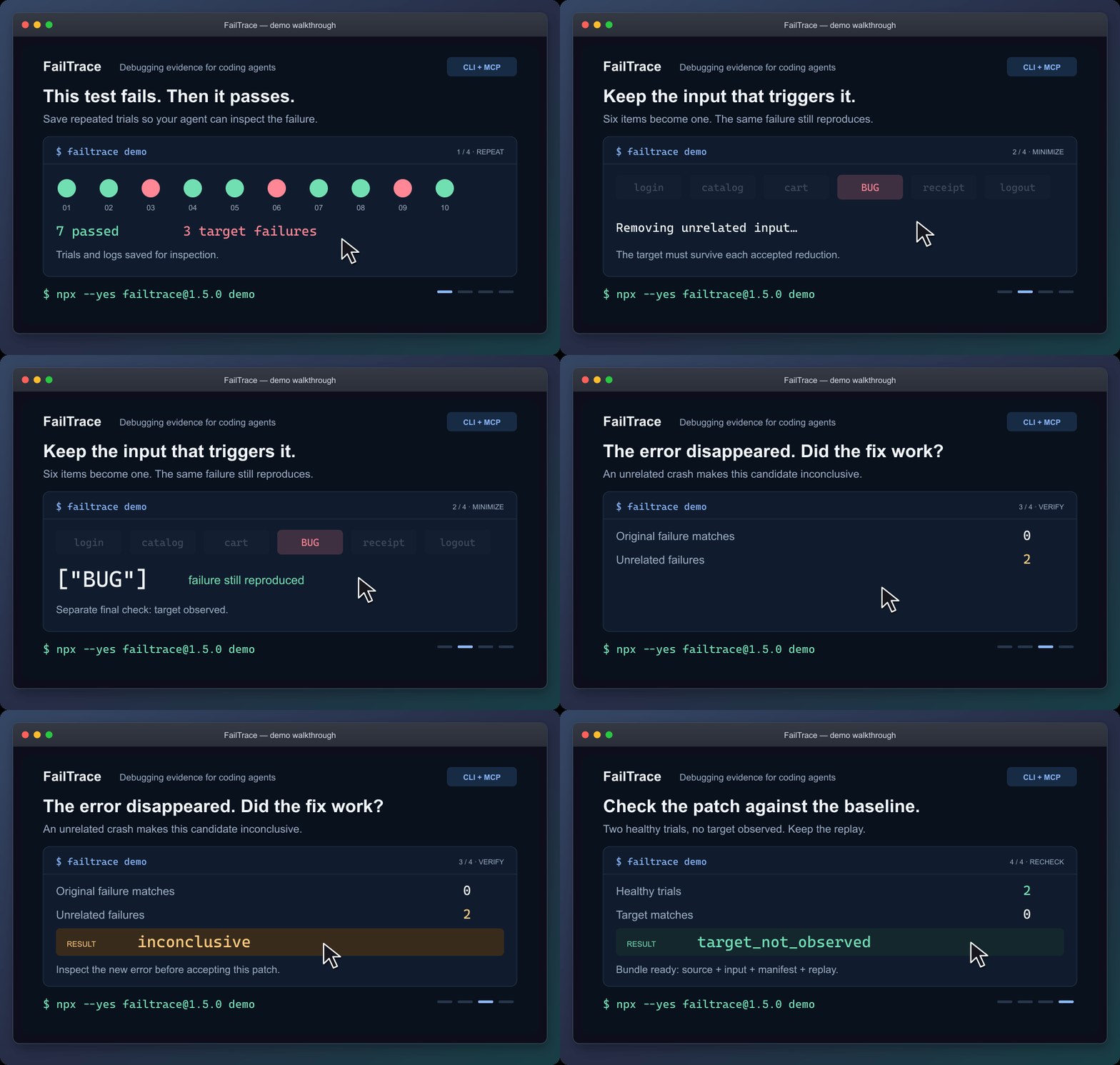
Static walkthrough · Static poster · Demo guide
The demo reduces six input items to ["BUG"], rejects a patch that crashes for another reason, and checks a working patch. It saves the evidence in .failtrace/ and prints a replay command.
For coding agents
Connect the local stdio MCP server through your client's configuration:
npx --yes failtrace@1.5.0 mcp --cwd "/absolute/path/to/your/project"
Copy the MCP configuration and check the connection →
Your client launches this command. Running it alone in a terminal waits for MCP requests. The guide includes Windows setup.
Then ask your agent:
Use FailTrace to capture this test failure before editing. Choose the exact test or failure message, save a bounded baseline, and inspect the matching trial. After the change, verify against that baseline and explain any unrelated errors or incomplete evidence.
The seven MCP tools share the CLI's Core engine. They retain the failure signature and investigation evidence across repetition, comparison, regression search, minimization, verification and replay. Agents can retrieve saved trial and log pages without rerunning the command. Shell-capable agents can also use the CLI with --json.
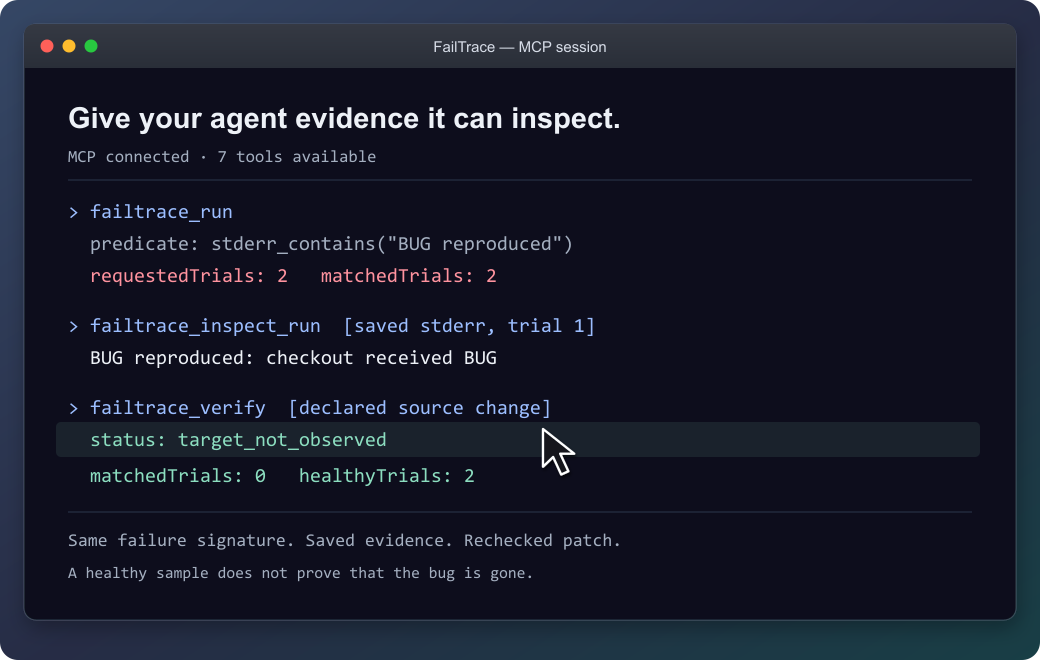
The agent can inspect the saved failure before checking the patch.
Recheck an existing unit test
Follow an exact NUnit or Unity test through a fix. Each attempt gets a fresh NUnit 3 report. Missing or skipped tests and unrelated failures stay inconclusive, so an agent cannot accept them as evidence that the selected test passed.
Connect your test or try the original EditMode example →
NUnit support is included in 1.3.0 through CLI and MCP. The documented Unity validation covers the Windows EditMode example.
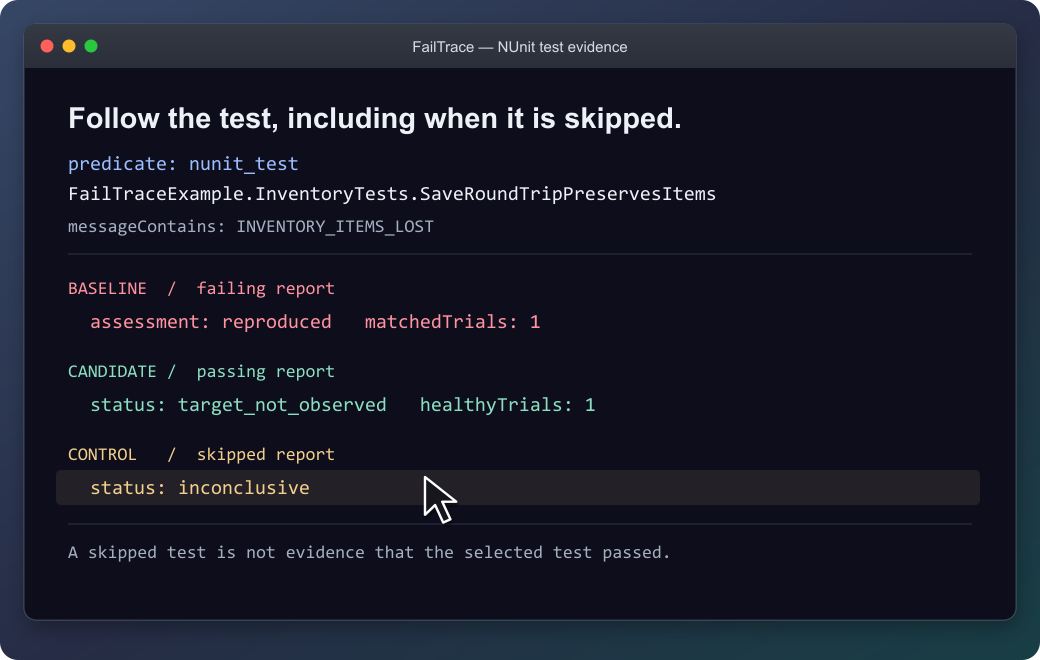
The selected test stays the same; a skipped report is not accepted as a passing test.
Use it on your own failure
From your project, replace the command and message with your own:
npx --yes failtrace@1.5.0 run "npm test -- checkout" --repeat 20 --stderr-contains "checkout failed" --capture-context
Run this before editing in a Git project. --capture-context records source identity for Verify; outside Git, select files with --context-source. Each trial saves its output, and exit 1 can mean the target was captured successfully. Then edit and verify the patch →
| Your next question | Command |
|---|---|
| How often does this failure appear? | run |
| What differs between a healthy and failing trial? | compare |
| Which Git change introduced it? | bisect |
| What input is enough to reproduce it? | minimize |
| What happened after the proposed fix? | verify |
| How can I replay this investigation? | bundle |
Command reference · Literal executable arguments · Reusable project scripts
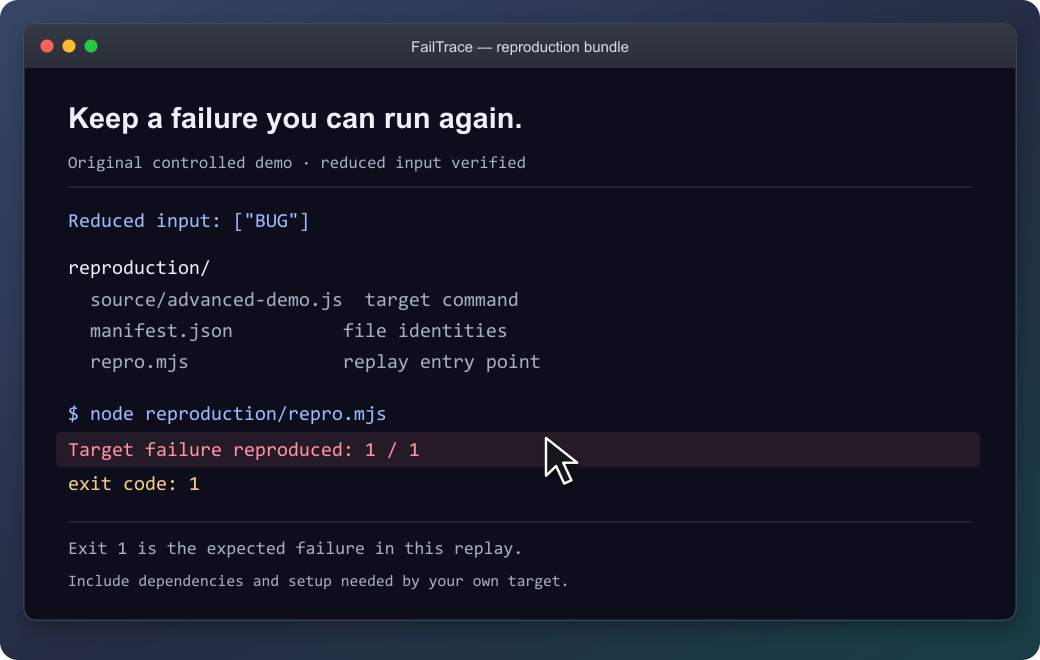
The demo's bundle reproduces its original failure with exit 1. Keep the source, input and replay together; supply the target's prerequisites when packaging your own investigation.
What the results establish
FailTrace reports observations under the chosen settings. Verify separates a target observed, a healthy sample without that target, and inconclusive evidence. Bisect reports a sampled first-parent boundary; minimization rechecks its result without promising the smallest possible input.
The demo shows controlled example outcomes, not performance measurements. A passing sample does not prove a bug is gone.
Commands run with your permissions, and process cleanup is best effort. Retained stdout/stderr is capped by default at 16 MiB per trial and 256 MiB per run or bisect/minimization. Previous investigations accumulate separately. Review logs, commands and selected files before sharing; bundles still require the target's dependencies and setup.
Result and exit-code reference · Resource limits · Storage inventory · Bundle guide
Availability and contributing
The quick start uses npm's latest release; the verified version is 1.5.0. MCP configuration and repeatable installation examples keep that exact version pinned: installation options, GitHub release, and MCP Registry entry.
Version 1.5.0 adds: short run references, Verify readiness and next-step guidance, and intermittent-minimization guidance. See the changelog.
Documentation: choose your next task →
Development instructions · Compatibility · Roadmap · Third-party notices
FailTrace MCP soruları
FailTrace MCP'yi Claude Code'a nasıl eklerim?
Terminalinizde claude mcp add failtrace -- npx -y failtrace komutunu çalıştırın. Her projede kullanılabilir olması için --scope user ekleyin.
FailTrace MCP'yi Cursor'a nasıl eklerim?
~/.cursor/mcp.json dosyasını açın ve yukarıdaki yükleme bölümünde gösterilen Cursor yapılandırmasını kullanarak sunucuyu mcpServers altına ekleyin.
FailTrace bir AI API'si veya hesabı gerektirir mi?
Hayır, herhangi bir AI API'si, hesap veya telemetri gerektirmeden yerel yürütme gerçekleştirir.
FailTrace'i NUnit testleri ile kullanabilir miyim?
Evet, hem CLI hem de MCP aracılığıyla 1.3.0 ve üzeri sürümlerde NUnit desteği bulunmaktadır.
Loglar için kaynak sınırları nelerdir?
Saklanan stdout/stderr miktarı deneme başına 16 MiB, her bir çalıştırma, bisect veya minimizasyon işlemi başına ise 256 MiB ile sınırlandırılmıştır.
Başarılı bir örnek bir hatanın düzeltildiğini kanıtlar mı?
Hayır, başarılı bir örnek bir hatanın tamamen giderildiğine dair kesin bir kanıt sağlamaz.