
MCP araç çağrılarını onaylanmış hedefler, teknikler ve zaman aralıklarına göre doğrulayarak yapay zeka ajanları için sızma testi kapsamını denetler.
Ayrıca bilinen adı IntegSec/agentic-pentest-proxy, @integsec/agentic-pentest-proxy
- Yıldızlar
- 9
- Araçlar
- —
- İndirmeler, 30 gün
- 6.447
- En son sürüm
- —
- Son commit
- 10 Kas 2026
- Lisans
- Apache-2.0
agentic-pentest-proxy MCP nedir?
agentic-pentest-proxy bir MCP sunucusudur. MCP araç çağrılarını onaylanmış hedefler, teknikler ve zaman aralıklarına göre doğrulayarak yapay zeka ajanları için sızma testi kapsamını denetler.
Özet, projenin README dosyasından oluşturuldu
agentic-pentest-proxy MCP sunucusu hakkında
Bu MCP proxy, yapay zeka ajanlarını içeren sızma testi süreçlerinde bir güvenlik geçidi görevi görür. Claude Desktop veya Claude Code gibi bir MCP istemcisi ile mevcut araçlarınız arasında konumlanarak, her araç çağrısının önceden tanımlanmış bir kapsam manifestine uymasını sağlar. Proxy; argümanları onaylanmış hedefler, belirli teknikler ve yetkilendirilmiş zaman aralıklarına göre doğrulayarak, ajanların bir test sırasında yetkisiz eylemler gerçekleştirmesini önler.
Geliştiriciler bunu npm, Docker veya GHCR imajları aracılığıyla Node.js 22 veya daha yeni bir sürüm kullanarak dağıtabilirler. Sistem; yerel komutlar için stdio, Burp Suite gibi upstream yapılar için SSE ve HTTP servisleri dahil olmak üzere çeşitli bağlantı türlerini destekler. Ekip yönetimi için tarayıcı arayüzüne sahip yönetilen bir gateway ve kullanıcıların istekleri gerçek zamanlı olarak durdurmasına, düzenlemesine veya düşürmesine olanak tanıyan bir MCP workbench içerir. Tüm kararlar, özel bir terminal kullanıcı arayüzü üzerinden izlenebilen yerel bir denetim günlüğüne kaydedilir.
Neler yapabilirsiniz
- 1Test sınırlarını zorunlu kılınBir yapay zeka ajanının, onaylanmış sızma testi kapsamı dışındaki hedeflere saldırmasını veya teknikler kullanmasını engelleyin.
- 2İstekleri manuel olarak inceleyin ve değiştirinAraç çağrılarını durdurmak ve argümanlarını upstream MCP server'a ulaşmadan önce değiştirmek için bir workbench kullanın.
Projenin README dosyasından alınmıştır. Her kullanım durumu, oradaki bir alıntı ile kontrol edilir.
agentic-pentest-proxy MCP nasıl yüklenir
Biçimler 10 Kas 2026 tarihinde doğrulandıCursor'a ekleGoose'a ekleagentic-pentest-proxy MCP'yi Claude Code içine yükleyin
$ claude mcp add agentic-pentest-proxy -- npx -y @integsec/agentic-pentest-proxyagentic-pentest-proxy MCP'yi Cursor içine yükleyin
~/.cursor/mcp.json
{
  "mcpServers": {
    "agentic-pentest-proxy": {
      "command": "npx",
      "args": [
        "-y",
        "@integsec/agentic-pentest-proxy"
      ]
    }
  }
}agentic-pentest-proxy MCP'yi VS Code içine yükleyin
.vscode/mcp.json
{
  "servers": {
    "agentic-pentest-proxy": {
      "type": "stdio",
      "command": "npx",
      "args": [
        "-y",
        "@integsec/agentic-pentest-proxy"
      ]
    }
  }
}agentic-pentest-proxy MCP'yi VS Code CLI içine yükleyin
$ code --add-mcp '{"name":"agentic-pentest-proxy","type":"stdio","command":"npx","args":["-y","@integsec/agentic-pentest-proxy"]}'agentic-pentest-proxy MCP'yi Claude Desktop içine yükleyin
claude_desktop_config.json
{
  "mcpServers": {
    "agentic-pentest-proxy": {
      "command": "npx",
      "args": [
        "-y",
        "@integsec/agentic-pentest-proxy"
      ]
    }
  }
}agentic-pentest-proxy MCP'yi Codex içine yükleyin
$ codex mcp add agentic-pentest-proxy -- npx -y @integsec/agentic-pentest-proxyagentic-pentest-proxy MCP'yi Codex config.toml içine yükleyin
~/.codex/config.toml
[mcp_servers.agentic-pentest-proxy]
command = "npx"
args = ["-y", "@integsec/agentic-pentest-proxy"]
agentic-pentest-proxy MCP'yi Gemini CLI içine yükleyin
$ gemini mcp add -s user agentic-pentest-proxy npx -- -y @integsec/agentic-pentest-proxyagentic-pentest-proxy MCP'yi Gemini settings.json içine yükleyin
~/.gemini/settings.json
{
  "mcpServers": {
    "agentic-pentest-proxy": {
      "command": "npx",
      "args": [
        "-y",
        "@integsec/agentic-pentest-proxy"
      ]
    }
  }
}Yapılandırma
AUDIT_LOG_PATHMCP_TRANSPORTSCOPE_MANIFEST_PATHUPSTREAM_MCP_ARGS_JSONUPSTREAM_MCP_COMMAND
| Ad | Açıklama | Sunucu |
|---|---|---|
| AUDIT_LOG_PATH | — | |
| MCP_TRANSPORT | — | |
| SCOPE_MANIFEST_PATH | — | |
| UPSTREAM_MCP_ARGS_JSON | — | |
| UPSTREAM_MCP_COMMAND | — |
Otomatik kontroller
Çalıştırıldı 13 Kas 2026Tam rapor →Otomatik kontrollerimizden geçti. Bu bir güvenlik denetimi değildir: kodu okuyun ve sunucuya ihtiyaç duyduğu en dar erişimi verin. Kontroller nasıl çalışır

- Kaynak deposu bağlantılı ve erişilebilirintegsec/agentic-pentest-proxy is public and reachablegithub.com/integsec/agentic-pentest-proxy ↗Geçti
- Paket, bu depoyu kaynağı olarak gösteriyor@integsec/agentic-pentest-proxy names integsec/agentic-pentest-proxy as sourcenpmjs.com/package/@integsec/agentic-pentest-proxy ↗Geçti
- Derleme kökeni (Sigstore onayı)Sigstore attestation for @integsec/agentic-pentest-proxynpmjs.com/package/@integsec/agentic-pentest-proxy/v/0.4.12#p ↗Geçti
- Açık kaynak lisansı (OSI)Apache-2.0spdx.org/licenses/Apache-2.0.html ↗Geçti
- Son bir yıl içinde commit veya sürüm mevcutLast commit or release 2026-11-10github.com/integsec/agentic-pentest-proxy ↗Geçti
- OpenSSF ScorecardKontrol edilmedi
- Paket adı popüler bir pakete yakın değilNo popular package one edit away from @integsec/agentic-pentest-proxyGeçti
- Pakette veya bağımlılıklarında kritik uyarı yokKontrol edilmedi
- Modele yönelik gizli talimat yok0 tool descriptions and the README read; no override phrases, credential paths or hidden charactersGeçti
- Yıkıcı araçlar etiketlenmişKontrol edilmedi
- Uzak uç nokta MCP el sıkışmasına yanıt veriyorKontrol edilmedi
Agentic Pentesting MCP Gateway
New to the gateway? The documentation site shows the local and hosted paths side by side, including where test traffic comes from. The full guides below are also available there after team sign-in.
An MCP proxy that checks tool calls against a pentest scope manifest before forwarding them to your MCP tools. It blocks calls it can identify as outside the targets, techniques, or time window you approved, and records decisions in a local audit log.
Requires Node.js 22 or newer. The proxy supports stdio tools, SSE upstreams such as Burp Suite, and HTTP upstreams.
Managing several tools? The managed gateway adds a browser UI with local MCP server presets, scope templates and technique checkboxes, JSON policy import and download, administrator approval and assignment, and a separate engagement choice for each user. It exposes scoped tools, an active engagement resource, PlexTrac reference resources, a TurboPentest knowledge-base catalog with search and controlled live reads, and guided pentest prompts. It supports one hosted MCP URL for ChatGPT and Claude and a local Burp route.
The MCP workbench shows your live tool calls and background jobs. Intercept requests, edit arguments before forwarding, or drop a call. Long calls return a job ID that you can inspect or cancel without waiting for one MCP request to stay open. The gateway checks scope again after any edit.
To keep the local gateway running after sign-in, use pentest-gateway service install; use pentest-gateway service remove to undo it. It binds to loopback only. See the local startup guide. The gateway cannot prevent an agent with a separate shell or network path from bypassing MCP checks; see the secure deployment guide.
Quick start: add an MCP tool
-
Install the proxy:
npm install -g @integsec/agentic-pentest-proxy -
Create a scope manifest with the guided wizard:
pentest-manifest new -o scope.jsonSet the real engagement targets and time window. Review the generated file with the engagement owner before using it.
-
Generate a client entry for each MCP tool. Put the tool's normal launch command after
--:pentest-setup --name scanner-scoped --manifest ./scope.json -- npx -y @example/scanner-mcpReplace
npx -y @example/scanner-mcpwith the command from your tool's own setup instructions. The command prints anmcpServersentry. Paste that entry into your MCP client's configuration and restart the client. To add another tool, run setup again with a new--name, then add its entry under the samemcpServersobject.For example, the generated entry has this shape (the setup command fills in your actual manifest and audit paths):
{
  "mcpServers": {
    "scanner-scoped": {
      "command": "pentest-proxy",
      "env": {
        "SCOPE_MANIFEST_PATH": "/path/to/scope.json",
        "MCP_TRANSPORT": "stdio",
        "AUDIT_LOG_PATH": "/path/to/audit",
        "UPSTREAM_MCP_COMMAND": "npx",
        "UPSTREAM_MCP_ARGS_JSON": "[\"-y\",\"@example/scanner-mcp\"]"
      }
    }
  }
}
Use the
mcpServersblock in Claude Desktop's MCP configuration or in your Claude Code project's.mcp.json. Other MCP clients may label the server settings differently; use the generated command and environment variables in their equivalent fields. The proxy starts when the client launches the tool. -
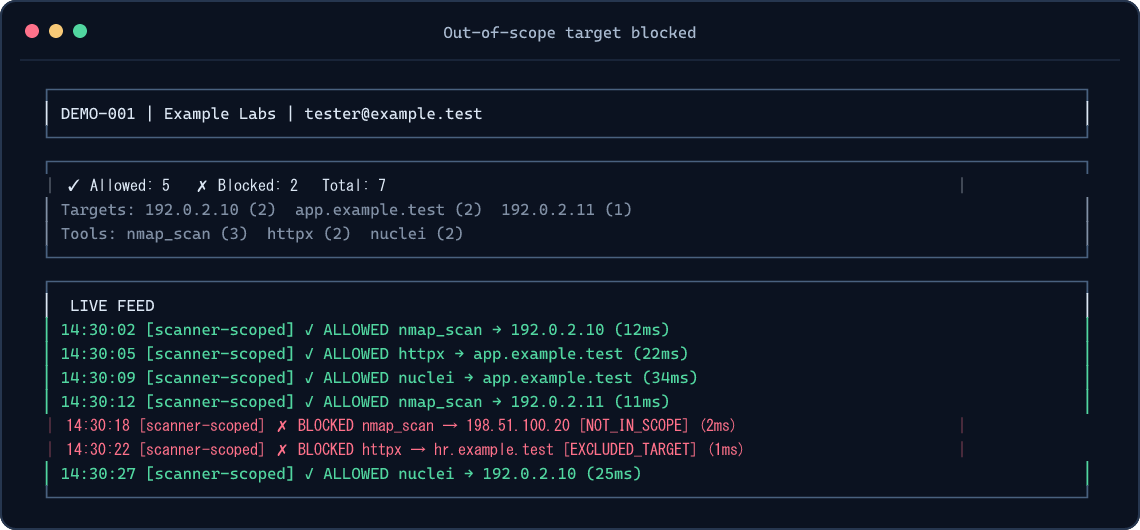
Watch decisions in another terminal:
pentest-tui --audit-path ./auditSetup prints the exact audit path to use. If your shell is in another directory, use that printed path. For a one-off TUI without a global install:
npm exec --yes --package=@integsec/agentic-pentest-proxy -- pentest-tui --audit-path ./auditThe TUI reads local audit files; it does not start the proxy. See TUI screenshots.
Other MCP tool types
| Tool connection | What to do |
|---|---|
| stdio tool launched by a command | Use the setup command above with -- <command> [args...]. |
| SSE upstream already listening, such as Burp Suite | Use pentest-setup --name burp-scoped --manifest ./scope.json --sse http://127.0.0.1:9876. |
| HTTP upstream | Run the proxy as an HTTP service and point your MCP client at it. HTTP and Docker guide. |
Use one generated client entry per upstream tool. A single scope manifest can be shared by several entries; each call still gets checked. More client examples.
What gets checked
The proxy checks MCP tools/call arguments it can inspect. It blocks unknown target-bearing arguments, out-of-scope targets, explicit exclusions, restricted techniques, expired engagement windows, and free-form commands by default. DNS names authorized through IP ranges must resolve entirely inside the allowed ranges. Local JSONL auditing is always on; cloud logging is optional.
The proxy cannot control destinations selected inside an upstream tool, HTTP redirects, targets read from files or encoded payloads, DNS changes after validation, or traffic that bypasses MCP. Use network egress controls and review each upstream tool's schema before relying on the proxy for an engagement. Security model.
Install and release options
| Option | Command or image |
|---|---|
| Global npm install | npm install -g @integsec/agentic-pentest-proxy |
| Project install | npm install @integsec/agentic-pentest-proxy |
| GHCR image | ghcr.io/integsec/agentic-pentest-proxy:latest |
| Docker Hub image | integsec/agentic-pentest-mcp-proxy:latest |
The npm package includes the gateway, proxy, manifest builder, setup helper, TUI, bridge, and scanner adapter. Run pentest-gateway version or pentest-gateway --version to check the installed release. The older integsec- command names still work for existing client configurations. To see the optional install welcome banner, add --foreground-scripts; npm hides package install-script output by default. You can always run pentest-gateway --help for the same next steps. The welcome script does not access the network or modify files.
Google Cloud logging and Secret Manager SDKs are opt-in to keep the default install lean and free of their deprecated transitive package. If you use either GCP backend, install the SDKs alongside the proxy:
npm install -g @integsec/agentic-pentest-proxy @google-cloud/logging @google-cloud/secret-manager
AWS and Azure SDKs are included as optional dependencies. See configuration and cloud setup for the required environment variables and Docker notes. If you use GCP and are upgrading from 0.2.6, install the GCP SDKs before restarting the proxy; it now reports a missing Cloud Logging SDK at startup.
Troubleshooting
| Symptom | Check |
|---|---|
| Tool does not appear in your MCP client | Paste the generated entry inside one mcpServers object, restart the client, and confirm the client can run pentest-proxy. |
| TUI shows no decisions | Start a tool call, then use the exact audit path printed by setup. The TUI and client may have different working directories. |
| Call is blocked | Check the decision and reason in the TUI or audit JSONL. Confirm the target, exclusions, technique, and window in your manifest. |
| GCP backend says its SDK is missing | Install the two GCP packages shown above alongside the proxy. |
| Need all CLI options | Run pentest-gateway --help, pentest-proxy --help, pentest-setup --help, pentest-manifest --help, or pentest-tui --help. |
Reference
- Configuration and manifest fields
- Client integrations, HTTP, and Docker
- TUI usage and screenshots
- Security model and limitations
- Contributing and development
License
Apache-2.0. See LICENSE.
agentic-pentest-proxy MCP soruları
agentic-pentest-proxy MCP'yi Claude Code'a nasıl eklerim?
Terminalinizde claude mcp add agentic-pentest-proxy -- npx -y @integsec/agentic-pentest-proxy komutunu çalıştırın. Her projede kullanılabilir olması için --scope user ekleyin.
agentic-pentest-proxy MCP'yi Cursor'a nasıl eklerim?
~/.cursor/mcp.json dosyasını açın ve yukarıdaki yükleme bölümünde gösterilen Cursor yapılandırmasını kullanarak sunucuyu mcpServers altına ekleyin.
Proxy aslında neyi kontrol eder?
Bilinmeyen hedef içeren argümanları, kapsam dışı hedefleri, kısıtlanmış teknikleri ve süresi dolmuş test süreçlerini engellemek için MCP araç çağrısı argümanlarını inceler.
Proxy, bir ajanın ayrı bir shell kullanarak kontrolleri atlatmasını engelleyebilir mi?
Hayır, gateway, ayrı bir shell veya ağ yolu kullanan bir ajanın MCP kontrollerini atlatmasını engelleyemez.
Hangi tür MCP araç bağlantıları destekleniyor?
Proxy; stdio araçlarını, SSE upstream yapılarını (Burp Suite gibi) ve HTTP upstream yapılarını destekler.