
AI kodlama ajanlarının görev hedeflerini, kararlarını ve kontrol noktalarını repoda kaydetmesini sağlayarak, sonraki oturumlarda çalışmaya kaldıkları yerden devam etmelerine olanak tanır.
Ayrıca bilinen adı ihorponom/agentpack, agentpack-cli
- Yıldızlar
- 19
- Araçlar
- —
- İndirmeler, 30 gün
- 1.337
- En son sürüm
- 1.11.1
- Son commit
- 25 Eki 2026
- Lisans
- MIT
Agentpack MCP nedir?
AI kodlama ajanlarının görev hedeflerini, kararlarını ve kontrol noktalarını repoda kaydetmesini sağlayarak, sonraki oturumlarda çalışmaya kaldıkları yerden devam etmelerine olanak tanır.
Özet, projenin README dosyasından oluşturuldu
Agentpack MCP sunucusu hakkında
Agentpack, ilerlemeyi doğrudan deponuzun içinde saklayarak AI kodlama ajanları için görev sürekliliğini sağlar. Sohbet geçmişi temizlendiğinde veya bağlam sıkıştırıldığında ilerlemenin kaybolması yerine, ajanlar bu aracı kullanarak hedefleri, kararları, çıkmaz yolları ve doğrulama kanıtlarını yerel bir .agentpack dizinine kaydeder. Bu yaklaşım; Claude Code, Cursor, Codex veya Claude Desktop gibi farklı istemcilerin, bir önceki oturumun tam olarak kaldığı yerden devam etmesine olanak tanır.
Bulut depolama veya telemetri olmadan çalışan bu yerel öncelikli çözüm, tüm görev durumunu deponuzda düz metin dosyaları olarak tutar. Geliştiriciler, durumu incelemek, kontrol noktaları oluşturmak veya görev paketlerini dışa aktarmak için bir CLI kullanarak bu kayıtları yönetebilirler. Sistem, kısıtlamalar ve sonraki adımlar dahil olmak üzere belirli bir hedefin yaşam döngüsünü izlemek için bir Task Passport kullanır. Ayrıca, ajanların tanımlanmış yazma kapsamları içinde kalmalarını sağlamak için düzenlemeler konusunda uyarı verebilen veya bunları engelleyebilen bir task gate özelliğine sahiptir.
Neler yapabilirsiniz
- 1Yarıda kesilen kodlama oturumlarına devam etmeBir ajan, bağlam sıkıştırmasından sonra veya yeni bir sohbet oturumu başladığında belirli hedefi ve son kararları yeniden yükleyebilir.
- 2Farklı AI istemcileri arasında geçiş yapmaAraştırma geçmişini kaybetmeden bir görevi Claude Code'dan Cursor'a taşıyabilirsiniz.
- 3Görev sınırlarını uygulamaYazma kapsamını izlemek için bir task gate kullanarak bir ajanın yetkisiz değişiklikler yapmasını engelleyin.
- 4Dosya özelindeki sonuçları takip etmeBelirli bir dosyanın ne yaptığına dair notlar kaydedin ve o dosya daha sonra değiştirilirse bir uyarı alın.
Projenin README dosyasından alınmıştır. Her kullanım durumu, oradaki bir alıntı ile kontrol edilir.
Agentpack MCP nasıl yüklenir
Biçimler 10 Kas 2026 tarihinde doğrulandıCursor'a ekleGoose'a ekleAgentpack MCP'yi Claude Code içine yükleyin
$ claude mcp add agentpack -- npx -y agentpack-cliAgentpack MCP'yi Cursor içine yükleyin
~/.cursor/mcp.json
{
  "mcpServers": {
    "agentpack": {
      "command": "npx",
      "args": [
        "-y",
        "agentpack-cli"
      ]
    }
  }
}Agentpack MCP'yi VS Code içine yükleyin
.vscode/mcp.json
{
  "servers": {
    "agentpack": {
      "type": "stdio",
      "command": "npx",
      "args": [
        "-y",
        "agentpack-cli"
      ]
    }
  }
}Agentpack MCP'yi VS Code CLI içine yükleyin
$ code --add-mcp '{"name":"agentpack","type":"stdio","command":"npx","args":["-y","agentpack-cli"]}'Agentpack MCP'yi Claude Desktop içine yükleyin
claude_desktop_config.json
{
  "mcpServers": {
    "agentpack": {
      "command": "npx",
      "args": [
        "-y",
        "agentpack-cli"
      ]
    }
  }
}Agentpack MCP'yi Codex içine yükleyin
$ codex mcp add agentpack -- npx -y agentpack-cliAgentpack MCP'yi Codex config.toml içine yükleyin
~/.codex/config.toml
[mcp_servers.agentpack]
command = "npx"
args = ["-y", "agentpack-cli"]
Agentpack MCP'yi Gemini CLI içine yükleyin
$ gemini mcp add -s user agentpack npx -- -y agentpack-cliAgentpack MCP'yi Gemini settings.json içine yükleyin
~/.gemini/settings.json
{
  "mcpServers": {
    "agentpack": {
      "command": "npx",
      "args": [
        "-y",
        "agentpack-cli"
      ]
    }
  }
}Otomatik kontroller
Çalıştırıldı 12 Kas 2026Tam rapor →Otomatik kontrollerimizden geçti. Bu bir güvenlik denetimi değildir: kodu okuyun ve sunucuya ihtiyaç duyduğu en dar erişimi verin. Kontroller nasıl çalışır

- Kaynak deposu bağlantılı ve erişilebilirGeçti
- Açık kaynak lisansı (OSI)Geçti
- Son bir yıl içinde commit veya sürüm mevcutGeçti
- Paket adı popüler bir pakete yakın değilGeçti
- Uzak uç nokta HTTPS kullanıyorKontrol edilmedi
- Yıkıcı araçlar etiketlenmişKontrol edilmedi
- Modele yönelik gizli talimat yokGeçti
- Pakette veya bağımlılıklarında kritik uyarı yokGeçti
Agentpack


Repo-native task continuity for AI coding agents.
Agent memory remembers how you work. Agentpack remembers where the task stands.
Your agent spent an hour on a task. It found the cause, rejected two approaches, and wrote down the next step. Then the context was compacted, or the chat closed. The next session starts from zero and does the same investigation again.
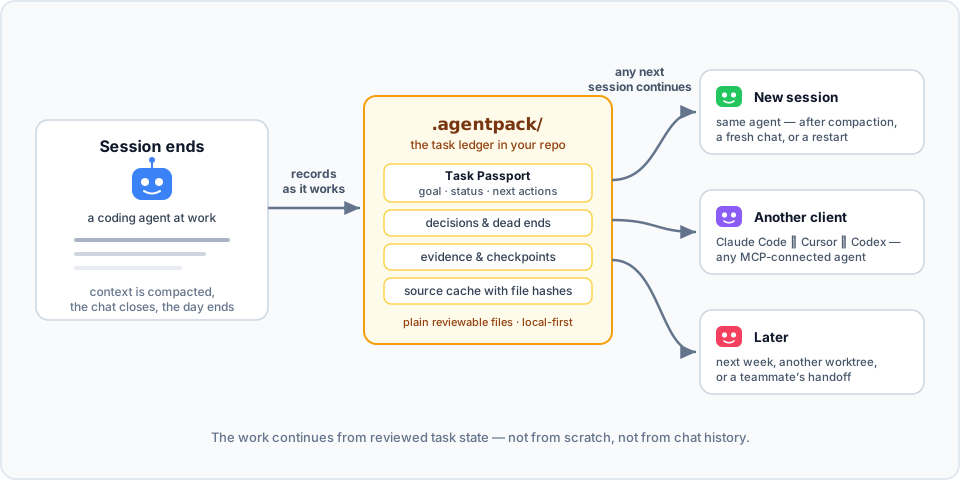
Agentpack keeps the task state in your repo. Connected agents record the goal, decisions, dead ends, verification evidence, and checkpoints in .agentpack/ while they work. Then the next session loads that state and continues: the same agent after compaction, a different client, or you next week.
Here it is in action. In session 1, an agent works on a flaky test and records a decision, a dead end, and a checkpoint through the Agentpack MCP tools. In session 2, the next day with an empty context, one load_context call brings the task back:

▶ Watch the 80-second explainer, with sound
To try the same flow by hand from the CLI, see docs/DEMOS.md.
- Local-first. Plain files in your repo. No cloud, no telemetry, no network calls.
- Made for agents. A local MCP server and generated project instructions (
AGENTS.md,CLAUDE.md, Cursor rules) tell agents when to load and record state. - Open to people. The CLI shows the same state, so you can inspect it, fix it, or hand it off yourself.
How is this different from agent memory?
Claude Code memory, Codex memories, and CLAUDE.md or AGENTS.md keep how to work: your preferences, project conventions, and facts that stay true. Agentpack keeps where the work is: the goal of the current task, its constraints, decisions, dead ends, next actions, and verification result.
| Agent memory | Agentpack | |
|---|---|---|
| Holds | Preferences, conventions, long-lived facts | The state of one task |
| Lives in | The profile or account of one client | .agentpack/ in the repo, local by default, portable with task bundles |
| Read by | That client only | Any MCP client: Claude Code, Codex, Cursor, Claude Desktop |
| Shape | Free-form notes, recalled by relevance | A Task Passport per task: goal, lifecycle, the paths it may change, and verification bound to a commit |
| Staleness | Not tied to file changes | Notes about files store the file hash, so Agentpack flags a note when its file changes |
Use both. Memory keeps how you like to work. Agentpack keeps what the task needs next.
Quick start
Agentpack needs Node.js 20 or later.
npm install -g agentpack-cli

cd path/to/your/repo
agentpack init                     # once per repo
agentpack install claude --write   # per client: codex | claude | cursor | claude-desktop
agentpack install git-hooks --write  # optional: task gate check before each commit
Restart or reconnect your coding agent, and approve the Agentpack server or hooks when the client asks. From then on, the agent loads the task state when a session starts, records decisions and evidence while it works, and creates checkpoints at meaningful points.
To check the setup, run agentpack doctor. To see the task state yourself, run agentpack resume --preset agent --query "<topic>".
In a Git repository, init adds the local Agentpack files to .git/info/exclude. The list includes .agentpack/, .mcp.json, .claude, .codex, .cursor, AGENTS.md, and CLAUDE.md. Agentpack does not change your .gitignore. Files that Git already tracks stay tracked.
For each client, docs/INTEGRATIONS.md shows what the installer writes and why.
How it works
- When a session starts, the agent loads a compact summary: the current Task Passport, recent checkpoints, decisions, and source conclusions.
- While it works, the agent records what is worth keeping: decisions, failed approaches, and verification evidence. It can also record a source conclusion: a short note about what a file does, stored with the file hash. If the file changes later, Agentpack flags the conclusion. A matching hash shows that the file is unchanged, not that the conclusion is correct.
- At a natural stop, the agent creates a checkpoint with the status, the next actions, and the Git state.
- The next session, in any MCP client, continues from that state. It does not rebuild the task from chat history.
Each task has a Task Passport: the goal, status, constraints, write scope (the paths the task may change), next actions, and verification. You can start, park, switch, and finalize tasks, so each handoff is explicit.
The task gate checks edits against the current Passport. The client installers add native hooks for Claude Code, Codex, and Cursor. install git-hooks adds a pre-commit check. By default, the gate only warns. Set "gateMode" in .agentpack/config.json to "block" to stop edits outside the write scope or outside an active task, or to "off" to turn the gate off. Hooks are a guardrail, not a sandbox. See docs/CLI.md.
The summary stays inside a token budget. The agent gets the useful state back, not the full history.
More features
- Task bundles. Export a task to one JSON file, and import it in a fresh clone or on another machine. See docs/TASK-PASSPORT.md.
- Tasks across repositories. One Passport can cover changes in several repositories, each with its own write scope.
- Monorepo focus. Give each part of a monorepo (
api/,frontend/,cron/) short tasks with their own write scope. The task gate warns when the agent leaves that part. - Usage reports.
agentpack usage reportreads local Claude Code and Codex transcripts and shows the token use of a task, including the Agentpack share. Nothing leaves your machine. - Read-only inspector.
agentpack tuishows tasks, evidence, and checkpoints in the terminal. See docs/TUI.md. - Builder subagent. Codex, Claude Code, and Cursor installs include an optional builder for larger implementation work. The main agent says what it will hand off before it uses the builder. Small tasks stay with the main agent.
When it helps
- The context is compacted in the middle of a task, and the next turn needs the state back.
- You start a new chat on a task that is still open.
- You change between Claude Code, Cursor, Codex, or another MCP client.
- You come back to a refactor or a bug fix days later.
- Another agent continues from your checkpoint.
Agentpack context also uses tokens. The compact output keeps the task state available without the full ledger history.
Security posture
- Zero runtime dependencies, exact dev dependencies, a committed lockfile, and
ignore-scripts=true. - No telemetry and no network calls in normal CLI or MCP operation.
- Best-effort redaction of values that look like secrets in stored context and handoff output.
- GitHub Actions publishes each release with npm provenance (Trusted Publisher, no long-lived tokens). To verify, run
npm audit signatures.
See SECURITY.md for the full policy, including what Agentpack reads outside the repo.
Documentation
- docs/INTEGRATIONS.md: setup for Codex, Claude Code, Cursor, Claude Desktop, and Git hooks
- docs/TASK-PASSPORT.md: task lifecycle, handoffs, additional repositories, and task bundles
- docs/CLI.md: full CLI reference, budgets, and manual workflows
- docs/MCP.md: MCP server contract and tools
- docs/DEMOS.md: short continuity demos to run yourself
- docs/TUI.md: the read-only terminal inspector
- docs/LEDGER-HYGIENE.md: keep the ledger small and useful
Contributing
Clone the repo and use Node.js 20 or later:
npm ci --ignore-scripts
npm test
npm run mcp:smoke
node dist/src/agentpack.js --help
See docs/SETUP.md for the development setup and docs/RELEASING.md for the release steps.
Mirror: Codeberg. Issues, releases, and npm provenance stay on GitHub.
Agentpack MCP soruları
Agentpack MCP'yi Claude Code'a nasıl eklerim?
Terminalinizde claude mcp add agentpack -- npx -y agentpack-cli komutunu çalıştırın. Her projede kullanılabilir olması için --scope user ekleyin.
Agentpack MCP'yi Cursor'a nasıl eklerim?
~/.cursor/mcp.json dosyasını açın ve yukarıdaki yükleme bölümünde gösterilen Cursor yapılandırmasını kullanarak sunucuyu mcpServers altına ekleyin.
Agentpack görev durumunu nerede saklar?
Görev durumunu, herhangi bir bulut veya ağ çağrısı yapmadan, deponuzun içindeki .agentpack/ dizininde düz metin dosyaları olarak saklar.
Agentpack hangi MCP istemcileriyle çalışır?
Claude Code, Codex, Cursor, Claude Desktop ve diğer MCP istemcileriyle çalışır.
Agentpack'in agent memory'den farkı nedir?
Agent memory tercihleri ve uzun süreli kuralları saklarken, Agentpack mevcut görevin durumunu; yani hedefi, kararları, çıkmaz yolları, sonraki adımları ve doğrulamaları saklar.
Agentpack nasıl kurulur?
agentpack-cli npm paketini (Node.js 20 veya üzeri) kurun, deponuzda agentpack init komutunu çalıştırın ve ardından istemciniz için entegrasyonu yükleyin.
Agentpack buluta herhangi bir veri gönderir mi?
Hayır. Normal CLI veya MCP operasyonları sırasında telemetri içermez ve hiçbir ağ çağrısı yapmaz.