
Claude Code oturumlarının ve alt ajanların, CDP aracılığıyla birden fazla numaralandırılmış Chrome örneğini paylaşmasını ve koordine etmesini sağlar.
Ayrıca bilinen adı IGELHARINE/CDPM, cdpm-mcp
- Yıldızlar
- 3
- Araçlar
- 22
- İndirmeler, 30 gün
- —
- En son sürüm
- 0.1.12
- Son commit
- 6 Kas 2026
- Lisans
- MIT
cdpm MCP nedir?
Claude Code oturumlarının ve alt ajanların, CDP aracılığıyla birden fazla numaralandırılmış Chrome örneğini paylaşmasını ve koordine etmesini sağlar. 22 araç sunar; örneğin browser_status, browser_launch, browser_close.
Özet, projenin README dosyasından oluşturuldu
cdpm MCP sunucusu hakkında
CDPM, geliştiricilerin bir MCP server aracılığıyla slot olarak adlandırılan 30 adede kadar bağımsız Chrome örneğini yönetmesine olanak tanır. Standart otomasyon araçlarının aksine bu server, güvenilir giriş olayları (input events) göndermek için Chrome DevTools Protocol kullanır; bu da yaygın otomasyon tespitlerinden kaçınmaya yardımcı olur. Her slot kendi özel profili ve hata ayıklama portu ile çalışır, yani oturum açma bilgileri ve oturumlar farklı çalıştırmalar arasında kalıcıdır.
Bu server, özellikle Claude Code oturumlarının ve alt ajanların karmaşık web görevlerini koordine etmesi için tasarlanmıştır. Slotlar bağımsız süreçler olduğu için yerel geliştirme ortamı veya yapay zeka istemcisi kapatılsa bile çalışmaya devam ederler. Birden fazla ajanın birbirine mesaj iletmesine olanak tanıyan slot_send ve slot_inbox gibi yerleşik iletişim araçlarını içerir. Bu özellik, paylaşılan durum veya ajanlar arası koordinasyon gerektiren paralel web otomasyon görevlerini çalıştırması gereken geliştiriciler için idealdir.
Neler yapabilirsiniz
- 1Paralel web görevlerini koordine edinBir ajan, veri toplamak için birden fazla alt ajana farklı Chrome slotlarında eş zamanlı çalışması talimatını verebilir.
- 2Kalıcı web oturumlarını koruyunGeliştiriciler, farklı yapay zeka oturumları boyunca oturum açılmış web uygulamalarını aktif tutmak için slotları kullanabilir.
- 3Ajanlar arası iletişimi etkinleştirinBir ajan, çok adımlı bir iş akışını koordine etmek için belirli bir slot üzerinden başka bir ajana mesaj gönderebilir.
Projenin README dosyasından alınmıştır. Her kullanım durumu, oradaki bir alıntı ile kontrol edilir.
cdpm MCP nasıl yüklenir
Biçimler 10 Kas 2026 tarihinde doğrulandıCursor'a ekleGoose'a eklecdpm MCP'yi Claude Code içine yükleyin
$ claude mcp add cdpm -- npx -y cdpm-mcpcdpm MCP'yi Cursor içine yükleyin
~/.cursor/mcp.json
{
  "mcpServers": {
    "cdpm": {
      "command": "npx",
      "args": [
        "-y",
        "cdpm-mcp"
      ]
    }
  }
}cdpm MCP'yi VS Code içine yükleyin
.vscode/mcp.json
{
  "servers": {
    "cdpm": {
      "type": "stdio",
      "command": "npx",
      "args": [
        "-y",
        "cdpm-mcp"
      ]
    }
  }
}cdpm MCP'yi VS Code CLI içine yükleyin
$ code --add-mcp '{"name":"cdpm","type":"stdio","command":"npx","args":["-y","cdpm-mcp"]}'cdpm MCP'yi Claude Desktop içine yükleyin
claude_desktop_config.json
{
  "mcpServers": {
    "cdpm": {
      "command": "npx",
      "args": [
        "-y",
        "cdpm-mcp"
      ]
    }
  }
}cdpm MCP'yi Codex içine yükleyin
$ codex mcp add cdpm -- npx -y cdpm-mcpcdpm MCP'yi Codex config.toml içine yükleyin
~/.codex/config.toml
[mcp_servers.cdpm]
command = "npx"
args = ["-y", "cdpm-mcp"]
cdpm MCP'yi Gemini CLI içine yükleyin
$ gemini mcp add -s user cdpm npx -- -y cdpm-mcpcdpm MCP'yi Gemini settings.json içine yükleyin
~/.gemini/settings.json
{
  "mcpServers": {
    "cdpm": {
      "command": "npx",
      "args": [
        "-y",
        "cdpm-mcp"
      ]
    }
  }
}cdpm MCP araçları 22
README dosyasından algılandıbrowser_statusbrowser_launchbrowser_closebrowser_snapshotbrowser_textbrowser_screenshotbrowser_clickbrowser_typebrowser_fillbrowser_dialogbrowser_permissionbrowser_hover
| browser_status | — | |
| browser_launch | — | |
| browser_close | — | |
| browser_snapshot | — | |
| browser_text | — | |
| browser_screenshot | — | |
| browser_click | — | |
| browser_type | — | |
| browser_fill | — | |
| browser_dialog | — | |
| browser_permission | — | |
| browser_hover | — |
22 aracın tümünü gösterDaha az araç göster
browser_dragbrowser_download_waitbrowser_pdfbrowser_uploadbrowser_selectbrowser_press_keybrowser_scrollbrowser_waitbrowser_evalbrowser_block
| browser_drag | — | |
| browser_download_wait | — | |
| browser_pdf | — | |
| browser_upload | — | |
| browser_select | — | |
| browser_press_key | — | |
| browser_scroll | — | |
| browser_wait | — | |
| browser_eval | — | |
| browser_block | — |
Otomatik kontroller
Çalıştırıldı 13 Kas 2026Tam rapor →Otomatik kontrollerimizden geçti. Bu bir güvenlik denetimi değildir: kodu okuyun ve sunucuya ihtiyaç duyduğu en dar erişimi verin. Kontroller nasıl çalışır

- Kaynak deposu bağlantılı ve erişilebilirGeçti
- Açık kaynak lisansı (OSI)Geçti
- Son bir yıl içinde commit veya sürüm mevcutGeçti
- Paket adı popüler bir pakete yakın değilGeçti
- Uzak uç nokta HTTPS kullanıyorKontrol edilmedi
- Yıkıcı araçlar etiketlenmişGeçti
- Modele yönelik gizli talimat yokGeçti
- Pakette veya bağımlılıklarında kritik uyarı yokGeçti
CDPM




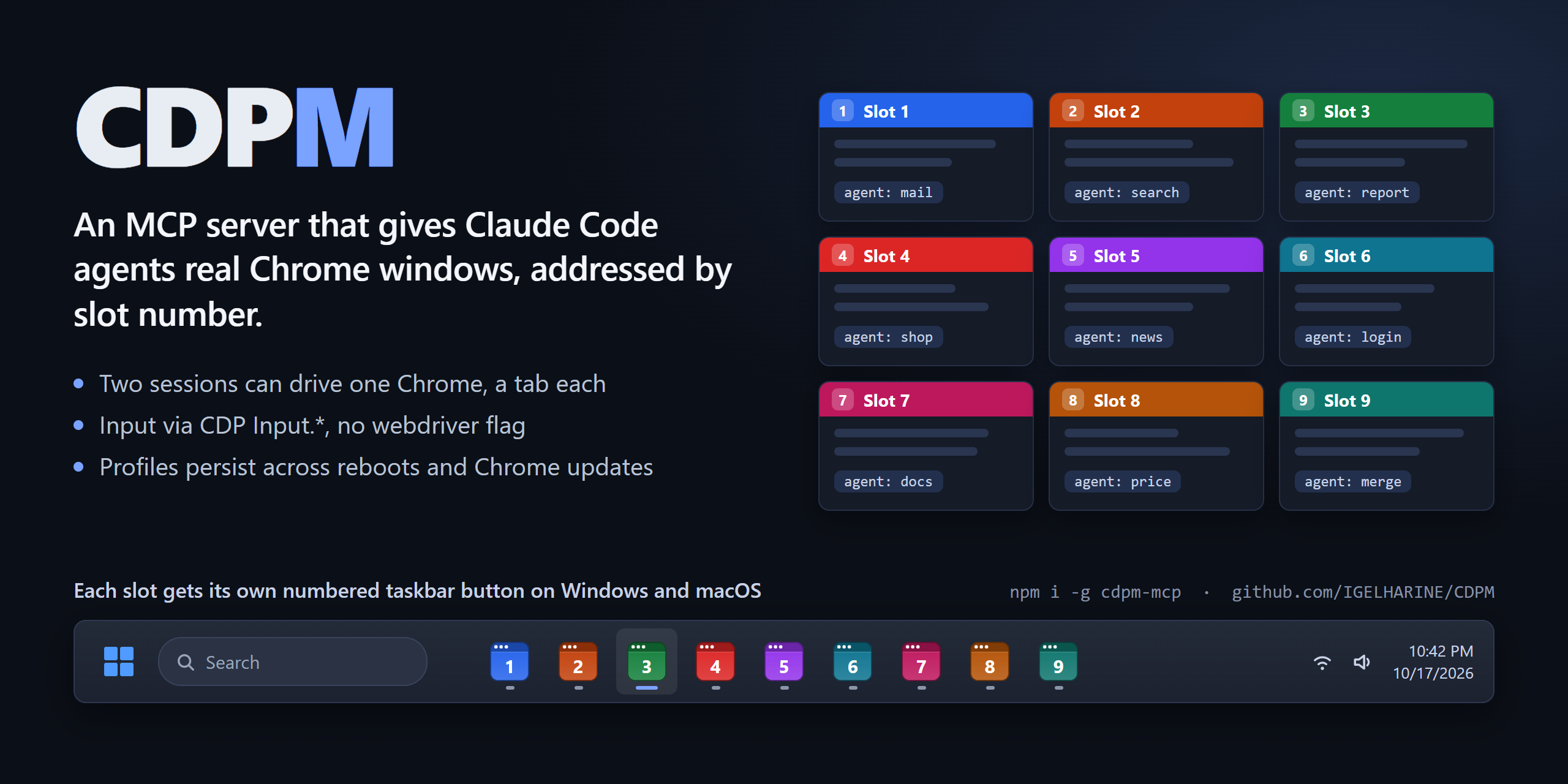
CDPM is an MCP server that keeps up to 30 Chrome instances ("slots") on fixed debugging ports and lets any number of Claude Code sessions and subagents drive them by number: "open slot 3", "log in on slot 1, then fill the form in slot 2". Each slot is an ordinary Chrome with its own profile, so logins stick between runs and the browser is the same one you would use by hand.
It grew out of running several Claude agents against logged-in web apps at once, where the hard parts were not clicking buttons but sharing browsers between sessions, keeping them alive, and noticing when Chrome itself got in the way.
Demo
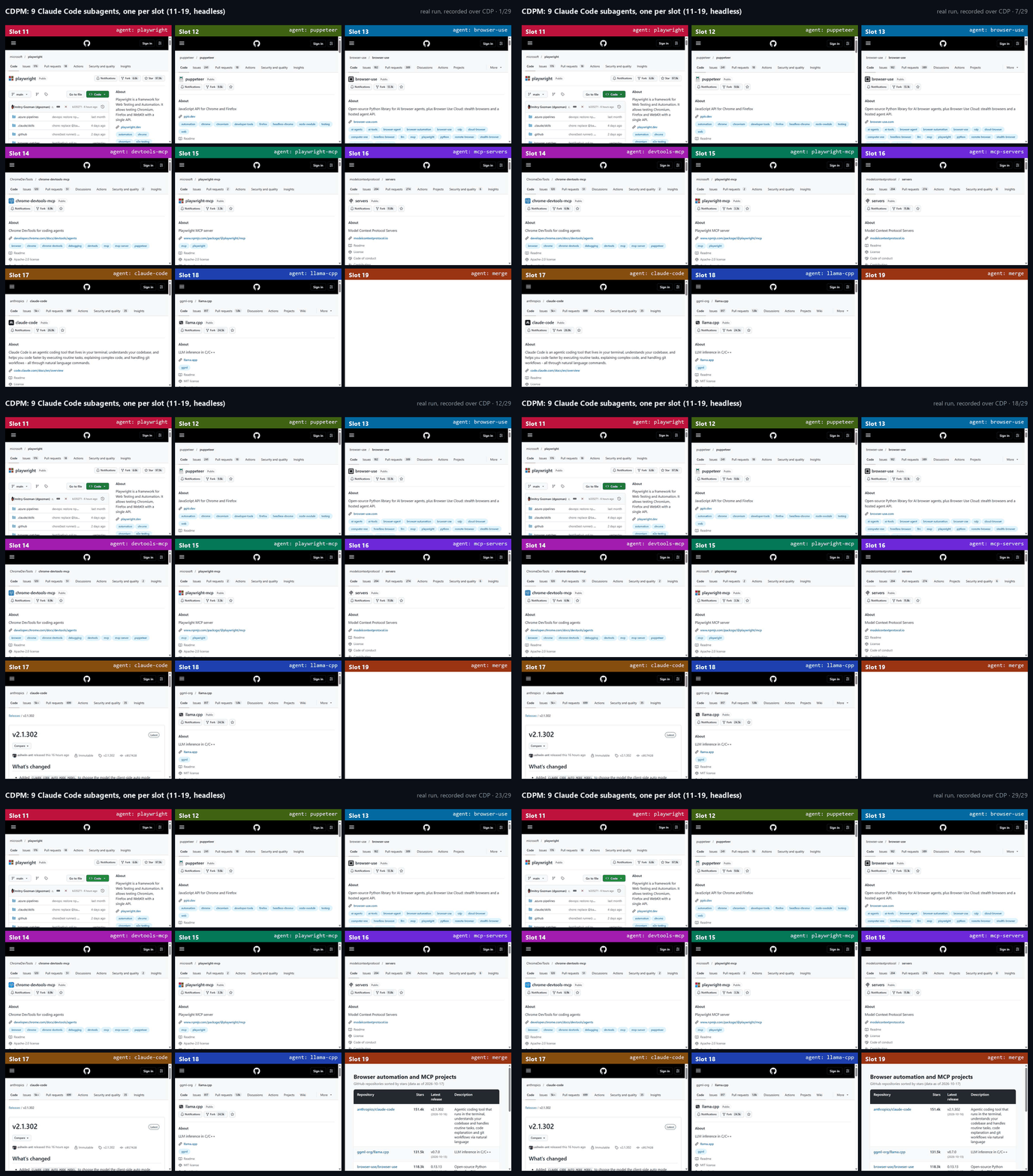
Nine subagents on slots 11-19 (headless). Slots 11-18 each read a GitHub repository page and send the numbers to slot 19 with slot_send; slot 19 waits on slot_inbox, writes a comparison table and opens it. Recorded over CDP from a real run: about 45 seconds of wall time, one frame per pass over the nine slots.
What is different
- Shared, numbered browsers. Slot N listens on port
14049 + Nand keeps its profile in its own folder. Sessions don't own a browser; they address a slot. Two sessions can work in the same slot on different tabs: commands are queued per tab, so two agents typing into one tab don't interleave. This is covered by an integration test and by a long test where three sessions share one slot for 600 rounds without memory, tab or lock-file growth. - Plain Chrome over CDP. No Playwright or Puppeteer. Clicks and keys are sent with
Input.dispatch*Event, so pages receive trusted events. Chrome is started without--enable-automation, sonavigator.webdriverstaysfalse. CDPM never callsRuntime.enable, and every script it runs to read the page lives in an isolated world the page cannot see; snapshots pierce shadow roots. That removes the usual automation fingerprints. It does not get you past rate limits or IP reputation: nine slots searching Google at the same moment will still get a CAPTCHA. - Survives the boring failures. Slots are started detached, so closing VS Code or Claude Code (even with a process-tree kill) leaves them running. After a reboot, CDPM re-attaches to whatever Chrome answers on the slot ports and re-checks its process ID before touching taskbar icons. If Chrome updates itself while a slot is running (on Windows the update swaps
chrome.exe, the old browser can no longer start renderers, and new tabs hang blank), CDPM restarts that slot on the new version and reopens its tabs. - Agents can coordinate.
slot_send/slot_inboxdeliver messages addressed by slot and agent name. They are stored on disk, so they survive a Chrome restart, and a waiting agent wakes as soon as one arrives. - Browser UI the page can't see. JavaScript dialogs are reported and answered with
browser_dialog. On Windows, permission bubbles ("access other apps and services on this device", notifications, location) are detected through UI Automation and answered withbrowser_permission. File pickers triggered by an agent's action are intercepted instead of opening OS windows; a print dialog the page opens is reported right away (the page itself is never modified).
Quick start
npm install -g cdpm-mcp
cdpm install
Restart Claude Code and ask for a slot, for example: "Open slot 1 with a window and go to github.com."
Compared with other browser MCP servers
| CDPM | Playwright MCP | Chrome DevTools MCP | |
|---|---|---|---|
| Browsers | up to 30 numbered slots shared by every session | one per server process | one per server process |
| Several sessions on one browser | yes: per-tab queues, ownership warnings | not a design goal | not a design goal |
| Logins kept between runs | yes, one profile per slot | yes, one persistent profile (--isolated for a fresh one) |
yes, one persistent profile (--isolated for a fresh one) |
| Driven by | raw CDP | Playwright | Puppeteer |
| Messages between agents | built in | no | no |
| Per-slot taskbar icons | Windows taskbar, macOS Dock | no | no |
| Other browsers | Chrome only | Chromium, Firefox, WebKit | Chrome only |
The other two are good tools and the better choice if you need Firefox or WebKit (Playwright) or performance traces and DevTools panels (Chrome DevTools MCP). Their columns reflect their documentation as of October 2026.
Security
Slot ports listen on 127.0.0.1 only, but any process on this machine can connect to them and act with that slot's logged-in sessions. Treat a running slot like an unlocked browser: don't leave sensitive accounts logged in on slots while running software you don't trust. Closed slots keep their profiles on disk (cdpm purge N deletes one).
Details
- Pure CDP. No Playwright, no Puppeteer, no stealth patches. A normal Chrome with a debugging port, driven with real input events.
- Numbered slots. Slot N uses CDP port
14049 + N(slot 1 = 14050 … slot 30 = 14079) and its own profile folder. The range avoids the common default 9222; setCDPM_PORT_BASEto move it if something else uses those ports. Ports outside that range are not managed. - Starts only when asked. No tool ever starts a closed slot except
browser_launch. Without a number, the lowest free slot is used. - Slots outlive their caller. Closing CDPM, Claude Code or VS Code (even when it kills its whole process tree) does not close slot Chrome. Slots end only with
browser_close/cdpm closeor when you close that Chrome yourself. - One taskbar button per slot, with a browser-window icon in the slot color and the slot number, pre-corrected so the taskbar shows it pixel-sharp (drawn with the system font via GDI+, so no font files ship in the repo). The window title shows "3번" via Chrome's own window-name feature (pages can't see it).
- Built for many agents. Every tool takes
slotexplicitly, records who opened each tab and who touched it last, warns (without blocking) when you act on a tab someone else just used, and serializes concurrent commands on the same tab. - Agents can talk with
slot_send/slot_inbox; unread messages are also delivered at the top of every result. - Status line.
cdpm statuslineprints live slots as slot-colored numbers; each slot shows the title of the tab last acted on (no agent names; only blank/new tabs left shows just the number):CDPM 1 NAVER 2 Daum. It fits the terminal width (from ccstatusline): titles shrink first, then only numbers, then+Nfor the rest. A paused slot (slot_pause/cdpm pause) shows its number in dim gray instead of its slot color. A dimCDPM -when none are running. Ending a slot's Chrome yourself (closing its last window on Windows, Cmd+Q on macOS) removes it right away, and titles are read live. - English for the AI. Server instructions, tool descriptions and tool results are in English to save tokens; Claude is told to answer in the user's language. CLI output is in Korean.
- Leaves the user's PC alone. No window, viewport or zoom changes, and actions that would pop up OS windows are refused (see below).
Works on Windows 11 and macOS. Per-slot icons: taskbar on Windows, Dock on macOS (see "macOS" below). Linux is experimental: the code paths exist (Chrome lookup, data folder) but it has not been tested on a Linux machine, and there are no per-slot icons.
Requirements
- Node.js 22+
- Google Chrome (found automatically. Windows: registry
App Paths, then standard install folders. macOS:/Applications,~/Applications, then Spotlight. Linux:/usr/bin/google-chrome,google-chrome-stable,/opt/google/chrome/chrome)
Install
Asked to install this? (for Claude / AI agents) Do these steps in order.
- Check that Node.js 22+ and Google Chrome are installed. If not, tell the user and stop.
- Run
npm install -g cdpm-mcp@latest(also when already installed: this updates it).- Run
cdpm install(ifcdpmisn't found:node "$(npm root -g)/cdpm-mcp/dist/cli.js" install). It registers CDPM with Claude Code and sets up the status line, rules, subagent and permissions; an older git-clone registration is switched to the new location.- Do not launch any Chrome slot, ask questions, or explain internals. On success reply with exactly one line in the user's language, e.g. "CDPM installed. Restart Claude Code to use it." (version:
cdpm --version). If a step failed, say only which step and why.
npm install -g cdpm-mcp
cdpm install
cdpm install registers CDPM with Claude Code and sets up the status line, the parallel-work rule, the cdpm-browser subagent and the permission allow list in one go. Restart Claude Code afterwards.
Other MCP clients (Cursor, Claude Desktop, ...)
cdpm install only registers with Claude Code. For other clients add it to their mcpServers config (paths from npm root -g):
{
  "mcpServers": {
    "cdpm": {
      "command": "C:\\Program Files\\nodejs\\node.exe",
      "args": ["C:\\Users\\<you>\\AppData\\Roaming\\npm\\node_modules\\cdpm-mcp\\dist\\cli.js"]
    }
  }
}
On macOS: "command": "/opt/homebrew/opt/node/bin/node", "args": ["/opt/homebrew/lib/node_modules/cdpm-mcp/dist/cli.js"].
- The tools are the same for every client.
- CDPM picks its instructions from the connecting client's name: only
claude-codegets the Claude Code specific guidance (spawning subagents with the Agent tool,cdpm-browser). Other clients get a generic rule: give each slot its own subagent if the client has them, otherwise use a differentagentname per slot. - The automatic setup (status line,
CLAUDE.mdrule,cdpm-browser, permissions) changes~/.claude, so it only runs when Claude Code connects. Starting CDPM from another client never touches Claude Code's settings.
From a clone (development)
git clone https://github.com/IGELHARINE/CDPM.git
cd CDPM
npm install
node dist/cli.js install
Update
npm install -g cdpm-mcp@latest
Then restart Claude Code. From a clone: git fetch origin && git reset --hard origin/main and npm install. The MCP registration and status line setting stay as they are. Check the version with node dist/cli.js --version; changes are listed in CHANGELOG.md.
Or just ask Claude: "update CDPM".
What happens automatically
The first time the MCP server starts, CDPM sets these up once, with no extra steps (original files backed up as .before-cdpm):
- the slot display in Claude Code's status line (redrawn every 3 s)
- a rule in the user's
CLAUDE.md: when several slots get different jobs, use one subagent per slot in parallel and let each write its own part of the output (Claude follows user instructions more reliably than MCP guidance) - a CDPM-only subagent
cdpm-browserin~/.claude/agents/: only CDPM tools plus file writing, noCLAUDE.md, so it starts faster (measured on a 3-slot parallel job: median 28.7 s -> 20.6 s, about 37% less usage); same model and effort as the main agent. It uses whatever name CDPM is registered under. - CDPM tools (
mcp__cdpm) in Claude Code's permission allow list (permissions.allowinsettings.json), so auto mode's classifier doesn't block typing and filling mid-task. Claude then performs CDPM input and clicks (sending mail, posting) without asking each time. - subagents run at most 20 at once, so beyond 20 slots Claude is told to launch them in batches (raise with
CLAUDE_CODE_MAX_CONCURRENT_SUBAGENTS).
Undo with cdpm unsetup; skip it entirely with CDPM_NO_AUTO_SETUP=1. When an update changes the automatic setup it runs once more, item by item: items still present are refreshed, items you removed (including with cdpm unsetup) are not brought back. cdpm setup re-adds everything.
Status line only
cdpm install (and the first server start) already turns it on. To redo only the status line: cdpm statusline-setup. With no status line it adds one to Claude's settings; with ccstatusline it adds a widget; with any other status line it changes nothing and prints the command to append. The original file is backed up as .before-cdpm.
How it behaves
Each result starts with a header: the slot's tabs (> = acted on now, ·앞 = the tab in front in its window), warnings, and new messages (marked as read there).
Tab rules: one tab → that tab; the agent's last-used (or newly opened) tab → that tab; first use → view tools take the front tab, action tools require tab. Tab numbers follow first-seen order; IDs like t7 never change while the tab lives.
Sharing one slot: several agents (even in different Claude sessions) can work in one slot at the same time, each in its own tab. Commands queue per tab, so agent A can type in tab 1 while agent B clicks in tab 2; only commands on the same tab wait for each other, across Claude sessions too (a per-tab lock file), so two sessions typing into one tab never interleave; a lock held by a dead process is released at once, and one held over 2 minutes is reported instead of waited on. Starting and closing a slot also take a per-slot lock, so two sessions starting the same slot at once launch Chrome only once (the other attaches). One slot is one Chrome profile, so a site logged in in one tab is logged in in a new tab too (except sites that authenticate per tab). browser_tab_new opens in the background, so neither the user's view nor another agent's tab changes, and the opener keeps using its own tab. Every session gets its own name (claude-a3f1, subagents use theirs); headers show who opened and last used each tab, and acting on a tab someone else just used is reported, not blocked. One agent drives one slot: acting on a second slot within a minute is refused with advice to start a subagent for it (multiSlot: true for comparisons); reading other slots is always allowed. Refer to slots by number ("slot 3"); a name like "browser B" makes Claude guess.
Background tabs can be read, driven and captured without switching tabs: while acting on a hidden tab, CDPM briefly enables Emulation.setFocusEmulationEnabled so Chrome paints it, then turns it off. The user's view does not change, but during that moment the page sees the tab as focused (document.hasFocus() etc.), so a site could notice.
Long pages: browser_snapshot returns page 1 (~12k chars) with "1/8 · next: page=2". Later pages carry their ancestor context; refs stay the same across pages. find matches lines ignoring whitespace and shows ancestors plus the next two lines; ref shows one subtree. browser_text is shorter for reading content. The same element keeps the same ref until navigation, and new refs are unique per agent across tabs, so a ref from another tab or an old page is always rejected.
Tools
All tools take slot (1–30) and agent (display name). Action tools also take tab, summary and read: read: "text" | "snapshot" | "changes" attaches the page after the action to the same result (no separate read call). changes shows only lines added or removed since the agent's previous snapshot of that page — the shortest way to see what a click did.
| Tool | What it does |
|---|---|
browser_status |
Live slots, tabs, openers, last actions, summaries, dialogs |
browser_launch |
Start a slot — only when the user asks; no slot = lowest free; slots (list) or count start several at once, lowest first; url / urls open a start page right away. Window or headless is the user's choice: if they didn't say, Claude asks first (without headless, a closed slot is not started). headless: true adds only --headless. proxy / proxies (only when the user asks for a proxy): host:port, http://user:pass@host:port, socks5://..., host:port:user:pass. Without it, no proxy flag is added at all. Proxies with a username and password go through a small per-slot local relay that adds the credentials and exits with that Chrome |
browser_close |
Close gracefully (profile kept) |
browser_tabs / browser_tab_new / browser_tab_close / browser_tab_select |
List / open in background (returns ID) / close / bring to front (only when the user wants) |
browser_snapshot |
Accessibility text with refs; page, find, ref |
browser_text |
Readable text (main/article first, or one ref), paginated |
browser_screenshot |
Visible area as PNG, background tabs included; no full-page capture |
browser_navigate / browser_back |
Waits for load; slow servers are reported as "still loading", not as errors |
browser_click |
Real mouse click; reports covering elements, new tabs, form-validation failures |
browser_type |
Real key events per character (clear, submit, fast); verifies the value and does not press Enter for submit if the value differs (the site rejected or reformatted the input); date/time inputs are set after format validation |
browser_fill |
Fill several inputs on one page in order, then optionally submit ("Enter" or a button ref); stops at the first failure, page change, dialog or a field whose value differs from what was typed (nothing is submitted then) |
browser_dialog |
Accept or dismiss an open alert/confirm/prompt/beforeunload (text for prompt). Claude decides from the message |
browser_permission |
List or answer Chrome permission bubbles ("site wants to access other apps and services on this device", notifications, location…) by exact button name. Windows, windowed slots |
browser_forward / browser_reload |
Forward / reload (Chrome's own reload, ignore_cache) |
browser_hover |
Real mouse over an element (hover-only menus) |
browser_drag |
Real mouse drag: drag-and-drop, sliders, reordering. Drop on to (ref), to_text (text) or dx/dy. HTML5 drags are handled without an OS drag; draggable elements get refs |
browser_download_wait |
Wait for a download to finish and return the saved file path (Chrome's download folder setting is kept) |
browser_pdf |
Save the page as PDF (default: Downloads folder, named after the title) |
browser_upload |
Upload files: into a file input by ref, or after clicking an "attach" button (CDPM intercepts the OS file dialog so it never appears) without a ref |
browser_select |
<select>: focus + keys (arrow keys on Windows, option prefix on macOS; trusted events, no popup) |
browser_press_key |
Enter, Tab, Control+A (Meta+A on macOS), … (clipboard keys refused) |
browser_scroll |
To a ref, or exactly dy pixels (reports position A → B) |
browser_wait |
Text in body or title / gone (text disappears) / url change / enabled (a button or input stops being disabled) / response (a network response whose URL matches finishes; returns its body, e.g. the JSON behind an SPA list — responses that arrived while you clicked are caught too; nothing extra is sent) / network_idle / N seconds |
browser_eval |
JavaScript in an isolated world (DOM visible, page globals not) |
browser_network / browser_network_detail |
Requests (last 500, 30 min) / headers, post data, body |
browser_block |
Block/unblock URL patterns on a tab, including its cross-site iframes (already open or created later, blocked before their first request); while the session lives; visible to other agents |
slot_send / slot_inbox |
Message an agent (use the receiver's slot number, works across slots) / receive (wait returns within ~0.1 s of a message, up to 600 s). A message also interrupts browser_wait immediately |
slot_pause / slot_resume |
Pause a slot when the user says so ("stop slot 3"): every action is refused at once, an action already running stops before its next key or mouse event, and waits return. Reading the screen still works. Resume wakes the agents with a message so they re-read the page and continue. Applies to every Claude session |
Subagents share their parent's MCP process — give each one its own agent name. When several slots get different jobs ("open 3: Naver, Daum, Google News"), Claude runs them in parallel by default, one subagent per slot, not one after another.
Status line
cdpm statusline exits in ~0.1 s (local registry plus a quick tab check on each live slot port); setup makes Claude Code redraw it every 3 s. Turned on by cdpm install; redo with cdpm statusline-setup. To wire it by hand: for ccstatusline, add a Custom Command widget with "C:\Program Files\nodejs\node.exe" "C:\path\to\CDPM\dist\cli.js" statusline (preserve colors). Otherwise point statusLine.command at the same command.
CLI
cdpm                               run the MCP server (stdio)
cdpm install                       register with Claude Code and run the automatic setup (once after installing)
cdpm setup                         add the status line, CLAUDE.md rule, cdpm-browser subagent and permission allow list, including ones you removed (also done automatically on first server start)
cdpm unsetup                       remove what CDPM added
cdpm --version                     print the version
cdpm launch [slot...]              start slots (ascending order; no number = lowest free)
cdpm launch --headless [slot...]   start without a window
cdpm close <slot...> | --all       close gracefully
cdpm pause <slot...> | --all       pause: stop all agent actions on the slot immediately
cdpm resume <slot...> | --all      resume: wake the waiting agents
cdpm purge <slot>                  delete a closed slot's profile
cdpm status | statusline
cdpm statusline-setup              turn on the slot display in Claude Code's status line (backs up settings)
Data lives in %LOCALAPPDATA%\cdpm\ on Windows ~/Library/Application Support/cdpm/ on macOS and ~/.cdpm/ on Linux (CDPM_HOME overrides): registry.json, messages\<slot>.jsonl (last 500 lines once over 1000) and messages\<slot>.cursors.json (read position per agent, latest 200), locks\ (per-tab and per-slot lock files so Claude sessions never drive one tab, or start/close one slot, at once; removed when the action ends, leftovers of dead processes cleaned every minute), profiles\<slot>\, icons\, auto-setup.json (which setup version ran and which items CDPM added, so removed items are not brought back), optional config.json (chromePath, extraArgs).
cdpm MCP soruları
cdpm MCP'yi Claude Code'a nasıl eklerim?
Terminalinizde claude mcp add cdpm -- npx -y cdpm-mcp komutunu çalıştırın. Her projede kullanılabilir olması için --scope user ekleyin.
cdpm MCP'yi Cursor'a nasıl eklerim?
~/.cursor/mcp.json dosyasını açın ve yukarıdaki yükleme bölümünde gösterilen Cursor yapılandırmasını kullanarak sunucuyu mcpServers altına ekleyin.
cdpm MCP hangi araçları sunar?
22 araç sunar; bunlar arasında browser_status, browser_launch, browser_close, browser_snapshot, browser_text yer alır.
Birden fazla ajan aynı tarayıcı slotunu kullanabilir mi?
Evet, iki oturum aynı slot üzerinde farklı sekmelerde çalışabilir; komutlar, karışıklığı önlemek için sekme başına kuyruğa alınır.
Oturum açma bilgileri oturumlar arasında korunur mu?
Evet, her slot kendi profil klasörünü kullandığı için oturum açma bilgileri çalıştırmalar arasında aktif kalır.
IDE veya Claude Code'u kapatırsam ne olur?
Chrome slotları bağımsız (detached) olarak başlatılır, yani VS Code veya Claude Code'u kapatsanız bile çalışmaya devam ederler.
Ajanlar birbirleriyle iletişim kurabilir mi?
Evet, ajanlar slot ve ajan adına göre adreslenmiş mesajları iletmek için slot_send ve slot_inbox özelliklerini kullanabilir.