
Depolaritörler veya derleme adımlarıyla uğraşmadan, statik siteleri ve dosyaları doğrudan bir AI agent üzerinden canlı HTTPS URL'lerine dağıtın.
Ayrıca bilinen adı hostsmith/mcp-server, @hostsmith/mcp-server
- Yıldızlar
- 0
- Araçlar
- 16
- İndirmeler, 30 gün
- 1.637
- En son sürüm
- 1.8.0
- Son commit
- 14 Kas 2026
- Lisans
- MIT
Hostsmith MCP nedir?
Hostsmith bir MCP sunucusudur. Depolaritörler veya derleme adımlarıyla uğraşmadan, statik siteleri ve dosyaları doğrudan bir AI agent üzerinden canlı HTTPS URL'lerine dağıtın. 16 araç sunar; örneğin list_sites, get_site, create_site.
Özet, projenin README dosyasından oluşturuldu
Hostsmith MCP sunucusu hakkında
Bu server, statik web sitelerini ve dosyaları doğrudan bir AI agent üzerinden canlı HTTPS URL'lerine dağıtmanıza olanak tanır. Geliştiricilerin; depoları, derleme yapılandırmalarını veya CI süreçlerini yönetmelerine gerek kalmadan, oluşturulan dosyaları saniyeler içinde halka açık web sayfalarına dönüştürmesini sağlar. Server, bir agent'ın bir HTML raporunu, demoyu veya tek sayfalık bir siteyi anında barındırabileceği artifact-öncelikli iş akışları için tasarlanmıştır.
Kullanıcılar Claude Desktop, Claude.ai, Cursor veya Claude Code ve Windsurf gibi araçlar için stdio üzerinden bağlantı kurabilirler. Kimlik doğrulama OAuth 2.0 aracılığıyla yönetilir; bu da statik token'lar yerine tarayıcı tabanlı bir yetkilendirme akışı gerektirir. Server, npx ile yerel kurulumu ve barındırılan bir URL üzerinden uzak bağlantıları destekler. Site oluşturma, silme ve listeleme araçlarının yanı sıra yönlendirmeleri ve dosya dağıtımlarını yönetme dahil olmak üzere site yönetimi üzerinde ayrıntılı kontrol sağlar. Kullanıcılar, belirli mimari gereksinimleri karşılamak için ABD veya AB veri yerleşkesi arasında da seçim yapabilirler.
Neler yapabilirsiniz
- 1Oluşturulan web demolarını yayınlamaBir AI agent, oluşturulan bir HTML dosyasını alabilir ve anında önizleme için canlı bir URL üzerinde barındırabilir.
- 2Anlık HTML raporlarını dağıtmaGeliştiriciler, veri raporlarını doğrudan halka açık bir HTTPS adresine göndermek için Claude Code kullanabilirler.
- 3Site yönlendirme kurallarını yönetmeÖzel alan adlarınız için belirli URL yönlendirme kuralları eklemesi, güncellemesi veya silmesi için bir agent'a talimat verebilirsiniz.
- 4Büyük binary yüklemelerini yönetmeServer, büyük dosyalar veya binary dosyalar için doğrudan yüklemeleri yönetmek üzere özel araçlar sunar.
Projenin README dosyasından alınmıştır. Her kullanım durumu, oradaki bir alıntı ile kontrol edilir.
Hostsmith MCP nasıl yüklenir
Biçimler 10 Kas 2026 tarihinde doğrulandıCursor'a ekleGoose'a ekleHostsmith MCP'yi Claude Code içine yükleyin
$ claude mcp add mcp-server -- npx -y @hostsmith/mcp-serverHostsmith MCP'yi Cursor içine yükleyin
~/.cursor/mcp.json
{
  "mcpServers": {
    "mcp-server": {
      "command": "npx",
      "args": [
        "-y",
        "@hostsmith/mcp-server"
      ]
    }
  }
}Hostsmith MCP'yi VS Code içine yükleyin
.vscode/mcp.json
{
  "servers": {
    "mcp-server": {
      "type": "stdio",
      "command": "npx",
      "args": [
        "-y",
        "@hostsmith/mcp-server"
      ]
    }
  }
}Hostsmith MCP'yi VS Code CLI içine yükleyin
$ code --add-mcp '{"name":"mcp-server","type":"stdio","command":"npx","args":["-y","@hostsmith/mcp-server"]}'Hostsmith MCP'yi Claude Desktop içine yükleyin
claude_desktop_config.json
{
  "mcpServers": {
    "mcp-server": {
      "command": "npx",
      "args": [
        "-y",
        "@hostsmith/mcp-server"
      ]
    }
  }
}Hostsmith MCP'yi Codex içine yükleyin
$ codex mcp add mcp-server -- npx -y @hostsmith/mcp-serverHostsmith MCP'yi Codex config.toml içine yükleyin
~/.codex/config.toml
[mcp_servers.mcp-server]
command = "npx"
args = ["-y", "@hostsmith/mcp-server"]
Hostsmith MCP'yi Gemini CLI içine yükleyin
$ gemini mcp add -s user mcp-server npx -- -y @hostsmith/mcp-serverHostsmith MCP'yi Gemini settings.json içine yükleyin
~/.gemini/settings.json
{
  "mcpServers": {
    "mcp-server": {
      "command": "npx",
      "args": [
        "-y",
        "@hostsmith/mcp-server"
      ]
    }
  }
}Hostsmith MCP araçları 16
README dosyasından algılandılist_sitesget_sitecreate_sitedelete_sitelist_domainsget_accountdeploy_filesdeploy_create_uploaddeploy_finalizelist_redirectsset_redirectsedit_redirects
| list_sites | — | |
| get_site | — | |
| create_site | — | |
| delete_site | — | |
| list_domains | — | |
| get_account | — | |
| deploy_files | — | |
| deploy_create_upload | — | |
| deploy_finalize | — | |
| list_redirects | — | |
| set_redirects | — | |
| edit_redirects | — |
16 aracın tümünü gösterDaha az araç göster
add_redirectdelete_redirectswitch_file_redirectstest_redirect
| add_redirect | — | |
| delete_redirect | — | |
| switch_file_redirects | — | |
| test_redirect | — |
Yapılandırma
HOSTSMITH_API_DOMAINOverride the upstream API domain across both partitions; 'us.api.' and 'eu.api.' are prepended to this value.
HOSTSMITH_BASE_URLOverride the API base URL with a single fixed value, bypassing partition selection entirely.
HOSTSMITH_URLHostsmith app URL (OAuth endpoints).
| Ad | Açıklama | Sunucu |
|---|---|---|
| HOSTSMITH_API_DOMAIN | Override the upstream API domain across both partitions; 'us.api.' and 'eu.api.' are prepended to this value. | |
| HOSTSMITH_BASE_URL | Override the API base URL with a single fixed value, bypassing partition selection entirely. | |
| HOSTSMITH_URL | Hostsmith app URL (OAuth endpoints). |
Otomatik kontroller
Çalıştırıldı 13 Kas 2026Tam rapor →Otomatik kontrollerimizden geçti. Bu bir güvenlik denetimi değildir: kodu okuyun ve sunucuya ihtiyaç duyduğu en dar erişimi verin. Kontroller nasıl çalışır

- Kaynak deposu bağlantılı ve erişilebilirGeçti
- Açık kaynak lisansı (OSI)Geçti
- Son bir yıl içinde commit veya sürüm mevcutGeçti
- Paket adı popüler bir pakete yakın değilGeçti
- Uzak uç nokta HTTPS kullanıyorGeçti
- Yıkıcı araçlar etiketlenmişKontrol edilmedi
- Modele yönelik gizli talimat yokGeçti
- Pakette veya bağımlılıklarında kritik uyarı yokGeçti
@hostsmith/mcp-server



Official Model Context Protocol server for the Hostsmith hosting platform.
Static hosting for agents - give it a file, get a live URL. Claude Code shipping an HTML report. Cursor previewing a generated demo. Claude publishing a one-pager from claude.ai or Desktop. One MCP call → public HTTPS URL in seconds. No repo, no CI, no build step. Custom domains, private sites, EU or US data residency.
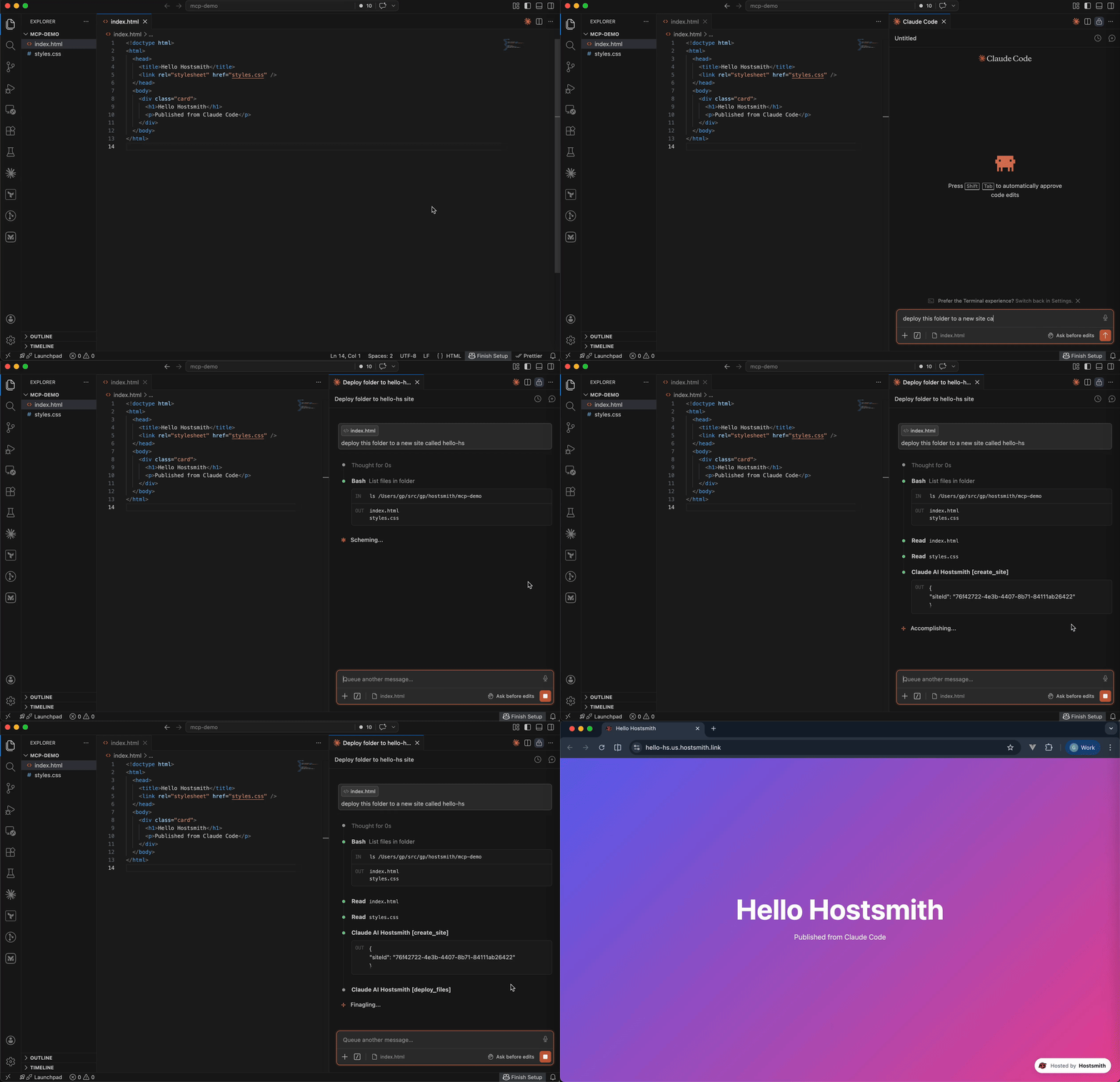
Why Hostsmith
- Artifact-first. No repo, no build config - drop a file (or have the agent generate one), get a URL.
- Built for agents. MCP-native, OAuth-scoped, structured tool descriptions agents can chain.
- EU or US data residency. Pick where the user's data lives, architecturally - not via a checkbox.
Tools
| Tool | Description |
|---|---|
list_sites |
List all sites in your account for a given data partition |
get_site |
Get details of a specific site |
create_site |
Create a new site, or a redirect host |
delete_site |
Delete a site |
list_domains |
List available domains (shared and custom) |
get_account |
Get account info, subscription plan, and usage |
deploy_files |
Deploy inline file contents to a site |
deploy_create_upload |
Start a direct upload for binaries / large files |
deploy_finalize |
Commit a deploy started with deploy_create_upload |
list_redirects |
List a site's redirect rules, in the order they are checked |
set_redirects |
Replace a site's user redirect rules, from rules or _redirects text |
edit_redirects |
Add, update and delete user redirect rules in one batch |
add_redirect |
Add one user redirect rule |
delete_redirect |
Delete one user redirect rule |
switch_file_redirects |
Switch the live deploy's _redirects rules off or back on |
test_redirect |
Test a path against the live or draft redirect rules |
Redirects apply only on your organization's own custom domains. User rules, kept on the hostname and changed through these tools, are checked before the live deploy's _redirects.
To forward a hostname with no content of its own, such as a retired domain or a campaign link, create a redirect host: create_site with kind: "redirect", then add its rules. A redirect host serves only its rules and takes no deploys. It doesn't count toward your plan's site limit; an organization can have up to 50.
Usage
Authentication is via OAuth 2.0. Static access tokens are not supported.
Claude (claude.ai, Desktop, Cowork, mobile)
Add Hostsmith once as a custom connector and it works in every Claude app on your account.
-
In Claude, open Customize > Connectors, click + Add, then Add custom connector.
-
Enter
Hostsmithas the name and paste the MCP server URL:https://mcp.hostsmith.net/mcp -
Click Continue, finish adding the connector, then connect it. Claude opens Hostsmith in your browser to authorize the connector against your Hostsmith account.
Free Claude plans allow one custom connector. On Team and Enterprise plans, an owner adds the connector under Organization settings > Connectors, and each member then clicks Connect next to Hostsmith under Customize > Connectors to sign in with their own Hostsmith account.
Claude asks for your approval before each tool call. To change that, open Hostsmith under Customize > Connectors and set its Tool permissions.
To revoke, open Hostsmith under Customize > Connectors, click ⋯, then Remove (Team and Enterprise owners: Organization settings > Connectors). To force a re-auth, click Disconnect, then Connect.
Stdio (Claude Code, Cursor, Cline, Windsurf, Zed)
Add this entry to your MCP client's config:
{
  "mcpServers": {
    "hostsmith": {
      "command": "npx",
      "args": ["-y", "@hostsmith/mcp-server"]
    }
  }
}
The first tool call triggers an OAuth flow in your browser to authorize the server against your Hostsmith account.
Remote URL (other clients)
Any MCP client that supports remote Streamable HTTP transport can point directly at the hosted server:
{
  "mcpServers": {
    "hostsmith": {
      "url": "https://mcp.hostsmith.net/mcp"
    }
  }
}
The client handles the OAuth flow automatically - you'll be redirected to Hostsmith to authorize access.
Claude Code can use the hosted server directly too:
claude mcp add --transport http hostsmith https://mcp.hostsmith.net/mcp
Cursor (one-click install)

Click the badge to add the remote Hostsmith server (https://mcp.hostsmith.net/mcp) to Cursor. The first tool call triggers OAuth in your browser.
Local HTTP (self-hosted)
Run the server in HTTP mode and have your MCP client perform OAuth against it:
npx @hostsmith/mcp-server http
{
  "mcpServers": {
    "hostsmith": {
      "url": "http://localhost:3100/mcp"
    }
  }
}
Embedding the HTTP handler
createFetchHandler returns a Web-Standard (req: Request) => Promise<Response> handler, for hosting the server in your own runtime (a Lambda, an edge worker, a Node server). It reads no environment variables; pass the configuration:
import { createFetchHandler } from "@hostsmith/mcp-server";

const handler = createFetchHandler({
  hostsmithUrl: "https://hostsmith.net",
  mcpBaseUrl: "https://mcp.example.com",
  // Optional: called for every authenticated MCP request with that
  // request's new McpServer and the access token's decoded claims,
  // before the server handles the request.
  onServer: async (server, { claims }) => {
    // e.g. attach your own instrumentation to `server`
  },
});
onServer is awaited. If it throws, the error is logged and the request is handled as if there were no hook. The claims are decoded, not verified; the Hostsmith API verifies the token on every tool call. Hostsmith's hosted server at mcp.hostsmith.net uses this hook for its usage analytics. The package itself contains no analytics client and sends no telemetry, and the CLI passes no hook.
Environment variables
| Variable | Default | Description |
|---|---|---|
HOSTSMITH_URL |
https://hostsmith.net |
Hostsmith app URL (OAuth endpoints). |
HOSTSMITH_API_DOMAIN |
- | Override the upstream API domain across both partitions. The server prepends us.api. and eu.api. to the value you set. Example: HOSTSMITH_API_DOMAIN=staging.example.com routes calls to https://us.api.staging.example.com and https://eu.api.staging.example.com. Use this to point at a staging or proxied API host. |
HOSTSMITH_BASE_URL |
- | Override the API base URL with a single fixed value, bypassing partition selection entirely. |
PORT |
3100 |
HTTP server port. |
MCP_BASE_URL |
http://localhost:$PORT |
Public URL of the MCP server, used in OAuth metadata. |
Network access
The MCP transport and OAuth flow run in your client's app process and need no agent-sandbox configuration - if your MCP client connected, those paths are working.
The one place sandboxed agents commonly fail is the upload PUT during deploy_create_upload + deploy_finalize: the bytes go from the agent's shell to the partition API host. From the agent terminal, allow outbound HTTPS (port 443) to:
us.api.hostsmith.net(for sites in theuspartition)eu.api.hostsmith.net(for sites in theeupartition)
Sandbox-specific snippets (Cursor sandbox.json, Claude Code settings.json, Codex config.toml, generic firewall guidance) live in the Network access docs.
The server's own calls to the Hostsmith API identify themselves with User-Agent: hostsmith-mcp-server/<version> hostsmith-js-sdk/<version>.
Troubleshooting
- Tool calls return 401: the OAuth session expired. Reconnect from your MCP client to re-authorize.
- OAuth redirect loops: confirm
MCP_BASE_URLmatches the URL your MCP client uses to reach the server. - Wrong partition: tool calls accept an explicit
partitionarg; if you omit it, the partition is inferred from your access token. - Upload PUT fails (DNS, refused, proxy, timeout): the agent's shell can't reach the partition API host. See Network access.
- Inspect the install:
npx @modelcontextprotocol/inspector npx -y @hostsmith/mcp-server httpto browse tools interactively.
Documentation
Deeper material lives at hostsmith.net/docs/mcp.
Contributing
See CONTRIBUTING.md (including the Releases section for the version-stamping flow). Security issues: see SECURITY.md.
License
Hostsmith MCP soruları
Hostsmith MCP'yi Claude Code'a nasıl eklerim?
Terminalinizde claude mcp add mcp-server -- npx -y @hostsmith/mcp-server komutunu çalıştırın. Her projede kullanılabilir olması için --scope user ekleyin.
Hostsmith MCP'yi Cursor'a nasıl eklerim?
~/.cursor/mcp.json dosyasını açın ve yukarıdaki yükleme bölümünde gösterilen Cursor yapılandırmasını kullanarak sunucuyu mcpServers altına ekleyin.
Hostsmith MCP hangi araçları sunar?
16 araç sunar; bunlar arasında list_sites, get_site, create_site, delete_site, list_domains yer alır.
Verilerimin nerede saklanacağını seçebilir miyim?
Evet, siteleriniz için AB veya ABD veri yerleşkesi arasında seçim yapabilirsiniz.