
Kişiler, ilişkiler, taahhütler ve tekrarlayan tarihler için SQLite veritabanı kullanarak yerel bir sosyal CRM yönetir.
Ayrıca bilinen adı GhostPawJS/affinity, affinity, @ghostpaw/affinity
- Yıldızlar
- 1
- Araçlar
- 12
- İndirmeler, 30 gün
- 2.464
- En son sürüm
- 0.7.2
- Son commit
- 12 Kas 2026
- Lisans
- MIT
GhostPaw Affinity MCP nedir?
GhostPaw Affinity bir MCP sunucusudur. Kişiler, ilişkiler, taahhütler ve tekrarlayan tarihler için SQLite veritabanı kullanarak yerel bir sosyal CRM yönetir. 12 araç sunar; örneğin search_affinity, review_affinity, inspect_affinity_item.
Özet, projenin README dosyasından oluşturuldu
GhostPaw Affinity MCP sunucusu hakkında
GhostPaw Affinity; kullanıcıların kişisel bağlantılarını, taahhütlerini ve tekrarlayan önemli tarihlerini yönetmelerine yardımcı olmak için tasarlanmış yerel bir sosyal CRM olarak hizmet eder. Kişileri, kimlikleri, ilişkileri, günlük olaylarını ve sözleri tek bir SQLite veritabanı içinde organize eden bir MCP server olarak çalışır. Bu araç, sosyal ağlarının yapılandırılmış bir kaydını tutmak ve yerleşik radar özelliği sayesinde kimlerle iletişimin koptuğunu takip etmek isteyen geliştiriciler ve bireyler için oluşturulmuştur.
Server, stdio üzerinden yerel olarak çalışır ve Claude Desktop, Cursor veya Codex CLI gibi istemcilere entegre edilebilir. Kullanıcılar, Linux, macOS ve Windows için bağımsız bir binary olarak yükleyebilir veya npx kullanarak çalıştırabilirler. Veri depolamayı yönetmek için kullanıcılar, GHOSTPAW_AFFINITY_DB ortam değişkenini veya --db bayrağını kullanarak özel bir veritabanı konumu belirleyebilirler; bu, özellikle sandbox ortamlarında çalışırken oldukça kullanışlıdır. AI agent'ların harici bulut servislerine güvenmeden kişisel sosyal verilerinizle etkileşime girmesi için yapılandırılmış bir yol sunar.
Neler yapabilirsiniz
- 1Sosyal taahhütleri takip edinAI'dan belirli bir kişiyle yapılan yeni bir sözü veya taahhüdü kaydetmesini isteyin.
- 2İlişki durumunu izleyinKiminle iletişimin koptuğunu görmek için son zamanlarda etkileşime girilmeyen kişilerin bir özetini talep edin.
- 3Kişi geçmişinde arama yapınİstemciye veritabanınızdaki bir kişi hakkında belirli bilgileri veya detayları bulması talimatını verin.
Projenin README dosyasından alınmıştır. Her kullanım durumu, oradaki bir alıntı ile kontrol edilir.
GhostPaw Affinity MCP nasıl yüklenir
Biçimler 10 Kas 2026 tarihinde doğrulandıCursor'a ekleGoose'a ekleGhostPaw Affinity MCP'yi Claude Code içine yükleyin
$ claude mcp add affinity -- npx -y @ghostpaw/affinityGhostPaw Affinity MCP'yi Cursor içine yükleyin
~/.cursor/mcp.json
{
  "mcpServers": {
    "affinity": {
      "command": "npx",
      "args": [
        "-y",
        "@ghostpaw/affinity"
      ]
    }
  }
}GhostPaw Affinity MCP'yi VS Code içine yükleyin
.vscode/mcp.json
{
  "servers": {
    "affinity": {
      "type": "stdio",
      "command": "npx",
      "args": [
        "-y",
        "@ghostpaw/affinity"
      ]
    }
  }
}GhostPaw Affinity MCP'yi VS Code CLI içine yükleyin
$ code --add-mcp '{"name":"affinity","type":"stdio","command":"npx","args":["-y","@ghostpaw/affinity"]}'GhostPaw Affinity MCP'yi Claude Desktop içine yükleyin
claude_desktop_config.json
{
  "mcpServers": {
    "affinity": {
      "command": "npx",
      "args": [
        "-y",
        "@ghostpaw/affinity"
      ]
    }
  }
}GhostPaw Affinity MCP'yi Codex içine yükleyin
$ codex mcp add affinity -- npx -y @ghostpaw/affinityGhostPaw Affinity MCP'yi Codex config.toml içine yükleyin
~/.codex/config.toml
[mcp_servers.affinity]
command = "npx"
args = ["-y", "@ghostpaw/affinity"]
GhostPaw Affinity MCP'yi Gemini CLI içine yükleyin
$ gemini mcp add -s user affinity npx -- -y @ghostpaw/affinityGhostPaw Affinity MCP'yi Gemini settings.json içine yükleyin
~/.gemini/settings.json
{
  "mcpServers": {
    "affinity": {
      "command": "npx",
      "args": [
        "-y",
        "@ghostpaw/affinity"
      ]
    }
  }
}GhostPaw Affinity MCP araçları 12
README dosyasından algılandısearch_affinityreview_affinityinspect_affinity_itemmanage_contactmerge_contactsmanage_duplicate_dismissalmanage_identitymanage_relationshiprecord_eventmanage_commitmentmanage_date_anchormanage_attribute
| search_affinity | — | |
| review_affinity | — | |
| inspect_affinity_item | — | |
| manage_contact | — | |
| merge_contacts | — | |
| manage_duplicate_dismissal | — | |
| manage_identity | — | |
| manage_relationship | — | |
| record_event | — | |
| manage_commitment | — | |
| manage_date_anchor | — | |
| manage_attribute | — |
Yapılandırma
GHOSTPAW_AFFINITY_DBSQLite database path (default: ~/.ghostpaw/affinity.db)
| Ad | Açıklama | Sunucu |
|---|---|---|
| GHOSTPAW_AFFINITY_DB | SQLite database path (default: ~/.ghostpaw/affinity.db) |
Otomatik kontroller
Çalıştırıldı 12 Kas 2026Tam rapor →Otomatik kontrollerimizden geçti. Bu bir güvenlik denetimi değildir: kodu okuyun ve sunucuya ihtiyaç duyduğu en dar erişimi verin. Kontroller nasıl çalışır

- Kaynak deposu bağlantılı ve erişilebilirGeçti
- Açık kaynak lisansı (OSI)Geçti
- Son bir yıl içinde commit veya sürüm mevcutGeçti
- Paket adı popüler bir pakete yakın değilGeçti
- Uzak uç nokta HTTPS kullanıyorKontrol edilmedi
- Yıkıcı araçlar etiketlenmişGeçti
- Modele yönelik gizli talimat yokGeçti
- Pakette veya bağımlılıklarında kritik uyarı yokGeçti
@ghostpaw/affinity








Agent contacts: people, promises and yearly dates, with a radar for who is drifting.
A local social CRM: contacts, identities, relationships, journal events, commitments and recurring dates in one SQLite file. One self-contained binary per platform, an MCP server, and a zero-dependency TypeScript library.
Install
Each line downloads the latest release for one platform, checks it against
SHA256SUMS, puts ghostpaw-affinity on your PATH and prints the version.
Linux x64
cd "$(mktemp -d)" && T=linux-x64 && V=$(curl -fsSLI -o /dev/null -w '%{url_effective}' https://github.com/GhostPawJS/affinity/releases/latest | sed 's|.*/v||') && F=ghostpaw-affinity-$V-$T.tar.gz && U=https://github.com/GhostPawJS/affinity/releases/download/v$V && curl -fsSL -O "$U/$F" -O "$U/SHA256SUMS" && grep " $F\$" SHA256SUMS | sha256sum -c - && tar -xzf "$F" ghostpaw-affinity && mkdir -p ~/.local/bin && mv ghostpaw-affinity ~/.local/bin/ && { case ":$PATH:" in *":$HOME/.local/bin:"*) ;; *) echo 'export PATH="$HOME/.local/bin:$PATH"' >> ~/.profile; export PATH="$HOME/.local/bin:$PATH";; esac; } && ghostpaw-affinity --version
Linux arm64
cd "$(mktemp -d)" && T=linux-arm64 && V=$(curl -fsSLI -o /dev/null -w '%{url_effective}' https://github.com/GhostPawJS/affinity/releases/latest | sed 's|.*/v||') && F=ghostpaw-affinity-$V-$T.tar.gz && U=https://github.com/GhostPawJS/affinity/releases/download/v$V && curl -fsSL -O "$U/$F" -O "$U/SHA256SUMS" && grep " $F\$" SHA256SUMS | sha256sum -c - && tar -xzf "$F" ghostpaw-affinity && mkdir -p ~/.local/bin && mv ghostpaw-affinity ~/.local/bin/ && { case ":$PATH:" in *":$HOME/.local/bin:"*) ;; *) echo 'export PATH="$HOME/.local/bin:$PATH"' >> ~/.profile; export PATH="$HOME/.local/bin:$PATH";; esac; } && ghostpaw-affinity --version
macOS Apple silicon
cd "$(mktemp -d)" && T=darwin-arm64 && V=$(curl -fsSLI -o /dev/null -w '%{url_effective}' https://github.com/GhostPawJS/affinity/releases/latest | sed 's|.*/v||') && F=ghostpaw-affinity-$V-$T.tar.gz && U=https://github.com/GhostPawJS/affinity/releases/download/v$V && curl -fsSL -O "$U/$F" -O "$U/SHA256SUMS" && grep " $F\$" SHA256SUMS | shasum -a 256 -c - && tar -xzf "$F" ghostpaw-affinity && sudo mkdir -p /usr/local/bin && sudo mv ghostpaw-affinity /usr/local/bin/ && ghostpaw-affinity --version
macOS Intel
cd "$(mktemp -d)" && T=darwin-x64 && V=$(curl -fsSLI -o /dev/null -w '%{url_effective}' https://github.com/GhostPawJS/affinity/releases/latest | sed 's|.*/v||') && F=ghostpaw-affinity-$V-$T.tar.gz && U=https://github.com/GhostPawJS/affinity/releases/download/v$V && curl -fsSL -O "$U/$F" -O "$U/SHA256SUMS" && grep " $F\$" SHA256SUMS | shasum -a 256 -c - && tar -xzf "$F" ghostpaw-affinity && sudo mkdir -p /usr/local/bin && sudo mv ghostpaw-affinity /usr/local/bin/ && ghostpaw-affinity --version
Windows x64 (PowerShell)
$r='GhostPawJS/affinity'; $v=(irm "https://api.github.com/repos/$r/releases/latest").tag_name; $f="ghostpaw-affinity-$($v.TrimStart('v'))-windows-x64.zip"; $u="https://github.com/$r/releases/download/$v"; $t=(New-Item -ItemType Directory (Join-Path $env:TEMP ([guid]::NewGuid()))).FullName; iwr "$u/$f" -OutFile "$t\$f" -UseBasicParsing; iwr "$u/SHA256SUMS" -OutFile "$t\SHA256SUMS" -UseBasicParsing; $want=((Get-Content "$t\SHA256SUMS" | Where-Object { $_ -like "* $f" }) -split '\s+')[0]; if (-not $want -or (Get-FileHash "$t\$f" -Algorithm SHA256).Hash -ne $want) { throw "checksum mismatch for $f" }; $d=Join-Path $env:LOCALAPPDATA 'Programs\ghostpaw\bin'; Expand-Archive "$t\$f" $t -Force; New-Item -ItemType Directory -Force $d | Out-Null; Copy-Item "$t\ghostpaw-affinity.exe" $d -Force; $p=[Environment]::GetEnvironmentVariable('Path','User'); if (";$p;" -notlike "*;$d;*") { [Environment]::SetEnvironmentVariable('Path',"$p;$d",'User') }; $env:Path="$d;$env:Path"; ghostpaw-affinity --version
These commands install the latest release in ~/.local/bin on Linux, /usr/local/bin on macOS (asks for sudo), or %LOCALAPPDATA%\Programs\ghostpaw\bin on Windows; Linux adds it to PATH via ~/.profile only if missing, and Windows adds it to the user PATH (open a new terminal afterwards). To pin a version, set V=0.6.0 instead of resolving latest ($v='v0.6.0' in PowerShell).
For a pinned Linux/macOS download to the current directory with no profile or PATH edits, choose the matching T (linux-x64, linux-arm64, darwin-arm64, or darwin-x64):
V=0.6.0
T=linux-x64
F=ghostpaw-affinity-$V-$T.tar.gz
U=https://github.com/GhostPawJS/affinity/releases/download/v$V
curl -fsSL -O "$U/$F" -O "$U/SHA256SUMS" &&
  { case "$T" in darwin-*) grep " $F\$" SHA256SUMS | shasum -a 256 -c - ;; *) grep " $F\$" SHA256SUMS | sha256sum -c - ;; esac; } &&
  tar -xzf "$F" ghostpaw-affinity && ./ghostpaw-affinity --version
Then:
ghostpaw-affinity contact create '{"name":"Owner","kind":"agent"}' --bootstrap-owner
ghostpaw-affinity contact create '{"name":"Sam","kind":"human"}' --json | jq .id
ghostpaw-affinity search sam
ghostpaw-affinity skill            # cheat sheet and tool reference
Contacts live in ~/.ghostpaw/affinity.db unless --db <path> or the
GHOSTPAW_AFFINITY_DB environment variable says otherwise; relative paths
resolve against the current directory.
A session with the linux-x64 binary against a fresh database:
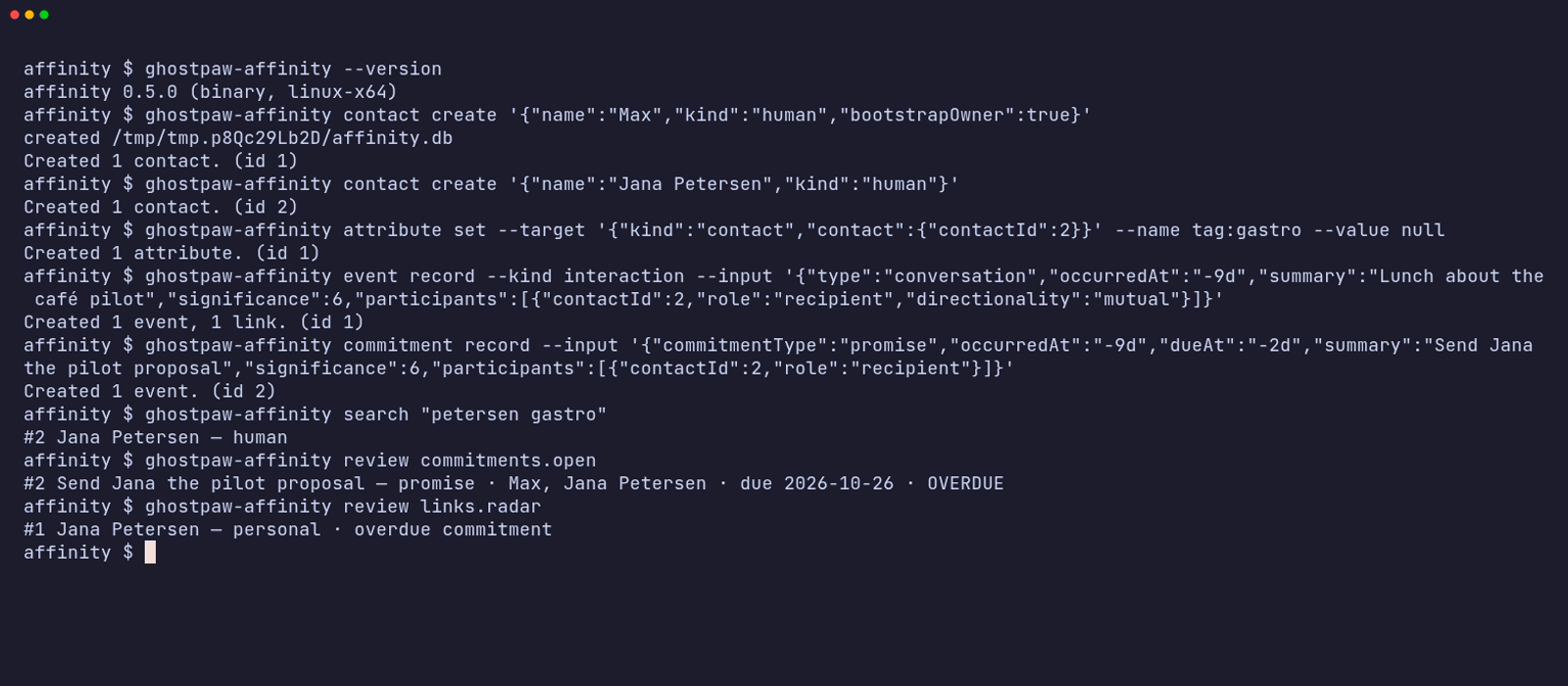
The same session as an animated GIF.
npx / npm (for npm-based environments)
The npm package needs Node 24+ and has zero runtime dependencies:
npx -y @ghostpaw/affinity --help
npm install -g @ghostpaw/affinity   # provides ghostpaw-affinity
Library (for harnesses)
npm install @ghostpaw/affinity
import { DatabaseSync } from "node:sqlite";
import { initAffinityTables, read, write, tools } from "@ghostpaw/affinity";
See Quick Start and docs/LLM.md for the tool facade.
Other installers and verification
Interactive installers (also verify SHA256SUMS):
curl -fsSL https://raw.githubusercontent.com/GhostPawJS/affinity/main/install.sh | sh
irm https://raw.githubusercontent.com/GhostPawJS/affinity/main/install.ps1 | iex
mise use -g github:GhostPawJS/affinity
ubi --project GhostPawJS/affinity --exe ghostpaw-affinity --in ~/.local/bin
eget GhostPawJS/affinity
For aqua, define a
github_release package in aqua.yaml:
registries:
  - name: affinity
    type: local
    path: affinity-registry.yaml
packages:
  - name: GhostPawJS/affinity@v<VERSION>
    registry: affinity
affinity-registry.yaml:
packages:
  - type: github_release
    repo_owner: GhostPawJS
    repo_name: affinity
    asset: ghostpaw-affinity-{{trimV .Version}}-{{.OS}}-{{.Arch}}.tar.gz
    format: tar.gz
    replacements: { amd64: x64 }
    overrides:
      - goos: windows
        asset: ghostpaw-affinity-{{trimV .Version}}-windows-{{.Arch}}.zip
        format: zip
    files:
      - name: ghostpaw-affinity
SHA256SUMS covers every archive and server.mcpb. To verify a downloaded
archive's build attestation:
gh attestation verify <archive> -R GhostPawJS/affinity
Set GHOSTPAW_VERIFY=attestation for attestation verification in install.sh.
Binaries are unsigned; macOS binaries carry an ad-hoc signature. For a browser
download on macOS, remove quarantine with
xattr -d com.apple.quarantine /path/to/ghostpaw-affinity.
Linux binaries require glibc 2.28+; use npx on Alpine.
See the binary build workflow.
Each archive is roughly 40-46 MB (the binary embeds the Node runtime, 105-150 MB unpacked); the npm package is about 2 MB unpacked. Every release, including the one-liners above, is installed and run on ubuntu-24.04, macos-15 and windows-2025 by the install check.
Running inside sandboxed agent harnesses
Inside a Codex CLI --sandbox workspace-write session, the database and its
parent directory must be inside a writable root, including SQLite's -wal and
-shm side files. A default DB under ~/.ghostpaw outside those roots can fail
with SQLITE_CANTOPEN or EPERM (often exit 70; directory creation failures
may exit 2), even when normal shell permissions allow access. Put the DB inside the workspace with --db ./state/affinity.db,
or set GHOSTPAW_AFFINITY_DB="$PWD/state/affinity.db" for CLI/MCP use.
To use an external DB directory, add it when starting the OpenAI Codex CLI
(replace <dir-with-db> with its absolute path):
codex exec --sandbox workspace-write --add-dir <dir-with-db> "Run the GhostPaw CLI"
Alternatively, set sandbox_workspace_write.writable_roots in
~/.codex/config.toml before starting the session:
[sandbox_workspace_write]
writable_roots = ["/absolute/dir-with-db"]
MCP server
Every client below starts the same stdio server: ghostpaw-affinity mcp.
Without the binary, use npx -y @ghostpaw/affinity mcp as the command instead.
Claude Code
claude mcp add ghostpaw-affinity -- ghostpaw-affinity mcp
or as a plugin, which also installs the skill:
/plugin marketplace add GhostPawJS/affinity
/plugin install ghostpaw-affinity@ghostpaw-affinity
Codex CLI (~/.codex/config.toml)
[mcp_servers.ghostpaw-affinity]
command = "ghostpaw-affinity"
args = ["mcp"]
Cursor (.cursor/mcp.json), Claude Desktop (claude_desktop_config.json)
or a project .mcp.json:
{
  "mcpServers": {
    "ghostpaw-affinity": {
      "command": "ghostpaw-affinity",
      "args": ["mcp"]
    }
  }
}
Claude Desktop users can also install server.mcpb from the
latest GitHub release.
A Dockerfile is included for container hosts:
docker build -t ghostpaw-affinity . && docker run -i --rm -v affinity:/data ghostpaw-affinity.
The server speaks MCP 2026-07-28 (stateless, server/discover) and the
initialize-based revisions 2025-11-25, 2025-06-18, 2025-03-26 and 2024-11-05.
Agent Skill
SKILL.md (repo root) and skills/affinity/SKILL.md follow the
Agent Skills format and ship in the npm package.
Copy skills/affinity/ into your agent's skills folder, or print it:
ghostpaw-affinity skill > SKILL.md
ghostpaw-affinity skill --list       # workflow guides
ghostpaw-affinity skill bootstrap-and-cold-start
Events
Record events and commitments with an optional externalRef: {source, id}.
Both values are trimmed and non-empty; source is lowercased. The pair is unique
across the database. Repeated intake returns the original event and no_op,
without creating rows or relationship effects.
content preserves text exactly, including whitespace, empty strings and NUL,
up to 1 MB (1,048,576 UTF-8 bytes). Supply a short summary, or omit it to derive
one from the first non-empty content line (at most 140 characters; empty text
becomes (no text)). Unknown event fields and moment kinds are validation errors.
Journal/timeline rows omit content by default; use {includeContent: true} in
library/tool options or CLI --with-content. Content appears once in review JSON.
Events support a free-text channel (trimmed, lowercased, at most 40 characters),
parentRef, parentEventId, and a root threadRef. Journal, timeline, moments,
and open commitment reviews accept a channel filter. Set event attributes with
write.setAttribute(db, {kind: "event", eventId}, name, value); unset and replace
use the same target and validation as contact/link attributes.
Read exact events with read.getEventById(db, eventId) or
read.getEventByExternalRef(db, source, id). read.searchEvents searches folded
summary, content, reference and channel text. The search tool's scope is
contacts by default, with additive events and all modes.
read.getEventThread(db, source, id) returns a root and its descendants in time
order, including parents imported after their children.
write.reviseEvent(db, eventIdOrTarget, patch) accepts summary, content,
occurredAt, significance, channel, type within the same event family, and an
externalRef only when absent. write.deleteEvent(db, eventIdOrTarget, {confirm: true}) removes evidence, participants, attributes and link effects,
then replays surviving effects and refreshes rollups. Targets can also be
{ref: {source, id}}. Existing 0.5.x databases migrate through
initAffinityTables. Historical affinity/trust/rank baselines are recovered
from saved deltas; historical cadence and state before evidence were not stored
and use the default cadence and active state during replay.
CLI
export GHOSTPAW_AFFINITY_DB=~/crm/affinity.db      # or --db <path>
ghostpaw-affinity contact create '{"name":"Fox","kind":"human","bootstrapOwner":true}'
ghostpaw-affinity search "jana"                     # names, identities, tags, attributes, roles, events
ghostpaw-affinity contact create '{"name":"Jana Petersen","kind":"human"}'
ghostpaw-affinity identity add --contact '{"contactId":2}' --input '{"type":"email","value":"jana@example.com"}'
ghostpaw-affinity event record --kind interaction --input '{"type":"conversation","occurredAt":"today","summary":"Call re pilot","significance":6,"participants":[{"contactId":2,"role":"recipient","directionality":"mutual"}]}'
ghostpaw-affinity commitment record --input '{"commitmentType":"promise","occurredAt":"today","dueAt":"+3d","summary":"Send proposal","significance":6,"participants":[{"contactId":2,"role":"recipient"}]}'
ghostpaw-affinity attribute set --target '{"kind":"contact","contact":{"contactId":2}}' --name tag:gastro --value null
ghostpaw-affinity review contacts.list --tag gastro
ghostpaw-affinity review contacts.list --attribute pipeline_stage=proposal
ghostpaw-affinity review commitments.open            # overdue promises are flagged
ghostpaw-affinity review links.radar                 # who is drifting, with reasons
ghostpaw-affinity show contact_profile --contact '{"contactId":2}'
ghostpaw-affinity contact export --contact '{"contactId":2}'   # omit --contact for the whole database
ghostpaw-affinity contact delete --contact '{"contactId":2}' --confirm
ghostpaw-affinity skill prints the full cheat sheet; skill --list and
skill <guide> print the workflow guides.
ghostpaw-affinity search <query> [--tag T] [--attribute name[=value]]
ghostpaw-affinity review <view> [--tag T] [--attribute name[=value]]
ghostpaw-affinity show <owner_profile|contact_profile|link> [--contact JSON --link JSON]
ghostpaw-affinity contact create|revise|lifecycle|export|delete|merge
ghostpaw-affinity identity add|revise|verify|remove [flags]
ghostpaw-affinity relationship add|bond|state|tie|untie [flags]
ghostpaw-affinity commitment record|resolve [flags]
ghostpaw-affinity attribute set|unset|replace [flags]
ghostpaw-affinity date add|revise|remove [flags]
ghostpaw-affinity event record [flags]
ghostpaw-affinity show event --event-id 12
ghostpaw-affinity show event --ref-source bluesky --ref-id at://record
ghostpaw-affinity search --scope events "text or record id"
ghostpaw-affinity review events.contact_journal --contact '{"contactId":2}' --with-content --channel bluesky
ghostpaw-affinity review events.thread --ref-source bluesky --ref-id at://root
ghostpaw-affinity event revise --event-id 12 --patch '{"summary":"Corrected"}'
ghostpaw-affinity event delete --event-id 12 --confirm
ghostpaw-affinity duplicate dismiss|undismiss [flags]
ghostpaw-affinity mcp|skill|tools|describe|call|completions|version|help
There are 29 domain commands. review accepts the existing view names,
including contacts.list, contacts.duplicates and dates.upcoming.
show selects an inspection kind; contact and link locators are JSON objects.
Use help contact or contact create --help for schema-derived help; a
mistyped command suggests the closest one. Nested payloads use JSON or @path
to read a file; repeated array flags accept JSON objects
(--entries '{"name":"a","value":"x"}') or one JSON array.
Every time field accepts epoch milliseconds, ISO 8601 with Z or an offset,
YYYY-MM-DD, DD.MM.YYYY, today, tomorrow, yesterday and signed day offsets
such as +3d or -2d, with the same grammar in CLI, MCP and direct tool calls.
Date-only values preserve their calendar day: timestamps use UTC midnight, or
23:59:59.999Z for dueAt. Keywords first resolve against the process local
calendar date; this is the only time-zone-dependent parsing step. occurredOn
and dueOn retain the input day (the written offset day for ISO inputs; UTC day
for epoch inputs). Existing rows derive these fields from their UTC timestamps.
Review rows for dates include occursOn, the anchor occurrence day; the library
keeps its numeric occursOn sorting key and adds occursOnDate.
The existing *Iso fields remain UTC. Overdue commitments compare the local
date to dueOn. Future events carry a future_event warning and do not count
as contact until their timestamp and day arrive. Commitments and their
resolutions do not reset recency or cadence. Radar marks drift after a gap
exceeds 1.5 times the expected cadence and explains its reasons in the snippet.
Global flags: --db <path>, --json, -q, --quiet, --compact,
--help/-h, --version/-V/-v, --no-color.
NO_COLOR is accepted. In a terminal, commands print a readable summary with
names and dates. With --json or piped stdout they print the tool result as
JSON with ISO date siblings and floats rounded to three decimals. Journal review rows
keep one summary and compact {id,name,role} participants. Radar rows keep one link
id, counterparty name, reasons and rounded scores; upcoming link dates omit radar
scores. Default piped writes and --compact keep primary and changed ids plus
warnings; explicit --json retains full mutation detail. --compact
removes indentation and empty receipt arrays. -q, --quiet suppresses stdout.
When a command opens the default database, the CLI prints using default db <path>
to stderr. Suppress this notice with -q, --quiet or GHOSTPAW_QUIET=1.
Writes list what changed in data.changes, and creates warn about likely
duplicates. Kebab-case flags map to schema properties. -- ends flags.
A positional -, or piped stdin when no other arguments are given, reads a
JSON object (echo '{"name":"Sam","kind":"human"}' | ghostpaw-affinity contact create).
Explicit flags override stdin fields.
Database selection uses --db, GHOSTPAW_AFFINITY_DB, then
~/.ghostpaw/affinity.db; relative paths resolve against the current
directory, and --help shows the resolved path. A new database is reported on
stderr. These commands work offline.
| Exit | Result |
|---|---|
| 0 | Success, including no_op |
| 1 | Other tool error |
| 2 | Usage, schema or invalid input |
| 3 | Clarification needed or not found |
| 4 | Conflict, already resolved or version mismatch |
| 70 | Internal error |
Errors go to stderr. With --json, errors also print to stdout.
--version names the variant: affinity 0.5.0 (binary, linux-x64),
(npm) or (library). Use --version --short in scripts for exact semver
matching. --version --json returns name, version, variant and target
(the target is null outside a binary). version --short and version --json
are equivalent.
Read commands (search, show, review and contact export, including direct tool
calls) exit 3 on a missing database without creating files:
Database not found: <path> (it is created by the first write).
The first write creates the database and reports created <path> on stderr.
Read commands open SQLite read-only: they never initialize or migrate the schema
or switch journal mode. Explicit :memory: stores retain transient initialization
and then enable query-only mode. This also applies to read-only facade tools over MCP.
Writes upgrade older schemas and print Affinity database schema upgraded. to
stderr when the schema changes. Run ghostpaw-affinity migrate --db <path> to
upgrade explicitly. Reads that require a newer schema suggest this command.
MCP opens the database per tool call; its first write creates the database.
String-valued flags such as --value Hamburg, --bond 'Warm lead' and
--reason 'Different people' accept plain strings or JSON strings/null.
Object and array flags still require JSON. Tag filters accept both
--tag gastro-radar and --tag tag:gastro-radar.
Per-command --help lists the fields used by that action. Unknown subcommands
suggest a valid command, including with --help: contact update suggests
contact revise, which accepts contact patches such as doNotContact.
Legacy tools [--json], describe <tool>,
call <tool> [JSON|-] and <tool_name> --parameter value remain available.
completions bash|zsh|fish prints shell scripts.
Quick Start
import { DatabaseSync } from "node:sqlite";
import { initAffinityTables, read, write } from "@ghostpaw/affinity";

const db = new DatabaseSync(":memory:");
db.exec("PRAGMA foreign_keys = ON");
initAffinityTables(db);

const { primary: owner } = write.createContact(db, {
  name: "Mika",
  kind: "human",
  bootstrapOwner: true,
});

const { primary: ada } = write.createContact(db, {
  name: "Ada Lovelace",
  kind: "human",
});

write.addIdentity(db, ada.id, {
  type: "email",
  value: "ada@example.com",
});

write.recordInteraction(db, {
  type: "conversation",
  occurredAt: Date.now(),
  summary: "Coffee together",
  significance: 6,
  participants: [
    { contactId: owner.id, role: "actor", directionality: "mutual" },
    { contactId: ada.id, role: "recipient", directionality: "mutual" },
  ],
});

const profile = read.getContactProfile(db, ada.id);
const radar = read.listRadar(db);
GhostPaw Affinity MCP soruları
GhostPaw Affinity MCP'yi Claude Code'a nasıl eklerim?
Terminalinizde claude mcp add affinity -- npx -y @ghostpaw/affinity komutunu çalıştırın. Her projede kullanılabilir olması için --scope user ekleyin.
GhostPaw Affinity MCP'yi Cursor'a nasıl eklerim?
~/.cursor/mcp.json dosyasını açın ve yukarıdaki yükleme bölümünde gösterilen Cursor yapılandırmasını kullanarak sunucuyu mcpServers altına ekleyin.
GhostPaw Affinity MCP hangi araçları sunar?
12 araç sunar; bunlar arasında search_affinity, review_affinity, inspect_affinity_item, manage_contact, merge_contacts yer alır.
Veriler nerede saklanıyor?
Kişi ve ilişki verileri, varsayılan olarak ~/.ghostpaw/affinity.db konumunda bulunan tek bir SQLite dosyasında saklanır.
Bunu bir MCP server olarak nasıl çalıştırabilirim?
stdio server'ı ghostpaw-affinity mcp komutuyla veya npx kullanarak npx -y @ghostpaw/affinity mcp komutuyla başlatabilirsiniz.
Bunu sandbox ortamında kullanabilir miyim?
Evet, ancak izin hatalarını önlemek için --db bayrağını kullanarak veya GHOSTPAW_AFFINITY_DB ortam değişkenini ayarlayarak veritabanını yazılabilir bir kök dizine yerleştirmelisiniz.