
Rigor MCP sunucusu
Commit 13 Kas 2026QA ekiplerinin test kodu yazmadan MCP araçlarını, kaynaklarını, istemlerini ve kontratlarını deterministik ve doğal dille test etmesini sağlar.
Ayrıca bilinen adı FusionOnePlatform/mcprigor
- Yıldızlar
- 3
- Araçlar
- —
- İndirmeler, 30 gün
- —
- En son sürüm
- —
- Son commit
- 13 Kas 2026
- Lisans
- Apache-2.0
Rigor MCP nedir?
QA ekiplerinin test kodu yazmadan MCP araçlarını, kaynaklarını, istemlerini ve kontratlarını deterministik ve doğal dille test etmesini sağlar.
Özet, projenin README dosyasından oluşturuldu
Rigor MCP sunucusu hakkında
QA ekipleri; MCP araçlarını, kaynaklarını, istemlerini ve kontratlarını geleneksel test kodu yazmaya gerek duymadan deterministik ve doğal dille test edebilirler. Test uzmanları, özel bir sözdizimi kullanarak araç çağrıları, kaynak okumaları ve istem çıktıları için beklentiler tanımlayabilirler. Bu yaklaşım, test ifadelerini yorumlamak için herhangi bir AI modeli kullanılmadığından testlerin öngörülebilir kalmasını sağlar.
Kullanıcılar; kimlik doğrulama için ortam değişkenlerini kullanarak yerel stdio sunucularına, Python sunucularına veya uzak HTTP sunucularına karşı testler çalıştırabilirler. Sistem; tarayıcı tabanlı yerel bir QA çalışma alanı, CI entegrasyonu için bir CLI ve canlı sunuculardan test üretmek için etkileşimli bir yazar modu dahil olmak üzere çeşitli iş akışlarını destekler. Ayrıca, yerel ve yayına alınmış ortamlar arasındaki davranışı karşılaştırmak için bir parity komutu sunar.
Geliştiriciler; CSV, JSON veya SQL adaptörlerini kullanarak veri odaklı senaryolar aracılığıyla karmaşık test ihtiyaçlarını yönetebilirler. Araç; güvenlik denetimleri, yüzdelik limitlerle performans bütçeleme ve çoklu sunucu filoları için kompozisyon kontrolleri gibi gelişmiş özellikler içerir. VS Code eklentisi aracılığıyla geliştirme iş akışlarına entegre olur ve etkileşimli kanıt zaman çizelgelerine sahip ayrıntılı HTML raporları sunar.
Neler yapabilirsiniz
- 1Araç çıktı doğruluğunu doğrulayınBir geliştirici, sisteme belirli argümanlarla belirli bir aracı çağırması talimatını verebilir ve dönen yapılandırılmış içeriğin beklenen değerle eşleşip eşleşmediğini kontrol edebilir.
- 2Yerel ve uzak ortamları karşılaştırınEkipler, semantik farkları belirlemek için hem yerel bir geliştirme sunucusuna hem de yayına alınmış bir QA sunucusuna karşı aynı test senaryolarını çalıştırabilirler.
- 3Harici veri ile testleri otomatize edinTest uzmanları, Excel veya SQL veritabanları gibi dosyalardan içe aktarılan birden fazla veri satırı üzerinde aynı araç çağrısını yürütebilirler.
- 4Canlı sunuculardan test üretinKullanıcılar, dosyaları manuel olarak yazmak yerine, işlemleri keşfetmek ve otomatik olarak incelenebilir test dosyaları oluşturmak için rehberli bir süreç kullanabilirler.
Projenin README dosyasından alınmıştır. Her kullanım durumu, oradaki bir alıntı ile kontrol edilir.
Yapılandırma
MCP_TOKEN
| Ad | Açıklama | Sunucu |
|---|---|---|
| MCP_TOKEN | — |
Otomatik kontroller
Çalıştırıldı 14 Kas 2026Tam rapor →Henüz doğrulanmadı. Bir sunucunun 80 puana, ciddi bir bulgu olmamasına ve kontrol edebilmemiz için yeterli veriye ihtiyacı vardır. Kontroller nasıl çalışır · Daha fazla puan için nelerin düzeltileceği

- Kaynak deposu bağlantılı ve erişilebilirfusiononeplatform/mcprigor is public and reachablegithub.com/fusiononeplatform/mcprigor ↗Geçti
- Paket, bu depoyu kaynağı olarak gösteriyorKontrol edilmedi
- Derleme kökeni (Sigstore onayı)Kontrol edilmedi
- Açık kaynak lisansı (OSI)Apache-2.0spdx.org/licenses/Apache-2.0.html ↗Geçti
- Son bir yıl içinde commit veya sürüm mevcutLast commit or release 2026-11-13github.com/fusiononeplatform/mcprigor ↗Geçti
- OpenSSF ScorecardKontrol edilmedi
- Paket adı popüler bir pakete yakın değilKontrol edilmedi
- Pakette veya bağımlılıklarında kritik uyarı yokKontrol edilmedi
- Modele yönelik gizli talimat yok0 tool descriptions and the README read; no override phrases, credential paths or hidden charactersGeçti
- Yıkıcı araçlar etiketlenmişKontrol edilmedi
- Uzak uç nokta MCP el sıkışmasına yanıt veriyorKontrol edilmedi
MCP Rigor







Natural-language testing for Model Context Protocol servers.
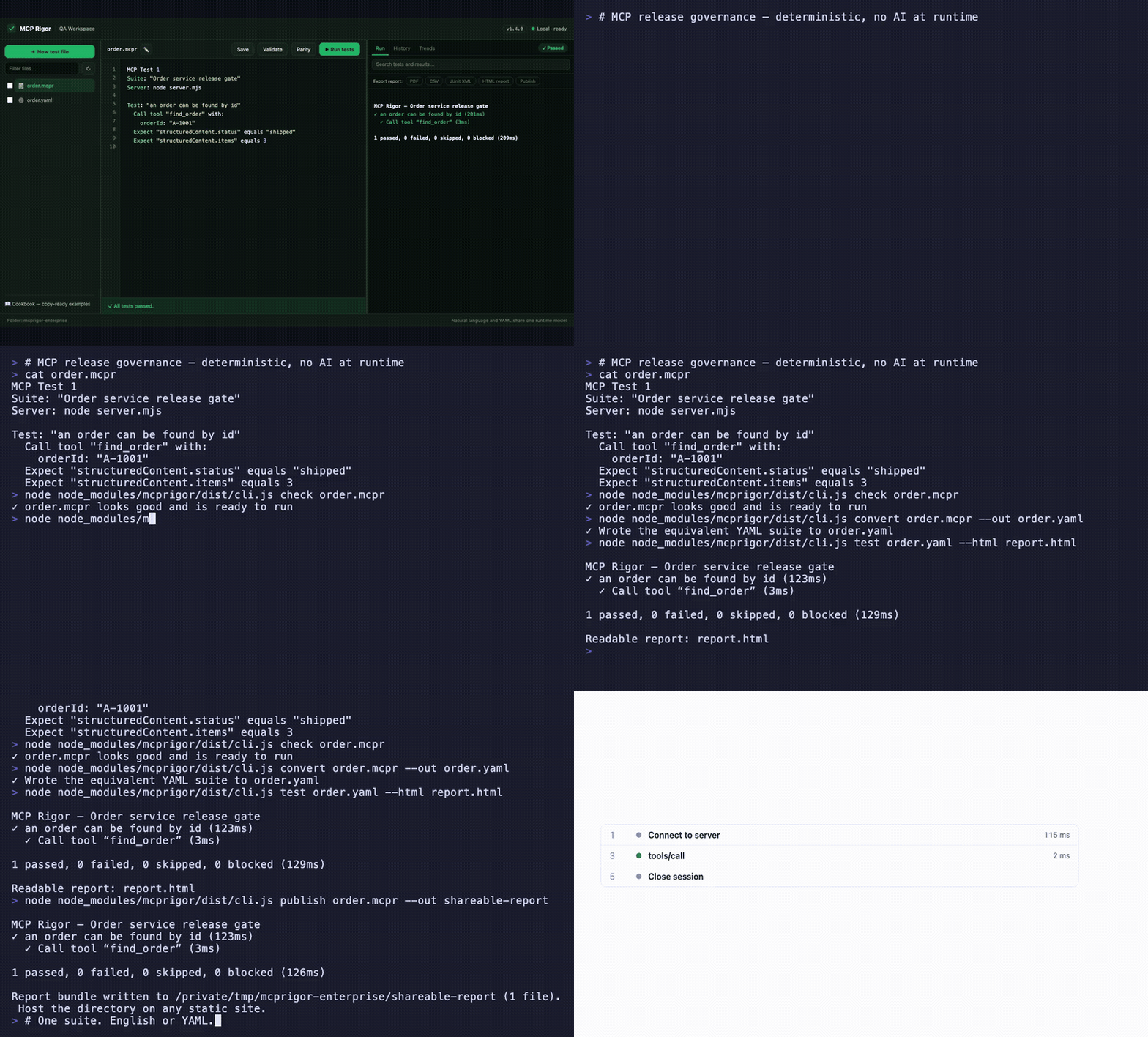
Visual QA workspace · English ⇄ YAML parity · interactive evidence timeline · CLI, CI, and shareable reports — watch the MP4
MCP Rigor lets QA teams test MCP tools, resources, prompts, contracts, and transports without writing test code. Tests are deterministic: no AI model interprets the wording.
Status:
1.5.0stable. Node.js 20 or 22 is required.
Install
MCP Rigor is published on npm as mcprigor. The package ships compiled code, ready to run:
npm install mcprigor
Or try it instantly without installing:
npx mcprigor@latest init tests/acceptance.mcpr
Use npx mcprigor in commands below, or install globally (npm install -g mcprigor) to use mcprigor directly. In a project where tests run only during development or CI, npm install --save-dev mcprigor keeps it out of production dependencies.
Install from source
Only needed if you want to modify MCP Rigor itself:
git clone https://github.com/FusionOnePlatform/mcprigor.git
cd mcprigor
npm ci
npm run check   # build + full test suite
npm link        # optional: use your local build as the global `mcprigor`
Write your first test
Create calculator.mcpr:
MCP Test 1

Suite: "Calculator acceptance tests"
Server: node dist/server.js

Test: "Adding 20 and 22 gives 42"
  Call tool "add" with:
    a: 20
    b: 22

  Expect "structuredContent.sum" equals 42
Check the wording, then run it:
npx mcprigor check calculator.mcpr
npx mcprigor test calculator.mcpr
Create a browser report:
npx mcprigor test calculator.mcpr --html report.html
Expected summary:
✓ Adding 20 and 22 gives 42

1 passed, 0 failed, 0 skipped, 0 blocked
Use the QA workspace
Start the local browser interface:
npx mcprigor workspace .
Or expose MCP Rigor to AI coding agents as an MCP server (docs):
npx mcprigor serve .
Open the printed http://127.0.0.1:... URL. You can select a suite, edit it, validate the wording, run tests, run transport parity, and review results.
The workspace is loopback-only and does not accept arbitrary commands from the browser.
Connect to an MCP server
Local stdio server:
Server: node dist/server.js
Python server:
Server: python -m my_mcp_server
Streamable HTTP server:
MCP URL: https://qa.example.com/mcp

Server options:
  headers:
    Authorization: "Bearer ${env.MCP_TOKEN}"
Run with an environment variable:
MCP_TOKEN="your-token" npx mcprigor test customer.mcpr
Do not place reusable credentials directly in test files.
Common test actions
Call tool "search" with:
  query: "red shoes"

Read resource "catalog://status"

Get prompt "write_summary" with:
  topic: "Release quality"

Expect it succeeds
Expect an error
Expect "structuredContent.total" equals 2
Expect "content[0].text" contains "complete"
Expect "items" has 3 items
See the natural-language cookbook for copy-ready examples.
Compare local and deployed behavior
MCP Test 1
Suite: "Calculator parity"

Compare target "Local": node dist/server.js
Compare target "QA": https://qa.example.com/mcp

Test: "Addition is consistent"
  Call tool "add" with:
    a: 20
    b: 22
  Expect "structuredContent.sum" equals 42
npx mcprigor parity calculator-parity.mcpr
MCP Rigor runs every scenario against both targets and reports semantic differences.
Create a test from a live server
Provide a small .mcpr file containing the target, then run:
npx mcprigor author server.mcpr --out search-customer.mcpr
The guided author discovers operations, asks for inputs, previews a response, and writes a reviewable natural-language test.
Use data-driven tests
Test: "Calculator examples"
  For each row:
    | caseId | a  | b  | expected |
    | basic  | 2  | 3  | 5        |
    | larger | 20 | 22 | 42       |

  Call tool "add" with:
    a: "${row.a}"
    b: "${row.b}"

  Expect "structuredContent.sum" equals "${row.expected}"
CSV, JSON, YAML, Excel, REST, Google Sheets, SQL adapters, typed columns, filters, joins, and deterministic sampling are also supported.
Use in CI
- uses: actions/setup-node@v4
  with:
    node-version: 20
- run: npm ci
- run: npx mcprigor check tests/acceptance.mcpr
- run: npx mcprigor test tests/acceptance.mcpr --junit reports/mcp.xml --evidence .mcprigor/ci-run
Exit codes:
| Code | Meaning |
|---|---|
0 |
Tests passed |
1 |
A test or comparison failed |
2 |
Usage, language, or configuration problem |
3 |
Server, transport, or internal failure |
Main commands
mcprigor workspace [DIRECTORY]        Start the local QA interface
mcprigor init FILE                    Create an example test
mcprigor check FILE                   Validate without connecting
mcprigor test FILE                    Run natural-language or YAML tests
mcprigor author TARGET --out FILE     Build a test interactively
mcprigor parity FILE                  Compare named targets
mcprigor audit FILE                   Run deterministic security probes
mcprigor composition-check FILE       Check a mounted server fleet
mcprigor composition-discover FILE    Save a combined fleet contract
mcprigor composition-drift FILE       Gate fleet contract drift
mcprigor discover FILE                Save the live MCP contract
mcprigor contract-check LOCK --target FILE
mcprigor evidence-show DIRECTORY
Performance and governance features new in 1.5.0:
Expect the call to finish within 800ms, percentile budgets, and--fail-on-regressionmcprigor auditdeterministic security probes with scored PDF/CSV/JSON reports- Multi-server test routing, collision checks, combined fleet locks, and composition drift
- GitHub Action with rich PR reports
- Live MCP surface and schema coverage with
--fail-under - Scheduled HTTP monitoring with failure/recovery webhooks
- Clickable HAR-style session timeline in HTML reports
- Contract drift markdown as a downloadable Action artifact
mcprigor publish— shareable static report URLs
See the complete CLI reference.
Editor support
The VS Code extension in editors/vscode adds syntax highlighting and inline mcprigor check diagnostics for .mcpr files. Package it with npx @vscode/vsce package from that directory, or install a release .vsix with code --install-extension.
Choose your next guide
- New QA user: Getting started
- Writing scenarios: Natural-language cookbook
- Using the browser UI: QA workspace
- Setting up targets and CI: Engineer setup
- Fixing failures: Troubleshooting
- All documentation: Documentation index
Scope and safety
MCP Rigor performs black-box behavior and contract testing. It complements MCP Inspector and official MCP Conformance; it does not provide certification.
Remote data and custom extensions are disabled unless explicitly enabled. Reports and evidence are sanitized, but business response data may still be sensitive. Review security and retention before storing CI artifacts.
Contributing
See CONTRIBUTING.md, then run:
npm ci
npm run check
Apache-2.0 licensed.
Rigor MCP soruları
Farklı sunucu ortamlarını karşılaştırmak için MCP Rigor kullanabilir miyim?
Evet, parity komutu, semantik farkları raporlamak için yerel bir hedefi QA hedefiyle karşılaştırmanıza olanak tanır.
Veri odaklı testleri destekliyor mu?
Evet; CSV, JSON, YAML, Excel, REST, Google Sheets ve SQL dahil olmak üzere çeşitli adaptörler kullanarak veri odaklı testleri destekler.