
Google Lighthouse denetimlerini, web performansını, SEO'yu ve erişilebilirliği artırmak için yapay zeka kodlama ajanlarının kullanabileceği yapılandırılmış ve uygulanabilir düzeltme paketlerine dönüştürür.
Ayrıca bilinen adı fullstackdegen/agent-audit, @fullstackdegen/agent-audit
- Yıldızlar
- 4
- Araçlar
- 2
- İndirmeler, 30 gün
- 197
- En son sürüm
- 0.3.1
- Son commit
- 2 Eyl 2026
- Lisans
- MIT
agent-audit MCP nedir?
agent-audit bir MCP sunucusudur. Google Lighthouse denetimlerini, web performansını, SEO'yu ve erişilebilirliği artırmak için yapay zeka kodlama ajanlarının kullanabileceği yapılandırılmış ve uygulanabilir düzeltme paketlerine dönüştürür. 2 araç sunar; örneğin fast, reliable.
Özet, projenin README dosyasından oluşturuldu
agent-audit MCP sunucusu hakkında
Agent Audit, ham performans teşhisleri ile otonom kod yürütme arasındaki boşluğu doldurmak için tasarlanmış bir MCP server'dır. Google Lighthouse raporlarını, kodlama ajanlarının yorumlayabileceği ve üzerinde işlem yapabileceği yapılandırılmış düzeltme paketlerine dönüştürür. Yapılandırılmamış veri sağlamak yerine; web performansı, erişilebilirlik ve teknik SEO için uygulama adımları, depo arama ipuçları ve ölçülebilir kabul kriterleri içeren önceliklendirilmiş iş listeleri sunar.
Geliştiriciler bu server'ı Claude Code, Cursor, GitHub Copilot ve Codex gibi MCP istemcileriyle entegre edebilirler. Node.js üzerinden çalışır ve denetimleri gerçekleştirmek için Google Chrome veya Chromium gerektirir. Kullanıcılar, tek seferlik çalıştırmalar için hızlı mod veya değişkenliği hesaba katmak için birden fazla çalıştırmayı birleştiren güvenilir mod arasında seçim yapabilirler. Temel olarak herkese açık URL'leri hedeflese de, geliştiriciler belirli bayraklar veya ortam değişkenleri kullanarak yerel geliştirme ortamları için localhost denetimini etkinleştirebilirler.
Neler yapabilirsiniz
- 1Web erişilebilirliğini ve SEO'yu iyileştirinBelirli erişilebilirlik hatalarını ve eksik meta veriler veya bozuk bağlantılar gibi teknik SEO sorunlarını tespit edin.
- 2Performans düzeltmelerini doğrulayınBir kod değişikliğinin tanımlanan performans sorununu gerçekten çözüp çözmediğinden emin olmak için ölçülebilir kabul kriterlerini kullanın.
Projenin README dosyasından alınmıştır. Her kullanım durumu, oradaki bir alıntı ile kontrol edilir.
agent-audit MCP nasıl yüklenir
Biçimler 10 Kas 2026 tarihinde doğrulandıCursor'a ekleGoose'a ekleagent-audit MCP'yi Claude Code içine yükleyin
$ claude mcp add agent-audit -- npx -y @fullstackdegen/agent-auditagent-audit MCP'yi Cursor içine yükleyin
~/.cursor/mcp.json
{
  "mcpServers": {
    "agent-audit": {
      "command": "npx",
      "args": [
        "-y",
        "@fullstackdegen/agent-audit"
      ]
    }
  }
}agent-audit MCP'yi VS Code içine yükleyin
.vscode/mcp.json
{
  "servers": {
    "agent-audit": {
      "type": "stdio",
      "command": "npx",
      "args": [
        "-y",
        "@fullstackdegen/agent-audit"
      ]
    }
  }
}agent-audit MCP'yi VS Code CLI içine yükleyin
$ code --add-mcp '{"name":"agent-audit","type":"stdio","command":"npx","args":["-y","@fullstackdegen/agent-audit"]}'agent-audit MCP'yi Claude Desktop içine yükleyin
claude_desktop_config.json
{
  "mcpServers": {
    "agent-audit": {
      "command": "npx",
      "args": [
        "-y",
        "@fullstackdegen/agent-audit"
      ]
    }
  }
}agent-audit MCP'yi Codex içine yükleyin
$ codex mcp add agent-audit -- npx -y @fullstackdegen/agent-auditagent-audit MCP'yi Codex config.toml içine yükleyin
~/.codex/config.toml
[mcp_servers.agent-audit]
command = "npx"
args = ["-y", "@fullstackdegen/agent-audit"]
agent-audit MCP'yi Gemini CLI içine yükleyin
$ gemini mcp add -s user agent-audit npx -- -y @fullstackdegen/agent-auditagent-audit MCP'yi Gemini settings.json içine yükleyin
~/.gemini/settings.json
{
  "mcpServers": {
    "agent-audit": {
      "command": "npx",
      "args": [
        "-y",
        "@fullstackdegen/agent-audit"
      ]
    }
  }
}agent-audit MCP araçları 2
README dosyasından algılandıfastreliable
| fast | — | |
| reliable | — |
Yapılandırma
LIGHTHOUSE_CHROME_NO_SANDBOXLIGHTHOUSE_MCP_ALLOW_LOCALHOST
| Ad | Açıklama | Sunucu |
|---|---|---|
| LIGHTHOUSE_CHROME_NO_SANDBOX | — | |
| LIGHTHOUSE_MCP_ALLOW_LOCALHOST | — |
Otomatik kontroller
Çalıştırıldı 13 Kas 2026Tam rapor →Otomatik kontrollerimizden geçti. Bu bir güvenlik denetimi değildir: kodu okuyun ve sunucuya ihtiyaç duyduğu en dar erişimi verin. Kontroller nasıl çalışır

- Kaynak deposu bağlantılı ve erişilebilirfullstackdegen/agent-audit is public and reachablegithub.com/fullstackdegen/agent-audit ↗Geçti
- Paket, bu depoyu kaynağı olarak gösteriyor@fullstackdegen/agent-audit names fullstackdegen/agent-audit as sourcenpmjs.com/package/@fullstackdegen/agent-audit ↗Geçti
- Derleme kökeni (Sigstore onayı)No build attestation published for this releaseKontrol edilmedi
- Açık kaynak lisansı (OSI)MITspdx.org/licenses/MIT.html ↗Geçti
- Son bir yıl içinde commit veya sürüm mevcutLast commit or release 2026-09-02github.com/fullstackdegen/agent-audit ↗Geçti
- OpenSSF ScorecardKontrol edilmedi
- Paket adı popüler bir pakete yakın değilNo popular package one edit away from @fullstackdegen/agent-auditGeçti
- Pakette veya bağımlılıklarında kritik uyarı yok239 resolved dependencies checked; no critical advisoryosv.dev ↗Geçti
- Modele yönelik gizli talimat yok2 tool descriptions and the README read; no override phrases, credential paths or hidden charactersGeçti
- Yıkıcı araçlar etiketlenmişNo tool named like delete, drop or execGeçti
- Uzak uç nokta MCP el sıkışmasına yanıt veriyorKontrol edilmedi
Agent Audit
Lighthouse-powered MCP server for AI coding agents, Core Web Vitals, technical SEO, accessibility, and GEO/LLM visibility audits.
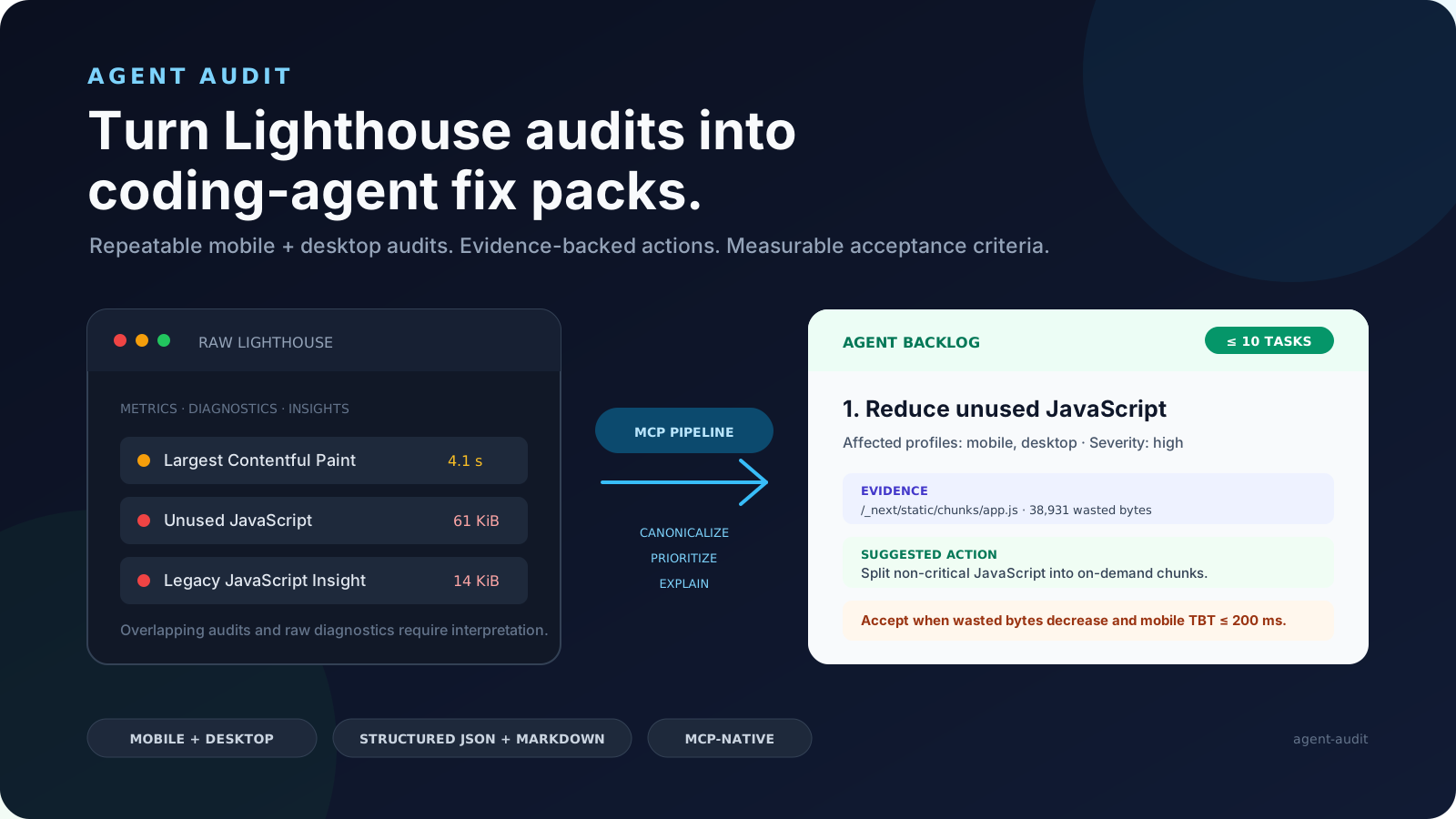
Agent Audit turns Google Lighthouse and bounded page-inspection results into structured fix packs that coding agents can actually execute. It gives Claude Code, Codex, Cursor, GitHub Copilot, and other MCP clients a prioritized, evidence-backed backlog instead of a raw performance report.
Turn Lighthouse audits into coding-agent fix packs.
npx -y @fullstackdegen/agent-audit


Why Agent Audit Exists
Lighthouse is excellent for diagnosis, but raw reports are not enough for an autonomous coding workflow. A coding agent still needs to know which issue is most important, whether it affects mobile, desktop, or both, which selectors or resources are evidence, what files to search for, how to verify the fix, and when it is safe to claim completion.
Agent Audit converts Lighthouse output into an implementation contract:
- Runs mobile and desktop Lighthouse audits.
- Aggregates repeated runs and exposes variability.
- Adds bounded same-page intelligence for technical SEO, links, metadata, structured data, images, assets, indexability, and AI discovery signals.
- Merges noisy audit output into a small prioritized issue list.
- Generates
fixPackswith repo search hints, implementation steps, and measurable acceptance criteria. - Returns strict MCP
structuredContentplus equivalent Markdown.
The goal is simple: give a coding agent a report it can read, reason about, fix, test, and verify.
What It Audits
Agent Audit is useful when people search for:
- Lighthouse-powered MCP server
- AI website audit tool
- coding agent Lighthouse report
- Core Web Vitals automation
- performance audit for Claude Code, Codex, Cursor, or Copilot
- technical SEO audit for AI agents
- accessibility fix packs
- LLM visibility audit
- GEO audit, generative engine optimization, AI search readiness
llms.txtreadiness and AI crawler visibility
Current checks include:
- Mobile and desktop Lighthouse scores for Performance, Accessibility, Best Practices, and SEO.
- FCP, Speed Index, LCP, TBT, and CLS metric distributions.
- Fast and reliable audit modes.
- Same-origin page inspection with bounded fetch limits.
- Broken links, missing link names, metadata, canonical tags, robots signals, JSON-LD, Open Graph, indexability, images, assets, and LLM visibility checks.
- Conservative
llms.txtdraft generation when page content is sufficient. - Prioritized issues with evidence, suggested actions, and acceptance criteria.
- Agent Fix Packs with repo search hints, implementation steps, and verification guidance.
- Strict MCP
outputSchemavalidation forstructuredContent. - Markdown generated from the same canonical report.
See a real CommaLabs JSON report and Markdown report.
Install
Requirements:
- Node.js 20 or later.
- Google Chrome or Chromium.
Run the MCP server:
npx -y @fullstackdegen/agent-audit
Useful links:
MCP Client Setup
Claude Desktop
Add a local MCP server:
{
  "mcpServers": {
    "agent-audit": {
      "command": "npx",
      "args": ["-y", "@fullstackdegen/agent-audit"]
    }
  }
}
Restart Claude Desktop after saving the configuration.
Claude Code
claude mcp add agent-audit -- npx -y @fullstackdegen/agent-audit
For local development audits:
claude mcp add agent-audit-local -- npx -y @fullstackdegen/agent-audit --local
Codex
codex mcp add agent-audit -- npx -y @fullstackdegen/agent-audit
Or add it to ~/.codex/config.toml:
[mcp_servers.agent-audit]
command = "npx"
args = ["-y", "@fullstackdegen/agent-audit"]
VS Code And GitHub Copilot
Create a workspace or user-level .mcp.json file:
{
  "servers": {
    "agent-audit": {
      "command": "npx",
      "args": ["-y", "@fullstackdegen/agent-audit"]
    }
  }
}
Or register it from a terminal:
code --add-mcp '{"name":"agent-audit","command":"npx","args":["-y","@fullstackdegen/agent-audit"]}'
Cursor
Configure a local stdio MCP server:
- name:
agent-audit - command:
npx - arguments:
-y,@fullstackdegen/agent-audit
Add --local to the arguments when you need localhost audits.
Tool
analyze_website_performance
Runs Lighthouse and site intelligence against a target URL:
{
  "url": "https://example.com",
  "mode": "reliable"
}
mode is optional:
fast: one mobile run and one desktop run.reliable: three runs per profile, medians, and variability ranges. This is the default.
Example Fix Pack
{
  "id": "fix-link-name",
  "priority": 2,
  "sourceIssueIds": ["link-name"],
  "goal": "Fix Links do not have a discernible name.",
  "category": "accessibility",
  "severity": "critical",
  "affectedProfiles": ["mobile", "desktop"],
  "repoSearchHints": [
    "div.border-t-2 > div.flex > div.flex > a.text-gray-600",
    "https://www.linkedin.com/company/commalabs"
  ],
  "implementationSteps": [
    "Inspect the repository for the evidence listed in repoSearchHints before editing.",
    "Give every link a discernible accessible name.",
    "Keep changes focused on source issue IDs: link-name."
  ],
  "acceptanceCriteria": [
    "All link elements pass the Lighthouse link-name audit.",
    "Raise the median accessibility score to at least 90/100."
  ],
  "verification": {
    "rerunMode": "reliable",
    "expectedAuditIds": ["link-name"]
  }
}
repoSearchHints are search clues, not guaranteed file paths. The coding agent
must inspect the repository before editing.
Coding-Agent Workflow
Use structuredContent as the source of truth and the Markdown report as the
execution summary.
- Inspect
fixPacksin priority order. - Search the repository using
repoSearchHints. - Map evidence to real files, components, routes, assets, or configuration.
- Apply one focused fix at a time.
- Run the repository's tests after each logical change.
- Rerun Agent Audit in
reliablemode. - Compare the new report against each fix pack's
acceptanceCriteria.
Do not claim completion from an incomplete report or from a rerun with materially higher variability than the baseline.
Agent-facing docs:
- AGENTS.md: general instructions for Codex, Cursor, Copilot, and other coding agents.
- CLAUDE.md: Claude Code setup and execution guidance.
- Agent workflow guide: report anatomy and fix-pack execution loop.
- Copy-paste coding-agent prompt
Localhost Audits
By default, Agent Audit only accepts publicly routable HTTP and HTTPS URLs. This is the right default for hosted agents and shared environments.
For developer machines, explicitly enable loopback targets:
npx -y @fullstackdegen/agent-audit --local
Then audit a local app through your MCP client:
{
  "url": "http://localhost:3000",
  "mode": "fast"
}
The opt-in allows localhost, *.localhost, 127.0.0.0/8, and ::1.
Private LAN ranges, link-local addresses, reserved ranges, multicast addresses,
and cloud metadata addresses remain blocked.
The environment variable form is also supported:
LIGHTHOUSE_MCP_ALLOW_LOCALHOST=true npx -y @fullstackdegen/agent-audit
Security Model
Agent Audit launches Chrome against user-provided URLs, so URL policy matters. The server rejects:
- protocols other than HTTP and HTTPS;
- embedded credentials;
- localhost and loopback targets unless explicitly enabled;
- private, link-local, multicast, reserved, and metadata-network IPs;
- non-localhost hostnames that resolve to any non-public address.
The page-inspection fetcher uses the same URL policy and applies timeout, byte-size, and bounded-resource limits.
Page-controlled titles, descriptions, URLs, selectors, snippets, and audit text are sanitized and length-limited. Consumers must still treat them as untrusted evidence, not agent instructions.
Chrome sandboxing is enabled by default. Only isolated environments that cannot support it should set:
LIGHTHOUSE_CHROME_NO_SANDBOX=true
See SECURITY.md for vulnerability reporting and deployment guidance.
Limits
Agent Audit is intentionally bounded:
- It audits one requested URL at a time.
- It is not a whole-site crawler.
- It is not an external SEO database.
- It does not modify Shopify, CMS, CDN, DNS, hosting, redirects, or analytics.
- It does not compress images, minify assets, submit IndexNow requests, or call third-party SEO APIs.
- Lighthouse results vary with browser version, hardware, network conditions, and page changes.
Roadmap
- Framework-aware repo search hints.
- Optional GitHub Action for pull request performance gates.
- Batch URL reports.
- HTML report export.
- Deeper marketing and discovery signals: analytics tags, consent signals, Open Graph, schema coverage, and AI discovery readiness.
- Optional third-party integrations for SEO, GEO, and visibility datasets.
Development
npm install
npm test
npm run check
npm run build
npm run validate:release
Run a real Chrome smoke audit:
npm run --silent smoke -- https://example.com fast
npm run --silent smoke -- https://example.com reliable
The smoke command writes canonical JSON to stdout and equivalent Markdown to stderr.
Release
Before publishing:
npm test
npm run check
npm run build
npm run validate:release
npm pack --dry-run --cache /private/tmp/agent-audit-npm-cache
Publish:
npm publish --access public --cache /private/tmp/agent-audit-npm-cache
Published package:
npx -y @fullstackdegen/agent-audit --help
Contributing
Focused issues and pull requests are welcome. Read CONTRIBUTING.md before changing the report contract, security policy, or MCP transport behavior.
License
agent-audit MCP soruları
agent-audit MCP'yi Claude Code'a nasıl eklerim?
Terminalinizde claude mcp add agent-audit -- npx -y @fullstackdegen/agent-audit komutunu çalıştırın. Her projede kullanılabilir olması için --scope user ekleyin.
agent-audit MCP'yi Cursor'a nasıl eklerim?
~/.cursor/mcp.json dosyasını açın ve yukarıdaki yükleme bölümünde gösterilen Cursor yapılandırmasını kullanarak sunucuyu mcpServers altına ekleyin.
agent-audit MCP hangi araçları sunar?
2 araç sunar; bunlar arasında fast, reliable yer alır.
Agent Audit, Lighthouse raporlarıyla ne yapar?
Ham Lighthouse verilerini; kodlama ajanlarının yürütebileceği depo arama ipuçları, uygulama adımları ve kabul kriterleri içeren yapılandırılmış 'düzeltme paketlerine' dönüştürür.
Hangi tür web metrikleri ve denetimleri dahildir?
Core Web Vitals (FCP, LCP, CLS vb.), teknik SEO, erişilebilirlik, bozuk bağlantılar, meta veriler ve llms.txt hazır bulunuşluğu gibi yapay zeka keşif sinyallerini kapsar.
Bu araç tüm web sitemi tarar mı?
Hayır, araç her seferinde yalnızca istenen tek bir URL'yi denetlemek üzere tasarlanmıştır ve tüm siteyi tarayan bir crawler değildir.