
glass MCP sunucusu
Commit 13 Kas 2026Erişilebilirlik odaklı bir döngü kullanarak AI kodlama ajanlarının masaüstü ve mobil platformlardaki yerel GUI uygulamalarını başlatmasına, etkileşime girmesine ve hata ayıklamasına olanak tanır.
Ayrıca bilinen adı fixed-width/glass
- Yıldızlar
- 21
- Araçlar
- —
- İndirmeler, 30 gün
- —
- En son sürüm
- 1.9.0
- Son commit
- 13 Kas 2026
- Lisans
- Apache-2.0
glass MCP nedir?
glass bir MCP sunucusudur. Erişilebilirlik odaklı bir döngü kullanarak AI kodlama ajanlarının masaüstü ve mobil platformlardaki yerel GUI uygulamalarını başlatmasına, etkileşime girmesine ve hata ayıklamasına olanak tanır.
Özet, projenin README dosyasından oluşturuldu
glass MCP sunucusu hakkında
Glass, AI kodlama ajanlarının inşa etme, görme, etkileşim kurma ve hata ayıklama süreçlerinden oluşan kapalı bir döngü aracılığıyla yerel GUI uygulamalarıyla etkileşime girmesini sağlar. Sunucu, yalnızca ekran görüntülerine güvenmek yerine, ajanların isimlendirilmiş kontrolleri tanımlamasına ve UI değişikliklerini metin üzerinden doğrulamasına olanak tanıyan erişilebilirlik ağaçlarını kullanır. Bu durum, bir ajanın bir uygulamayı başlatabileceği, bir hatayı yeniden oluşturabileceği, kaynak kodu düzeltebileceği ve insan müdahalesi olmadan çözümü onaylayabileceği otonom bir iş akışı sağlar.
Sunucu; Windows, macOS, X11 veya Wayland kullanan Linux ve Android AVD emülatörleri veya iOS Simülatörleri aracılığıyla mobil ortamlar dahil olmak üzere birden fazla platformu destekler. Bir black box olarak çalışır, yani test edilen uygulama içinde özel bir entegrasyon gerektirmez. Kullanıcılar, stdio veya ağ HTTP taşıma protokollerini kullanarak herhangi bir MCP hostuna bağlayabilirler. Kurulum gereksinimleri platforma göre değişir; örneğin Windows'ta Sandboxie kullanımı veya macOS'ta geliştirme hesaplarını yönetmek için belirli kayıt ve izin onayları gerekebilir.
Neler yapabilirsiniz
- 1Otomatik UI hata reprodüksiyonuBir ajan, belirli bir butonu bulmak ve bir hatayı tanımlamak için bir hatayı tetiklemek amacıyla erişilebilirlik ağacını kullanabilir.
- 2Platformlar arası mobil testGeliştiriciler, mobil arayüzleri test etmek için bir ajanın Android emülatörünü veya bir iOS simülatörünü yönetmesini sağlayabilir.
- 3Görsel regresyon testiErişilebilirlik desteği olmayan uygulamalar için bir ajan, UI güncellemelerini tespit etmek amacıyla piksel değişikliklerini karşılaştırabilir.
- 4Headless Linux geliştirmeBir ajan, kullanıcının masaüstüne müdahale etmemek için özel ekranlar kullanarak Linux üzerinde GUI uygulamalarını çalıştırabilir ve test edebilir.
Projenin README dosyasından alınmıştır. Her kullanım durumu, oradaki bir alıntı ile kontrol edilir.
Otomatik kontroller
Çalıştırıldı 14 Kas 2026Tam rapor →Henüz doğrulanmadı. Bir sunucunun 80 puana, ciddi bir bulgu olmamasına ve kontrol edebilmemiz için yeterli veriye ihtiyacı vardır. Kontroller nasıl çalışır · Daha fazla puan için nelerin düzeltileceği

- Kaynak deposu bağlantılı ve erişilebilirfixed-width/glass is public and reachablegithub.com/fixed-width/glass ↗Geçti
- Paket, bu depoyu kaynağı olarak gösteriyorKontrol edilmedi
- Derleme kökeni (Sigstore onayı)Kontrol edilmedi
- Açık kaynak lisansı (OSI)Apache-2.0spdx.org/licenses/Apache-2.0.html ↗Geçti
- Son bir yıl içinde commit veya sürüm mevcutLast commit or release 2026-11-13github.com/fixed-width/glass ↗Geçti
- OpenSSF ScorecardKontrol edilmedi
- Paket adı popüler bir pakete yakın değilKontrol edilmedi
- Pakette veya bağımlılıklarında kritik uyarı yokKontrol edilmedi
- Modele yönelik gizli talimat yok0 tool descriptions and the README read; no override phrases, credential paths or hidden charactersGeçti
- Yıkıcı araçlar etiketlenmişKontrol edilmedi
- Uzak uç nokta MCP el sıkışmasına yanıt veriyorKontrol edilmedi
glass


Give your coding agent hands for the app it's building — launch it, drive it, and verify the result, without burning a screenshot on every step.
A Rust MCP server that gives an AI coding agent a closed build → see → interact → debug loop over external native GUI applications.
glass lets an agent launch a GUI app, capture what is on screen, inject mouse and keyboard input, read the app's logs, and detect visual changes — so a coding agent can build and debug UI applications independently instead of asking the user "does this look right?".
glass drives apps as an external black box, so it works with any native GUI app regardless of toolkit
or language. It has two Linux backends (X11 and Wayland), a Windows backend, an
Android backend (an AVD emulator, driven over adb from any host), an iOS backend (native
apps in the Simulator over xcrun simctl, with input and the accessibility tree via idb_companion,
including a two-finger pinch), and a macOS backend, behind a platform-agnostic core.
The same input tools work across backends. Default Linux displays and mobile emulators keep input
separate from your desktop. Windows shares it; macOS adds a preview of separate-account setup for
apps off your desktop, alongside its existing shared-desktop setup. glass_capabilities with
scope: "session" reports click, scroll and text support and whether each can affect your desktop.
The macOS account setup uses the normal
MCP tools and one Glass installation. Application setup… guides enrollment, permission handoff and
live readiness checks, including creating a standard development account with a locally chosen
password. It needs a real login and Glass privacy grants in that account,
retained between runs. Enrollment applies to your macOS user; glass-mcp unenroll returns to
shared-desktop use while retaining the app, development account and MCP startup integration.
Development loops have been tested on an Apple Silicon Mac mini without a physical monitor.
These runtime checks used an initialized development account and include physical keyboard/mouse
coexistence, recovery after an interrupted client, and starting its development desktop after a real
reboot with existing permissions. New-account onboarding has also reached Ready and passed ordinary
app interaction on that Mac. Initial macOS login and any missing privacy grants require user action;
setup on a clean macOS installation without prior Glass grants has not been tested. Application setup includes
Start environment… for a missing development desktop, using local account credentials and an
already enabled macOS Screen Sharing service. This guided post-reboot flow and ordinary
build/interact/rebuild/stop loops in an indexed workspace have been tested without repeating
enrollment or permission setup. Unattended development-desktop startup is not implemented.
See it
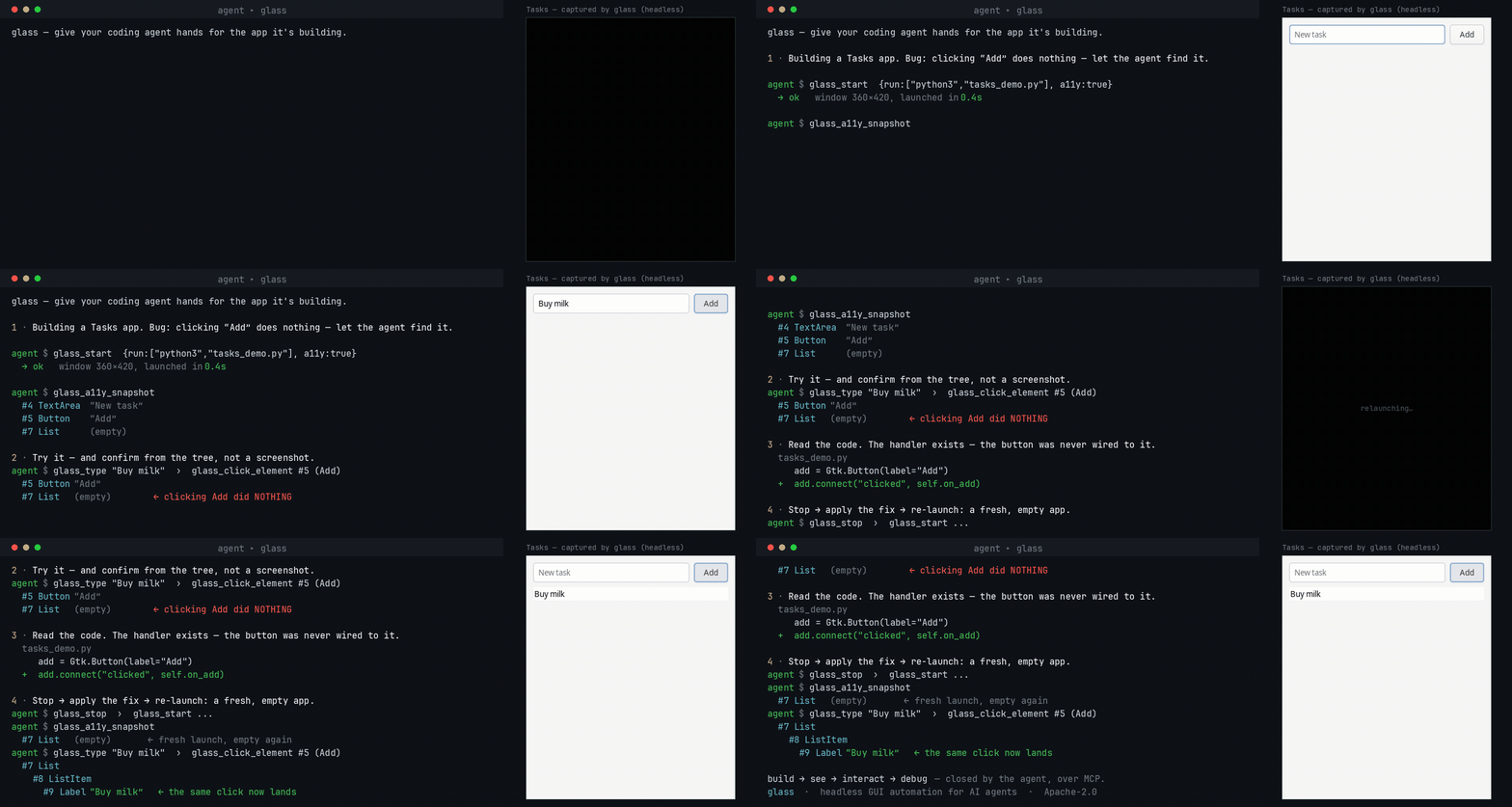
An agent building a GUI app runs it under glass, reproduces a bug from the accessibility tree (no screenshots), fixes the code, and re-verifies — the loop it otherwise can't close on its own. Try it yourself.
Try it in 60 seconds
-
Download glass for your platform from the Releases page and connect it to your agent — glass works with any MCP host (see which are verified).
-
Get the example app — clone this repo, or download
examples/tasks-demo/tasks_demo.py(on Linux it needssudo apt install python3-gi gir1.2-gtk-4.0). -
Paste this to your agent:
Use glass to run
examples/tasks-demo/tasks_demo.pywith accessibility on. There's a bug: clicking Add doesn't add the typed task. Reproduce it by driving the UI and checking the accessibility tree (don't just screenshot), then find and fix the bug in the code and verify a task actually appears.
Your agent launches the app, reproduces the bug from the accessibility tree, fixes the one-line
wiring bug, and confirms the task appears — the whole build → see → interact → debug loop, start to
finish. (glass-mcp doctor checks your environment if anything's off.)
The loop in practice
An agent can fill in a form, click Save, and check that the app reports success. When the app exposes an accessibility tree, the agent works with named controls and verifies changes from text:
glass_start { "run": ["python3", "app.py"] }
glass_do { "actions": [
  { "action": "set_value",
    "target": { "query": "account", "role": "TextField", "states": ["enabled"] },
    "text": "hello" },
  { "action": "click_element",
    "target": { "query": "Save", "role": "Button", "states": ["enabled"] },
    "mode": "auto" },
  { "action": "wait_for_element", "name": "Saved" }
] }
glass_logs
Use glass_find_elements to inspect candidates when the intended target is not unique or known well
enough to act on directly. Use glass_a11y_snapshot to explore the app's controls. See the
tool reference for click modes and platform behavior.
For a canvas or custom-rendered app with no accessibility tree, drive it by pixels instead —
glass_screenshot, glass_click {x,y}, and glass_diff, which returns changed_pct + a bbox as
text, so routine checks between screenshots cost no vision tokens. Why the loop is shaped this way:
the build → see → interact → debug loop.
To review a run after the app stops, opt into session evidence recording
with --trace-dir. Glass retains tool inputs and requested results in bounded storage, then
glass-mcp trace inspect and trace export validate the trace and package its evidence in a ZIP.
Recording is off by default; retained app content can contain sensitive data.
Install at a glance
Download the latest build for your platform from the Releases page, then set up your host:
- Linux — docs/how-to/setup-linux.md (X11 or Wayland;
Xvfb/sway+ bubblewrap) - Windows — docs/how-to/setup-windows.md (a prebuilt
.exe+ Sandboxie) - macOS — docs/how-to/setup-macos.md (install the notarized
.dmg; no build needed) - Android — docs/how-to/setup-android.md (an AVD emulator, from any host)
- iOS — docs/how-to/setup-ios.md (the Simulator, macOS host only)
Every asset is listed in docs/reference/platforms.md.
Prefer to compile, or on an architecture with no published asset? See
docs/how-to/build-from-source.md — it is a single cargo build.
Then connect glass to your agent and run glass-mcp doctor to check
the environment. New here? Follow the tutorial for a guaranteed first
success.
For new agent configurations, use glass-mcp --tool-profile lean for 17 tools, with actions through
glass_do, annotated screenshots and optional log waits. The full toolbox remains the compatible
binary default. Inspect either inventory without
starting a session using glass-mcp tools --json; see tool profiles.
Drive it well — the glass-drive skill
glass needs no app integration and no skill to run, but an agent drives it far more reliably with the open glass-drive Agent Skill — it stops the agent spending its first turns rediscovering the verify-cheaply-then-look loop. Installing it is the single highest-leverage thing you can add when pointing an agent at glass.
Platform support
✓ supported · ◑ partial · – not supported · 🚧 planned.
| Capability | Linux (X11 + Wayland) | Windows | Android (AVD) | iOS (Simulator) | macOS |
|---|---|---|---|---|---|
| Capture · input · windows · clipboard · logs | ✓ | ✓ | ✓ | ✓ | ✓ |
| Accessibility (semantic addressing) | ✓ AT-SPI | ✓ UI Automation | ✓ UIAutomator | ✓ idb | ✓ AX |
| Containment / sandboxing | ✓ bubblewrap | ✓ Sandboxie | ✓ the emulator VM | ✓ the Simulator | ✓ Seatbelt |
| Input without desktop interference | ✓ private display | – shared desktop | ✓ emulator | ✓ Simulator | ◑ separate account (preview) |
| Display isolation (app off your desktop) | ✓ headless Xvfb / sway | – VM needed | ✓ headless emulator | ✓ headless simctl boot | ◑ separate account (preview) |
Full matrix, per-capability detail, and system requirements: docs/reference/platforms.md. Transport is MCP over stdio (default) or network HTTP.
Documentation
The full docs — tutorial, how-to guides, reference, and explanations — are under
docs/. See CHANGELOG.md for release notes, and
Stability and versioning for what a 1.0 release guarantees.
Contributing? CONTRIBUTING.md has the gates a PR has to pass, and
Verify a change covers platform code your own host cannot run.
License
glass is open core, licensed Apache-2.0 — see LICENSE-APACHE.
glass MCP soruları
Ajan uygulamalarla nasıl etkileşime girer?
Ajan, isimlendirilmiş kontrollerle çalışmak için erişilebilirlik ağacını kullanabilir veya ekran görüntüleri ve koordinat tabanlı tıklamalar kullanarak uygulamayı piksel düzeyinde yönetebilir.
Glass, masaüstüme müdahale etmeden uygulamaları çalıştırabilir mi?
Evet, varsayılan Linux ekranları ve mobil emülatörler girdileri masaüstünüzden ayrı tutar; macOS ise masaüstünüzde olmayan uygulamalar için ayrı bir hesap önizlemesi sunar.