
EximAgent MCP sunucusu
Commit 13 Eki 2026Yapay zeka istemcilerinin dış arama (outbound prospecting), ticari veri analizi ve ithalat-ihracat sektörü için uyumluluk kontrolleri yapmasını sağlar.
Ayrıca bilinen adı EximAgent/cursor-plugin, cursor-plugin
- Yıldızlar
- 1
- Araçlar
- —
- İndirmeler, 30 gün
- —
- En son sürüm
- 0.1.1
- Son commit
- 13 Eki 2026
- Lisans
- MIT
EximAgent MCP nedir?
EximAgent bir MCP sunucusudur. Yapay zeka istemcilerinin dış arama (outbound prospecting), ticari veri analizi ve ithalat-ihracat sektörü için uyumluluk kontrolleri yapmasını sağlar.
Özet, projenin README dosyasından oluşturuldu
EximAgent MCP sunucusu hakkında
EximAgent, ithalat-ihracat sektöründeki profesyoneller için tasarlanmış özel bir yapay zeka ajanları ekibi sunar. Claude, Cursor ve Claude Code gibi istemcilere, barındırılan bir MCP bağlayıcısı veya bir komut satırı aracı aracılığıyla bağlanır. Kullanıcılar, OAuth üzerinden bir Google hesabı ile oturum açarak hizmeti entegre edebilirler. Sistem üç farklı ajan rolü üzerinden çalışır: Alıcı bulma ve erişim e-postaları yazma için Outbound, ticari akışları ve pazar trendlerini incelemek için Analyst ve yasal gereklilikleri yönetmek için Compliance.
Geliştiriciler ve ticaret profesyonelleri, gerçek gümrük sevkiyat kayıtlarına ve ticari verilere erişmek için bu sunucuyu kullanır. Araç seti; HS sınıflandırması, tarife sorgulama ve OFAC yaptırım taraması gibi özel yetenekler içerir. Bağlayıcı verileri streamable HTTP bağlantısı üzerinden işlerken, terminal erişimi olan asistanlar scriptler veya uzun listeler için eximagent CLI aracını da kullanabilir. Hizmet başlangıç için ücretsizdir ve tam erişim için bir EximAgent hesabı gerektirir.
Neler yapabilirsiniz
- 1Yeni alıcıları belirleme ve onlarla iletişime geçmeGümrük kayıtlarından belirli malların ithalatçılarını bulun ve kişiselleştirilmiş erişim e-postaları oluşturun.
- 2Küresel ticaret trendlerini analiz etmeBelirli emtialar için pazar büyüklüklerini, fiyat trendlerini ve ana ticaret rotalarını araştırın.
- 3Mevzuat uyumluluğunu doğrulamaŞirket isimlerini yaptırım listeleriyle karşılaştırın ve belirli ticaret hatları için geçerli vergileri belirleyin.
- 4Ürün sınıflandırmalarını belirlemeÜlkeler arası mal sevkiyatı için doğru HS kodlarını ve ilgili tarifeleri tanımlayın.
Projenin README dosyasından alınmıştır. Her kullanım durumu, oradaki bir alıntı ile kontrol edilir.
EximAgent MCP nasıl yüklenir
Biçimler 10 Kas 2026 tarihinde doğrulandıCursor'a ekleGoose'a ekleEximAgent MCP'yi Claude Code içine yükleyin
$ claude mcp add --transport http cursor-plugin https://mcp.eximagent.ai/mcpEximAgent MCP'yi Cursor içine yükleyin
~/.cursor/mcp.json
{
  "mcpServers": {
    "cursor-plugin": {
      "url": "https://mcp.eximagent.ai/mcp"
    }
  }
}EximAgent MCP'yi VS Code içine yükleyin
.vscode/mcp.json
{
  "servers": {
    "cursor-plugin": {
      "type": "http",
      "url": "https://mcp.eximagent.ai/mcp"
    }
  }
}EximAgent MCP'yi VS Code CLI içine yükleyin
$ code --add-mcp '{"name":"cursor-plugin","type":"http","url":"https://mcp.eximagent.ai/mcp"}'EximAgent MCP'yi Codex içine yükleyin
$ codex mcp add cursor-plugin --url https://mcp.eximagent.ai/mcpEximAgent MCP'yi Codex config.toml içine yükleyin
~/.codex/config.toml
[mcp_servers.cursor-plugin]
url = "https://mcp.eximagent.ai/mcp"
EximAgent MCP'yi Gemini CLI içine yükleyin
$ gemini mcp add -s user --transport http cursor-plugin https://mcp.eximagent.ai/mcpEximAgent MCP'yi Gemini settings.json içine yükleyin
~/.gemini/settings.json
{
  "mcpServers": {
    "cursor-plugin": {
      "url": "https://mcp.eximagent.ai/mcp",
      "type": "http"
    }
  }
}Otomatik kontroller
Çalıştırıldı 14 Kas 2026Tam rapor →Henüz doğrulanmadı. Bir sunucunun 80 puana, ciddi bir bulgu olmamasına ve kontrol edebilmemiz için yeterli veriye ihtiyacı vardır. Kontroller nasıl çalışır · Daha fazla puan için nelerin düzeltileceği

- Kaynak deposu bağlantılı ve erişilebilireximagent/cursor-plugin is public and reachablegithub.com/eximagent/cursor-plugin ↗Geçti
- Paket, bu depoyu kaynağı olarak gösteriyorKontrol edilmedi
- Derleme kökeni (Sigstore onayı)Kontrol edilmedi
- Açık kaynak lisansı (OSI)MITspdx.org/licenses/MIT.html ↗Geçti
- Son bir yıl içinde commit veya sürüm mevcutLast commit or release 2026-10-13github.com/eximagent/cursor-plugin ↗Geçti
- OpenSSF ScorecardKontrol edilmedi
- Paket adı popüler bir pakete yakın değilKontrol edilmedi
- Pakette veya bağımlılıklarında kritik uyarı yokKontrol edilmedi
- Modele yönelik gizli talimat yok0 tool descriptions and the README read; no override phrases, credential paths or hidden charactersGeçti
- Yıkıcı araçlar etiketlenmişKontrol edilmedi
- Uzak uç nokta MCP el sıkışmasına yanıt veriyorHTTPS endpoint answered 401 (sign-in required)Geçti
EximAgent plugin
EximAgent is a team of AI agents for the export-import industry, connected to Claude, Cursor and other AI clients through one MCP connector. Outbound finds importers and buyers and writes personalized outreach. Analyst digs into trade data: market size, price trends, trade flows and company profiles. Compliance handles HS classification, tariffs, landed cost and OFAC screening.
An AI sales team for export-import: Outbound, Analyst and Compliance, in Claude Code, Cursor and other AI clients. Free to start.
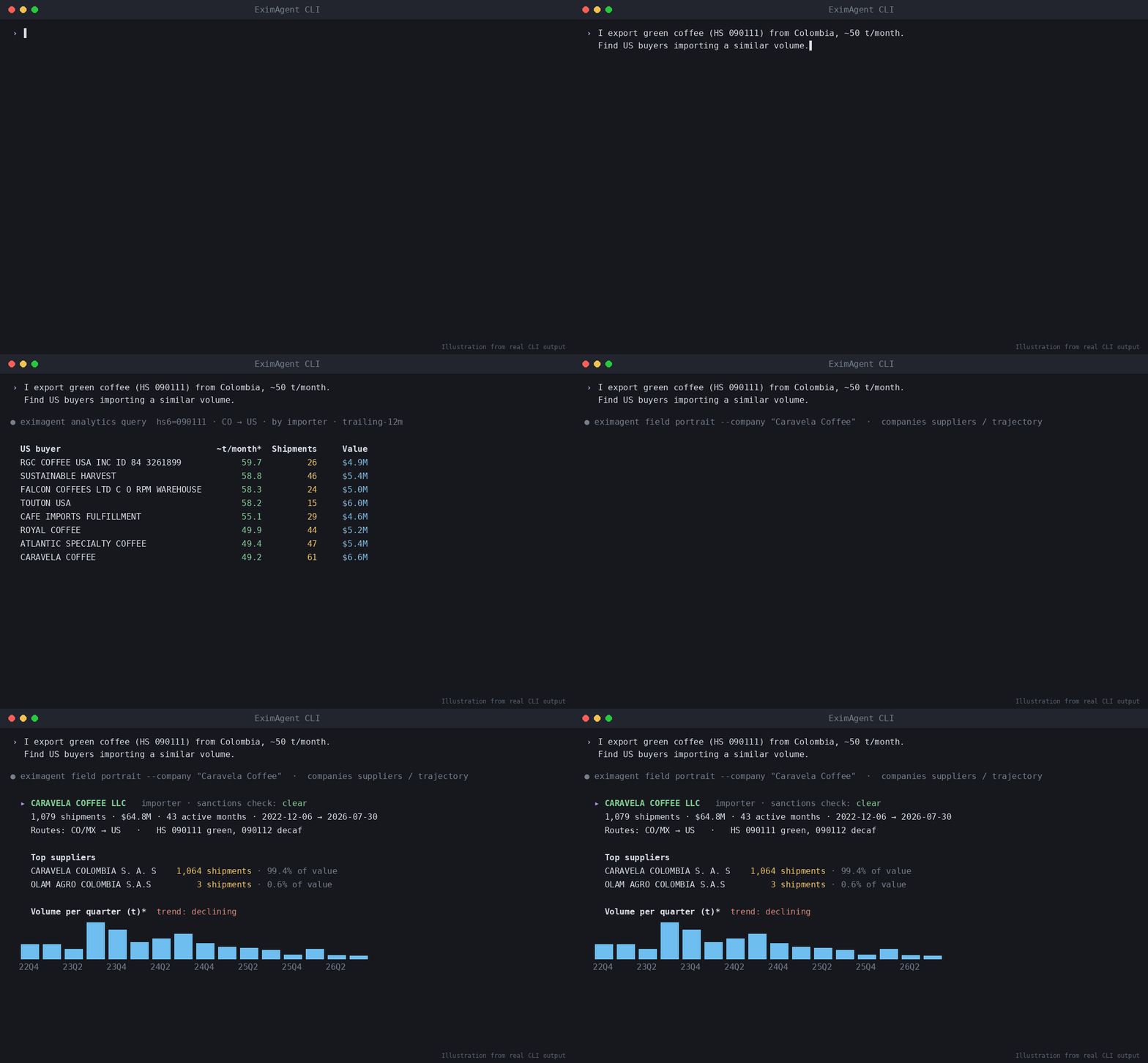
▶ Watch the demo video on YouTube
Ask in plain words, and your assistant uses EximAgent to:
- find importers, buyers and distributors from real customs shipment records
- look up HS codes, tariffs and duties for a trade lane
- screen company or person names against the OFAC sanctions list
- research a company from its website
- write personalized outreach emails to the buyers it finds
What's inside
| Part | What it does |
|---|---|
mcp.json |
Connects to the hosted EximAgent connector at https://mcp.eximagent.ai/mcp (streamable HTTP, OAuth sign-in) |
skills/eximagent |
Teaches the assistant to use the EximAgent connector: which agent and tool to use for prospecting, trade data analysis and compliance checks |
skills/eximagent-cli |
Teaches assistants that have a terminal to install and use the eximagent command-line tool |
Set up (about 2 minutes)
You need an EximAgent account. See pricing.
Cursor
Add the hosted connector to ~/.cursor/mcp.json:
{ "mcpServers": { "eximagent": { "url": "https://mcp.eximagent.ai/mcp" } } }
Then open Cursor's MCP settings, choose Connect on eximagent, and sign in with Google in the browser window that opens.
If you already use the eximagent CLI and are signed in, eximagent connect cursor writes this config for you.
Claude Code
claude mcp add --transport http eximagent https://mcp.eximagent.ai/mcp --scope user
Then run /mcp in Claude Code and sign in with Google. (CLI users who are signed in can run eximagent connect claude-code instead.)
Other assistants
- Grok Bot: open Connect Apps, find EximAgent, choose Add, then sign in with Google.
- Codex:
codex mcp add eximagent --url https://mcp.eximagent.ai/mcp, thencodex mcp login eximagent. - Claude desktop or web: Settings → Connectors → Add custom connector →
https://mcp.eximagent.ai/mcp.
Skills only (any agent that supports Agent Skills)
Add the two EximAgent skills to Claude Code, Codex, Cursor and other agents with the open-source skills CLI:
npx skills add EximAgent/cursor-plugin
To add one skill only, use --skill eximagent (for the connector) or --skill eximagent-cli (for the command-line tool). The skills work together with the EximAgent connector or the eximagent CLI.
Full connector guide: https://eximagent.ai/connectors
What you can ask
Outbound:
- "Find importers of green coffee in Germany from customs shipment records and shortlist the best five."
- "Research this buyer's website and write a personalized first email."
Analyst:
- "How big is the US market for frozen shrimp imports, and who are the top importers?"
- "Show the price trend and main trade routes for cashew nuts shipped into the Netherlands."
Compliance:
- "What HS code fits frozen shrimp, and what duty applies shipping it from Vietnam to Germany?"
- "Screen these three company names against the OFAC sanctions list."
Access
- Lookups (HS codes, tariffs, sanctions, trade questions) only read data.
- The connector reads the account you sign in with and the EximAgent trade data. It does not read your files, your mail or your other connectors.
Use the command-line tool
If your assistant can run terminal commands (for example Grok Bot, Cursor's terminal, Claude Code or Codex), it can also use
the eximagent command-line tool. This helps when the connector isn't set up, or for scripts and long lists. The
eximagent-cli skill tells the assistant how to install it with the official installer,
let you sign in yourself, and run the main commands. You sign in
in your own browser. Never paste a password or token into the chat.
Help
- Docs: https://eximagent.ai/docs
- Contact: brickai@eximagent.ai
- Command-line tool (for developers): https://github.com/EximAgent/cli
If this is useful, a star helps others find it. ⭐
License
The files in this repository (manifest, MCP config, skills and README) are released under the MIT License. See LICENSE. Using the EximAgent service is governed by the EximAgent Terms and Privacy Policy.
EximAgent MCP soruları
EximAgent MCP'yi Claude Code'a nasıl eklerim?
Terminalinizde claude mcp add --transport http cursor-plugin https://mcp.eximagent.ai/mcp komutunu çalıştırın. Her projede kullanılabilir olması için --scope user ekleyin.
EximAgent MCP'yi Cursor'a nasıl eklerim?
~/.cursor/mcp.json dosyasını açın ve yukarıdaki yükleme bölümünde gösterilen Cursor yapılandırmasını kullanarak sunucuyu mcpServers altına ekleyin.
Bağlayıcı özel dosyalarıma erişiyor mu?
Hayır, bağlayıcı dosyalarınıza veya e-postalarınıza değil, yalnızca oturum açtığınız hesaba ve EximAgent ticari verilerine erişir.