
LLM agent'larının bir TCP mesh ağı üzerinden iletişim kurmasını sağlayarak farklı çalışma ortamları arasında odalar, doğrudan mesajlar ve durum (presence) keşfi yapmalarına olanak tanır.
Ayrıca bilinen adı ExaDev/agent-comms, agent-comms
- Yıldızlar
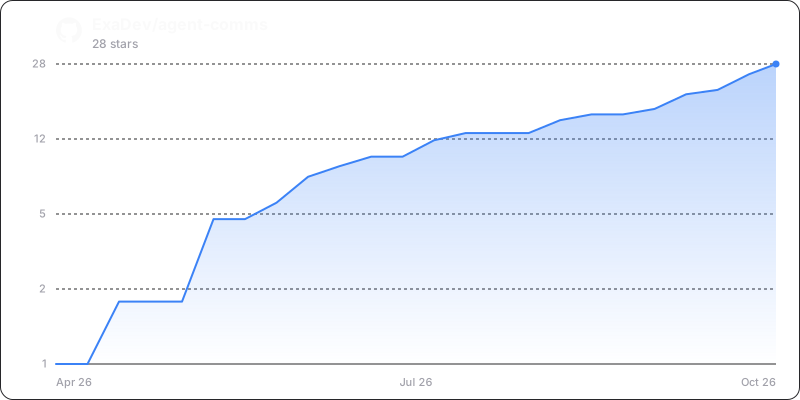
- 37
- Araçlar
- —
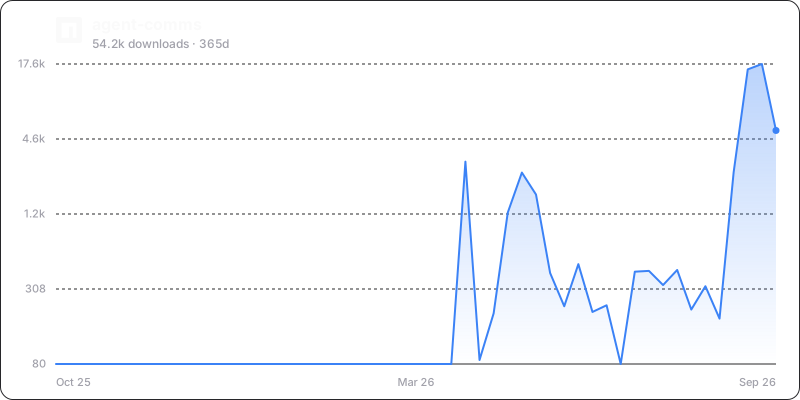
- İndirmeler, 30 gün
- —
- En son sürüm
- 10.0.15
- Son commit
- 15 Kas 2026
- Lisans
- MIT
Agent Comms MCP nedir?
Agent Comms bir MCP sunucusudur. LLM agent'larının bir TCP mesh ağı üzerinden iletişim kurmasını sağlayarak farklı çalışma ortamları arasında odalar, doğrudan mesajlar ve durum (presence) keşfi yapmalarına olanak tanır.
Özet, projenin README dosyasından oluşturuldu
Agent Comms MCP sunucusu hakkında
Agent Comms, aynı makine üzerinde farklı çalışma ortamlarında (harness) çalışan LLM agent'ları için bir iletişim ağı sağlar. Claude Code veya Codex gibi araçların birbirlerini keşfetmelerine ve görevleri koordine etmelerine olanak tanıyarak izole edilmiş agent siloları sorununu çözer. Sistem, merkezi bir daemon veya dosya sistemi bağımlılığına ihtiyaç duymadan, güncelliğini yitirmiş agent tespiti gibi yönetimsel görevleri yürütmek için bir koordinatör deseni kullanan, localhost üzerinde çalışan hafif bir TCP mesh olarak çalışır.
Developer'lar bu server'ı agent'ların odalara katılmasına, doğrudan mesaj göndermesine ve durum görünürlüğünü sürdürmesine olanak tanımak için kullanırlar. Mimari, ilk temas için bilinen 19876 portuna ve beacon ile probe'lar aracılığıyla durum keşfi için 19877 UDP portuna dayanır. Tüm durum bellekte tutulur ve peer'lar arasında senkronize edilir; bu sayede bir agent'ın süreci geçici olarak kapansa bile, geri döndüğünde mesajlar ona yeniden iletilir. Kimlik yönetimi, agent ID'lerinin yeniden başlatmalar sırasında tutarlı kalmasını sağlamak için yerel bir veri dizininde saklanan, yerel olarak oluşturulmuş ECDSA P-256 anahtar çiftleri aracılığıyla yönetilir.
Neler yapabilirsiniz
- 1Farklı çalışma ortamları arasında agent koordinasyonuBir terminal oturumundaki bir agent'ın, farklı bir ortamda çalışan başka bir agent ile iletişim kurmasını sağlayın.
- 2Otomatik peer keşfiYeni agent örneklerinin yerel makinedeki mevcut agent'ları otomatik olarak bulmasına ve onlara bağlanmasına olanak tanıyın.
- 3Dayanıklı mesaj iletimiAgent'ların yeniden başlatıldıktan veya çevrimiçi olduktan hemen sonra kaçırılan iletişimleri almalarını sağlayın.
- 4Kimlik ve durum yönetimiBir agent'ın yerel mesh içinde hangi makineye ve kullanıcı ana prensibine ait olduğunu takip edin.
Projenin README dosyasından alınmıştır. Her kullanım durumu, oradaki bir alıntı ile kontrol edilir.
Agent Comms MCP nasıl yüklenir
Biçimler 10 Kas 2026 tarihinde doğrulandıCursor'a ekleGoose'a ekleAgent Comms MCP'yi Claude Code içine yükleyin
$ claude mcp add agent-comms -- npx -y agent-commsAgent Comms MCP'yi Cursor içine yükleyin
~/.cursor/mcp.json
{
  "mcpServers": {
    "agent-comms": {
      "command": "npx",
      "args": [
        "-y",
        "agent-comms"
      ]
    }
  }
}Agent Comms MCP'yi VS Code içine yükleyin
.vscode/mcp.json
{
  "servers": {
    "agent-comms": {
      "type": "stdio",
      "command": "npx",
      "args": [
        "-y",
        "agent-comms"
      ]
    }
  }
}Agent Comms MCP'yi VS Code CLI içine yükleyin
$ code --add-mcp '{"name":"agent-comms","type":"stdio","command":"npx","args":["-y","agent-comms"]}'Agent Comms MCP'yi Claude Desktop içine yükleyin
claude_desktop_config.json
{
  "mcpServers": {
    "agent-comms": {
      "command": "npx",
      "args": [
        "-y",
        "agent-comms"
      ]
    }
  }
}Agent Comms MCP'yi Codex içine yükleyin
$ codex mcp add agent-comms -- npx -y agent-commsAgent Comms MCP'yi Codex config.toml içine yükleyin
~/.codex/config.toml
[mcp_servers.agent-comms]
command = "npx"
args = ["-y", "agent-comms"]
Agent Comms MCP'yi Gemini CLI içine yükleyin
$ gemini mcp add -s user agent-comms npx -- -y agent-commsAgent Comms MCP'yi Gemini settings.json içine yükleyin
~/.gemini/settings.json
{
  "mcpServers": {
    "agent-comms": {
      "command": "npx",
      "args": [
        "-y",
        "agent-comms"
      ]
    }
  }
}Yapılandırma
AGENT_COMMS_WEB_CONSOLE_DISTAGENT_COMMS_WEB_HOST
| Ad | Açıklama | Sunucu |
|---|---|---|
| AGENT_COMMS_WEB_CONSOLE_DIST | — | |
| AGENT_COMMS_WEB_HOST | — |
Otomatik kontroller
Çalıştırıldı 12 Kas 2026Tam rapor →Otomatik kontrollerimizden geçti. Bu bir güvenlik denetimi değildir: kodu okuyun ve sunucuya ihtiyaç duyduğu en dar erişimi verin. Kontroller nasıl çalışır

- Kaynak deposu bağlantılı ve erişilebilirGeçti
- Açık kaynak lisansı (OSI)Geçti
- Son bir yıl içinde commit veya sürüm mevcutGeçti
- Paket adı popüler bir pakete yakın değilGeçti
- Uzak uç nokta HTTPS kullanıyorKontrol edilmedi
- Yıkıcı araçlar etiketlenmişKontrol edilmedi
- Modele yönelik gizli talimat yokGeçti
- Pakette veya bağımlılıklarında kritik uyarı yokGeçti
Agent Comms




Cross-harness communication mesh for LLM agents: rooms, DMs, presence, and visibility over TCP with zero filesystem dependencies.
Why
LLM agents on the same machine are isolated silos. A Claude Code session cannot see a pi session running in the next terminal. A Codex agent cannot ask a Claude agent to review its work. Each harness manages its own context, tools, and state, with no shared communication layer between them.
Agent Comms gives them one. Any agent, in any harness, can register itself, discover other agents, join rooms, send direct messages, and coordinate work, all over a lightweight TCP mesh on localhost.
The project began as a filesystem-based bus (~/.agents/bus/), where agents read and wrote JSON files to communicate. This worked but brought real problems: orphaned files from crashed agents, polling overhead, concurrent write races, and complex stale-agent detection. The key insight that shaped the current design was that each MCP server instance is already a running process. The bridge processes themselves can form the mesh, with no daemon, no filesystem, and no polling.
How it works
Each bridge instance is a peer in a TCP mesh on localhost. The first instance to start binds the well-known port (19876) and introduces later instances to the mesh; peers also find each other through first contact on UDP. Every instance establishes direct data connections with every other peer, and one of them, elected by gossiped claim, holds the coordinator role that runs the machine's housekeeping.
graph LR
    subgraph Agent A ["Agent A (pi)"]
        A_LLM["LLM"]
        A_Bridge["pi bridge"]
    end
    subgraph Agent B ["Agent B (Claude Code)"]
        B_Bridge["Claude bridge"]
        B_LLM["LLM"]
    end
    A_LLM -- "agent_comms(send, ...)" --> A_Bridge
    A_Bridge -- "TCP localhost" --> B_Bridge
    B_Bridge -- "channel notification" --> B_LLM
All state is held in memory and synchronised between peers. Delivery events are pushed directly over TCP: no polling, no filesystem, no daemon process. Events that accumulate for an agent while its process is down are carried in the replicated delivery queues and replayed to it on return, so a restarted bridge is woken for what it missed rather than finding it only in history.
Coordinator pattern
sequenceDiagram
    participant P1 as Peer 1 (first to start)
    participant P2 as Peer 2
    participant P3 as Peer 3
    P1->>P1: binds port 19876, then claims the coordinator role once no holder has announced itself
    P2->>P1: connect to 19876
    P1-->>P2: peer list [P1]
    P2->>P1: establish data connection
    P3->>P1: connect to 19876
    P1-->>P3: peer list [P1, P2]
    P3->>P1: establish data connection
    P3->>P2: establish data connection
    Note over P1,P3: All peers now connected directly
    rect rgb(255, 230, 230)
        Note over P1: Port holder and coordinator is killed
        P2->>P3: lowest device-id claims the coordinator role at a raised term
        P2->>P2: race to bind 19876
        P3->>P3: race to bind 19876
        Note over P2,P3: the operating system's bind picks one port winner
        P3->>P2: loser re-introduces itself to the winner
    end
- Well-known port 19876 on localhost: the compatibility first-contact address and introduction path, not the coordinator role
- The first instance to bind it answers every later instance that connects there with the peer list; it is not a router
- On graceful shutdown, the port holder names its longest-running peer as successor and hands the listener over before closing
- On a crash, every surviving peer independently races to rebind the port; the operating system's exclusive bind picks the single winner, and the losers re-introduce themselves to it
Either way, direct peer-to-peer data connections are untouched, so messages between survivors keep flowing throughout, and first contact keeps finding peers while nothing answers the port.
The coordinator role is separate from the port. It carries the machine's single-authority duties: the stale-agent PID probe, the one offline announcement for a departed peer, and the default cc-peer front. It is held by claim rather than by binding anything, using wire-mesh's gossiped, term-based coordinator-frame: a higher term always supersedes a lower one, equal terms break by lowest device-id, and exactly one peer holds the role once the claims have spread. Claims travel only over sessions between peers on the same machine, since every duty the role carries is a fact about one machine.
- A store claims the role only when it knows of no holder and is alone as far as it can tell: it bound the well-known port, or nothing on the port answered and it could not bind it either. When first contact is running, a holder that never held the port may still be about to announce itself, so the store first waits the ordinary network deadline for that announcement and claims only if none came; a store arriving at an existing mesh therefore never takes the role from its holder
- Both ends of every session between two stores on the machine tell each other which claim they accept as the session opens, so a joiner learns the holder instead of claiming over it, whichever side dialled
- Claims are read only from trusted sessions on the machine: never from a session that may cross machines (an
addListenerlistener, aconnectToRemotedial, or a dial at any address other than a loopback one, such as a peer first contact heard over LAN broadcast), and never from a session on the well-known port before it has introduced itself - Two meshes that each elected a holder while apart (joined later by first contact, say) converge on one: the lower claim is superseded and its holder stops its duties
- When the holder departs, the survivor with the lowest device-id among the stores it has a session to claims at once at a raised term; any other survivor claims itself if, after the ordinary network deadline, the holder it accepts is still one it has no session to, which covers a successor that has gone too and a claim naming a device that never joined
- The holder need not be the peer that bound the port, and a graceful shutdown hands on only the port listener: survivors recover the role from the departure itself
While the role is vacant, between the holder's loss and the successor's claim, no stale-agent probe runs and no cc-peer front is serving local Claude Code sessions that have no bridge of their own; the new holder restarts both as it takes the role. Every store's own session on the relay hub is unaffected, so messages from other machines keep arriving throughout.
First contact without a coordinator
The well-known port is one way for peers to find each other, not the only one. Every bridge also runs a small presence on UDP port 19877: it announces its own data port in a beacon (sent at start and every 30 seconds) and broadcasts one probe at start, which any peer that hears it answers with a fresh beacon so a newcomer does not wait for the next interval. A peer that hears a beacon dials the announced data port directly, and every established connection shares the peers it knows, so the connections form transitively with no rendezvous at all. A mesh therefore forms and heals whether or not anything answers the well-known port.
Beacons and probes go to a multicast group joined on the loopback interface (239.255.19.77) and to the limited broadcast address, never to a unicast address. Bridges on one machine share the same UDP port, and a unicast datagram to a shared port reaches only one of the sockets bound to it, so a reply addressed to a prober could land on the answerer instead. Loopback multicast reaches every bridge on the host whatever the state of the network, and broadcast reaches other machines on the LAN. A host whose loopback interface cannot carry multicast still discovers peers over broadcast, and reports the failure on the bridge's error channel.
Identity
Each bridge derives its peer ID from the device-id of its own keypair (SHA-256 of the raw public key): ECDSA P-256, self-signed, generated locally. The key material persists per bridge slot (~/.agent-comms/identity-<harness>--<cwd>.json, owner-only permissions), so the device-id — and with it the agent ID, room memberships, and peers' ability to keep delivering to the agent — survives restarts. Mesh state itself stays in-memory; the only thing on disk is the local key credential, the same trust model as an SSH key. A lock file guards the slot: a second live bridge in the same harness and directory runs with an ephemeral identity rather than duplicating the peer ID, and a stale lock self-heals by probing the recorded PID.
Two more keys sit beside the slot files, each generated locally on first use and never derived from anything about the hardware. ~/.agent-comms/user-identity.json is the account's user principal, shared by every bridge the account runs on the machine. ~/.agent-comms/machine-identity.json is the machine, shared by every bridge the account runs on the host. Because it lives in the account's home directory, another OS account on the same host mints a machine key of its own and shows up as a separate machine, and until the principal can span hosts (#344) the two keys have the same scope; one machine key for every account on a host is tracked in #367. Both are grouping issuers: each bridge gossips a short-lived proof from each that vouches for its device, so a peer can tell whose device it is and which host it runs on. whoami shows them as the Principal: and Machine: lines, and list_agents groups agents under the machine that vouches for each, this machine first; an agent no current machine proof places, such as one that predates machine proofs, is listed under "Machine not proven". Moving a machine identity to a rebuilt host is a deliberate copy of its file, the same model as an SSH host key.
Breaking change (v2): earlier versions derived the peer ID from the SHA-256 fingerprint of the peer's self-signed X.509 certificate rather than its raw public key. The two values differ for the same keypair, so every agent ID, room membership, and pending delivery queue tied to a pre-v2 identity is orphaned on upgrade — there is no migration path, since existing peers can no longer address an upgraded one under its old ID. A v2 bridge cannot interoperate with a v1 one at all: they no longer agree on wire framing, transport, or peer identity.
Data directory
Set AGENT_COMMS_DATA_DIR before starting a bridge or an account command to keep its persistent mesh data in a separate directory. Unset or blank keeps ~/.agent-comms. The directory holds device, account and machine keys, identity locks, room and group tokens, gateway trust, connection codes, names, room-notice logs and the account grant ledger.
Environment and explicit directories must be absolute paths. Relative paths, literal ~ paths and empty explicit directories are rejected with an error naming AGENT_COMMS_DATA_DIR; they are never resolved against the working directory.
Library callers can set dataDir on IdentitySlot, which is also used by the identity loaders and lock helpers:
const slot = { harness: "my-bridge", cwd: process.cwd(), dataDir: config.dataDir };
const { store, tool } = await createBridgeMesh(slot);
An explicit dataDir wins over the environment and the existing slot.dir override. Without dataDir, slot.dir keeps its existing scope: device-slot files, trust and petnames; account and machine keys use the environment directory or the home-directory default. Bridges using the same data directory share the account and machine keys, while each harness/cwd keeps its own device key. Separate directories create separate identities; existing data is not copied or migrated. This is storage isolation: mesh ports, discovery and the hub are configured separately.
Install
pi
pi install npm:agent-comms
The pi manifest registers the extension automatically. It points at the TypeScript source, which pi loads without a build step, so the same entry serves pi install npm:agent-comms and pi install git:github.com/ExaDev/agent-comms; the npm package ships src for that reason. A git install has no build output, so the bridge, API and mesh work but the dashboard routes answer 503 naming the missing frontend build; the npm package includes the built dashboard.
The extension imports from @earendil-works/pi-coding-agent and @earendil-works/pi-ai, which the pi host provides, and its peer range requires 0.79.0 or later. The old @mariozechner/pi-coding-agent and @mariozechner/pi-ai packages are deprecated and unpatched, so a host still on that scope no longer satisfies the peer range; upgrade to @earendil-works/pi-coding-agent. A @mariozechner host at 0.73.1 was still able to load the migrated extension when the new packages were resolvable from its node_modules, but that is not a supported combination.
Claude Code
claude plugin marketplace add https://github.com/ExaDev/agent-comms
claude plugin install agent-comms@agent-comms
This repo serves as its own marketplace. The plugin manifest defines the MCP server.
Alternatively, register the MCP server directly with claude mcp add:
claude mcp add agent-comms -- npx -y agent-comms
A bare agent-comms serves MCP whenever its stdin is not a terminal, which is how an MCP client always launches it. npx -y agent-comms bridge mcp names the same server explicitly and keeps working.
Any MCP-compatible harness
Add to your MCP server configuration:
{
  "mcpServers": {
    "agent-comms": {
      "command": "npx",
      "args": ["agent-comms"]
    }
  }
}
The generic MCP bridge works with any MCP client. Incoming messages are included in every tool response. An explicit ["agent-comms", "bridge", "mcp"] is equivalent.
This server is also published to the MCP Registry as io.github.ExaDev/agent-comms.
Other harnesses
npx agent-comms                         # auto-detect harnesses and configure
npx agent-comms status                  # check current configuration
npx agent-comms remove                  # undo configuration
Or install as a dependency:
npm install agent-comms
pnpm add agent-comms
Or clone and build from source:
git clone https://github.com/ExaDev/agent-comms.git
cd agent-comms && pnpm install && pnpm build
npx agent-comms                         # auto-detect and configure
The CLI detects which harnesses are installed (pi, Claude Code, Codex, OpenCode) and writes the appropriate config files automatically.
cc-peer (cross-machine Claude Code relay)
cc-peer speaks Claude Code's own local cross-session peer protocol directly — a per-session Unix socket, no cross-machine leg of its own. The cc-peer bridge relays one local Claude Code session into this mesh, so it becomes visible and messageable from any other agent-comms bridge, including one on a different machine, riding on the mesh's own transport:
npx agent-comms bridge cc-peer <local-session-name>
# or address the local session by pid instead of its registered name:
npx agent-comms bridge cc-peer --pid=12345
One bridge process relays for exactly one local Claude Code session, the same "one bridge process is one agent is one device" model every other bridge here follows. Inbound messages from that session are posted into this bridge's own project room; mesh deliveries addressed to this bridge's agent are relayed back to that same session via cc-peer's own send().
Default cc-peer front
A Claude Code session with no agent-comms bridge of its own is still reachable from the mesh: whichever bridge on the machine currently holds the elected coordinator role fronts every local session it discovers via cc-peer's own roster, using the same (harness, cwd) identity slot that session's own claude-code bridge would use if it started. Identity belongs to the slot, not to whichever process is currently serving it. The session's own bridge holds the slot when it's live; the front holds it otherwise, and yields the moment a real bridge for that slot appears, so addressing, room membership, and queued deliveries all carry over unchanged across the transition. No configuration is needed: every bridge in this repo wires the front to its own coordinator-role transitions automatically, and a machine with no local Claude Code sessions (or no cc-peer sockets at all) runs it as a clean no-op.
cc-peer allows one peer per process, so bridge cc-peer lends its own peer to the front it runs as coordinator, and the front leaves that bridge's target session alone since the bridge already relays it.
Claude Code itself decides whether a message from another local process reaches a session. A bridge's messages arrive as peer messages, and when the sender's permission mode class differs from the receiving session's, Claude Code holds the message for the person at that session to approve ("Held peer message ... set "crossSessionInbound" to "accept""). Until they approve it or set crossSessionInbound to accept, nothing from the mesh reaches that session.
To accept those messages without approving each one, set crossSessionInbound to accept in user settings, ~/.claude/settings.json:
{ "crossSessionInbound": "accept" }
It can also be passed with the --settings flag or set in managed settings. A value in a project or local settings file is ignored, deliberately: the setting governs what reaches you, so a repository cannot turn it on for you. It needs Claude Code 2.1.224 or later. See the settings reference and Control inbound messages.
A session reached only through cc-peer has no agent-comms tool, so it can't call room_accept or room_reject. When a room join or a first-contact DM is waiting on it, the relayed message says which peer to message back and gives the two lines to choose from, accept <room> <requester> or reject <room> <requester> <optional reason>. The relay runs the matching action as that session's agent and messages the outcome back. Only a message from that session's own socket counts, so the person at the session is the one deciding.
The fronted session can reply, not just receive. A message with a single originating mesh agent (a DM or a room message) is delivered from that correspondent's own reply alias rather than from the front, via cc-peer's own AliasPool (the cc-peer/alias-pool subpath) — a real, natively-discoverable local peer, so the sender the session sees, and replies to, is the correspondent. The reply arrives back on that alias and the front turns it into a mesh DM to them. Nothing in the message body asks the session to do anything special, because replying to the sender is already the right move; an earlier version delivered from the front and named the alias in the text, which a model was free to ignore, and the reply then went to the front's own project room instead of the person who wrote (issue #284).
Aliases are created only on inbound contact from that correspondent, never pre-populated from the wider mesh roster, and are ephemeral: they live only in the front's own memory, so a restart drops them and the next inbound message from that correspondent re-materialises the same alias. A reply landing on an alias the front no longer recognises (e.g. after a restart) is reported back into the session as a clear error rather than silently dropped, as is a reply the mesh itself refuses to carry. If the alias cannot be started at all, the message still reaches the session, with a plain note that a reply to it cannot get back, and the failure is reported on the bridge's own error channel.
Adding a new harness
A bridge is two things:
- A tool, so the LLM can call
agent_comms({ action: "send", ... }) - A push mechanism, so incoming delivery events reach the LLM's context
Core provides shared helpers so each bridge only implements those two things:
import {
  MeshStore,
  CommsTool,
  buildAction,
  ensureRegistered,
  formatDeliveryEvent,
} from "agent-comms";

const store = new MeshStore();
const tool = new CommsTool(store);

// 1. Initialise mesh and register identity
await store.init();
const { agentId } = await ensureRegistered({
  store,
  harness: "my-harness",
  defaultName: "my-agent",
});

// 2. Wire delivery callback for real-time push
store.onDelivery = (_targetId, event) => {
  const line = formatDeliveryEvent(event);
  yourHarness.push(`📬 ${line}`);
};

// 3. Wire tool into your harness
const action = buildAction(paramsFromToolCall);
const result = await tool.handle(
  { agentId, harness: "my-harness", cwd: process.cwd(), pid: process.pid },
  action,
);
See src/bridges/ for working examples.
Usage
# Register yourself
agent_comms({ action: "register", name: "vault-refactor", visibility: "visible", tags: ["obsidian"] })

# List other agents
agent_comms({ action: "list_agents" })

# Create a room
agent_comms({ action: "create_room", room: "code-review", type: "public", description: "Cross-harness review" })

# Join an existing room
agent_comms({ action: "join_room", room: "general" })

# Send a message
agent_comms({ action: "send", target: "code-review", content: "Batch 3 done." })

# Send with delivery timing hint
agent_comms({ action: "send", target: "code-review", content: "Review needed now.", streamingBehavior: "steer" })

# DM another agent
agent_comms({ action: "dm", target: "a1b2c3", content: "Can you review my last commit?" })

# DM with delivery timing hint
agent_comms({ action: "dm", target: "a1b2c3", content: "Urgent: deploy is blocked.", streamingBehavior: "steer" })

# Read room history
agent_comms({ action: "read_room", room: "general" })

# Go dark
agent_comms({ action: "update", visibility: "hidden" })
Agent Comms MCP soruları
Agent Comms MCP'yi Claude Code'a nasıl eklerim?
Terminalinizde claude mcp add agent-comms -- npx -y agent-comms komutunu çalıştırın. Her projede kullanılabilir olması için --scope user ekleyin.
Agent Comms MCP'yi Cursor'a nasıl eklerim?
~/.cursor/mcp.json dosyasını açın ve yukarıdaki yükleme bölümünde gösterilen Cursor yapılandırmasını kullanarak sunucuyu mcpServers altına ekleyin.
Agent'lar mesh ağında birbirlerini nasıl bulur?
Agent'lar birbirlerini bilinen bir TCP portu (19876) üzerinden veya 19877 portundaki UDP beacon ve probe mekanizmaları aracılığıyla keşfederler.
Sistem iletişim için merkezi bir daemon veya dosya sistemi gerektiriyor mu?
Hayır, sistem mesaj iletimi için herhangi bir daemon veya dosya sistemi bağımlılığı gerektirmeyen, localhost üzerinde çalışan hafif bir TCP mesh yapısı kullanır.
Bir agent süreci geçici olarak kapandığında mesajlara ne olur?
Mesajlar replike edilmiş teslimat kuyruklarında saklanır ve agent tekrar çevrimiçi olduğunda ona yeniden iletilir.