
Yapay zeka asistanlarının doğal dil kullanarak Dev Proxy yapılandırmaları oluşturmasına, dokümantasyon çekmesine ve yüklü sürümleri kontrol etmesine olanak tanır.
Ayrıca bilinen adı dev-proxy-tools/mcp, @devproxy/mcp
- Yıldızlar
- 4
- Araçlar
- —
- İndirmeler, 30 gün
- 710
- En son sürüm
- 0.3.1
- Son commit
- 12 Kas 2026
- Lisans
- MIT
Dev Proxy MCP nedir?
Dev Proxy bir MCP sunucusudur. Yapay zeka asistanlarının doğal dil kullanarak Dev Proxy yapılandırmaları oluşturmasına, dokümantasyon çekmesine ve yüklü sürümleri kontrol etmesine olanak tanır.
Özet, projenin README dosyasından oluşturuldu
Dev Proxy MCP sunucusu hakkında
Bu sunucu, yapay zeka asistanı kullanan geliştiricilerin API simülasyon ayarlarını doğal dil yoluyla yönetmesini sağlar. Visual Studio Code gibi MCP uyumlu istemciler ile Dev Proxy API simülatörü arasında bir köprü görevi görür. npx kullanarak stdio üzerinden bağlantı kuran bir yapay zeka; uygulama kodunuzu değiştirmeden hata yönetimi, hız sınırları ve yavaş ağ yanıtlarını test etmek için yapılandırmalar oluşturmanıza yardımcı olabilir.
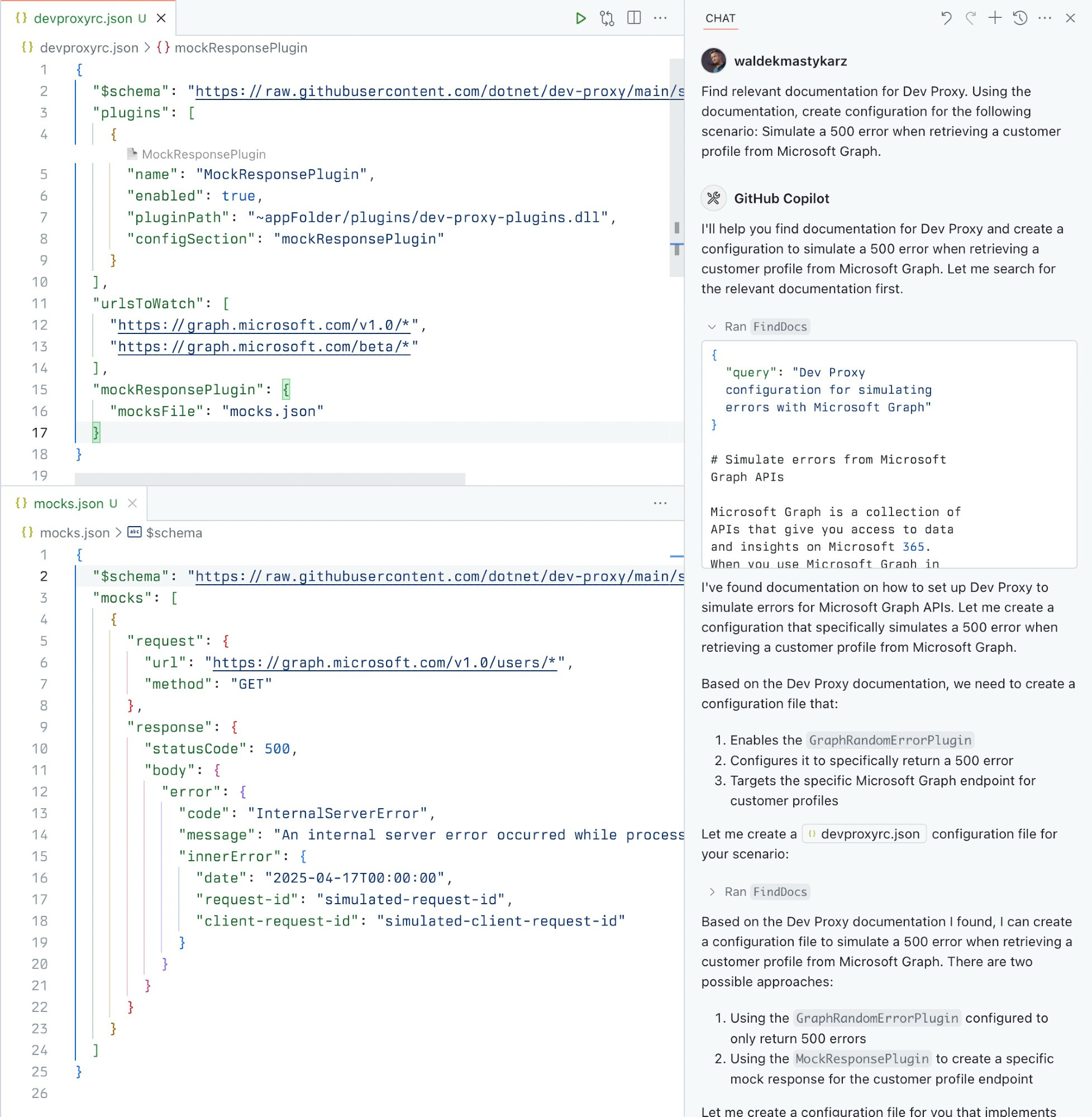
Kullanıcılar, test iş akışlarını hızlandırmak için sunucuyla belirli araçlar aracılığıyla etkileşime girerler. GetBestPractices aracı yapılandırma rehberliği sağlarken, FindDocs aracı ilgili dokümantasyonu bulmak için doğal dil sorgularına olanak tanır. Ayrıca, mevcut Dev Proxy kurulumunuzun oluşturulan yapılandırmalarla uyumlu olup olmadığını doğrulamak için GetVersion aracını kullanabilirsiniz. Bu kurulum için Node.js LTS ve yerel makinenizde global olarak yüklü bir Dev Proxy gereklidir.
Neler yapabilirsiniz
- 1API hata simülasyonları oluşturunUygulamanızın nasıl tepki verdiğini test etmek için API hatalarını taklit eden bir yapılandırma oluşturmasını yapay zekadan isteyin.
- 2Teknik dokümantasyon çekinÇeşitli ağ koşullarının nasıl simüle edileceğine dair spesifik talimatları bulmak için asistana sorgu gönderin.
- 3Yapılandırma en iyi uygulamalarını uygulayınAPI simülatörünüzü kurmak için önerilen ayarların bir listesini talep edin.
Projenin README dosyasından alınmıştır. Her kullanım durumu, oradaki bir alıntı ile kontrol edilir.
Dev Proxy MCP nasıl yüklenir
Biçimler 10 Kas 2026 tarihinde doğrulandıCursor'a ekleGoose'a ekleDev Proxy MCP'yi Claude Code içine yükleyin
$ claude mcp add mcp -- npx -y @devproxy/mcpDev Proxy MCP'yi Cursor içine yükleyin
~/.cursor/mcp.json
{
  "mcpServers": {
    "mcp": {
      "command": "npx",
      "args": [
        "-y",
        "@devproxy/mcp"
      ]
    }
  }
}Dev Proxy MCP'yi VS Code içine yükleyin
.vscode/mcp.json
{
  "servers": {
    "mcp": {
      "type": "stdio",
      "command": "npx",
      "args": [
        "-y",
        "@devproxy/mcp"
      ]
    }
  }
}Dev Proxy MCP'yi VS Code CLI içine yükleyin
$ code --add-mcp '{"name":"mcp","type":"stdio","command":"npx","args":["-y","@devproxy/mcp"]}'Dev Proxy MCP'yi Claude Desktop içine yükleyin
claude_desktop_config.json
{
  "mcpServers": {
    "mcp": {
      "command": "npx",
      "args": [
        "-y",
        "@devproxy/mcp"
      ]
    }
  }
}Dev Proxy MCP'yi Codex içine yükleyin
$ codex mcp add mcp -- npx -y @devproxy/mcpDev Proxy MCP'yi Codex config.toml içine yükleyin
~/.codex/config.toml
[mcp_servers.mcp]
command = "npx"
args = ["-y", "@devproxy/mcp"]
Dev Proxy MCP'yi Gemini CLI içine yükleyin
$ gemini mcp add -s user mcp npx -- -y @devproxy/mcpDev Proxy MCP'yi Gemini settings.json içine yükleyin
~/.gemini/settings.json
{
  "mcpServers": {
    "mcp": {
      "command": "npx",
      "args": [
        "-y",
        "@devproxy/mcp"
      ]
    }
  }
}Otomatik kontroller
Çalıştırıldı 14 Kas 2026Tam rapor →Otomatik kontrollerimizden geçti. Bu bir güvenlik denetimi değildir: kodu okuyun ve sunucuya ihtiyaç duyduğu en dar erişimi verin. Kontroller nasıl çalışır

- Kaynak deposu bağlantılı ve erişilebilirdev-proxy-tools/mcp is public and reachablegithub.com/dev-proxy-tools/mcp ↗Geçti
- Paket, bu depoyu kaynağı olarak gösteriyor@devproxy/mcp names dev-proxy-tools/mcp as sourcenpmjs.com/package/@devproxy/mcp ↗Geçti
- Derleme kökeni (Sigstore onayı)Sigstore attestation for @devproxy/mcpnpmjs.com/package/@devproxy/mcp/v/0.3.1#provenance ↗Geçti
- Açık kaynak lisansı (OSI)MITspdx.org/licenses/MIT.html ↗Geçti
- Son bir yıl içinde commit veya sürüm mevcutLast commit or release 2026-11-12github.com/dev-proxy-tools/mcp ↗Geçti
- OpenSSF ScorecardKontrol edilmedi
- Paket adı popüler bir pakete yakın değilNo popular package one edit away from @devproxy/mcpGeçti
- Pakette veya bağımlılıklarında kritik uyarı yok99 resolved dependencies checked; no critical advisoryosv.dev ↗Geçti
- Modele yönelik gizli talimat yok0 tool descriptions and the README read; no override phrases, credential paths or hidden charactersGeçti
- Yıkıcı araçlar etiketlenmişKontrol edilmedi
- Uzak uç nokta MCP el sıkışmasına yanıt veriyorKontrol edilmedi
Dev Proxy MCP Server


A Model Context Protocol (MCP) server for Dev Proxy that enables AI assistants to interact with Dev Proxy capabilities using the MCP standard. Use this server to:
- Create Dev Proxy configurations using natural language
- Get contextual help for working with Dev Proxy
- Discover Dev Proxy features and capabilities
What is Dev Proxy?
Dev Proxy is an API simulator that helps you effortlessly test your app beyond the happy path. It allows you to:
- Test API error handling: See how your app responds to API errors without changing your code
- Verify rate limit handling: Simulate API rate limits to improve user experience
- Test slow API responses: See how your app handles slow APIs to implement necessary affordances
- Create mock APIs: Quickly stand up mock APIs without writing code you won't ship
Dev Proxy works with any type of app and tech stack as it intercepts network requests at the proxy level.
What This Package Does
This package provides a Model Context Protocol (MCP) server interface to Dev Proxy. It allows AI assistants and other MCP-compatible clients to:
- Find Dev Proxy documentation using natural language queries
- Get the installed Dev Proxy version
Prerequisites
Usage
To set up and use the MCP server, refer to the instructions for your MCP host, such as Visual Studio Code. The Dev Proxy MCP server is published on npm under @devproxy/mcp.
Use the following values:
- Type:
stdio - Command:
npx - Arguments:
-y@devproxy/mcp
- Environment: none
[!TIP] If you want to test the preview version of the server using
@devproxy/mcp@next.
Connect with an MCP Client
This MCP server exposes the following tools:
GetBestPractices
Gets a list of best practices for configuring and using Dev Proxy. Call it for any code generation or operation involving Dev Proxy. These best practices do not change so once it has been called during the current session, you do not need to invoke it again.
_Best practices in markdown_
FindDocs
Finds relevant Dev Proxy documentation related to a specific query.
{
  "query": "How to simulate API errors"
}
GetVersion
Gets the currently installed Dev Proxy version. This is useful to ensure that the generated configuration is compatible with the installed version of Dev Proxy.
{}
Development
# Clone the repository
git clone https://github.com/waldekmastykarz/dev-proxy-mcp.git
cd dev-proxy-mcp

# Install dependencies
npm install

# Build the project
npm run build

# Run the server
npm start

# Run with MCP inspector for debugging
npm run inspect
Contributing
Contributions are welcome! Please feel free to submit a Pull Request.
- Fork the repository
- Create your feature branch (
git checkout -b feature/amazing-feature) - Commit your changes (
git commit -m 'Add some amazing feature') - Push to the branch (
git push origin feature/amazing-feature) - Open a Pull Request
License
This project is licensed under the MIT License - see the LICENSE file for details.
Related Projects
- Dev Proxy - The core Dev Proxy tool
- Model Context Protocol (MCP) - Protocol specification for AI assistant tools
Dev Proxy MCP soruları
Dev Proxy MCP'yi Claude Code'a nasıl eklerim?
Terminalinizde claude mcp add mcp -- npx -y @devproxy/mcp komutunu çalıştırın. Her projede kullanılabilir olması için --scope user ekleyin.
Dev Proxy MCP'yi Cursor'a nasıl eklerim?
~/.cursor/mcp.json dosyasını açın ve yukarıdaki yükleme bölümünde gösterilen Cursor yapılandırmasını kullanarak sunucuyu mcpServers altına ekleyin.
Dev Proxy neler yapabilir?
Dev Proxy; API hata yönetimini test etmenize, hız sınırı (rate limit) yönetimini doğrulamanıza, yavaş API yanıtlarını test etmenize ve mock API'ler oluşturmanıza olanak tanıyan bir API simülatörüdür.