
Codebase MCP sunucusu
Commit 29 Eki 2026Claude Desktop'ı semantik kod arama, kalıcı bellek ve yapay zeka destekli düzenleme iş akışı ile bir kodlama asistanına dönüştürür.
Ayrıca bilinen adı danyQe/codebase-mcp
- Yıldızlar
- 50
- Araçlar
- 16
- İndirmeler, 30 gün
- —
- En son sürüm
- —
- Son commit
- 29 Eki 2026
- Lisans
- Apache-2.0
Codebase MCP nedir?
Codebase bir MCP sunucusudur. Claude Desktop'ı semantik kod arama, kalıcı bellek ve yapay zeka destekli düzenleme iş akışı ile bir kodlama asistanına dönüştürür. 16 araç sunar; örneğin session_tool, memory_tool, git_tool.
Özet, projenin README dosyasından oluşturuldu
Codebase MCP sunucusu hakkında
codebase-mcp, ek aylık ücretler ödemeden mevcut Claude Pro veya Team aboneliklerini kullanmak isteyen geliştiriciler için Claude Desktop'ı özelleşmiş bir kodlama asistanına dönüştürür. Model Context Protocol üzerinden bağlantı kurarak, Cursor gibi ücretli servislerin açık kaynaklı bir alternatifini sunar. Sistem; Python, JavaScript ve TypeScript dosyaları üzerinde saniyenin altında semantik aramalar gerçekleştirmek için yerel embedding ve FAISS indeksleme kullanır.
Kullanıcılar, çekirdek motoru yönetmek için bir FastAPI backend yapılandırarak, Python 3.11 ve uv paket yöneticisi ile sunucuyu yerel olarak kurarlar. Gizliliği sağlamak adına çoğu işlem yerelde kalsa da, edit_file aracı yapay zeka destekli kod modifikasyonlarını kolaylaştırmak için bir Gemini API anahtarı gerektirir. Sunucu; mimari öğrenimleri ve hataları kategorize eden kalıcı bir bellek sistemi, izole özellik geliştirme için oturum tabanlı bir Git iş akışı ve kodun commit edilmeden önce belirli standartlara uygunluğunu sağlamak için Black ve Ruff kullanan otomatik kalite kontrolleri dahil olmak üzere 16 farklı araç sunar.
Neler yapabilirsiniz
- 1Bağlam ile yeni özellikler ekleyinYapay zekadan yeni bir API endpoint'i oluşturmasını isterken, mevcut desenleri otomatik olarak aramasını ve özel bir geliştirme dalını yönetmesini sağlayın.
- 2Akıllı kod refactoring işlemleri yapınDeğişiklikleri kalite kontrollerine karşı doğrulayan yapay zeka destekli düzenleme özelliğini kullanarak servislerinizde yapısal değişiklikler talep edin.
- 3Uzun vadeli proje bilgisini koruyunAsistanın önceki mimari kararları hatırlamasını ve geçmiş hataları tekrarlamamasını sağlamak için kalıcı bellek sistemini kullanın.
- 4Karmaşık kod tabanlarında gezininProjeniz içindeki belirli fonksiyonları veya sınıfları bulmak için semantik veya sembol düzeyinde aramalar yapın.
Projenin README dosyasından alınmıştır. Her kullanım durumu, oradaki bir alıntı ile kontrol edilir.
Codebase MCP araçları 16
README dosyasından algılandısession_toolmemory_toolgit_toolwrite_tooledit_filesearch_toolread_code_toolproject_context_toollist_directory_toolcode_analysis_toollist_file_symbols_toolread_symbol_from_database
| session_tool | — | |
| memory_tool | — | |
| git_tool | — | |
| write_tool | — | |
| edit_file | — | |
| search_tool | — | |
| read_code_tool | — | |
| project_context_tool | — | |
| list_directory_tool | — | |
| code_analysis_tool | — | |
| list_file_symbols_tool | — | |
| read_symbol_from_database | — |
16 aracın tümünü gösterDaha az araç göster
project_structure_toolfile_toolexecute_toolshow_directory_tree
| project_structure_tool | — | |
| file_tool | — | |
| execute_tool | — | |
| show_directory_tree | — |
Yapılandırma
GEMINI_API_KEY
| Ad | Açıklama | Sunucu |
|---|---|---|
| GEMINI_API_KEY | — |
Otomatik kontroller
Çalıştırıldı 13 Kas 2026Tam rapor →Henüz doğrulanmadı. Bir sunucunun 80 puana, ciddi bir bulgu olmamasına ve kontrol edebilmemiz için yeterli veriye ihtiyacı vardır. Kontroller nasıl çalışır

- Kaynak deposu bağlantılı ve erişilebilirGeçti
- Açık kaynak lisansı (OSI)Geçti
- Son bir yıl içinde commit veya sürüm mevcutGeçti
- Paket adı popüler bir pakete yakın değilKontrol edilmedi
- Uzak uç nokta HTTPS kullanıyorKontrol edilmedi
- Yıkıcı araçlar etiketlenmişKontrol edilmedi
- Modele yönelik gizli talimat yokGeçti
- Pakette ve bağımlılıklarında kritik uyarı yokKontrol edilmedi
Codebase MCP
Privacy-first AI development assistant via MCP | Turn Claude into your personal coding assistant | Semantic code search • AI-assisted editing • Quality-checked generation • Persistent memory | Free open-source alternative to Cursor & paid AI coding tools | Python, React, TypeScript, FastAPI
Open Source**


Codebase MCP is an open-source AI-powered development assistant that connects Claude Desktop (or any MCP-compatible LLM) to your codebase through the Model Context Protocol. Stop paying for separate coding assistants - if you already have a Claude subscription, that's all you need.
📖 Read Full Documentation | 🏗️ Architecture | 🤝 Contributing
🌟 Why Codebase MCP?
The Problem
Modern AI coding assistants like Cursor, Windsurf, and others charge $20-40+/month on top of your existing LLM subscription. If you already pay for Claude, why pay again for a coding assistant?
The Solution
Codebase MCP turns your existing Claude subscription into a powerful coding assistant:
- ✅ One subscription - Use your existing Claude Pro/Team plan
- ✅ Privacy-first - Local embeddings and processing (except edit operations)
- ✅ Open source - Apache 2.0 license, community-driven
- ✅ Extensible - Works with any MCP-compatible LLM via Model Context Protocol
- ✅ Lightweight - ~100MB memory footprint for medium projects
- ✅ Fast - Sub-second semantic search with local FAISS indexing
⚡ Quick Start
Prerequisites
- Python 3.11+
- Claude Desktop (or any MCP-compatible client)
- Git installed
- uv package manager (recommended)
Installation
1. Clone the repository:
git clone https://github.com/danyQe/codebase-mcp.git
cd codebase-mcp
2. Install globally (recommended):
# Install uv if you haven't
pip install uv

# Create virtual environment and install dependencies
uv venv
source .venv/bin/activate  # On Windows: .venv\Scripts\activate
uv pip install -r requirements.txt

# Install formatters globally (required for code formatting)
pip install black ruff
3. Configure Gemini API (for edit tool):
# Create .env file
cp .env.example .env

# Get free API key from: https://aistudio.google.com/app/apikey
# Add to .env:
GEMINI_API_KEY=your_api_key_here
4. Configure Claude Desktop:
Add to your claude_desktop_config.json:
{
  "mcpServers": {
    "codebase-manager": {
      "command": "/path/to/your/.venv/bin/python",
      "args": [
        "/path/to/codebase-mcp/mcp_server.py"
      ]
    }
  }
}
5. Start the FastAPI server:
# In a separate terminal, navigate to your project directory
python main.py /path/to/your/project

# Server starts on http://localhost:6789
# You can access the web dashboard at: http://localhost:6789
6. Use with Claude Desktop:
- Restart Claude Desktop
- Start chatting - Claude now has access to 16 MCP tools for codebase management!
🎯 Key Features
🔍 Semantic Code Search
- AI-powered code understanding with local embeddings
- Multi-language support (Python, JavaScript, TypeScript)
- Symbol-level indexing (functions, classes, interfaces)
- Fuzzy search and exact matching modes
🧠 Persistent Memory System
- Remember context across chat sessions
- Categorize learnings: progress, mistakes, solutions, architecture
- Semantic memory search with importance scoring
- Never repeat the same mistake twice
🌿 Session-Based Git Workflow
- Isolated development branches for each feature
- Automatic commit tracking in
.codebasedirectory - Separate from user's
.git- track AI changes independently - Auto-merge support with quality gates
✍️ Intelligent Code Writing
- Write Tool: Create new files with auto-formatting and quality scoring
- Edit Tool: AI-assisted editing with Gemini integration (inspired by Cursor)
- Quality Gates: Auto-commit only when code quality ≥ 80%
- Dependency Checking: Prevent code duplication and missing imports
🎨 Auto-Formatting
- Python: Black + Ruff (PEP 8 compliant)
- TypeScript/JavaScript: Prettier (run through npx), plus a few simple lint-style warnings (no ESLint)
- Quality Scoring: Automatic code quality assessment
- Error Recovery: Intelligent retry with corrections
📊 Project Intelligence
- Real-time codebase analysis
- File structure visualization
- Dependency tracking
- Symbol extraction and indexing
🏗️ Architecture
┌─────────────────┐
│ Claude Desktop  │  User interacts via chat
└────────┬────────┘
         │ MCP Protocol (stdio)
         ↓
┌─────────────────┐
│   MCP Server    │  16 Tools (proxy layer)
│  (mcp_server.py)│  Lightweight, fast
└────────┬────────┘
         │ HTTP/REST
         ↓
┌─────────────────┐
│ FastAPI Server  │  Port 6789 (main.py)
│   Core Engine   │  40+ API endpoints
└────────┬────────┘
         │
    ┌────┴─────┬─────────┬──────────┐
    ↓          ↓         ↓          ↓
┌────────┐ ┌──────┐ ┌────────┐ ┌───────────┐
│Semantic│ │Memory│ │  Git   │ │Code Tools │
│ Search │ │System│ │Manager │ │  Pipeline │
└────────┘ └──────┘ └────────┘ └───────────┘
    │          │         │          │
    └──────────┴─────────┴──────────┘
               ↓
    ┌──────────────────────┐
    │   Local Storage      │
    │ • FAISS (vectors)    │
    │ • SQLite (metadata)  │
    │ • .codebase (git)    │
    └──────────────────────┘
Privacy Note: All processing is local except the edit tool, which uses Google's free Gemini API for AI-assisted code editing. Only the edited file is sent to Gemini - no project context or history.
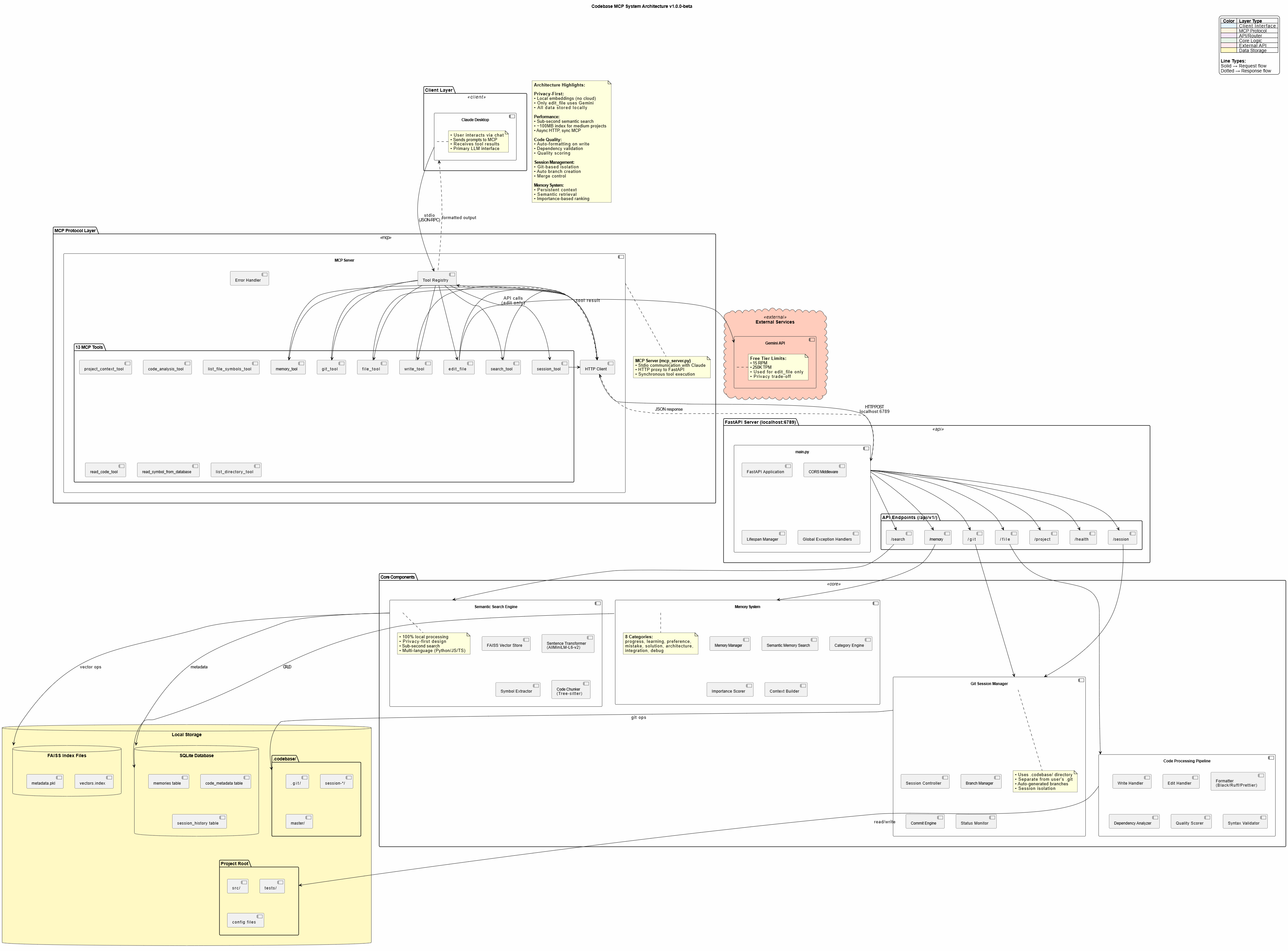
🛠️ Available Tools
Codebase MCP provides 16 MCP tools for comprehensive development automation:
| Tool | Purpose | Key Features |
|---|---|---|
session_tool |
Manage dev sessions | Create branches, auto-commit, merge |
memory_tool |
Store/retrieve knowledge | Persistent context, semantic search |
git_tool |
Git operations | Status, diff, log, commit, branches |
write_tool |
Intelligent file creation | Auto-format, quality scoring, dependency check |
edit_file |
AI-assisted editing | Gemini-powered, error recovery, format validation |
search_tool |
Semantic code search | 4 modes: semantic, fuzzy, text, symbol |
read_code_tool |
Smart code reading | Symbol-level, line ranges, whole file |
project_context_tool |
Project analysis | Structure, dependencies, overview |
list_directory_tool |
Directory exploration | Tree view, metadata, gitignore support |
code_analysis_tool |
Code quality checks | Syntax, linting, imports, dependencies |
list_file_symbols_tool |
Symbol extraction | Functions, classes, interfaces |
read_symbol_from_database |
DB symbol lookup | Fast indexed retrieval |
project_structure_tool |
Project visualization | Enhanced tree with stats |
file_tool |
Basic file operations (legacy) | Read and write by line range; write_tool is preferred for new code |
execute_tool |
Run a command | Arguments, timeout and working directory |
show_directory_tree |
Compact directory tree | Depth 1 to 5, tuned for LLM context |
📈 Performance
- Semantic Search: Sub-second response for typical codebases
- Memory Footprint: ~100MB for medium projects (<20k lines)
- Indexing Speed: ~30 seconds for 10k lines initial index
- Edit Operations: 5-15 seconds (Gemini API + formatting)
- Optimal Project Size: <20,000 lines (tested and verified)
Note: Edit tool can be slow due to Gemini API latency and code formatting. Claude Desktop may timeout on very large edits (use smaller, focused edits).
🎓 Usage Examples
Creating a New Feature
User: "Create a FastAPI endpoint for user authentication with JWT tokens"

Claude:
✅ Searching for existing auth patterns...
✅ Creating session: feat/user-auth
✅ Writing authentication.py with JWT implementation
✅ Auto-formatted with Black + Ruff
✅ Quality score: 95% - Auto-committed
✅ Storing solution in memory
Refactoring Code
User: "Refactor the user service to use dependency injection"

Claude:
✅ Reading current user service implementation
✅ Searching for DI patterns in codebase
✅ Editing with AI assistance (Gemini)
✅ Validating changes with quality gates
✅ Session: refactor/user-di ready for review
Memory-Driven Development
User: "Continue working on the payment integration"

Claude:
✅ Loading memory context...
✅ Found previous progress: Stripe API setup complete
✅ Found previous mistake: Don't use synchronous requests in async endpoints
✅ Continuing from last checkpoint...
🔐 Privacy & Security
Privacy-First Design
- Local Embeddings: AllMiniLM-L6-v2 runs entirely on your machine
- Local Processing: FAISS vector store, SQLite metadata - all local
- No Cloud Dependencies: Except for Gemini API (edit tool only)
Gemini API Usage
- Scope: Only
edit_filetool uses Gemini - Data Sent: Only the file being edited (no project context)
- Alternative: Contributors can add local LLM support (GPU required)
- Cost: Free tier (15 RPM, 250K TPM, 1K RPD)
Security Best Practices
- Never commit
.envwith API keys - Use
.gitignorefor sensitive files - Review AI-generated code before production deployment
- Keep dependencies updated
🤝 Contributing
We welcome contributions! This project was built to be community-driven and extensible.
Priority Areas:
- 🌐 Language Support: Add Java, Go, Rust, PHP, etc.
- 🧠 Local LLM Integration: Replace Gemini with local models
- 🔍 Search Improvements: Enhanced semantic algorithms
- 📊 UI/UX: Improve web dashboard
- ⚡ Performance: Optimization for larger codebases
See CONTRIBUTING.md for detailed guidelines.
📄 License
This project is licensed under the Apache License 2.0 - see LICENSE file for details.
Credits:
- Edit tool techniques inspired by Cursor
- Built with Claude Sonnet 4 and 4.5
- Powered by Model Context Protocol
🗺️ Roadmap
Current Version: v1.0.0-beta
Upcoming Features:
- Community-driven enhancements
- More language support
- Local LLM alternatives
- Performance optimizations
- Advanced prompt engineering templates
📞 Support
- 📖 Documentation: https://danyqe.github.io/codebase-mcp/
- 🐛 Issues: https://github.com/danyQe/codebase-mcp/issues
- 💬 Discussions: https://github.com/danyQe/codebase-mcp/discussions
- 🌟 Star this repo if you find it useful!
🎉 Acknowledgments
Special thanks to:
- Anthropic for Claude and the Model Context Protocol
- Google for the free Gemini API
- Cursor team for pioneering AI-assisted editing techniques
- Open source community for making this possible
Made with ❤️ by developers, for developers
Stop paying for coding assistants. Start building with your own LLM.
Codebase MCP soruları
Codebase MCP hangi araçları sunar?
16 araç sunar; bunlar arasında session_tool, memory_tool, git_tool, write_tool, edit_file yer alır.
Ayrı bir abonelik gerektiriyor mu?
Hayır, Cursor gibi ücretli araçlara açık kaynaklı bir alternatif olarak çalışır ve mevcut Claude Pro veya Team planınızı kullanır.
Kodlarım gizli mi kalıyor?
Evet, yerel embedding ve işleme süreçlerini içeren gizlilik odaklı bir tasarım kullanır; yalnızca düzenlenmekte olan spesifik dosya Gemini API'ye gönderilir.
Hangi programlama dilleri destekleniyor?
Şu anda Python, JavaScript ve TypeScript dillerini desteklemektedir.