
Kod tabanınızı indeksleyerek yapay zeka asistanlarının kod, dokümantasyon ve notlar içinde grep yönteminden çok daha az bağlam kullanarak arama yapmasını sağlar.
Ayrıca bilinen adı CSCSoftware/AiDex, aidex-mcp
- Yıldızlar
- 48
- Araçlar
- 31
- İndirmeler, 30 gün
- —
- En son sürüm
- 1.8.0
- Son commit
- 14 Kas 2026
- Lisans
- MIT
AiDex MCP nedir?
AiDex bir MCP sunucusudur. Kod tabanınızı indeksleyerek yapay zeka asistanlarının kod, dokümantasyon ve notlar içinde grep yönteminden çok daha az bağlam kullanarak arama yapmasını sağlar. 31 araç sunar; örneğin exact, semantic, aidex_init.
Özet, projenin README dosyasından oluşturuldu
AiDex MCP sunucusu hakkında
AiDex, yapay zeka asistanlarına semantik bellek ve verimli arama yeteneği kazandırmak için kod tabanlarını indeksler. Claude Desktop, Cursor, Windsurf veya VS Code Copilot gibi MCP uyumlu istemcileri kullanan geliştiricilere, ağır grep tabanlı aramaların yerine hafif ve tanımlayıcı tabanlı bir indeks sunar. Bu yaklaşım token tüketimini önemli ölçüde azaltır; normalde binlerce token gerektirecek bir sorgu için genellikle sadece 50 token kullanılır.
Kullanıcılar kod, dokümantasyon ve çalışma alanı notları üzerinde tam eşleşmeli, semantik veya hibrit aramalar gerçekleştirebilir. Sunucu; TypeScript, Python, Rust ve Go dahil olmak üzere 14 dili destekler. Dosyaların tamamını okumadan dosya imzalarını getirmek, planlanmış öğelerle bir görev birikimini yönetmek ve farklı sohbetler arasında kalıcı olan oturum notlarını tutmak için özelleşmiş araçlar içerir. Hata ayıklama için, HTTP üzerinden canlı telemetri alan bir Log Hub ve görsel bağlam için optimize edilmiş bir ekran görüntüsü aracı mevcuttur.
Kurulum yerel önceliklidir ve modelden bağımsızdır. Yerel embedding'ler kullanarak tamamen çevrimdışı çalışabilse de kullanıcılar, sorguları tercüme etmek veya sonuçları yeniden sıralamak için Anthropic, OpenAI veya Ollama üzerinden isteğe bağlı olarak bir LLM katmanı yapılandırabilirler. Bir gizlilik anahtarı, açıkça etkinleştirilmediği sürece kod içeriklerinin yerelde kalmasını sağlar.
Neler yapabilirsiniz
- 1Verimli kod navigasyonuYapay zeka bağlamını alakasız metin eşleşmeleriyle doldurmadan belirli sınıf veya metod tanımlarını bulun.
- 2Yapısal kod analiziDosyanın tam içeriğini okumadan yapısını anlamak için dosyadaki sınıf ve metod imzalarını getirin.
- 3Projeler arası keşifÇalışma alanınızdaki indekslenmiş tüm depolarda aynı anda belirli tanımlayıcıları veya kalıpları arayın.
- 4Kalıcı görev yönetimiYapay zekanın gelecekteki oturumlarda referans verebileceği önceliklere ve etiketlere sahip kodlama görevleri oluşturun ve takip edin.
- 5Canlı uygulama izlemeKodun gerçek zamanlı davranışını gözlemlemek için canlı uygulama günlüklerini doğrudan yapay zekaya aktarın.
Projenin README dosyasından alınmıştır. Her kullanım durumu, oradaki bir alıntı ile kontrol edilir.
AiDex MCP nasıl yüklenir
Biçimler 10 Kas 2026 tarihinde doğrulandıCursor'a ekleGoose'a ekleAiDex MCP'yi Claude Code içine yükleyin
$ claude mcp add aidex -- npx -y aidex-mcpAiDex MCP'yi Cursor içine yükleyin
~/.cursor/mcp.json
{
  "mcpServers": {
    "aidex": {
      "command": "npx",
      "args": [
        "-y",
        "aidex-mcp"
      ]
    }
  }
}AiDex MCP'yi VS Code içine yükleyin
.vscode/mcp.json
{
  "servers": {
    "aidex": {
      "type": "stdio",
      "command": "npx",
      "args": [
        "-y",
        "aidex-mcp"
      ]
    }
  }
}AiDex MCP'yi VS Code CLI içine yükleyin
$ code --add-mcp '{"name":"aidex","type":"stdio","command":"npx","args":["-y","aidex-mcp"]}'AiDex MCP'yi Claude Desktop içine yükleyin
claude_desktop_config.json
{
  "mcpServers": {
    "aidex": {
      "command": "npx",
      "args": [
        "-y",
        "aidex-mcp"
      ]
    }
  }
}AiDex MCP'yi Codex içine yükleyin
$ codex mcp add aidex -- npx -y aidex-mcpAiDex MCP'yi Codex config.toml içine yükleyin
~/.codex/config.toml
[mcp_servers.aidex]
command = "npx"
args = ["-y", "aidex-mcp"]
AiDex MCP'yi Gemini CLI içine yükleyin
$ gemini mcp add -s user aidex npx -- -y aidex-mcpAiDex MCP'yi Gemini settings.json içine yükleyin
~/.gemini/settings.json
{
  "mcpServers": {
    "aidex": {
      "command": "npx",
      "args": [
        "-y",
        "aidex-mcp"
      ]
    }
  }
}AiDex MCP araçları 31
README dosyasından algılandıexactsemanticaidex_initaidex_queryaidex_signatureaidex_signaturesaidex_updateaidex_removeaidex_summaryaidex_treeaidex_describeaidex_link
| exact | — | |
| semantic | — | |
| aidex_init | — | |
| aidex_query | — | |
| aidex_signature | — | |
| aidex_signatures | — | |
| aidex_update | — | |
| aidex_remove | — | |
| aidex_summary | — | |
| aidex_tree | — | |
| aidex_describe | — | |
| aidex_link | — |
31 aracın tümünü gösterDaha az araç göster
aidex_unlinkaidex_linksaidex_statusaidex_scanaidex_filesaidex_noteaidex_sessionaidex_vieweraidex_taskaidex_tasksaidex_screenshotaidex_windowsaidex_global_initaidex_global_statusaidex_global_queryaidex_global_signaturesaidex_global_refreshaidex_global_guidelineaidex_log
| aidex_unlink | — | |
| aidex_links | — | |
| aidex_status | — | |
| aidex_scan | — | |
| aidex_files | — | |
| aidex_note | — | |
| aidex_session | — | |
| aidex_viewer | — | |
| aidex_task | — | |
| aidex_tasks | — | |
| aidex_screenshot | — | |
| aidex_windows | — | |
| aidex_global_init | — | |
| aidex_global_status | — | |
| aidex_global_query | — | |
| aidex_global_signatures | — | |
| aidex_global_refresh | — | |
| aidex_global_guideline | — | |
| aidex_log | — |
Otomatik kontroller
Çalıştırıldı 12 Kas 2026Tam rapor →Otomatik kontrollerimizden geçti. Bu bir güvenlik denetimi değildir: kodu okuyun ve sunucuya ihtiyaç duyduğu en dar erişimi verin. Kontroller nasıl çalışır

- Kaynak deposu bağlantılı ve erişilebilirGeçti
- Açık kaynak lisansı (OSI)Geçti
- Son bir yıl içinde commit veya sürüm mevcutGeçti
- Paket adı popüler bir pakete yakın değilGeçti
- Uzak uç nokta HTTPS kullanıyorKontrol edilmedi
- Yıkıcı araçlar etiketlenmişGeçti
- Modele yönelik gizli talimat yokGeçti
- Pakette veya bağımlılıklarında kritik uyarı yokGeçti
AiDex



The persistent brain for AI coding agents.
AiDex is an MCP server that gives AI coding assistants a memory, semantic search, and live telemetry — local-first, model-agnostic. Works with any MCP-compatible AI assistant: Claude Code, Claude Desktop, Cursor, Windsurf, Gemini CLI, VS Code Copilot, and more.
Three Pillars
🧠 Memory — Tasks, notes, and session-notes survive every chat. Auto-logged history, scheduled tasks, cross-session continuity. Your AI knows tomorrow what mattered today.
🔍 Search — Three modes: exact (identifier), semantic (concept), hybrid (RRF fusion of both). Embeds code, docs, and workspace items into one ranking. Cross-project — every repo in one query. Optional LLM layer translates non-English queries and reranks results.
🌐 Telemetry — LogHub receives live logs from any app via HTTP (no SDK). The AI watches what your code actually does, not just what it says. Live-streamed in the Viewer.
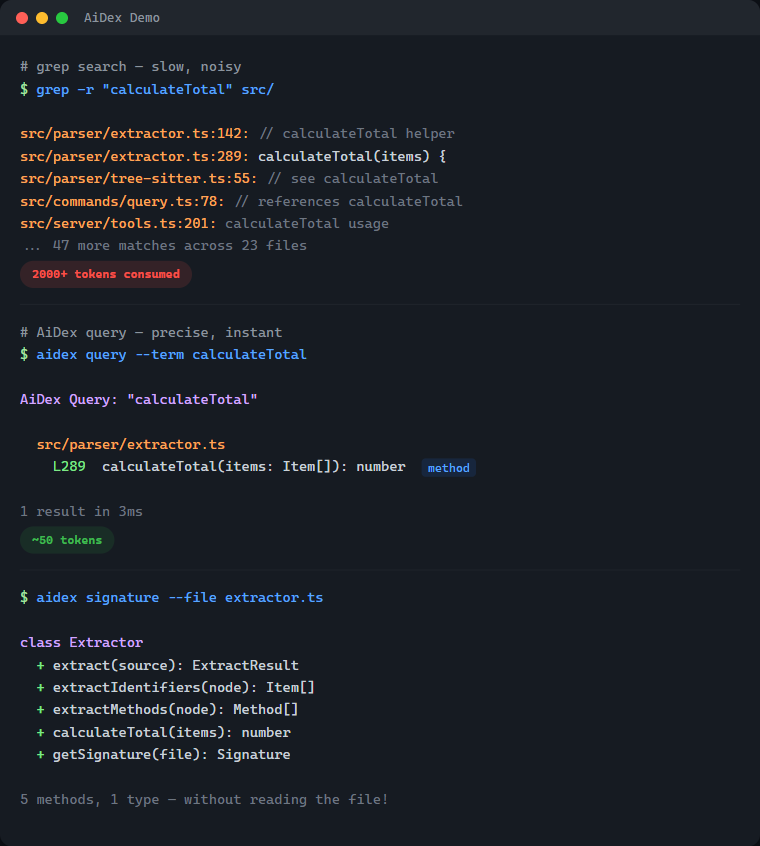
| Without AiDex | With AiDex | |
|---|---|---|
Find PlayerHealth |
Grep → 200 hits in 40 files → reads 5 files → 2,000+ tokens | 1 query → 3 exact locations → ~50 tokens |
| Get file structure | Reads entire 500-line file → 1,500 tokens | Signatures → classes + methods → ~80 tokens |
| What changed today? | git diff + grep + context → 3,000+ tokens |
Time-filtered query → ~50 tokens |
What's Inside — 33 Tools in One Server
| Category | Tools | What it does |
|---|---|---|
| Semantic Search 🆕 | search, settings |
Hybrid / semantic / exact retrieval over code, docs & workspace. Settings tab to configure embeddings + LLM layer |
| Index & Identifier Search | init, query, update, remove, status |
Index your project, search identifiers by name (exact/contains/starts_with), time-based filtering |
| Signatures | signature, signatures |
Get classes + methods of any file without reading it — single file or glob pattern |
| Project Overview | summary, tree, describe, files |
Entry points, language breakdown, file tree with stats, file listing by type |
| Cross-Project | link, unlink, links, scan |
Link dependencies, discover indexed projects |
| Global Search | global_init, global_query, global_signatures, global_status, global_refresh |
Search identifiers across ALL your projects — "Have I ever written X?" |
| Guidelines | global_guideline |
Persistent AI instructions & coding conventions — shared across all projects |
| Sessions | session, note |
Track sessions, detect external changes, leave notes for next session (with searchable history) |
| Task Backlog | task, tasks |
Built-in task management with priorities, tags, auto-logged history, and scheduled/recurring tasks |
| Log Hub | log |
Universal log receiver — any program sends logs via HTTP, queryable by the AI, live in Viewer |
| Screenshots | screenshot, windows |
Cross-platform screen capture with LLM optimization — scale + color reduction saves up to 95% tokens |
| Viewer | viewer |
Interactive browser UI with file tree, signatures, tasks, logs, search, and live reload |
14 languages — C#, TypeScript, JavaScript, Rust, Python, C, C++, Java, Go, PHP, Ruby, HCL/Terraform, Kotlin, Swift — plus Astro frontmatter
# Find where "PlayerHealth" is defined — 1 call, ~50 tokens
aidex_query({ term: "PlayerHealth" })
→ Engine.cs:45, Player.cs:23, UI.cs:156

# All methods in a file — without reading the whole file
aidex_signature({ file: "src/Engine.cs" })
→ class GameEngine { Update(), Render(), LoadScene(), ... }

# What changed in the last 2 hours?
aidex_query({ term: "render", modified_since: "2h" })

# Search across ALL your projects at once
aidex_global_query({ term: "TransparentWindow", mode: "contains" })
→ Found in: LibWebAppGpu (3 hits), DebugViewer (1 hit)

# Leave a note for your next session
aidex_note({ path: ".", note: "Test the parser fix after restart" })

# Create a task while working
aidex_task({ path: ".", action: "create", title: "Fix edge case in parser", priority: 1, tags: "bug" })
Table of Contents
- What's Inside
- Semantic Search & LLM Layer 🆕
- The Problem
- The Solution
- Why Not Just Grep?
- How It Works
- Features
- Supported Languages
- Quick Start
- Available Tools
- Time-based Filtering
- Project Structure
- Session Notes
- Task Backlog
- Global Search
- AI Guidelines
- Log Hub
- Debug Dashboard
- Screenshots — LLM-Optimized
- Interactive Viewer
- CLI Usage
- Performance
- Technology
- Contributing
- License
Semantic Search & LLM Layer
v2.0 added semantic search via locally-run embeddings — your AI can find a function even when it doesn't know the exact identifier.
Three modes — pick the right tool for the question
| Mode | What it does | When to use |
|---|---|---|
exact |
Identifier match (same as aidex_query) |
You know the name. PlayerHealth → 3 hits |
semantic |
Vector KNN over embedded code+docs+workspace | You know the concept. "how do we cache the model" → finds getQueryEmbedder |
hybrid (default) |
RRF fusion of both | Mixed queries. Robust by default |
What gets embedded
- Code — every method and type, three-tier chunking (signature + doc-comment + weighted identifier bag)
- Docs — Markdown sections (README, CHANGELOG, docs/, plan files), split at heading boundaries
- Workspace — tasks, task logs, session notes, archived note history
One ranking, all kinds. A query like "how to write logs from external programs" surfaces the README's ## Log Hub section first, then the log method in commands/log.ts, then any related task.
Setup
// Enable embeddings on a project (one-time, ~30s for AiDex itself, cached afterwards)
aidex_init({ path: ".", embeddings: true })

// Search
aidex_search({ query: "how do we batch requests to the LLM", path: "." })
aidex_search({ query: "retry with backoff", scope: "all" })  // across every embedded project
Or use the Settings tab in the Viewer (aidex_settings({ path: ".", open: true })) — toggles for embeddings, LLM provider, model, and the privacy switch.
Optional LLM layer
When an Anthropic / OpenAI / OpenRouter / Ollama / HuggingFace API key is configured, AiDex can:
- Translate non-English queries → "wie speichere ich Logs lokal" finds the right code
- Expand vague queries into 2-4 concrete subqueries (RRF-merged)
- Rerank top-N retrieval candidates
Privacy switch llm_send_code defaults to off — only your literal query and metadata (paths, names, anchors) are sent. Code bodies stay local. Per-project, easy to verify in Settings.
Local-first: works fully offline with pure embeddings. The LLM layer is opt-in, never required.
The Problem
Every time your AI assistant searches for code, it:
- Greps through thousands of files → hundreds of results flood the context
- Reads file after file to understand the structure → more context consumed
- Forgets everything when the session ends → repeat from scratch
A single "Where is X defined?" question can eat 2,000+ tokens. Do that 10 times and you've burned half your context on navigation alone.
The Solution
Index once, query forever:
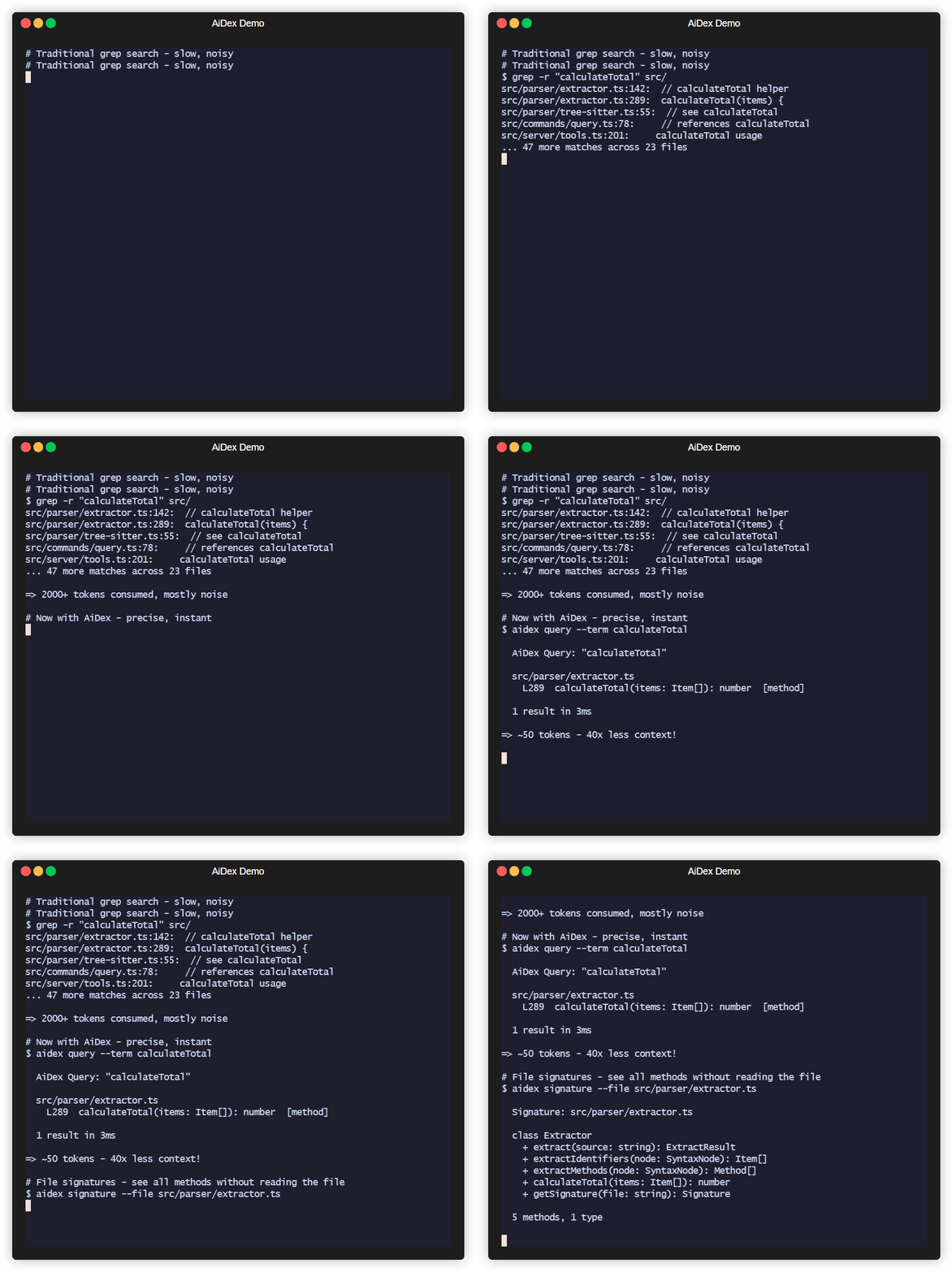
# Before: grep flooding your context
AI: grep "PlayerHealth" → 200 hits in 40 files
AI: read File1.cs, File2.cs, File3.cs...
→ 2000+ tokens consumed, 5+ tool calls

# After: precise results, minimal context
AI: aidex_query({ term: "PlayerHealth" })
→ Engine.cs:45, Player.cs:23, UI.cs:156
→ ~50 tokens, 1 tool call
Result: 50-80% less context used for code navigation.
Why Not Just Grep?
| Grep/Ripgrep | AiDex | |
|---|---|---|
| Context usage | 2000+ tokens per search | ~50 tokens |
| Results | All text matches | Only identifiers |
| Precision | log matches catalog, logarithm |
log finds only log |
| Persistence | Starts fresh every time | Index survives sessions |
| Structure | Flat text search | Knows methods, classes, types |
The real cost of grep: Every grep result includes surrounding context. Search for User in a large project and you'll get hundreds of hits - comments, strings, partial matches. Your AI reads through all of them, burning context tokens on noise.
AiDex indexes identifiers: It uses Tree-sitter to actually parse your code. When you search for User, you get the class definition, the method parameters, the variable declarations - not every comment that mentions "user".
How It Works
-
Index your project once (~1 second per 1000 files)
aidex_init({ path: "/path/to/project" }) -
AI searches the index instead of grepping
aidex_query({ term: "Calculate", mode: "starts_with" }) → All functions starting with "Calculate" + exact line numbers aidex_query({ term: "Player", modified_since: "2h" }) → Only matches changed in the last 2 hours -
Get file overviews without reading entire files
aidex_signature({ file: "src/Engine.cs" })
→ All classes, methods, and their signatures
The index lives in .aidex/index.db (SQLite) - fast, portable, no external dependencies.
Features
- Tree-sitter Parsing: Real code parsing, not regex — indexes identifiers, ignores keywords and noise
- ~50 Tokens per Search: vs 2000+ with grep — your AI keeps its context for actual work
- Persistent Index: Survives between sessions — no re-scanning, no re-reading
- Incremental Updates: Re-index single files after changes, not the whole project
- Time-based Filtering: Find what changed in the last hour, day, or week
- Auto-Cleanup: Excluded files (e.g., build outputs) are automatically removed from index
- Zero Dependencies: SQLite with WAL mode — single file, fast, portable
Supported Languages
| Language | Extensions |
|---|---|
| C# | .cs |
| TypeScript | .ts, .tsx |
| JavaScript | .js, .jsx, .mjs, .cjs |
| Rust | .rs |
| Python | .py, .pyw |
| C | .c, .h |
| C++ | .cpp, .cc, .cxx, .hpp, .hxx |
| Java | .java |
| Go | .go |
| PHP | .php |
| Ruby | .rb, .rake |
| HCL/Terraform | .tf, .tfvars, .hcl |
| Kotlin | .kt, .kts |
| Swift | .swift |
| Astro | .astro (TypeScript frontmatter) |
Quick Start
Prerequisites
- Node.js ≥ 20 (check with
node --version)- macOS:
brew install nodeornvm install 20 && nvm use 20 - Linux: use your package manager or nvm
- Windows: nodejs.org
- If you use
nvm, the repo ships a.nvmrc—nvm usepicks the right version automatically.
- macOS:
1. Install
npm install -g aidex-mcp
That's it. Setup runs automatically after install — it detects your installed AI clients (Claude Code, Claude Desktop, Cursor, Windsurf, Gemini CLI, VS Code Copilot) and registers AiDex as an MCP server. It also adds usage instructions to your AI's config (~/.claude/CLAUDE.md, ~/.gemini/GEMINI.md).
To re-run setup manually: aidex setup | To unregister: aidex unsetup | To skip auto-setup: AIDEX_NO_SETUP=1 npm install -g aidex-mcp
2. Or register manually with your AI assistant
For Claude Code (~/.claude/settings.json or ~/.claude.json):
{
  "mcpServers": {
    "aidex": {
      "type": "stdio",
      "command": "aidex",
      "env": {}
    }
  }
}
For Claude Desktop (%APPDATA%/Claude/claude_desktop_config.json on Windows):
{
  "mcpServers": {
    "aidex": {
      "command": "aidex"
    }
  }
}
Note: Both
aidexandaidex-mcpwork as command names.
Important: The server name in your config determines the MCP tool prefix. Use
"aidex"as shown above — this gives you tool names likeaidex_query,aidex_signature, etc. Using a different name (e.g.,"codegraph") would change the prefix accordingly.
For Gemini CLI (~/.gemini/settings.json):
{
  "mcpServers": {
    "aidex": {
      "command": "aidex"
    }
  }
}
For VS Code Copilot (run MCP: Open User Configuration in Command Palette):
{
  "servers": {
    "aidex": {
      "type": "stdio",
      "command": "aidex"
    }
  }
}
For other MCP clients: See your client's documentation for MCP server configuration.
3. Make your AI actually use it
Add to your AI's instructions (e.g., ~/.claude/CLAUDE.md for Claude Code, or the equivalent for your AI client). This tells the AI when and how to use AiDex instead of grepping:
## AiDex - Persistent Code Index (MCP Server)

AiDex provides fast, precise code search through a pre-built index.
**Always prefer AiDex over Grep/Glob for code searches.**

### REQUIRED: Before using Grep/Glob/Read for code searches
Do I want to search code? ├── .aidex/ exists → STOP! Use AiDex instead ├── .aidex/ missing → run aidex_init (don't ask), THEN use AiDex └── Config/Logs/Text → Grep/Read is fine
**NEVER do this when .aidex/ exists:**
- ❌ `Grep pattern="functionName"` → ✅ `aidex_query term="functionName"`
- ❌ `Grep pattern="class.*Name"` → ✅ `aidex_query term="Name" mode="contains"`
- ❌ `Read file.cs` to see methods → ✅ `aidex_signature file="file.cs"`
- ❌ `Glob pattern="**/*.cs"` + Read → ✅ `aidex_signatures pattern="**/*.cs"`

### Session-Start Rule (REQUIRED — every session, no exceptions)

1. Call `aidex_session({ path: "<project>" })` — detects external changes, auto-reindexes
2. If `.aidex/` does NOT exist → run `aidex_init` automatically (don't ask)
3. If a session note exists → **show it to the user** before continuing
4. **Before ending a session:** always leave a note about what to do next

### Question → Right Tool

| Question | Tool |
|----------|------|
| "Where is X defined?" | `aidex_query term="X"` |
| "Find anything containing X" | `aidex_query term="X" mode="contains"` |
| "All functions starting with X" | `aidex_query term="X" mode="starts_with"` |
| "What methods does file Y have?" | `aidex_signature file="Y"` |
| "Explore all files in src/" | `aidex_signatures pattern="src/**"` |
| "Project overview" | `aidex_summary` + `aidex_tree` |
| "What changed recently?" | `aidex_query term="X" modified_since="2h"` |
| "What files changed today?" | `aidex_files path="." modified_since="8h"` |
| "Have I ever written X?" | `aidex_global_query term="X" mode="contains"` |
| "Which project has class Y?" | `aidex_global_signatures term="Y" kind="class"` |
| "All indexed projects?" | `aidex_global_status` |

### Search Modes

- **`exact`** (default): Finds only the exact identifier — `log` won't match `catalog`
- **`contains`**: Finds identifiers containing the term — `render` matches `preRenderSetup`
- **`starts_with`**: Finds identifiers starting with the term — `Update` matches `UpdatePlayer`, `UpdateUI`

### All Tools (30)

| Category | Tools | Purpose |
|----------|-------|---------|
| Search & Index | `aidex_init`, `aidex_query`, `aidex_update`, `aidex_remove`, `aidex_status` | Index project, search identifiers (exact/contains/starts_with), time filter |
| Signatures | `aidex_signature`, `aidex_signatures` | Get classes + methods without reading files |
| Overview | `aidex_summary`, `aidex_tree`, `aidex_describe`, `aidex_files` | Entry points, file tree, file listing by type |
| Cross-Project | `aidex_link`, `aidex_unlink`, `aidex_links`, `aidex_scan` | Link dependencies, discover projects |
| Global Search | `aidex_global_init`, `aidex_global_query`, `aidex_global_signatures`, `aidex_global_status`, `aidex_global_refresh` | Search across ALL projects |
| Guidelines | `aidex_global_guideline` | Persistent AI instructions & conventions (key-value, global) |
| Sessions | `aidex_session`, `aidex_note` | Track sessions, leave notes (with searchable history) |
| Tasks | `aidex_task`, `aidex_tasks` | Built-in backlog with priorities, tags, summaries, auto-logged history, scheduled/recurring tasks |
| Log Hub | `aidex_log` | Universal log receiver — any program sends logs via HTTP, AI queries them, live in Viewer |
| Screenshots | `aidex_screenshot`, `aidex_windows` | Screen capture with LLM optimization (scale + color reduction, no index needed) |
| Viewer | `aidex_viewer` | Interactive browser UI with file tree, signatures, tasks, and live logs |

**14 languages:** C#, TypeScript, JavaScript, Rust, Python, C, C++, Java, Go, PHP, Ruby, HCL/Terraform, Kotlin, Swift — plus Astro frontmatter

### Session Notes

Leave notes for the next session — they persist in the database:
aidex_note({ path: ".", note: "Test the fix after restart" }) # Write aidex_note({ path: ".", note: "Also check edge cases", append: true }) # Append aidex_note({ path: "." }) # Read aidex_note({ path: ".", search: "parser" }) # Search history aidex_note({ path: ".", clear: true }) # Clear
- **Before ending a session:** automatically leave a note about next steps
- **User says "remember for next session: ..."** → write it immediately

### Task Backlog

Track TODOs, bugs, and features right next to your code index:
aidex_task({ path: ".", action: "create", title: "Fix bug", priority: 1, tags: "bug" }) aidex_task({ path: ".", action: "update", id: 1, status: "done" }) aidex_task({ path: ".", action: "log", id: 1, note: "Root cause found" }) aidex_tasks({ path: ".", status: "active" })
Scheduled & recurring tasks
aidex_task({ path: ".", action: "create", title: "Check PR status", due: "3d", interval: "3d", task_action: "gh pr list" })
Priority: 1=high, 2=medium, 3=low | Status: `backlog → active → done | cancelled`

### Global Search (across all projects)
aidex_global_init({ path: "/path/to/all/repos" }) # Scan & register aidex_global_init({ path: "...", index_unindexed: true }) # + auto-index small projects aidex_global_query({ term: "TransparentWindow", mode: "contains" }) # Search everywhere aidex_global_signatures({ term: "Render", kind: "method" }) # Find methods everywhere aidex_global_status({ sort: "recent" }) # List all projects
### Screenshots
aidex_screenshot() # Full screen aidex_screenshot({ mode: "active_window" }) # Active window aidex_screenshot({ mode: "window", window_title: "VS Code" }) # Specific window aidex_screenshot({ scale: 0.5, colors: 2 }) # B&W, half size (ideal for LLM) aidex_screenshot({ colors: 16 }) # 16 colors (UI readable) aidex_windows({ filter: "chrome" }) # Find window titles
No index needed. Returns file path → use `Read` to view immediately.

**LLM optimization strategy:** Always start with aggressive settings, then retry if unreadable:
1. First try: `scale: 0.5, colors: 2` (B&W, half size — smallest possible)
2. If unreadable: retry with `colors: 16` (adds shading for UI elements)
3. If still unclear: `scale: 0.75` or omit `colors` for full quality
4. **Remember** what works for each window/app during the session — don't retry every time.
4. Index your project
Ask your AI: "Index this project with AiDex"
Or manually in the AI chat:
aidex_init({ path: "/path/to/your/project" })
Available Tools
| Tool | Description |
|---|---|
aidex_init |
Index a project (creates .aidex/) |
aidex_query |
Search by term (exact/contains/starts_with) |
aidex_signature |
Get one file's classes + methods |
aidex_signatures |
Get signatures for multiple files (glob) |
aidex_update |
Re-index a single changed file |
aidex_remove |
Remove a deleted file from index |
aidex_summary |
Project overview |
aidex_tree |
File tree with statistics |
aidex_describe |
Add documentation to summary |
aidex_link |
Link another indexed project |
aidex_unlink |
Remove linked project |
aidex_links |
List linked projects |
aidex_status |
Index statistics |
aidex_scan |
Find indexed projects in directory tree |
aidex_files |
List project files by type (code/config/doc/asset) |
aidex_note |
Read/write session notes (persists between sessions) |
aidex_session |
Start session, detect external changes, auto-reindex |
aidex_viewer |
Open interactive project tree in browser |
aidex_task |
Create, read, update, delete tasks with priority and tags |
aidex_tasks |
List and filter tasks by status, priority, or tag |
aidex_screenshot |
Take a screenshot (fullscreen, window, region) with optional scale + color reduction |
aidex_windows |
List open windows for screenshot targeting |
aidex_global_init |
Scan directory tree, register all indexed projects in global DB |
aidex_global_status |
List all registered projects with stats |
aidex_global_query |
Search terms across ALL registered projects |
aidex_global_signatures |
Search methods/types by name across all projects |
aidex_global_refresh |
Update stats and remove stale projects from global DB |
aidex_global_guideline |
Store/retrieve AI guidelines and coding conventions (key-value, global) |
aidex_log |
Universal log receiver — start HTTP server, query logs, live stream in Viewer |
Time-based Filtering
Track what changed recently with modified_since and modified_before:
aidex_query({ term: "render", modified_since: "2h" })   # Last 2 hours
aidex_query({ term: "User", modified_since: "1d" })     # Last day
aidex_query({ term: "API", modified_since: "1w" })      # Last week
Supported formats:
- Relative:
30m(minutes),2h(hours),1d(days),1w(weeks) - ISO date:
2026-01-27or2026-01-27T14:30:00
Perfect for questions like "What did I change in the last hour?"
Project Structure
AiDex indexes ALL files in your project (not just code), letting you query the structure:
aidex_files({ path: ".", type: "config" })  # All config files
aidex_files({ path: ".", type: "test" })    # All test files
aidex_files({ path: ".", pattern: "**/*.md" })  # All markdown files
aidex_files({ path: ".", modified_since: "30m" })  # Changed this session
File types: code, config, doc, asset, test, other, dir
Use modified_since to find files changed in this session - perfect for "What did I edit?"
AiDex MCP soruları
AiDex MCP'yi Claude Code'a nasıl eklerim?
Terminalinizde claude mcp add aidex -- npx -y aidex-mcp komutunu çalıştırın. Her projede kullanılabilir olması için --scope user ekleyin.
AiDex MCP'yi Cursor'a nasıl eklerim?
~/.cursor/mcp.json dosyasını açın ve yukarıdaki yükleme bölümünde gösterilen Cursor yapılandırmasını kullanarak sunucuyu mcpServers altına ekleyin.
AiDex MCP hangi araçları sunar?
31 araç sunar; bunlar arasında exact, semantic, aidex_init, aidex_query, aidex_signature yer alır.
AiDex hangi dilleri indeksler?
C#, TypeScript, JavaScript, Rust, Python, C, C++, Java, Go, PHP, Ruby, HCL/Terraform, Kotlin ve Swift dahil olmak üzere 14 dili destekler.
AiDex bir API anahtarı veya internet bağlantısı gerektirir mi?
Hayır; semantik arama, yerel embedding'ler ile tamamen çevrimdışı çalışır; LLM katmanı ise isteğe bağlıdır.
AiDex indeksi nerede saklanır?
İndeks, proje içinde .aidex/index.db konumunda bir SQLite veritabanı dosyası olarak saklanır.
AiDex hangi arama modlarını sunar?
Tam tanımlayıcı eşleştirme, semantik vektör araması ve her iki sıralama yöntemini birleştiren hibrit mod sunar.