
Scraper MCP sunucusu
Commit 12 Kas 2026Web içeriğini markdown formatına dönüştürerek ve optimize edilmiş web kazıma için sunucu tarafında CSS filtreleme uygulayarak LLM token kullanımını azaltır.
Ayrıca bilinen adı cotdp/scraper-mcp
- Yıldızlar
- 8
- Araçlar
- 6
- İndirmeler, 30 gün
- —
- En son sürüm
- —
- Son commit
- 12 Kas 2026
- Lisans
- MIT
Scraper MCP nedir?
Web içeriğini markdown formatına dönüştürerek ve optimize edilmiş web kazıma için sunucu tarafında CSS filtreleme uygulayarak LLM token kullanımını azaltır. 6 araç sunar; örneğin scrape_url, scrape_url_html, scrape_url_text.
Özet, projenin README dosyasından oluşturuldu
Scraper MCP sunucusu hakkında
scraper-mcp, HTML'i optimize edilmiş markdown formatına dönüştürerek yapay zeka modelleri için temiz web içeriği çıkarılmasını sağlar. Bu server, sunucu tarafında CSS filtreleme ve hedefli içerik çıkarma yöntemleriyle token tüketimini %70-90 oranında azaltır. Claude Code veya Claude Desktop gibi istemciler kullanan, Docker üzerinden yerel olarak veya uzak bir servis olarak çalıştıran geliştiriciler için tasarlanmıştır.
Kullanıcılar; ham HTML, markdown, düz metin ve bağlantı çıkarma dahil olmak üzere dört farklı kazıma modu arasından seçim yapabilirler. Tek sayfa uygulamaları (SPA) veya dinamik içeriğe sahip siteler için server, JavaScript render işlemi gerçekleştirmek üzere Playwright kullanır. Sistem ayrıca, web araması ve karmaşık akıl yürütme işlemleri için Perplexity veya OpenRouter API anahtarı gerektiren entegre Perplexity AI araçlarını da içerir.
Yerleşik bir izleme paneli; gerçek zamanlı istatistikler, önbellek metrikleri ve araçları test etmek için etkileşimli bir playground sunar. Güvenliği sağlamak amacıyla, MCP uç noktası güvenilir istemciler için tasarlanmıştır ve bir loopback adresinde veya kimlik doğrulamalı bir gateway arkasında tutulmalıdır. Yönetim özellikleri, token tabanlı bir kimlik doğrulama sistemi ile korunmaktadır.
Neler yapabilirsiniz
- 1LLM token maliyetlerini düşürünWeb sayfalarını markdown formatına dönüştürün ve gereksiz HTML öğelerini temizlemek için CSS seçicileri kullanın.
- 2Dinamik tek sayfa uygulamalarını kazıyınVerileri görüntülemek için JavaScript yürütülmesi gerektiren React veya Vue uygulamalarından içerik render edin.
- 3Yapay zeka destekli web araştırması yapınEntegre Perplexity AI yeteneklerini kullanarak karmaşık aramalar ve akıl yürütme görevleri gerçekleştirin.
- 4Kazıma performansını izleyinİstek istatistiklerini ve önbellek başarı oranlarını görsel bir arayüz üzerinden takip edin.
Projenin README dosyasından alınmıştır. Her kullanım durumu, oradaki bir alıntı ile kontrol edilir.
Scraper MCP araçları 6
README dosyasından algılandıscrape_urlscrape_url_htmlscrape_url_textscrape_extract_linksperplexityperplexity_reason
| scrape_url | — | |
| scrape_url_html | — | |
| scrape_url_text | — | |
| scrape_extract_links | — | |
| perplexity | — | |
| perplexity_reason | — |
Yapılandırma
ENABLE_PROMPTSENABLE_RESOURCESOPENROUTER_API_KEYPERPLEXITY_API_KEYPERPLEXITY_PROVIDERPLAYWRIGHT_DISABLE_GPUPLAYWRIGHT_MAX_CONTEXTSPLAYWRIGHT_TIMEOUTSCRAPEOPS_API_KEYSCRAPEOPS_RENDER_JS
| Ad | Açıklama | Sunucu |
|---|---|---|
| ENABLE_PROMPTS | — | |
| ENABLE_RESOURCES | — | |
| OPENROUTER_API_KEY | — | |
| PERPLEXITY_API_KEY | — | |
| PERPLEXITY_PROVIDER | — | |
| PLAYWRIGHT_DISABLE_GPU | — | |
| PLAYWRIGHT_MAX_CONTEXTS | — | |
| PLAYWRIGHT_TIMEOUT | — | |
| SCRAPEOPS_API_KEY | — | |
| SCRAPEOPS_RENDER_JS | — |
Otomatik kontroller
Çalıştırıldı 14 Kas 2026Tam rapor →Henüz doğrulanmadı. Bir sunucunun 80 puana, ciddi bir bulgu olmamasına ve kontrol edebilmemiz için yeterli veriye ihtiyacı vardır. Kontroller nasıl çalışır · Daha fazla puan için nelerin düzeltileceği

- Kaynak deposu bağlantılı ve erişilebilircotdp/scraper-mcp is public and reachablegithub.com/cotdp/scraper-mcp ↗Geçti
- Paket, bu depoyu kaynağı olarak gösteriyorKontrol edilmedi
- Derleme kökeni (Sigstore onayı)Kontrol edilmedi
- Açık kaynak lisansı (OSI)MITspdx.org/licenses/MIT.html ↗Geçti
- Son bir yıl içinde commit veya sürüm mevcutLast commit or release 2026-11-12github.com/cotdp/scraper-mcp ↗Geçti
- OpenSSF ScorecardKontrol edilmedi
- Paket adı popüler bir pakete yakın değilKontrol edilmedi
- Pakette veya bağımlılıklarında kritik uyarı yokKontrol edilmedi
- Modele yönelik gizli talimat yok6 tool descriptions and the README read; no override phrases, credential paths or hidden charactersGeçti
- Yıkıcı araçlar etiketlenmişNo tool named like delete, drop or execGeçti
- Uzak uç nokta MCP el sıkışmasına yanıt veriyorKontrol edilmedi
Scraper MCP



A context-optimized MCP server for web scraping. Reduces LLM token usage by 70-90% through server-side HTML filtering, markdown conversion, and CSS selector targeting.
The latest Docker image updates on version tags or a manual Docker publish run.
Quick Start
# Run with Docker (GitHub Container Registry)
docker run -d -p 127.0.0.1:8000:8000 --name scraper-mcp ghcr.io/cotdp/scraper-mcp:latest

# Add to Claude Code
claude mcp add --transport http scraper http://localhost:8000/mcp --scope user
Try it:
> scrape https://example.com
> scrape and filter .article-content from https://blog.example.com/post
Endpoints:
- MCP:
http://localhost:8000/mcp - Dashboard:
http://localhost:8000/
The MCP endpoint is for trusted clients and can scrape private network addresses.
Keep it on loopback or behind an authenticated gateway. To enable the dashboard,
inject SCRAPER_ADMIN_TOKEN into the container (for example, add
-e SCRAPER_ADMIN_TOKEN when the value is already exported) and sign in with
username admin and the token as the password. Administration is disabled without
a token; /healthz remains public. See Security and the
0.5.0 migration notes before upgrading.
Features
Web Scraping
- 4 scraping modes: Raw HTML, markdown, plain text, link extraction
- JavaScript rendering: Optional Playwright-based rendering for SPAs and dynamic content
- CSS selector filtering: Extract only relevant content server-side
- Batch operations: Process multiple URLs concurrently
- Smart caching: Three-tier cache system (realtime/default/static)
- Retry logic: Exponential backoff for transient failures
Perplexity AI Integration
- Web search: AI-powered search with citations (
perplexitytool) - Reasoning: Complex analysis with step-by-step reasoning (
perplexity_reasontool) - Requires
PERPLEXITY_API_KEYand/orOPENROUTER_API_KEY(overridable at runtime) - OpenRouter backend: serve the same Sonar models via OpenRouter — set
PERPLEXITY_PROVIDER=openrouter(or leave onautoto fall back when only an OpenRouter key is present) - Model allowlist (opt-in): only
sonaris enabled by default;sonar-pro,sonar-reasoning,sonar-reasoning-pro, andsonar-deep-researchmust be enabled explicitly to control cost (see docs/CONFIGURATION.md)
Monitoring Dashboard
- Real-time request statistics and cache metrics
- Interactive API playground for testing tools
- Runtime configuration without restarts
- Token authentication and credential-safe configuration responses
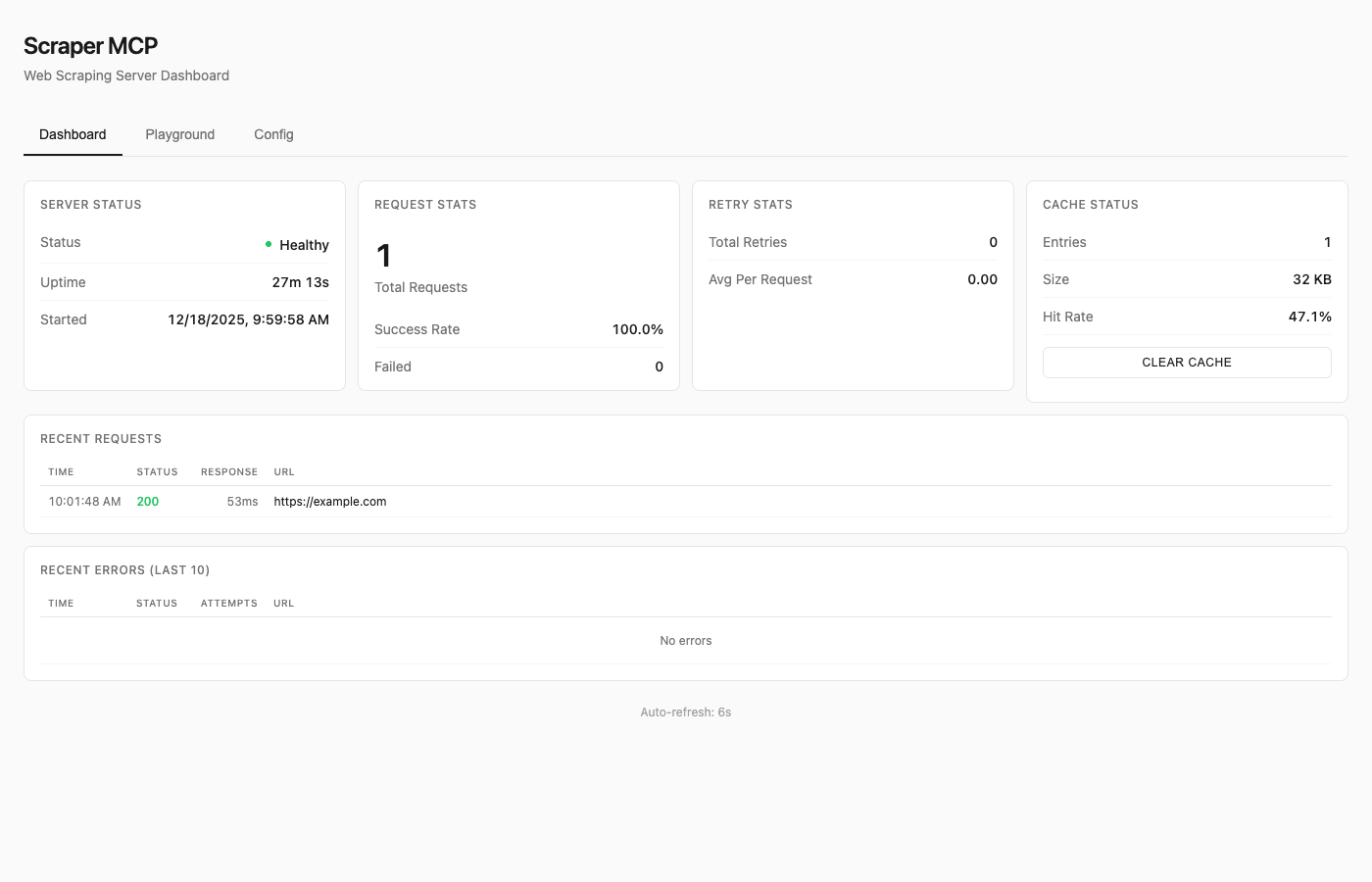
See Dashboard Guide for details.
Available Tools
| Tool | Description |
|---|---|
scrape_url |
HTML converted to markdown (best for LLMs) |
scrape_url_html |
Raw HTML content |
scrape_url_text |
Plain text extraction |
scrape_extract_links |
Extract all links with metadata |
perplexity |
AI web search with citations |
perplexity_reason |
Complex reasoning tasks |
All tools support:
- Single URL or batch operations (pass array)
timeoutandmax_retriesparameterscss_selectorfor targeted extractionrender_jsfor JavaScript rendering (SPAs, dynamic content)
Resources
Note: Resources are disabled by default to reduce context overhead. Enable with
--enable-resourcesflag orENABLE_RESOURCES=trueenvironment variable.
MCP resources provide read-only data access via URI-based addressing:
| URI | Description |
|---|---|
cache://stats |
Cache hit rate, size, entry counts |
cache://requests |
List of recent request IDs |
cache://request/{id} |
Retrieve cached result by ID |
config://current |
Current runtime configuration |
config://scraping |
Timeout, retries, concurrency |
server://info |
Version, uptime, capabilities |
server://metrics |
Request counts, success rates |
Prompts
Note: Prompts are disabled by default to reduce context overhead. Enable with
--enable-promptsflag orENABLE_PROMPTS=trueenvironment variable.
MCP prompts provide reusable workflow templates:
| Prompt | Description |
|---|---|
analyze_webpage |
Structured webpage analysis |
summarize_content |
Generate content summaries |
extract_data |
Extract specific data types |
seo_audit |
Comprehensive SEO check |
link_audit |
Analyze internal/external links |
research_topic |
Multi-source research |
fact_check |
Verify claims across sources |
See API Reference for complete documentation.
JavaScript Rendering
For SPAs (React, Vue, Angular) and pages with dynamic content, enable JavaScript rendering:
# Enable JS rendering with render_js=True
scrape_url(["https://spa-example.com"], render_js=True)

# Combine with CSS selector for targeted extraction
scrape_url(["https://react-app.com"], render_js=True, css_selector=".main-content")
When to use render_js=True:
- Single-page applications (SPAs) - React, Vue, Angular, etc.
- Sites with lazy-loaded content
- Pages requiring JavaScript execution
- Dynamic content loaded via AJAX/fetch
When NOT needed:
- Static HTML pages (most blogs, news sites, documentation)
- Server-rendered content
- Simple websites without JavaScript dependencies
How it works:
- Uses Playwright with headless Chromium
- Single browser instance with pooled contexts (~300MB base + 10-20MB per context)
- Lazy initialization (browser only starts when first JS render is requested)
- Semaphore-controlled concurrency (default: 5 concurrent contexts)
Memory considerations:
- Base requests provider: ~50MB
- With Playwright active: ~300-500MB depending on concurrent contexts
- Recommend minimum 1GB container memory when using JS rendering
Testing JS rendering:
Use the dashboard playground at http://localhost:8000/ to test JavaScript rendering interactively with the toggle switch.
Docker Deployment
Quick Run
# Using GitHub Container Registry (recommended)
docker run -d -p 127.0.0.1:8000:8000 --name scraper-mcp ghcr.io/cotdp/scraper-mcp:latest

# With JavaScript rendering (requires more memory)
docker run -d -p 127.0.0.1:8000:8000 --memory=1g --name scraper-mcp ghcr.io/cotdp/scraper-mcp:latest

# With Perplexity AI (direct API)
docker run -d -p 127.0.0.1:8000:8000 -e PERPLEXITY_API_KEY=your_key ghcr.io/cotdp/scraper-mcp:latest

# With Perplexity via OpenRouter
docker run -d -p 127.0.0.1:8000:8000 -e OPENROUTER_API_KEY=your_key ghcr.io/cotdp/scraper-mcp:latest
Docker Compose
For persistent storage and custom configuration:
# docker-compose.yml
services:
  scraper-mcp:
    image: ghcr.io/cotdp/scraper-mcp:latest
    ports:
      - "127.0.0.1:8000:8000"
    volumes:
      - cache:/app/cache
    environment:
      - PERPLEXITY_API_KEY=${PERPLEXITY_API_KEY:-}
      - PLAYWRIGHT_MAX_CONTEXTS=5
    deploy:
      resources:
        limits:
          memory: 1G  # Recommended for JS rendering
    restart: unless-stopped

volumes:
  cache:
docker-compose up -d
Production deployment (pre-built image from GHCR):
docker-compose -f docker-compose.prod.yml up -d
Upgrading
To upgrade an existing deployment to the latest version:
# Pull the latest image
docker pull ghcr.io/cotdp/scraper-mcp:latest

# Restart with new image (docker-compose)
docker-compose down && docker-compose up -d

# Or for production deployments
docker-compose -f docker-compose.prod.yml pull
docker-compose -f docker-compose.prod.yml up -d

# Or restart a standalone container
docker stop scraper-mcp && docker rm scraper-mcp
docker run -d -p 127.0.0.1:8000:8000 --name scraper-mcp ghcr.io/cotdp/scraper-mcp:latest
Your cache data persists in the named volume across upgrades.
Available Tags
| Tag | Description |
|---|---|
latest |
Latest stable release |
0.5.0 |
Specific version, after the release is published |
Configuration
Create a .env file for custom settings:
# Perplexity AI (optional; either key enables the AI tools)
PERPLEXITY_API_KEY=your_key_here
# ...or via OpenRouter
OPENROUTER_API_KEY=your_key_here
PERPLEXITY_PROVIDER=openrouter  # auto | perplexity | openrouter (default: auto)

# JavaScript rendering (optional, requires Playwright)
PLAYWRIGHT_MAX_CONTEXTS=5       # Max concurrent browser contexts
PLAYWRIGHT_TIMEOUT=30000        # Page load timeout in ms
PLAYWRIGHT_DISABLE_GPU=true     # Reduce memory in containers

# MCP features (disabled by default to reduce context overhead)
ENABLE_RESOURCES=true           # Enable MCP resources
ENABLE_PROMPTS=true             # Enable MCP prompts

# Proxy (optional)
HTTP_PROXY=http://proxy.example.com:8080
HTTPS_PROXY=http://proxy.example.com:8080

# ScrapeOps proxy service (optional)
SCRAPEOPS_API_KEY=your_key_here
SCRAPEOPS_RENDER_JS=true
See Configuration Guide for all options.
Claude Desktop
Add to your MCP settings:
{
  "mcpServers": {
    "scraper": {
      "url": "http://localhost:8000/mcp"
    }
  }
}
Claude Code Skills
This project includes Agent Skills that provide Claude Code with specialized knowledge for using the scraper tools effectively.
| Skill | Description |
|---|---|
| web-scraping | CSS selectors, batch operations, retry configuration |
| perplexity | AI search, reasoning tasks, conversation patterns |
Install Skills
Copy the skills to your Claude Code skills directory:
# Clone or download this repo, then:
cp -r .claude/skills/web-scraping ~/.claude/skills/
cp -r .claude/skills/perplexity ~/.claude/skills/
Or install directly:
# web-scraping skill
mkdir -p ~/.claude/skills/web-scraping
curl -o ~/.claude/skills/web-scraping/SKILL.md \
  https://raw.githubusercontent.com/cotdp/scraper-mcp/main/.claude/skills/web-scraping/SKILL.md

# perplexity skill
mkdir -p ~/.claude/skills/perplexity
curl -o ~/.claude/skills/perplexity/SKILL.md \
  https://raw.githubusercontent.com/cotdp/scraper-mcp/main/.claude/skills/perplexity/SKILL.md
Once installed, Claude Code will automatically use these skills when performing web scraping or Perplexity AI tasks.
Documentation
| Document | Description |
|---|---|
| API Reference | Complete tool documentation, parameters, CSS selectors |
| Configuration | Environment variables, proxy setup, ScrapeOps |
| Dashboard | Monitoring UI, playground, runtime config |
| Development | Local setup, architecture, contributing |
| Testing | Test suite, coverage, adding tests |
Local Development
# Install
uv pip install -e ".[dev]"

# Run
python -m scraper_mcp

# Test
pytest

# Lint
ruff check . && mypy src/
See Development Guide for details.
License
MIT License
Last updated: December 23, 2025
Scraper MCP soruları
Scraper MCP hangi araçları sunar?
6 araç sunar; bunlar arasında scrape_url, scrape_url_html, scrape_url_text, scrape_extract_links, perplexity yer alır.
Bu server LLM token kullanımını nasıl azaltır?
Gereksiz verileri temizlemek için sunucu tarafında HTML filtreleme, markdown dönüşümü ve CSS seçici hedefleme kullanır.
İçerik yüklemek için JavaScript gerektiren web sitelerini kazıyabilir miyim?
Evet, render_js parametresini kullanarak SPA'lar ve dinamik içerikler için isteğe bağlı Playwright tabanlı render işlemini etkinleştirebilirsiniz.