
Bir AI istemcisinin Substack taslakları oluşturmasına, yönetmesine, Notes paylaşımları yapmasına, gönderileri aramasına, analitikleri incelemesine ve yayınlar genelinde onay vermiş aboneleri yönetmesine olanak tanır.
Ayrıca bilinen adı conorbronsdon/substack-mcp, substack-mcp, @conorbronsdon/substack-mcp
- Yıldızlar
- 48
- Araçlar
- 42
- İndirmeler, 30 gün
- 5.504
- En son sürüm
- 1.3.0
- Son commit
- 14 Kas 2026
- Lisans
- MIT
Substack MCP nedir?
Bir AI istemcisinin Substack taslakları oluşturmasına, yönetmesine, Notes paylaşımları yapmasına, gönderileri aramasına, analitikleri incelemesine ve yayınlar genelinde onay vermiş aboneleri yönetmesine olanak tanır. 42 araç sunar; örneğin get_subscriber_count, list_subscribers, search_subscribers.
Özet, projenin README dosyasından oluşturuldu
Substack MCP sunucusu hakkında
Bu MCP server ile bir Substack bültenini bir AI asistanı aracılığıyla yönetmek mümkündür. Kullanıcıların zengin içerikli uzun metrajlı taslaklar hazırlamasına, mevcut arşivlerde arama yapmasına ve yayın analitiklerini incelemesine olanak tanır. Anında yayınlanan kısa metrajlı Notes paylaşımlarını yönetebilse de, uzun metrajlı içerikler yalnızca taslak odaklı bir iş akışıyla sınırlandırılmıştır. Bu durum, kullanıcıların gönderileri resmi Substack editörü üzerinden manuel olarak inceleyip yayınlamasını sağlayarak kritik içerikler için insan kontrolü sunar.
Geliştiriciler, bu sunucuyu yerel stdio veya kendi sunucunuzda barındırılan HTTP taşıma protokollerini kullanarak Claude Desktop veya Claude Code gibi istemcilere bağlayabilirler. Kurulum için bir Substack hesabına ihtiyaç duyulur ve yapılandırma ortam değişkenleri veya Playwright kullanarak tarayıcı tabanlı giriş yoluyla yapılabilir. Sunucu, isimlendirilmiş profiller aracılığıyla birden fazla yayını yönetmeyi destekler ve yerel şifrelenmiş dosyalar veya macOS Keychain veya Windows Credential Manager gibi işletim sistemine özel anahtarlıklar dahil olmak üzere güvenli kimlik bilgisi depolama seçenekleri sunar. Ayrıca, giriş sırasında uygun erişim izni verildiğinde, onay vermiş ücretsiz aboneleri yönetmek için araçlar sağlar.
Neler yapabilirsiniz
- 1Uzun metrajlı bülten gönderileri taslaklamaBir AI'ya, daha sonra manuel olarak inceleyeceğiniz detaylı bir bülten taslağı oluşturması, güncellemesi ve planlaması talimatını verebilirsiniz.
- 2Kısa metrajlı sosyal güncellemeler yayınlamaBir AI istemcisi, Substack yayınınızda kısa metrajlı Notes paylaşımlarını anında yayınlayabilir.
- 3Yayın performansını analiz etmeİçerik stratejinizi belirlemek için AI asistanınızdan bülteninizin analitik verilerini sorgulamasını isteyebilirsiniz.
- 4Abonelik verilerini yönetmeAbonelik sayılarınızı kontrol etmek veya listenize katılmayı onaylamış kullanıcıları yönetmek için asistanı kullanabilirsiniz.
Projenin README dosyasından alınmıştır. Her kullanım durumu, oradaki bir alıntı ile kontrol edilir.
Substack MCP nasıl yüklenir
Biçimler 10 Kas 2026 tarihinde doğrulandıCursor'a ekleGoose'a ekleSubstack MCP'yi Claude Code içine yükleyin
$ claude mcp add --env 'SUBSTACK_SESSION_TOKEN=<YOUR_SUBSTACK_SESSION_TOKEN>' --env 'SUBSTACK_PUBLICATION_URL=<SUBSTACK_PUBLICATION_URL>' --env 'SUBSTACK_USER_ID=<SUBSTACK_USER_ID>' substack-mcp -- npx -y @conorbronsdon/substack-mcpSubstack MCP'yi Cursor içine yükleyin
~/.cursor/mcp.json
{
  "mcpServers": {
    "substack-mcp": {
      "command": "npx",
      "args": [
        "-y",
        "@conorbronsdon/substack-mcp"
      ],
      "env": {
        "SUBSTACK_SESSION_TOKEN": "<YOUR_SUBSTACK_SESSION_TOKEN>",
        "SUBSTACK_PUBLICATION_URL": "<SUBSTACK_PUBLICATION_URL>",
        "SUBSTACK_USER_ID": "<SUBSTACK_USER_ID>"
      }
    }
  }
}Substack MCP'yi VS Code içine yükleyin
.vscode/mcp.json
{
  "servers": {
    "substack-mcp": {
      "type": "stdio",
      "command": "npx",
      "args": [
        "-y",
        "@conorbronsdon/substack-mcp"
      ],
      "env": {
        "SUBSTACK_SESSION_TOKEN": "<YOUR_SUBSTACK_SESSION_TOKEN>",
        "SUBSTACK_PUBLICATION_URL": "<SUBSTACK_PUBLICATION_URL>",
        "SUBSTACK_USER_ID": "<SUBSTACK_USER_ID>"
      }
    }
  }
}Substack MCP'yi VS Code CLI içine yükleyin
$ code --add-mcp '{"name":"substack-mcp","type":"stdio","command":"npx","args":["-y","@conorbronsdon/substack-mcp"],"env":{"SUBSTACK_SESSION_TOKEN":"<YOUR_SUBSTACK_SESSION_TOKEN>","SUBSTACK_PUBLICATION_URL":"<SUBSTACK_PUBLICATION_URL>","SUBSTACK_USER_ID":"<SUBSTACK_USER_ID>"}}'Substack MCP'yi Claude Desktop içine yükleyin
claude_desktop_config.json
{
  "mcpServers": {
    "substack-mcp": {
      "command": "npx",
      "args": [
        "-y",
        "@conorbronsdon/substack-mcp"
      ],
      "env": {
        "SUBSTACK_SESSION_TOKEN": "<YOUR_SUBSTACK_SESSION_TOKEN>",
        "SUBSTACK_PUBLICATION_URL": "<SUBSTACK_PUBLICATION_URL>",
        "SUBSTACK_USER_ID": "<SUBSTACK_USER_ID>"
      }
    }
  }
}Substack MCP'yi Codex içine yükleyin
$ codex mcp add substack-mcp --env 'SUBSTACK_SESSION_TOKEN=<YOUR_SUBSTACK_SESSION_TOKEN>' --env 'SUBSTACK_PUBLICATION_URL=<SUBSTACK_PUBLICATION_URL>' --env 'SUBSTACK_USER_ID=<SUBSTACK_USER_ID>' -- npx -y @conorbronsdon/substack-mcpSubstack MCP'yi Codex config.toml içine yükleyin
~/.codex/config.toml
[mcp_servers.substack-mcp]
command = "npx"
args = ["-y", "@conorbronsdon/substack-mcp"]

[mcp_servers.substack-mcp.env]
SUBSTACK_SESSION_TOKEN = "<YOUR_SUBSTACK_SESSION_TOKEN>"
SUBSTACK_PUBLICATION_URL = "<SUBSTACK_PUBLICATION_URL>"
SUBSTACK_USER_ID = "<SUBSTACK_USER_ID>"
Substack MCP'yi Gemini CLI içine yükleyin
$ gemini mcp add -s user -e 'SUBSTACK_SESSION_TOKEN=<YOUR_SUBSTACK_SESSION_TOKEN>' -e 'SUBSTACK_PUBLICATION_URL=<SUBSTACK_PUBLICATION_URL>' -e 'SUBSTACK_USER_ID=<SUBSTACK_USER_ID>' substack-mcp npx -- -y @conorbronsdon/substack-mcpSubstack MCP'yi Gemini settings.json içine yükleyin
~/.gemini/settings.json
{
  "mcpServers": {
    "substack-mcp": {
      "command": "npx",
      "args": [
        "-y",
        "@conorbronsdon/substack-mcp"
      ],
      "env": {
        "SUBSTACK_SESSION_TOKEN": "<YOUR_SUBSTACK_SESSION_TOKEN>",
        "SUBSTACK_PUBLICATION_URL": "<SUBSTACK_PUBLICATION_URL>",
        "SUBSTACK_USER_ID": "<SUBSTACK_USER_ID>"
      }
    }
  }
}Başlamadan önce anahtar gerekiyor
16 Kas 2026 tarihinde anahtarsız başlatıldığında durdu ve anahtar istedi; yukarıdaki değişkenleri ayarlayana kadar istemci hiçbir araç görmez.
Substack MCP araçları 42
README dosyasından algılandıget_subscriber_countlist_subscriberssearch_subscribersget_subscriberlist_published_postsget_publicationlist_publication_tagsget_post_tagssearch_postsplan_draft_updateexport_draftpreflight_draft
| get_subscriber_count | — | |
| list_subscribers | — | |
| search_subscribers | — | |
| get_subscriber | — | |
| list_published_posts | — | |
| get_publication | — | |
| list_publication_tags | — | |
| get_post_tags | — | |
| search_posts | — | |
| plan_draft_update | — | |
| export_draft | — | |
| preflight_draft | — |
42 aracın tümünü gösterDaha az araç göster
list_draftsget_postget_draftget_post_commentsget_sectionsget_post_analyticsrank_postsget_publication_statsget_growth_sourceslist_incoming_recommendationslist_outgoing_recommendationslist_outgoing_recommendation_statslist_scheduled_postsget_user_profileget_profile_feedget_note_threadlist_public_postsget_public_postcreate_draftupdate_draftupdate_draft_tagsupload_imagecreate_post_commentrestackcreate_notecreate_note_with_linkreview_draftwhat_workeddraft_from_ideaplan_notes
| list_drafts | — | |
| get_post | — | |
| get_draft | — | |
| get_post_comments | — | |
| get_sections | — | |
| get_post_analytics | — | |
| rank_posts | — | |
| get_publication_stats | — | |
| get_growth_sources | — | |
| list_incoming_recommendations | — | |
| list_outgoing_recommendations | — | |
| list_outgoing_recommendation_stats | — | |
| list_scheduled_posts | — | |
| get_user_profile | — | |
| get_profile_feed | — | |
| get_note_thread | — | |
| list_public_posts | — | |
| get_public_post | — | |
| create_draft | — | |
| update_draft | — | |
| update_draft_tags | — | |
| upload_image | — | |
| create_post_comment | — | |
| restack | — | |
| create_note | — | |
| create_note_with_link | — | |
| review_draft | — | |
| what_worked | — | |
| draft_from_idea | — | |
| plan_notes | — |
Yapılandırma
SUBSTACK_SESSION_TOKENGerekliGizliconnect.sid cookie value from your Substack session
SUBSTACK_PUBLICATION_URLGerekliYour Substack publication URL (e.g., https://yourblog.substack.com)
SUBSTACK_USER_IDGerekliYour Substack user ID
SUBSTACK_PUBLICATION_URLSUBSTACK_PUB_KEVIN_MULDOON_PUBLICATION_URLSUBSTACK_PUB_KEVIN_MULDOON_SESSION_TOKENSUBSTACK_PUB_KEVIN_MULDOON_USER_IDSUBSTACK_PUB_SAPERE_PUBLICATION_URLSUBSTACK_PUB_SAPERE_SESSION_TOKENSUBSTACK_PUB_SAPERE_USER_IDSUBSTACK_REQUEST_TIMEOUT_MSSUBSTACK_SESSION_TOKENSUBSTACK_USER_AGENTSUBSTACK_USER_ID
| Ad | Açıklama | Sunucu |
|---|---|---|
| SUBSTACK_SESSION_TOKEN | connect.sid cookie value from your Substack session | GerekliGizli |
| SUBSTACK_PUBLICATION_URL | Your Substack publication URL (e.g., https://yourblog.substack.com) | Gerekli |
| SUBSTACK_USER_ID | Your Substack user ID | Gerekli |
| SUBSTACK_PUBLICATION_URL | — | |
| SUBSTACK_PUB_KEVIN_MULDOON_PUBLICATION_URL | — | |
| SUBSTACK_PUB_KEVIN_MULDOON_SESSION_TOKEN | — | |
| SUBSTACK_PUB_KEVIN_MULDOON_USER_ID | — | |
| SUBSTACK_PUB_SAPERE_PUBLICATION_URL | — | |
| SUBSTACK_PUB_SAPERE_SESSION_TOKEN | — | |
| SUBSTACK_PUB_SAPERE_USER_ID | — | |
| SUBSTACK_REQUEST_TIMEOUT_MS | — | |
| SUBSTACK_SESSION_TOKEN | — | |
| SUBSTACK_USER_AGENT | — | |
| SUBSTACK_USER_ID | — |
Otomatik kontroller
Çalıştırıldı 12 Kas 2026Tam rapor →Otomatik kontrollerimizden geçti. Bu bir güvenlik denetimi değildir: kodu okuyun ve sunucuya ihtiyaç duyduğu en dar erişimi verin. Kontroller nasıl çalışır

- Kaynak deposu bağlantılı ve erişilebilirGeçti
- Açık kaynak lisansı (OSI)Geçti
- Son bir yıl içinde commit veya sürüm mevcutGeçti
- Paket adı popüler bir pakete yakın değilGeçti
- Uzak uç nokta HTTPS kullanıyorKontrol edilmedi
- Yıkıcı araçlar etiketlenmişGeçti
- Modele yönelik gizli talimat yokGeçti
- Pakette veya bağımlılıklarında kritik uyarı yokGeçti
substack-mcp
Create and manage your Substack newsletter from your AI assistant or terminal. Prepare rich drafts, search your archive, publish Notes, inspect analytics, and manage explicitly consented free subscribers across publications. Review and publish long-form posts in Substack.






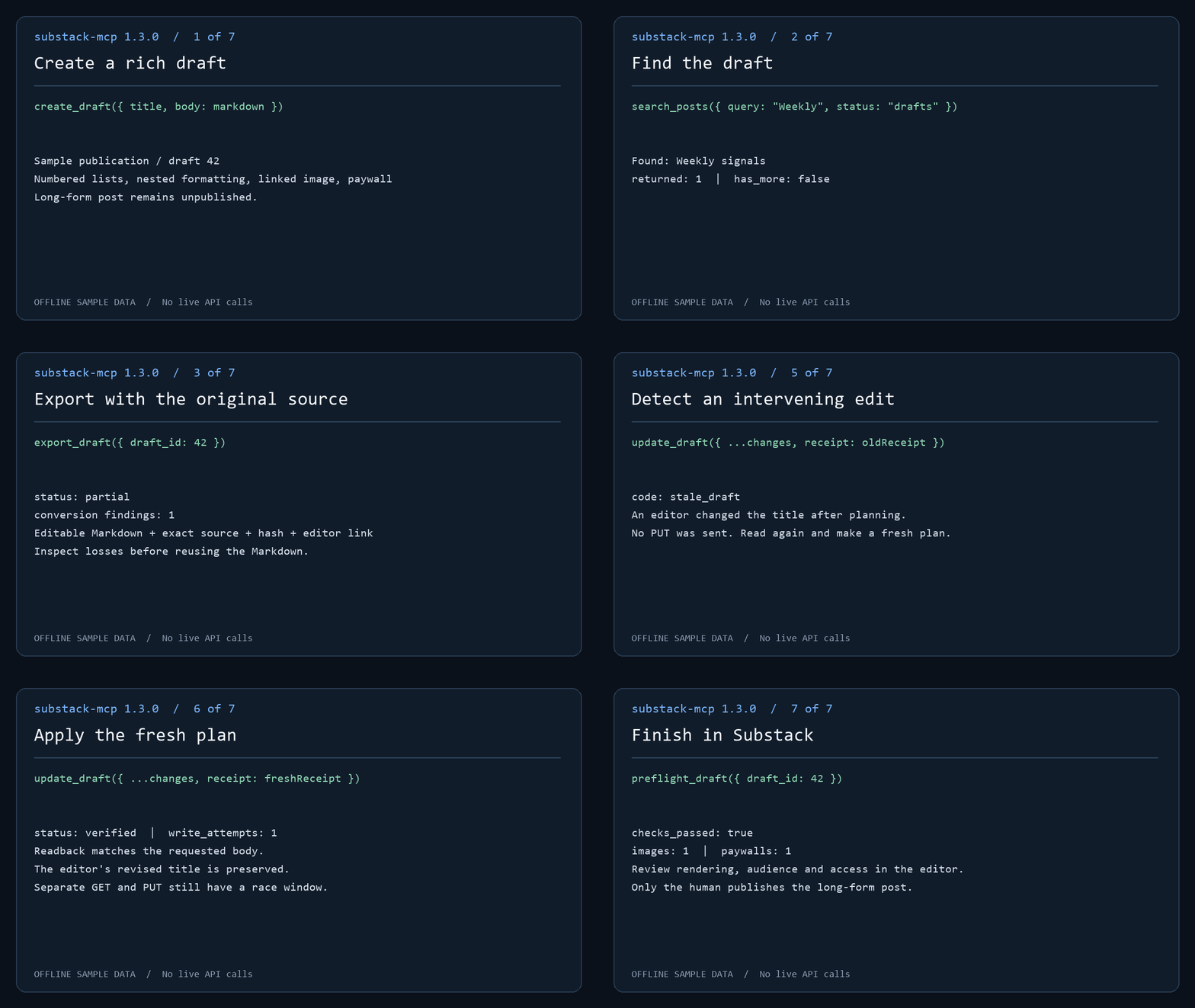
The demo runs actual MCP handlers against offline sample data. No live API calls or publication occur. Follow the draft workflow to create, find, export and review a post.
Draft-only long-form posts; explicit public actions: This server cannot publish or delete long-form posts. Post tools create and edit drafts only; you review and publish manually through Substack's editor. Public community comments/restacks are separately experimental and consent-gated. Substack Notes also publish publicly: create_note and create_note_with_link publish short-form Notes immediately, because Notes have no draft state on Substack. Treat the Note tools as public-publish actions — there is no preview step and no undo from this server. The split is proportionate review, the piece of trust infrastructure for agents this server cares most about: the high-stakes surface gets a human gate, and the exception is stated loudly.
This server imposes no Bestseller-status check. Use an authenticated account with permission to manage the publication; individual operations depend on your Substack access. Connect through local stdio or self-hosted HTTP.
For 1.0 setup coverage and account eligibility, see compatibility. Run substack-mcp compatibility report for an offline, shareable diagnostic report; reporting guide. Maintainers can use the release checklist and distribution inventory.
Contents: Quick start · Setup · Tools · Operator CLI · Draft workflow · Analytics to draft · Export · Markdown · Multiple publications · Transports · Compatibility
Quick start
-
Install and sign in. Browser login needs the optional Playwright dependency:
npm install @conorbronsdon/substack-mcp playwright
npx playwright install chromium
npx substack-mcp login https://yourblog.substack.com --user-id 12345
Use your own account's user ID (how to find it). The session is saved only after a bounded authenticated read succeeds. To paste credentials instead, see Option B.
-
Verify a read.
npx substack-mcp doctor --json --check-authmakes one bounded read per publication. It confirms read access, not your user ID or write permission. -
Connect your MCP client. Add the server to Claude Desktop or Claude Code, or use the Codex plugin. Environment variables take precedence; omit them to use the stored browser-login session. Then ask your assistant: "How many Substack subscribers do I have?"
-
Prepare a draft for review. Follow the draft workflow:
create_draft,search_posts,export_draft,preflight_draft, thenplan_draft_updateandupdate_draft. Long-form posts stay unpublished drafts until you publish them in Substack's editor.create_noteandcreate_note_with_linkpublish immediately.
Community walkthrough
Jonathan Price's I used Codex to connect ChatGPT to Substack. Then it drafted this post. walks through using Codex to install the MCP locally, connecting ChatGPT through OpenAI's Secure MCP Tunnel, and creating a private draft for manual publication. He used the connection to create the draft of the guide itself.
The guide documents his September 18, 2026 setup with version 1.2.0. Its reported
get_post 404 is fixed in 1.2.1. Client interfaces and access requirements can
change; use the setup instructions below for this package's current
configuration. This is a community walkthrough, not a hosted service provided
by this project.
Setup
Requires Node.js 22 or newer (CI covers Node 22 and 24). Browser login additionally requires Playwright.
You can supply credentials two ways: paste them as env vars (below), or run the optional browser login which captures and stores them for you.
Option A — Browser login (optional, no manual cookie copying)
Install the server and optional Playwright dependency together in a local tools directory, then sign in:
npm install @conorbronsdon/substack-mcp playwright
npx playwright install chromium
npx substack-mcp login https://yourblog.substack.com --user-id 12345
substack-mcp-login remains a supported alias. Missing publication URL and user
ID are prompted. Supply your own account's user ID (steps below); a post author's byline does
not verify your identity. The browser opens for sign-in, including any CAPTCHA.
Login then opens <publication>/publish/home and waits for the publication
session cookie; on custom domains this is connect.sid on the custom domain.
A bounded authenticated read must succeed before saving. The default flow verifies
read access, not the configured user ID or permission to write.
To derive your ID from the selected publication's authenticated session instead of entering it manually, use:
npx substack-mcp login https://yourblog.substack.com --verify-identity --profile work
--verify-identity reads the publication-host /api/v1/user/profile/self with
that host's cookie, requires a positive safe integer top-level ID, and then
performs the existing authenticated draft-list check before saving. Supplying
--user-id as well turns it into an assertion: a mismatch stops without saving
or replacing a profile, even with --force. No public profile, post byline,
other-host cookie or other-host endpoint is used as a fallback. The verified
mode's JSON result reports user_identity: "verified" and
identity_source: "authenticated_publication_self_profile"; it prints no ID.
This is an observation at login time, not a persisted identity attestation or
proof of write permission. Ordinary doctor continues to report identity as
unverified.
For subscriber tools or the calendar opt-in sync, add --subscriber-access.
Substack asks for a one-time "Confirm it's you" code (by email or authenticator
app) before it allows subscriber reads, and login prompts for it. See
docs/subscriber-step-up.md.
Self-profile support on publication hosts has not been live-verified for every Substack/custom-domain configuration. If the endpoint is unavailable, expired, redirected or malformed, verified mode fails closed and saves nothing. The existing manually configured-ID flow remains available and explicitly unverified. A real browser run is still needed for #150; fixture tests are not evidence about the current sign-in UI.
Without --profile, login saves ~/.substack-mcp/session.json (directory override:
SUBSTACK_MCP_HOME). The server uses this legacy session when publication
credential environment variables and SUBSTACK_PROFILES are unset.
Default storage (SUBSTACK_CREDENTIAL_STORE=file): sessions use AES-256-GCM with a key derived from the OS account and
machine. File permissions request 0600; Windows access also depends on directory
ACLs. This is a machine-bound file, not an OS keychain or secret vault. Code
running as your OS user can derive the key. Use environment credentials if your
MCP client manages secrets for you.
Optional OS keychain: set SUBSTACK_CREDENTIAL_STORE=keychain in both the
login process and the MCP client's environment. macOS uses Keychain via
/usr/bin/security; Linux needs libsecret and secret-tool plus an unlocked Secret
Service; Windows uses Credential Manager through PowerShell's PasswordVault. All
three are exercised with synthetic credentials by the keychain CI workflow on
GitHub-hosted runners (an unlocked temporary macOS keychain and a gnome-keyring
session on Linux); desktop setups with locked keychains may still prompt. Login writes the selected account to the keychain, and the
server reads it there. Explicit keychain selection never reads the encrypted
file as a fallback. The keychain helps against other OS users, copied disks,
and some malware limited to file access. Code running as your user can usually
query the keychain. Keep the OS account and running code trusted.
On Linux, secret-tool lookup can exit 1 without an error message for either
an absent entry or a locked keyring. Named writes without --force search and
unlock first, and refuse overwrites when an entry is found.
Named profiles and migration
npx substack-mcp login https://yourblog.substack.com --user-id 12345 --profile work
npx substack-mcp profiles list
# Copy an existing legacy session without changing its file:
npx substack-mcp profiles migrate --name personal
# Copy a file session or named file profile into the keychain; source remains:
npx substack-mcp profiles migrate --to keychain
npx substack-mcp profiles migrate --to keychain --name work
Keys start with a lowercase ASCII letter and contain only lowercase letters,
digits and hyphens, up to 64 characters. Existing profiles require explicit
--force to replace. List output contains keys, readability status, publication origins and file save
times; it excludes cookies and user IDs. Unreadable profiles remain visible but
cannot be selected. Save time records local persistence, including migration; it
is not token issuance or expiration time. Listing is bounded to 32 profiles.
Profile storage requires a local filesystem supporting hard links (such as NTFS
or a typical Linux filesystem), so creation can install a complete encrypted file
without overwriting an existing name. FAT/exFAT and some network mounts are not
supported: set SUBSTACK_MCP_HOME to a suitable local directory. Do not use
--force to work around an unsupported filesystem.
Set SUBSTACK_PROFILES=work,personal in your MCP client's environment to select
up to 32 distinct profiles. Remove all publication credential variables first:
combining profile selection with legacy or named credential variables is an
error, including empty variables. Missing, corrupt or invalid selected profiles
stop startup; they never fall back to another account. Profiles on disk are
never activated by discovery. With multiple profiles, tools require an explicit
publication key and CLI reads require --publication.
To roll back, unset SUBSTACK_PROFILES and restore your previous environment
configuration. Migration preserves the legacy session byte-for-byte. These files
use the existing encryption format. profiles list lists file profiles; select
keychain profiles explicitly with SUBSTACK_PROFILES after migration or login.
Run substack-mcp status --json for offline configuration diagnostics or
substack-mcp doctor --check-auth --json for a bounded read per selected account.
Option B — Get your credentials manually
Open your Substack in a browser, then:
- Session token: For custom domains, open DevTools → Application → Cookies →
https://your-custom-domainand copyconnect.sidfrom the publication's own domain (URL-encoded string starting withs%3A). Do not copysubstack.sidfrom substack.com: it is a different session that the custom domain's admin API rejects with 403. For*.substack.compublications, useconnect.sidon that host orsubstack.sidon.substack.com. The token must match the host ofSUBSTACK_PUBLICATION_URL, with the.substack.comfallback only for Substack-hosted publications. - User ID: Follow Find your account user ID. Do not use a publication post's byline ID: publications can have multiple authors. This server does not independently verify the supplied ID.
- Publication URL: Your Substack URL, including custom domain if you have one (e.g.,
https://newsletter.yourdomain.comorhttps://yourblog.substack.com)
Find your account user ID
- In Substack, open your own account profile and copy its handle (the part after
@inhttps://substack.com/@your-handle). A publication URL or another author's profile is not your account handle. - Open
https://substack.com/api/v1/user/your-handle/public_profilewith that handle substituted. Read the top-level numericidin the JSON response; do not use an ID nested under a publication or post byline. This public profile endpoint is also used by this server's anonymous profile lookup. - Confirm that the response's
handleand name match the account you will sign in with. Supply the top-levelidtologin --user-idorSUBSTACK_USER_ID. A public profile lookup identifies the handle you entered; the browser-login read check does not prove that the cookie belongs to that ID. Recheck the account before any write operation.
2. Configure your MCP client
Claude Desktop
Add to your claude_desktop_config.json:
{
  "mcpServers": {
    "substack": {
      "command": "npx",
      "args": ["-y", "@conorbronsdon/substack-mcp"],
      "env": {
        "SUBSTACK_PUBLICATION_URL": "https://yourblog.substack.com",
        "SUBSTACK_SESSION_TOKEN": "your-session-token",
        "SUBSTACK_USER_ID": "your-user-id"
      }
    }
  }
}
Claude Code and Codex plugin setup is available alongside manual MCP configuration. The repository marketplace and local plugin are separate from curated-directory acceptance or hosted ChatGPT support.
Claude Code
Add to your .mcp.json:
{
  "mcpServers": {
    "substack": {
      "command": "npx",
      "args": ["-y", "@conorbronsdon/substack-mcp"],
      "env": {
        "SUBSTACK_PUBLICATION_URL": "https://yourblog.substack.com",
        "SUBSTACK_SESSION_TOKEN": "your-session-token",
        "SUBSTACK_USER_ID": "your-user-id"
      }
    }
  }
}
3. Verify
Ask your AI assistant: "How many Substack subscribers do I have?"
Tool output compatibility, response limits and versioning are documented in the tool contract.
Operator diagnostics
The CLI exposes operator commands and configuration checks through the same MCP
handlers and credential resolution as the server. drafts create writes one
private draft; the other operator commands read:
substack-mcp status --json
substack-mcp doctor --json --check-auth
substack-mcp drafts list --limit 10
Commands, the JSON envelope, exit codes, request deadlines and response limits are documented in operator CLI and diagnostics.
Tools
Every tool declares explicit MCP side-effect annotations; see tool annotations. Tool descriptions carry the authoritative wording.
Read
| Tool | Description |
|---|---|
get_subscriber_count |
Get your publication's current subscriber count |
list_subscribers |
Read a bounded page of private subscriber records |
search_subscribers |
Filter and page private subscriber records; optional activity, date, flags and revenue fields |
get_subscriber |
Look up membership by exact email; reconcile pending additions |
list_published_posts |
List published posts with pagination |
get_publication |
Read projected publication identity/settings, verify the configured host, and report missing fields; does not verify account identity or role |
list_publication_tags |
Read tag definitions, including hidden tags by default, with bounded local pagination |
get_post_tags |
Resolve post tag associations; preserves unresolved IDs and reports empty-result identity uncertainty. Draft coverage is currently live-verified only for empty responses |
search_posts |
Search a publication archive by query and status; bounded pages with continuation metadata |
plan_draft_update |
Review proposed changes, preflight and a receipt for best-effort stale detection; no writes |
export_draft |
Editable Markdown, exact original body, conversion diagnostics, preflight and editor link |
preflight_draft |
Read-only checks for title, audience, body structure, images, and paywalls, with an editor link; optionally adds Substack's own prepublish errors and suggestions |
list_drafts |
List draft posts |
get_post |
Get full content of a published post by ID |
get_draft |
Get full content of a draft by ID |
get_post_comments |
Get comments on a published post |
get_sections |
List your publication's sections (categories) with their IDs |
get_post_analytics |
Get a published post's stats (views, opens, signups, subscribes, reactions) by ID |
rank_posts |
Rank posts by views, opens, sends, rates, signups, subscribes, estimated value or date, keeping null and missing values distinct |
get_publication_stats |
Read dashboard summary and ranged publication metrics, with missing and unavailable states |
get_growth_sources |
Read bounded growth source attribution and optional events |
list_incoming_recommendations |
List publications that recommend yours, with start date, active state and dashboard-attributed subscribers |
list_outgoing_recommendations |
List whom your publication recommends (can be partial). This is not who recommends it; use list_incoming_recommendations for that |
list_outgoing_recommendation_stats |
List subscribers your publication has sent to the publications it recommends |
list_scheduled_posts |
List posts scheduled for future publication (read-only; scheduling stays in Substack's editor) |
get_user_profile |
Read a minimal public user profile by handle, anonymously |
get_profile_feed |
Read one public profile feed page with cursor continuation, anonymously |
get_note_thread |
Read a public Note, ancestors and one replies page, anonymously |
list_public_posts |
Read a bounded public archive page, anonymously |
get_public_post |
Read an anonymous public post by URL with body status and truncation flags |
Public reading
These five tools use a separate anonymous reader. It sends only User-Agent and
Accept, never the configured publication cookie or other credentials. The
configured publication selects the default archive origin; callers may supply an
allowlisted HTTPS publication origin. Allowed hosts are substack.com, one-label
*.substack.com, configured publication origins, and exact origins in
SUBSTACK_PUBLIC_READ_ORIGINS (comma-separated HTTPS origins without ports,
paths or userinfo). Redirects are rejected. A *.substack.com publication may
redirect to its custom domain (for example, lenny.substack.com); JSON reads do
not follow that redirect. Add the custom HTTPS origin to
SUBSTACK_PUBLIC_READ_ORIGINS and read through that origin. With multiple
publications, the publication key remains required for every publication tool.
Profile feed pages are upstream-sized; has_more: null means the upstream omitted
continuation metadata. Thread pages can omit replies when more_branches or
next_cursor is present; completeness: "unknown" means continuation metadata
was omitted.
Archive full pages have has_more: null because no total is returned. Public
post body_status is a heuristic based on audience and body presence; it does
not establish full access. The anonymous reader does not use subscription
entitlements. Reader subscriptions and inbox are unsupported: the configured
publication session received 401 on the substack.com reader-account routes,
which require a separate reader session this server does not manage.
Archive search and draft review
search_posts accepts query (1–500 characters), status (published, drafts,
or scheduled, default published), offset (default 0), and limit (1–50,
default 25). It makes one authenticated archive request and returns projected
metadata, returned, total, has_more, and next_offset. Continue with
next_offset and the same query/status. When Substack omits the total and a
page is full, has_more is null (unknown); another page may be empty. Substack
controls matching and indexing: this is not a guaranteed full-text scan. Use
get_post or get_draft to retrieve full content. Pagination is not a snapshot;
concurrent edits can move results between pages.
preflight_draft accepts draft_id, reads it once, and returns checks_passed,
findings with severity/code/message, content counts and an editor link. It checks title,
audience, JSON/body shape, image wrappers and HTTPS sources, and paywall count
and edge placement. Unknown nodes and external images produce review warnings.
Bodies over two million characters, 10,000 nodes, or depth 100 are not fully
checked; counts.complete is false and aggregate checks are skipped after a
scan limit. Unknown-node warnings name up to five types for editor review.
With substack_check: true, it also makes one more read: Substack's own
prepublish validator (GET /api/v1/drafts/{id}/prepublish, the check the editor
runs before its publish dialog). The result comes back separately as
substack_check with errors and suggestions (up to 50 each, 300 characters
each) and never changes checks_passed or findings. The endpoint is
undocumented and its response shape is not yet live-verified: any failure or
unexpected shape returns substack_check.status: "unavailable" with a reason, and
the static checks still return. A clean result is not publish approval.
This is a focused static check, not full ProseMirror validation or
publish approval. It does not fetch links/images, verify access settings, or
prove final rendering. Review the draft in Substack; no content is modified.
Both tools require publication when multiple publications are configured.
Substack MCP soruları
Substack MCP'yi Claude Code'a nasıl eklerim?
Terminalinizde claude mcp add --env 'SUBSTACK_SESSION_TOKEN=<YOUR_SUBSTACK_SESSION_TOKEN>' --env 'SUBSTACK_PUBLICATION_URL=<SUBSTACK_PUBLICATION_URL>' --env 'SUBSTACK_USER_ID=<SUBSTACK_USER_ID>' substack-mcp -- npx -y @conorbronsdon/substack-mcp komutunu çalıştırın. Her projede kullanılabilir olması için --scope user ekleyin.
Substack MCP'yi Cursor'a nasıl eklerim?
~/.cursor/mcp.json dosyasını açın ve yukarıdaki yükleme bölümünde gösterilen Cursor yapılandırmasını kullanarak sunucuyu mcpServers altına ekleyin.
Substack MCP hangi araçları sunar?
42 araç sunar; bunlar arasında get_subscriber_count, list_subscribers, search_subscribers, get_subscriber, list_published_posts yer alır.
Substack MCP server uzun metrajlı gönderilerimi yayınlayabilir mi?
Hayır. Uzun metrajlı gönderi araçları yalnızca taslak oluşturur ve düzenler; gönderilerinizi Substack editörü üzerinden manuel olarak inceleyip yayınlamanız gerekir.
Sunucu üzerinden oluşturulan Notes paylaşımları anında yayınlanır mı?
Evet. Substack üzerinde Notes için bir taslak durumu bulunmadığından, Note araçları önizleme veya geri alma seçeneği olmaksızın paylaşımları anında herkese açık şekilde yayınlar.
Substack MCP server kimlik doğrulamasını nasıl yaparım?
Kimlik bilgilerinizi ortam değişkeni (environment variable) olarak yapıştırabilir veya oturumu daha sonra kullanmak üzere saklayan isteğe bağlı tarayıcı girişini çalıştırabilirsiniz.
Birden fazla Substack yayını ile çalışır mı?
Evet. İsimlendirilmiş profiller sayesinde ayrı oturumlar saklayabilir ve bunları SUBSTACK_PROFILES ortam değişkeni ile seçebilirsiniz.
Substack MCP server'ı çalıştırmak için neye ihtiyacım var?
Node.js 22 veya daha yeni bir sürüm gereklidir; tarayıcı girişi için ek olarak Playwright gerekmektedir.