
Backstage MCP sunucusu
Commit 13 Kas 2026Backstage Software Catalog API'sini, LLM'lerin varlık keşfi, katalog işlemleri ve doğrulama yapabilmesi için araçlar olarak sunar.
Ayrıca bilinen adı Coderrob/backstage-mcp-server
- Yıldızlar
- 3
- Araçlar
- —
- İndirmeler, 30 gün
- —
- En son sürüm
- —
- Son commit
- 13 Kas 2026
- Lisans
- GPL-3.0
Backstage MCP nedir?
Backstage bir MCP sunucusudur. Backstage Software Catalog API'sini, LLM'lerin varlık keşfi, katalog işlemleri ve doğrulama yapabilmesi için araçlar olarak sunar.
Özet, projenin README dosyasından oluşturuldu
Backstage MCP sunucusu hakkında
LLM'leri Backstage Software Catalog API'sine bağlayan bu sunucu, yazılım kataloglarının yapay zeka ajanları aracılığıyla yönetilmesini mümkün kılar. stdio bağlantısı üzerinden varlıkları keşfetmek, konumları yönetmek ve tanımlayıcıları doğrulamak için 32 özelleşmiş araç sunar. Geliştiriciler bunu varlık soy ağacı, facet'ler ve kaynak konumlarını sorgulamak veya konum ekleme ve varlıkları yenileme gibi mutasyon işlemleri gerçekleştirmek için kullanabilirler.
Sunucuyu kurmak için Node.js 24.15 veya üzeri bir sürüme ve erişilebilir bir Backstage backend'ine ihtiyacınız vardır. Kimlik doğrulama, BACKSTAGE_TOKEN ortam değişkeni aracılığıyla sağlanan bir bearer token veya değişen kimlik bilgileri için BACKSTAGE_TOKEN_FILE üzerinden yönetilir. Sunucu, üretim seviyesinde entegrasyon sağlamak için resmi Backstage CatalogClient'ı kullanır. Salt okunur, mutasyon yapan ve remove_entity_by_uid gibi yıkıcı araçlar arasında ayrım yapan kullanıcı başına hız sınırları, zaman aşımları ve anotasyonlar gibi yerleşik güvenlik özellikleri içerir.
Neler yapabilirsiniz
- 1Yazılım bileşenlerini keşfetmeYapay zekadan belirli bir namespace içindeki tüm bileşenleri ve API'leri bulmasını isteyin.
Projenin README dosyasından alınmıştır. Her kullanım durumu, oradaki bir alıntı ile kontrol edilir.
Yapılandırma
BACKSTAGE_BASE_URLBACKSTAGE_TOKENBACKSTAGE_TOKEN_FILE
| Ad | Açıklama | Sunucu |
|---|---|---|
| BACKSTAGE_BASE_URL | — | |
| BACKSTAGE_TOKEN | — | |
| BACKSTAGE_TOKEN_FILE | — |
Otomatik kontroller
Çalıştırıldı 14 Kas 2026Tam rapor →Henüz doğrulanmadı. Bir sunucunun 80 puana, ciddi bir bulgu olmamasına ve kontrol edebilmemiz için yeterli veriye ihtiyacı vardır. Kontroller nasıl çalışır · Daha fazla puan için nelerin düzeltileceği

- Kaynak deposu bağlantılı ve erişilebilircoderrob/backstage-mcp-server is public and reachablegithub.com/coderrob/backstage-mcp-server ↗Geçti
- Paket, bu depoyu kaynağı olarak gösteriyorKontrol edilmedi
- Derleme kökeni (Sigstore onayı)Kontrol edilmedi
- Açık kaynak lisansı (OSI)GPL-3.0spdx.org/licenses/GPL-3.0.html ↗Geçti
- Son bir yıl içinde commit veya sürüm mevcutLast commit or release 2026-11-12github.com/coderrob/backstage-mcp-server ↗Geçti
- OpenSSF ScorecardKontrol edilmedi
- Paket adı popüler bir pakete yakın değilKontrol edilmedi
- Pakette veya bağımlılıklarında kritik uyarı yokKontrol edilmedi
- Modele yönelik gizli talimat yok0 tool descriptions and the README read; no override phrases, credential paths or hidden charactersGeçti
- Yıkıcı araçlar etiketlenmişKontrol edilmedi
- Uzak uç nokta MCP el sıkışmasına yanıt veriyorKontrol edilmedi
Backstage MCP Server
A type-safe Model Context Protocol server for the Backstage Software Catalog, built on the published @coderrob/mcp-kernel runtime.
It exposes 32 Catalog tools over stdio, uses Backstage's official Catalog client, supports rotating bearer credentials, and ships with black-box SDK and MCP Inspector verification.
What you get
| Capability | Implementation |
|---|---|
| Catalog discovery | Entity queries, references, ancestry, facets, and source locations |
| Catalog operations | Add locations, refresh entities, remove entities or locations, and validate descriptors |
| Type safety | Zod schemas infer handler inputs and emit MCP-compatible JSON Schemas |
| Runtime policies | Timeouts, caller scopes, per-principal rate limits, tagged caching, and invalidation |
| Safe operations | MCP annotations distinguish read-only, mutating, idempotent, and destructive tools |
| Production boundary | Official Backstage CatalogClient, authenticated fetch, redacted stderr logging |
| Verification | Per-file coverage, SDK stdio smoke tests, every-tool execution, and MCP Inspector |
Quick start
1. Install and build
Requirements:
- Node.js 24.15 or newer
- Corepack
- A reachable Backstage backend and an accepted external-access bearer token
corepack enable
corepack yarn install --immutable
corepack yarn build
The Yarn release comes from the packageManager field in package.json; use corepack yarn so local and CI behavior stay aligned.
2. Configure Backstage
Set the backend root or the complete Catalog plugin URL and choose one credential source:
export BACKSTAGE_BASE_URL=https://backstage.example.com
export BACKSTAGE_TOKEN=your-token
For externally rotated credentials, point to a token file instead:
export BACKSTAGE_BASE_URL=https://backstage.example.com
export BACKSTAGE_TOKEN_FILE=/run/secrets/backstage-token
BACKSTAGE_TOKEN_FILE takes precedence when both variables are present and is reread for every outgoing request. Optional LOG_LEVEL=debug enables diagnostic logging. Logs always go to stderr because stdout carries MCP protocol traffic.
3. Start the stdio server
corepack yarn start
The process waits for an MCP client on stdin/stdout. For a read-only check against a real deployment, use corepack yarn test:live; see live Backstage verification.
Connect an MCP client
After building, configure a stdio client with an absolute path:
{
  "mcpServers": {
    "backstage": {
      "command": "node",
      "args": ["/absolute/path/to/backstage-mcp-server/dist/cli.cjs"],
      "env": {
        "BACKSTAGE_BASE_URL": "https://backstage.example.com",
        "BACKSTAGE_TOKEN": "your-token"
      }
    }
  }
}
After global installation, use backstage-mcp-server as the command. Do not place credentials in committed client configuration; use the client's secret or environment mechanism where available.
Tool catalog
The checked-in tools-manifest.json is generated from the runtime definitions and is the machine-readable source of truth.
| Category | Tools |
|---|---|
| Entity discovery | get_entities, get_entities_by_query, get_entities_by_refs, get_entity_by_ref, get_entity_ancestors, get_entity_facets |
| Location discovery | get_location_by_entity, get_location_by_ref |
| Validation | validate_entity |
| Catalog mutation | add_location, refresh_entity |
| Destructive mutation | remove_entity_by_uid, remove_location_by_id |
get_entities.filter follows Backstage's key-value model: keys in one record are AND conditions, values for one key are OR conditions, and multiple records are OR groups.
{
  "filter": {
    "kind": ["Component", "API"],
    "metadata.namespace": "default"
  }
}
This selects Components or APIs in the default namespace. The Backstage integration guide documents every tool-to-client mapping, cursor behavior, authentication, permissions, and error conversion.
How it works
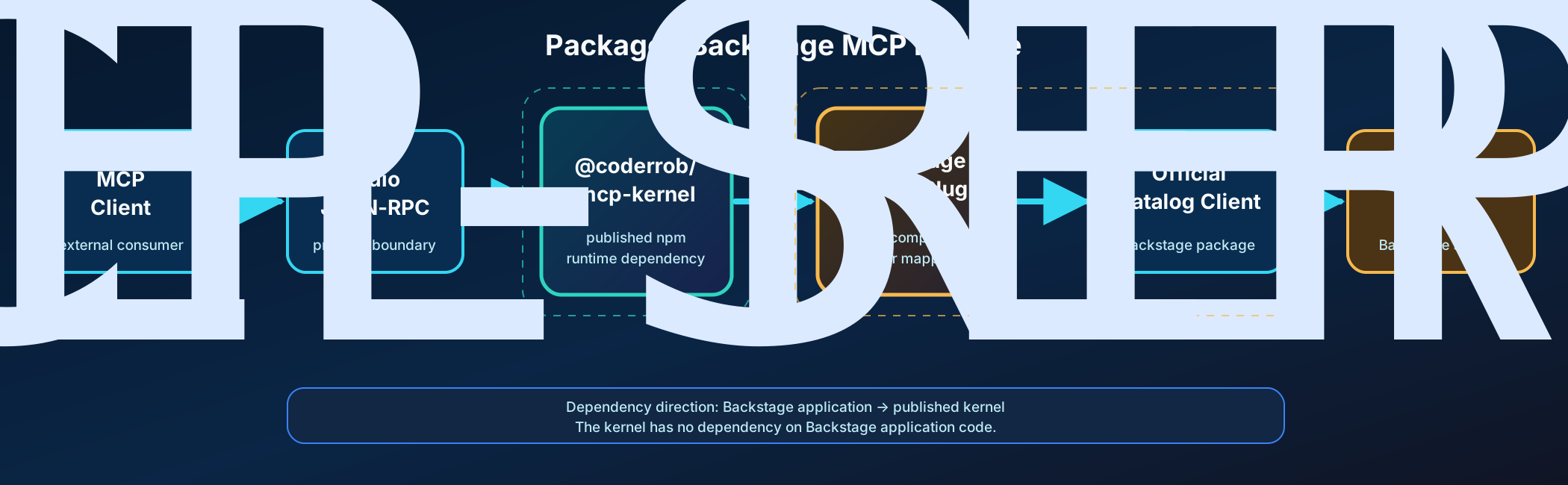
- An MCP client launches the packaged CLI and exchanges JSON-RPC over stdio.
- The published MCP Kernel validates and compiles immutable feature definitions.
- Zod validates input before middleware, authorization, caching, rate limiting, and timeout policies run.
- A Backstage tool calls the typed Catalog contract from its application context.
- The adapter delegates HTTP behavior to the official Backstage
CatalogClientand injects the bearer token at the fetch boundary. - Results return as MCP text plus structured content; expected failures use stable error codes and safe details.
The published @coderrob/mcp-kernel package owns protocol registration, lifecycle, policies, transports, testing support, and protocol-safe logging. This repository owns only the Backstage application and Catalog integration. See the current architecture overview for the dependency boundary.
MCP Kernel dependency
Generic server authoring, lifecycle, policies, transports, results, testing support, and logging are documented in the @coderrob/mcp-kernel repository. This package re-exports the kernel API for compatibility, but new generic consumers should install and import @coderrob/mcp-kernel directly.
To contribute a Catalog capability, follow Adding a Backstage MCP tool.
Verification
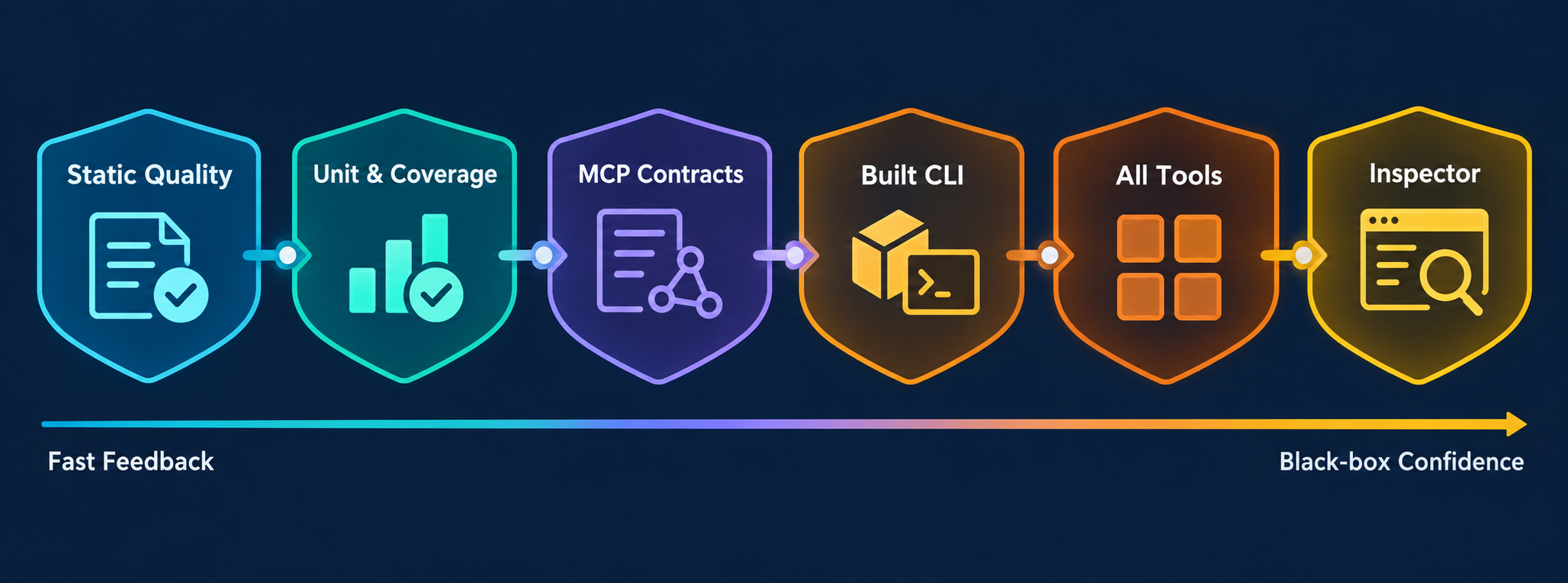
Run the normal contributor gate:
corepack yarn lint
corepack yarn typecheck
corepack yarn architecture:check
corepack yarn knip
corepack yarn test
corepack yarn test:shell
For MCP, tool, adapter, or packaging changes, also run:
corepack yarn test:mcp
corepack yarn manifest:check
test:mcp runs contract tests, builds the distribution, launches dist/cli.cjs over stdio with the official SDK client, invokes every registered tool against a deterministic authenticated Catalog stub, and performs an independent MCP Inspector check. It does not bypass the server with direct handler or HTTP calls.
See Repository tooling for the purpose and side effects of every command and MCP end-to-end testing for the exact black-box boundary.
Documentation
Choose a path from the documentation hub:
- Operate it: Backstage integration and end-to-end testing
- Develop it: Repository tooling, code quality, and adding tools
- Understand it: Architecture overview, ADRs, historical analysis, and implementation plan
- Maintain it: Dependency management
License
GPL-3.0. See LICENSE.
Curated knowledge and skills
The Backstage knowledge base maintains classified articles, named source citations and schema.org metadata. Repository skills in .agents/skills support catalog lookups, entity maintenance and MCP development.
The 19 contextual lookup tools cover names, System and Domain contents, Groups, ownership, dependencies, APIs, annotations and orphaned entities. See lookup contracts and examples, including pagination, ambiguity and work bounds.
Backstage MCP soruları
Backstage sunucusu için kimlik doğrulamayı nasıl yapılandırırım?
BACKSTAGE_TOKEN ortam değişkeni aracılığıyla bir bearer token sağlayabilir veya BACKSTAGE_TOKEN_FILE kullanarak bir token dosyası belirtebilirsiniz.
Yapay zeka ne tür katalog işlemleri gerçekleştirebilir?
Sunucu; varlık keşfi, konum keşfi, varlık doğrulama ve varlık ile konum ekleme, yenileme veya kaldırma gibi katalog mutasyonları için araçlar sağlar.
Bu sunucuyu gerçek bir Backstage dağıtımıyla kullanabilir miyim?
Evet, test:live komutunu kullanarak gerçek bir dağıtım üzerinde salt okunur kontrol gerçekleştirebilirsiniz.
Kurulum için sistem gereksinimleri nelerdir?
Node.js sürüm 24.15 veya üzeri ile Corepack kurulu olmalıdır.