
Farklı yapay zeka kodlama ajanlarının bağlam paylaşmasına ve birinin bıraktığı yerden diğerinin devam etmesine olanak tanıyan, yerel öncelikli (local-first) bir bellek ve süreklilik katmanı sağlar.
Ayrıca bilinen adı Coder8124/logos, @noeton/logos
- Yıldızlar
- 4
- Araçlar
- —
- İndirmeler, 30 gün
- —
- En son sürüm
- —
- Son commit
- 9 Kas 2026
- Lisans
- Apache-2.0
Logos MCP nedir?
Logos bir MCP sunucusudur. Farklı yapay zeka kodlama ajanlarının bağlam paylaşmasına ve birinin bıraktığı yerden diğerinin devam etmesine olanak tanıyan, yerel öncelikli (local-first) bir bellek ve süreklilik katmanı sağlar.
Özet, projenin README dosyasından oluşturuldu
Logos MCP sunucusu hakkında
Birden fazla yapay zeka kodlama ajanı kullanan geliştiriciler, farklı oturumlar ve araçlar arasında sürekliliği sağlamak için logos kullanabilirler. Logos; Claude Code, Cursor ve Codex gibi ajanların tek bir markdown dosyası kasasını paylaştığı, yerel öncelikli bir bellek katmanı olarak görev yapar. Bu kurulum, bir ajanın ilerlemesini bir kontrol noktasına (checkpoint) kaydetmesine ve böylece farklı bir modelin veya aracın çalışmaya tam olarak bir öncekinin durduğu yerden devam etmesine olanak tanır.
Sistem tamamen kendi makinenizde çalışarak, kasayı yerelde tutar ve veri gizliliğini sağlar. Önbelleğe alma için bir SQLite indeksi kullanır; bu indeks, veri kaybı yaşamadan logos index komutu kullanılarak yeniden oluşturulabilir. Kullanıcılar macOS ve Linux üzerinde Homebrew ile veya Windows üzerinde npm aracılığıyla kurulum yapabilirler. Sunucu; Claude Desktop, Cline, Devin ve GitHub Copilot dahil olmak üzere çeşitli hostları destekler ve yalnızca shell erişimi olan ajanlar için bir CLI sağlar.
Basit bir devam etme özelliğinin ötesinde sunucu, before_you_try aracı sayesinde ajanların başarısız olmuş yaklaşımları tekrarlamasını önlemeye yardımcı olur. Ayrıca geliştiricilerin why komutunu kullanarak belirli kod değişikliklerinin arkasındaki mantığı sorgulamasına olanak tanır. Bellek kasasını doldurmak için git geçmişi, Cursor kuralları veya CLAUDE.md gibi kaynaklardan mevcut proje geçmişini içe aktarabilirsiniz.
Neler yapabilirsiniz
- 1Yarıda kalan kodlama görevlerine devam etmeSon bilinen durumu ve açık görevleri geri çağırarak bir projeyi bir yapay zeka ajanından diğerine devredin.
- 2Tekrarlayan kodlama hatalarından kaçınmaYeni bir ajanın, başarısız olduğu kanıtlanmış bir çözümü tekrar denemesini engelleyin.
- 3Geçmiş kod kararlarını anlamaYapay zekadan belirli bir dosyanın mevcut uygulamasının arkasındaki mantığı açıklamasını isteyin.
- 4Mevcut ajan belleklerini taşımaÖnceki beyin kasanızı (brain vault) yeni logos sistemine taşıyın.
Projenin README dosyasından alınmıştır. Her kullanım durumu, oradaki bir alıntı ile kontrol edilir.
Logos MCP nasıl yüklenir
Biçimler 10 Kas 2026 tarihinde doğrulandıCursor'a ekleGoose'a ekleLogos MCP'yi Claude Code içine yükleyin
$ claude mcp add logos -- npx -y @noeton/logosLogos MCP'yi Cursor içine yükleyin
~/.cursor/mcp.json
{
  "mcpServers": {
    "logos": {
      "command": "npx",
      "args": [
        "-y",
        "@noeton/logos"
      ]
    }
  }
}Logos MCP'yi VS Code içine yükleyin
.vscode/mcp.json
{
  "servers": {
    "logos": {
      "type": "stdio",
      "command": "npx",
      "args": [
        "-y",
        "@noeton/logos"
      ]
    }
  }
}Logos MCP'yi VS Code CLI içine yükleyin
$ code --add-mcp '{"name":"logos","type":"stdio","command":"npx","args":["-y","@noeton/logos"]}'Logos MCP'yi Claude Desktop içine yükleyin
claude_desktop_config.json
{
  "mcpServers": {
    "logos": {
      "command": "npx",
      "args": [
        "-y",
        "@noeton/logos"
      ]
    }
  }
}Logos MCP'yi Codex içine yükleyin
$ codex mcp add logos -- npx -y @noeton/logosLogos MCP'yi Codex config.toml içine yükleyin
~/.codex/config.toml
[mcp_servers.logos]
command = "npx"
args = ["-y", "@noeton/logos"]
Logos MCP'yi Gemini CLI içine yükleyin
$ gemini mcp add -s user logos npx -- -y @noeton/logosLogos MCP'yi Gemini settings.json içine yükleyin
~/.gemini/settings.json
{
  "mcpServers": {
    "logos": {
      "command": "npx",
      "args": [
        "-y",
        "@noeton/logos"
      ]
    }
  }
}Otomatik kontroller
Çalıştırıldı 14 Kas 2026Tam rapor →Otomatik kontrollerimizden geçti. Bu bir güvenlik denetimi değildir: kodu okuyun ve sunucuya ihtiyaç duyduğu en dar erişimi verin. Kontroller nasıl çalışır

- Kaynak deposu bağlantılı ve erişilebilircoder8124/logos is public and reachablegithub.com/coder8124/logos ↗Geçti
- Paket, bu depoyu kaynağı olarak gösteriyor@noeton/logos names coder8124/logos as sourcenpmjs.com/package/@noeton/logos ↗Geçti
- Derleme kökeni (Sigstore onayı)Sigstore attestation for @noeton/logosnpmjs.com/package/@noeton/logos/v/0.5.8#provenance ↗Geçti
- Açık kaynak lisansı (OSI)Apache-2.0spdx.org/licenses/Apache-2.0.html ↗Geçti
- Son bir yıl içinde commit veya sürüm mevcutLast commit or release 2026-11-09github.com/coder8124/logos ↗Geçti
- OpenSSF ScorecardKontrol edilmedi
- Paket adı popüler bir pakete yakın değilNo popular package one edit away from @noeton/logosGeçti
- Pakette veya bağımlılıklarında kritik uyarı yokKontrol edilmedi
- Modele yönelik gizli talimat yok0 tool descriptions and the README read; no override phrases, credential paths or hidden charactersGeçti
- Yıkıcı araçlar etiketlenmişKontrol edilmedi
- Uzak uç nokta MCP el sıkışmasına yanıt veriyorKontrol edilmedi
Logos
When one coding agent stops, the next one continues the work.











Docs · Quick Start · Benchmark · Site · Issues
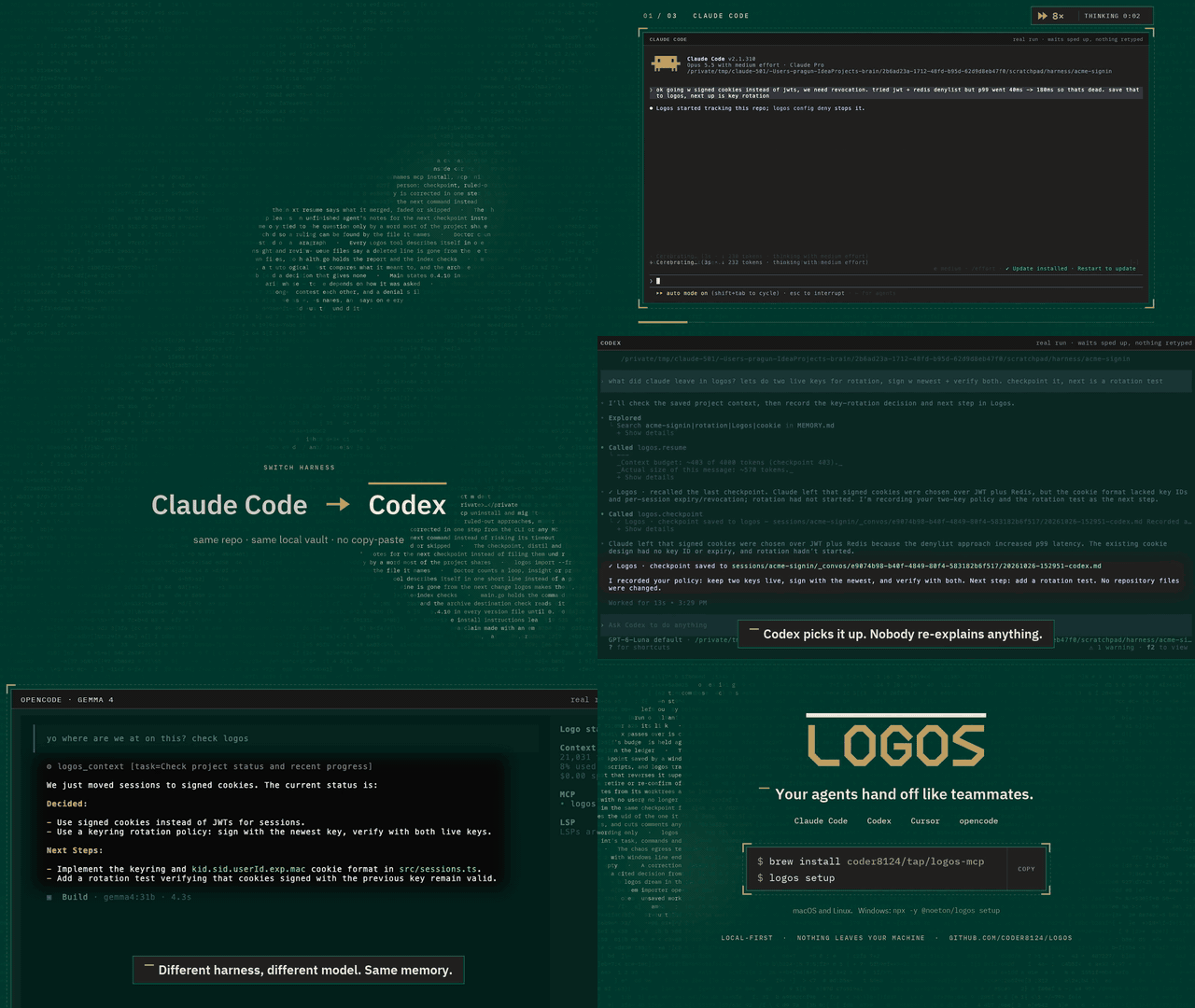
Logos is a local-first memory and continuity layer for coding agents. Claude Code, Codex, Cursor and your own agents share one vault over MCP. An agent checkpoints what it did, and the next one resumes where it stopped, even if it is a different model, in a different tool, on a different day.
Claude Code  ──▶  checkpoint  ──▶  Logos  ──▶  resume  ──▶  Cursor
                                (your vault)
The vault is a folder of markdown files on your machine. Nothing is uploaded,
and the SQLite index beside it is a cache: delete it, run logos index, and you
lose nothing.
Quick start
brew install coder8124/tap/logos-mcp && logos setup    # macOS and Linux
npm i -g @noeton/logos && logos setup                  # Windows
setup picks a vault, shows which agents it would wire, and asks before
touching any of them (--dry-run writes nothing). For Claude Code it also
installs the plugin, so the last handoff is in front of the model before it does
anything.
The formula is logos-mcp: a bare brew install logos installs Logos Bible
Software. Building from source, hand-wiring a host and the one-click buttons are
in Installation.
What it does
- Resume where the last agent stopped.
resumeshows what was done, what was verified and what is still open. - Stop the next agent repeating a dead end. Ruled-out approaches are their
own field, and
before_you_trychecks a plan against them. - Keep "verified" apart from "claimed". Resume marks another agent's verified items as its claim, and flags a command the activity log never saw.
- Answer "why is this code like this?"
why <path>shows what was being decided when a file was last worked on. - Remember what lasts. Decisions, constraints and procedures, reviewed before they become project memory.
- Bring your history. Import CLAUDE.md, AGENTS.md, Cursor rules, claude-mem, Claude Code's auto memory, transcripts or git history.
Every write returns a receipt, so you can see it working. The Handoff Loop shows how an agent uses it, step by step.
Works with
Claude Code, Codex, Cursor, Claude Desktop, Cline, Devin, GitHub Copilot, opencode, Amp, Grok Build, and anything else that speaks MCP. Agents with only a shell get a CLI command for every tool. See Agent Hosts.
Does it work?
On a handoff suite built for this (32 scenarios, nine memory systems, one machine), Logos passes 84.4%. The next best system passes 46.9%.
Every real system retrieves about equally well. What separates them is whether the agent that resumes gets the current answer, or gets it next to the stale one it replaced. Method, per-scenario scores and the cases Logos loses are in the benchmark.
Local, private and durable
- No model required. Search falls back from local embeddings (Ollama) to full-text search, and nothing breaks.
- Nothing is observed. Logos does not watch your screen, browser or files. The vault holds what agents wrote there, plus the Claude Code plugin's activity log, which you can turn off.
- Nothing leaves.
logos doctor --egresslists every address Logos can contact, and when. - Hard to break. It survives SIGKILL mid-write, a full disk, sync-client
conflict copies and two worktrees racing on one vault (
chaos/).
Exactly what is recorded, and every switch for it, is in Settings and Privacy.
Documentation
Everything lives in the wiki.
| Start | Use | Look up |
|---|---|---|
| Installation | The Handoff Loop | CLI Reference |
| Quick Start | Memory | MCP Tools Reference |
| Core Concepts | Importing History | Agent Hosts |
| Troubleshooting | The Vault | Embedding in Go |
Contributing
Contributions are welcome. CONTRIBUTING.md covers the build,
the test tiers and the two load-bearing conventions: the vault is the truth, and
every feature announces itself. Agents working here get the context-connect
and continuity skills from the plugin (plugin/skills/); this repository
dogfoods its own plugin.
Coming from brain? Since 0.5.0 the old names are not read. logos migrate
moves a ~/brain vault; see
Moving a 0.4 vault.
License
Apache 2.0. See LICENSE. Git history satisfies §4(b), so there are no change notices to add and no CLA (details). Prior work that shaped the ideas is in systemmd/CREDITS.md.
Logos MCP soruları
Logos MCP'yi Claude Code'a nasıl eklerim?
Terminalinizde claude mcp add logos -- npx -y @noeton/logos komutunu çalıştırın. Her projede kullanılabilir olması için --scope user ekleyin.
Logos MCP'yi Cursor'a nasıl eklerim?
~/.cursor/mcp.json dosyasını açın ve yukarıdaki yükleme bölümünde gösterilen Cursor yapılandırmasını kullanarak sunucuyu mcpServers altına ekleyin.
Logos veri gizliliğini nasıl yönetir?
Logos yerel önceliklidir; vault (kasa) makinenizdeki markdown dosyalarından oluşan bir klasördür ve hiçbir veri yüklenmez.
Logos'u farklı yapay zeka ajanlarıyla kullanabilir miyim?
Evet; Claude Code, Codex, Cursor, Claude Desktop, Cline, Devin, GitHub Copilot ve MCP destekleyen diğer tüm araçlarla çalışır.
İndeks dosyasını silersem ne olur?
Hiçbir şey kaybetmezsiniz; yeniden oluşturmak için basitçe index komutunu çalıştırmanız yeterlidir.
Çalışması için bir LLM gerekir mi?
Temel işlevsellik için herhangi bir model gerekmez; yerel embedding'ler mevcut değilse arama işlemi tam metin aramasına (full-text search) geri döner.