
Yapay zeka kodlama ajanlarına görevle ilgili depo bağlamı ve kanıta dayalı dosya paketleri sunarak doğruluğu artırır ve token kullanımını azaltır.
Ayrıca bilinen adı codeledgerECF/codeledger, @codeledger/cli
- Yıldızlar
- 8
- Araçlar
- —
- İndirmeler, 30 gün
- 4.468
- En son sürüm
- 0.10.82
- Son commit
- 11 Kas 2026
- Lisans
- —
CodeLedger MCP nedir?
CodeLedger bir MCP sunucusudur. Yapay zeka kodlama ajanlarına görevle ilgili depo bağlamı ve kanıta dayalı dosya paketleri sunarak doğruluğu artırır ve token kullanımını azaltır.
Özet, projenin README dosyasından oluşturuldu
CodeLedger MCP sunucusu hakkında
CodeLedger, yapay zeka kodlama ajanlarının doğruluğunu artırmak ve token tüketimini azaltmak için yerel öncelikli bağlam kontrolü sağlar. Bağımlılık yapısı ve test dosyaları gibi sinyalleri bir depoda tarayarak, görevle ilgili sınırlı bir dosya setini seçer. Bu bilgiler .codeledger/active-bundle.md konumundaki belirli bir artefakta yazılır; Claude Code, Cursor veya GitHub Copilot gibi ajanlar çalışmaya başlamadan önce bu dosyayı okuyabilir.
Geliştiriciler, depoları başlatmak ve ready komutunu kullanarak belirli görevlere hazırlanmak için CLI'ı kullanırlar. Araç, analizleri varsayılan olarak yerel olarak çalıştırır ve kaynak kodunu telemetri üzerinden göndermez. Uyumlu istemcilerle entegre olmak için komut satırı üzerinden başlatılabilen bir MCP server içerir. Kullanıcılar ayrıca token kullanımı ve test geçme oranları gibi metriklerdeki performans iyileştirmelerini ölçmek için compare komutunu çalıştırabilirler.
Neler yapabilirsiniz
- 1Göreve özel bağlam hazırlamaBir yapay zeka ajanı, belirli bir hata düzeltmesi veya özellik isteğiyle ilgili odaklanmış bir dosya paketi alabilir.
- 2Ajan değişikliklerini doğrulamaKullanıcılar, oturum özetleri ve makbuzlar aracılığıyla bir ajanın neleri değiştirdiğini inceleyebilirler.
Projenin README dosyasından alınmıştır. Her kullanım durumu, oradaki bir alıntı ile kontrol edilir.
CodeLedger MCP nasıl yüklenir
Biçimler 10 Kas 2026 tarihinde doğrulandıCodeLedger MCP'yi Claude Code içine yükleyin
$ claude mcp add codeledger -- npx -y @codeledger/cliCodeLedger MCP'yi Cursor içine yükleyin
~/.cursor/mcp.json
{
  "mcpServers": {
    "codeledger": {
      "command": "npx",
      "args": [
        "-y",
        "@codeledger/cli"
      ]
    }
  }
}CodeLedger MCP'yi VS Code içine yükleyin
.vscode/mcp.json
{
  "servers": {
    "codeledger": {
      "type": "stdio",
      "command": "npx",
      "args": [
        "-y",
        "@codeledger/cli"
      ]
    }
  }
}CodeLedger MCP'yi Claude Desktop içine yükleyin
claude_desktop_config.json
{
  "mcpServers": {
    "codeledger": {
      "command": "npx",
      "args": [
        "-y",
        "@codeledger/cli"
      ]
    }
  }
}CodeLedger MCP'yi Codex içine yükleyin
~/.codex/config.toml
[mcp_servers.codeledger]
command = "npx"
args = ["-y", "@codeledger/cli"]
CodeLedger MCP'yi Gemini CLI içine yükleyin
~/.gemini/settings.json
{
  "mcpServers": {
    "codeledger": {
      "command": "npx",
      "args": [
        "-y",
        "@codeledger/cli"
      ]
    }
  }
}Otomatik kontroller
Çalıştırıldı 14 Kas 2026Tam rapor →Otomatik kontrollerimizden geçti. Bu bir güvenlik denetimi değildir: kodu okuyun ve sunucuya ihtiyaç duyduğu en dar erişimi verin. Kontroller nasıl çalışır

- Kaynak deposu bağlantılı ve erişilebilircodeledgerecf/codeledger is public and reachablegithub.com/codeledgerecf/codeledger ↗Geçti
- Paket bu depoyu kaynak olarak gösteriyor@codeledger/cli names github:codeledgerECF/codeledger as its sourcenpmjs.com/package/@codeledger/cli ↗Bulgu
- Derleme kaynağı (Sigstore onayı)No build attestation published for this releaseKontrol edilmedi
- Açık kaynak lisansı (OSI)No licenseBulgu
- Son bir yıl içinde commit veya sürüm mevcutLast commit or release 2026-11-11github.com/codeledgerecf/codeledger ↗Geçti
- OpenSSF ScorecardKontrol edilmedi
- Paket adı popüler bir pakete yakın değilNo popular package one edit away from @codeledger/cliGeçti
- Pakette ve bağımlılıklarında kritik uyarı yok1 resolved dependencies checked; no critical advisoryosv.dev ↗Geçti
- Modele yönelik gizli talimat yok0 tool descriptions and the README read; no override phrases, credential paths or hidden charactersGeçti
- Yıkıcı araçlar etiketlenmişKontrol edilmedi
- Uzak endpoint MCP el sıkışmasına yanıt veriyorKontrol edilmedi
CodeLedger
Give AI coding agents the right repo context before they start - then verify what changed.
CodeLedger is local-first context control for AI coding agents. It scans a repository, selects a bounded task-relevant set of files, and writes an evidence-backed context bundle before the agent begins work.
Works with Claude Code, Codex, Cursor, GitHub Copilot, Gemini CLI, and other CLI or MCP-compatible coding agents.
Try It
npm install -g @codeledger/cli
cd your-project
codeledger ready --task "Fix null handling in user service"
CodeLedger initializes the repo if needed, refreshes the index, and creates the
task-specific bundle at .codeledger/active-bundle.md. Your agent reads that
artifact first so it starts with the files most relevant to the task.
Runtime analysis is local by default. Installing or updating may fetch packages or release artifacts from npm and GitHub Releases; CodeLedger runtime analysis does not send your source code through CodeLedger telemetry by default.
Example Benchmark
Example result from a mid-sized Node.js service. Results vary by repository, task, agent, and scenario.
| Metric | Without CodeLedger | With CodeLedger | Change |
|---|---|---|---|
| Tests Passed | 78% | 94% | +16% |
| Iterations | 4 | 2 | -50% |
| Files Changed | 17 | 9 | -47% |
| Time to Finish | 6m 12s | 3m 40s | -41% |
| Token Usage | 28k | 18k | -36% |
Do not take the benchmark on faith - measure CodeLedger on your own repo:
codeledger compare \
  --scenario .codeledger/harness/scenarios/auth-rate-limit.json \
  --guided
If CodeLedger improves your coding-agent workflow, star the repo to follow releases and help other developers discover it.
Start Here
- Getting Started
- CLI Reference
- How It Works
- MCP Server
- Feature Tiers
- Security
- Contributing
- Latest Release
- npm package
How It Works
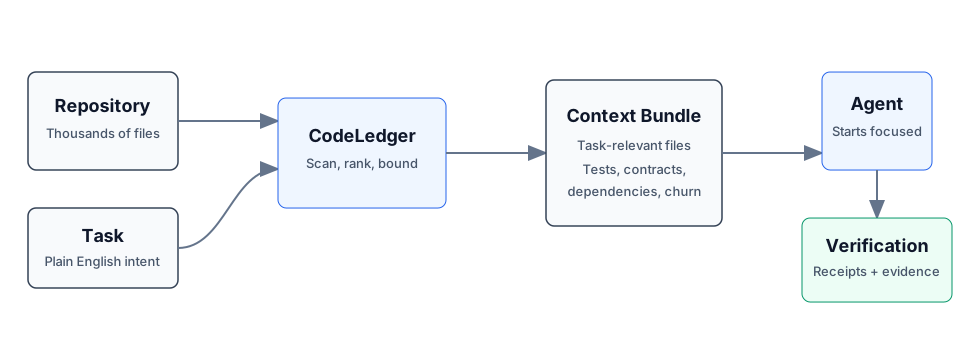
- CodeLedger scans the repo for deterministic local signals such as dependency structure, churn, tests, contracts, and task keywords.
- It ranks and packs a bounded set of task-relevant files.
- It writes
.codeledger/active-bundle.mdfor your coding agent. - After work, verification, receipts, and session summaries help show what changed and whether the selected context was useful.
Same task plus same repo state produces the same file ranking behavior.
Core Capabilities
- Give agents the right context: deterministic file selection, scope inference, bounded budgets, blast-radius hints, and co-change context.
- Keep work continuous: session summaries, checkpoints, mid-session refine, and handoff/recovery commands.
- Keep agents inside the task: scope contracts, intent governance, loop detection, and multi-agent conflict checks.
- Prove what happened: review intelligence, receipts, provenance, audit exports, and release evidence.
For the full command surface, see the CLI Reference.
Agent Integration
Claude Code can use CodeLedger hooks after codeledger ready initializes the
repo. Cursor, Codex, GitHub Copilot, Gemini CLI, Aider, Windsurf, and other
agents can read CLAUDE.md plus .codeledger/active-bundle.md, or use the
repo-local wrappers when available.
CodeLedger also includes an MCP server for supported tiers:
codeledger mcp start
codeledger mcp status
See MCP Server and Feature Tiers for setup and tier details.
Trust And Verification
- Runtime source analysis runs locally by default.
- Source code is not sent through CodeLedger telemetry by default.
- No account is required for the local CLI flow.
- Public releases include
SHA256SUMSand release-evidence artifacts. codeledger doctorchecks the local install, hooks, config, index, and ledger health.- The public wrapper, docs, harness, and scanning surface are inspectable in
this repo; the protected hardened runtime is covered by
LICENSE-CORE.
Install
npm install -g @codeledger/cli
codeledger --version
Or use the release zip:
- Download the latest release.
- Extract it.
- Run
install.sh.
The installer uses the bundled package from the zip, so the installed wrapper version matches the release. The wrapper then fetches the matching hardened binary from the GitHub release unless your environment already provides it.
Everyday Flow
cd your-project
codeledger ready
codeledger ready --task "Fix null handling in user service"
Inside an initialized repo, you can also use:
codeledger activate --task "Fix null handling in user service"
codeledger doctor
Browser, cloud, and sandboxed environments can use the repo-local runtime
deployed under .codeledger/bin/ after initialization or vendoring.
Architecture
CodeLedger has an open public surface and a protected hardened runtime:
PUBLIC:    CLI wrapper, types, repo scanner, harness, reports, docs, hooks
PROTECTED: Scoring engine, selection algorithm, confidence internals
Use codeledger about, codeledger doctor, and command-specific --explain
output to inspect behavior and evidence without exposing protected
implementation internals.
Privacy
- Installation may use npm and GitHub Releases.
- Runtime analysis runs on your local machine by default.
- Runtime analysis makes zero source-code telemetry calls by default.
- Your source code is not required to leave your machine for the local CLI flow.
- Uninstall at any time.
License
- Public wrapper, types, repo scanning, harness, reports, docs, and examples: MIT
- Downloaded hardened binary: CodeLedger Core License
GitHub may classify the combined licensing structure as "Other" because the repo includes both MIT-covered public files and separately licensed protected runtime terms. Changing the license files should be a human legal decision.
Part Of ContextECF
CodeLedger applies Intelligent Context AI's context-control architecture to software engineering. For enterprise-wide governed context across applications and agents, see ContextECF.
CodeLedger is produced by Intelligent Context AI, Inc. See codeledger.dev.
CodeLedger MCP soruları
CodeLedger MCP'yi Claude Code'a nasıl eklerim?
Terminalinizde claude mcp add codeledger -- npx -y @codeledger/cli komutunu çalıştırın. Her projede kullanılabilir olması için --scope user ekleyin.
CodeLedger MCP'yi Cursor'a nasıl eklerim?
~/.cursor/mcp.json dosyasını açın ve yukarıdaki yükleme bölümünde gösterilen Cursor yapılandırmasını kullanarak sunucuyu mcpServers altına ekleyin.
CodeLedger kaynak kodumu kendi sunucularına gönderiyor mu?
Hayır, çalışma zamanı analizi varsayılan olarak yereldir ve kaynak kodunuzu varsayılan olarak CodeLedger telemetrisi üzerinden göndermez.
CodeLedger hangi yapay zeka kodlama ajanlarıyla uyumludur?
Claude Code, Codex, Cursor, GitHub Copilot, Gemini CLI, Aider, Windsurf ve diğer CLI veya MCP uyumlu ajanlarla çalışır.
CodeLedger kodlama iş akışlarını nasıl iyileştirir?
Görevle ilgili dosyaları seçerek daha yüksek test geçme oranları, daha az yineleme ve azaltılmış token kullanımı sağlar.
Yerel CLI'ı kullanmak için bir hesaba ihtiyacım var mı?
Yerel CLI akışı için hesap gerekmemektedir.