
fusionwright MCP sunucusu
Commit 27 Eki 2026Bir yapay zeka asistanını Autodesk Fusion'a bağlayarak 3D modelleme, doğrulama, render alma ve dosya dışa aktarma işlemlerini bir doğrulama döngüsü üzerinden otomatikleştirir.
Ayrıca bilinen adı Cocoloco20/fusionwright
- Yıldızlar
- 2
- Araçlar
- 10
- İndirmeler, 30 gün
- —
- En son sürüm
- —
- Son commit
- 27 Eki 2026
- Lisans
- MIT
fusionwright MCP nedir?
Bir yapay zeka asistanını Autodesk Fusion'a bağlayarak 3D modelleme, doğrulama, render alma ve dosya dışa aktarma işlemlerini bir doğrulama döngüsü üzerinden otomatikleştirir. 10 araç sunar; örneğin fusion_status, fusion_api, fusion_run.
Özet, projenin README dosyasından oluşturuldu
fusionwright MCP sunucusu hakkında
fusionwright, mühendisler ve tasarımcılar için Autodesk Fusion içerisinde 3D modelleme ve mekanik doğrulama süreçlerini otomatikleştirir. Claude veya Cursor gibi bir yapay zeka asistanını canlı bir Fusion oturumuna bağlayarak, kullanıcılar karmaşık parçaları tarif edebilir ve asistanın gerekli Python kodunu yazmasını, çalıştırmasını ve doğrulamasını sağlayabilir. Bu kurulum, yerel bir köprü eklentisi kullanarak macOS veya Windows üzerinde çalışır ve Python 3.10 veya üzeri bir sürüm gerektirir.
Basit betik köprülerinin aksine, bu server doğruluğu sağlamak için bir doğrulama döngüsü uygular. Kod çalıştırmak için fusion_run, hacimleri ve çakışmaları Fusion çekirdeğine karşı doğrulamak için fusion_check ve çok açılı ekran görüntüleri almak için fusion_look gibi araçlar kullanır. Sistem ayrıca fusion_render aracılığıyla fotorealistik renderlar alabilir ve STEP, STL veya OBJ gibi formatlarda dosyaları dışa aktarabilir. Bu yaklaşım, yapay zekanın nihai tasarım tamamlanmadan önce geometrideki hataları tespit etmesine ve düzeltmesine olanak tanır.
Neler yapabilirsiniz
- 1Muhafaza oluşturma ve dışa aktarmaYapay zekadan havalandırma kanalları olan belirli bir PCB muhafazası oluşturmasını ve bunu bir STEP dosyası olarak dışa aktarmasını isteyin.
- 2Mekanik doğruluğu kontrol etmeAsistanın bir parçayı geçersiz gövdeler veya çakışmalar açısından kontrol etmesini ve bunları otomatik olarak onarmasını sağlayın.
- 3Estetik bitirme işlemlerini otomatize etmeTüm dış kenarlara radius (fillet) eklenmesini ve belirli bir malzeme ile render alınmasını talep edin.
- 4Geometriyi aritmetik ile doğrulamaOluşturulan 3D hacmin, Fusion çekirdeğini kullanarak belirli bir hesaplanmış değerle eşleştiğinden emin olun.
Projenin README dosyasından alınmıştır. Her kullanım durumu, oradaki bir alıntı ile kontrol edilir.
fusionwright MCP araçları 10
README dosyasından algılandıfusion_statusfusion_apifusion_runfusion_rollbackfusion_inspectfusion_checkfusion_lookfusion_renderfusion_exportfusion_ui_command
| fusion_status | — | |
| fusion_api | — | |
| fusion_run | — | |
| fusion_rollback | — | |
| fusion_inspect | — | |
| fusion_check | — | |
| fusion_look | — | |
| fusion_render | — | |
| fusion_export | — | |
| fusion_ui_command | — |
Otomatik kontroller
Çalıştırıldı 14 Kas 2026Tam rapor →Henüz doğrulanmadı. Bir sunucunun 80 puana, ciddi bir bulgu olmamasına ve kontrol edebilmemiz için yeterli veriye ihtiyacı vardır. Kontroller nasıl çalışır · Daha fazla puan için nelerin düzeltileceği

- Kaynak deposu bağlantılı ve erişilebilircocoloco20/fusionwright is public and reachablegithub.com/cocoloco20/fusionwright ↗Geçti
- Paket, bu depoyu kaynağı olarak gösteriyorKontrol edilmedi
- Derleme kökeni (Sigstore onayı)Kontrol edilmedi
- Açık kaynak lisansı (OSI)MITspdx.org/licenses/MIT.html ↗Geçti
- Son bir yıl içinde commit veya sürüm mevcutLast commit or release 2026-10-27github.com/cocoloco20/fusionwright ↗Geçti
- OpenSSF ScorecardKontrol edilmedi
- Paket adı popüler bir pakete yakın değilKontrol edilmedi
- Pakette veya bağımlılıklarında kritik uyarı yokKontrol edilmedi
- Modele yönelik gizli talimat yok10 tool descriptions and the README read; no override phrases, credential paths or hidden charactersGeçti
- Yıkıcı araçlar etiketlenmişNo tool named like delete, drop or execGeçti
- Uzak uç nokta MCP el sıkışmasına yanıt veriyorKontrol edilmedi
fusionwright
Let an AI build in Autodesk Fusion for you.
An open-source MCP server that connects an AI assistant (Claude, ChatGPT, Cursor, anything that speaks MCP) to your live Fusion session. You describe what you want; the AI writes the Fusion code, looks at the result from several angles, measures and verifies it with Fusion's own kernel, fixes its mistakes, then renders it and exports files you can print, machine or send on. It is not tied to any kind of object: brackets, enclosures, gears, jigs, furniture, product mock-ups, anything solid.
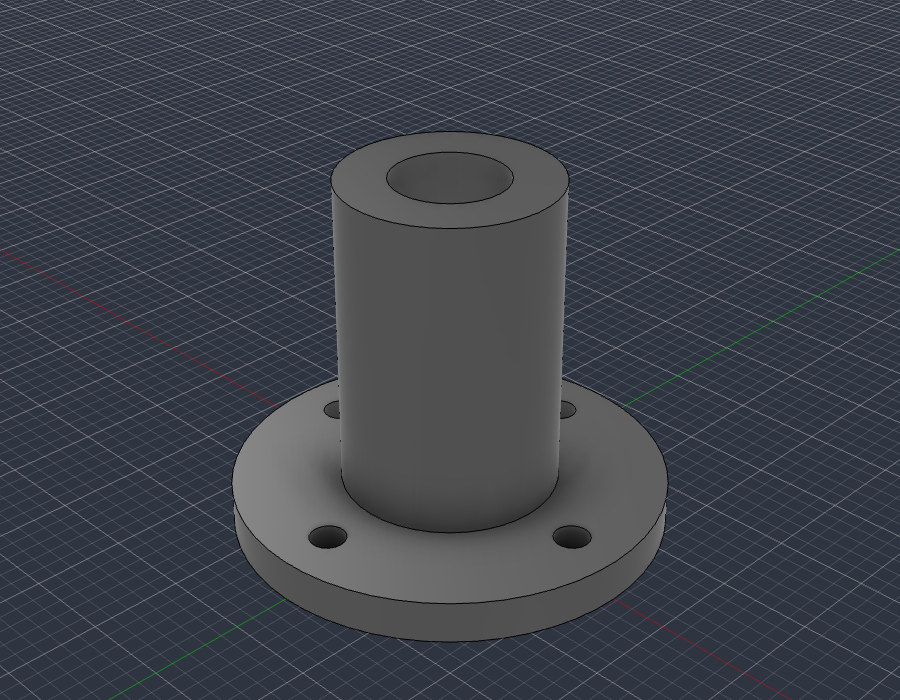
examples/flange_fusion_run.py, run through fusion_run in a live Fusion document: sketch, extrude, join, cut. The script checks Fusion's volume (37.542 cm3) against the hand-computed value (37.542 cm3), then fusion_look took this picture.
What you can ask for
- "Make an 80 x 50 x 25 mm enclosure for a PCB with four screw posts and vent slots, then export a STEP and an STL."
- "Model an M6 flange bracket with a 4-hole bolt circle, check it, and show me from the front."
- "Take the part open in Fusion, find any invalid bodies or interferences and fix them."
- "Add a 2 mm fillet to every outside edge and render it in brushed aluminium."
- "Build a 24-inch bookcase from 3/4 inch plywood and give me every part as its own component."
The loop that makes it dependable: write code, look at it, measure it against the arithmetic, repair, repeat. Executable CAD is often not correct CAD (research), and a validation loop sharply improves results, so the tools are built around checking the work.
Requirements
- Autodesk Fusion on macOS (tested) or Windows (untested). The free Personal-use tier works.
- Python 3.10+ and an MCP client.
It only uses Autodesk's documented public API and a legitimately licensed Fusion; it does not touch licensing.
Quick start
-
Install the bridge add-in (once): run
./scripts/install_addin.sh, then in Fusion pressShift+S, pick FusionBridge, click Run (tick Run on Startup to make it automatic). -
Register the server with your client.
Claude Desktop (
claude_desktop_config.json):{ "mcpServers": { "fusionwright": { "command": "uvx", "args": ["--from", "git+https://github.com/Cocoloco20/fusionwright", "fusionwright"] } } }Claude Code:
claude mcp add fusionwright -- uvx --from git+https://github.com/Cocoloco20/fusionwright fusionwright -
Ask. Exports land in
~/fusionwright-projects/(override withFUSIONWRIGHT_HOME).
Tools (10)
A small surface on purpose: fewer, higher-level tools beat dozens of thin wrappers.
| Tool | Purpose |
|---|---|
fusion_status |
Is Fusion reachable? Which document is open? |
fusion_api |
Look up the real Fusion API (class members with docs) before writing code |
fusion_run |
Run Python inside Fusion (helpers predefined); returns a rollback checkpoint |
fusion_rollback |
Undo everything after a checkpoint |
fusion_inspect |
Compact design state: sizes, volume, invalid bodies, timeline problems |
fusion_check |
Kernel validation: body validity, timeline health, interference, expected size |
fusion_look |
Screenshots from iso / front / back / left / right / top / bottom |
fusion_render |
Photoreal render with Fusion's local renderer |
fusion_export |
STEP, STL, F3D, OBJ, 3MF, IGES, SAT (local files only) |
fusion_ui_command |
Run any of Fusion's ~3,000 UI commands by id, or search them |
Inside fusion_run the names app, ui, design, root, adsk, P3, VI, FO, IN, coll() and board() are predefined; assign your answer to result. Fusion works in centimetres internally.
Examples
| File | What it shows |
|---|---|
examples/flange_fusion_run.py |
sketches, extrude / join / cut, picking profiles by area, checking against hand arithmetic |
Contributions of more examples (enclosures, gears, sheet metal, assemblies, anything) are welcome.
How it compares
- Autodesk's official Fusion MCP (announced May 2026) is a thin scripting bridge: read / screenshot, run a script, undo / redo. fusionwright adds a verification layer (kernel checks, multi-angle images, rollback checkpoints, an API lookup, UI-command access).
- Community Fusion MCPs expose dozens of low-level CAD operations (the biggest lists 89 tools) and mostly stop there. fusionwright is deliberately small and runs its bridge on an authenticated loopback port.
Safety
See SECURITY.md. In short: loopback only, bearer token (~/.fusion-bridge-token, mode 0600), Host-header guard, request-size cap; fusion_run blocks file deletion, network access and cloud saves by default and returns a rollback checkpoint. It is a safety net, not a sandbox: code you let an AI run inside Fusion is powerful. Save your work first.
What's tested
- 9 unit tests: the add-in's HTTP layer with a stubbed Fusion (token, host guard, size cap, error tracebacks) and a real stdio MCP round trip (tool list, safety guard, error messages).
- Live tests against a real Fusion (
pytest tests/integration): build a part and verify sizes, volume and interference with the kernel, views that must differ from each other, 5 export formats, a real render, rollback, API lookup, UI-command search, and a full MCP client round trip that returns images. - A 30-case capability suite (
tests/integration/capability_suite.py) covering sketches, constraints, extrude / cut / revolve / sweep / loft, fillet / shell / chamfer / hole, patterns, booleans, components and joints, parameters, timeline edits, materials, measurement, 8 export formats, STEP re-import, CAM setup creation, configurations, rendering and more.
See docs/COVERAGE.md for what the Fusion API can and cannot do and docs/GOTCHAS.md for API traps found along the way.
Known limitations
- Fusion-native drawings (
adsk.drawing) can only be created from a design saved to your Autodesk cloud, so they are not automated here. Verify every dimension before cutting, printing or machining. - "Everything a human can do in Fusion" is not literally achievable through its API.
fusion_ui_commandandfusion_runcover a great deal, but some interactions (some drag gestures, cloud workflows) remain manual.
Roadmap
Adapter for Autodesk's official Fusion MCP as an alternative transport · more verified examples · driving models from Fusion user parameters · MCP Apps live 3D preview · MCP Tasks for long renders · a cross-model evaluation suite.
Not affiliated
fusionwright is an independent project, not affiliated with or endorsed by Autodesk, Anthropic or OpenAI. "Autodesk" and "Fusion" are trademarks of Autodesk, Inc.
MIT licensed. Contributions welcome.
fusionwright MCP soruları
fusionwright MCP hangi araçları sunar?
10 araç sunar; bunlar arasında fusion_status, fusion_api, fusion_run, fusion_rollback, fusion_inspect yer alır.
Hangi işletim sistemleri destekleniyor?
macOS üzerinde test edilmiştir; Windows üzerinde henüz test edilmemiştir.
Ücretli bir Autodesk aboneliği gerektiriyor mu?
Hayır, Autodesk Fusion'ın ücretsiz Personal-use sürümü bu MCP server ile çalışmaktadır.
Yapay zekanın tasarımlarının doğru olduğundan nasıl emin olunuyor?
Kod yazan, tasarımı Fusion çekirdeği ile inceleyen, aritmetik yöntemlerle ölçüm yapan ve hataları düzelten bir doğrulama döngüsü kullanır.
Hangi dosya formatları dışa aktarılabilir?
STEP, STL, F3D, OBJ, 3MF, IGES ve SAT formatlarında dosya dışa aktarabilirsiniz.