
Bult DevOps platformını kullanarak AI kodlama ajanları aracılığıyla bulut altyapısını, veritabanlarını ve servisleri dağıtın ve yönetin.
Ayrıca bilinen adı bultcloud/mcp-server, mcp-server, @bultcloud/mcp-server
- Yıldızlar
- 2
- Araçlar
- 24
- İndirmeler, 30 gün
- 128
- En son sürüm
- 1.0.1
- Son commit
- 12 Eki 2026
- Lisans
- MIT
Bult MCP nedir?
Bult bir MCP sunucusudur. Bult DevOps platformını kullanarak AI kodlama ajanları aracılığıyla bulut altyapısını, veritabanlarını ve servisleri dağıtın ve yönetin. 24 araç sunar; örneğin list-projects, get-project, create-project.
Özet, projenin README dosyasından oluşturuldu
Bult MCP sunucusu hakkında
Bult, AI kodlama ajanlarının bulut altyapısını ve barındırma kaynaklarını doğrudan Bult DevOps platformu üzerinden yönetmelerine olanak tanır. Geliştiriciler; GitHub depolarının, Docker imajlarının ve veritabanı servislerinin dağıtımını otomatikleştirmek için bu MCP server'ı Claude Desktop, Claude Code, Cursor ve Codex gibi istemcilerle birlikte kullanabilirler. Sunucu stdio üzerinden çalışır ve işlevini yerine getirmek için bir Bult API tokenı ile Bult API URL'sine ihtiyaç duyar.
Sunucu, tüm proje yaşam döngüsünü yönetmek için geniş bir araç yelpazesi sunar. Projeleri listelemek veya oluşturmak, daemon ve veritabanı servislerini yönetmek ve kalıcı birimleri (persistent volumes) işlemek için belirli komutlar kullanabilirsiniz. Ayrıca rota ve alan adı eşlemelerinin yapılandırılmasına, proje şablonlarının uygulanmasına ve derleme geçmişinin incelenmesine olanak tanır.
Dağıtımın ötesinde sunucu, servis günlüklerine (logs) erişim sağlayarak aktif sorun giderme imkanı sunar. Bu sayede bir AI ajanı, başarısız olan dağıtımları inceleyebilir veya uygulama davranışlarını izleyebilir. Kullanıcılar, Bult API'sine yapılan istekleri doğrulamak için ortam değişkenleri aracılığıyla bir BULT_API_TOKEN sağlamalıdır.
Neler yapabilirsiniz
- 1Kod depolarını dağıtmaBir AI ajanı, bir GitHub deposunu alıp Bult bulut platformuna dağıtabilir.
- 2Dağıtım hatalarını gidermeBir dağıtımın neden çalışmadığını öğrenmek için bir AI'dan servis günlüklerini incelemesini isteyebilirsiniz.
- 3Veritabanı servislerini yönetmeBir geliştirici, bir ajana yeni bir veritabanı servisi oluşturması ve yapılandırması talimatını verebilir.
- 4Ağ rotalarını yapılandırmaBir AI, belirli bir servis için genel alan adı veya yol eşlemeleri ayarlayabilir.
Projenin README dosyasından alınmıştır. Her kullanım durumu, oradaki bir alıntı ile kontrol edilir.
Bult MCP nasıl yüklenir
Biçimler 10 Kas 2026 tarihinde doğrulandıCursor'a ekleGoose'a ekleBult MCP'yi Claude Code içine yükleyin
$ claude mcp add --env 'BULT_API_TOKEN=<YOUR_BULT_API_TOKEN>' --env 'BULT_API_URL=<BULT_API_URL>' mcp-server -- npx -y @bultcloud/mcp-serverBult MCP'yi Cursor içine yükleyin
~/.cursor/mcp.json
{
  "mcpServers": {
    "mcp-server": {
      "command": "npx",
      "args": [
        "-y",
        "@bultcloud/mcp-server"
      ],
      "env": {
        "BULT_API_TOKEN": "<YOUR_BULT_API_TOKEN>",
        "BULT_API_URL": "<BULT_API_URL>"
      }
    }
  }
}Bult MCP'yi VS Code içine yükleyin
.vscode/mcp.json
{
  "servers": {
    "mcp-server": {
      "type": "stdio",
      "command": "npx",
      "args": [
        "-y",
        "@bultcloud/mcp-server"
      ],
      "env": {
        "BULT_API_TOKEN": "<YOUR_BULT_API_TOKEN>",
        "BULT_API_URL": "<BULT_API_URL>"
      }
    }
  }
}Bult MCP'yi VS Code CLI içine yükleyin
$ code --add-mcp '{"name":"mcp-server","type":"stdio","command":"npx","args":["-y","@bultcloud/mcp-server"],"env":{"BULT_API_TOKEN":"<YOUR_BULT_API_TOKEN>","BULT_API_URL":"<BULT_API_URL>"}}'Bult MCP'yi Claude Desktop içine yükleyin
claude_desktop_config.json
{
  "mcpServers": {
    "mcp-server": {
      "command": "npx",
      "args": [
        "-y",
        "@bultcloud/mcp-server"
      ],
      "env": {
        "BULT_API_TOKEN": "<YOUR_BULT_API_TOKEN>",
        "BULT_API_URL": "<BULT_API_URL>"
      }
    }
  }
}Bult MCP'yi Codex içine yükleyin
$ codex mcp add mcp-server --env 'BULT_API_TOKEN=<YOUR_BULT_API_TOKEN>' --env 'BULT_API_URL=<BULT_API_URL>' -- npx -y @bultcloud/mcp-serverBult MCP'yi Codex config.toml içine yükleyin
~/.codex/config.toml
[mcp_servers.mcp-server]
command = "npx"
args = ["-y", "@bultcloud/mcp-server"]

[mcp_servers.mcp-server.env]
BULT_API_TOKEN = "<YOUR_BULT_API_TOKEN>"
BULT_API_URL = "<BULT_API_URL>"
Bult MCP'yi Gemini CLI içine yükleyin
$ gemini mcp add -s user -e 'BULT_API_TOKEN=<YOUR_BULT_API_TOKEN>' -e 'BULT_API_URL=<BULT_API_URL>' mcp-server npx -- -y @bultcloud/mcp-serverBult MCP'yi Gemini settings.json içine yükleyin
~/.gemini/settings.json
{
  "mcpServers": {
    "mcp-server": {
      "command": "npx",
      "args": [
        "-y",
        "@bultcloud/mcp-server"
      ],
      "env": {
        "BULT_API_TOKEN": "<YOUR_BULT_API_TOKEN>",
        "BULT_API_URL": "<BULT_API_URL>"
      }
    }
  }
}Bult MCP araçları 24
README dosyasından algılandılist-projectsget-projectcreate-projectupdate-projectdelete-projectdeploy-projectcontrol-projectlist-servicesget-servicecreate-serviceupdate-servicedelete-service
| list-projects | — | |
| get-project | — | |
| create-project | — | |
| update-project | — | |
| delete-project | — | |
| deploy-project | — | |
| control-project | — | |
| list-services | — | |
| get-service | — | |
| create-service | — | |
| update-service | — | |
| delete-service | — |
24 aracın tümünü gösterDaha az araç göster
control-servicecreate-volumeupdate-volumedelete-volumewipe-volumecreate-routeupdate-routedelete-routelist-templatesapply-templateget-service-logslist-builds
| control-service | — | |
| create-volume | — | |
| update-volume | — | |
| delete-volume | — | |
| wipe-volume | — | |
| create-route | — | |
| update-route | — | |
| delete-route | — | |
| list-templates | — | |
| apply-template | — | |
| get-service-logs | — | |
| list-builds | — |
Yapılandırma
BULT_API_TOKENGerekliGizliBult API token used to authenticate requests.
BULT_API_URLGerekliBase URL of the Bult.ai API.
| Ad | Açıklama | Sunucu |
|---|---|---|
| BULT_API_TOKEN | Bult API token used to authenticate requests. | GerekliGizli |
| BULT_API_URL | Base URL of the Bult.ai API. | Gerekli |
Otomatik kontroller
Çalıştırıldı 14 Kas 2026Tam rapor →Otomatik kontrollerimizden geçti. Bu bir güvenlik denetimi değildir: kodu okuyun ve sunucuya ihtiyaç duyduğu en dar erişimi verin. Kontroller nasıl çalışır

- Kaynak deposu bağlantılı ve erişilebilirbultcloud/mcp-server is public and reachablegithub.com/bultcloud/mcp-server ↗Geçti
- Paket, bu depoyu kaynağı olarak gösteriyor@bultcloud/mcp-server names bultcloud/mcp-server as sourcenpmjs.com/package/@bultcloud/mcp-server ↗Geçti
- Derleme kökeni (Sigstore onayı)No build attestation published for this releaseKontrol edilmedi
- Açık kaynak lisansı (OSI)MITspdx.org/licenses/MIT.html ↗Geçti
- Son bir yıl içinde commit veya sürüm mevcutLast commit or release 2026-10-12github.com/bultcloud/mcp-server ↗Geçti
- OpenSSF ScorecardKontrol edilmedi
- Paket adı popüler bir pakete yakın değilNo popular package one edit away from @bultcloud/mcp-serverGeçti
- Pakette veya bağımlılıklarında kritik uyarı yok99 resolved dependencies checked; no critical advisoryosv.dev ↗Geçti
- Modele yönelik gizli talimat yok24 tool descriptions and the README read; no override phrases, credential paths or hidden charactersGeçti
- Yıkıcı araçlar etiketlenmişKontrol edilmedi
- Uzak uç nokta MCP el sıkışmasına yanıt veriyorKontrol edilmedi
@bultcloud/mcp-server

Official Model Context Protocol (MCP) server for Bult.ai, a DevOps platform and cloud hosting Platform-as-a-Service for deploying apps, GitHub repositories, Docker images, databases, and services with AI agents.
Use Bult MCP with Claude Desktop, Claude Code, Cursor, Codex, and other MCP-compatible clients to deploy apps, manage cloud infrastructure, inspect logs, and troubleshoot deployments through the Bult API.
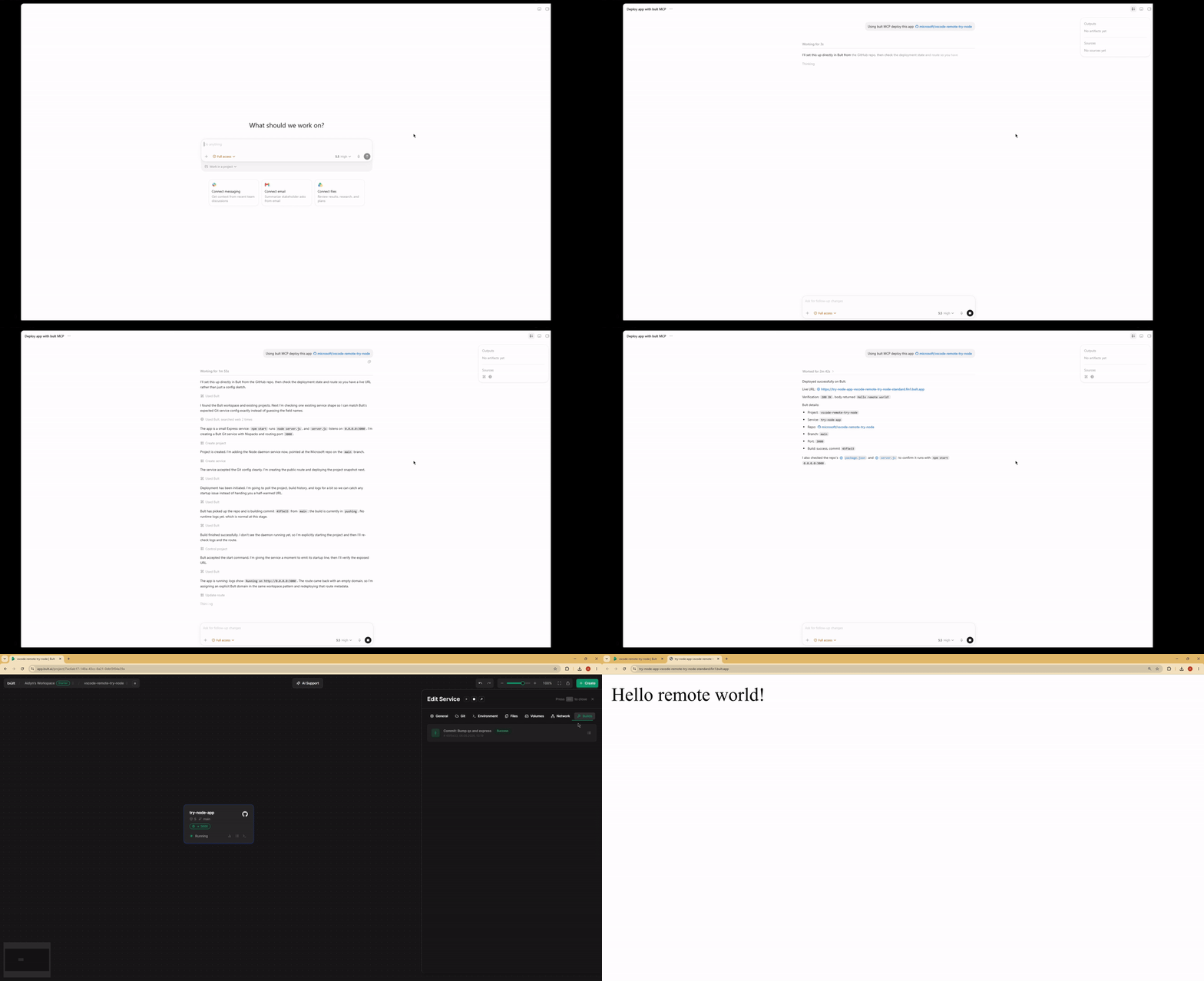
Demo
Features
- Deploy GitHub repositories, Docker images, databases, and app services from MCP-compatible AI agents.
- Project lifecycle tools: list, inspect, create, update, delete, deploy, start, stop, and discard changes.
- Service management for daemon and database services, including Docker image and Git-based deployments.
- Persistent volumes, route/domain mappings, templates, service logs, and build history.
- MCP tool annotations for read-only, idempotent, and destructive operations where supported.
- Works over stdio with Claude Desktop, Claude Code, Cursor, Google Antigravity and other MCP-compatible clients.
When to use Bult MCP
Use Bult MCP when you want an AI coding agent to deploy and operate cloud hosting resources for you. Common workflows include deploying a GitHub repo from Cursor, deploying the current project from Claude Code, launching a Docker image, creating a database service, adding a public route, checking build logs, and debugging failed deployments.
Requirements
- Node.js 18 or newer.
- Bult API token.
Installation
If you install the package globally, use the bult-mcp binary:
npm install -g @bultcloud/mcp-server
bult-mcp
You can also run it with npx from MCP client configs:
npx -y @bultcloud/mcp-server
Configuration
The server reads its configuration from environment variables.
| Variable | Required | Description |
|---|---|---|
BULT_API_URL |
Yes | Bult API base URL, https://app.bult.ai. |
BULT_API_TOKEN |
Yes | API token used for Bearer authentication. |
The server exits during startup if either variable is missing.
MCP Client Setup
Claude Desktop
Add the server to claude_desktop_config.json.
Using npx:
{
  "mcpServers": {
    "bult": {
      "command": "npx",
      "args": ["-y", "@bultcloud/mcp-server"],
      "env": {
        "BULT_API_URL": "https://app.bult.ai",
        "BULT_API_TOKEN": "your-token"
      }
    }
  }
}
Claude Code
Using npx:
claude mcp add bult \
  -e BULT_API_URL=https://app.bult.ai \
  -e BULT_API_TOKEN=your-token \
  -- npx -y @bultcloud/mcp-server
Codex CLI
Using npx:
codex mcp add \
  --env BULT_API_URL=https://app.bult.ai \
  --env BULT_API_TOKEN=your-token \
  bult \
  -- npx -y @bultcloud/mcp-server
Available Tools
Projects
| Tool | Description |
|---|---|
list-projects |
List all projects in the workspace. |
get-project |
Get a project overview with services, volumes, and routes. |
create-project |
Create a new project. |
update-project |
Update a project name. |
delete-project |
Delete a project and all of its resources. |
deploy-project |
Deploy project changes and create a version snapshot. |
control-project |
Start, stop, or discard project changes. |
Services
| Tool | Description |
|---|---|
list-services |
List all services in a project. |
get-service |
Get service details and configuration. |
create-service |
Create a daemon or database service. |
update-service |
Update service configuration. |
delete-service |
Delete a service. |
control-service |
Start, stop, or rebuild a service. |
Volumes
| Tool | Description |
|---|---|
create-volume |
Create a persistent storage volume. |
update-volume |
Update a volume name or size. |
delete-volume |
Delete a volume. |
wipe-volume |
Irreversibly wipe all data from a volume. |
Routes
| Tool | Description |
|---|---|
create-route |
Create a domain or path mapping for a service. |
update-route |
Update route configuration. |
delete-route |
Delete a route. |
Templates
| Tool | Description |
|---|---|
list-templates |
List available project templates. |
apply-template |
Apply a template to a project. |
Logs and Builds
| Tool | Description |
|---|---|
get-service-logs |
Read service logs with cursor-based pagination. |
list-builds |
List build history for a service. |
Example Prompts
- Deploy this GitHub repo to Bult and give me the public URL.
- Deploy the current project to Bult.
- Check why my deployment failed.
- Show the latest logs for my app.
- Set DATABASE_URL and restart the service.
- Deploy this Docker image to Bult.
- List my Bult projects and services.
Development
npm run dev      # run with tsx, no build step
npm run build    # compile TypeScript to dist/
npm run lint     # type-check without emitting files
Project layout:
src/index.ts          MCP server entrypoint
src/client.ts         Bult API client
src/tools/*.ts        MCP tool registrations by resource type
Security
BULT_API_TOKEN grants access to your Bult resources. Keep it out of
source control, shell history, issue reports, and screenshots. Prefer scoped or
rotatable tokens when available.
Some tools can create, delete, deploy, stop, or wipe resources. Review tool calls from your MCP client before approving destructive actions.
Privacy Policy
This MCP server connects your MCP client to Bult.ai using the API token you provide. Requests are sent to Bult.ai to perform actions such as listing projects, deploying services, managing routes and volumes, and reading logs.
The server does not store your API token. Tokens are passed through your MCP client configuration or extension settings. For Bult.ai data handling practices, see the Bult.ai Privacy Policy.
Contributing
Issues and pull requests are welcome at github.com/bultcloud/mcp-server.
Before opening a pull request, run:
npm run lint
npm run build
License
This project is licensed under the MIT License.
Bult MCP soruları
Bult MCP'yi Claude Code'a nasıl eklerim?
Terminalinizde claude mcp add --env 'BULT_API_TOKEN=<YOUR_BULT_API_TOKEN>' --env 'BULT_API_URL=<BULT_API_URL>' mcp-server -- npx -y @bultcloud/mcp-server komutunu çalıştırın. Her projede kullanılabilir olması için --scope user ekleyin.
Bult MCP'yi Cursor'a nasıl eklerim?
~/.cursor/mcp.json dosyasını açın ve yukarıdaki yükleme bölümünde gösterilen Cursor yapılandırmasını kullanarak sunucuyu mcpServers altına ekleyin.
Bult MCP hangi araçları sunar?
24 araç sunar; bunlar arasında list-projects, get-project, create-project, update-project, delete-project yer alır.
Bult MCP kullanarak neler dağıtabilirim?
GitHub depolarını, Docker imajlarını, veritabanlarını ve çeşitli uygulama servislerini dağıtabilirsiniz.
Bult MCP hangi AI istemcileriyle uyumludur?
Claude Desktop, Claude Code, Cursor, Codex, Google Antigravity ve diğer MCP uyumlu istemcilerle çalışır.
Kurulum için sistem gereksinimleri nelerdir?
Node.js sürüm 18 veya daha yenisine ve geçerli bir Bult API tokenına ihtiyacınız vardır.
Sunucuyu nasıl yapılandırırım?
Sunucu, BULT_API_URL ve BULT_API_TOKEN ortam değişkenleri kullanılarak yapılandırılır.