
Yerel bir MCP server aracılığıyla Jetpack Compose UI geri bildirimi ve kaynak bağlam aktarımı sağlayarak yapay zeka kodlama ajanlarına destek olur.
Ayrıca bilinen adı beyondwin/FixThis, @beyondwin/fixthis
- Yıldızlar
- 5
- Araçlar
- —
- İndirmeler, 30 gün
- 357
- En son sürüm
- 1.5.0
- Son commit
- 28 Eki 2026
- Lisans
- MIT
FixThis MCP nedir?
FixThis bir MCP sunucusudur. Yerel bir MCP server aracılığıyla Jetpack Compose UI geri bildirimi ve kaynak bağlam aktarımı sağlayarak yapay zeka kodlama ajanlarına destek olur.
Özet, projenin README dosyasından oluşturuldu
FixThis MCP sunucusu hakkında
Jetpack Compose ile çalışan Android geliştiricileri, görsel UI hataları ile kaynak kod bağlamı arasındaki boşluğu kapatmak için FixThis'i kullanabilirler. Bir Compose uygulamasına hata ayıklama yardımcısı ekleyerek, kullanıcıların yerel bir tarayıcı konsolundaki belirli UI öğelerini işaretlemesine ve istenen değişiklikleri not etmesine olanak tanır. Bu süreç; ekran görüntüsü sınırlarını, semantiği ve doğrudan kodlama ajanlarına gönderilebilecek kaynak adaylarını içeren kompakt bir aktarım dosyası oluşturur.
Bu yerel MCP server, ADB ve localhost üzerinden çalışarak hiçbir verinin harici API'lere gönderilmemesini sağlar. Gradle plugin kurulumunu ve MCP yapılandırmasını otomatikleştirebilen Claude Code veya Codex gibi ajanlarla kullanılmak üzere tasarlanmıştır. Kullanıcılar, sohbet arayüzleri için istemleri manuel olarak kopyalamayı veya isteklere maskelenmiş Android tanı verilerini eklemek için Save to MCP özelliğini kullanmayı seçebilirler. Sistem, ajanların doğru composable bileşenlerini tanımlamasına yardımcı olmak için satır numaraları ve editSurface ipuçları gibi spesifik teknik detaylar sunar.
Neler yapabilirsiniz
- 1Otomatik ajan kurulumuBir yapay zeka ajanı, install-agent komutunu çalıştırarak ve gerekli Gradle plugin'ini uygulayarak bir Jetpack Compose projesini otomatik olarak yapılandırabilir.
- 2Görsel UI hata ayıklamaGeliştiriciler, düzen veya boşluk değişikliklerini tanımlamak için tarayıcı tabanlı bir konsolda belirli bileşenleri seçebilir veya alanlar üzerinde sürükleme yapabilirler.
- 3Bağlamsal kod aktarımıAraç, basit ekran görüntülerinin aksine, ajanlara hassas düzenleme yapabilmeleri için en iyi kaynak adaylarını ve satır numaralarını sağlar.
- 4Tanı verisi eklemeKullanıcılar, bir oturumu MCP client'ına kaydederken sınırlandırılmış ve maskelenmiş Android tanı verilerini dahil edebilirler.
Projenin README dosyasından alınmıştır. Her kullanım durumu, oradaki bir alıntı ile kontrol edilir.
FixThis MCP nasıl yüklenir
Biçimler 10 Kas 2026 tarihinde doğrulandıCursor'a ekleGoose'a ekleFixThis MCP'yi Claude Code içine yükleyin
$ claude mcp add fixthis -- npx -y @beyondwin/fixthisFixThis MCP'yi Cursor içine yükleyin
~/.cursor/mcp.json
{
  "mcpServers": {
    "fixthis": {
      "command": "npx",
      "args": [
        "-y",
        "@beyondwin/fixthis"
      ]
    }
  }
}FixThis MCP'yi VS Code içine yükleyin
.vscode/mcp.json
{
  "servers": {
    "fixthis": {
      "type": "stdio",
      "command": "npx",
      "args": [
        "-y",
        "@beyondwin/fixthis"
      ]
    }
  }
}FixThis MCP'yi VS Code CLI içine yükleyin
$ code --add-mcp '{"name":"fixthis","type":"stdio","command":"npx","args":["-y","@beyondwin/fixthis"]}'FixThis MCP'yi Claude Desktop içine yükleyin
claude_desktop_config.json
{
  "mcpServers": {
    "fixthis": {
      "command": "npx",
      "args": [
        "-y",
        "@beyondwin/fixthis"
      ]
    }
  }
}FixThis MCP'yi Codex içine yükleyin
$ codex mcp add fixthis -- npx -y @beyondwin/fixthisFixThis MCP'yi Codex config.toml içine yükleyin
~/.codex/config.toml
[mcp_servers.fixthis]
command = "npx"
args = ["-y", "@beyondwin/fixthis"]
FixThis MCP'yi Gemini CLI içine yükleyin
$ gemini mcp add -s user fixthis npx -- -y @beyondwin/fixthisFixThis MCP'yi Gemini settings.json içine yükleyin
~/.gemini/settings.json
{
  "mcpServers": {
    "fixthis": {
      "command": "npx",
      "args": [
        "-y",
        "@beyondwin/fixthis"
      ]
    }
  }
}Otomatik kontroller
Çalıştırıldı 14 Kas 2026Tam rapor →Otomatik kontrollerimizden geçti. Bu bir güvenlik denetimi değildir: kodu okuyun ve sunucuya ihtiyaç duyduğu en dar erişimi verin. Kontroller nasıl çalışır

- Kaynak deposu bağlantılı ve erişilebilirbeyondwin/fixthis is public and reachablegithub.com/beyondwin/fixthis ↗Geçti
- Paket, bu depoyu kaynağı olarak gösteriyor@beyondwin/fixthis names beyondwin/fixthis as sourcenpmjs.com/package/@beyondwin/fixthis ↗Geçti
- Derleme kökeni (Sigstore onayı)Sigstore attestation for @beyondwin/fixthisnpmjs.com/package/@beyondwin/fixthis/v/1.5.0#provenance ↗Geçti
- Açık kaynak lisansı (OSI)MITspdx.org/licenses/MIT.html ↗Geçti
- Son bir yıl içinde commit veya sürüm mevcutLast commit or release 2026-10-28github.com/beyondwin/fixthis ↗Geçti
- OpenSSF ScorecardKontrol edilmedi
- Paket adı popüler bir pakete yakın değilNo popular package one edit away from @beyondwin/fixthisGeçti
- Pakette veya bağımlılıklarında kritik uyarı yok1 resolved dependencies checked; no critical advisoryosv.dev ↗Geçti
- Modele yönelik gizli talimat yok0 tool descriptions and the README read; no override phrases, credential paths or hidden charactersGeçti
- Yıkıcı araçlar etiketlenmişKontrol edilmedi
- Uzak uç nokta MCP el sıkışmasına yanıt veriyorKontrol edilmedi
FixThis for Android Compose


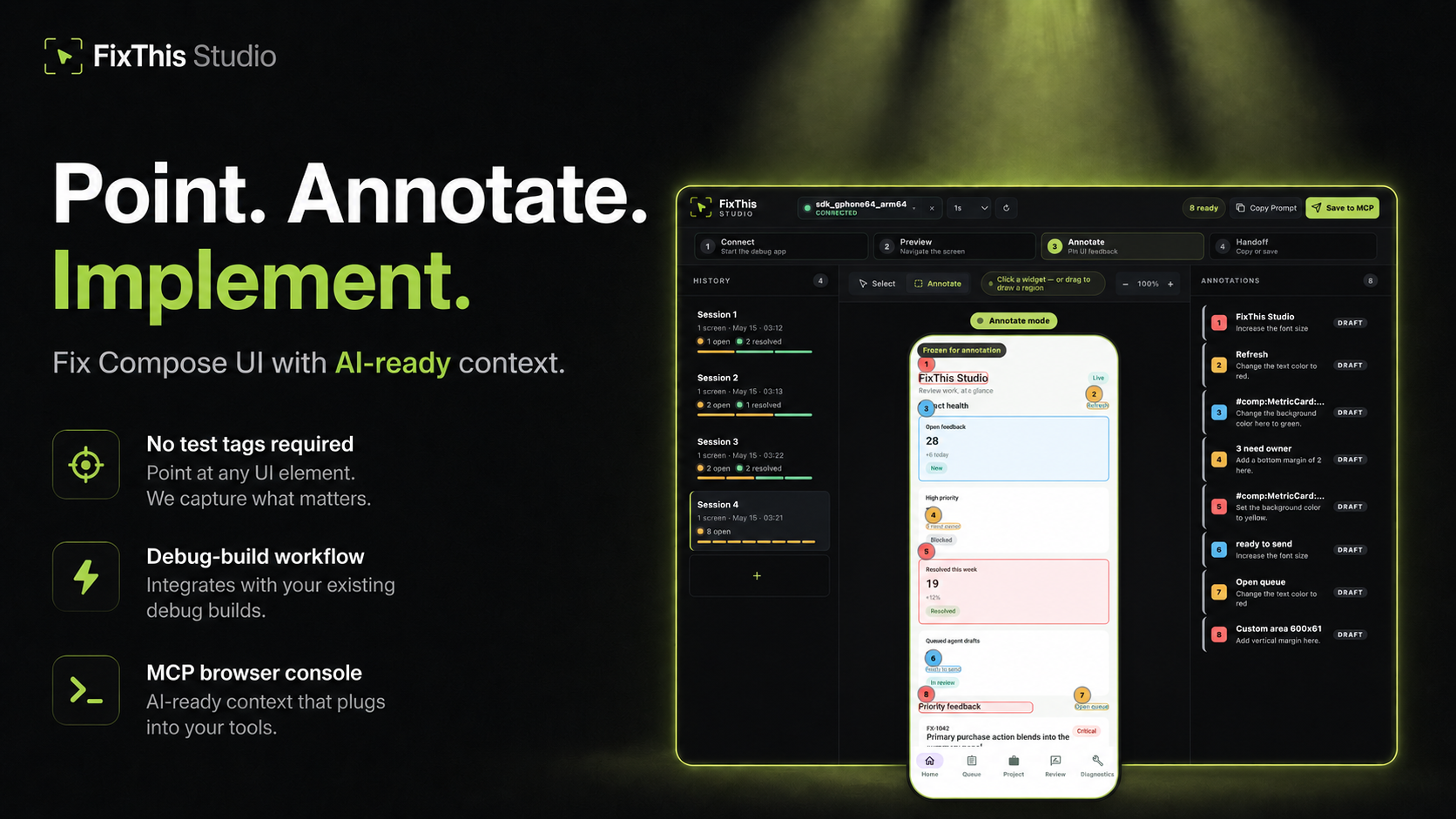
Point at a Jetpack Compose UI, write the change, and hand Claude, Codex, Cursor, or another coding agent the source context it needs.
FixThis is debug-only. It attaches a sidekick to a Compose debug app, mirrors the screen into a local browser console, and turns annotations into a compact handoff: screenshot bounds, semantics, source candidates, and confidence warnings.
Click a component to select it. Drag when the target is spacing, empty room, or something that is not a clean Compose node.
Works Today
- Try the sample app in about five minutes.
- Install the desktop CLI/MCP with Homebrew, npm, or GitHub Releases.
- Add it to an external app with the Gradle plugin
io.github.beyondwin.fixthis.compose. - Let Claude Code or Codex configure the sample with
./scripts/bootstrap-mcp.sh --sample. - Let an agent configure your app with
fixthis install-agent. - Use Copy Prompt with Cursor, ChatGPT, or any chat agent.
- Use Save to MCP with Claude Code or Codex.
- Save to MCP can attach a bounded, redacted Android diagnostics baseline. Switch the session to Manual or Off if you do not want that. Copy Prompt never starts collection.
- Runs locally over ADB and
127.0.0.1. No external API calls.
Quick Start: Agent Installs FixThis in Your App
Claude Code / Codex Bootstrap Prompt
Paste this into Claude Code or Codex from the root of a Jetpack Compose Android app:
Install FixThis in this project and configure it for this agent.

Use this order:
1. Run `fixthis install-agent --project-dir . --target all --verify --json`.
2. Use the JSON `readiness.state` and `actions[]` as the source of truth.
3. If `requiresUserAction` is true, tell me the exact blocking action.
4. Do not call `fixthis_open_feedback_console` until `readyForMcpTooling` is true, or until the report's `agent_after_restart` action is reached after restart.

Restart Claude Code or Codex if the report asks for it.
Do not configure release builds. Do not commit `.fixthis/`.
The agent should run:
# macOS
brew install beyondwin/tools/fixthis

# Node
npm install -g @beyondwin/fixthis

# macOS/Linux fallback
curl -fsSL https://raw.githubusercontent.com/beyondwin/FixThis/main/scripts/install-fixthis.sh \
  | bash -s -- --version v1.5.0

fixthis install-agent --project-dir . --target all --verify --json
If Homebrew already has it, run
brew update && brew upgrade beyondwin/tools/fixthis and check
fixthis --version.
fixthis install-agent applies the Gradle plugin, writes MCP config, and
writes .fixthis/project.json plus .fixthis/agent-setup.*. If doctor
reports NEEDS_INSTALL or metadata is missing, run ./gradlew fixthisSetup
and rerun fixthis install-agent --project-dir . --target all --verify --json.
Restart Claude Code or Codex when the report asks, then call
fixthis_open_feedback_console. For a manual check, use
fixthis doctor --project-dir . --json.
Published plugin:
plugins {
    id("io.github.beyondwin.fixthis.compose") version "1.5.0"
}
The plugin adds the debug-only sidekick and keeps release builds out.
Quick Start: Sample App to Agent Handoff
git clone <this-repo> && cd FixThis
./gradlew :fixthis-cli:installDist :fixthis-mcp:installDist
fixthis-cli/build/install/fixthis/bin/fixthis doctor --package io.github.beyondwin.fixthis.sample
fixthis-cli/build/install/fixthis/bin/fixthis run --package io.github.beyondwin.fixthis.sample
fixthis run installs the sample debug APK, launches it, and opens FixThis
Studio at http://127.0.0.1:<port>.
In the console:
- Click Annotate.
- Click a UI element, or drag an area.
- Type the change you want.
- Repeat for other spots on this screen.
- Copy Prompt for a chat agent, or Save to MCP for Claude Code / Codex.
You are done when a numbered annotation is visible and you have copied Markdown or saved a local MCP handoff.
Maintainers can prove that Copy Prompt path on a connected device:
npm run real-copy-prompt:smoke -- --strict
Pick Your Path
| Goal | Start here |
|---|---|
| Try it without touching your app | Sample quick start |
| Add it to your debug build | Add to your app |
| Connect an agent | Connect your agent |
| Bootstrap MCP from this repo | MCP.md |
| Use the console | Console tour |
| Understand the product | Product |
| Diagnose a failure | Troubleshooting |
| Inspect contracts | Docs index |
| Contribute | CONTRIBUTING.md |
| Reader | Start here |
|---|---|
| First-time user | Sample quick start |
| External app developer | Add to your app |
| Agent in this repo | AGENTS.md and project map |
| Maintainer | Docs index and project map |
| Contract or CLI change | Reference contracts |
Why not just a screenshot?
A screenshot is enough when the target is obvious. FixThis helps when the UI is dense, list-rendered, or named mostly by composable:
- Top-3 source candidates with line numbers and match reasons
editSurfacehints for call site vs component vs copy vs layout vs interop- Instance grouping so identical cards stay distinct
- Screen fingerprint so a rotated or changed screen cannot sneak into a save
- Honest confidence: visual-only, stale, or possible AndroidView/WebView
- Bounded runtime diagnostics on Save to MCP
- Retry-safe batches that do not duplicate work
Modules
| Module | Role |
|---|---|
:app (sample/) |
Validation sample |
:fixthis-compose-core |
Pure Kotlin domain |
:fixthis-compose-sidekick |
Debug Android runtime |
:fixthis-gradle-plugin |
Source index and debug wiring |
:fixthis-cli |
Desktop CLI |
:fixthis-mcp |
MCP server and local console |
More: Product, decisions, architecture.
Status
Public install paths:
- Gradle plugin
io.github.beyondwin.fixthis.compose - Maven
io.github.beyondwin:fixthis-compose-sidekickandfixthis-compose-core - Homebrew
brew install beyondwin/tools/fixthis - GitHub Release
fixthis-cli-mcp-vX.Y.Z.tar.gz - npm
@beyondwin/fixthis - MCP Registry
io.github.beyondwin/fixthis
Live dashboard: Release readiness.
main may be ahead of the latest tag. See CHANGELOG
and release notes.
Agents in this repo should read AGENTS.md.
Trust
FixThis stays on your machine. The sidekick talks over ADB, the console binds
to localhost, and Save to MCP writes under .fixthis/. Screenshots can
still contain sensitive pixels. Review them before sharing. Do not commit
.fixthis/.
Details: Privacy, Security, Threat model.
V1 stays narrow: Compose debug builds, local ADB, MCP-first handoff, best-effort source candidates, no cloud upload. See Roadmap.
License
FixThis MCP soruları
FixThis MCP'yi Claude Code'a nasıl eklerim?
Terminalinizde claude mcp add fixthis -- npx -y @beyondwin/fixthis komutunu çalıştırın. Her projede kullanılabilir olması için --scope user ekleyin.
FixThis MCP'yi Cursor'a nasıl eklerim?
~/.cursor/mcp.json dosyasını açın ve yukarıdaki yükleme bölümünde gösterilen Cursor yapılandırmasını kullanarak sunucuyu mcpServers altına ekleyin.
FixThis verileri buluta gönderir mi?
Hayır, harici API çağrıları yapmadan ADB ve localhost üzerinden yerel olarak çalışır.
FixThis'i Claude Code veya Codex ile nasıl kullanabilirim?
'Save to MCP' özelliğini kullanabilir veya ajanı yapılandırmak için sağlanan bootstrap prompt'undan yararlanabilirsiniz.