
Generate Tech Stack MCP sunucusu
✓ DoğrulandıKod tabanlarını tarayarak dillerin, frameworklerin, veritabanlarının ve altyapının görsel bir HTML envanterini oluşturur.
Ayrıca bilinen adı askuma/generate-tech-stack, generate-tech-stack, generate-tech-stack-mcp
- Yıldızlar
- 0
- Araçlar
- —
- İndirmeler, 30 gün
- 93
- En son sürüm
- 0.2.2
- Son commit
- 27 Tem 2026
- Lisans
- MIT
Generate Tech Stack MCP nedir?
Generate Tech Stack bir MCP sunucusudur. Kod tabanlarını tarayarak dillerin, frameworklerin, veritabanlarının ve altyapının görsel bir HTML envanterini oluşturur.
Özet, projenin README dosyasından oluşturuldu
Generate Tech Stack MCP sunucusu hakkında
Bu araç, geliştiricilerin bir kod tabanındaki bağımlılıkların görsel bir envanterini çıkarmasını sağlar. Dilleri, frameworkleri, veritabanlarını ve altyapıyı tanımlamak için requirements.txt, package.json ve Dockerfile gibi proje dosyalarını tarar. Sonuç; bir mimari diyagram, çubuk grafikler, kategorize edilmiş araç kartları, rehberli bir tur ve tema değiştirme özelliği içeren, kendi kendine yeten bir TECH_STACK.html dosyasıdır.
Kullanıcılar bunu bir Claude Code skill'i, bir GitHub Copilot Extension'ı veya stdio üzerinden standart bir MCP server olarak dağıtabilirler. pip kurulumu ile yerel olarak veya uzak bir eklenti olarak çalışır. MCP server'ı Claude Desktop, Cursor veya Zed gibi istemcilerle kullanırken, raporu yazmak için generate_tech_stack aracını tetikleyebilir veya dosya oluşturmadan bir JSON özeti almak için list_tech_stack aracını kullanabilirsiniz. Temel analiz betiği, herhangi bir üçüncü taraf bağımlılığa ihtiyaç duymadan Python 3.8+ üzerinde çalışır.
Neler yapabilirsiniz
- 1Görsel bir mimari raporu oluşturunYapay zekadan mevcut dizininizi taramasını ve tüm proje araçlarınızı gösteren temalı bir HTML sayfası oluşturmasını isteyin.
- 2Hafif bir JSON özeti alınTam bir HTML dosyası oluşturmadan teknoloji yığınınızın metin tabanlı bir özetini talep edin.
Projenin README dosyasından alınmıştır. Her kullanım durumu, oradaki bir alıntı ile kontrol edilir.
Generate Tech Stack MCP nasıl yüklenir
Biçimler 10 Kas 2026 tarihinde doğrulandıCursor'a ekleGoose'a ekleGenerate Tech Stack MCP'yi Claude Code içine yükleyin
$ claude mcp add generate-tech-stack -- uvx generate-tech-stack-mcpGenerate Tech Stack MCP'yi Cursor içine yükleyin
~/.cursor/mcp.json
{
  "mcpServers": {
    "generate-tech-stack": {
      "command": "uvx",
      "args": [
        "generate-tech-stack-mcp"
      ]
    }
  }
}Generate Tech Stack MCP'yi VS Code içine yükleyin
.vscode/mcp.json
{
  "servers": {
    "generate-tech-stack": {
      "type": "stdio",
      "command": "uvx",
      "args": [
        "generate-tech-stack-mcp"
      ]
    }
  }
}Generate Tech Stack MCP'yi VS Code CLI içine yükleyin
$ code --add-mcp '{"name":"generate-tech-stack","type":"stdio","command":"uvx","args":["generate-tech-stack-mcp"]}'Generate Tech Stack MCP'yi Claude Desktop içine yükleyin
claude_desktop_config.json
{
  "mcpServers": {
    "generate-tech-stack": {
      "command": "uvx",
      "args": [
        "generate-tech-stack-mcp"
      ]
    }
  }
}Generate Tech Stack MCP'yi Codex içine yükleyin
$ codex mcp add generate-tech-stack -- uvx generate-tech-stack-mcpGenerate Tech Stack MCP'yi Codex config.toml içine yükleyin
~/.codex/config.toml
[mcp_servers.generate-tech-stack]
command = "uvx"
args = ["generate-tech-stack-mcp"]
Generate Tech Stack MCP'yi Gemini CLI içine yükleyin
$ gemini mcp add -s user generate-tech-stack uvx -- generate-tech-stack-mcpGenerate Tech Stack MCP'yi Gemini settings.json içine yükleyin
~/.gemini/settings.json
{
  "mcpServers": {
    "generate-tech-stack": {
      "command": "uvx",
      "args": [
        "generate-tech-stack-mcp"
      ]
    }
  }
}Otomatik kontroller
Çalıştırıldı 15 Kas 2026Tam rapor →Otomatik kontrollerimizden geçti. Bu bir güvenlik denetimi değildir: kodu okuyun ve sunucuya ihtiyaç duyduğu en dar erişimi verin. Kontroller nasıl çalışır

- Kaynak deposu bağlantılı ve erişilebiliraskuma/generate-tech-stack is public and reachablegithub.com/askuma/generate-tech-stack ↗Geçti
- Paket, bu depoyu kaynağı olarak gösteriyorgenerate-tech-stack-mcp names askuma/generate-tech-stack as sourcepypi.org/project/generate-tech-stack-mcp/ ↗Geçti
- Derleme kökeni (Sigstore onayı)Sigstore attestation for generate-tech-stack-mcppypi.org/project/generate-tech-stack-mcp/ ↗Geçti
- Açık kaynak lisansı (OSI)MITspdx.org/licenses/MIT.html ↗Geçti
- Son bir yıl içinde commit veya sürüm mevcutLast commit or release 2026-07-27github.com/askuma/generate-tech-stack ↗Geçti
- OpenSSF ScorecardKontrol edilmedi
- Paket adı popüler bir pakete yakın değilNo popular package one edit away from generate-tech-stack-mcpGeçti
- Pakette veya bağımlılıklarında kritik uyarı yok29 resolved dependencies checked; no critical advisoryosv.dev ↗Geçti
- Modele yönelik gizli talimat yok0 tool descriptions and the README read; no override phrases, credential paths or hidden charactersGeçti
- Yıkıcı araçlar etiketlenmişKontrol edilmedi
- Uzak uç nokta MCP el sıkışmasına yanıt veriyorKontrol edilmedi
generate-tech-stack
Scan any project and generate a visual TECH_STACK.html page — light/dark theme, auto-adapting, zero config.
Works as a Claude Code skill, MCP server, or GitHub Copilot Extension.
Live demo → — generated from fastapi/full-stack-fastapi-template, unmodified.
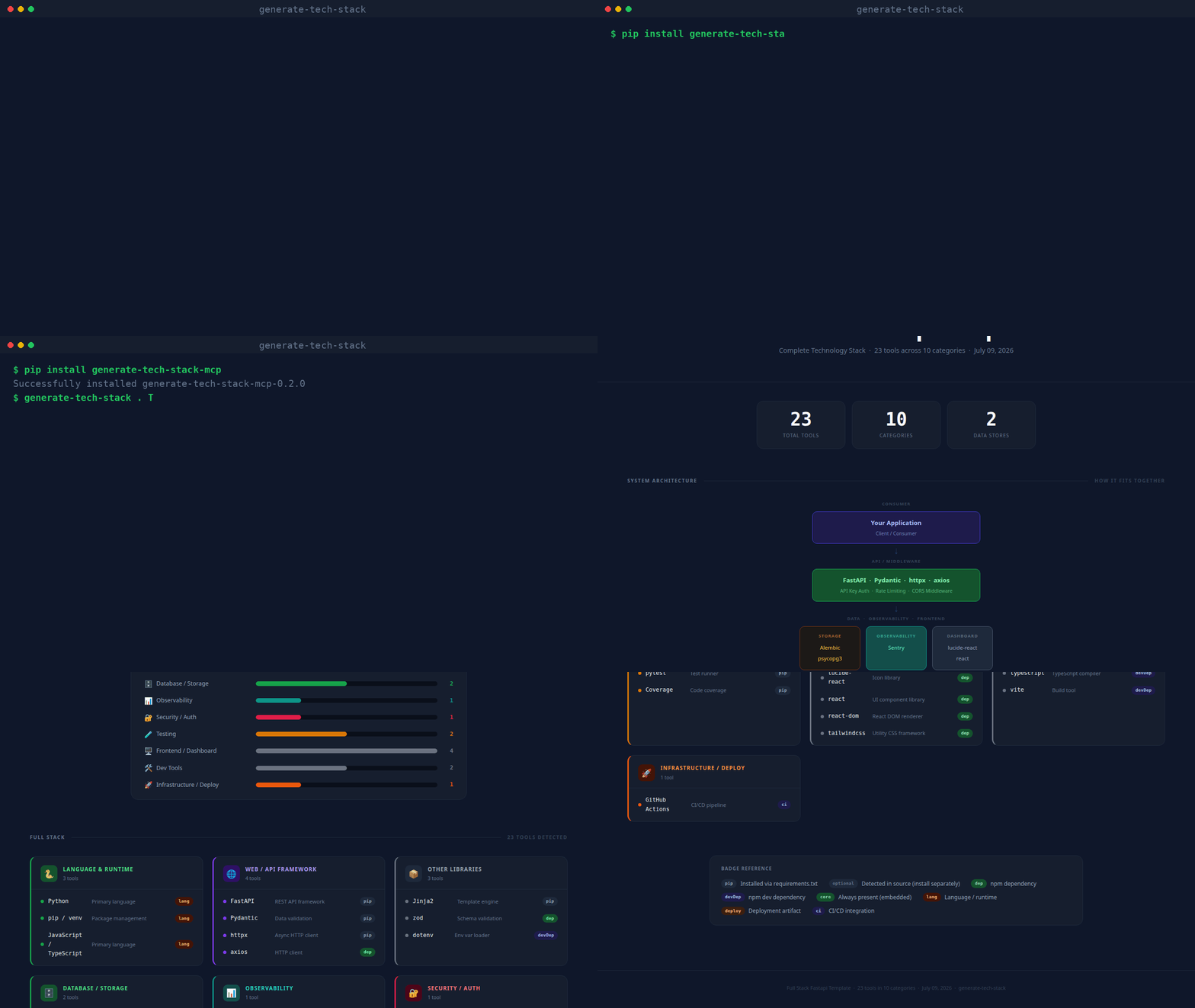
(real CLI output, unscripted — static screenshot if you'd rather not autoplay)
What it produces
Every generated page contains:
| Section | Description |
|---|---|
| Stat row | Total tools · Categories · AI Backends · Data Stores |
| Architecture diagram | Layered flow diagram (Consumer → API → AI/NLP → Data/Obs/Frontend) |
| Bar chart | Horizontal bars per category, colour-matched |
| Tool cards | One card per category; each tool shows a dot, name, description, and badge |
| Badge legend | Explains pip, dep, optional, core, deploy, ci, etc. |
| Footer | Project name · tool count · generation date |
| Guided tour | Spotlight walkthrough of every section, shown automatically the first time a report is opened; replay anytime with the ? button |
| Theme toggle | Sun/moon button next to the tour button switches between dark and light mode |
Repository layout
~/.claude/skills/generate-tech-stack/
├── SKILL.md                  ← Claude Code skill definition
├── INSTALL.md                ← detailed per-platform installation guide
├── README.md                 ← this file
├── scripts/
│   └── analyze.py            ← core scanner + HTML renderer (no dependencies)
├── mcp/
│   ├── server.py             ← MCP stdio server (pip install mcp)
│   └── requirements.txt
└── copilot/
    ├── index.js              ← GitHub Copilot Extension (Express)
    ├── package.json
    └── openai_function.json  ← OpenAI / Antigravity function definition
Usage
pip (CLI + MCP server)
pip install generate-tech-stack-mcp

generate-tech-stack . TECH_STACK.html    # CLI: scan and write the report
generate-tech-stack-mcp                   # stdio MCP server
With pip installed, any MCP host config reduces to:
{
  "mcpServers": {
    "generate-tech-stack": { "command": "generate-tech-stack-mcp" }
  }
}
Claude Code
/generate-tech-stack
Run it from any project directory. The skill calls scripts/analyze.py and opens the result in your browser.
MCP (Claude Desktop, VS Code, Cursor, Zed, Windsurf, Continue)
pip install mcp
Add to your host's MCP config (replace the path with your actual home directory):
{
  "mcpServers": {
    "generate-tech-stack": {
      "command": "python3",
      "args": ["/home/<you>/.claude/skills/generate-tech-stack/mcp/server.py"]
    }
  }
}
Then ask: generate my tech stack or /generate-tech-stack.
MCP tools exposed:
generate_tech_stack— scans a project, writesTECH_STACK.html, opens in browserlist_tech_stack— returns a JSON summary, no file written
GitHub Copilot Extension
cd copilot
npm install
npm start        # listens on port 3000
ngrok http 3000  # expose for GitHub to reach
Register a GitHub App with Copilot Extension enabled, set the Agent URL to https://your-url/agent, and install it on your account. Then in Copilot Chat:
@generate-tech-stack /generate-tech-stack
@generate-tech-stack /generate-tech-stack /path/to/project
Command line (standalone)
python3 ~/.claude/skills/generate-tech-stack/scripts/analyze.py /path/to/project
# output: /path/to/project/TECH_STACK.html

# custom output path:
python3 scripts/analyze.py . ~/Desktop/TECH_STACK.html
analyze.py has no third-party dependencies — just Python 3.8+.
What gets detected
| Source file | Detected tools |
|---|---|
requirements.txt / pyproject.toml |
Python packages (web, DB, AI, testing, observability, security…) |
package.json |
Node / npm packages (frameworks, frontend, DB drivers, tooling) |
go.mod |
Go language |
Cargo.toml |
Rust language |
pom.xml / build.gradle |
Java / Kotlin |
Gemfile |
Ruby |
composer.json |
PHP |
**/*.py source |
Optional/dynamic SDKs via importlib.find_spec() patterns |
docker-compose.yml / .env |
PostgreSQL, Redis, MongoDB, SQLite connection strings |
Dockerfile |
Docker |
docker-compose.yml |
Docker Compose |
.github/workflows/ |
GitHub Actions |
.gitlab-ci.yml |
GitLab CI |
alembic.ini |
Alembic migrations |
nginx.conf / Caddyfile |
Reverse proxy |
tsconfig.json / src/**/*.ts |
TypeScript |
Detected categories
| Category | Colour | Examples |
|---|---|---|
| Language & Runtime | Green | Python, Go, Rust, TypeScript |
| Web / API Framework | Purple | FastAPI, Express, Django, Next.js |
| Database / Storage | Green | SQLAlchemy, Prisma, Redis, ChromaDB |
| AI SDKs | Blue | OpenAI, Anthropic, LangChain, GuardrailsAI, NVIDIA NeMo, Presidio |
| NLP / ML | Teal | spaCy, Transformers, Sentence Transformers |
| Observability | Teal | Prometheus, OpenTelemetry, Sentry, Loguru |
| Testing | Yellow | pytest, Jest, Cypress, Playwright |
| Security / Auth | Rose | PyJWT, bcrypt, Authlib, Helmet |
| Infrastructure / Deploy | Orange | Docker, Kubernetes, Celery, Boto3 |
| Frontend / Dashboard | Gray | React, Vue, Tailwind, Recharts |
| Messaging / Comms | Blue | Kafka, RabbitMQ, Socket.io |
| Dev Tools | Gray | ESLint, Prettier, Vite, TypeScript |
Design
Dark by default with a light-mode toggle (top-right corner, no persistence — resets to dark on reload). Fonts: IBM Plex Sans (body) + JetBrains Mono (code/badges), loaded from Google Fonts. Vanilla JS powers the guided tour and theme toggle only — everything else is plain HTML + CSS. Self-contained single file, opens in any browser offline.
See also
- INSTALL.md — per-platform setup instructions
- SKILL.md — Claude Code skill specification
Generate Tech Stack MCP soruları
Generate Tech Stack MCP'yi Claude Code'a nasıl eklerim?
Terminalinizde claude mcp add generate-tech-stack -- uvx generate-tech-stack-mcp komutunu çalıştırın. Her projede kullanılabilir olması için --scope user ekleyin.
Generate Tech Stack MCP'yi Cursor'a nasıl eklerim?
~/.cursor/mcp.json dosyasını açın ve yukarıdaki yükleme bölümünde gösterilen Cursor yapılandırmasını kullanarak sunucuyu mcpServers altına ekleyin.
Sunucu ne tür bir çıktı üretir?
Mimari diyagram, çubuk grafikler, araç kartları ve rehberli bir tur içeren görsel bir TECH_STACK.html sayfası oluşturur.
Oluşturulan raporu görüntülemek için internet bağlantısı gerekir mi?
Hayır, rapor herhangi bir tarayıcıda çevrimdışı olarak açılabilen, kendi kendine yeten tek bir dosyadır.