
React geliştiricilerinin, tip tanımlı uygulama işlevlerini yapay zeka ajanlarının keşfedip çağırabileceği WebMCP araçları olarak sunmalarını sağlar.
Ayrıca bilinen adı agentcathq/webmcp-react
- Yıldızlar
- 92
- Araçlar
- —
- İndirmeler, 30 gün
- —
- En son sürüm
- —
- Son commit
- 27 Eki 2026
- Lisans
- MIT
webmcp-react MCP nedir?
webmcp-react bir MCP sunucusudur. React geliştiricilerinin, tip tanımlı uygulama işlevlerini yapay zeka ajanlarının keşfedip çağırabileceği WebMCP araçları olarak sunmalarını sağlar.
Özet, projenin README dosyasından oluşturuldu
webmcp-react MCP sunucusu hakkında
webmcp-react, bir React uygulamasının belirli kısımlarını yapay zeka ajanları için çağrılabilir araçlar olarak sunmanıza olanak tanır. Bunu, her bir aracı document.modelContext üzerinde kaydeden hook'lar aracılığıyla gerçekleştirir. React geliştiricileri, uygulamalarını WebMCPProvider ile sarmalar ve useMcpTool kullanarak her bir araca bir isim, açıklama, girdi (input) ve asenkron işleyici (handler) atayarak araçları tanımlarlar. Girdiler, işleyicilerde tip çıkarımı yapabilmek için Zod ile veya Zod kullanılmadığında inputSchema aracılığıyla ham JSON Schema ile tanımlanabilir. React 18 veya üzeri gereklidir; Zod kullanıldığında ise Zod 3.25 veya üzeri ya da Zod 4 peer dependency olarak gereklidir.
Kütüphane, tarayıcıda yerel WebMCP desteği bulunmadığında hafif bir polyfill yükler, aksi takdirde yerel API'yi kullanır. SSR uyumludur ve "use client" direktifiyle birlikte gelir, bu nedenle Next.js ve Remix için ekstra bir kurulum gerektirmez; ayrıca StrictMode altında mükerrer kayıtlara karşı koruma sağlar. Araçlar mount edildiğinde kaydedilir ve unmount edildiğinde kaydı kaldırılır, bu sayede koşullu render (conditional rendering) ajanların neleri görebileceğini kontrol eder. useMcpTool; yürütme durumunu (isExecuting, lastResult, error) döndürür, her çağrı kendi AbortSignal nesnesini alır ve onSuccess ile onError callback'leri yan etkileri (side effects) çalıştırır. Dört farklı anotasyon (readOnlyHint, untrustedContentHint, consequentialHint, debugging), araç davranışlarını ajanlara açıklar.
Codex gibi yerel WebMCP desteğine sahip ajanlar araçları doğrudan sayfadan çağırabilir; Claude Code, Cursor ve diğer MCP istemcileri ise bir Bridge tarayıcı eklentisi aracılığıyla bağlanır. Bir Wordle oyun alanı ve skills CLI ile yüklenen Agent Skills, araçların nasıl oluşturulacağını ve kullanılacağını gösterir.
Neler yapabilirsiniz
- 1Ajanlar için katalog arama aracıBir yapay zeka istemcisinin çağırabilmesi için sorgu metni alan ve eşleşen katalog sonuçlarını döndüren bir arama aracı kaydedin.
- 2İptal edilebilir rapor getirmeBir ajanın ID ile rapor getirmesine olanak tanıyın ve sağlanan AbortSignal'ı fetch işlemine bağlayarak iptal edilen bir çağrının isteği durdurmasını sağlayın.
- 3Siparişler için onay mekanizmasıGeri alınması zor bir işlem yapılmadan önce ajanların kullanıcıdan onay alması gerektiğini bilmeleri için bir ödeme aracını uygun bir hint ile işaretleyin.
- 4Koşullu render arkasındaki admin araçlarıSadece mevcut kullanıcı bir admin olduğunda admin araçlarını görünür kılın; mount ve unmount işlemlerinin kayıt yönetimini yapmasına izin verin.
- 5UI'da araç yürütme durumuBir çeviri aracı hook'undan dönen yürütme durumunu kullanarak bir butonun devre dışı kalma durumunu ve mesajını yönetin.
Projenin README dosyasından alınmıştır. Her kullanım durumu, oradaki bir alıntı ile kontrol edilir.
webmcp-react MCP nasıl yüklenir
Biçimler 10 Kas 2026 tarihinde doğrulandıCursor'a ekleGoose'a eklewebmcp-react MCP'yi Claude Code içine yükleyin
$ claude mcp add webmcp-react -- npx -y webmcp-reactwebmcp-react MCP'yi Cursor içine yükleyin
~/.cursor/mcp.json
{
  "mcpServers": {
    "webmcp-react": {
      "command": "npx",
      "args": [
        "-y",
        "webmcp-react"
      ]
    }
  }
}webmcp-react MCP'yi VS Code içine yükleyin
.vscode/mcp.json
{
  "servers": {
    "webmcp-react": {
      "type": "stdio",
      "command": "npx",
      "args": [
        "-y",
        "webmcp-react"
      ]
    }
  }
}webmcp-react MCP'yi VS Code CLI içine yükleyin
$ code --add-mcp '{"name":"webmcp-react","type":"stdio","command":"npx","args":["-y","webmcp-react"]}'webmcp-react MCP'yi Claude Desktop içine yükleyin
claude_desktop_config.json
{
  "mcpServers": {
    "webmcp-react": {
      "command": "npx",
      "args": [
        "-y",
        "webmcp-react"
      ]
    }
  }
}webmcp-react MCP'yi Codex içine yükleyin
$ codex mcp add webmcp-react -- npx -y webmcp-reactwebmcp-react MCP'yi Codex config.toml içine yükleyin
~/.codex/config.toml
[mcp_servers.webmcp-react]
command = "npx"
args = ["-y", "webmcp-react"]
webmcp-react MCP'yi Gemini CLI içine yükleyin
$ gemini mcp add -s user webmcp-react npx -- -y webmcp-reactwebmcp-react MCP'yi Gemini settings.json içine yükleyin
~/.gemini/settings.json
{
  "mcpServers": {
    "webmcp-react": {
      "command": "npx",
      "args": [
        "-y",
        "webmcp-react"
      ]
    }
  }
}Otomatik kontroller
Çalıştırıldı 13 Kas 2026Tam rapor →Otomatik kontrollerimizden geçti. Bu bir güvenlik denetimi değildir: kodu okuyun ve sunucuya ihtiyaç duyduğu en dar erişimi verin. Kontroller nasıl çalışır

- Kaynak deposu bağlantılı ve erişilebilirGeçti
- Açık kaynak lisansı (OSI)Geçti
- Son bir yıl içinde commit veya sürüm mevcutGeçti
- Paket adı popüler bir pakete yakın değilGeçti
- Uzak uç nokta HTTPS kullanıyorKontrol edilmedi
- Yıkıcı araçlar etiketlenmişKontrol edilmedi
- Modele yönelik gizli talimat yokGeçti
- Pakette veya bağımlılıklarında kritik uyarı yokKontrol edilmedi
webmcp-react
React hooks for exposing typed tools on document.modelContext, aligned with the current WebMCP specification.




- Zod-first. Define inputs with Zod and get full type inference in handlers
- JSON Schema support. Pass raw JSON Schema when you do not use Zod
- Built-in polyfill. Installs a lightweight polyfill when native WebMCP is unavailable
- SSR-safe. Works with Next.js, Remix, and other server-rendering frameworks
- StrictMode-safe. Prevents duplicate registrations and orphaned tools
- Spec-aligned. Tracks the WebMCP specification and native Chrome behavior release by release
Requirements
- React 18 or later
- Zod 3.25 or later, or Zod 4, as a peer dependency. Tools can also be defined with JSON Schema.
Install
npm install webmcp-react zod
Quick start
Wrap your app in <WebMCPProvider> and register tools with useMcpTool:
import { WebMCPProvider, useMcpTool } from "webmcp-react";
import { z } from "zod";

function SearchTool() {
  useMcpTool({
    name: "search",
    description: "Search the catalog",
    input: z.object({ query: z.string() }),
    handler: async ({ query }) => ({
      content: [{ type: "text", text: `Results for: ${query}` }],
    }),
  });
  return null;
}

export default function App() {
  return (
    <WebMCPProvider name="my-app" version="1.0">
      <SearchTool />
    </WebMCPProvider>
  );
}
The tool is now registered on document.modelContext and any WebMCP-compatible agent can call it.
Agent skills
This repository ships agent skills that install webmcp-react and scaffold tools for you. Install them with the skills CLI:
npx skills add agentcathq/webmcp-react
The skills work with Cursor, Claude Code, GitHub Copilot, Cline, and 18+ other agents.
Playground
Try it live: WebMCP Wordle Demo
The playground is a fully playable Wordle clone built on webmcp-react hooks. Tools register and unregister as the game moves through its phases (idle, playing, won, lost). You can make guesses with the keyboard or through an AI agent. A DevPanel shows the current tool state, and an easy-mode toggle enables a hint tool.
To play with an AI agent:
- Codex. Open the demo in Codex and ask it to play. Codex discovers and calls the page's WebMCP tools directly.
- Claude, Cursor, and other MCP clients. Install the WebMCP Bridge extension, open the demo in Chrome, and activate the extension for the page.
How it works
WebMCP is a proposed web standard from the W3C Web Machine Learning Community Group. It adds document.modelContext to the browser, an API that lets any page expose typed, callable tools to AI agents. Chrome ships the API in Early Preview.
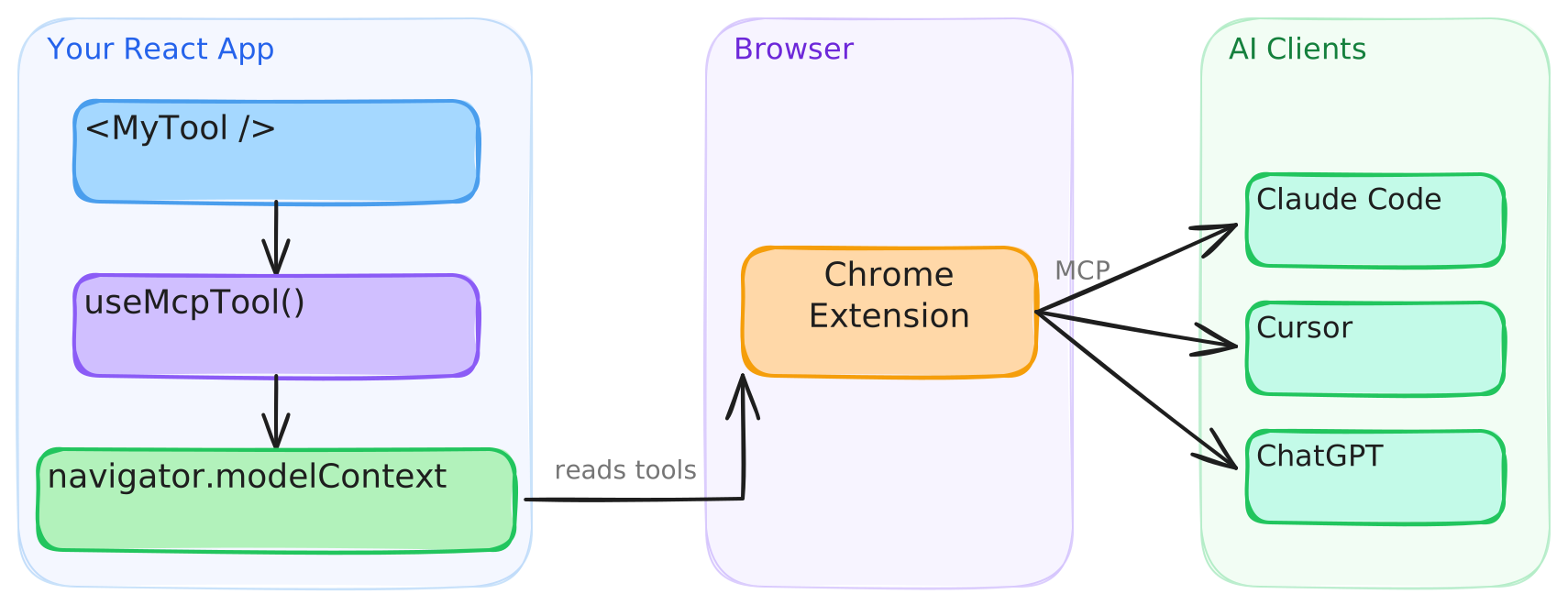
This library provides the React bindings for that API. <WebMCPProvider> installs a polyfill when native support is absent, and each useMcpTool call registers a tool that agents can discover and execute.
Connect to AI clients
Agents with built-in WebMCP browser support, such as Codex, discover and call tools directly from the page. Clients that cannot access document.modelContext directly, such as Claude Code and Cursor, connect through the WebMCP Bridge extension, which exposes your registered tools to any MCP client.
- Install the extension from the Chrome Web Store.
- Configure your MCP client. See the extension setup guide for details.
The extension will be deprecated when Chrome provides native bridging to desktop clients.
Testing in Chrome
Google's WebMCP extension lists a page's tools and runs an agent against them from a side panel, which is handy while building tools. It only sees tools registered through Chrome's native API, so on a page running the polyfill it finds nothing. Turn on chrome://flags/#enable-webmcp-testing (the extension needs Chrome 155 or newer) and <WebMCPProvider> will use the native API instead of the polyfill.
Usage
Execution state
useMcpTool returns reactive state you can use to build UI around tool execution:
function TranslateTool() {
  const { state, execute } = useMcpTool({
    name: "translate",
    description: "Translate text to Spanish",
    input: z.object({ text: z.string() }),
    handler: async ({ text }) => {
      const result = await translate(text, "es");
      return { content: [{ type: "text", text: result }] };
    },
  });

  return (
    <div>
      <button onClick={() => execute({ text: "Hello" })} disabled={state.isExecuting}>
        {state.isExecuting ? "Translating..." : "Translate"}
      </button>
      {state.lastResult && <p>{state.lastResult.content[0].text}</p>}
      {state.error && <p className="error">{state.error.message}</p>}
    </div>
  );
}
Cancellation
Each execution receives its own AbortSignal. Pass it to fetch and other cancellable work. Chrome 153+ aborts the signal when the agent cancels the call. On older browsers the library substitutes a never-aborting signal, so the second argument is always safe to use:
useMcpTool({
  name: "fetch_report",
  description: "Fetch a report by ID",
  input: z.object({ id: z.string() }),
  handler: async ({ id }, { signal }) => {
    const res = await fetch(`/api/reports/${id}`, { signal });
    return { content: [{ type: "text", text: await res.text() }] };
  },
});
Title and annotations
Give a tool a human-friendly display title, and describe its behavior to agents with annotations. The current WebMCP specification defines four annotations: readOnlyHint, untrustedContentHint, consequentialHint and debugging. Set consequentialHint on tools that do something hard to undo, like placing an order, so agents know to check with the user first.
useMcpTool({
  name: "search_users",
  title: "Search users",
  description: "Find users by name or email",
  input: z.object({ query: z.string() }),
  annotations: {
    readOnlyHint: true,
  },
  handler: async ({ query }) => { /* ... */ },
});
Dynamic tools
Tools register on mount and unregister on unmount. Render them conditionally like any React component:
function App({ user }) {
  return (
    <WebMCPProvider name="app" version="1.0">
      <PublicTools />
      {user.isAdmin && <AdminTools />}
    </WebMCPProvider>
  );
}
Callbacks
Run side effects on success or failure:
useMcpTool({
  name: "checkout",
  description: "Complete a purchase",
  input: z.object({ cartId: z.string() }),
  handler: async ({ cartId }) => { /* ... */ },
  onSuccess: (result) => analytics.track("checkout_complete"),
  onError: (error) => toast.error(error.message),
});
onError fires when the handler throws. A handler that returns { isError: true } on its own still counts as a success, so onSuccess fires for it.
JSON Schema
Pass inputSchema directly to define a tool without Zod:
useMcpTool({
  name: "calculate",
  description: "Basic arithmetic",
  inputSchema: {
    type: "object",
    properties: {
      a: { type: "number" },
      b: { type: "number" },
      op: { type: "string", enum: ["add", "subtract", "multiply", "divide"] },
    },
    required: ["a", "b", "op"],
  },
  handler: async (args) => {
    const { a, b, op } = args as { a: number; b: number; op: string };
    const result = { add: a + b, subtract: a - b, multiply: a * b, divide: a / b }[op];
    return { content: [{ type: "text", text: String(result) }] };
  },
});
TypeScript
webmcp-react already types document.modelContext, so theres no need to add Google's webmcp-types as well. The two packages declare the same global differently and clash if you install both, see TypeScript and webmcp-types for details and a workaround.
SSR
The library works with Next.js, Remix, and any server-rendering framework. The build includes a "use client" banner, so no extra configuration is needed.
Browser support
| Environment | Behavior |
|---|---|
Chrome with native document.modelContext |
The library uses the native API. The polyfill is not installed. |
| All other browsers | The library installs its polyfill, which implements the registration and consumer APIs. |
The polyfill follows native Chrome behavior. See the polyfill section of the API reference for the exact Chrome versions each behavior tracks.
Versioning and stability
webmcp-react follows Semantic Versioning. Breaking changes to the public API bump the major version. Every release is documented in the changelog, including the WebMCP specification and Chrome changes it tracks.
outputSchema and structuredContent are documented library extensions to the WebMCP specification. They are part of the public API and follow the same versioning policy.
API
See the full API reference.
Contributing
Bug reports, feature requests, and pull requests are welcome. Read the contributing guide before you open a pull request. This project follows the Contributor Covenant Code of Conduct.
License
webmcp-react MCP soruları
webmcp-react MCP'yi Claude Code'a nasıl eklerim?
Terminalinizde claude mcp add webmcp-react -- npx -y webmcp-react komutunu çalıştırın. Her projede kullanılabilir olması için --scope user ekleyin.
webmcp-react MCP'yi Cursor'a nasıl eklerim?
~/.cursor/mcp.json dosyasını açın ve yukarıdaki yükleme bölümünde gösterilen Cursor yapılandırmasını kullanarak sunucuyu mcpServers altına ekleyin.
webmcp-react ne için kullanılır?
Yapay zeka ajanlarının web uygulamanızın işlevlerini çağırabilmesi için araçları document.modelContext üzerinde kaydetmeye yarayan React hook'ları sağlar.
webmcp-react, tarayıcıda yerel WebMCP desteği olmadan çalışır mı?
Evet. Yerel WebMCP mevcut olmadığında hafif bir polyfill yükler, mevcut olduğunda ise yerel API'yi kullanır.
Araçları Zod yerine JSON Schema ile tanımlayabilir miyim?
Evet, Zod kullanmadan bir aracı tanımlamak için inputSchema parametresine doğrudan JSON Schema geçebilirsiniz.
webmcp-react SSR uyumlu mu?
Evet; Next.js, Remix ve diğer sunucu taraflı render (SSR) framework'leri ile çalışır ve build dosyası "use client" direktifini içerir.
Araçların kaydı nasıl kaldırılır?
Araçlar bileşen mount edildiğinde kaydedilir ve unmount edildiğinde kaydı kaldırılır; böylece herhangi bir React bileşeni gibi koşullu olarak render edilebilirler.