
client-cli MCP sunucusu
LLM istemlerini çalıştırmak ve uyumlu sunucularla etkileşime geçmek için bir MCP istemcisi olarak görev yapan bir komut satırı arayüzü.
Ayrıca bilinen adı adhikasp/mcp-client-cli
- Yıldızlar
- 675
- Araçlar
- —
- İndirmeler, 30 gün
- —
- En son sürüm
- —
- Son commit
- 2 Ara 2025
- Lisans
- MIT
client-cli MCP nedir?
client-cli bir MCP sunucusudur. LLM istemlerini çalıştırmak ve uyumlu sunucularla etkileşime geçmek için bir MCP istemcisi olarak görev yapan bir komut satırı arayüzü.
Özet, projenin README dosyasından oluşturuldu
client-cli MCP sunucusu hakkında
Bu komut satırı arayüzü, LLM istemlerini doğrudan terminalinizden çalıştırmanızı ve Model Context Protocol sunucularıyla etkileşime geçmenizi sağlar. Claude Desktop'a esnek bir alternatif olarak hizmet vererek geliştiricilerin herhangi bir uyumlu MCP server ile bağlantı kurmasına olanak tanır. Kullanıcılar; OpenAI, Groq veya llama.cpp üzerinden çalışan yerel modeller gibi LLM sağlayıcılarını belirtmek için ortamlarını bir JSON dosyası aracılığıyla yapılandırabilirler.
Araç, komut çıktısını veya görsel dosyalarını analiz için doğrudan istemlere pipe etmek dahil olmak üzere geniş bir iş akışını destekler. Windows, macOS ve Linux üzerinde pano içeriği için yerleşik desteğe sahiptir; bu da kopyalanan metinlerin veya ekran görüntülerinin hızlıca işlenmesini sağlar. Geliştiriciler, araç yürütme sürecini onay istemleri aracılığıyla yönetebilir veya otomatize edilmiş betikler için belirli bayrakları kullanarak bu istemleri atlayabilirler.
Basit sorguların ötesinde istemci; git değişikliklerini incelemek veya YouTube videolarını özetlemek gibi yaygın görevler için istem şablonları içerir. Ayrıca, kullanıcıların basit bir önek ile önceki diyaloglara devam etmelerine olanak tanıyarak konuşma durumunu korur. Bu kurulum, brave-search veya fetch gibi harici araçları terminal tabanlı bir yapay zeka iş akışına entegre etmek için oldukça özelleştirilebilir bir yol sunar.
Neler yapabilirsiniz
- 1Pano verilerini anında işleyinSistem panonuzda bulunan metin veya görselleri işlenmek üzere doğrudan LLM'e gönderin.
Projenin README dosyasından alınmıştır. Her kullanım durumu, oradaki bir alıntı ile kontrol edilir.
Yapılandırma
BRAVE_API_KEY
| Ad | Açıklama | Sunucu |
|---|---|---|
| BRAVE_API_KEY | — |
Otomatik kontroller
Çalıştırıldı 15 Kas 2026Tam rapor →Henüz doğrulanmadı. Bir sunucunun 80 puana, ciddi bir bulgu olmamasına ve kontrol edebilmemiz için yeterli veriye ihtiyacı vardır. Kontroller nasıl çalışır · Daha fazla puan için nelerin düzeltileceği

- Kaynak deposu bağlantılı ve erişilebiliradhikasp/mcp-client-cli is public and reachablegithub.com/adhikasp/mcp-client-cli ↗Geçti
- Paket, bu depoyu kaynağı olarak gösteriyorKontrol edilmedi
- Derleme kökeni (Sigstore onayı)Kontrol edilmedi
- Açık kaynak lisansı (OSI)MITspdx.org/licenses/MIT.html ↗Geçti
- Son bir yıl içinde commit veya sürüm mevcutLast commit or release 2025-12-02github.com/adhikasp/mcp-client-cli ↗Geçti
- OpenSSF ScorecardKontrol edilmedi
- Paket adı popüler bir pakete yakın değilKontrol edilmedi
- Pakette veya bağımlılıklarında kritik uyarı yokKontrol edilmedi
- Modele yönelik gizli talimat yok0 tool descriptions and the README read; no override phrases, credential paths or hidden charactersGeçti
- Yıkıcı araçlar etiketlenmişKontrol edilmedi
- Uzak uç nokta MCP el sıkışmasına yanıt veriyorKontrol edilmedi
MCP CLI client
A simple CLI program to run LLM prompt and implement Model Context Protocol (MCP) client.
You can use any MCP-compatible servers from the convenience of your terminal.
This act as alternative client beside Claude Desktop. Additionally you can use any LLM provider like OpenAI, Groq, or local LLM model via llama.
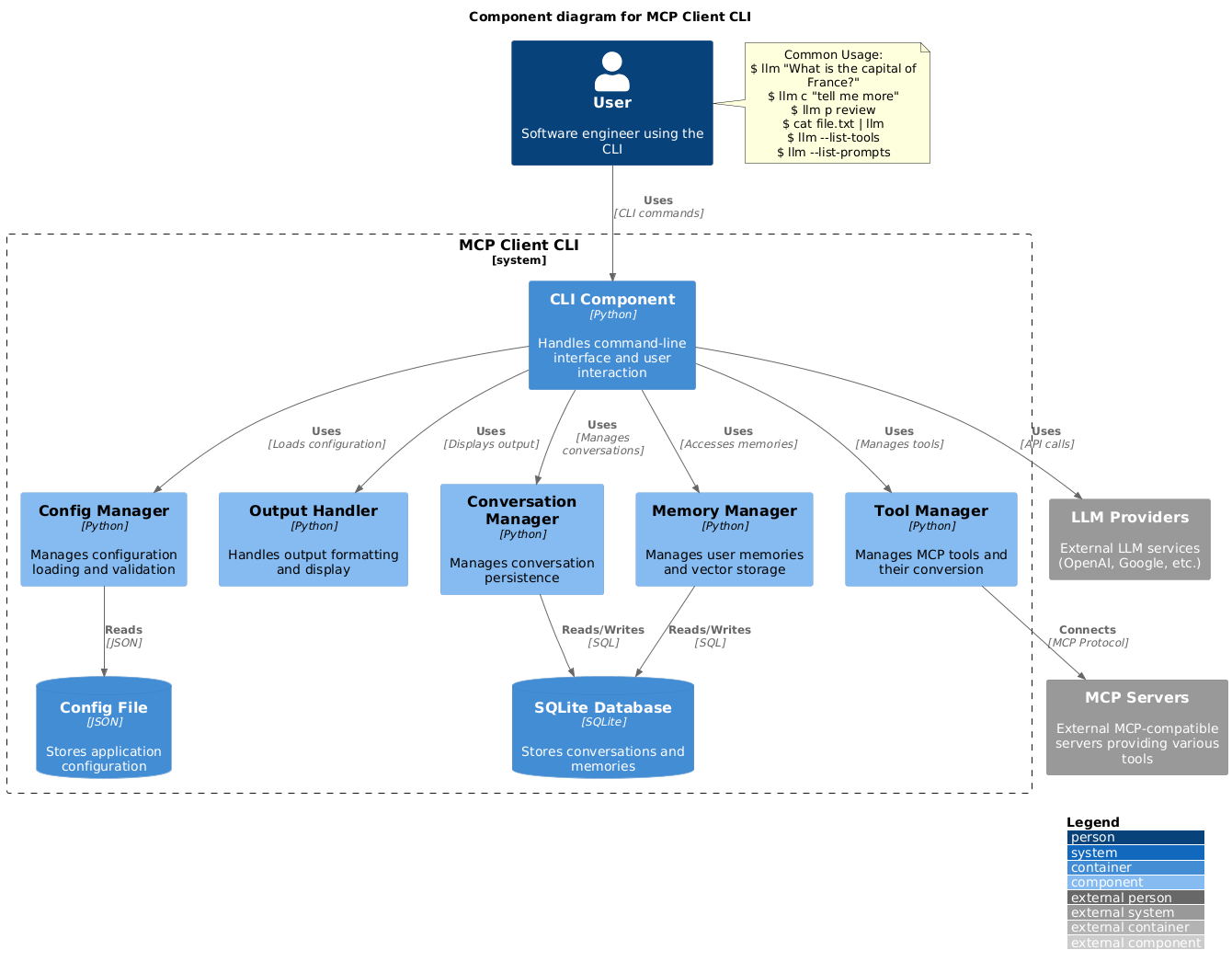
Setup
-
Install via pip:
pip install mcp-client-cli -
Create a
~/.llm/config.jsonfile to configure your LLM and MCP servers:{ "systemPrompt": "You are an AI assistant helping a software engineer...", "llm": { "provider": "openai", "model": "gpt-4", "api_key": "your-openai-api-key", "temperature": 0.7, "base_url": "https://api.openai.com/v1" // Optional, for OpenRouter or other providers }, "mcpServers": { "fetch": { "command": "uvx", "args": ["mcp-server-fetch"], "requires_confirmation": ["fetch"], "enabled": true, // Optional, defaults to true "exclude_tools": [] // Optional, list of tool names to exclude }, "brave-search": { "command": "npx", "args": ["-y", "@modelcontextprotocol/server-brave-search"], "env": { "BRAVE_API_KEY": "your-brave-api-key" }, "requires_confirmation": ["brave_web_search"] }, "youtube": { "command": "uvx", "args": ["--from", "git+https://github.com/adhikasp/mcp-youtube", "mcp-youtube"] } } }Note:
- See CONFIG.md for complete documentation of the configuration format
- Use
requires_confirmationto specify which tools need user confirmation before execution - The LLM API key can also be set via environment variables
LLM_API_KEYorOPENAI_API_KEY - The config file can be placed in either
~/.llm/config.jsonor$PWD/.llm/config.json - You can comment the JSON config file with
//if you like to switch around the configuration
-
Run the CLI:
llm "What is the capital city of North Sumatra?"
Usage
Basic Usage
$ llm What is the capital city of North Sumatra?
The capital city of North Sumatra is Medan.
You can omit the quotes, but be careful with bash special characters like &, |, ; that might be interpreted by your shell.
You can also pipe input from other commands or files:
$ echo "What is the capital city of North Sumatra?" | llm
The capital city of North Sumatra is Medan.

$ echo "Given a location, tell me its capital city." > instructions.txt
$ cat instruction.txt | llm "West Java"
The capital city of West Java is Bandung.
Image Input
You can pipe image files to analyze them with multimodal LLMs:
$ cat image.jpg | llm "What do you see in this image?"
[LLM will analyze and describe the image]

$ cat screenshot.png | llm "Is there any error in this screenshot?"
[LLM will analyze the screenshot and point out any errors]
Using Prompt Templates
You can use predefined prompt templates by using the p prefix followed by the template name and its arguments:
# List available prompt templates
$ llm --list-prompts

# Use a template
$ llm p review  # Review git changes
$ llm p commit  # Generate commit message
$ llm p yt url=https://youtube.com/...  # Summarize YouTube video
Triggering a tool
$ llm What is the top article on hackernews today?

================================== Ai Message ==================================
Tool Calls:
  brave_web_search (call_eXmFQizLUp8TKBgPtgFo71et)
 Call ID: call_eXmFQizLUp8TKBgPtgFo71et
  Args:
    query: site:news.ycombinator.com
    count: 1
Brave Search MCP Server running on stdio

# If the tool requires confirmation, you'll be prompted:
Confirm tool call? [y/n]: y

================================== Ai Message ==================================
Tool Calls:
  fetch (call_xH32S0QKqMfudgN1ZGV6vH1P)
 Call ID: call_xH32S0QKqMfudgN1ZGV6vH1P
  Args:
    url: https://news.ycombinator.com/
================================= Tool Message =================================
Name: fetch

[TextContent(type='text', text='Contents [REDACTED]]
================================== Ai Message ==================================

The top article on Hacker News today is:

### [Why pipes sometimes get "stuck": buffering](https://jvns.ca)
- **Points:** 31
- **Posted by:** tanelpoder
- **Posted:** 1 hour ago

You can view the full list of articles on [Hacker News](https://news.ycombinator.com/)
To bypass tool confirmation requirements, use the --no-confirmations flag:
$ llm --no-confirmations "What is the top article on hackernews today?"
To use in bash scripts, add the --no-intermediates, so it doesn't print intermediate messages, only the concluding end message.
$ llm --no-intermediates "What is the time in Tokyo right now?"
Continuation
Add a c prefix to your message to continue the last conversation.
$ llm asldkfjasdfkl
It seems like your message might have been a typo or an error. Could you please clarify or provide more details about what you need help with?
$ llm c what did i say previously?
You previously typed "asldkfjasdfkl," which appears to be a random string of characters. If you meant to ask something specific or if you have a question, please let me know!
Clipboard Support
You can use content from your clipboard using the cb command:
# After copying text to clipboard
$ llm cb
[LLM will process the clipboard text]

$ llm cb "What language is this code written in?"
[LLM will analyze the clipboard text with your question]

# After copying an image to clipboard
$ llm cb "What do you see in this image?"
[LLM will analyze the clipboard image]

# You can combine it with continuation
$ llm cb c "Tell me more about what you see"
[LLM will continue the conversation about the clipboard content]
The clipboard feature works in:
- Native Windows/macOS/Linux environments
- Windows: Uses PowerShell
- macOS: Uses
pbpastefor text,pngpastefor images (optional) - Linux: Uses
xclip(required for clipboard support)
- Windows Subsystem for Linux (WSL)
- Accesses the Windows clipboard through PowerShell
- Works with both text and images
- Make sure you have access to
powershell.exefrom WSL
Required tools for clipboard support:
- Windows: PowerShell (built-in)
- macOS:
pbpaste(built-in) for textpngpaste(optional) for images:brew install pngpaste
- Linux:
xclip:sudo apt install xclipor equivalent
The CLI automatically detects if the clipboard content is text or image and handles it appropriately.
Additional Options
$ llm --list-tools                # List all available tools
$ llm --list-prompts              # List available prompt templates
$ llm --no-tools                  # Run without any tools
$ llm --force-refresh             # Force refresh tool capabilities cache
$ llm --text-only                 # Output raw text without markdown formatting
$ llm --show-memories             # Show user memories
$ llm --model gpt-4               # Override the model specified in config
Contributing
Feel free to submit issues and pull requests for improvements or bug fixes.
client-cli MCP soruları
Bu istemci ile yerel LLM'leri kullanabilir miyim?
Evet, llama.cpp aracılığıyla yerel LLM modellerini kullanabilirsiniz.
Araç onay istemlerini nasıl atlayabilirim?
Araç yürütülmeden önce kullanıcı onayı gereksinimini atlamak için --no-confirmations bayrağını kullanın.
Görsel girişini destekliyor mu?
Evet, multimodal LLM'ler ile analiz etmek için görsel dosyalarını CLI'ya pipe edebilirsiniz.
Panomdaki içeriği kullanabilir miyim?
Evet, cb komutu metin veya görselleri doğrudan panonuzdan işlemenize olanak tanır.