
AGS API MCP sunucusu
Commit 6 Eki 2026Yerleşik veri görselleştirme araçlarıyla yapay zeka asistanlarının AccelByte Gaming Services API isteklerini aramasını, tanımlamasını ve yürütmesini sağlar.
Ayrıca bilinen adı AccelByte/ags-api-mcp-server, ags-api-mcp-server
- Yıldızlar
- 0
- Araçlar
- —
- İndirmeler, 30 gün
- —
- En son sürüm
- 2026.4.0
- Son commit
- 6 Eki 2026
- Lisans
- Apache-2.0
AGS API MCP nedir?
Yerleşik veri görselleştirme araçlarıyla yapay zeka asistanlarının AccelByte Gaming Services API isteklerini aramasını, tanımlamasını ve yürütmesini sağlar.
Özet, projenin README dosyasından oluşturuldu
AGS API MCP sunucusu hakkında
AGS API MCP server, OpenAPI entegrasyonu aracılığıyla yapay zeka asistanlarına AccelByte Gaming Services'a doğrudan erişim sağlar. Bu barındırılan bir çözümdür; yani geliştiricilerin herhangi bir yerel işlem çalıştırmasına gerek yoktur; bunun yerine yapay zeka istemcilerini AccelByte sürümleri tarafından sağlanan belirli bir uzak URL'ye bağlarlar. Bu sunucu; VS Code Copilot, Cursor, Claude Code, Antigravity ve Gemini CLI dahil olmak üzere çeşitli ortamlarla uyumludur.
Yazılımcılar; belirli operasyonları arayarak, API şemalarını tanımlayarak ve OAuth 2.0 kimlik doğrulaması kullanarak oyun servisleriyle etkileşime girebilirler. Sunucu, asistanların API yanıtlarını sütun grafikleri, çizgi grafikleri veya tablolar gibi çeşitli formatlara dönüştürmesine olanak tanıyan özel veri görselleştirme araçları içerir. Yapay zeka asistanı ile oyun backend'i arasındaki güvenli bağlantıları yönetmek için PKCE ve Dynamic Client Registration kullanarak hem Public Cloud hem de Private Cloud dağıtımlarını destekler.
Neler yapabilirsiniz
- 1API uç noktalarını keşfedinYapay zeka asistanınızdan, kullanım amaçlarına veya etiketlerine göre belirli oyun servisi operasyonlarını bulmasını isteyin.
- 2API şemalarını inceleyinBelirli bir uç nokta için parametreler ve kimlik doğrulama gereksinimleri hakkında ayrıntılı bilgi talep edin.
- 3Canlı API istekleri yürütünBir yapay zekaya kullanıcı profili getirme veya envanter öğelerini listeleme gibi eylemleri gerçekleştirme talimatı verin.
- 4Oyun analitiklerini görselleştirinHam sorgu verilerini doğrudan yapay zeka kodlama ortamınız içinde görsel grafiklere veya metriklere dönüştürün.
Projenin README dosyasından alınmıştır. Her kullanım durumu, oradaki bir alıntı ile kontrol edilir.
AGS API MCP nasıl yüklenir
AGS API her hesaba kendi uç noktasını verir, bu yüzden burada kopyalanacak bir adres yoktur. Kendi uç noktanızı sağlayıcıdan alın, süslü parantez içindeki kısmın yerine koyun ve istemcinize uzak sunucu olarak ekleyin.
https://{studio}-{game}.prod.gamingservices.accelbyte.io/mcp/%7Bstudio%7D-%7Bgame%7D
Otomatik kontroller
Çalıştırıldı 15 Kas 2026Tam rapor →Henüz doğrulanmadı. Bir sunucunun 80 puana, ciddi bir bulgu olmamasına ve kontrol edebilmemiz için yeterli veriye ihtiyacı vardır. Kontroller nasıl çalışır · Daha fazla puan için nelerin düzeltileceği

- Kaynak deposu bağlantılı ve erişilebiliraccelbyte/ags-api-mcp-server is public and reachablegithub.com/accelbyte/ags-api-mcp-server ↗Geçti
- Paket, bu depoyu kaynağı olarak gösteriyorKontrol edilmedi
- Derleme kökeni (Sigstore onayı)Kontrol edilmedi
- Açık kaynak lisansı (OSI)Apache-2.0spdx.org/licenses/Apache-2.0.html ↗Geçti
- Son bir yıl içinde commit veya sürüm mevcutLast commit or release 2026-10-06github.com/accelbyte/ags-api-mcp-server ↗Geçti
- OpenSSF ScorecardKontrol edilmedi
- Paket adı popüler bir pakete yakın değilKontrol edilmedi
- Pakette veya bağımlılıklarında kritik uyarı yokKontrol edilmedi
- Modele yönelik gizli talimat yok0 tool descriptions and the README read; no override phrases, credential paths or hidden charactersGeçti
- Yıkıcı araçlar etiketlenmişKontrol edilmedi
- Uzak uç nokta MCP el sıkışmasına yanıt veriyorEndpoint did not answer initialize: unreachableBulgu
AGS API MCP Server
A Model Context Protocol (MCP) server that gives AI assistants (VS Code Copilot, Cursor, Claude, Gemini, Antigravity) access to AccelByte Gaming Services (AGS) APIs through OpenAPI integration.
What It Does
- Search AGS API operations by description, tags, method, or service
- Describe specific operations — parameters, schemas, auth requirements
- Execute API requests with your authenticated token
- Render query results as charts, tables, and metrics (see Analytics & Visualization)
AccelByte hosts the AGS API MCP Server for you — you don't need to install or run anything locally. Just point your AI assistant at your environment's MCP URL and sign in.
Quick Install
Paste this into your AI coding assistant — it will fetch the install guide, ask you a couple of questions, and configure everything for you:
Install the AGS API MCP server for me. Fetch and follow the instructions at
https://raw.githubusercontent.com/AccelByte/ags-api-mcp-server/refs/heads/master/INSTALL.md
Works in VS Code Copilot, Cursor, Claude Code, Antigravity, and Gemini CLI.
Claude Desktop users: The simplest path is Settings → Connectors → Add custom connector (Name:
ags-api, URL: your MCP URL) — no AI installer needed. See Claude Desktop below for the full instructions and the fallback for accounts where workspace policy blocks custom connectors.If you do want to use the Quick Install prompt above, switch to the Code tab first (Chat and Cowork can't edit your config file).
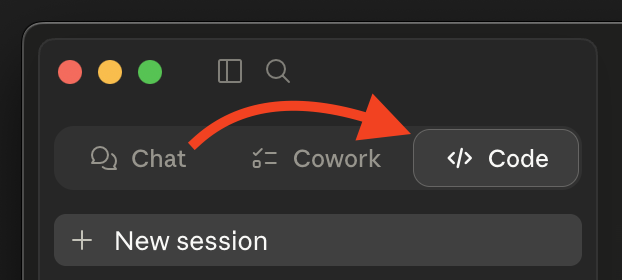
Prefer to do it yourself? See Manual Install below.
Manual Install
Step 1: Find Your MCP Server URL
The URL depends on which AGS edition you're on:
| Edition | URL format |
|---|---|
| Public Cloud | https://{studio}.prod.gamingservices.accelbyte.io/mcp/{studio} |
| Private Cloud | https://{domain}/mcp |
- Public Cloud customers receive a
{studio}namespace at registration — that one value goes in twice, once as the subdomain and once as the path. Studio admins and game admins use the same URL; your assigned roles decide which namespaces you can reach, not the URL you connect to. - Private Cloud customers use their own environment domain, whatever it is — no namespace segment. You may need to coordinate with AccelByte support to enable the MCP endpoint.
"Shared Cloud" is the same thing as Public Cloud — older docs and support threads use that name.
Not sure which edition you're on? Check with your AccelByte administrator.
Step 2: Configure Your Client
The deployed server uses OAuth 2.0 with PKCE and Dynamic Client Registration (DCR). If your client supports DCR, you can connect to the URL directly. If not — or if your client only supports stdio transport — use mcp-remote as a bridge.
Need
mcp-remote? It runs vianpx. You need Node.js 18+ withnpxavailable — verify withnpx --version. Most installers (nodejs.org, Homebrew,nvm, official Windows installer) bundlenpxvianpmautomatically, but minimal Linux distros sometimes ship Node without it; installnpmfrom your package manager if that's the case. No globalmcp-remoteinstall required.
Substitute your URL from Step 1 wherever you see <URL> below.
Visual Studio Code (Copilot)
.vscode/mcp.json in your workspace (or user settings.json):
{
  "servers": {
    "ags-api": {
      "type": "http",
      "url": "<URL>"
    }
  }
}
If you hit DCR errors, swap to: { "command": "npx", "args": ["-y", "mcp-remote", "<URL>"] }.
See the VS Code MCP documentation.
Cursor
.cursor/mcp.json in your workspace (or user settings):
{
  "mcpServers": {
    "ags-api": {
      "type": "http",
      "url": "<URL>"
    }
  }
}
If you hit DCR errors, swap to: { "command": "npx", "args": ["-y", "mcp-remote", "<URL>"] }.
See the Cursor MCP documentation.
Claude Code
claude mcp add --transport http ags-api <URL>
Fallback: claude mcp add ags-api -- npx -y mcp-remote <URL>.
See the Claude Code MCP documentation.
Antigravity
mcp_config.json in your project root:
{
  "mcpServers": {
    "ags-api": {
      "type": "http",
      "url": "<URL>"
    }
  }
}
If you hit DCR errors, swap to: { "command": "npx", "args": ["-y", "mcp-remote", "<URL>"] }.
See the Antigravity MCP documentation.
Gemini CLI
gemini mcp add --transport http ags-api <URL>
Fallback: gemini mcp add ags-api -- npx -y mcp-remote <URL>.
See the Gemini CLI MCP documentation.
Claude Desktop
Claude Desktop has two install paths. Pick the first one that works for your account:
Option A — Custom Connector (recommended for personal / Pro accounts)
- Open Settings → Connectors → Add custom connector (under the "Customize" area).
- Fill in:
- Name:
ags-api - Remote MCP server URL: your
<URL>from Step 1
- Name:
- Save. Claude Desktop handles OAuth (DCR + PKCE) natively — no config file edits, no
mcp-remote.
Don't see "Add custom connector"? Some Team and Enterprise plans disable custom connectors via workspace policy. If the option is missing or greyed out, use Option B.
Option B — mcp-remote config file (fallback when custom connectors are blocked)
Edit claude_desktop_config.json:
- macOS:
~/Library/Application Support/Claude/claude_desktop_config.json - Windows:
%APPDATA%\Claude\claude_desktop_config.json
{
  "mcpServers": {
    "ags-api": {
      "command": "npx",
      "args": ["-y", "mcp-remote", "<URL>"]
    }
  }
}
Restart Claude Desktop after saving.
Step 3: Sign In
When your AI assistant first calls a tool, it will open a browser to AccelByte to complete OAuth. Approve the consent screen and you're connected.
Using the Tools
Once connected, your assistant has access to these tools:
get_token_info
Returns details about your authenticated session — subject, namespace, roles/permissions, token kind, and expiration.
"What's my current user information?"
search-apis
Search AGS operations by description, HTTP method, tags, or service.
"Find APIs for user management" · "Search for inventory endpoints"
describe-apis
Get the full schema for a specific operation — parameters, request/response shapes, auth requirements.
"What parameters does the createItem endpoint need?"
run-apis
Execute an API request. Write operations (POST/PUT/PATCH/DELETE) prompt for consent before running.
"Get my user profile" · "List all items in my inventory"
Analytics & Visualization
The server exposes 16 render tools for turning tabular data into charts, tables, and metrics inside MCP hosts that support app resources:
render_bar_chart,render_line_chart,render_area_chart,render_scatter_chart,render_histogram_chart,render_box_chart,render_heatmap_chartrender_pie_chart,render_donut_chart,render_waterfall_chart,render_funnel_chart,render_gauge_chart,render_state_timeline_chartrender_table,render_metric,render_meter
All render tools require a provider:
provider="facade"reads Athena Facade results byquery_id+namespaceprovider="direct"renders small inline datasets fromdata_columns+data_rows
The typical Athena Facade flow:
- Use
run-apisto submit a query viaPOST /afs/v1/admin/namespaces/{namespace}/queries, preferably withwait_ms=0if you plan to render byquery_id - Poll
GET /afs/v1/admin/namespaces/{namespace}/queries/{id}untilstatus="SUCCEEDED" - Pass that
query_idto arender_*tool withprovider="facade"
If the submit returns 200 with inline rows on the fast path, render those rows directly with provider="direct".
See docs/ARCHITECTURE.md for the render-tool input matrix and the Athena Facade operation list.
Workflow Prompts
The server also provides workflow resources and prompts. Ask your assistant about available workflows or invoke the run-workflow prompt.
Troubleshooting
mcp-remote opens a browser every time
mcp-remote caches tokens under ~/.mcp-auth/. If it's re-authenticating on every launch, that directory may be unwritable or hold stale entries.
First, check permissions on ~/.mcp-auth/ (it needs to be writable by your user). If permissions look fine, the cache may be stale — back the directory up (e.g. mv ~/.mcp-auth ~/.mcp-auth.bak) and retry. Restore the backup if the move doesn't help. Note: removing the cache will sign you out of every MCP server you've authenticated with via mcp-remote, not just this one.
Native config fails with an OAuth or DCR error
Your client may not yet support Dynamic Client Registration. Switch to the mcp-remote fallback config shown above.
Sign-in succeeds but tool calls fail with 403
Your AccelByte user may not have permission for the operation you're calling. Check with your AGS administrator.
Authentication fails with "Invalid Request", "invalid client ID", or "client ID not found"
If your client connected before but now fails at sign-in — often with a generic IAM Invalid Request page mentioning an invalid redirect URI, client ID, or target path, or an "invalid client ID" / "client ID not found" error — the cached Dynamic Client Registration (DCR) is likely stale.
Clients that use DCR cache the IAM client ID they registered. If an administrator or an inactive-client cleanup job later removes that IAM client, the cached registration becomes invalid. The client keeps reusing the deleted client ID and authentication fails before a fresh DCR registration is ever attempted.
This is different from normal token expiry. When only your access token has expired, the client silently refreshes it or reauthorizes against the same valid client ID and you may not notice. A deleted client can't be refreshed — you have to clear the cached registration so the client runs DCR again and registers a new one.
Recovery — clear the cached authentication for the ags-api server, then sign in again:
- Claude Code: run
/mcp, select theags-apiserver, and choose Clear authentication. Then reconnect (via/mcpor by restarting) to trigger a new sign-in. - Codex: run
codex mcp logout ags-api, thencodex mcp login ags-api. mcp-remoteclients: seemcp-remoteopens a browser every time above for clearing the~/.mcp-auth/cache.
Clearing authentication only removes the local OAuth state (the cached registration and tokens) for this one server and requires you to sign in again — it creates a fresh DCR registration and restores access. You do not need to remove and re-add the MCP server, and you should not wipe all MCP credentials globally unless your client offers no way to clear a single server on its own.
Documentation
- Installation Guide — followed by the Quick Install prompt; readable on its own
- Architecture — design, security mechanisms, render tools, AFS operations
- Environment Variables — for self-hosters
- Self-Hosting & Development — build, run, test, deploy with Docker
Looking for V1? See docs/v1/README.md (legacy; stdio + server-managed OAuth).
Contributions
This repository is published as-is. We don't accept external pull requests at this time. For bug reports and questions, please open an issue.
AGS API MCP soruları
Bu sunucuyu yerel olarak kurmam veya çalıştırmam gerekiyor mu?
Hayır, AGS API MCP Server sizin için AccelByte tarafından barındırılır. Yapay zeka asistanınızı doğrudan ortamınızın MCP URL'sine yönlendirmeniz yeterlidir.
API sorgu sonuçlarını nasıl görselleştirebilirim?
Sunucu; tablo verilerini sütun grafikleri, pasta grafikleri ve ısı haritaları gibi çeşitli grafiklere, tablolara ve metriklere dönüştürebilen 16 render aracı sunar.