
AI 클라이언트가 Git identity, SSH key, repository 설정을 검사하여 올바른 커밋 서명과 사용자 정보를 사용하도록 지원합니다.
다른 이름 Yantrakar/gitpro
- 스타
- 0
- Tools
- —
- 다운로드, 30일
- —
- 최신 버전
- 0.4.6
- 마지막 커밋
- 2026년 11월 6일
- 라이선스
- MIT
gitpro MCP란?
AI 클라이언트가 Git identity, SSH key, repository 설정을 검사하여 올바른 커밋 서명과 사용자 정보를 사용하도록 지원합니다.
프로젝트 README에서 생성된 요약
gitpro MCP server 정보
Gitpro는 AI 클라이언트와 개발자가 여러 repository에 걸쳐 다양한 Git identity, SSH key, 커밋 서명을 관리할 수 있는 방법을 제공합니다. remote URL을 분석하여 업무용 또는 개인용 자격 증명 사용 여부를 결정하며, 모든 프로젝트에 올바른 이메일과 서명 키가 적용되도록 보장합니다. 이 도구는 GitHub 또는 GitLab 계정을 별도로 관리하며 잘못된 사용자 정보로 커밋하는 실수를 방지하려는 사용자를 위해 설계되었습니다.
이 server는 Linux 또는 macOS에서 로컬로 실행되며 Git 2.36+, Python 3.9+, OpenSSH가 필요합니다. 기존 Git 및 SSH 설정, repository 설정, SSH key를 검사하여 작동합니다. 사용자는 gitpro setup 명령어를 사용하여 환경을 설정할 수 있으며, 이 명령어는 기존 repository를 스캔하여 적절한 identity를 제안합니다. 설정이 완료되면 AI agent가 MCP server를 사용하여 identity와 repository 설정을 검사함으로써 업무용과 개인용 작업을 엄격하게 분리할 수 있습니다.
활용 사례
- 1repository identity 확인특정 repository가 왜 특정 이메일이나 SSH key를 사용하는지 AI에게 질문합니다.
- 2설정 불일치 식별현재 identity 설정이 잘못된 모든 repository 목록을 요청합니다.
- 3잘못된 커밋 방지특정 host에 대해 잘못된 identity를 사용하는 커밋을 차단하는 안전 메커니즘을 사용합니다.
프로젝트의 README를 바탕으로 작성되었습니다. 모든 활용 사례는 해당 내용의 인용문과 대조하여 확인합니다.
gitpro MCP 설치 방법
형식 확인: 2026년 11월 10일Cursor에 추가Goose에 추가Claude Code에 gitpro MCP 설치
$ claude mcp add gitpro -- uvx gitproCursor에 gitpro MCP 설치
~/.cursor/mcp.json
{
  "mcpServers": {
    "gitpro": {
      "command": "uvx",
      "args": [
        "gitpro"
      ]
    }
  }
}VS Code에 gitpro MCP 설치
.vscode/mcp.json
{
  "servers": {
    "gitpro": {
      "type": "stdio",
      "command": "uvx",
      "args": [
        "gitpro"
      ]
    }
  }
}VS Code CLI에 gitpro MCP 설치
$ code --add-mcp '{"name":"gitpro","type":"stdio","command":"uvx","args":["gitpro"]}'Claude Desktop에 gitpro MCP 설치
claude_desktop_config.json
{
  "mcpServers": {
    "gitpro": {
      "command": "uvx",
      "args": [
        "gitpro"
      ]
    }
  }
}Codex에 gitpro MCP 설치
$ codex mcp add gitpro -- uvx gitproCodex config.toml에 gitpro MCP 설치
~/.codex/config.toml
[mcp_servers.gitpro]
command = "uvx"
args = ["gitpro"]
Gemini CLI에 gitpro MCP 설치
$ gemini mcp add -s user gitpro uvx -- gitproGemini settings.json에 gitpro MCP 설치
~/.gemini/settings.json
{
  "mcpServers": {
    "gitpro": {
      "command": "uvx",
      "args": [
        "gitpro"
      ]
    }
  }
}자동 검사
2026년 11월 14일에 실행됨전체 보고서 →자동 검사를 통과했습니다. 이는 보안 감사가 아닙니다. 코드를 직접 읽고 서버에 필요한 최소한의 권한만 부여하십시오. 검사 방식

- 소스 저장소 연결 및 접근 가능yantrakar/gitpro is public and reachablegithub.com/yantrakar/gitpro ↗통과
- 패키지가 이 저장소를 소스로 명시gitpro names yantrakar/gitpro as sourcepypi.org/project/gitpro/ ↗통과
- 빌드 출처(Sigstore 증명)Sigstore attestation for gitpropypi.org/project/gitpro/ ↗통과
- 오픈 소스 라이선스 (OSI)MITspdx.org/licenses/MIT.html ↗통과
- 최근 1년 내 커밋 또는 릴리스Last commit or release 2026-11-06github.com/yantrakar/gitpro ↗통과
- OpenSSF Scorecard검사되지 않음
- 패키지 이름이 인기 패키지와 유사하지 않음No popular package one edit away from gitpro통과
- 패키지 및 해당 종속성에 중요한 보안 권고 없음5 resolved dependencies checked; no critical advisoryosv.dev ↗통과
- 모델에 대한 숨겨진 지침 없음0 tool descriptions and the README read; no override phrases, credential paths or hidden characters통과
- 파괴적인 도구에 라벨 표시됨검사되지 않음
- 원격 엔드포인트가 MCP 핸드셰이크에 응답검사되지 않음
README
GitHub에서 보기gitpro
The right Git identity, SSH key and signature for every repository.
gitpro.dev · PyPI · VS Code · made by Yantrakar
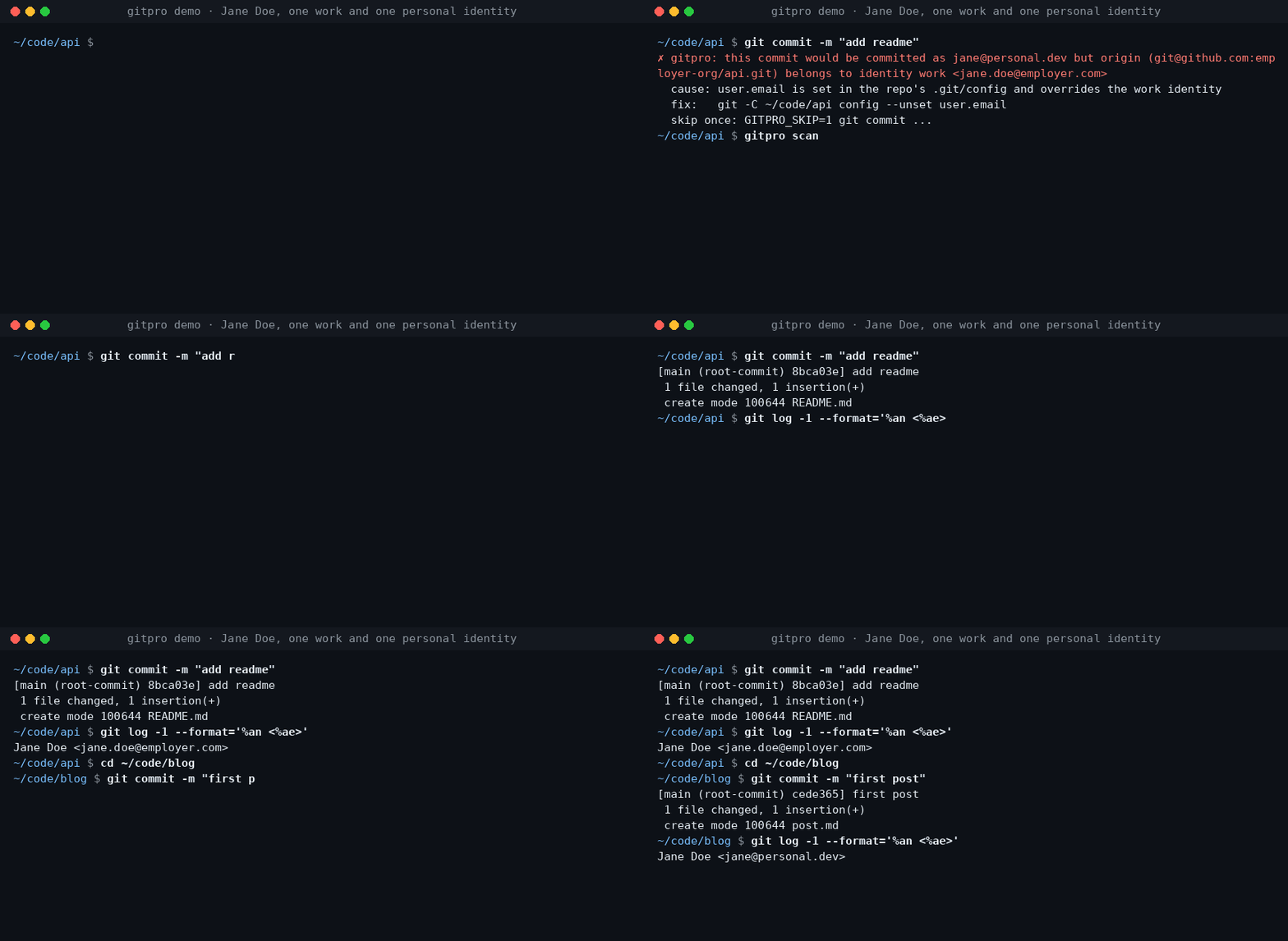
Work on a company repository, commit with your work email. Switch to a personal project, use your personal identity. Gitpro chooses by remote URL, not by where you happened to clone the repository.
Useful when you have more than one GitHub/GitLab account, separate work and personal keys, or keep finding the wrong email on your commits.
Try it
Requires Linux or macOS, Git 2.36+, Python 3.9+ and OpenSSH. Install from PyPI with pipx.
pipx install gitpro
gitpro setup
Setup offers to look through your repos and proposes your identities. Accept, edit or answer the questions yourself; no TOML editing is needed. One preview shows everything, including the commit guard and, with Claude Code, its hook and MCP server. One yes applies it all. Setup never changes your repos.
flowchart LR
  S["gitpro setup"] --> HC{"Config <br/>exists?"}
  HC -->|no| L["Read your repos, <br/>SSH config and <br/>editor recents, <br/>if you agree"]
  L --> Q["Propose <br/>identities; you <br/>accept or edit"]
  Q --> I
  HC -->|yes| I["Inspect config, <br/>Git and SSH files, <br/>keys, guard, <br/>agent hook, MCP"]
  I -->|all current| OK["Nothing <br/>to do"]
  I -->|something to do| PV["One preview, <br/>each part with <br/>its undo"]
  PV --> ASK{"Apply <br/>all?"}
  ASK -->|no| NONE["Nothing <br/>written"]
  ASK -->|yes| AP["Write it, print <br/>the public keys <br/>to register"]
  AP --> NX["Next: <br/>gitpro scan"]
Then:
gitpro why               # inside a repository: the expected identity and anything overriding it
gitpro scan              # repos that need a fix, with the command for each
Already have a config? gitpro setup brings this machine up to date with it.
gitpro setup -n only shows what is left to do. Prefer editing files? The
user guide covers the full TOML format.
What you get
- Work/personal separation: names, emails, SSH keys and signing per host/owner.
- Answers, not guesswork:
gitpro whyexplains mismatches and suggests a fix. - A safety net: optional hooks can block wrong-identity commits and pushes.
- Editor and container support: see your identity in VS Code and carry it into dev containers.
Gitpro generates ordinary Git and SSH configuration; it needs no background service. Changes can be previewed, existing hand-written files are backed up, and key uploads are never part of setup.
Using VS Code?
The extension shows the current identity and helps find repository-level overrides. It runs the same commands as the terminal. Install the extension.
Go further when you need to
AI agents get the same answers through the MCP server and the Claude Code hook: see agent workflows.
| I want to… | Start here |
|---|---|
| Understand matching, SSH keys or signing | Configuration |
| Find wrong identities or forgotten work | Daily use · Finding things |
| Use dev containers | Container setup |
| Configure team policy, CI or AI assistants | Teams and CI · AI assistants |
| Look up a command or undo changes | Command reference · Undo |
| Troubleshoot or contribute | Troubleshooting · Development |
Problems and questions
Run gitpro report to draft an issue with the versions and a redacted gitpro why; it shows
you the draft and opens nothing until you say yes. Or open an issue at github.com/Yantrakar/gitpro/issues.
Report a security problem privately with gitpro report --security, as the
security policy describes, not in a public issue.
License
gitpro MCP 질문
gitpro MCP를 Claude Code에 추가하려면 어떻게 하나요?
터미널에서 claude mcp add gitpro -- uvx gitpro를 실행합니다. 모든 프로젝트에서 사용할 수 있게 하려면 --scope user를 추가합니다.
gitpro MCP를 Cursor에 추가하려면 어떻게 하나요?
~/.cursor/mcp.json를 열고 mcpServers 아래에 서버를 추가합니다. 위 설치 섹션에 표시된 Cursor 구성을 사용합니다.
gitpro는 어떤 identity를 사용할지 어떻게 결정하나요?
gitpro는 repository가 클론된 로컬 디렉토리가 아닌 remote URL을 기준으로 identity를 선택합니다.
gitpro를 통해 잘못된 이메일로 커밋하는 것을 방지할 수 있나요?
네, hooks를 통해 잘못된 identity를 사용하는 커밋과 push를 차단하는 선택적 안전 장치를 제공합니다.
gitpro를 실행하려면 백그라운드 서비스가 필요한가요?
아니요, 표준 Git 및 SSH 설정을 생성하며 별도의 백그라운드 프로세스를 실행할 필요가 없습니다.