
chatwatch MCP server
2026년 11월 11일 커밋Azure app registration이나 관리자 승인 없이 로컬 Chrome 세션을 제어하여 AI agent가 Microsoft Teams 채팅을 읽고 응답할 수 있도록 합니다.
다른 이름 xxxxDev/chatwatch
- 스타
- 1
- Tools
- 11
- 다운로드, 30일
- —
- 최신 버전
- —
- 마지막 커밋
- 2026년 11월 11일
- 라이선스
- MIT
chatwatch MCP란?
chatwatch은(는) MCP server입니다. Azure app registration이나 관리자 승인 없이 로컬 Chrome 세션을 제어하여 AI agent가 Microsoft Teams 채팅을 읽고 응답할 수 있도록 합니다. 11개 도구를 제공합니다. 예: teams_list_chats, teams_read_messages, teams_wait_for_messages.
프로젝트 README에서 생성된 요약
chatwatch MCP server 정보
chatwatch는 로컬 Chrome 세션을 제어하여 AI 클라이언트 내에서 Microsoft Teams 채팅 상호작용을 자동화합니다. 복잡한 Azure app registrations나 관리자 승인 과정 대신, 기존 Teams 웹 로그인을 사용하여 agent가 메시지를 읽고 응답할 수 있도록 합니다. 이 도구는 사용자의 컴퓨터에서 로컬로 실행되며 Claude Code, Codex, Cursor와 같은 MCP 클라이언트와 함께 작동합니다.
사용자는 두 가지 주요 방법을 통해 채팅과 상호작용할 수 있습니다. MCP 도구를 통해 데이터를 가져오거나, 특정 명령 또는 URL로 새 메시지를 보내는 push handler를 사용하는 방식입니다. 제어력을 유지하기 위해 서버에는 전송 모드 시스템이 포함되어 있습니다. agent의 답변을 로컬 페이지에 보관하여 사용자가 수동으로 승인하는 draft 모드나, 즉시 전송하는 auto 모드를 설정할 수 있습니다. 또한 시스템은 Chrome 세션의 라이브 뷰를 제공하므로, 사용자가 직접 클릭, 스크롤 또는 타이핑하여 로그인 상태를 관리할 수 있습니다.
활용 사례
- 1채팅 답장 초안 작성AI agent가 메시지를 모니터링하고 검토할 수 있도록 답변 초안을 준비하도록 요청합니다.
- 2메시지 모니터링 자동화설정된 기간 동안 특정 정보가 들어오는지 대기하도록 agent에게 지시합니다.
- 3외부 핸들러와 통합수신된 Teams 메시지를 처리를 위해 커스텀 로컬 명령이나 웹 URL로 전달합니다.
프로젝트의 README를 바탕으로 작성되었습니다. 모든 활용 사례는 해당 내용의 인용문과 대조하여 확인합니다.
chatwatch MCP 도구 11
README에서 감지됨teams_list_chatsteams_read_messagesteams_wait_for_messagesteams_send_messageteams_get_attachmentsteams_list_draftssentdraftrefusednot_sentmaybe_sent
| teams_list_chats | — | |
| teams_read_messages | — | |
| teams_wait_for_messages | — | |
| teams_send_message | — | |
| teams_get_attachments | — | |
| teams_list_drafts | — | |
| sent | — | |
| draft | — | |
| refused | — | |
| not_sent | — | |
| maybe_sent | — |
자동 검사
2026년 11월 14일에 실행됨전체 보고서 →아직 인증되지 않았습니다. 서버는 80점 이상의 점수, 심각한 결함 없음, 그리고 검사에 충분한 데이터를 갖추어야 합니다. 검사 방식 · 점수를 높이기 위해 수정할 항목

- 소스 저장소 연결 및 접근 가능xxxxdev/chatwatch is public and reachablegithub.com/xxxxdev/chatwatch ↗통과
- 패키지가 이 저장소를 소스로 명시검사되지 않음
- 빌드 출처(Sigstore 증명)검사되지 않음
- 오픈 소스 라이선스 (OSI)MITspdx.org/licenses/MIT.html ↗통과
- 최근 1년 내 커밋 또는 릴리스Last commit or release 2026-11-11github.com/xxxxdev/chatwatch ↗통과
- OpenSSF Scorecard검사되지 않음
- 패키지 이름이 인기 패키지와 유사하지 않음검사되지 않음
- 패키지 및 해당 종속성에 중요한 보안 권고 없음검사되지 않음
- 모델에 대한 숨겨진 지침 없음11 tool descriptions and the README read; no override phrases, credential paths or hidden characters통과
- 파괴적인 도구에 라벨 표시됨No tool named like delete, drop or exec통과
- 원격 엔드포인트가 MCP 핸드셰이크에 응답검사되지 않음
README
GitHub에서 보기What it is
chatwatch runs on your own computer, as your user, with your Teams sign-in. Your agents work with your chats through MCP tools or push handlers, and every send passes the chat's send mode before anything reaches Teams.
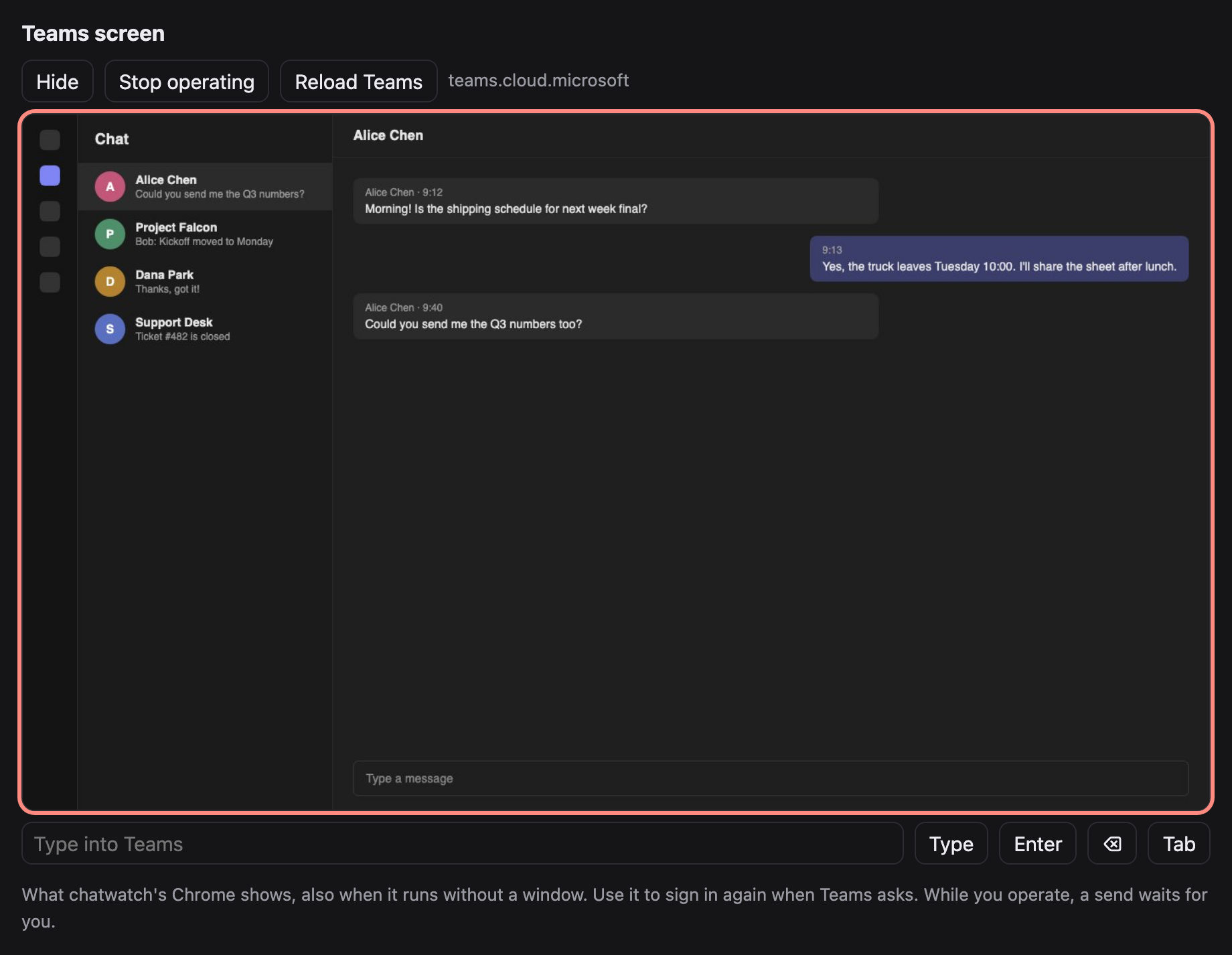
The Teams tab, seen on chatwatch's local page (made-up chats).
Features
- Pull (MCP): any MCP client (Claude Code, Codex, Cursor, …) gets tools to list chats, read messages, wait for new ones, fetch attachments and send.
- Push (handlers): each new batch of messages in a chat goes to a command or URL you choose; its answer is sent back to the chat.
- You stay in control: every chat has a send mode.
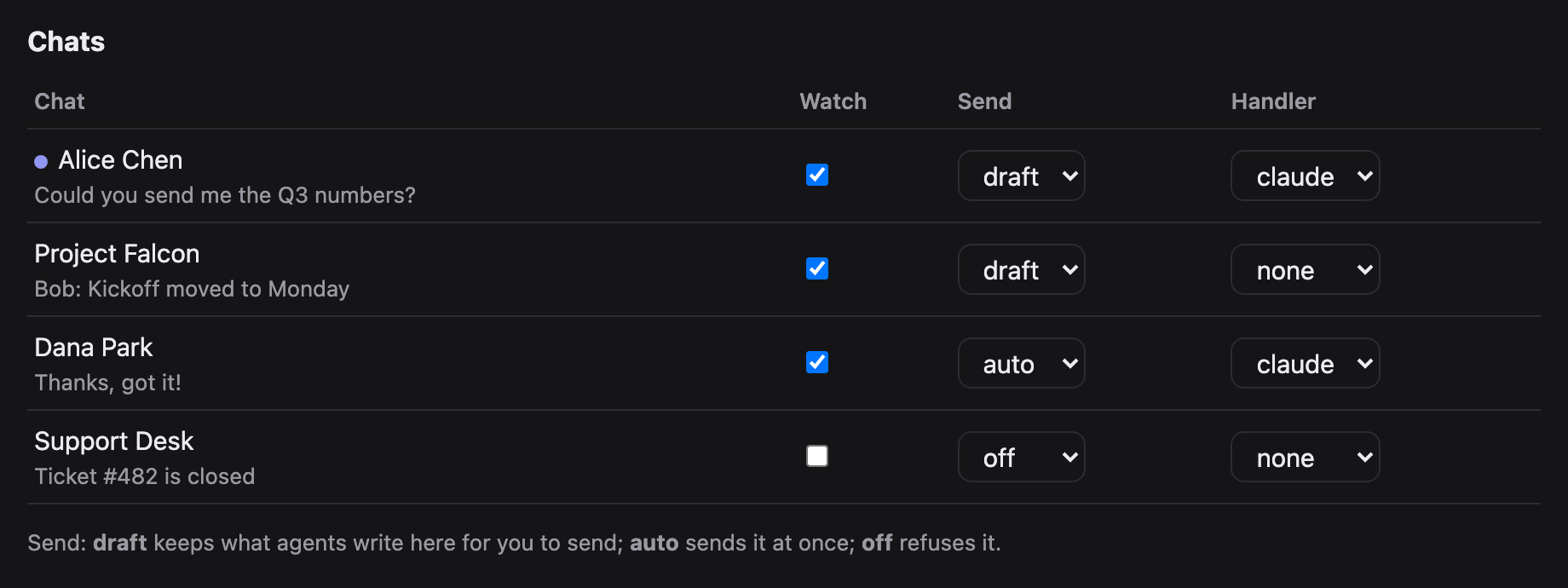
draft(the default) keeps what an agent writes on the local page until you send or discard it;autosends at once;offrefuses. - Nothing is marked read by watching. New messages are read through Teams' own chat service API from inside the tab, so chats stay unread. Sending opens the chat, which marks it read (Teams does that; it cannot be avoided).
- See Teams on the page. A live view of chatwatch's Chrome, also when it runs without a window: click, scroll and type in it to sign in again when Teams asks.
- The Teams token never leaves the tab. It is used inside the page and is never returned to Python, printed or saved.
Requirements
- Python 3.9 or later. chatwatch uses the standard library only, so there is nothing else to install.
- Chrome, Chromium or Edge. If chatwatch does not find it, set
CHATWATCH_CHROMEto its executable. - A Microsoft Teams account you can sign in to on the Teams web page.
- For the pull tools, an MCP client such as Claude Code, Codex or Cursor.
Quick start
git clone https://github.com/xxxxDev/chatwatch.git chatwatch && cd chatwatch
pip install .                    # or run python3 -m chatwatch from this folder

# 1. Sign in to Teams once, in chatwatch's own Chrome profile
chatwatch browser --show         # sign in, then close the window

# 2. Run the watcher (starts Chrome headless) and open the page
chatwatch serve
chatwatch open                   # prints http://127.0.0.1:8766/#key=...

# 3. Give your agent the tools
claude mcp add teams -- chatwatch mcp
How it fits together
flowchart LR
    agent["Your agent<br/>Claude Code, Codex,<br/>any MCP client"]
    handler["Your handler<br/>a command or URL"]
    mcp["chatwatch mcp"]
    serve["chatwatch serve"]
    mode{"Send mode<br/>of the chat"}
    page["Local page<br/>you send or discard"]
    tab["Teams tab in<br/>chatwatch's Chrome"]
    teams[("Microsoft Teams")]

    agent -- "MCP tools" --> mcp
    mcp -- "local API + key" --> serve
    serve -- "new messages" --> handler
    handler -- "reply" --> serve
    serve -- "read through the chat API,<br/>never marks read" --> tab
    serve -- "send" --> mode
    mode -- "auto" --> tab
    mode -- "draft" --> page
    page -- "you approve" --> tab
    mode -- "off" --> refused["refused"]
    page -. "live view" .- tab
    tab <--> teams
An agent works with chats in one of two ways. Through MCP it asks for chats and messages and sends when it decides to. Through a handler each new batch of messages is pushed to it, and its answer is sent back. Either way, every send passes the chat's send mode before anything reaches Teams.
The page
chatwatch open prints the page's address with its key; open it in your browser. It refreshes itself every few seconds.
- Pause / Resume (top): the emergency stop, see Push handlers.
- Teams screen: see below.
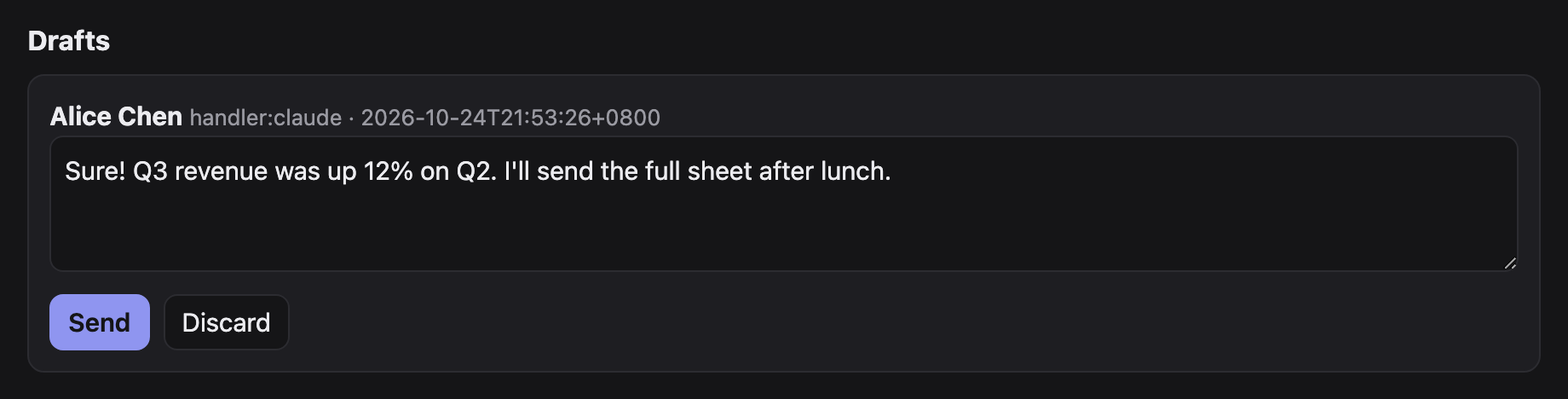
- Drafts: every reply waiting for you. Edit the text, then Send or Discard. A draft whose earlier send may have gone out asks you to tick I checked the chat first, so nothing is sent twice by mistake.
- Chats: each chat Teams lists, with a dot when unread. Per chat: Watch (record its new messages and pass them on), Send (
draft,autooroff;autoasks you to confirm) and Handler (where its new messages are pushed; handlers come fromconfig.json). - Recent: the last 30 events: new messages, sends, drafts, refusals and errors.
Teams screen
On the page, Show under Teams screen displays what the Teams tab shows. Start operating sends your clicks, scrolling and typing to it (on a phone, use the text box and the Enter, ⌫ and Tab buttons); Reload Teams reloads the tab. A send waits while you operate, and your input waits for a send in progress. Only the Teams tab (or the Microsoft sign-in page it goes to) is shown; there is no address bar.
MCP tools
| Tool | What it does |
|---|---|
teams_list_chats |
Chats with title, id, preview, unread flag and their settings |
teams_read_messages |
Last n messages of a chat, without marking it read |
teams_wait_for_messages |
New incoming messages after an event number, waiting up to 60 s |
teams_send_message |
Text and files to a chat, under its send mode |
teams_get_attachments |
Download the pictures and files of given messages |
teams_list_drafts |
Replies waiting for you on the page |
teams_send_message answers with a status:
sent: it is in the chat.draft: waiting for you on the page.refused: sending is off for this chat.not_sent: nothing went out; trying again is safe.maybe_sent: send was pressed but the message was not seen; do not resend before someone checks the chat.
A chat is named by its title, a part of the title that matches only one chat, or its id.
Push handlers
Define handlers in ~/.chatwatch/config.json and pick one per chat on the page:
{
  "handlers": {
    "claude": {"command": ["claude", "-p", "--output-format", "text",
                "Answer this Teams chat. The messages are JSON on stdin."]},
    "my-bot": {"url": "http://127.0.0.1:9000/teams", "timeout": 300}
  }
}
A command gets the batch as JSON on stdin; a URL gets it POSTed:
{"chat_id": "19:...", "chat": "Alice", "kind": "OneOnOneChat", "send": "draft",
 "messages": [{"mid": "...", "author": "Alice", "time": "...", "text": "Hi"}]}
It answers with plain text (the reply) or JSON {"text": "...", "files": ["/abs/path"]}. An empty answer sends nothing. The reply follows the chat's send mode. In auto, a send that certainly did not go is tried again after 20 s, 60 s and 180 s, then kept as a draft; one that may have gone is kept as a draft marked for checking, never resent by itself.
Two bots answering each other on auto never stop. Keep bot chats on draft. Pause on the page is the emergency stop: nothing is read, queued handler work is skipped, and while paused every auto chat behaves as draft. A reply that comes back after its chat was paused, unwatched or given another handler waits as a draft.
Using it with an agent
With the MCP tools added, ask your agent in plain words, for example:
Check my Teams chats for anything new from Alice and draft a reply.
Wait for new Teams messages for the next 10 minutes and answer the questions about the shipping schedule.
The agent lists chats, reads, waits and sends with the tools above. On a draft chat its replies wait on the page; switch a chat to auto only when you trust what it sends there.
Starting, stopping and signing in again
chatwatch serveruns in the foreground; stop it with Ctrl+C. Chrome keeps running;chatwatch browser stopcloses it.- When Teams signs you out, reading stops with
NO_TEAMS_TOKEN. Sign in again on the page's Teams screen, or close Chrome and runchatwatch browser --show. - Settings, drafts and the sign-in stay in
~/.chatwatchacross restarts. Messages that arrived while chatwatch was stopped are passed on when it starts again (up to the last 20 per chat); those that arrived while it was paused are not, so no late automatic reply goes out after a pause.
Troubleshooting
| Message | What to do |
|---|---|
chatwatch is not running at ... |
Start chatwatch serve. |
NO_TEAMS_TOKEN, CHAT_API_401 |
Teams signed out: sign in again (above). |
Chrome not found |
Set CHATWATCH_CHROME to Chrome's executable. |
no chat matches / several chats match |
Use the exact title or the chat id from teams_list_chats. |
DRAFT_NOT_EMPTY |
Someone left text in that chat's message box; clear it on the Teams screen. |
CHAT_NOT_FOUND, NO_COMPOSE_BOX, NO_SEND_BUTTON |
Teams is still loading or its page changed; look at the Teams screen, then try again. |
TYPED_TEXT_MISMATCH, SEND_NOT_TAKEN |
Nothing was sent; trying again is safe. |
maybe_sent |
Look at the chat before sending again. |
the Teams tab is busy sending |
Your input on the Teams screen waited for a send; try again. |
Command line
chatwatch chats
chatwatch read "Alice" 10
chatwatch send "Alice" "Hello" ./report.pdf     # sends now, whatever the mode: you are the person
chatwatch set "Alice" --watch on --send auto --handler claude
Settings
| Variable | Default | |
|---|---|---|
CHATWATCH_HOME |
~/.chatwatch |
config, state, events, drafts, API key, Chrome profile |
CHATWATCH_PORT |
8766 |
page and local API |
CHATWATCH_CDP_PORT |
9334 |
DevTools port of chatwatch's Chrome |
CHATWATCH_CDP |
use a Chrome you already run with --remote-debugging-port |
|
CHATWATCH_CHROME |
path to the Chrome executable | |
CHATWATCH_POLL |
4 |
seconds between checks |
CHATWATCH_URL |
http://127.0.0.1:8766 |
address of the running chatwatch serve that chatwatch mcp talks to; when unset, its port follows CHATWATCH_PORT |
How it works
teams.py reads through the chat service API inside the Teams tab and sends by pasting the whole text into the compose box (a synthetic paste keeps line breaks; typing key by key now and then lost a key), attaching files through the file chooser, pressing send, and waiting for the message to appear. service.py polls, records events, runs handlers and applies send modes. http_api.py serves the page and the local API; mcp.py is a stdio MCP server that talks to that API. cdp.py is a small DevTools client.
Teams changes its web page from time to time; the selectors in teams.py then need updating.
Limits
- Chats only, not channel posts.
- Chats are found among those Teams lists in its sidebar.
- Sending marks the chat read; watching does not.
- It depends on the Teams web page. When Teams changes it, reading or sending can stop until
teams.pyis updated; the error names the step that failed.
Security
The page and API listen on 127.0.0.1 only and need the key in ~/.chatwatch/api-key. Agents read what other people write to you, and in an auto chat what they write goes out at once. Read SECURITY.md before connecting an agent, and use it to report a problem.
Contributing
See CONTRIBUTING.md before you open an issue or a pull request. Changes are listed in CHANGELOG.md and ideas for later in docs/ROADMAP.md.
License
The code is under the MIT License.
chatwatch is an independent project. It is not made by, affiliated with or endorsed by Microsoft. Microsoft Teams is a trademark of Microsoft.
Made by V-AX.
chatwatch MCP 질문
chatwatch MCP는 어떤 도구를 제공하나요?
11개 도구를 제공합니다. 예: teams_list_chats, teams_read_messages, teams_wait_for_messages, teams_send_message, teams_get_attachments.
chatwatch를 사용하려면 Azure app registration이나 관리자 승인이 필요한가요?
아니요, 기존 Teams 세션이 활성화된 Chrome 탭을 제어하므로 Azure app registration, 관리자 승인 또는 봇 계정이 필요하지 않습니다.
AI agent가 메시지를 자동으로 보낼지 여부를 어떻게 제어하나요?
각 채팅에 대해 전송 모드를 설정할 수 있습니다. 'draft' 모드는 메시지를 로컬 페이지에 유지하여 사용자의 승인을 기다리며, 'auto' 모드는 즉시 전송하고, 'off' 모드는 전송을 거부합니다.
채팅을 모니터링하면 Microsoft Teams에서 읽음 상태로 표시되나요?
아니요, 탭 내부의 Teams 자체 채팅 서비스 API를 통해 새 메시지를 읽으므로, 실제로 메시지를 보내기 전까지는 읽지 않음 상태로 유지됩니다.
chatwatch를 실행하기 위한 시스템 요구 사항은 무엇인가요?
Python 3.9 이상 버전과 Chrome, Chromium 또는 Edge와 같은 브라우저가 필요합니다.