
Worktable MCP server
2026년 11월 14일 커밋AI 에이전트가 협업 워크스페이스 내에서 문서, 도면, 구조화된 기록 및 대화형 HTML 도구를 생성하고 수정할 수 있도록 지원합니다.
다른 이름 worktable/worktable-dev, worktable-dev
- 스타
- 8
- Tools
- —
- 다운로드, 30일
- —
- 최신 버전
- 0.1.49
- 마지막 커밋
- 2026년 11월 14일
- 라이선스
- AGPL-3.0
Worktable MCP란?
Worktable은(는) MCP server입니다. AI 에이전트가 협업 워크스페이스 내에서 문서, 도면, 구조화된 기록 및 대화형 HTML 도구를 생성하고 수정할 수 있도록 지원합니다.
프로젝트 README에서 생성된 요약
Worktable MCP server 정보
Worktable을 통해 AI 에이전트와 협업하여 문서, 도면 및 대화형 도구를 구축할 수 있습니다. 이 워크스페이스를 사용하면 MCP 호환 에이전트를 연결하여 구조화된 기록이나 계산기 및 대시보드와 같은 HTML 기반 도구를 생성하고 수정할 수 있습니다. 브라우저, macOS용 데스크톱 애플리케이션 또는 macOS 및 Linux용 터미널 설치를 통해 작업을 관리할 수 있습니다.
사용자는 직접 제어하는 파일로 로컬 인스턴스를 실행하거나, 자체 환경을 셀프 호스팅하거나, Worktable Cloud를 사용하는 방법 중 선택할 수 있습니다. 로컬 설정은 계정이 필요하지 않지만, 클라우드 옵션은 호스팅을 대신 관리해 줍니다. 에이전트를 사용할 때는 특정 에이전트 제공업체에서 요구하는 대로 사용자의 구독 정보나 API 자격 증명을 직접 제공해야 합니다.
이 환경은 서로 다른 에이전트가 동일한 저장된 연구 및 데이터에 접근할 수 있도록 하여 작업의 연속성을 지원합니다. 사용자는 결과를 수동으로 편집하거나 에이전트가 따를 수 있도록 댓글을 남길 수 있습니다. 시스템은 내보내기 및 가져오기 기능을 통해 로컬, 셀프 호스팅 및 클라우드 버전 간에 워크스페이스를 이동하는 것을 지원합니다.
활용 사례
- 1연구 결과 정리에이전트에게 정보를 수집하고 그 결과를 워크스페이스 내의 연결된 문서로 저장하도록 요청합니다.
- 2시각적 다이어그램 생성에이전트가 레이아웃이나 시각적 설명을 스케치하도록 하고, 이후에 이를 직접 수정할 수 있습니다.
- 3맞춤형 계산기 개발에이전트에게 특정 데이터를 사용하여 대시보드나 비용 탐색기와 같은 대화형 도구를 구축하도록 지시합니다.
- 4구조화된 데이터 기록 관리에이전트를 사용하여 정리된 기록의 공유 필드를 통해 작업 및 피드백을 관리합니다.
프로젝트의 README를 바탕으로 작성되었습니다. 모든 활용 사례는 해당 내용의 인용문과 대조하여 확인합니다.
Worktable MCP 설치 방법
형식 확인: 2026년 11월 10일Claude Code에 Worktable MCP 설치
$ claude mcp add --transport http worktable-dev https://app.worktable.cloud/api/mcpCursor에 Worktable MCP 설치
~/.cursor/mcp.json
{
  "mcpServers": {
    "worktable-dev": {
      "url": "https://app.worktable.cloud/api/mcp"
    }
  }
}VS Code에 Worktable MCP 설치
.vscode/mcp.json
{
  "servers": {
    "worktable-dev": {
      "type": "http",
      "url": "https://app.worktable.cloud/api/mcp"
    }
  }
}Codex에 Worktable MCP 설치
~/.codex/config.toml
[mcp_servers.worktable-dev]
url = "https://app.worktable.cloud/api/mcp"
Gemini CLI에 Worktable MCP 설치
~/.gemini/settings.json
{
  "mcpServers": {
    "worktable-dev": {
      "httpUrl": "https://app.worktable.cloud/api/mcp"
    }
  }
}자동 검사
2026년 11월 14일에 실행됨전체 보고서 →아직 인증되지 않았습니다. 서버는 80점 이상의 점수, 심각한 결함 없음, 그리고 검사에 충분한 데이터를 갖추어야 합니다. 검사 방식

- 소스 저장소 연결 및 접근 가능worktable/worktable-dev is public and reachablegithub.com/worktable/worktable-dev ↗통과
- 패키지가 이 저장소를 소스로 지정검사되지 않음
- 빌드 출처(Sigstore 증명)검사되지 않음
- 오픈 소스 라이선스 (OSI)AGPL-3.0spdx.org/licenses/AGPL-3.0.html ↗통과
- 최근 1년 내 커밋 또는 릴리스Last commit or release 2026-11-14github.com/worktable/worktable-dev ↗통과
- OpenSSF Scorecard검사되지 않음
- 패키지 이름이 인기 패키지와 유사하지 않음검사되지 않음
- 패키지와 의존성에 심각한 보안 권고 없음검사되지 않음
- 모델에 대한 숨겨진 지침 없음0 tool descriptions and the README read; no override phrases, credential paths or hidden characters통과
- 파괴적인 도구에 라벨 표시됨검사되지 않음
- 원격 endpoint가 MCP 핸드셰이크에 응답HTTPS endpoint answered 401 (sign-in required)통과
README
GitHub에서 보기Worktable
Worktable is an open-source workspace where you and your agents create and revise documents, drawings, structured records, and interactive tools. Connect an agent through MCP, then work together in the browser or Desktop app.
Run it locally with files you control, self-host it, or use Worktable Cloud.
Get started · Documentation · Worktable Cloud · Releases
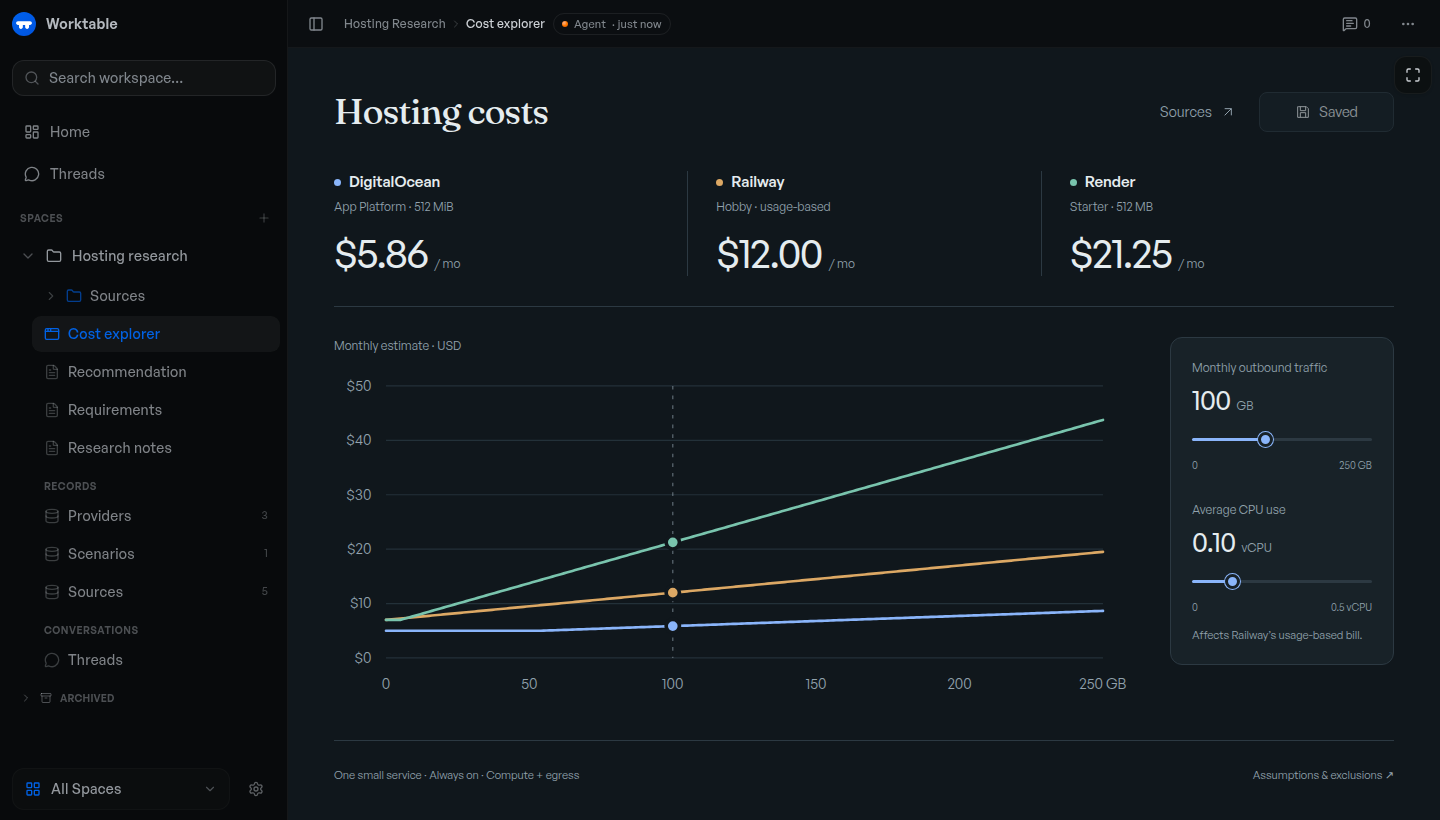
Example cost explorer backed by saved research and records. The displayed prices illustrate the tool; they are not current provider quotes.
Get started
Use an MCP-compatible agent, with its own subscription or API credentials where required.
macOS app: Download Worktable for Mac for Apple Silicon, macOS 13 or newer. Install and open the app, then choose This Mac.
Terminal: macOS or Linux, arm64 or x64. No separate runtime or source checkout needed.
curl -fsSL https://worktable.dev/install | sh
Open the browser address printed by the installer. Run worktable to open
it again later.
In either version, open Settings → Agents and connect your agent. Ask it to save research, organize records, or build a tool in Worktable.
Inspect the installer · Installation guide · First task
Cloud: Worktable Cloud manages hosting for you. For other setups, see self-hosting.
What to make
- Save your research. Keep findings, plans, and decisions in linked documents.
- Organize your data. Maintain tasks, sources, feedback, and other records with shared fields.
- Draw a plan. Sketch a layout, diagram, or visual explanation and revise it with an agent.
- Build interactive tools. Create a calculator, dashboard, or explorer. Use supplied data, or connect the tool to workspace records when needed.
For example, ask an agent to research hosting options, save the sources and pricing, and build a cost explorer for your expected usage. Recheck the rates or change the assumptions later; the research, data, and tool stay together.
Continue your work
Connected agents work with the same saved documents, records, and tools. Ask another agent to continue from what's already there. You can edit the results yourself or leave comments for an agent to act on.
Your data
- Keep work local. Local and self-hosted workspaces are backed by files you can inspect and back up. Local Worktable requires no account.
- Move your workspace. Export and import between Local, self-hosted Worktable, and Cloud.
Connected agent providers may process the content you give them under their own terms. See workspace storage for storage and portability details.
Documentation
Workflows · CLI and MCP reference · Changelog
Report a bug or ask a question. Remove private information from attachments. Report vulnerabilities privately through the security policy.
Contributing
Fixes and documentation improvements are welcome. Please discuss substantial features first. Read CONTRIBUTING.md for the contribution process, development to run from source, or building to create release artifacts.
License
The Worktable application is AGPL-3.0-only, copyright Reva Labs. See LICENSE. Some shared components and agent plugins have MIT licenses; NOTICE and the relevant package notices identify the exact exceptions and third-party terms.
Worktable MCP 질문
Worktable MCP를 Claude Code에 추가하려면 어떻게 하나요?
터미널에서 claude mcp add --transport http worktable-dev https://app.worktable.cloud/api/mcp를 실행합니다. 모든 프로젝트에서 사용할 수 있게 하려면 --scope user를 추가합니다.
Worktable MCP를 Cursor에 추가하려면 어떻게 하나요?
~/.cursor/mcp.json를 열고 mcpServers 아래에 서버를 추가합니다. 위 설치 섹션에 표시된 Cursor 구성을 사용합니다.
Worktable에서 에이전트가 어떤 종류의 도구를 만들 수 있나요?
에이전트는 워크스페이스 데이터를 사용하여 계산기, 대시보드 또는 탐색기와 같은 대화형 도구를 구축할 수 있습니다.
로컬 버전을 사용하려면 계정이 필요한가요?
아니요, Worktable 로컬 버전은 계정이 필요하지 않습니다.