
Whimsical MCP란?
Whimsical은(는) MCP server입니다. AI 클라이언트를 사용하여 Whimsical 워크스페이스 내에서 플로우차트, 마인드맵, 와이어프레임 및 문서를 직접 생성하고 편집합니다. 14개 도구를 제공합니다. 예: search, fetch, file_tree.
프로젝트 README에서 생성된 요약
Whimsical MCP server 정보
이 공식 Whimsical MCP server를 사용하면 자연어 프롬프트만으로 편집 가능한 플로우차트, 마인드맵, 와이어프레임을 생성할 수 있습니다. 사용자는 정적인 이미지를 받는 대신, 팀원이 열어서 편집하고 댓글을 달 수 있는 실제 상호작용 가능한 파일을 Whimsical 워크스페이스 내에 생성하게 됩니다. 이 도구는 Whimsical에서 호스팅하는 원격 엔드포인트에 연결하여 Claude, ChatGPT, Cursor, GitHub Copilot이 포함된 VS Code 등 다양한 AI 클라이언트와 함께 작동합니다.
개발자와 디자이너는 이를 활용해 복잡한 아키텍처 다이어그램, 시퀀스 다이어그램 및 기술 문서를 작성할 수 있습니다. 생성 기능 외에도 기존 워크스페이스 검색, 보드 읽기, 폴더 간 파일 이동, 댓글 스레드 관리 등이 가능합니다. 인증에는 PKCE를 사용하는 OAuth 2.1을 사용하므로 수동으로 API key를 관리할 필요가 없습니다. 무료 플랜은 월 최대 50개의 보드 오브젝트를 허용하며, 유료 플랜은 무제制限적인 오브젝트 생성을 제공합니다.
활용 사례
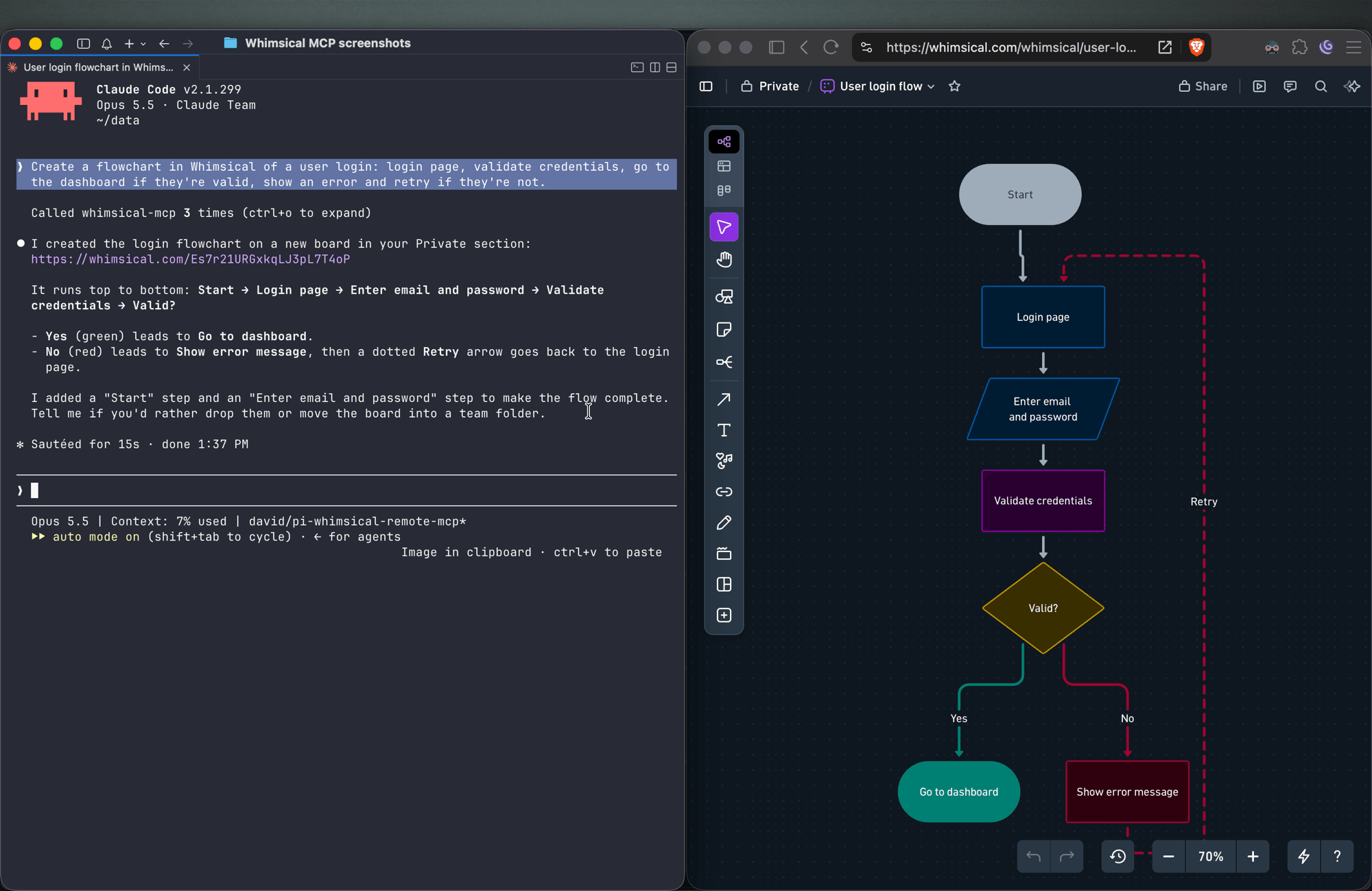
- 1사용자 인증 흐름 시각화AI 클라이언트에 결정 노드와 라벨이 지정된 커넥터를 포함하여 로그인 프로세스를 나타내는 상세 플로우차트를 생성하도록 요청합니다.
- 2대화형 UI 와이어프레임 설계에이전트에게 flexbox 구조를 따르는 컨테이너, 입력창, 버튼을 사용하여 설정 페이지 레이아웃을 구축하도록 지시합니다.
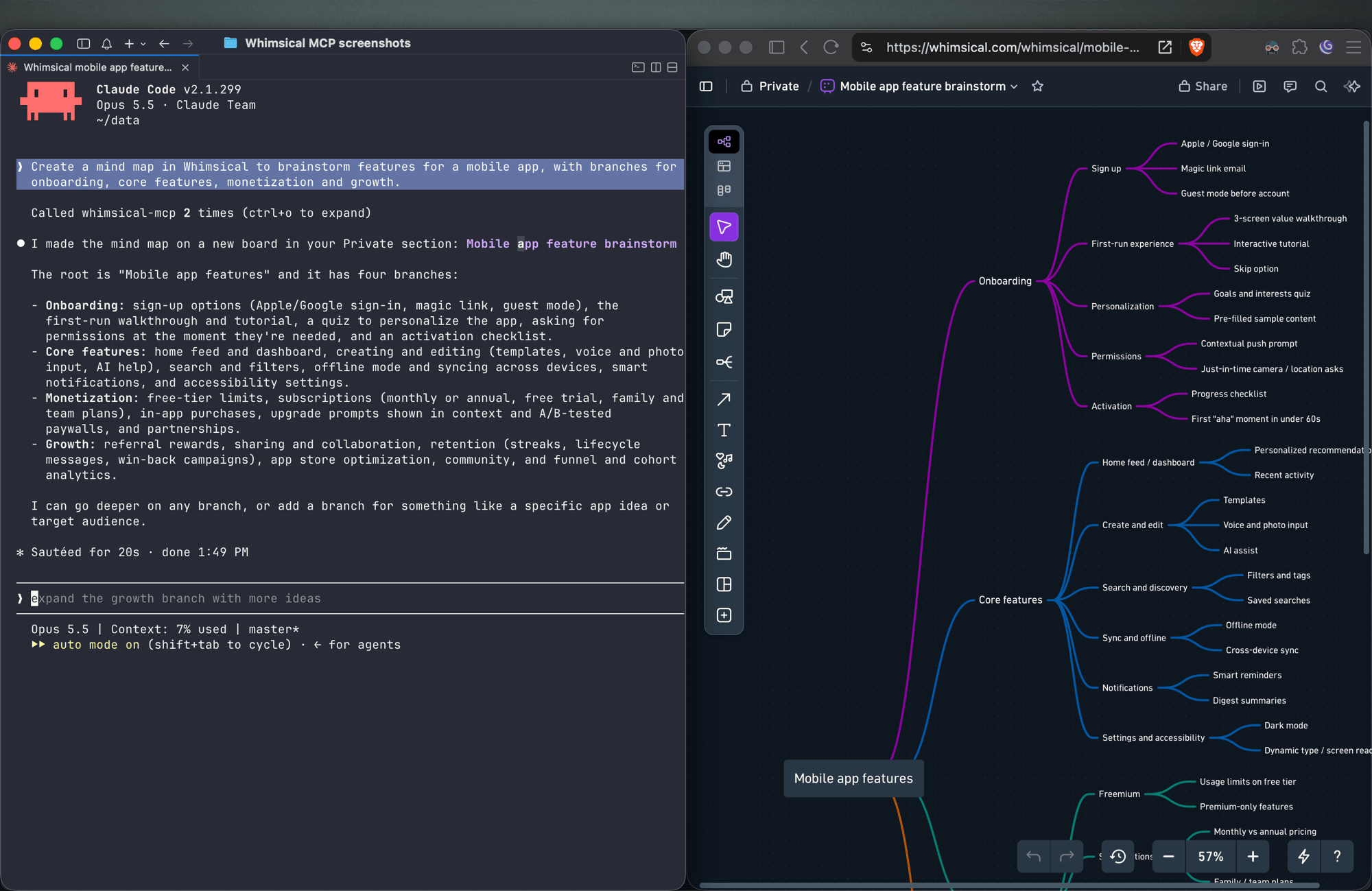
- 3프로젝트 기능 브레인스토밍server를 사용하여 모바일 앱 기능을 특정 브랜치로 정리하는 구조화된 마인드맵을 생성합니다.
- 4기존 워크스페이스 콘텐츠 관리AI에게 현재 보드 내에서 특정 정보를 찾아 내용을 요약하도록 요청합니다.
프로젝트의 README를 바탕으로 작성되었습니다. 모든 활용 사례는 해당 내용의 인용문과 대조하여 확인합니다.
Whimsical MCP 설치 방법
형식 확인: 2026년 11월 10일Cursor에 추가Goose에 추가Claude Code에 Whimsical MCP 설치
$ claude mcp add --transport http mcp-server-guide https://mcp.whimsical.com/mcpCursor에 Whimsical MCP 설치
~/.cursor/mcp.json
{
  "mcpServers": {
    "mcp-server-guide": {
      "url": "https://mcp.whimsical.com/mcp"
    }
  }
}VS Code에 Whimsical MCP 설치
.vscode/mcp.json
{
  "servers": {
    "mcp-server-guide": {
      "type": "http",
      "url": "https://mcp.whimsical.com/mcp"
    }
  }
}VS Code CLI에 Whimsical MCP 설치
$ code --add-mcp '{"name":"mcp-server-guide","type":"http","url":"https://mcp.whimsical.com/mcp"}'Codex에 Whimsical MCP 설치
$ codex mcp add mcp-server-guide --url https://mcp.whimsical.com/mcpCodex config.toml에 Whimsical MCP 설치
~/.codex/config.toml
[mcp_servers.mcp-server-guide]
url = "https://mcp.whimsical.com/mcp"
Gemini CLI에 Whimsical MCP 설치
$ gemini mcp add -s user --transport http mcp-server-guide https://mcp.whimsical.com/mcpGemini settings.json에 Whimsical MCP 설치
~/.gemini/settings.json
{
  "mcpServers": {
    "mcp-server-guide": {
      "url": "https://mcp.whimsical.com/mcp",
      "type": "http"
    }
  }
}Whimsical MCP 도구 14
README에서 감지됨searchfetchfile_treehow_tocreate_fileadd_board_contentadd_doc_contenteditwireframe_editauto_layoutdeletemove
| search | — | |
| fetch | — | |
| file_tree | — | |
| how_to | — | |
| create_file | — | |
| add_board_content | — | |
| add_doc_content | — | |
| edit | — | |
| wireframe_edit | — | |
| auto_layout | — | |
| delete | — | |
| move | — |
도구 14개 모두 보기도구 수 줄이기
comment_readcomment_edit
| comment_read | — | |
| comment_edit | — |
자동 검사
2026년 11월 13일에 실행됨전체 보고서 →자동 검사를 통과했습니다. 이는 보안 감사가 아닙니다. 코드를 직접 읽고 서버에 필요한 최소한의 권한만 부여하십시오. 검사 방식

- 소스 저장소 연결 및 접근 가능통과
- 오픈 소스 라이선스 (OSI)통과
- 최근 1년 내 커밋 또는 릴리스통과
- 패키지 이름이 인기 패키지와 유사하지 않음검사되지 않음
- 원격 엔드포인트가 HTTPS 사용통과
- 파괴적인 도구에 라벨 표시됨검사되지 않음
- 모델에 대한 숨겨진 지침 없음통과
- 패키지 및 해당 종속성에 중요한 보안 권고 없음검사되지 않음
README
GitHub에서 보기Whimsical MCP Server
The official Whimsical MCP server. Ask Claude, ChatGPT, Cursor or any MCP client for a flowchart, mind map, sequence diagram, wireframe or architecture diagram, and it builds an editable Whimsical board in your workspace. You get a real file your team can open, edit and comment on, not a static image. The server can also search, read, edit and comment on the boards and docs you already have.
- Endpoint:
https://mcp.whimsical.com/mcp(hosted by Whimsical, Streamable HTTP, nothing to install) - Authentication: OAuth 2.1 with PKCE. There's no API key to manage.
- Plan: every tool works on the free plan, which includes up to 50 board objects a month. Paid plans have no object limit.
- Clients: Claude, Claude Code, ChatGPT, Cursor, VS Code with GitHub Copilot, Grok, Codex, and any client that supports remote MCP servers.

Quick start
In Claude Code:
claude mcp add --transport http whimsical https://mcp.whimsical.com/mcp
In other clients that support remote MCP servers, add a server with this URL and sign in to Whimsical when prompted:
https://mcp.whimsical.com/mcp
Then try: "Create a flowchart in Whimsical of our user signup flow." Setup steps for each client are below.
What you can build
Each example below is a prompt you can try. The agent creates the file in your Whimsical workspace and replies with a link. Clients that support it also show a preview in the chat.
Flowcharts
Create a flowchart in Whimsical of a user login: login page, validate credentials, go to the dashboard if they're valid, show an error and retry if they're not.
You get an auto-laid-out flowchart with decision nodes, labeled connectors and a clean top-to-bottom layout. Ask for left-to-right and the agent re-runs the layout.
Sequence diagrams
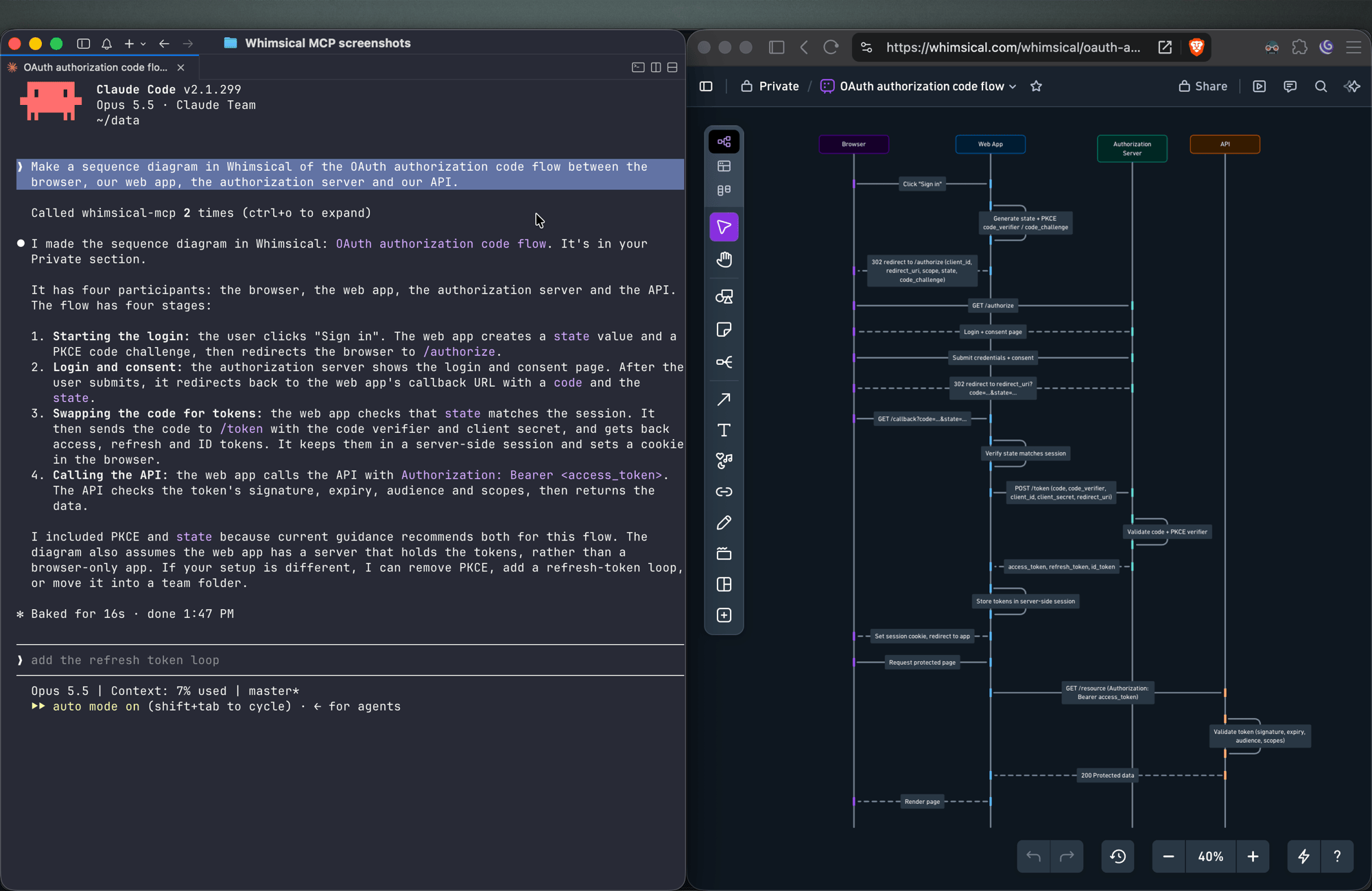
Make a sequence diagram in Whimsical of the OAuth authorization code flow between the browser, our web app, the authorization server and our API.
The agent creates a sequence diagram with one lifeline per actor and the messages between them in order.
Architecture diagrams
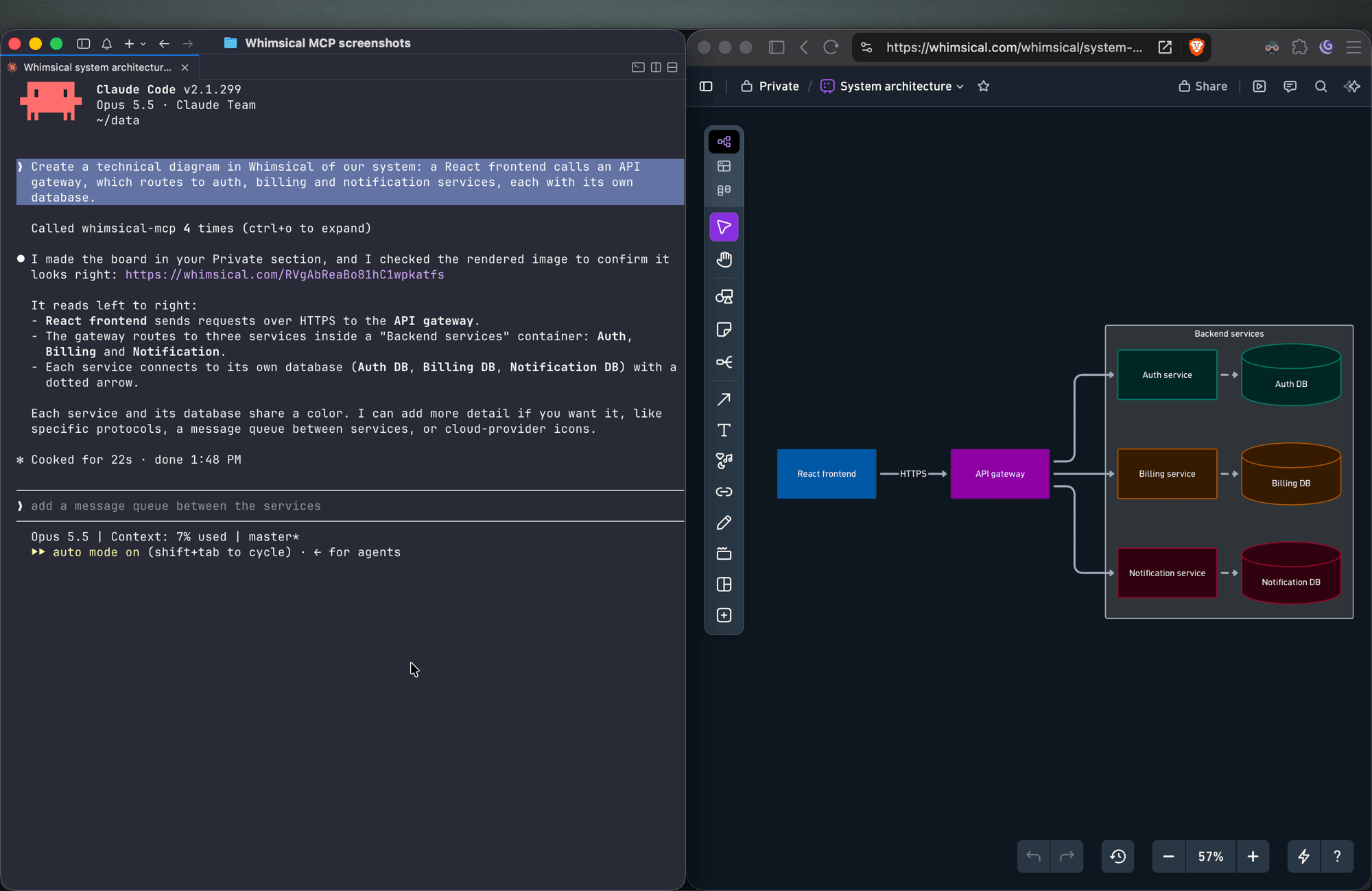
Create a technical diagram in Whimsical of our system: a React frontend calls an API gateway, which routes to auth, billing and notification services, each with its own database.
The agent lays out the components on a board with service boundaries and connectors showing how requests and data move between them.
Mind maps
Create a mind map in Whimsical to brainstorm features for a mobile app, with branches for onboarding, core features, monetization and growth.
You get a mind map with the central topic and its branches, laid out horizontally. Ask for a vertical layout to get a top-down tree.
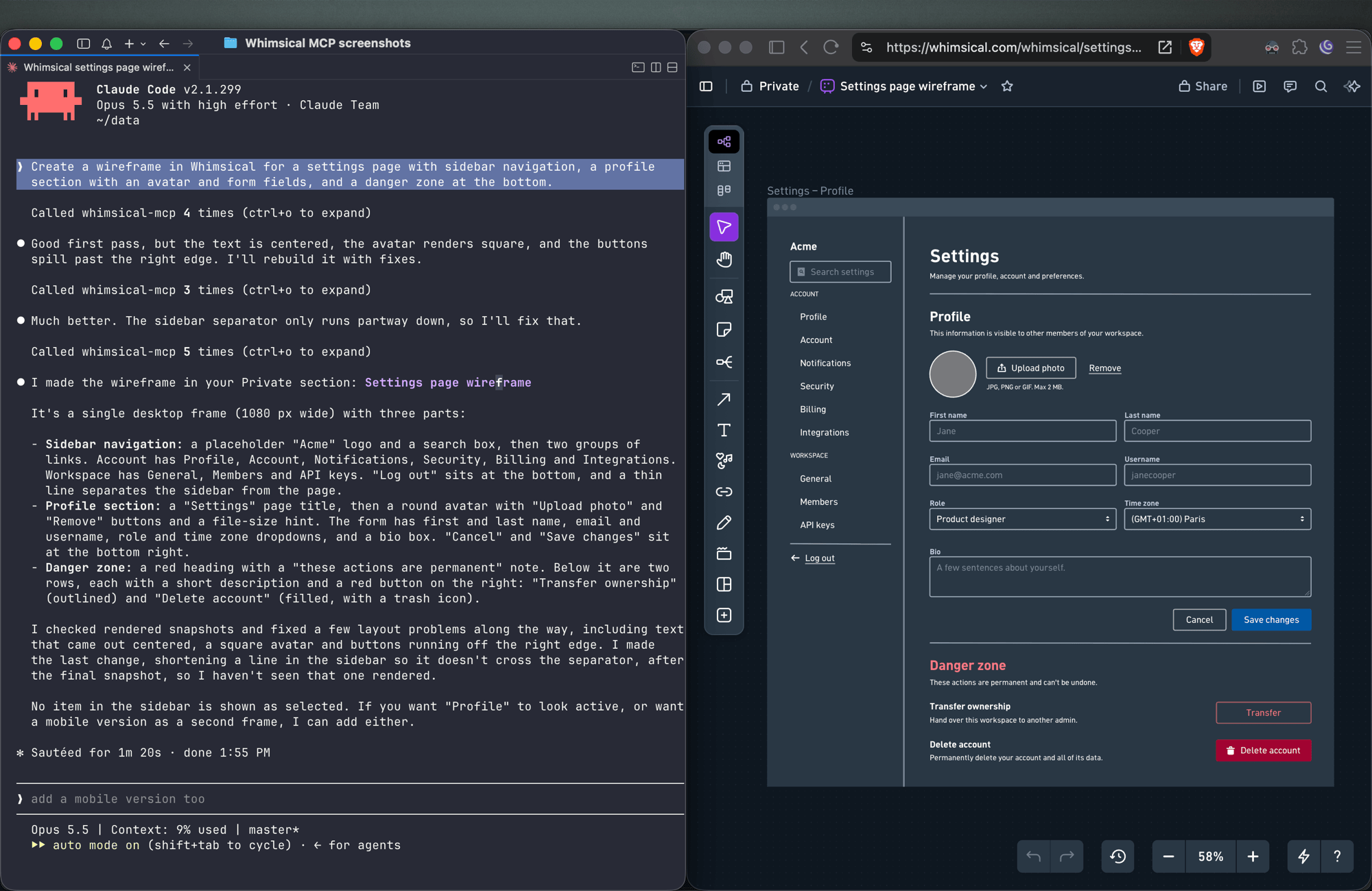
Wireframes
Create a wireframe in Whimsical for a settings page with sidebar navigation, a profile section with an avatar and form fields, and a danger zone at the bottom.
The agent builds the screen from wireframe elements (containers, inputs, buttons, icons) with a flexbox layout, so follow-ups like "make the primary button full width" keep everything aligned.
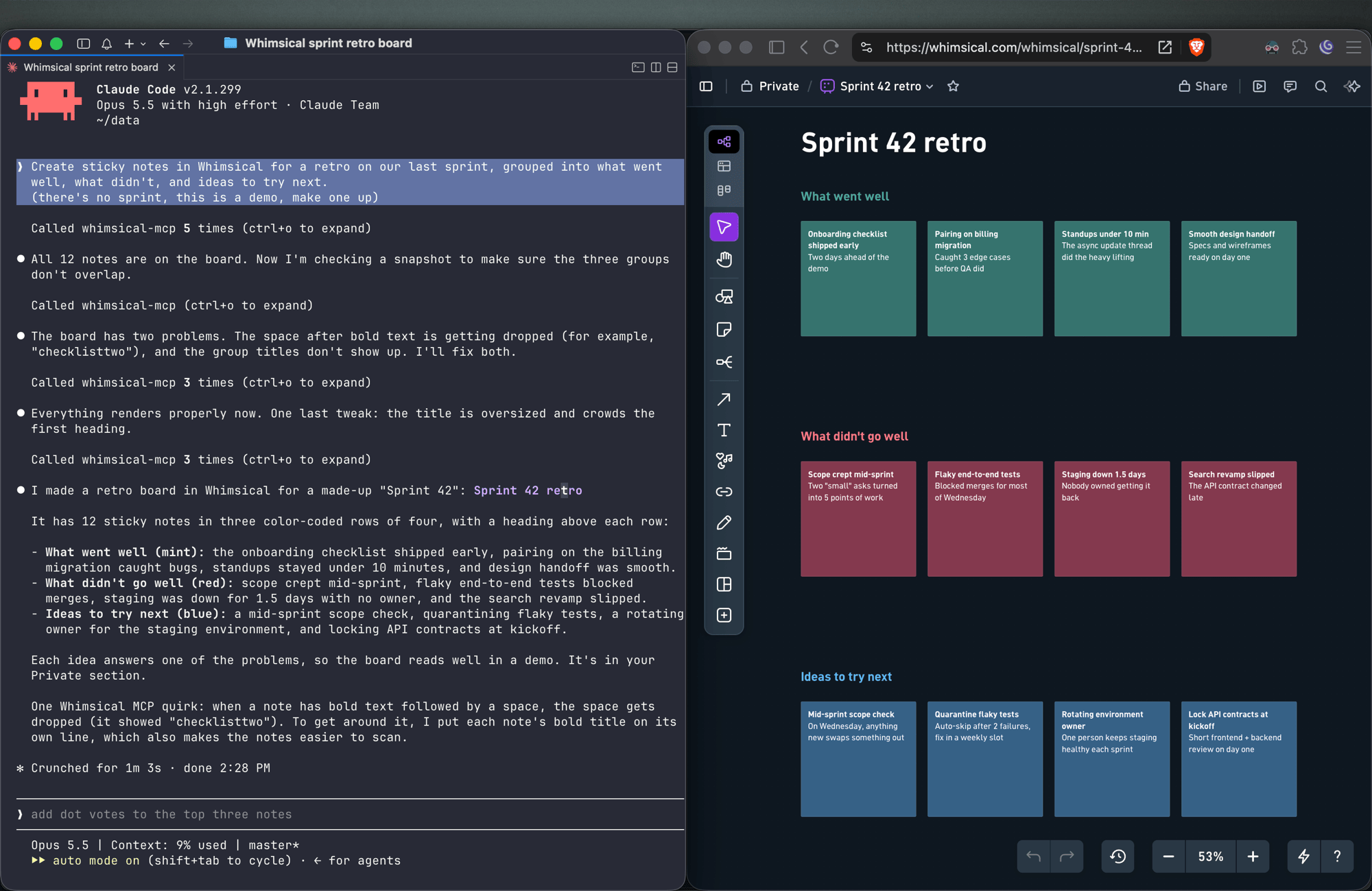
Sticky notes
Create sticky notes in Whimsical for a retro on our last sprint, grouped into what went well, what didn't, and ideas to try next.
You get sticky notes on a board, grouped into the clusters you asked for and laid out automatically, ready for your team to add to and vote on.
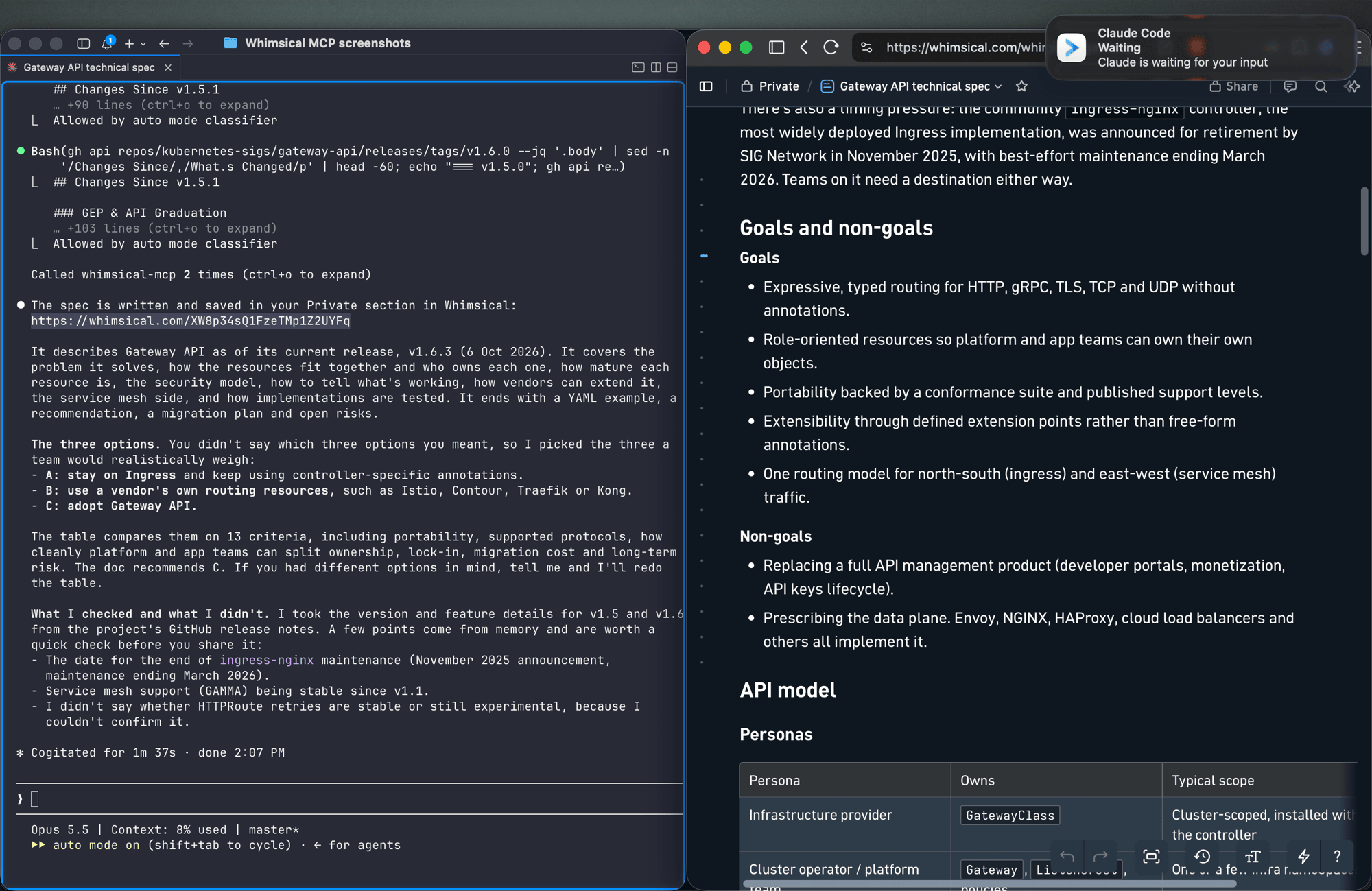
Docs and tables
Write up the technical spec for the new API as a Whimsical doc, with a table comparing the three options we discussed.
Docs support headings, lists, links, code blocks and tables. Tables can also go on a board.
Work with what's already in your workspace
Search my Whimsical workspace for anything about "API design" and summarize what you find.
Add a rate limiting step to the API flow diagram, then leave a comment asking the team to review it.
The agent can search your workspace, read boards and docs (including a PNG snapshot of a board), edit existing diagrams, move files between folders, and read, write and resolve comment threads.
Tools
| Tool | What it does |
|---|---|
search |
Search the workspace by text, creation date or update date |
fetch |
Read a board, doc or folder by ID, or get a PNG snapshot of a board |
file_tree |
Browse the Private, Shared and team sections and the folders inside them |
how_to |
Look up Whimsical syntax guides before creating flowcharts or wireframes (agents call this on their own) |
create_file |
Create a board, doc or folder, in your Private section unless you choose a folder |
add_board_content |
Add a flowchart, mind map, sequence diagram, sticky notes, table or wireframe to a board |
add_doc_content |
Append markdown to a doc |
edit |
Add, update or delete shapes, text and connectors on a board, edit mind map and sequence diagram nodes, or change blocks in a doc |
wireframe_edit |
Reflow or edit the elements of a wireframe |
auto_layout |
Re-run automatic layout on a flowchart, top to bottom, left to right or other directions |
delete |
Move a file, folder or doc to the trash |
move |
Move a file, folder or doc into another folder |
comment_read |
Read comment threads on a board or doc |
comment_edit |
Create, reply to, edit, resolve, reopen or delete comments |
See the tool reference for details and more example prompts.
Setup
Claude
Whimsical is a verified connector in Claude's connector directory. Open the Whimsical connector, click Connect and sign in to Whimsical.
Claude Code
claude mcp add --transport http whimsical https://mcp.whimsical.com/mcp
Run /mcp in Claude Code to sign in.
ChatGPT
Use the Whimsical app for ChatGPT:
- In ChatGPT, open Settings → Plugins.
- Search for Whimsical, or use the link above.
- Click Connect and complete the authorization.
Then type @Whimsical in any chat. See the ChatGPT guide for more.
Cursor
Or install the Whimsical plugin from Cursor's plugin directory, or add it by hand: open Cursor → Settings → Cursor Settings → Tools & MCP, add a new MCP server, and save this configuration:
{
  "mcpServers": {
    "whimsical": {
      "url": "https://mcp.whimsical.com/mcp"
    }
  }
}
See Cursor's MCP documentation for more.
VS Code (GitHub Copilot)
- Press
⌘ Shift P(orCtrl Shift P) and runMCP: Add Server. - Select
HTTP. - Paste
https://mcp.whimsical.com/mcpand pressEnter. - When prompted for a server ID, enter
whimsical. - Choose whether to add the server globally or only for the current workspace.
Grok
- Go to grok.com/connectors.
- Click New Connector, then select Custom.
- Enter
https://mcp.whimsical.com/mcpand sign in to Whimsical.
See the Grok guide for more.
Other clients
Any client that supports remote MCP servers over Streamable HTTP can connect with this configuration:
{
  "mcpServers": {
    "whimsical": {
      "url": "https://mcp.whimsical.com/mcp"
    }
  }
}
Authentication
The server uses OAuth 2.1 with PKCE. The first time you connect, your client opens a browser window where you sign in to Whimsical and approve access to your workspace. The agent then works in Whimsical as you, using the access you approved.
Remote and desktop MCP
This repository covers the remote MCP server, which Whimsical hosts and recommends for most people. Whimsical also offers a desktop MCP server that runs inside the Whimsical desktop app and works on the file you have open. To set it up, contact support.
FAQ
Is this the official Whimsical MCP server?
Yes. Whimsical builds, hosts and maintains it, and it's listed in the official MCP Registry as com.whimsical/mcp. Community-built Whimsical MCP servers also exist; this is the one maintained by Whimsical.
Do I need to install or run anything?
No. The server runs at https://mcp.whimsical.com/mcp. You add the URL to your client and sign in.
Do I need an API key? No. Sign-in uses OAuth, so there are no keys to create, store or rotate.
Does it make images or editable diagrams?
Editable diagrams. Everything the agent creates is a normal Whimsical file in your workspace that you and your team can open, change and comment on. The fetch tool can also return a PNG snapshot of a board.
Can it read and update diagrams I already have? Yes. It can search your workspace, read boards and docs, edit them, re-run the layout and work with comments.
Troubleshooting
- Sign-in doesn't open or fails. Run
/mcpin Claude Code, or use your client's reconnect action, to sign in again. The browser redirects back to your client once you've signed in to Whimsical. - Tools don't appear after install. Run
/reload-pluginsin Claude Code, or restart your editor in other clients. 401or "Missing Bearer token". Your session has expired. Sign in again via/mcpor your client's reconnect action.- No Whimsical account. Create one for free at https://whimsical.com. The server signs you in to your existing workspace.
Links
- Overview: https://whimsical.com/mcp
- Setup guide: https://whimsical.com/learn/integrations/mcp
- Tool reference: https://whimsical.com/learn/ai/mcp-tools
- Support: help@whimsical.com
- Privacy policy: https://whimsical.com/terms/privacy
Whimsical MCP 질문
Whimsical MCP를 Claude Code에 추가하려면 어떻게 하나요?
터미널에서 claude mcp add --transport http mcp-server-guide https://mcp.whimsical.com/mcp를 실행합니다. 모든 프로젝트에서 사용할 수 있게 하려면 --scope user를 추가합니다.
Whimsical MCP를 Cursor에 추가하려면 어떻게 하나요?
~/.cursor/mcp.json를 열고 mcpServers 아래에 서버를 추가합니다. 위 설치 섹션에 표시된 Cursor 구성을 사용합니다.
Whimsical MCP는 어떤 도구를 제공하나요?
14개 도구를 제공합니다. 예: search, fetch, file_tree, how_to, create_file.
이것이 공식 Whimsical MCP server인가요?
네, Whimsical에서 직접 구축, 호스팅 및 관리하는 공식 server입니다.
별도로 설치하거나 실행해야 하는 것이 있나요?
아니요, server는 Whimsical에서 호스팅하며 MCP 클라이언트에 URL만 추가하면 됩니다.
API key가 필요한가요?
아니요, server는 인증을 위해 OAuth를 사용하므로 관리할 API key가 없습니다.
이미지를 생성하나요, 아니면 편집 가능한 다이어그램을 생성하나요?
정적인 이미지가 아닌, 팀원이 열어서 편집하고 댓글을 달 수 있는 편집 가능한 다이어그램을 생성합니다.
기존에 가지고 있는 다이어그램을 읽거나 업데이트할 수 있나요?
네, server를 통해 워크스페이스를 검색하고, 기존 보드와 문서를 읽고, 편집하며, 댓글을 관리할 수 있습니다.