
framesmith MCP server
2026년 11월 13일 커밋시각적 캔버스, 검증된 디자인 패턴, HTML/CSS 디자인 품질 검증 기능을 제공하여 AI 코딩 에이전트를 UI 디자이너로 변환합니다.
다른 이름 vicmaster/framesmith
- 스타
- 16
- Tools
- 9
- 다운로드, 30일
- —
- 최신 버전
- —
- 마지막 커밋
- 2026년 11월 13일
- 라이선스
- MIT
framesmith MCP란?
framesmith은(는) MCP server입니다. 시각적 캔버스, 검증된 디자인 패턴, HTML/CSS 디자인 품질 검증 기능을 제공하여 AI 코딩 에이전트를 UI 디자이너로 변환합니다. 9개 도구를 제공합니다. 예: dir, projects, name.
프로젝트 README에서 생성된 요약
framesmith MCP server 정보
framesmith의 주요 목표는 AI 코딩 에이전트를 전문 UI 디자이너로 변환하는 것입니다. LLM이 흔히 생성하는 일반적인 레이아웃을 방지하기 위해 시각적 캔버스와 대시보드, 인증 화면, 가격 페이지 등 검증된 11가지 페이지 패턴 라이브러리를 제공합니다. 에이전트는 프레임워크 코드를 즉시 작성하는 대신, generate_design_system과 같은 도구를 사용하여 시드 색상과 기술적 또는 부드러운 스타일과 같은 특정 페르소나를 기반으로 시각적 언어를 구축합니다.
개발자는 호환 가능한 클라이언트를 통해 이 MCP server를 사용하여 로컬에서 디자인 워크플로우를 관리할 수 있습니다. 이 시스템은 canvas_evaluate 도구를 통해 엄격한 품질 검증을 포함하며, READY 지시를 내리기 전에 클리셰, 상태 커버리지 및 사용성을 확인합니다. 독립형 브라우저 뷰어에서 이러한 디자인을 검토하여 품질 점수와 디자인 토큰을 확인할 수 있습니다. 출력 결과는 저장소에 오픈 JSON으로 저장되므로, 독점적인 종속성 없이 디자인 자산에 대한 완전한 소유권을 유지할 수 있습니다.
활용 사례
- 1UI 품질 및 사용성 검증에이전트가 품질 체크를 실행하여 디자인이 특정 제작 표준을 충족하고 로딩 또는 에러 상태를 포함하는지 확인하도록 합니다.
- 2콘텐츠를 통한 레이아웃 스트레스 테스트에이전트에게 극단적인 텍스트 길이 또는 대규모 데이터 세트를 컴포넌트가 어떻게 처리하는지 테스트하도록 지시하여 구조적 무결성을 보장합니다.
프로젝트의 README를 바탕으로 작성되었습니다. 모든 활용 사례는 해당 내용의 인용문과 대조하여 확인합니다.
framesmith MCP 도구 9
README에서 감지됨dirprojectsnamewidthheighttypedevicestateoperations
| dir | — | |
| projects | — | |
| name | — | |
| width | — | |
| height | — | |
| type | — | |
| device | — | |
| state | — | |
| operations | — |
자동 검사
2026년 11월 14일에 실행됨전체 보고서 →아직 인증되지 않았습니다. 서버는 80점 이상의 점수, 심각한 결함 없음, 그리고 검사에 충분한 데이터를 갖추어야 합니다. 검사 방식

- 소스 저장소 연결 및 접근 가능vicmaster/framesmith is public and reachablegithub.com/vicmaster/framesmith ↗통과
- 패키지가 이 저장소를 소스로 지정검사되지 않음
- 빌드 출처(Sigstore 증명)검사되지 않음
- 오픈 소스 라이선스 (OSI)MITspdx.org/licenses/MIT.html ↗통과
- 최근 1년 내 커밋 또는 릴리스Last commit or release 2026-11-13github.com/vicmaster/framesmith ↗통과
- OpenSSF Scorecard검사되지 않음
- 패키지 이름이 인기 패키지와 유사하지 않음검사되지 않음
- 패키지와 의존성에 심각한 보안 권고 없음검사되지 않음
- 모델에 대한 숨겨진 지침 없음9 tool descriptions and the README read; no override phrases, credential paths or hidden characters통과
- 파괴적인 도구에 라벨 표시됨No tool named like delete, drop or exec통과
- 원격 endpoint가 MCP 핸드셰이크에 응답검사되지 않음
README
GitHub에서 보기framesmith




An open-source MCP server that turns your AI coding agent into a capable UI designer. It gives the agent a visual canvas, a library of vetted design patterns, and a quality bar it must clear before showing you anything — so you review a real, non-slop design in the browser and agree on it before any framework code is written.
Contents: What it does · Capabilities · Viewer · Installation · Tools · Usage Example · Workflow · Development
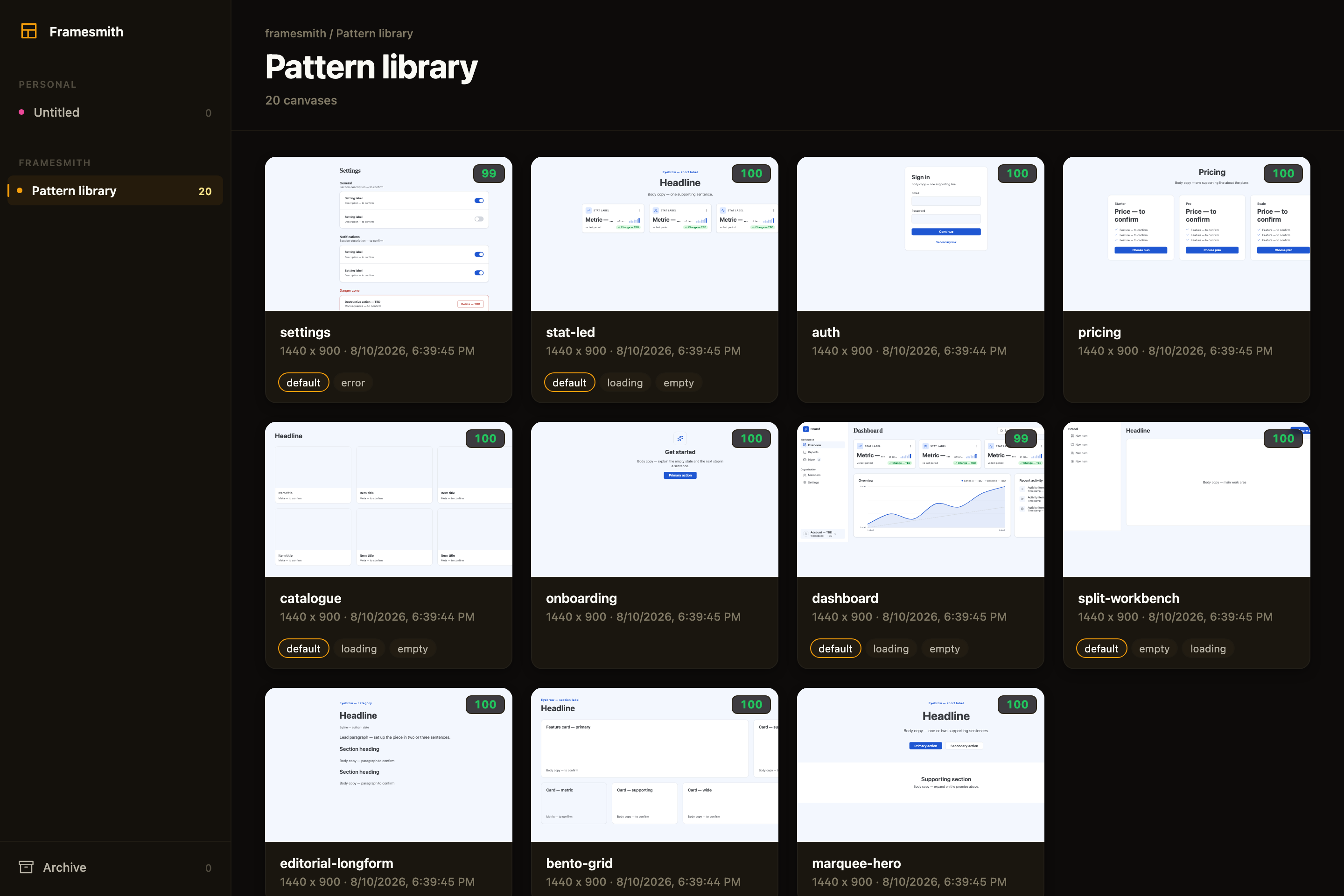
Above: the framesmith viewer, showing the built-in pattern library — 11 vetted page archetypes an agent starts from, each carrying its live quality score and its designed state variants. Workspaces and projects sit in the sidebar; you browse canvases like design files.
What an agent actually ships
Every screen below was built end-to-end by an agent with framesmith's own vocabulary — one generate_design_system call each (a seed color + a personality), stamped patterns, real controls, and every quality gate cleared (score ≥ 95, stress-tested, both themes, and every state the evaluator demands designed):
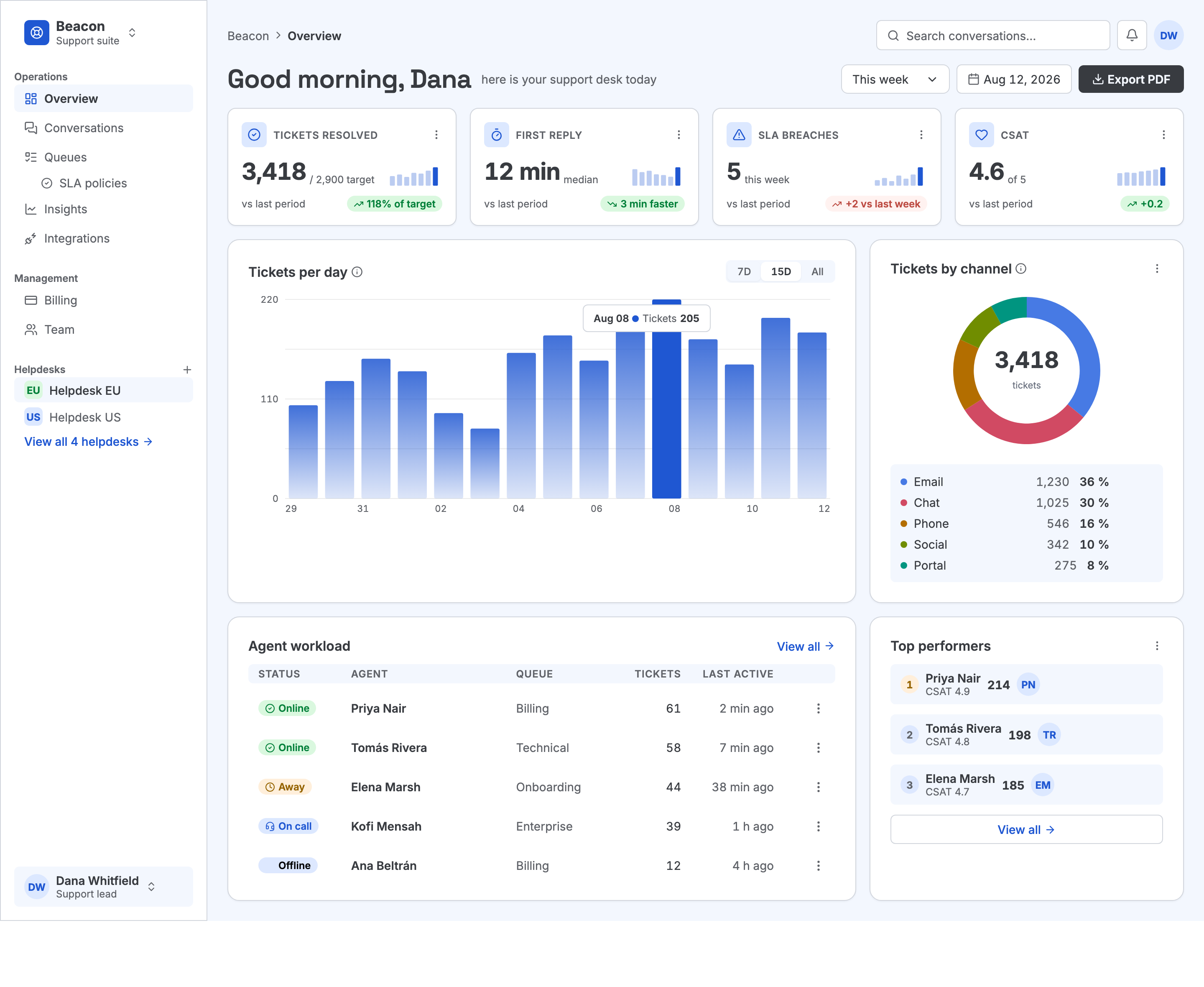
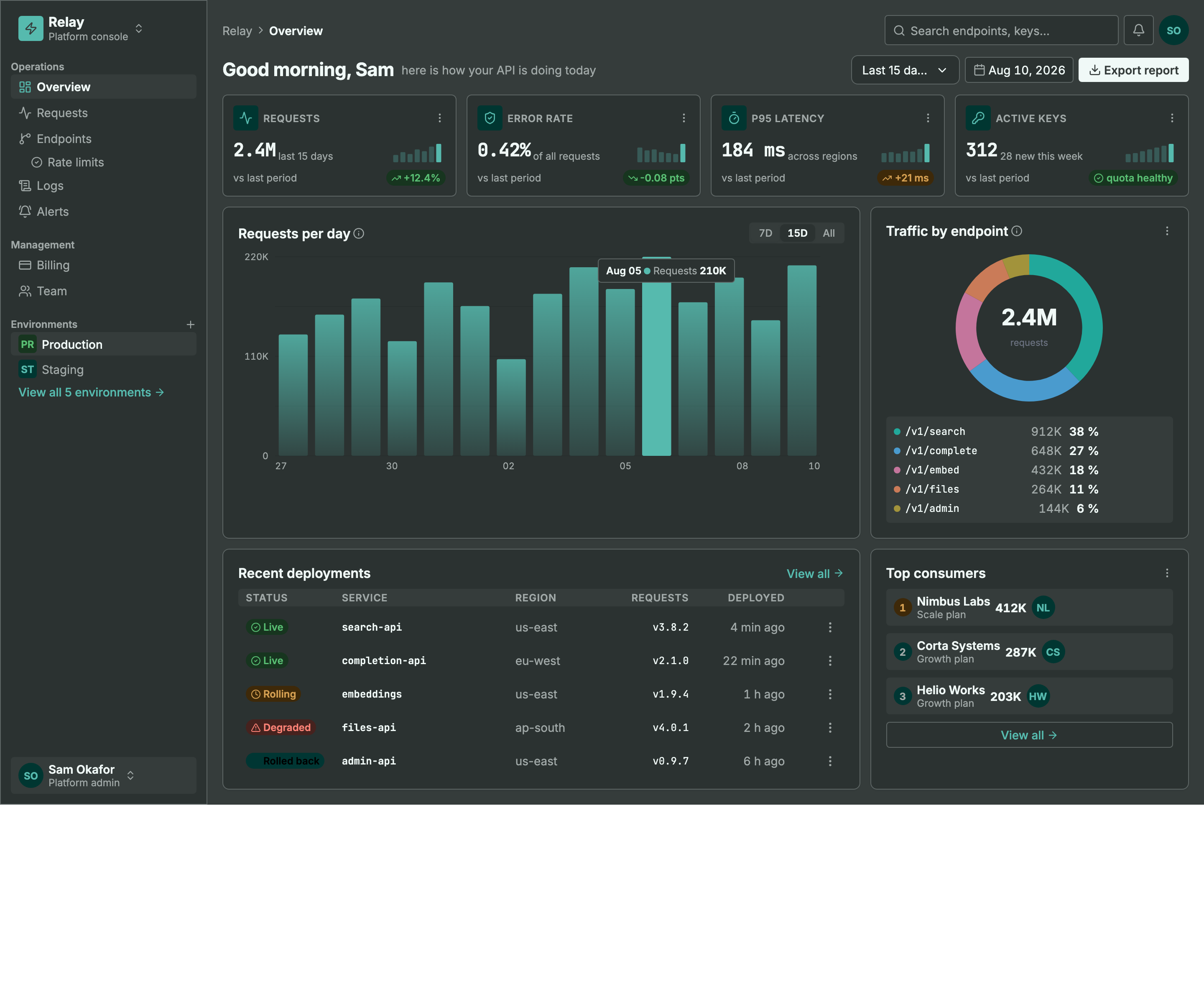
Same machinery, different seed + personality: a light ops dashboard and a dark API console. Every color pair is AA by construction, every chart is data-bound (edit a value, not an SVG path), and the dark theme is generated — not inverted.
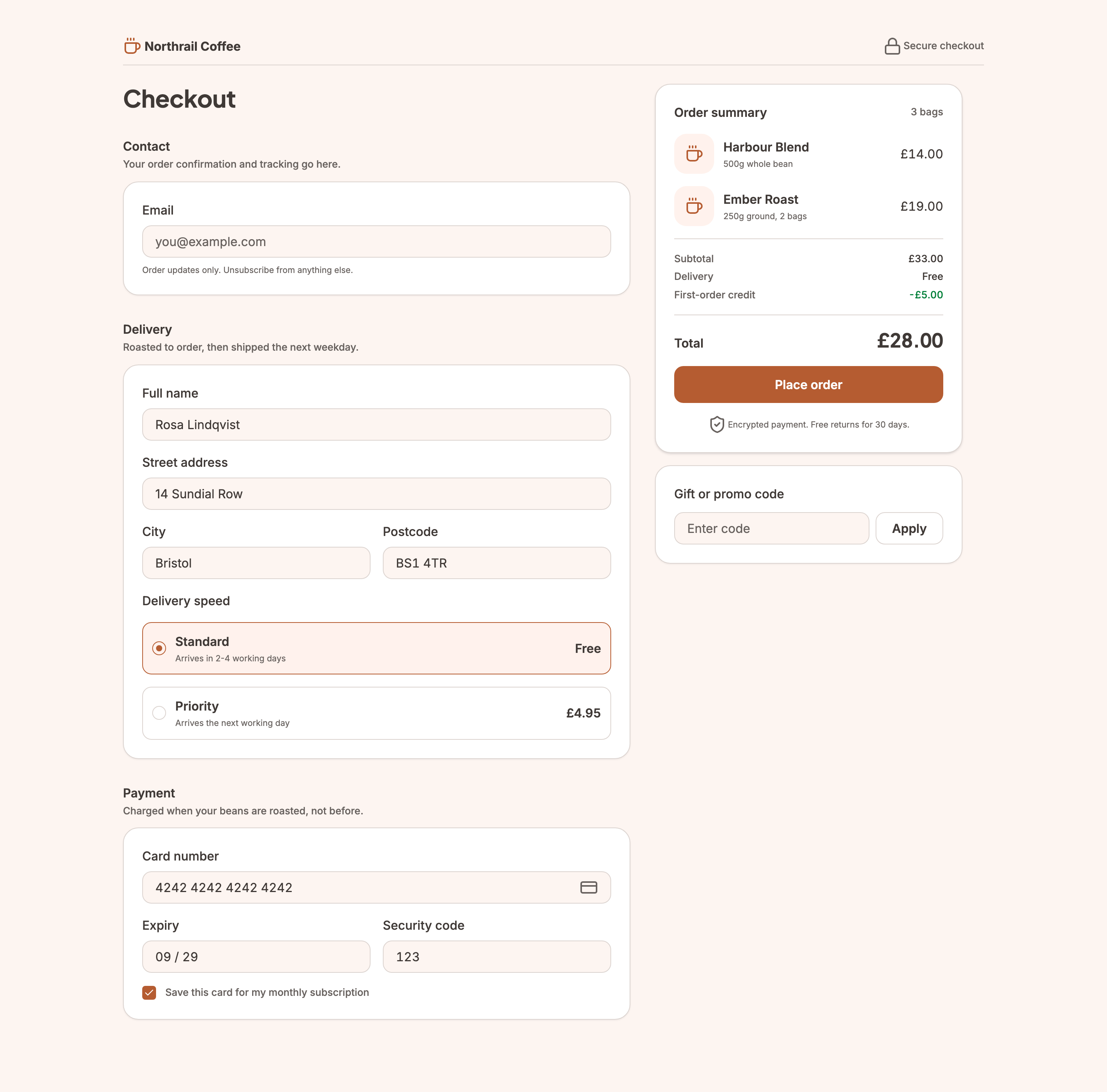
Not every screen is a dashboard. This checkout carries the
commercegenre — the transactional counterpart todata— so the evaluator reads its line prices and total as the design rather than as fabricated data. It still cleared the same bar as the two screens above, including designed empty-basket and loading states.
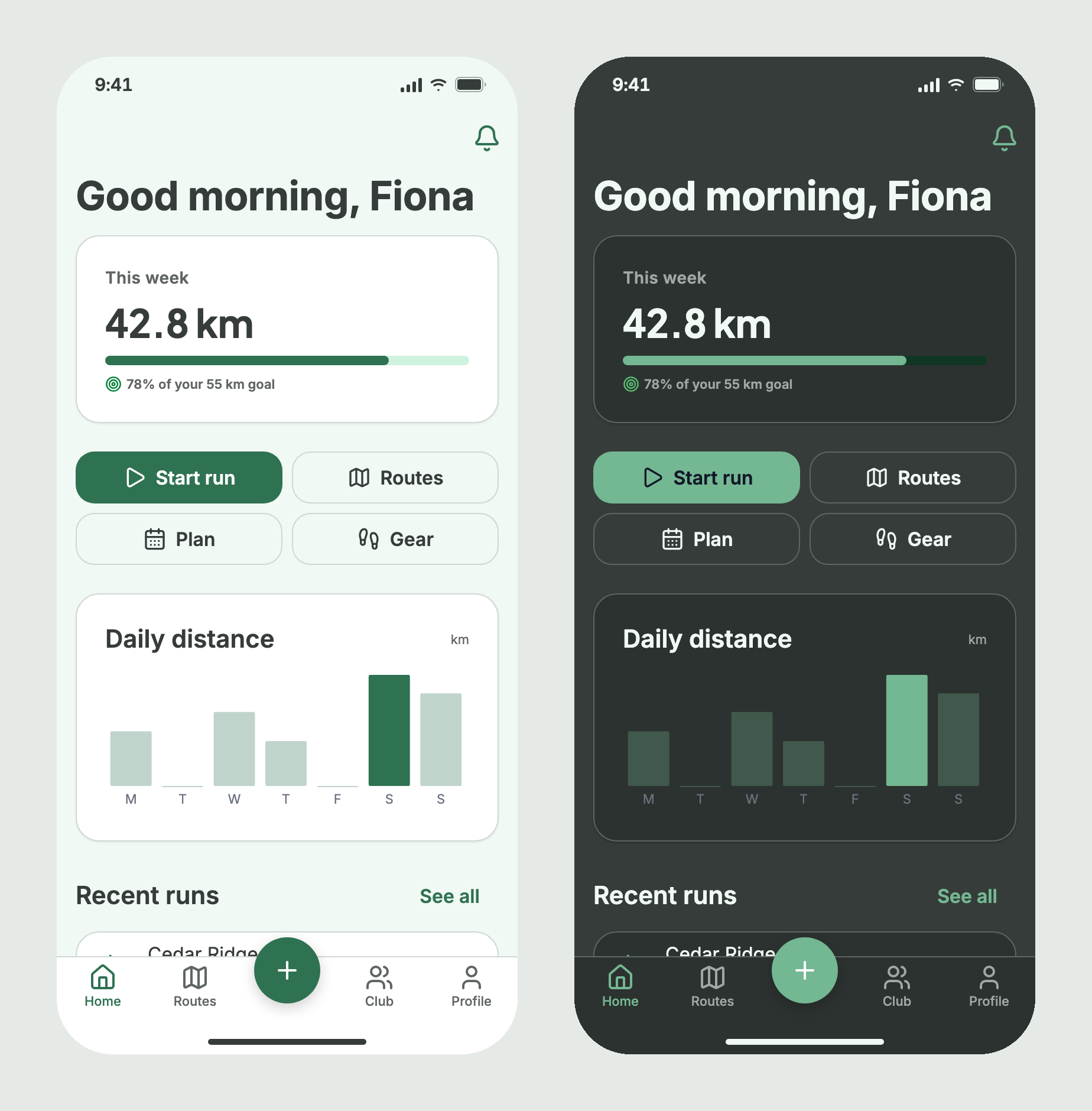
Not every screen is a web page either. This one is declared
type: "mobile", so it is judged as a phone screen: a 44px tap target on every button, row and tab, content clear of the status bar and home indicator, and a minimum body size. It started from thedashboardstructure, which stamps its phone version on a mobile canvas, and is built from the phone primitives (status bar, nav bar, buttons, list rows, tab bar) with no hand-built device chrome, in 33 nodes. framesmith's test suite rebuilds it on every run.
MCP Client → stdio → framesmith server
                        ↓
              Scene Graph (in-memory JSON tree)
                        ↓
              HTML/CSS Renderer (inline styles)
                        ↓
              Puppeteer (headless Chromium → PNG)
What framesmith does
Left to itself, an AI agent tends to produce UI that looks AI-generated — generic spacing, no icons, a purple gradient by default, placeholder text that reads like placeholder text. framesmith closes that gap by moving design before code and holding it to a bar:
- Start from taste, not a blank canvas. The agent stamps one of 11 vetted page patterns (dashboard, auth, pricing, settings, onboarding, and more), or on a phone canvas one of 6 mobile realisations built from the mobile primitives — each regression-tested to score > 95 with zero cliché tells under the neutral default theme and all four presets (a mobile realisation takes the presets' colours over a phone type scale, is also held to every personality's generated phone system, and raises no mobile-ruleset finding), and every structure (page and component alike) built entirely from type-role tokens so it re-voices under a generated design system instead of injecting stray pixel sizes, and hardened to survive hostile-length content (
canvas_stressCLEAN) — then adapts it. A blank canvas is where slop comes from; a pattern is a non-slop starting point. (list_structures/apply_structure) - Use the whole toolkit — like a real UI does. Real icons (Lucide + Material Symbols), fonts resolved by name, real input controls (
toggle/checkbox/radio/select), data-driven charts (line/bar/donut/sparkline, multi-series, bar emphasis), reusable components, and layered design tokens — never faked with Unicode glyphs, stray ellipses, or hand-drawn SVG paths standing in for a chart. - Evaluate, then self-correct.
canvas_evaluatescores the design across five craft categories plus a cliché-tell detector, a state-coverage check (a data screen without designed empty/loading states isn't done), and a usability layer (hit-target floor, label association, honest action copy), and returns aREADY/NOT READYdirective. The agent resolves every warning and tell and only presents once it'sREADY— polishing to the bar is the agent's job, not yours. - Review in the browser, own the output. You browse canvases like design files, with a live quality inspector and design-system panel. Designs persist as open JSON checked into your repo — no proprietary format, no lock-in — and can be re-imported from shipped HTML to keep the design honest.
Capabilities at a glance
| Area | What you get |
|---|---|
| Rendering | Scene graph → HTML/CSS → Puppeteer PNG · responsive breakpoints · real CSS grid (layout: "grid" + spans) for bento/editorial compositions · gradients, shadows, blur, glassmorphism · SVG paths · animations · data-driven charts (line/bar/donut/sparkline, multi-series, bar emphasis + in-SVG gradients) |
| Pattern library | 11 vetted page archetypes + 6 mobile realisations + 14 component scaffolds, all scoring > 95 with zero cliché tells, typography built from type-role tokens (not literal pixel sizes), and stress-hardened to survive hostile-length content; taxonomy axes + a diversification signal so successive screens vary |
| Quality & taste | canvas_evaluate (8 categories incl. cliché tells, state coverage + usability floors) with a READY/NOT READY directive · canvas_autofix (mechanical fixes) · optional vision-model rubric critique + canvas_revise · canvas_add_variant clones a screen into a linked empty/loading/error state · canvas_stress content-perturbation testing (long text, i18n, big numbers, empty/many rows) · project_evaluate rolls up a project's screens for cross-screen consistency (radius/accent drift, token adoption, hand-copied chrome, state coverage) plus an optional multi-screen flow critique — advisory, never a gate |
| Design systems | generate_design_system: one seed + one personality (technical / editorial / soft / data-dense) → the complete design language — colors, curated font pairing, typography roles, radius/density stances, $elevation depth tokens (dark-aware), $motion defaults · layered $tokens (workspace ▸ project ▸ canvas) · style presets · DESIGN.md import · generate_scale derives a modular type + spacing scale from a named ratio (optional fluid clamp() sizes) · generate_color_system turns one seed color into OKLCH ramps + AA-checked semantic tokens, a categorical chart palette, and a tint layer for chips/tiles/badges, dark theme included · dual-theme rendering + evaluation (theme: "dark" on screenshot/export, both-theme contrast in canvas_evaluate with APCA advisory) · token-detachment lint re-attaches literals that drift from a token |
| Primitives | Lucide + Material Symbols icons · Google Fonts by name · real form controls · components with instance overrides — create_component promotes existing work, copy_nodes carries subtrees (and their component defs) across canvases |
| Import from code | canvas_import_html / canvas_import_url — token-mapped, structure-reconstructed · canvas_sync_from_url pixel drift · canvas_check_drift structural drift · framesmith verify / check-drift CLI for CI/pre-commit gates, no MCP client needed |
| Viewer | Browser gallery + detail view · phone canvases in a device frame with a safe-area overlay · quality inspector (score, issues, click-to-highlight) · design-system token panel · point-and-tell feedback (Comment mode + Feedback tab) |
| Open by design | MIT · plain HTML/CSS · open JSON you own in your repo · content-hash versioning (canvas_version) so approvals reference an exact design, not just a name · works with any MCP-compatible client |
Viewer
Run npx -p framesmith framesmith-viewer to start the standalone browser viewer (it takes the first free port from 3001 up; pass a port to pin one). Open a web canvas to review it at multiple breakpoints and compare them side-by-side (a canvas declared desktop-app offers the narrower windows of its profile instead, 1024 and 1280 under a 1440 artboard); open any canvas to inspect its JSON, leave comments, or archive / delete it. Cards keep each artboard's proportions (between a phone held upright and 2:1; a longer page shows its top), so phone screens are portrait cards. A canvas declared mobile opens at 1:1 in a device frame instead of the breakpoint buttons, with a Safe area toggle that shades the status-bar and home-indicator insets (47 and 34 on the default iphone-390). The overlay is viewer-only: it never changes a screenshot.
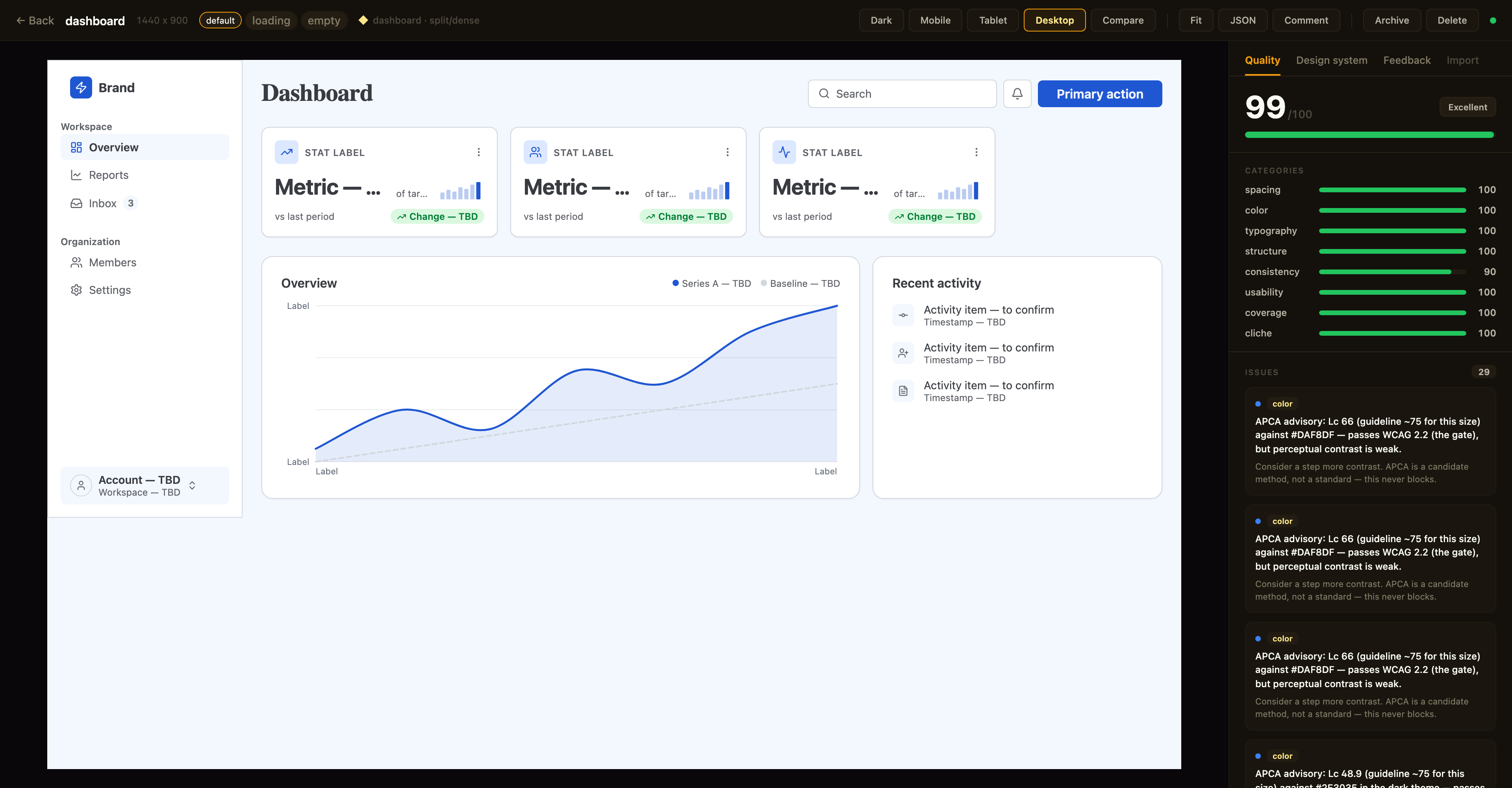
Above: a canvas in the detail view with the Quality inspector on the right — the same
canvas_evaluatescore the agent sees, with per-category bars and the issue list; the tabs along the top switch to the Design-system and Feedback panels. The toolbar exposes breakpoint previews, Compare, Fit, JSON, a Comment toggle for point-and-tell feedback, and lifecycle actions.
Quality panel. The canvas detail view shows a read-only quality inspector on the right: the heuristic canvas_evaluate score (0–100), per-category bars, and the issue list — each cliché tell with its category · tell badge, severity, and suggestion. Issues that canvas_autofix can resolve carry an auto-fixable tag, and clicking any issue highlights its node in the live preview. Every gallery card also shows a color-coded score badge so weak canvases stand out at a glance. The score matches what your agent sees over MCP (same fast-mode evaluation, relaxed by the canvas's stored genre and applied preset) — it's computed for display only and never written back.
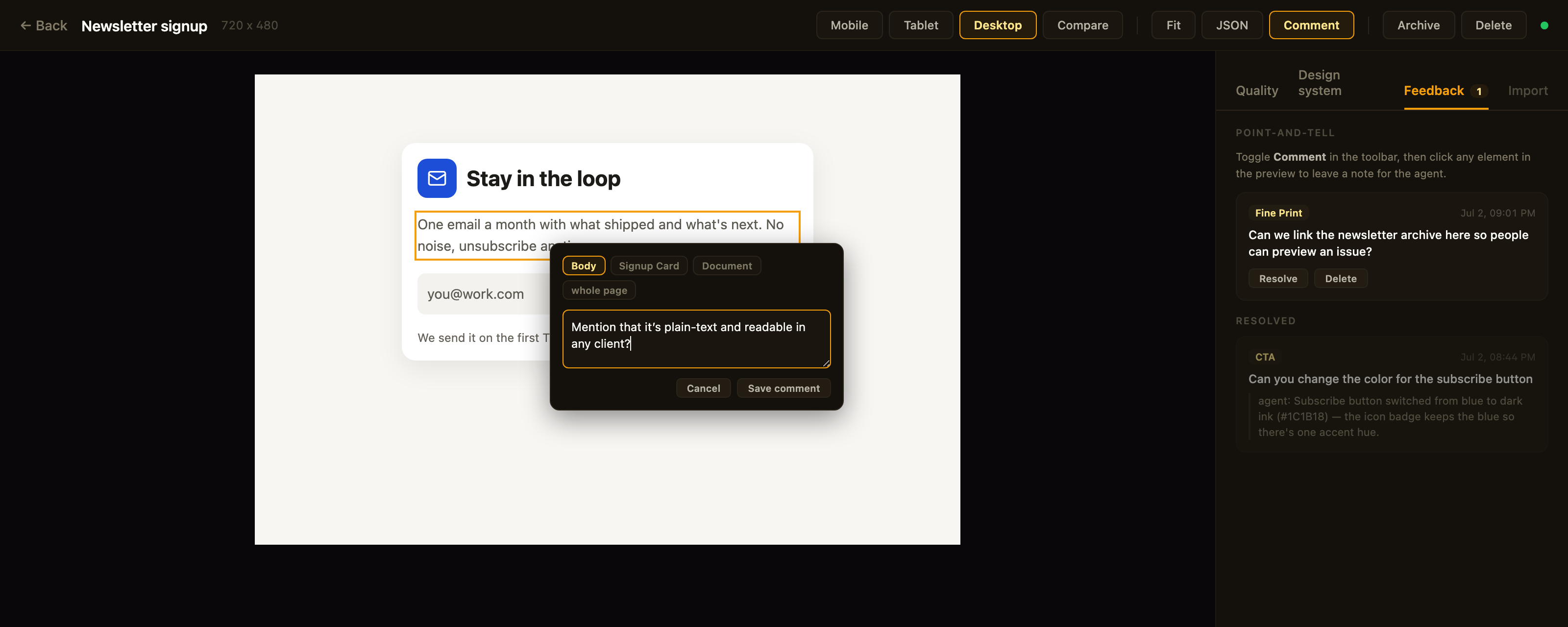
Above: point-and-tell in action — Comment mode is on, the clicked element is outlined, the popover's breadcrumb re-scopes the anchor, and the Feedback tab tracks open comments plus the agent's replies to resolved ones.
Feedback panel. Point-and-tell: toggle Comment in the toolbar and click any element in the preview to leave a note for the agent — a breadcrumb in the popover re-scopes the anchor from the exact element up to its card, section, or the whole page. The Feedback tab lists open comments (badge = open count) with click-to-highlight, lets you resolve or delete them, and shows the agent's resolution note as a reply once it has addressed the item. Comments persist on the canvas itself (metadata.feedback — git-diffable in bound repos) and the agent reads them over MCP via get_feedback; open feedback blocks the agent from presenting, same as open quality issues.
Design-system panel. A second inspector tab shows the canvas's effective design tokens — color swatches, type scale, spacing, and radius — resolved through the full workspace ▸ project ▸ canvas inheritance chain. Each section notes its dominant source layer, and any token resolving from a different layer is tagged (canvas / project / workspace) so you can see at a glance what a given canvas customized versus inherited.
Designs are authored through MCP tool calls from your AI assistant — in the viewer you review, comment, and manage lifecycle; you don't edit nodes. Unbound canvases persist to ~/.framesmith/canvases/ (canvases in a bound repo live in its .framesmith/ instead) so the viewer keeps showing them across sessions.
Installation
No clone or build needed — register framesmith with your MCP client via npx (requires Node 20+).
Claude Code
claude mcp add framesmith -- npx -y framesmith
Codex
Add to ~/.codex/config.toml:
[mcp_servers.framesmith]
command = "npx"
args = ["-y", "framesmith"]
Cursor
Add to ~/.cursor/mcp.json (or per-project .cursor/mcp.json):
{
  "mcpServers": {
    "framesmith": {
      "command": "npx",
      "args": ["-y", "framesmith"]
    }
  }
}
Windsurf
Add to ~/.codeium/windsurf/mcp_config.json:
{
  "mcpServers": {
    "framesmith": {
      "command": "npx",
      "args": ["-y", "framesmith"]
    }
  }
}
VS Code + MCP extension
Add to .vscode/mcp.json (project-scoped) or your global MCP settings:
{
  "servers": {
    "framesmith": {
      "command": "npx",
      "args": ["-y", "framesmith"]
    }
  }
}
Any other MCP-compatible client
framesmith speaks standard stdio MCP. Point your client at npx -y framesmith using whatever config shape your client expects.
Optional: set
FRAMESMITH_VIEWER_URL=http://localhost:3001in the MCP server env to pin it to a long-lived standalone viewer process — see Running the viewer.
Build from source (for development)
git clone https://github.com/vicmaster/framesmith.git
cd framesmith
npm install
npm run build
# then point your client at: node /path/to/framesmith/dist/index.js
Tools
init
One-call onboarding — the recommended first call each session, and safe to run repeatedly (idempotent). Binds the current repo if it isn't already (canvases become checked-in JSON under .framesmith/), ensures the convention projects exist, and returns the live state you need to start working.
| Param | Type | Description |
|---|---|---|
dir |
string? | Directory to bind / detect. Defaults to the nearest git repo root above the server working directory. |
workspaceName |
string? | Name for the workspace when binding fresh. Defaults to the repo folder name. |
projects |
string[]? | Projects to ensure exist (default: ["Foundations", "UI"]). Existing projects are never removed, so it's safe for adding feature/area projects like Onboarding. |
Returns the bound workspace + project IDs (binding re-keys workspace and project IDs to repo-* — use the ones init returns; canvas IDs are kept), the on-disk layout, the workspace-layer token count, a workflow cheatsheet, the current gotchas, the framesmith://guidelines URI, and the viewer URL. If any canvas in the workspace has open point-and-tell comments, the result also carries openFeedback: { total, note } — a nudge to run get_feedback before doing anything else. It does not seed design tokens — set those at the workspace layer with workspace_set_design_system. The default Foundations project is just a canvas that visualizes the workspace tokens (which is where the design system actually lives).
canvas_create
Create a new canvas. If projectId is omitted, it lands in the built-in Untitled project of the Personal workspace.
| Param | Type | Description |
|---|---|---|
name |
string? | Canvas name |
projectId |
string? | Target project. Defaults to the built-in Untitled project. See project_list. |
width |
number? | Artboard width in px, a positive integer (default 1440, or the device or window width for type: "mobile" / "desktop-app"). |
height |
number? | Artboard height in px, a positive integer (default 900, or the device or window height for type: "mobile" / "desktop-app"). Each dimension defaults on its own. |
type |
"web" | "mobile" | "desktop-app"? |
What medium the canvas is on. "desktop-app" declares an application screen, a tool you work in (an editor, an admin console, a file browser) in a browser tab or a native window: the artboard defaults to the window (1440×900), and it runs the desktop-app ruleset; a page you read and scroll stays "web". "mobile" declares a phone app screen: the artboard defaults to the device size and the root gets the device's safe-area insets as safeArea: { top, bottom }, which the renderer adds to the root's top and bottom padding. Omitted, the canvas is undeclared and judged as web. On a mobile canvas apply_structure stamps the mobile realisations (dashboard, settings, auth, onboarding, feed, detail). |
device |
string? | The type's profile: a phone for type: "mobile" (default "iphone-390", the only one today: 390×844, insets 47 top and 34 bottom) or a window for type: "desktop-app" (default "window-1440": 1440×900, no insets). Passing it without a type, with "web", or naming a profile from the other type's table, is an error. An explicit width/height overrides the profile's size for that side; the insets stay the profile's. |
The response also carries the artboard width/height, type, typeSource ("declared" or "default"), device and safeArea for a mobile canvas, and a diversification signal for the target project: the recently-built structures (newest first) and a hint to differ on at least one taxonomy axis, so successive canvases don't converge on the same layout. It's advisory — never blocking.
canvas_list
List canvases. Excludes archived canvases by default. A row carrying openFeedback: n has open point-and-tell comments waiting — read them with get_feedback before working on that canvas.
| Param | Type | Description |
|---|---|---|
projectId |
string? | Scope to one project |
includeArchived |
bool? | Include archived canvases (default false) |
Returns [{ id, name, createdAt, lastModified, versionHash, projectId, archived, openFeedback?, variant?, variants? }] — openFeedback (a count) is present only when > 0; versionHash is the design-content hash canvas_version checks approvals against. variant: { of, state } is present on a state-variant row; variants: [{ state, canvasId }] rolls the designed states onto a base row (see canvas_add_variant).
canvas_add_variant
Clone a screen into a linked state variant — the empty / loading / error version of a canvas, as its own sibling canvas. The clone gets re-keyed node IDs, the same project, copied tokens/components/fonts, and carries the provenance/genre stamp (feedback and critique stay behind); it's named <base> · <state> and linked via metadata.variant = { of, state }.
| Param | Type | Description |
|---|---|---|
canvasId |
string | The base canvas (a variant id also works — it resolves to the root base; variants never nest) |
state |
string | The state this variant designs — empty / loading / error recommended; free string accepted |
Returns { canvasId, name, state, of, idMap } — idMap maps every base node id to its clone, so follow-up edits target the right nodes immediately. One canvas per state per base (a duplicate state errors). The viewer shows a screen and its variants as one card with state chips; canvas_list rolls designed states onto the base row.
framesmith MCP 질문
framesmith MCP는 어떤 도구를 제공하나요?
9개 도구를 제공합니다. 예: dir, projects, name, width, height.
framesmith는 어떤 디자인 형식을 사용하나요?
디자인은 저장소 내에 소유권을 가진 오픈 JSON 파일로 저장되며, 일반 HTML/CSS로 내보낼 수 있습니다.
품질 검증(quality gate)은 어떻게 작동하나요?
canvas_evaluate 도구가 클리셰 탐지 및 상태 커버리지 확인을 포함한 5가지 제작 카테고리에 따라 디자인 점수를 매기고, READY 또는 NOT READY 지시를 반환합니다.
브라우저에서 디자인을 미리 볼 수 있나요?
네, npx를 사용하여 독립형 브라우저 뷰어를 실행하면 다양한 브레이크포인트에서 캔버스를 검토할 수 있습니다.