
uidx MCP server
2026년 11월 14일 커밋AI 에이전트와 사용자가 프로젝트 저장소에 직접 저장된 diff 가능한 JSX 파일을 사용하여 시각적 워크스페이스를 협업하여 설계하고 편집할 수 있습니다.
다른 이름 uidxkit/uidx
- 스타
- 13
- Tools
- —
- 다운로드, 30일
- —
- 최신 버전
- —
- 마지막 커밋
- 2026년 11월 14일
- 라이선스
- MIT
uidx MCP란?
AI 에이전트와 사용자가 프로젝트 저장소에 직접 저장된 diff 가능한 JSX 파일을 사용하여 시각적 워크스페이스를 협업하여 설계하고 편집할 수 있습니다.
프로젝트 README에서 생성된 요약
uidx MCP server 정보
uidx는 개발자와 AI 에이전트가 애플리케이션 저장소 내에서 직접 시각적 워크스페이스를 설계할 수 있도록 지원합니다. @uidxkit/uidx를 로컬 개발 의존성으로 설치하면 .uidx 폴더에 저장된 diff 가능한 JSX 파일을 통해 디자인을 관리할 수 있습니다. 이 방식을 사용하면 Git을 통해 애플리케이션 코드와 함께 디자인 자산, 폰트, 레이아웃의 버전을 관리할 수 있습니다.
사용자는 로컬 뷰어와 프로젝트 내 파일과 동기화되는 캔버스를 통해 시스템과 상호작용합니다. 설정은 로컬 머신에서 실행되며 캔버스 동기화를 위해 호스팅된 디자인 서비스나 LLM이 필요하지 않습니다. AI 클라이언트를 연결하려면 생성된 .mcp.json 파일을 사용하여 uidx:mcp 스크립트를 실행합니다. 이 스크립트는 실행 중인 프로젝트 서버에 대한 stdio 브릿지 역할을 합니다. 이 설정을 통해 외부 도구는 사용자가 시각적 인스펙터에서 사용하는 것과 동일한 디자인 파일을 검사하고 편집할 수 있습니다.
활용 사례
- 1협업 디자인 편집AI 에이전트가 저장소의 디자인 파일을 수정하여 레이아웃이나 스타일을 업데이트할 수 있습니다.
- 2버전 관리되는 디자인 시스템개발자는 표준 Git 워크플로우를 사용하여 컴포넌트, 변형(variants), 디자인 토큰을 관리할 수 있습니다.
- 3시각적 워크스페이스 관리시각적 캔버스와 인스펙터를 사용하여 새로운 페이지를 생성하고 레이아웃을 조정할 수 있습니다.
프로젝트의 README를 바탕으로 작성되었습니다. 모든 활용 사례는 해당 내용의 인용문과 대조하여 확인합니다.
자동 검사
2026년 11월 14일에 실행됨전체 보고서 →아직 인증되지 않았습니다. 서버는 80점 이상의 점수, 심각한 결함 없음, 그리고 검사에 충분한 데이터를 갖추어야 합니다. 검사 방식 · 점수를 높이기 위해 수정할 항목

- 소스 저장소 연결 및 접근 가능uidxkit/uidx is public and reachablegithub.com/uidxkit/uidx ↗통과
- 패키지가 이 저장소를 소스로 명시검사되지 않음
- 빌드 출처(Sigstore 증명)검사되지 않음
- 오픈 소스 라이선스 (OSI)MITspdx.org/licenses/MIT.html ↗통과
- 최근 1년 내 커밋 또는 릴리스Last commit or release 2026-11-14github.com/uidxkit/uidx ↗통과
- OpenSSF Scorecard검사되지 않음
- 패키지 이름이 인기 패키지와 유사하지 않음검사되지 않음
- 패키지 및 해당 종속성에 중요한 보안 권고 없음검사되지 않음
- 모델에 대한 숨겨진 지침 없음0 tool descriptions and the README read; no override phrases, credential paths or hidden characters통과
- 파괴적인 도구에 라벨 표시됨검사되지 않음
- 원격 엔드포인트가 MCP 핸드셰이크에 응답검사되지 않음
README
GitHub에서 보기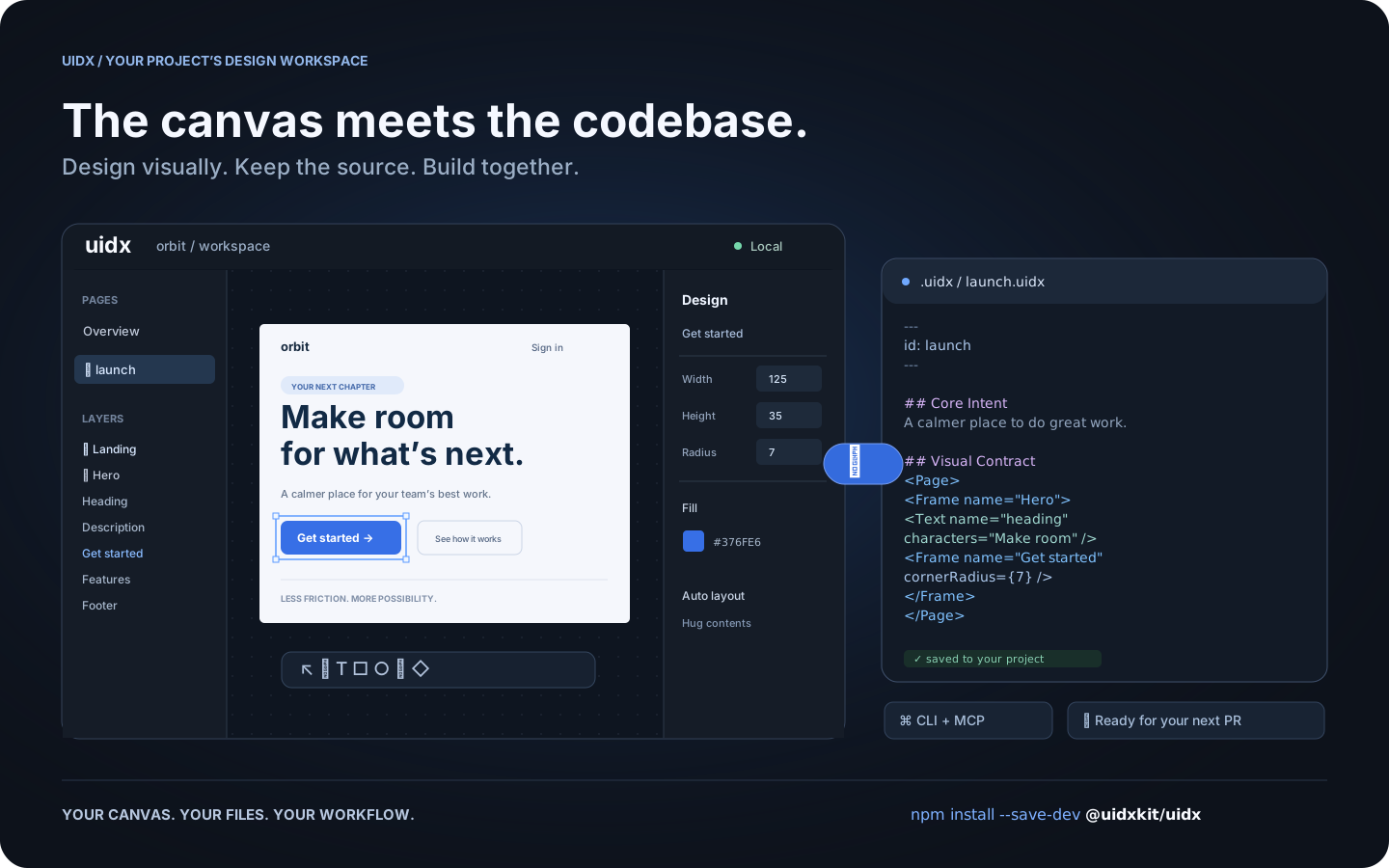
Workflow illustration: one design, shared by the canvas, your files, and your tools.
What is UIDX?
UIDX brings a design canvas into your application's repository. Install
@uidxkit/uidx as a local development dependency, run npm run uidx, and
work on designs stored in your project's .uidx/ folder.
A .uidx file combines Markdown describing a design's purpose with a declarative
node tree describing its appearance. Edit the canvas and the file updates. Edit
the file and the canvas follows. Changes produce focused text diffs you can
review in a pull request.
- A visual workspace. Create pages, draw shapes, edit text, and adjust layout and styling from the canvas and inspector.
- Reusable design systems. Components, instances, variants, slots, and design tokens share a document namespace.
- Your project owns the files. Keep designs, assets, and fonts next to your application and version them with Git.
- A shared workflow for people and agents. The CLI and MCP bridge let external tools inspect and edit the same files the viewer uses.
- Local by default. The viewer and project server run on your machine. Canvas synchronization does not require an LLM or a hosted design service.
UIDX is an early release. The file format and APIs may change before 1.0. It is a design workspace; it does not render your application's existing UI components as Storybook stories.
Install
Requires Node.js 22.19 or newer. Node 24 is recommended.
Run these commands inside your application's repository:
npm install --save-dev @uidxkit/uidx
npm run uidx
Installation adds the uidx and uidx:mcp scripts and creates .uidx/ when it
doesn't exist. Existing scripts, configuration, and designs are preserved.
The CLI, server, viewer, WASM, and bundled fonts live in your project's
node_modules; a global UIDX installation is not required.
Recent npm versions do not run a package's install script until you approve
it, and warn with install scripts not yet covered by allowScripts. Nothing is
lost: the first npx uidx dev performs the same setup itself and says so, or
approve the script with npm install-scripts approve @uidxkit/uidx and
reinstall. To set up explicitly, run npx --no-install uidx init. If your
project already uses a script named uidx, choose another with
npx --no-install uidx init --script design, then run npm run design.
Your design workspace
your-project/
├── package.json          # @uidxkit/uidx devDependency and npm scripts
├── .mcp.json             # connection for MCP clients
├── src/
└── .uidx/
    ├── config.json       # project settings
    ├── uidx.json         # document name, page patterns, and asset patterns
    ├── welcome.uidx      # initial page for a new workspace
    ├── assets/
    └── fonts/
Open the viewer, click New page, give it a name, and start designing. New
pages are saved in your design folder and appear in the overview. Commit your
project's .uidx/ files alongside application code.
Configuration
Set the shared viewer and MCP port in .uidx/config.json:
{
  "port": 4400
}
Restart npm run uidx after changing it. Use npm run uidx -- --port 4500 for a
one-time override. If the requested port is busy, UIDX tries the next available
one and reports its actual address. Configuration currently uses JSON.
The separate .uidx/uidx.json manifest controls which files belong to the document:
{
  "id": "my-project",
  "files": ["**/*.uidx"],
  "assets": ["assets/**"]
}
CLI and MCP
npm run uidx starts the local viewer, file synchronization server, and MCP HTTP
endpoint on one port. MCP clients use the generated .mcp.json to launch
npm run --silent uidx:mcp, a stdio bridge to that running project server.
npx --no-install uidx status
npx --no-install uidx check
npx --no-install uidx fmt --check
The CLI also supports reading, creating, editing, and rendering pages. See the CLI guide and agent architecture.
Documentation
- Drawing icons and custom graphics
- Fonts
- Property vocabulary
- Architecture decisions
- Release guide
- Changelog
Contributing and license
Bug reports, documentation improvements, and pull requests are welcome.
See Contributing for development setup and checks.
Follow the Code of Conduct and report vulnerabilities through
the security policy. Changes to main are merged by the owner.
UIDX is MIT licensed. Third-party code and fonts retain their respective licenses.
uidx MCP 질문
프로젝트에 UIDX를 어떻게 설치하나요?
npm install --save-dev @uidxkit/uidx 명령어를 사용하여 로컬 개발 의존성으로 설치한 후 npm run uidx를 실행합니다.
UIDX는 동기화를 위해 호스팅된 디자인 서비스나 LLM이 필요한가요?
아니요, 뷰어와 프로젝트 서버는 로컬 머신에서 실행되며 캔버스 동기화를 위해 LLM이나 호스팅된 서비스가 필요하지 않습니다.
AI 에이전트와 함께 UIDX를 사용할 수 있나요?
네, MCP 브릿지를 통해 외부 도구와 에이전트가 시각적 캔버스에서 사용하는 것과 동일한 디자인 파일을 검사하고 편집할 수 있습니다.
UIDX의 시스템 요구 사항은 무엇인가요?
Node.js 버전 22.19 이상이 필요하며, Node 24 사용을 권장합니다.