
sysketch MCP란?
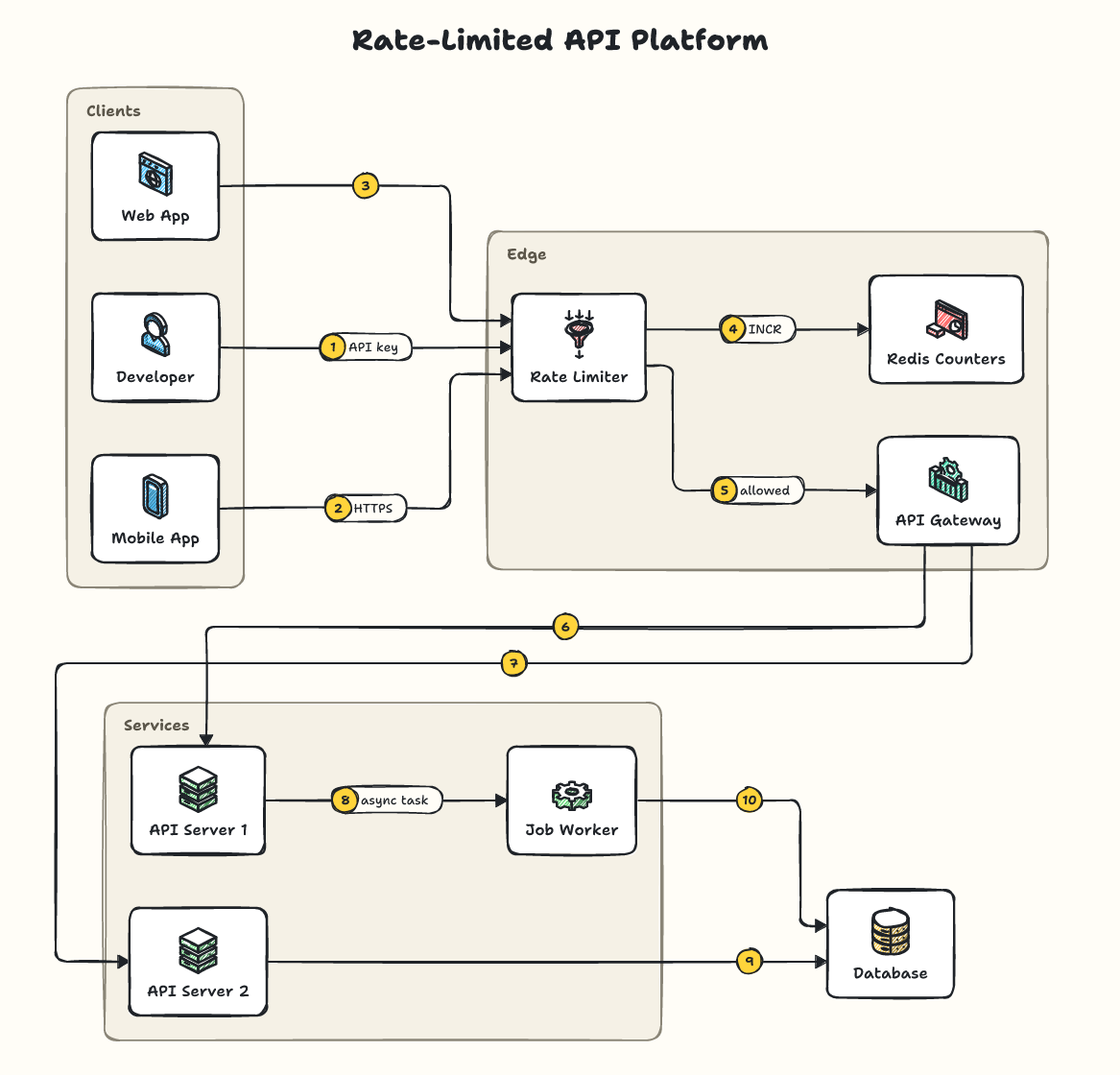
sysketch은(는) MCP server입니다. 간결한 YAML 사양을 바탕으로 손으로 그린 듯한 시스템 디자인 다이어그램을 SVG 또는 PNG 형식으로 생성합니다. 2개 도구를 제공합니다. 예: render_diagram, list_icons.
프로젝트 README에서 생성된 요약
sysketch MCP server 정보
sysketch를 사용하면 Claude 및 Cursor와 같은 AI 어시스턴트가 YAML 사양을 사용하여 손으로 그린 듯한 시스템 디자인 다이어그램을 생성할 수 있습니다. 어시스턴트가 복잡한 이미지 데이터를 직접 생성하는 대신, 짧은 설명을 작성하면 MCP server가 이를 SVG 또는 PNG 파일로 변환합니다. 이 방식은 토큰 사용량을 크게 줄여주어 개발자에게 더 빠르고 비용 효율적인 프로세스를 제공합니다.
사용자는 데스크톱 클라이언트를 위해 npx를 통해 로컬에 서버를 설정하거나, 웹 기반 채팅을 위해 원격 엔드포인트에 연결할 수 있습니다. 서버에는 Node.js 20 이상의 버전이 필요합니다. 사양이나 파일을 기반으로 시각 자료를 만드는 render_diagram 도구와 사용 가능한 아이콘 및 로고를 확인하는 list_icons 도구를 제공합니다. 다이어그램은 로컬 디렉토리에 저장되며, SYSKETCH_DIR 환경 변수나 특정 디렉토리 인수를 사용하여 사용자 지정할 수 있습니다.
활용 사례
- 1시스템 아키텍처 시각화 생성AI 어시스턴트에게 차량 공유 시스템 아키텍처의 PNG 다이어그램 생성을 요청합니다.
- 2기존 다이어그램 수정새로운 서비스를 추가하는 등 이전에 생성된 다이어그램에 특정 수정을 요청합니다.
- 3다양한 시각적 스타일 적용blueprint와 같은 다른 테마를 지정하여 다이어그램의 미적 스타일을 변경합니다.
- 4공식 브랜드 로고 포함인식 가능한 제품 이름을 사용하여 S3 또는 Stripe와 같은 서비스의 실제 로고를 표시합니다.
프로젝트의 README를 바탕으로 작성되었습니다. 모든 활용 사례는 해당 내용의 인용문과 대조하여 확인합니다.
sysketch MCP 설치 방법
형식 확인: 2026년 11월 10일Cursor에 추가Goose에 추가Claude Code에 sysketch MCP 설치
$ claude mcp add sysketch -- npx -y sysketch-mcpCursor에 sysketch MCP 설치
~/.cursor/mcp.json
{
  "mcpServers": {
    "sysketch": {
      "command": "npx",
      "args": [
        "-y",
        "sysketch-mcp"
      ]
    }
  }
}VS Code에 sysketch MCP 설치
.vscode/mcp.json
{
  "servers": {
    "sysketch": {
      "type": "stdio",
      "command": "npx",
      "args": [
        "-y",
        "sysketch-mcp"
      ]
    }
  }
}VS Code CLI에 sysketch MCP 설치
$ code --add-mcp '{"name":"sysketch","type":"stdio","command":"npx","args":["-y","sysketch-mcp"]}'Claude Desktop에 sysketch MCP 설치
claude_desktop_config.json
{
  "mcpServers": {
    "sysketch": {
      "command": "npx",
      "args": [
        "-y",
        "sysketch-mcp"
      ]
    }
  }
}Codex에 sysketch MCP 설치
$ codex mcp add sysketch -- npx -y sysketch-mcpCodex config.toml에 sysketch MCP 설치
~/.codex/config.toml
[mcp_servers.sysketch]
command = "npx"
args = ["-y", "sysketch-mcp"]
Gemini CLI에 sysketch MCP 설치
$ gemini mcp add -s user sysketch npx -- -y sysketch-mcpGemini settings.json에 sysketch MCP 설치
~/.gemini/settings.json
{
  "mcpServers": {
    "sysketch": {
      "command": "npx",
      "args": [
        "-y",
        "sysketch-mcp"
      ]
    }
  }
}sysketch MCP 도구 2
README에서 감지됨render_diagramlist_icons
| render_diagram | — | |
| list_icons | — |
자동 검사
2026년 11월 13일에 실행됨전체 보고서 →자동 검사를 통과했습니다. 이는 보안 감사가 아닙니다. 코드를 직접 읽고 서버에 필요한 최소한의 권한만 부여하십시오. 검사 방식

- 소스 저장소 연결 및 접근 가능통과
- 오픈 소스 라이선스 (OSI)통과
- 최근 1년 내 커밋 또는 릴리스통과
- 패키지 이름이 인기 패키지와 유사하지 않음통과
- 원격 엔드포인트가 HTTPS 사용통과
- 파괴적인 도구에 라벨 표시됨통과
- 모델에 대한 숨겨진 지침 없음통과
- 패키지 및 해당 종속성에 중요한 보안 권고 없음통과
README
GitHub에서 보기sysketch-mcp
Lets Claude, Cursor and other AI assistants draw clean, hand-sketched system design diagrams with sysketch. The assistant writes a short description of your system instead of drawing the image itself, which makes diagrams faster, cheaper and consistent.
Setup
You need Node.js 20 or newer.
Claude Code: run once in your terminal:
claude mcp add sysketch -- npx -y sysketch-mcp
Claude Desktop, Cursor and other assistants: add this to the assistant's MCP settings, then restart it:
{
  "mcpServers": {
    "sysketch": { "command": "npx", "args": ["-y", "sysketch-mcp"] }
  }
}
Diagrams are saved in the folder your assistant runs the server in (your project, in Claude Code and Cursor). Claude Desktop starts servers outside any project, so there they go to a sysketch folder in your home folder. To choose a folder, add "--dir", "/path/to/folder" to args, or set the SYSKETCH_DIR environment variable.
ChatGPT, Claude on the web, Perplexity and other AI chats: you don't need this package. Add https://sysketch.vercel.app/mcp as a custom connector instead (details).
Use
Ask your assistant, for example:
Use sysketch to draw a ride-sharing system as a PNG.
The diagram is saved in diagrams/ inside that folder, together with its description, so you can ask for changes later: "add a notification service", "use the blueprint theme". Only a one-line summary comes back into the conversation, never the image data.
Measured with Claude Code (Sonnet) on 5 system design requests: 4,352 output tokens with sysketch vs 77,518 when the assistant drew the SVG itself, about 18x fewer (benchmark).
Tools
| Tool | What it does |
|---|---|
render_diagram |
Draws a diagram from a description (spec) or a file (file) to .svg or .png, with an optional theme. preview: true returns the image to the assistant (off by default). |
list_icons |
Lists the icons and recognized names; logos searches installed official logos. |
The tool definitions add about 450 tokens to each session.
Official logos (optional)
When official logos are installed, product names like s3 or stripe show the real logo. See the logos guide.
More examples, themes and the full spec: github.com/Tonys-Coding/sysketch
MIT License.
sysketch MCP 질문
sysketch MCP를 Claude Code에 추가하려면 어떻게 하나요?
터미널에서 claude mcp add sysketch -- npx -y sysketch-mcp를 실행합니다. 모든 프로젝트에서 사용할 수 있게 하려면 --scope user를 추가합니다.
sysketch MCP를 Cursor에 추가하려면 어떻게 하나요?
~/.cursor/mcp.json를 열고 mcpServers 아래에 서버를 추가합니다. 위 설치 섹션에 표시된 Cursor 구성을 사용합니다.
sysketch MCP는 어떤 도구를 제공하나요?
2개 도구를 제공합니다. 예: render_diagram, list_icons.
다이어그램에 공식 로고를 사용할 수 있나요?
네, 공식 로고가 설치되어 있다면 s3 또는 stripe와 같은 제품 이름이 실제 로고로 표시됩니다.
이 MCP server는 토큰을 많이 사용하나요?
아니요, 매우 효율적입니다. 어시스턴트가 직접 원시 SVG를 그리게 하는 것보다 약 18배 적은 토큰을 사용합니다.