
수동태, 모호한 표현, AI 생성 패턴 등 문체 문제를 분석하여 글의 품질을 개선합니다.
다른 이름 theserverlessdev/wsc, wsc, wsc-mcp
- 스타
- 9
- Tools
- 4
- 다운로드, 30일
- —
- 최신 버전
- 2.2.2
- 마지막 커밋
- 2026년 11월 11일
- 라이선스
- MIT
Writing Style Checker MCP란?
Writing Style Checker은(는) MCP server입니다. 수동태, 모호한 표현, AI 생성 패턴 등 문체 문제를 분석하여 글의 품질을 개선합니다. 4개 도구를 제공합니다. 예: check_text, fix_duplicates, list_word_lists.
프로젝트 README에서 생성된 요약
Writing Style Checker MCP server 정보
Writing Style Checker는 AI 생성 텍스트에서 자주 발견되는 특정 문체 문제와 패턴을 식별하도록 설계된 prose linter입니다. 수동태, 모호한 표현(weasel words), 불필요한 부사, 완곡어법, 명사화, 긴 문장 등을 표시하여 작가가 글의 품질을 높일 수 있도록 돕습니다. 또한 AI 특유의 흔적을 찾아내는 특화된 탐지기를 포함하고 있어, 기계가 생성한 콘텐츠에서 과도하게 나타나는 특정 단어와 구조적 패턴을 식별합니다.
개발자는 streamable HTTP 전송을 사용하는 원격 MCP server를 통해 이 서비스를 통합하거나, wsc-mcp npm 패키지를 통해 로컬 stdio 기반 server를 설치할 수 있습니다. 로컬 버전은 디스크의 파일을 직접 분석할 수 있는 check_file 도구를 추가로 제공합니다. 사용자는 .wscrc.json 설정 파일을 사용하여 특정 단어 목록과 임계값을 활성화, 비활성화 또는 수정함으로써 탐지 규칙을 사용자 정의할 수 있습니다.
활용 사례
- 1AI 생성 문체 패턴 탐지텍스트가 AI에 의해 작성되었음을 암시하는 특정 단어나 문장 구조를 식별하도록 어시스턴트에게 요청합니다.
- 2중복 단어 정리텍스트 블록에서 인접하게 반복되는 단어를 제거하도록 클라이언트에 지시합니다.
- 3로컬 markdown 파일 감사AI가 컴퓨터에 있는 특정 파일을 읽고 문체 문제를 분석하도록 합니다.
- 4일반 문체 품질 검토문단을 제출하여 수동태, 모호한 표현 및 불필요한 부사가 있는지 확인합니다.
프로젝트의 README를 바탕으로 작성되었습니다. 모든 활용 사례는 해당 내용의 인용문과 대조하여 확인합니다.
Writing Style Checker MCP 설치 방법
형식 확인: 2026년 11월 10일Cursor에 추가Goose에 추가Claude Code에 Writing Style Checker MCP 설치
$ claude mcp add wsc -- npx -y wsc-mcpCursor에 Writing Style Checker MCP 설치
~/.cursor/mcp.json
{
  "mcpServers": {
    "wsc": {
      "command": "npx",
      "args": [
        "-y",
        "wsc-mcp"
      ]
    }
  }
}VS Code에 Writing Style Checker MCP 설치
.vscode/mcp.json
{
  "servers": {
    "wsc": {
      "type": "stdio",
      "command": "npx",
      "args": [
        "-y",
        "wsc-mcp"
      ]
    }
  }
}VS Code CLI에 Writing Style Checker MCP 설치
$ code --add-mcp '{"name":"wsc","type":"stdio","command":"npx","args":["-y","wsc-mcp"]}'Claude Desktop에 Writing Style Checker MCP 설치
claude_desktop_config.json
{
  "mcpServers": {
    "wsc": {
      "command": "npx",
      "args": [
        "-y",
        "wsc-mcp"
      ]
    }
  }
}Codex에 Writing Style Checker MCP 설치
$ codex mcp add wsc -- npx -y wsc-mcpCodex config.toml에 Writing Style Checker MCP 설치
~/.codex/config.toml
[mcp_servers.wsc]
command = "npx"
args = ["-y", "wsc-mcp"]
Gemini CLI에 Writing Style Checker MCP 설치
$ gemini mcp add -s user wsc npx -- -y wsc-mcpGemini settings.json에 Writing Style Checker MCP 설치
~/.gemini/settings.json
{
  "mcpServers": {
    "wsc": {
      "command": "npx",
      "args": [
        "-y",
        "wsc-mcp"
      ]
    }
  }
}Writing Style Checker MCP 도구 4
README에서 감지됨check_textfix_duplicateslist_word_listscheck_file
| check_text | — | |
| fix_duplicates | — | |
| list_word_lists | — | |
| check_file | — |
자동 검사
2026년 11월 12일에 실행됨전체 보고서 →자동 검사를 통과했습니다. 이는 보안 감사가 아닙니다. 코드를 직접 읽고 서버에 필요한 최소한의 권한만 부여하십시오. 검사 방식

- 소스 저장소 연결 및 접근 가능통과
- 오픈 소스 라이선스 (OSI)통과
- 최근 1년 내 커밋 또는 릴리스통과
- 패키지 이름이 인기 패키지와 유사하지 않음통과
- 원격 엔드포인트가 HTTPS 사용통과
- 파괴적인 도구에 라벨 표시됨통과
- 모델에 대한 숨겨진 지침 없음통과
- 패키지 및 해당 종속성에 중요한 보안 권고 없음통과
README
GitHub에서 보기Writing Style Checker


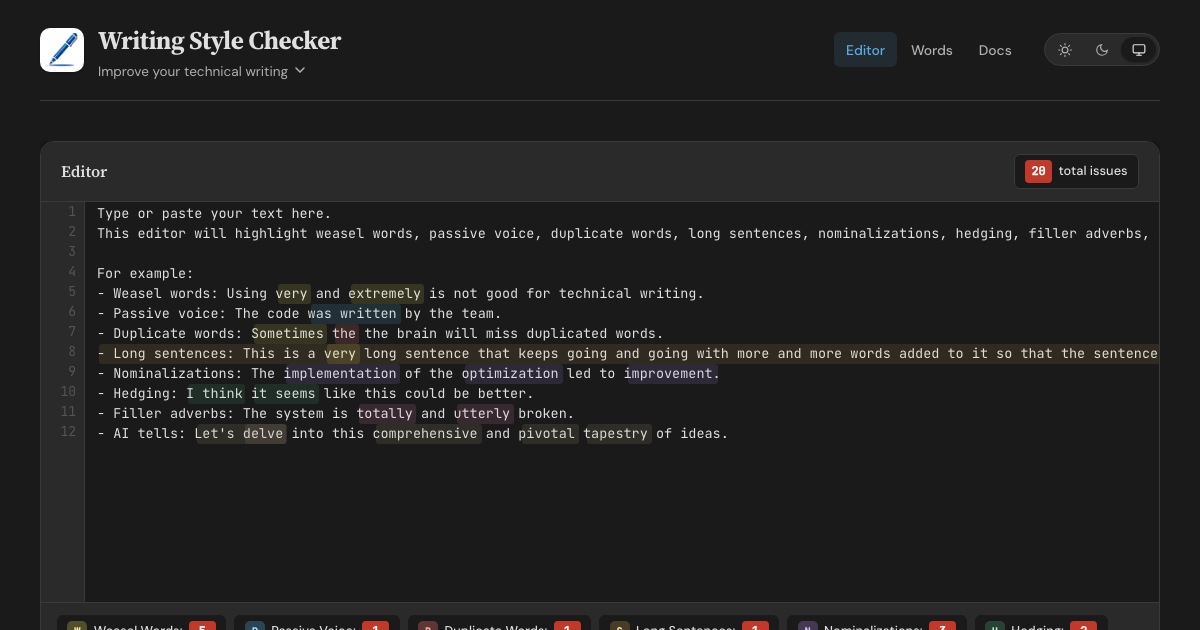
A prose linter and AI-slop detector. WSC finds AI tells — words, phrases, and sentence structures overrepresented in AI-generated text, each flag backed by a published corpus study. It also catches classic writing issues: weasel words, passive voice, duplicate words, long sentences, nominalizations, hedging, and filler adverbs. Available as a web editor, HTTP API, MCP server, CLI, and GitHub Action.
Features
- Web Editor - Real-time highlighting with inline fix buttons for all 8 detectors
- HTTP API - POST text with optional config, retrieve structured JSON responses
- MCP Server (Remote) - Connect AI assistants via Streamable HTTP transport
- MCP Server (Local) - Stdio-based server via
wsc-mcpon npm - CLI - Check files from the command line via
wsc-lint - GitHub Action - Run checks in CI with
::warningannotations - Configurable - Customize detectors with
.wscrc.jsonfiles
What WSC is (and isn't)
WSC flags patterns that research on AI-generated text finds overrepresented, and cites a source for every flag. It does not, and cannot, prove authorship. Classifier-based detectors carry a documented false-accusation risk: a Stanford study found that seven of them misflagged 61% of essays written by non-native English speakers. WSC avoids that trap by design — every flag is a specific, explainable edit that improves the text no matter who, or what, wrote it.
Detection Rules
| Detector | Items | Description |
|---|---|---|
| Weasel Words | 95 words/phrases | Vague terms like "very", "basically", "arguably", "numerous" |
| Passive Voice | 260 irregular verbs | Auxiliary verbs + past participles (regular -ed + irregular) |
| Duplicate Words | — | Adjacent repeated words across whitespace, case-insensitive |
| Long Sentences | threshold: 30 words | Sentences exceeding a configurable word count |
| Nominalizations | 245 word pairs | Nouns replaceable with verbs ("utilization" → "use") |
| Hedging | 100 phrases | Phrases that weaken assertions ("I think", "it seems") |
| Filler Adverbs | 139 words | Adverbs adding emphasis without substance ("totally", "utterly") |
| AI Tells | 98 words (+111 inflected forms) + 83 phrases + 12 structural patterns | Words, phrases, and sentence constructions overrepresented in AI-generated text (delve, rich tapestry, It's not just X — it's Y) |
Word lists sourced from Matt Might's shell scripts and expanded with additional entries. AI tells draw on published corpus studies: Kobak et al. 2025 (Science Advances), Juzek & Ward 2025 (COLING), Liang et al. 2024 (Stanford), and Reinhart et al. 2025 (PNAS). Wikipedia's editor-maintained Signs of AI writing catalogue and AI-detection vendor reports round out the sources.
Configuration
Create a .wscrc.json to customize detectors. All tools (API, MCP, CLI) support it.
{
  "$schema": "https://wsc.theserverless.dev/schema.json",
  "ignore": ["CHANGELOG.md", "docs/vendor/**"],
  "detectors": {
    "weaselWords": {
      "enabled": true,
      "add": ["synergy", "leverage"],
      "remove": ["very"]
    },
    "longSentences": { "maxWords": 25 },
    "adverbs": { "enabled": false }
  }
}
Every field is optional. Missing fields use defaults. JSON Schema provides autocompletion in VS Code.
ignore is an array of glob patterns relative to the working directory. The GitHub Action uses the repository root. The CLI adds these patterns to its built-in **/node_modules/** and **/.git/** skips, together with the Action exclude input and the CLI --ignore flag.
API Usage
POST /api/check
Analyze text for writing style issues. Accepts optional config object.
curl -X POST https://wsc.theserverless.dev/api/check \
  -H "Content-Type: application/json" \
  -d '{"text":"The code was written very quickly."}'
Response:
{
  "summary": {
    "total": 2,
    "weaselWords": 1,
    "passiveVoice": 1,
    "duplicateWords": 0,
    "longSentences": 0,
    "nominalizations": 0,
    "hedging": 0,
    "adverbs": 0
  },
  "issues": {
    "weaselWords": [{ "word": "very", "index": 21, "line": 1, "column": 22, "context": "..." }],
    "passiveVoice": [{ "phrase": "was written", "index": 9, "line": 1, "column": 10, "context": "..." }],
    "duplicateWords": [],
    "longSentences": [],
    "nominalizations": [],
    "hedging": [],
    "adverbs": []
  },
  "meta": { "characterCount": 34, "wordCount": 6, "sentenceCount": 1, "processingTimeMs": 2 }
}
With config:
curl -X POST https://wsc.theserverless.dev/api/check \
  -H "Content-Type: application/json" \
  -d '{"text":"The code was written very quickly.", "config":{"detectors":{"weaselWords":{"enabled":false}}}}'
GET /api/check
Returns API documentation as JSON.
GET /api/detectors
Returns the list of all 8 detectors with descriptions, configurability, and word counts.
GET /health
Runs a smoke test with known text and returns {"status":"healthy"} or 503.
Limits: Max 100,000 characters per request. CORS enabled for all origins.
MCP Server
The Writing Style Checker is available as an MCP server, letting AI assistants check your writing directly.
Tools
| Tool | Description |
|---|---|
check_text |
Analyze text for all 8 writing style issues. Accepts optional config. |
fix_duplicates |
Remove duplicate adjacent words and return cleaned text |
list_word_lists |
Return info about all detector word lists |
check_file |
(Local only) Read a file from disk and analyze it. Auto-discovers .wscrc.json. |
Remote MCP Server
Connect any MCP client to the hosted server - no installation required.
{
  "mcpServers": {
    "writing-style-checker": {
      "type": "url",
      "url": "https://wsc.theserverless.dev/mcp"
    }
  }
}
Local MCP Server (stdio)
Install via npm for local usage. Includes check_file for analyzing files on disk with auto-discovery of .wscrc.json.
npx wsc-mcp
Claude Desktop / Claude Code config:
{
  "mcpServers": {
    "writing-style-checker": {
      "command": "npx",
      "args": ["wsc-mcp"]
    }
  }
}
See the wsc-mcp npm page for full documentation.
CLI
Check files from the command line.
# Check all markdown files
npx wsc-lint check "**/*.md"

# Read from stdin
echo "The code was written very quickly." | npx wsc-lint check --stdin

# JSON output for scripting
npx wsc-lint check "**/*.md" --format json

# GitHub Actions annotations
npx wsc-lint check "**/*.md" --format github

# Create a config file
npx wsc-lint init
See the wsc-lint README for full documentation.
GitHub Action
- uses: theserverlessdev/wsc@v1
  with:
    files: '**/*.md'
    max-warnings: 20
    exclude: |
      CHANGELOG.md
      vendor/**
| Input | Default | Description |
|---|---|---|
files |
**/*.md |
Glob pattern for files to check |
config |
— | Path to .wscrc.json config file |
max-warnings |
unlimited | Max warnings before failing |
only-changed |
false |
On a pull request, check changed files that match files. If none match, skip the check. Other events check files. |
exclude |
— | Glob patterns to skip. Separate with a comma or a new line. Adds to config ignore. |
Privacy
The web editor runs in your browser - we never send text to any server. The API and MCP endpoints only process text you explicitly send to them.
Project Structure
.
├── src/
│   ├── core/                    # Shared detection engine
│   │   ├── detector.ts          # 8 detection algorithms
│   │   ├── words.ts             # Word/phrase lists (800+ entries)
│   │   ├── config.ts            # Config types, merging, validation
│   │   ├── config-node.ts       # Node-only: file loading, discovery
│   │   ├── analyzer.ts          # Unified analyzeText() entry point
│   │   └── index.ts             # Public API exports
│   ├── docs/                    # Documentation content (Markdown files)
│   ├── mcp/
│   │   └── handler.ts           # MCP JSON-RPC 2.0 handler
│   ├── lib/
│   │   ├── App.svelte           # Main editor page component
│   │   ├── stores/theme.ts      # Theme store (light/dark/system)
│   │   └── components/          # UI components (StatsBar, ConfigPanel, etc.)
│   ├── routes/
│   │   ├── +layout.svelte       # Shared layout (header, nav, footer)
│   │   ├── api/check/+server.ts # HTTP API endpoint
│   │   ├── mcp/+server.ts       # MCP endpoint
│   │   ├── health/+server.ts    # Health check endpoint
│   │   ├── docs/+page.svelte    # Documentation page
│   │   └── words/+page.svelte   # Word library browser
│   └── styles/
│       └── main.scss            # Global styles (light + dark themes)
├── mcp-server/                  # Standalone stdio MCP server (npm: wsc-mcp)
├── cli/                         # CLI tool (npm: wsc-lint)
├── action/                      # GitHub Action (composite)
├── tests/                       # 341 tests across 18 files
├── static/
│   ├── schema.json              # JSON Schema for .wscrc.json
│   ├── llms.txt                 # AI/LLM discovery file
│   └── llms-full.txt            # Detailed LLM context
├── wrangler.toml                # Cloudflare Workers config
└── svelte.config.js             # SvelteKit configuration
Local Development
git clone https://github.com/theserverlessdev/wsc.git
cd wsc
npm install
npm run dev
Visit http://localhost:5173. The API is at /api/check, MCP at /mcp, health at /health.
Commands
| Command | Description |
|---|---|
npm run dev |
Start dev server |
npm run build |
Build for production |
npm run check |
Type check with svelte-check |
npm test |
Run all 341 tests |
npm run test:coverage |
Coverage report |
Deployment
Deployed as a Cloudflare Worker at wsc.theserverless.dev.
npm run build
npx wrangler deploy
Contributing
See CONTRIBUTING.md for development setup, testing, and pull request guidelines.
For substantial changes, please open an issue first.
Acknowledgements
- Matt Might for the original shell scripts
- Built with SvelteKit and Svelte 5, deployed on Cloudflare Workers
- Logo made with DiffusionBee
License
Writing Style Checker MCP 질문
Writing Style Checker MCP를 Claude Code에 추가하려면 어떻게 하나요?
터미널에서 claude mcp add wsc -- npx -y wsc-mcp를 실행합니다. 모든 프로젝트에서 사용할 수 있게 하려면 --scope user를 추가합니다.
Writing Style Checker MCP를 Cursor에 추가하려면 어떻게 하나요?
~/.cursor/mcp.json를 열고 mcpServers 아래에 서버를 추가합니다. 위 설치 섹션에 표시된 Cursor 구성을 사용합니다.
Writing Style Checker MCP는 어떤 도구를 제공하나요?
4개 도구를 제공합니다. 예: check_text, fix_duplicates, list_word_lists, check_file.
이 도구가 AI가 작성했는지 증명할 수 있나요?
아니요, 작성자를 증명하지는 않습니다. 대신 AI 생성 텍스트에서 과도하게 나타나는 특정 패턴과 단어를 표시하여 설명 가능한 편집 방향을 제시합니다.
탐지 규칙을 사용자 정의할 수 있나요?
네, .wscrc.json 설정 파일을 사용하여 탐지기를 사용자 정의할 수 있습니다.
웹 에디터를 사용할 때 텍스트가 비공개로 유지되나요?
네, 웹 에디터는 브라우저에서 완전히 실행되므로 텍스트가 서버로 전송되지 않습니다.