
Ternimal MCP server
2026년 11월 14일 커밋Model Context Protocol를 통해 AI agent가 원격 호스트에서 명령을 실행하고 파일을 관리할 수 있는 보안 원격 터미널을 제공합니다.
다른 이름 ternimal/tern
- 스타
- 1
- Tools
- —
- 다운로드, 30일
- —
- 최신 버전
- —
- 마지막 커밋
- 2026년 11월 14일
- 라이선스
- AGPL-3.0
Ternimal MCP란?
Ternimal은(는) MCP server입니다. Model Context Protocol를 통해 AI agent가 원격 호스트에서 명령을 실행하고 파일을 관리할 수 있는 보안 원격 터미널을 제공합니다.
프로젝트 README에서 생성된 요약
Ternimal MCP server 정보
Ternimal을 사용하면 AI 인터페이스를 통해 원격 서버를 관리할 수 있습니다. 이 도구는 Model Context Protocol을 사용하여 AI agent가 원격 호스트에서 명령을 실행하고 파일을 관리할 수 있는 보안 원격 터미널을 제공합니다. Claude Desktop, Claude Code 또는 Cursor와 같은 AI 클라이언트에 시스템에 대한 제어된 액세스 권한을 부여해야 하는 관리자를 위해 설계되었습니다.
설정 과정은 원격 호스트에서 ternd agent를 실행하고 tern client를 통해 연결하는 방식으로 진행됩니다. 사용자는 로컬 네트워크를 통해 직접 연결하거나, 인바운드 포트 없이도 NAT를 통과할 수 있도록 ternr relay를 사용할 수 있습니다. 보안은 종단간 TLS 암호화와 OpenSSH 키 또는 공유 토큰을 사용하는 필수 인증을 통해 유지됩니다.
무단 작업을 방지하기 위해 MCP server는 특정 정책에 따라 작동하며 기본적으로 읽기 전용입니다. 모든 호출에 대한 감사 로그를 유지하며, 지정된 작업을 수행하기 전에 수동 승인을 요구합니다. 이를 통해 AI agent가 shell, exec, port forwarding, file copy 도구를 사용할 수 있으면서도, 실제 원격 환경에 대한 제어권은 사용자가 유지할 수 있도록 합니다.
활용 사례
- 1AI를 통한 원격 명령 실행MCP 인터페이스를 통해 AI agent에게 원격 호스트에서 특정 shell 명령을 실행하도록 요청합니다.
- 2AI 관리 작업 감사시스템에서 AI agent가 수행한 모든 명령 및 상호작용에 대한 전체 로그를 검토합니다.
프로젝트의 README를 바탕으로 작성되었습니다. 모든 활용 사례는 해당 내용의 인용문과 대조하여 확인합니다.
구성
TERN_TOKEN
| 이름 | 설명 | 유형 |
|---|---|---|
| TERN_TOKEN | — |
자동 검사
2026년 11월 15일에 실행됨전체 보고서 →아직 인증되지 않았습니다. 서버는 80점 이상의 점수, 심각한 결함 없음, 그리고 검사에 충분한 데이터를 갖추어야 합니다. 검사 방식 · 점수를 높이기 위해 수정할 항목

- 소스 저장소 연결 및 접근 가능ternimal/tern is public and reachablegithub.com/ternimal/tern ↗통과
- 패키지가 이 저장소를 소스로 명시검사되지 않음
- 빌드 출처(Sigstore 증명)검사되지 않음
- 오픈 소스 라이선스 (OSI)AGPL-3.0spdx.org/licenses/AGPL-3.0.html ↗통과
- 최근 1년 내 커밋 또는 릴리스Last commit or release 2026-11-14github.com/ternimal/tern ↗통과
- OpenSSF Scorecard검사되지 않음
- 패키지 이름이 인기 패키지와 유사하지 않음검사되지 않음
- 패키지 및 해당 종속성에 중요한 보안 권고 없음검사되지 않음
- 모델에 대한 숨겨진 지침 없음0 tool descriptions and the README read; no override phrases, credential paths or hidden characters통과
- 파괴적인 도구에 라벨 표시됨검사되지 않음
- 원격 엔드포인트가 MCP 핸드셰이크에 응답검사되지 않음
README
GitHub에서 보기Ternimal
+------------------------------------------------------------------+
| \\\_\                                                            |
| \\\( ^>     t e r n                                              |
|  \\\=/      A minimal, portable, secure remote terminal with MCP |
|  ~~~~~                                                           |
+------------------------------------------------------------------+


Ternimal (terminal + minimal) is a minimal, portable, secure remote terminal: SSH-style shells, command exec, port forwarding and file copy over end-to-end TLS, reached directly or through a relay for NAT traversal. One project, four small binaries:
| binary | role |
|---|---|
tern |
client: shells, exec, port forwarding, file copy, REST gateway, MCP server for AI agents |
ternd |
agent: hosts sessions for authenticated clients; listens directly or dials a relay |
ternr |
relay: bridges clients to agents behind NAT; a public rendezvous that only forwards opaque bytes |
rtern |
combined relay + client: catches an agent that dials in and drops you into its shell; one process instead of ternr + tern |
Client-to-agent traffic is end-to-end TLS (clients pin the agent's certificate) and authentication to the agent is mandatory. This is an administration tool, not a stealth tool: connections are logged and the agent has no unauthenticated mode. Only use it on systems you own or are authorized to access.
Installation
Download the zip for your OS and architecture from the
latest release, check it
against SHA256SUMS and, with the GitHub CLI, its
build provenance attestation, and put the four binaries on your PATH:
curl -LO https://github.com/ternimal/tern/releases/latest/download/ternimal-linux-amd64.zip
curl -LO https://github.com/ternimal/tern/releases/latest/download/SHA256SUMS
sha256sum --ignore-missing -c SHA256SUMS
gh attestation verify ternimal-linux-amd64.zip -R ternimal/tern
mkdir -p ~/.local/bin
unzip ternimal-linux-amd64.zip tern ternd ternr rtern -d ~/.local/bin
Or build them with Go 1.21 or later:
go install github.com/ternimal/tern/cmd/...@latest
Notes for macOS and Windows, building from source and the supported platforms are in docs/install.md.
Quick start
# agent: zero-config, listens on port 2222 on every IPv4 and IPv6 address,
# mints a token, prints its fingerprint
ternd

# client: connect by IP with the agent's fingerprint and token
TERN_TOKEN=<token> tern connect -a AGENT_IP:2222 -f <agent-fp>
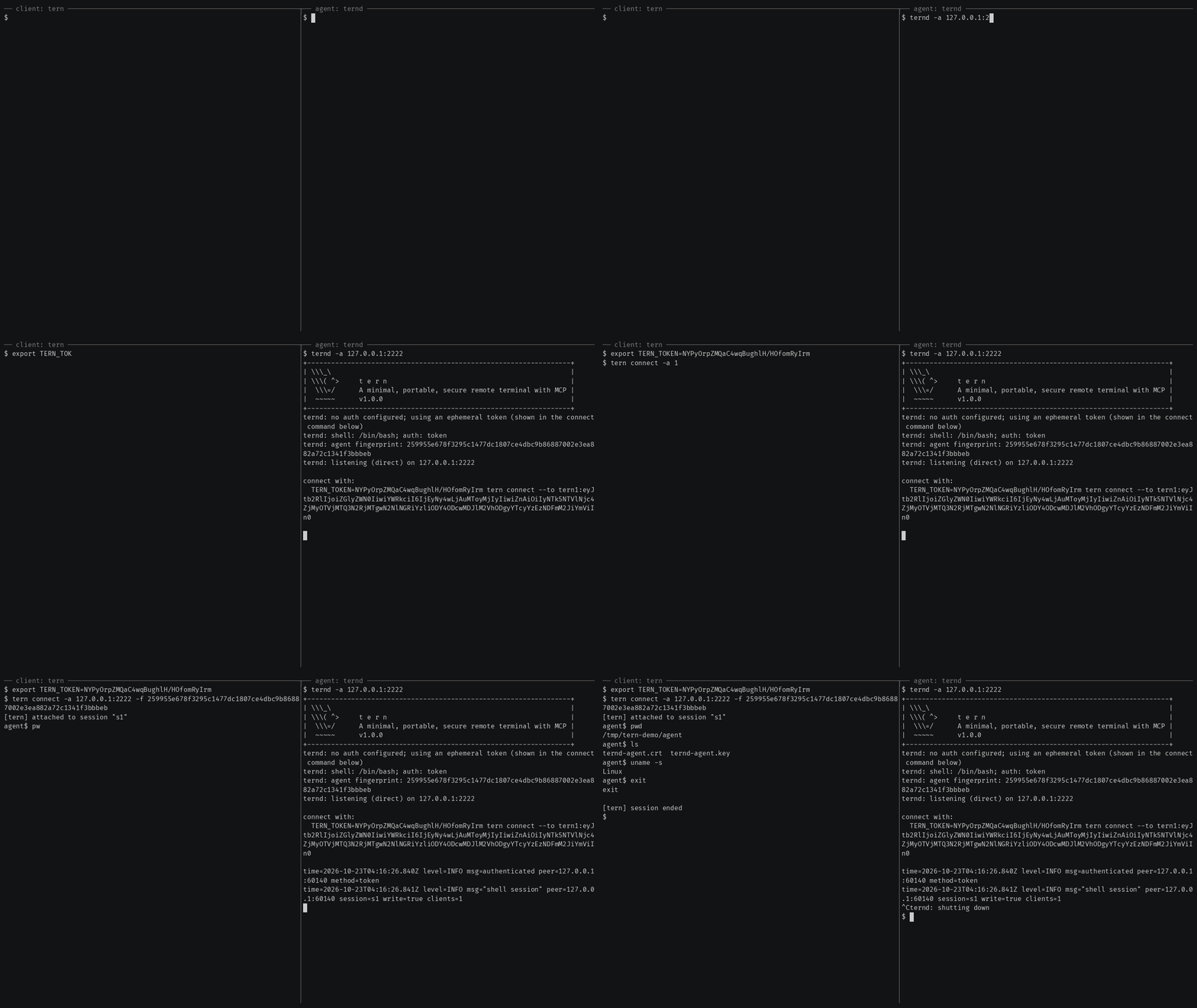
Getting started also covers reaching an agent
behind NAT through a relay, catching one with rtern and logging in with
OpenSSH keys instead of a token.
AI agents (tern mcp)
tern mcp lets an AI client such as Claude Code, Claude Desktop or Cursor work
on your agents through the
Model Context Protocol, under a policy you
set and with an audit log of every call. It is read-only by default, and asks
you before the actions you choose.
In Claude Code, install tern first, then the Ternimal plugin:
claude plugin marketplace add ternimal/tern
claude plugin install ternimal@ternimal
The plugin starts tern from your PATH and reads your hosts from a config
file, ~/.config/tern/mcp.json by default; its ternimal:setup skill walks
you through writing one. plugin/README.md says what it
runs and what it sends. Other clients, a one-line setup without a config
file, the tools and the safety model are in docs/mcp.md.
Features
- Direct or relay: reach an agent on your LAN directly, or reach one behind NAT through a relay, so that agent needs no inbound port.
- End-to-end encryption: TLS and authentication run between client and agent, so a relay only forwards ciphertext.
- Keys or tokens: OpenSSH public keys in
authorized_keysformat, or a shared token. - Resumable sessions:
tern connectreconnects on its own after a drop and resumes the session with scrollback replay; others can join it as read-only viewers. - One connection, many channels: one authenticated connection can carry a
shell,
exec, port forwards and file copy at once. - REST gateway and MCP server: run commands over HTTP, or let AI agents work under a policy.
- Recording: with
ternd --record-dir, the agent saves each session as an asciicast, playable withasciinema play. - Zero-config: run
terndwith no flags on a terminal and it mints a token and prints the line to connect with. - Portable: Linux, macOS, Windows and Android on amd64 and arm64.
All of them in detail: docs/features.md.
Documentation
- Getting started: direct, through a relay, with
rtern, with OpenSSH keys and the insecure flags for testing - Commands: every
terncommand, sharing and resuming sessions, copying files, port forwards - REST gateway: run commands on an agent over HTTP
- AI agents over MCP: the config file, profiles, tools, approvals and the audit log
- Install and build: checking a release, building from source, supported platforms
- Keys, tokens and files: the rules for the files tern reads
- Operating notes: listeners, shutdown, recordings and other details
- Security: the threat model, the dangerous flags and how to report a vulnerability
- Contributing: license terms, the CLA, development and the code layout
License
Ternimal is licensed under the GNU Affero General Public License v3.0 only (AGPL-3.0-only); see LICENSE. Running a modified version to provide a network service requires offering that version's source to its users.
A separate commercial license is available for uses that cannot comply with the AGPL, for example embedding Ternimal in a proprietary or hosted service; see NOTICE. Contributions are welcome; see CONTRIBUTING for the license terms and the CLA.
"Ternimal", the binary names (tern, ternd, ternr, rtern) and the
project logo are project trademarks and are not licensed under the AGPL; see
NOTICE.
Ternimal MCP 질문
AI agent가 Ternimal을 어떻게 사용하나요?
Claude Code 또는 Cursor와 같은 AI 클라이언트는 tern mcp 명령어를 사용하여 Model Context Protocol(MCP)을 통해 agent를 작동시킬 수 있습니다.
연결이 안전한가요?
네, 클라이언트와 agent 간의 트래픽은 필수 인증을 포함한 종단간 TLS를 사용하므로, relay는 암호화된 데이터만 전달합니다.
NAT 뒤에 있는 머신에 Ternimal로 접속할 수 있나요?
네, relay를 사용하여 연결을 브릿지하면 NAT 뒤에 있는 agent에 접속할 수 있습니다.
AI agent의 기본 권한은 무엇인가요?
기본적으로 MCP server는 읽기 전용이며, 지정된 작업을 수행하기 전에 사용자의 승인을 요청합니다.