
tty-table MCP server
2026년 10월 13일 커밋AI 클라이언트가 데이터를 ASCII 또는 Unicode 터미널 테이블로 렌더링하여 README 및 기타 텍스트 파일에 사용할 수 있도록 합니다.
다른 이름 tecfu/tty-table
- 스타
- 311
- Tools
- 4
- 다운로드, 30일
- —
- 최신 버전
- —
- 마지막 커밋
- 2026년 10월 13일
- 라이선스
- MIT
tty-table MCP란?
tty-table은(는) MCP server입니다. AI 클라이언트가 데이터를 ASCII 또는 Unicode 터미널 테이블로 렌더링하여 README 및 기타 텍스트 파일에 사용할 수 있도록 합니다. 4개 도구를 제공합니다. 예: render_table, header, rows.
프로젝트 README에서 생성된 요약
tty-table MCP server 정보
tty-table은 AI 클라이언트가 가공되지 않은 데이터를 포맷팅된 ASCII 또는 Unicode 터미널 테이블로 변환할 수 있게 해줍니다. Claude, Cursor 또는 기타 IDE 에이전트를 사용하는 개발자는 npx를 사용하여 stdio를 통해 이 server를 연결하고, 구조화된 정보를 읽기 쉬운 텍스트 레이아웃으로 변환할 수 있습니다. 이는 AI 대화에서 직접 깔끔한 문서, README 파일 또는 터미널 친화적인 보고서를 생성할 때 특히 유용합니다.
render_table 도구는 기본 인터페이스 역할을 하며, 사용자가 헤더, 행, 그리고 width, borderStyle, align 또는 compact mode와 같은 특정 구성 옵션을 전달할 수 있도록 합니다. server는 Unicode 너비 측정 및 텍스트 줄 바꿈을 포함한 복잡한 포맷팅 로직을 처리하여 터미널 환경에서 테이블이 올바르게 보이도록 보장합니다. MCP 구현을 실행하려면 Node.js 22 이상이 필요합니다.
프로젝트의 README를 바탕으로 작성되었습니다. 모든 활용 사례는 해당 내용의 인용문과 대조하여 확인합니다.
tty-table MCP 도구 4
README에서 감지됨render_tableheaderrowsoptions
| render_table | — | |
| header | — | |
| rows | — | |
| options | — |
자동 검사
2026년 11월 13일에 실행됨전체 보고서 →아직 인증되지 않았습니다. 서버는 80점 이상의 점수, 심각한 결함 없음, 그리고 검사에 충분한 데이터를 갖추어야 합니다. 검사 방식 · 점수를 높이기 위해 수정할 항목

- 소스 저장소 연결 및 접근 가능tecfu/tty-table is public and reachablegithub.com/tecfu/tty-table ↗통과
- 패키지가 이 저장소를 소스로 명시검사되지 않음
- 빌드 출처(Sigstore 증명)검사되지 않음
- 오픈 소스 라이선스 (OSI)MITspdx.org/licenses/MIT.html ↗통과
- 최근 1년 내 커밋 또는 릴리스Last commit or release 2026-10-13github.com/tecfu/tty-table ↗통과
- OpenSSF ScorecardOpenSSF Scorecard 4.8 / 10; weakest: Code-Review 0, Pinned-Dependencies 0, CII-Best-Practices 0scorecard.dev/viewer/?uri=github.com/tecfu/tty-table ↗부분 7/15
- 패키지 이름이 인기 패키지와 유사하지 않음검사되지 않음
- 패키지 및 해당 종속성에 중요한 보안 권고 없음검사되지 않음
- 모델에 대한 숨겨진 지침 없음4 tool descriptions and the README read; no override phrases, credential paths or hidden characters통과
- 파괴적인 도구에 라벨 표시됨No tool named like delete, drop or exec통과
- 원격 엔드포인트가 MCP 핸드셰이크에 응답검사되지 않음
README
GitHub에서 보기tty-table
A TypeScript-first terminal table renderer with a compatibility-oriented factory API.
Examples
See here for complete example list
To view all example output:
$ git clone https://github.com/tecfu/tty-table && cd tty-table && npm i
$ npm run view-examples
Terminal (Static)
examples/styles-and-formatting.js

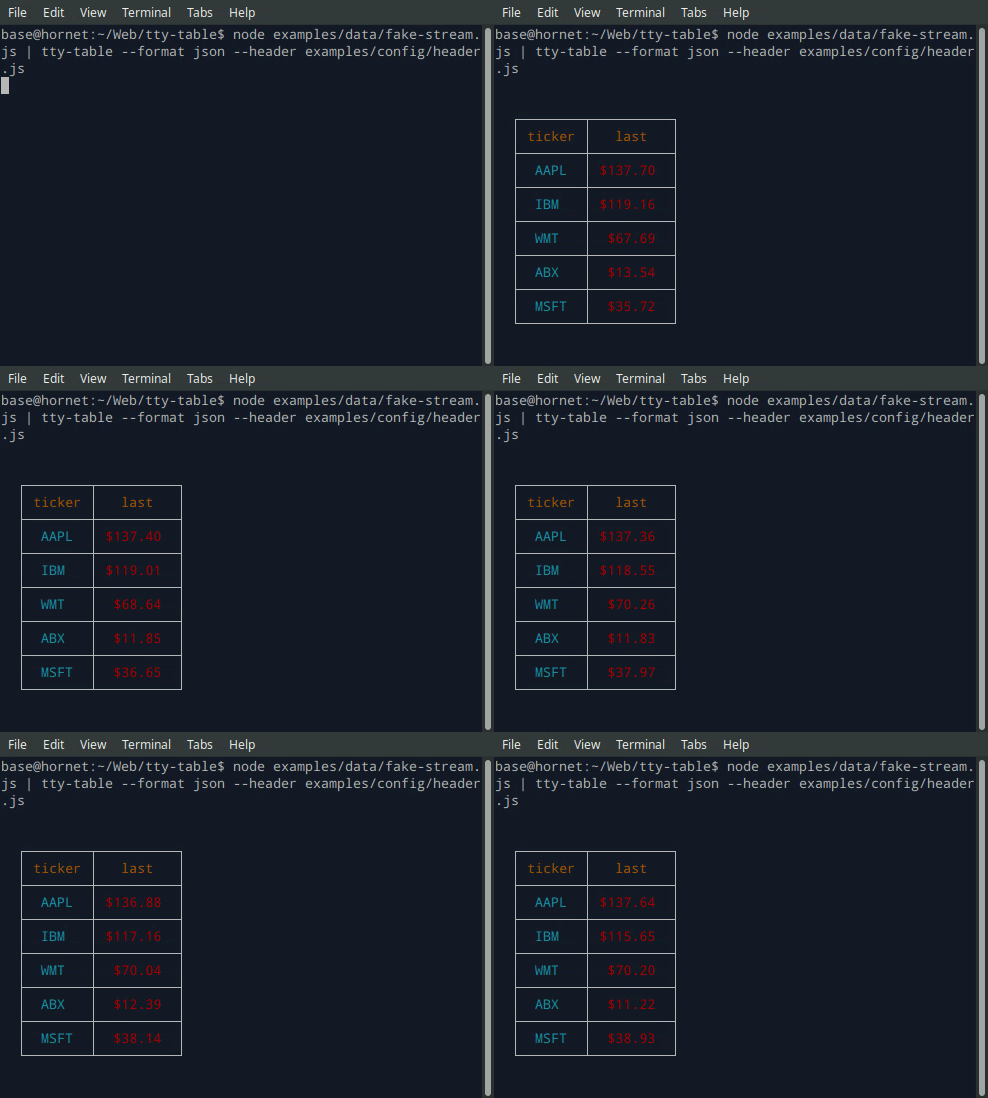
Terminal (Streaming)
$ node examples/data/fake-stream.js | tty-table --format json --header examples/config/header.js
- See the built-in help for the terminal version of tty-table with:
$ tty-table -h
MCP server
Expose tty-table to MCP clients (Claude, IDE agents, Cursor, etc.) over stdio.
Client configuration
{
  "mcpServers": {
    "tty-table": {
      "command": "npx",
      "args": ["-y", "--package=tty-table", "tty-table-mcp"]
    }
  }
}
Tools
| Tool | Description |
|---|---|
render_table |
Render data as an ASCII/Unicode terminal table. Accepts header, rows, and any tty-table options; returns the rendered table as text. |
Arguments for render_table:
| Name | Type | Required | Description |
|---|---|---|---|
header |
(string | {value, align?, width?})[] |
no | Column definitions |
rows |
(unknown[] | Record<string, unknown>)[] |
yes | Row data (arrays of cells, or objects keyed by column name) |
options |
object |
no | Any tty-table option (e.g. width, borderStyle, align, compact) |
Example tool call:
{
  "header": [{ "value": "name" }, { "value": "score", "align": "right" }],
  "rows": [["Ada", 100], ["Grace", 98]],
  "options": { "width": 40 }
}
Rendered result:
  ┌───────┬───────┐
  │ name  │ score │
  ├───────┼───────┤
  │  Ada  │   100 │
  ├───────┼───────┤
  │ Grace │    98 │
  └───────┴───────┘
Additional tools may be added in future releases under the same MCP server.
Browser & Browser Console
The published package ships a standalone IIFE bundle that exposes a TtyTable global. Load it directly from a CDN — no install or build step required:
<script src="https://cdn.jsdelivr.net/npm/tty-table@7/dist/browser/tty-table.global.js"></script>
<script>
  const Table = TtyTable.default
  console.log(Table([{ value: "name" }, { value: "score" }], [["Ada", 100]], null).render())
</script>
- Try it online before installing: live example on JSFiddle
- View the full example locally in Chrome or Chromium by opening examples/browser-example.html (e.g. served with
npx serve .or any static file server). - source: examples/browser-example.html

Compatibility
Node.js
Current releases require Node.js 22 or newer. This is a breaking change from the Node 20 baseline used by early v6 releases (and from the v5 line, which supported older Node.js releases). The floor was raised to match smartwrap@4 / breakword@2.1.0. If your application must remain on Node 20, stay on a prior tty-table release until you can upgrade.
The published package provides both ESM and CommonJS entry points for Node.js. The CLI requires Node.js 22+ as well.
API
import Table from "tty-table"

const table = Table(
  [{ value: "name" }, { value: "score", align: "right" }],
  [
    { name: "Ada", score: 100 },
    { name: "Grace", score: 98 }
  ],
  { borderStyle: "solid" }
)

console.log(table.render())
Legacy Table(header, rows, footer, options) and Table(rows, options) construction remains supported.
Formatter context
New code can use the explicit context form:
const formatter = (value: unknown) => String(value).toUpperCase()
The compatibility callback signature is still accepted. New integrations should prefer a formatter that accepts the documented context object and avoid relying on dynamic this mutation.
Width semantics
Widths are measured in terminal display columns, not JavaScript string length. ANSI escape sequences are ignored for measurement; Unicode code points are counted using breakword.width() (Unicode 18.0.0 East Asian Width + UAX #51 Emoji_Presentation). Wrapping and truncation operate on the same display-width semantics.
Compared with older releases that used wcwidth, some symbols that were previously treated as 1 cell are now 2 cells (for example ⚡ U+26A1). Tables containing those characters may reflow slightly; measurement is now aligned with the same library used for wrapping.
Development
npm install
npm run typecheck
npm run build
npm test
npm run test:unit
npm run lint
tty-table MCP 질문
tty-table MCP는 어떤 도구를 제공하나요?
4개 도구를 제공합니다. 예: render_table, header, rows, options.
Claude 또는 Cursor에서 tty-table을 어떻게 사용하나요?
클라이언트 설정에서 mcpServers를 구성하여 Claude, IDE 에이전트 또는 Cursor와 같은 MCP 클라이언트에 stdio를 통해 노출할 수 있습니다.
MCP server에서 사용할 수 있는 도구는 무엇인가요?
이 server는 render_table 도구를 제공하며, 헤더, 행 및 다양한 tty-table 옵션을 입력받아 렌더링된 ASCII/Unicode 테이블을 반환합니다.
필요한 Node.js 버전은 무엇인가요?
현재 버전은 Node.js 22 이상이 필요합니다.