
SyncSo MCP server
2026년 10월 16일 커밋라이브 음악, 공연, 클래스, 마켓, 나이트라이프를 포함한 뉴욕시의 실시간 이벤트 정보를 AI agent에게 제공합니다.
다른 이름 SyncSo-Inc/syncso
- 스타
- 2
- Tools
- —
- 다운로드, 30일
- —
- 최신 버전
- 2.0.0
- 마지막 커밋
- 2026년 10월 16일
- 라이선스
- MIT
SyncSo MCP란?
SyncSo은(는) MCP server입니다. 라이브 음악, 공연, 클래스, 마켓, 나이트라이프를 포함한 뉴욕시의 실시간 이벤트 정보를 AI agent에게 제공합니다.
프로젝트 README에서 생성된 요약
SyncSo MCP server 정보
SyncSo는 뉴욕시의 지역 이벤트에 관한 실시간 데이터를 AI agent에게 제공합니다. 일반적인 언어 모델은 가이드북처럼 정적인 학습 데이터에 의존하지만, 이 MCP server는 agent를 음악, 공연, 코미디, 마켓, 클래스, 나이트라이프의 라이브 데이터베이스에 연결합니다. 기존 데이터셋에는 나타나지 않을 수 있는 이벤트의 날짜, 시간, 가격, 예약 링크와 같은 구체적인 정보를 전달합니다.
개발자는 Claude Desktop, Claude Code, Cursor, Windsurf, VS Code를 포함한 다양한 환경에 이 서비스를 통합할 수 있습니다. 연결은 원격 MCP URL을 사용하거나 skill 파일을 추가하여 설정합니다. 사용자는 인증을 위해 syncso.com에서 로그인해야 하며, 모든 계정에는 매월 무료 검색 쿼리가 제공됩니다. 시스템은 정보 검색을 위해 find_things_to_do와 get_details라는 두 가지 주요 도구를 사용합니다. 현재 서비스 범위는 뉴욕시에 한정되어 있으나, 향후 더 많은 도시로 확장될 예정입니다.
활용 사례
- 1방문객을 위한 지역 활동 계획화요일에 방문하는 부모님을 위한 특정 활동을 찾아달라고 agent에게 요청합니다.
- 2즉각적인 지역 엔터테인먼트 탐색향후 4시간 이내에 열리는 무료 야외 이벤트 목록을 요청합니다.
- 3향후 사교 모임 일정 예약커플이 3주 전에 예약할 수 있는 활동을 agent가 찾도록 합니다.
- 4틈새 지역 이벤트 발견도예 클래스나 야시장 같은 소규모 이벤트를 검색합니다.
프로젝트의 README를 바탕으로 작성되었습니다. 모든 활용 사례는 해당 내용의 인용문과 대조하여 확인합니다.
SyncSo MCP 설치 방법
형식 확인: 2026년 11월 10일Cursor에 추가Goose에 추가Claude Code에 SyncSo MCP 설치
$ claude mcp add --transport http syncso https://rtdb.syncso.com/partner/mcpCursor에 SyncSo MCP 설치
~/.cursor/mcp.json
{
  "mcpServers": {
    "syncso": {
      "url": "https://rtdb.syncso.com/partner/mcp"
    }
  }
}VS Code에 SyncSo MCP 설치
.vscode/mcp.json
{
  "servers": {
    "syncso": {
      "type": "http",
      "url": "https://rtdb.syncso.com/partner/mcp"
    }
  }
}VS Code CLI에 SyncSo MCP 설치
$ code --add-mcp '{"name":"syncso","type":"http","url":"https://rtdb.syncso.com/partner/mcp"}'Codex에 SyncSo MCP 설치
$ codex mcp add syncso --url https://rtdb.syncso.com/partner/mcpCodex config.toml에 SyncSo MCP 설치
~/.codex/config.toml
[mcp_servers.syncso]
url = "https://rtdb.syncso.com/partner/mcp"
Gemini CLI에 SyncSo MCP 설치
$ gemini mcp add -s user --transport http syncso https://rtdb.syncso.com/partner/mcpGemini settings.json에 SyncSo MCP 설치
~/.gemini/settings.json
{
  "mcpServers": {
    "syncso": {
      "url": "https://rtdb.syncso.com/partner/mcp",
      "type": "http"
    }
  }
}자동 검사
2026년 11월 14일에 실행됨전체 보고서 →아직 인증되지 않았습니다. 서버는 80점 이상의 점수, 심각한 결함 없음, 그리고 검사에 충분한 데이터를 갖추어야 합니다. 검사 방식 · 점수를 높이기 위해 수정할 항목

- 소스 저장소 연결 및 접근 가능syncso-inc/syncso is public and reachablegithub.com/syncso-inc/syncso ↗통과
- 패키지가 이 저장소를 소스로 명시검사되지 않음
- 빌드 출처(Sigstore 증명)검사되지 않음
- 오픈 소스 라이선스 (OSI)MITspdx.org/licenses/MIT.html ↗통과
- 최근 1년 내 커밋 또는 릴리스Last commit or release 2026-10-16github.com/syncso-inc/syncso ↗통과
- OpenSSF Scorecard검사되지 않음
- 패키지 이름이 인기 패키지와 유사하지 않음검사되지 않음
- 패키지 및 해당 종속성에 중요한 보안 권고 없음검사되지 않음
- 모델에 대한 숨겨진 지침 없음0 tool descriptions and the README read; no override phrases, credential paths or hidden characters통과
- 파괴적인 도구에 라벨 표시됨검사되지 않음
- 원격 엔드포인트가 MCP 핸드셰이크에 응답HTTPS endpoint answered 401 (sign-in required)통과
README
GitHub에서 보기SyncSo
Let your agents understand what's happening locally, in real time.
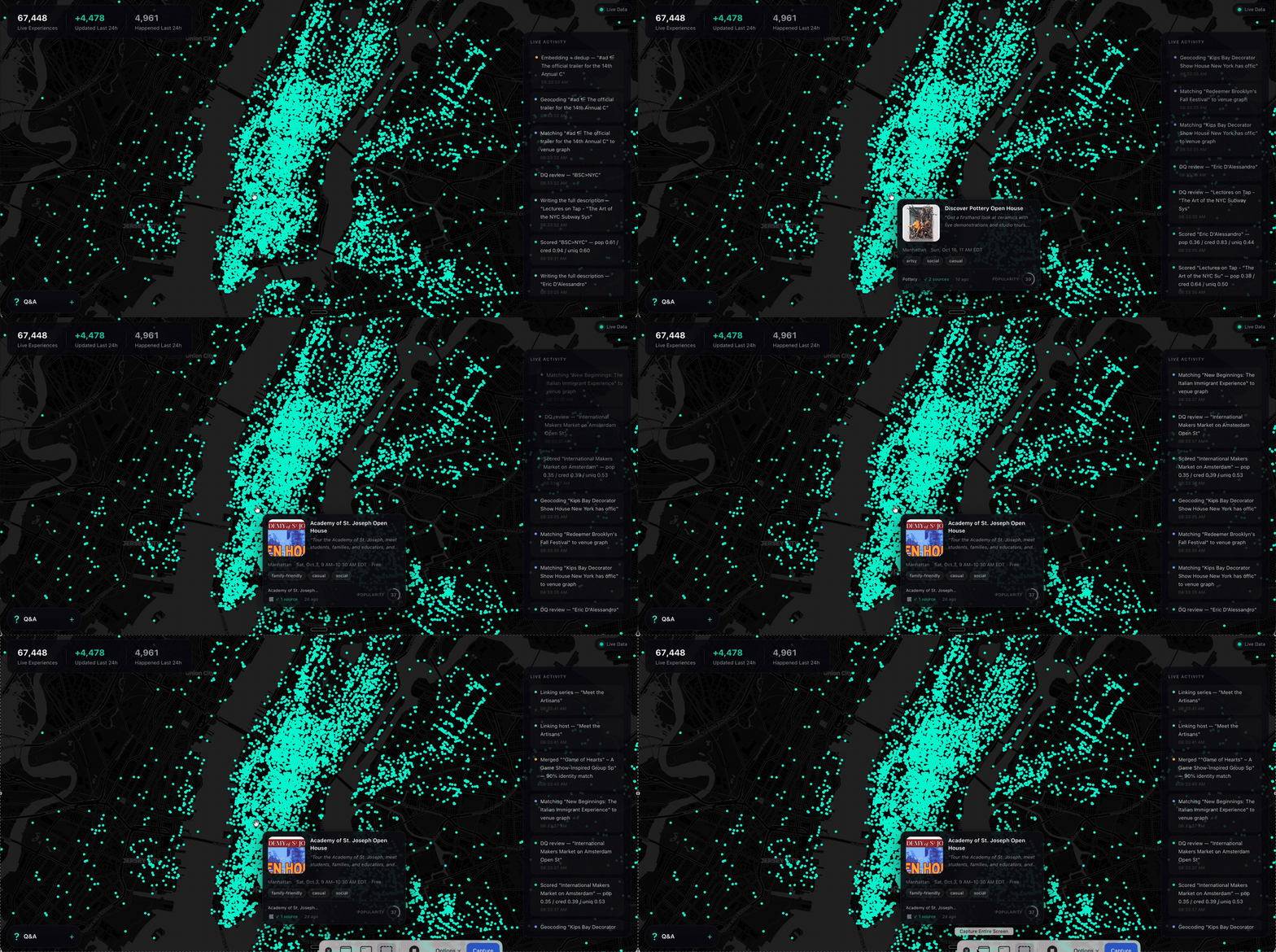
Ask a model what to do in New York and it names the Whitney. It is not wrong. It is just answering from a guidebook, because that is what it has — a city as a list of places, frozen whenever the training run ended.
What it does not have is everything going on inside those places, and the thousand rooms that never make a guidebook. The Tuesday gig. The pottery class with two seats left. The night market under the bridge. Your model has never heard of any of it.
SyncSo is that missing half: live music, theater, comedy, film, art, sports, festivals, markets, food and drink, classes, tours, nightlife — the whole surface of a city, each thing carrying its dates, times, prices, booking links and images. Not one category. Not the famous parts.
Which means your agent can finally take the questions it used to hand back. Where to take a visiting parent on a Tuesday. What a couple could book three weeks out. What is free, outdoors, and happening in the next four hours. Real answers, with a link to book them.
Install
One catalogue, two doors. Assistants that speak MCP connect to
https://rtdb.syncso.com/partner/mcp. Anything else reads the skill file at
https://syncso.com/SKILL.md. Both open the same account: the first search
asks the person to sign in once at syncso.com, and every account starts with
a free monthly allowance of searches.
Claude
In Claude.ai or the Claude desktop app: Settings → Connectors → Add custom connector, paste the MCP URL, and ask. Claude also lists SyncSo in its directory, where it is one click.
In Claude Code, connect the MCP server:
claude mcp add --transport http syncso https://rtdb.syncso.com/partner/mcp
or install the skill as a plugin, which keeps itself current:
claude plugin marketplace add SyncSo-Inc/syncso
claude plugin install syncso@syncso
ChatGPT
Coming to the ChatGPT app directory. Until it is listed: Settings → Apps & Connectors → Advanced → Developer mode, add a connector, paste the MCP URL. Developer mode is not available on every plan.
Cursor, Windsurf, VS Code and other MCP clients
Add SyncSo to the client's MCP configuration:
{
  "mcpServers": {
    "syncso": { "url": "https://rtdb.syncso.com/partner/mcp" }
  }
}
OpenClaw
openclaw skills install @liangstl/syncso
Also on ClawHub, where
clawhub install syncso does the same.
Coding agents that read skill folders
Claude Code, Codex, Cursor, Copilot and the rest, one command:
npx skills add SyncSo-Inc/syncso
Anything else
Tell your assistant:
Set up SyncSo from https://syncso.com/SKILL.md
The file carries the guidance and the tool definitions, works with anything that can call a tool and make an HTTPS request, and the copy at that URL is always the current one. A person using it gets their sign-in code at syncso.com/connect.
Two tools do the work, find_things_to_do and get_details. That is the
whole surface.
Coverage
New York only, for now. More cities over the coming months.
Within it, everything: every category above, from the institutions down to the one-night thing in a room above a bar. Ask about anywhere else and the skill tells your model to say so rather than invent an answer — the same refusal to guess that makes the New York answers worth trusting.
Links
- syncso.com — what SyncSo is
- syncso.com/connect — where your user gets their code
- syncso.com/SKILL.md — the skill itself, always the current copy (also in this repo)
Questions
Something missing, wrong, or not working the way this page says? Open an issue, or email hello@syncso.com. And if there is a city you want open, tell us.
License
MIT. See LICENSE.
SyncSo MCP 질문
SyncSo MCP를 Claude Code에 추가하려면 어떻게 하나요?
터미널에서 claude mcp add --transport http syncso https://rtdb.syncso.com/partner/mcp를 실행합니다. 모든 프로젝트에서 사용할 수 있게 하려면 --scope user를 추가합니다.
SyncSo MCP를 Cursor에 추가하려면 어떻게 하나요?
~/.cursor/mcp.json를 열고 mcpServers 아래에 서버를 추가합니다. 위 설치 섹션에 표시된 Cursor 구성을 사용합니다.
SyncSo는 어느 지역을 지원하나요?
현재는 뉴욕 지역만 지원하며, 향후 몇 달 내에 더 많은 도시로 확장할 계획입니다.
사용 비용은 얼마인가요?
모든 계정에는 매월 무료 검색 쿼리가 제공됩니다.
어떤 정보를 찾을 수 있나요?
라이브 음악, 공연, 코미디, 영화, 예술, 스포츠, 축제, 마켓, 음식, 음료, 클래스, 투어, 나이트라이프에 관한 상세 정보를 찾을 수 있습니다.