
AI 클라이언트가 자체 호스팅 팀 위키의 페이지와 테이블을 작성, 업데이트 및 조회할 수 있도록 하며, 내장된 검토 워크플로우를 제공합니다.
다른 이름 stuga-dev/stuga, @stuga/mcp
- 스타
- 6
- Tools
- —
- 다운로드, 30일
- —
- 최신 버전
- 0.2.1
- 마지막 커밋
- 2026년 11월 12일
- 라이선스
- AGPL-3.0
Stuga MCP란?
Stuga은(는) MCP server입니다. AI 클라이언트가 자체 호스팅 팀 위키의 페이지와 테이블을 작성, 업데이트 및 조회할 수 있도록 하며, 내장된 검토 워크플로우를 제공합니다.
프로젝트 README에서 생성된 요약
Stuga MCP server 정보
Stuga는 에이전트가 페이지와 테이블을 작성, 업데이트 및 조회할 수 있게 하여 AI 클라이언트를 통해 팀 위키를 관리할 수 있도록 합니다. 이 자체 호스팅 솔루션은 Apple silicon이 탑재된 Mac 또는 서버의 Docker를 통해 실행됩니다. Claude Desktop, Cursor, VS Code와 같은 다양한 MCP 클라이언트에 연결되며, 에이전트의 자체 모델을 사용하므로 노드 자체를 위한 별도의 AI 키가 필요하지 않습니다.
사용자는 세 가지 단계의 검토 레벨을 통해 정보가 업데이트되는 방식을 제어할 수 있습니다. 변경 사항은 요청한 사람이 검토하거나, 동료의 승인을 거치거나, 위키에 직접 적용할 수 있습니다. 시스템은 정보를 기록하는 Save to Stuga, 승인된 콘텐츠를 조회하는 Ask Stuga, 오래된 페이지나 깨진 링크를 식별하는 Check Stuga와 같은 도구를 사용합니다. 데이터는 Postgres 및 SQLite를 사용하여 로컬에 저장되므로 팀의 문서가 사용자의 통제하에 유지됩니다.
활용 사례
- 1자동화된 위키 문서화AI 에이전트가 회의록이나 이메일 내용을 정확한 위키 페이지 또는 테이블 행에 자동으로 기록할 수 있습니다.
- 2협업 콘텐츠 검증AI가 제안한 편집 사항을 다른 팀원이 반드시 승인해야 하는 워크플로우를 설정할 수 있습니다.
- 3검증된 지식 조회개발자는 공식적으로 승인된 정보만을 기반으로 답변하도록 AI에게 질문할 수 있습니다.
- 4위키 유지 관리 및 정리AI가 문서를 스캔하여 연결되지 않은 페이지나 깨진 링크를 찾아 수정안을 제안할 수 있습니다.
프로젝트의 README를 바탕으로 작성되었습니다. 모든 활용 사례는 해당 내용의 인용문과 대조하여 확인합니다.
Stuga MCP 설치 방법
형식 확인: 2026년 11월 10일Cursor에 추가Goose에 추가Claude Code에 Stuga MCP 설치
$ claude mcp add --env 'STUGA_URL=<STUGA_URL>' stuga -- npx -y @stuga/mcpCursor에 Stuga MCP 설치
~/.cursor/mcp.json
{
  "mcpServers": {
    "stuga": {
      "command": "npx",
      "args": [
        "-y",
        "@stuga/mcp"
      ],
      "env": {
        "STUGA_URL": "<STUGA_URL>"
      }
    }
  }
}VS Code에 Stuga MCP 설치
.vscode/mcp.json
{
  "servers": {
    "stuga": {
      "type": "stdio",
      "command": "npx",
      "args": [
        "-y",
        "@stuga/mcp"
      ],
      "env": {
        "STUGA_URL": "<STUGA_URL>"
      }
    }
  }
}VS Code CLI에 Stuga MCP 설치
$ code --add-mcp '{"name":"stuga","type":"stdio","command":"npx","args":["-y","@stuga/mcp"],"env":{"STUGA_URL":"<STUGA_URL>"}}'Claude Desktop에 Stuga MCP 설치
claude_desktop_config.json
{
  "mcpServers": {
    "stuga": {
      "command": "npx",
      "args": [
        "-y",
        "@stuga/mcp"
      ],
      "env": {
        "STUGA_URL": "<STUGA_URL>"
      }
    }
  }
}Codex에 Stuga MCP 설치
$ codex mcp add stuga --env 'STUGA_URL=<STUGA_URL>' -- npx -y @stuga/mcpCodex config.toml에 Stuga MCP 설치
~/.codex/config.toml
[mcp_servers.stuga]
command = "npx"
args = ["-y", "@stuga/mcp"]

[mcp_servers.stuga.env]
STUGA_URL = "<STUGA_URL>"
Gemini CLI에 Stuga MCP 설치
$ gemini mcp add -s user -e 'STUGA_URL=<STUGA_URL>' stuga npx -- -y @stuga/mcpGemini settings.json에 Stuga MCP 설치
~/.gemini/settings.json
{
  "mcpServers": {
    "stuga": {
      "command": "npx",
      "args": [
        "-y",
        "@stuga/mcp"
      ],
      "env": {
        "STUGA_URL": "<STUGA_URL>"
      }
    }
  }
}구성
STUGA_URL필수The address you open Stuga at.
| 이름 | 설명 | 유형 |
|---|---|---|
| STUGA_URL | The address you open Stuga at. | 필수 |
자동 검사
2026년 11월 12일에 실행됨전체 보고서 →자동 검사를 통과했습니다. 이는 보안 감사가 아닙니다. 코드를 직접 읽고 서버에 필요한 최소한의 권한만 부여하십시오. 검사 방식

- 소스 저장소 연결 및 접근 가능통과
- 오픈 소스 라이선스 (OSI)통과
- 최근 1년 내 커밋 또는 릴리스통과
- 패키지 이름이 인기 패키지와 유사하지 않음통과
- 원격 엔드포인트가 HTTPS 사용통과
- 파괴적인 도구에 라벨 표시됨검사되지 않음
- 모델에 대한 숨겨진 지침 없음통과
- 패키지 및 해당 종속성에 중요한 보안 권고 없음통과
README
GitHub에서 보기Stuga
Your AI writes the team wiki. A colleague approves.
A team wiki of pages and tables, on a Mac or server you run. Say Save to Stuga to Claude, Codex or any MCP client, and it files each point on the right page or in the right table row. By default a change to the wiki waits for whoever asked the AI; set a folder to Reviewed by a colleague and someone else approves it. Ask Stuga answers from what is approved, and says what still waits.
Download for Mac (Apple silicon, macOS 15+) · Install with Docker
Install, then create your account and workspace and connect your AI. Help for people using Stuga: stuga.dev/docs.
How the wiki stays right
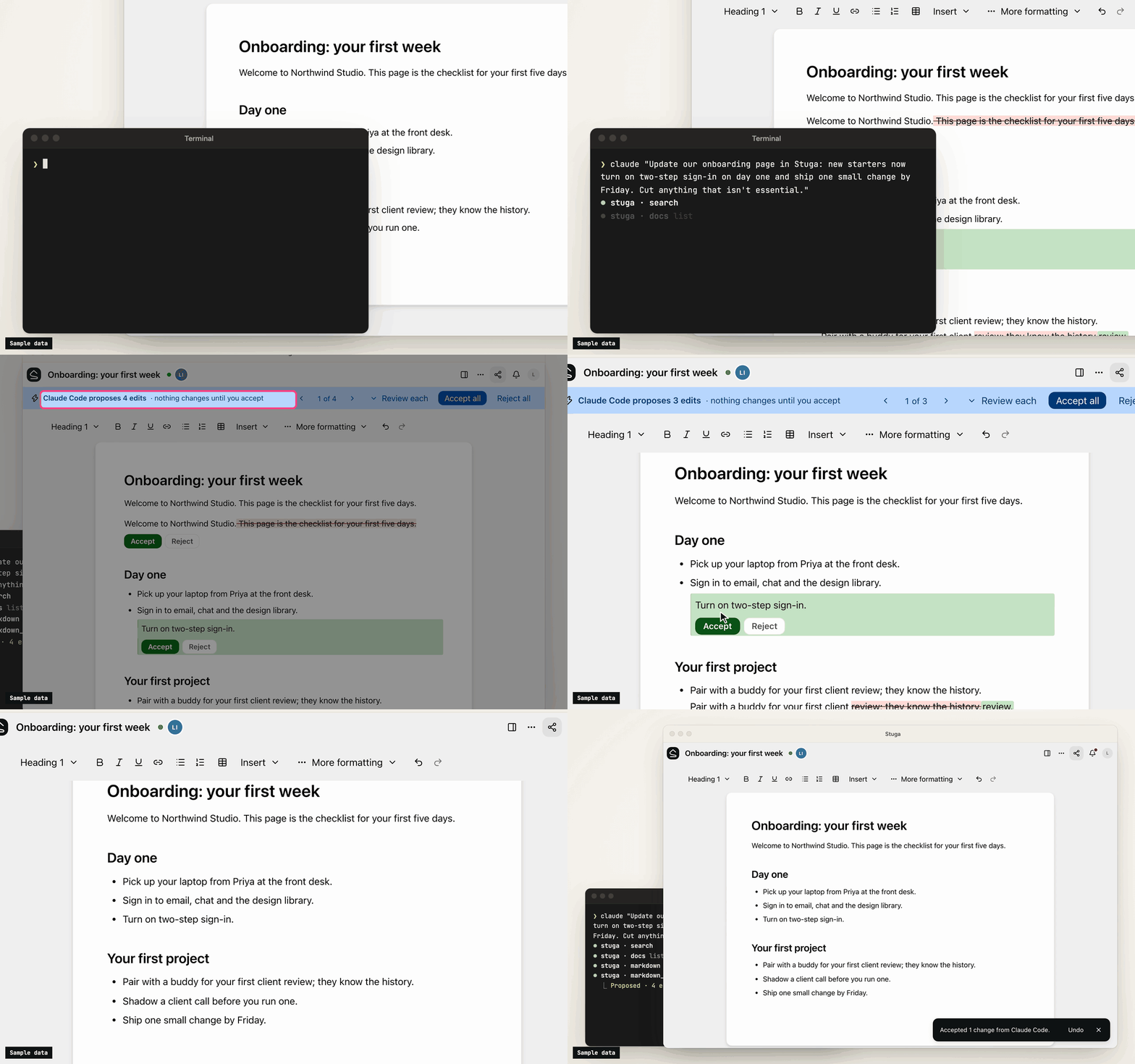
- Save to Stuga. Your AI finds the page and section a point belongs in, or the row a fact fills, and corrects the sentence it changes rather than adding another. It cites the meeting or email a point came from, and tells you what it saved where and what waits. A point no page is about starts a page in the folder it belongs in, or goes in your own My notes.
- Three review levels. In Who reviews AI edits…, a folder, page or database is Reviewed by whoever asked the AI (the default), Reviewed by a colleague (someone else who can edit it, from the folder's approver group if it names one, never the person who asked), or AI edits apply directly (recorded, attributed and revertible). People's own edits go straight in.
- One card per change. Filing a meeting across several pages is one change, reviewed on one card laid out for a phone: each edit in its paragraph, with the sources it cites. Approve all, Ask for changes… or Decline… with a note the AI reads. A folder can post each change that waits for a colleague to a Slack channel.
- Ask Stuga. Your AI answers from the pages and tables, with who last changed each one and when, and what waits: "the page says 14 days; a change to 30 days waits for a colleague".
- Check Stuga. Linked from under each page, Needs checking when a page it cites changes, and Wiki → Index and Wiki → Log. Say Check Stuga and your AI finds stale pages, orphans and broken links, and proposes the fixes as one change.
- Instructions that stack. The workspace, folders, pages and databases can each tell agents what goes where. They advise the model; permissions and review decide what a write does.
What's in it
- Pages written together. Real-time editing (Tiptap over a Yjs CRDT) with presence, comments, @mentions and version history.
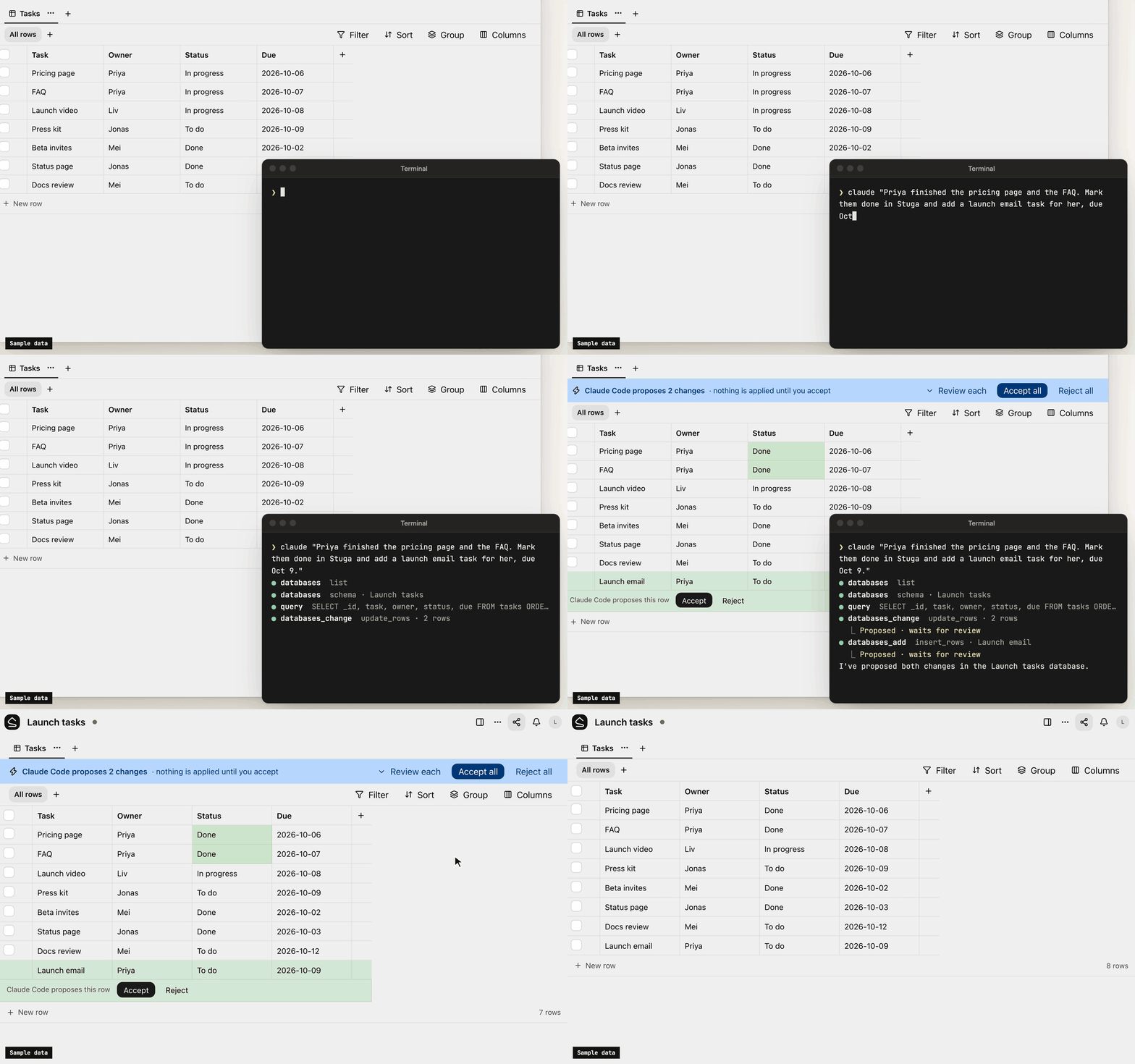
- Tables beside the pages. Typed tables, each database its own SQLite file, with saved views, row pages and CSV import. Agents, Ask and the REST API run read-only SQL on them.
- Search that follows permissions. Keyword (BM25 over Postgres full-text search) and semantic (pgvector) search in one SQL statement, with access checked inside it. Chinese, Japanese, Korean and Thai work without setup.
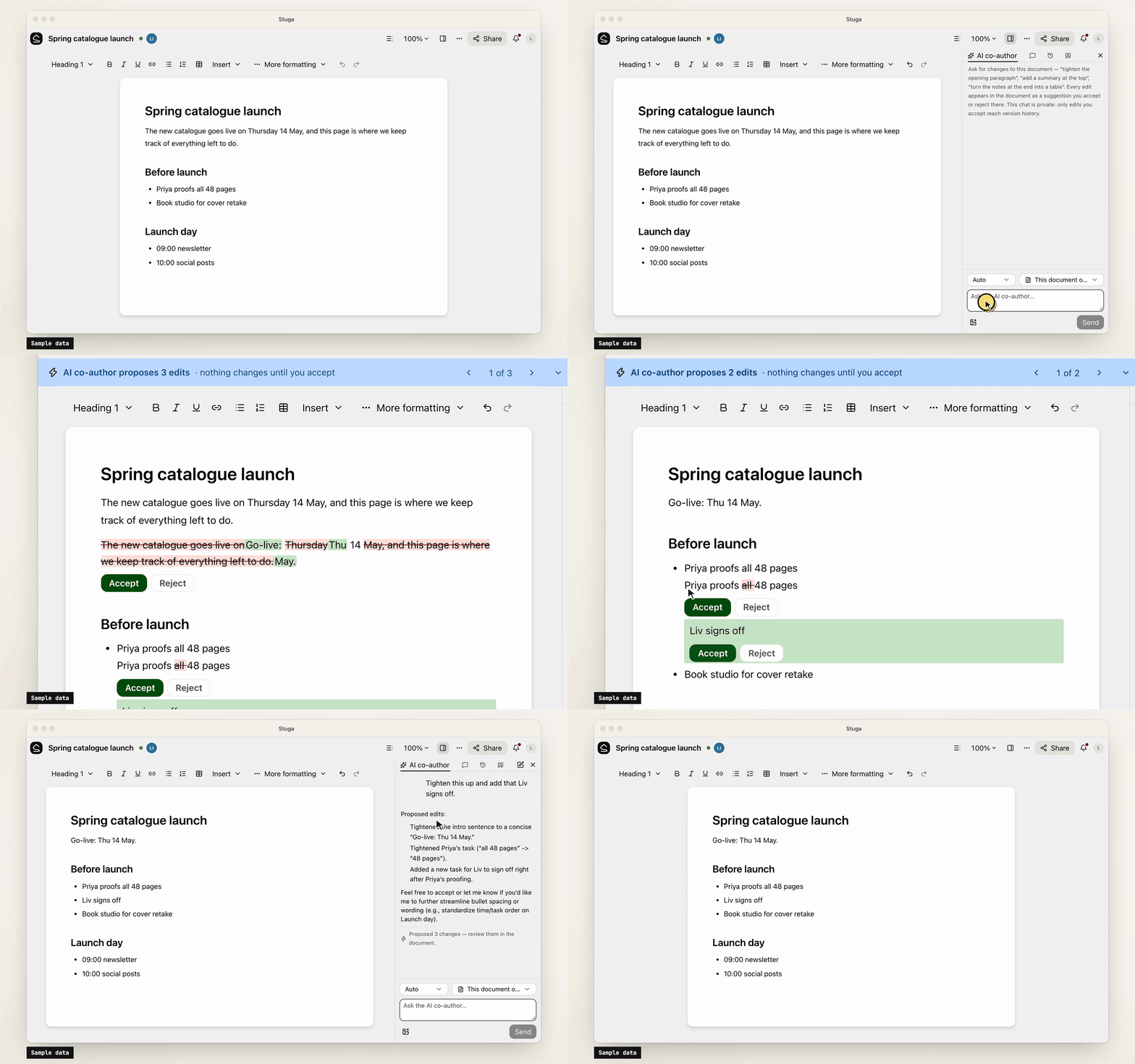
- Built-in AI, off until set up. A co-author and a table assistant, whose edits are reviewed like an agent's, and Ask, which cites sources. OpenAI, Anthropic, Gemini, DeepSeek and more, or Ollama.
- Sharing and sign-in. Workspaces, folders, per-page sharing, groups and guests. People join by invite link and sign in with a password or your OpenID Connect provider.
- Import and export. A Notion export, or a zipped Obsidian vault or folder of Markdown, becomes a
workspace; a workspace exports as one
.stuga.zipof Markdown, JSON Lines and its files.
Connect your AI
Agents connect over MCP. Settings → Your AI agents gives the setup for Claude Code, Claude Desktop, Codex, Antigravity, Cursor, VS Code, Kiro, Goose, LM Studio, DeepSeek Harness and Pi, with your node's address filled in, and the URL any other MCP client needs (docs/agents.md). Each agent brings its own model, so the node needs no AI key.
- Scoped sign-in. Most clients sign in through the browser, where you tick the workspaces an app may use and choose Read only or Read and suggest changes. Revoke ends its access.
- Narrow keys. A client without sign-in uses an API key, which can be confined to folders, made read-only or given an expiry.
- Content only. Agents change documents and databases. Renaming, moving, deleting, sharing and the review setting stay with people.
- Full audit. Every MCP call, reads included, is in the workspace's audit log. An event feed and signed webhooks report what changed.
Your data
Stuga sends no telemetry, and nothing reaches us unless a node admin turns on remote access. The node makes outbound requests only for features in use, such as an AI provider, and asks GitHub once a day for the list of releases unless a node admin turns that off. docs/privacy.md lists what the node sends and stores.
Install
-
A Mac with Apple silicon, on macOS 15 or later: open the package, or
Stuga-<version>.pkgfrom the latest release. It carries its own Postgres and Node.js (docs/install/macos.md). -
Docker on x86-64 or arm64, such as a Linux server or a NAS:
install.shstarts Postgres and the node with Compose (docs/install/docker.md):curl -fsSL https://github.com/stuga-dev/stuga/releases/latest/download/install.sh | bash
A node is one Node.js process and Postgres with pgvector; people open it in a browser. It backs itself up every day by default and before every upgrade (docs/operations.md). docs/getting-started.md walks through the first hour.
Questions and feedback
Ask a question or share an idea in Discussions; report a bug as an issue.
Contributing
Issues and pull requests are welcome. CONTRIBUTING.md covers running Stuga from source, the tests and the conventions, and RELEASING.md how a release is cut. Contributions are accepted under a Contributor License Agreement (CLA.md); a bot asks on your first pull request. Report a vulnerability privately, as SECURITY.md describes.
License
AGPL-3.0-only, except integrations/, which is MIT; copyright notice in NOTICE. If you modify Stuga and offer it to others over a network, you share your changes under the same terms. The name and logo are not covered by the license: TRADEMARKS.md says how you may use them.
Stuga MCP 질문
Stuga MCP를 Claude Code에 추가하려면 어떻게 하나요?
터미널에서 claude mcp add --env 'STUGA_URL=<STUGA_URL>' stuga -- npx -y @stuga/mcp를 실행합니다. 모든 프로젝트에서 사용할 수 있게 하려면 --scope user를 추가합니다.
Stuga MCP를 Cursor에 추가하려면 어떻게 하나요?
~/.cursor/mcp.json를 열고 mcpServers 아래에 서버를 추가합니다. 위 설치 섹션에 표시된 Cursor 구성을 사용합니다.
AI가 위키를 어떻게 업데이트하나요?
AI가 업데이트할 정확한 페이지, 섹션 또는 테이블 행을 찾아 단순히 새로운 내용을 추가하는 대신 기존 문장을 수정합니다.
서버에 별도의 AI 키가 필요한가요?
아니요, 각 에이전트가 자체 모델을 사용하므로 노드에 별도의 AI 키가 필요하지 않습니다.
기존 노트를 어떻게 가져오나요?
Notion 내보내기 파일이나 압축된 Obsidian vault 또는 Markdown 폴더를 워크스페이스로 가져올 수 있습니다.