
Conduct AI MCP란?
Claude Code 및 Cursor와 같은 AI 클라이언트 전반에서 AI 에이전트를 관리하고, 워크플로우를 트리거하며, 팀 보안 정책을 적용합니다.
프로젝트 README에서 생성된 요약
Conduct AI MCP server 정보
Conduct AI는 엔지니어링 팀이 AI 에이전트를 관리하고 개발 환경 전반에 걸쳐 보안 정책을 적용할 수 있도록 지원합니다. 개발자는 플레이북에서 에이전트를 설치하고, 프로젝트를 관리하며, CLI를 사용하여 엔드 투 엔드 테스트를 실행할 수 있습니다. 이 시스템은 Linux, macOS, Windows에서 로컬로 작동하며, Python 설치와 conduct login 명령어를 통한 인증을 위한 Conduct AI 대시보드 생성 에이전트 토큰이 필요합니다.
보안 팀은 ConductGuard를 사용하여 Claude Code, Cursor, Windsurf와 같은 클라이언트의 AI 도구 사용을 제어합니다. conduct guard sync를 실행하면 CLI가 PreToolUse hook과 MCP server를 설치하여 팀 규칙을 자동으로 적용합니다. 이 설정을 통해 사전 정의된 정책에 따라 도구 호출을 차단, 경고 또는 감사할 수 있습니다. 또한 이 시스템은 보안 이벤트를 OWASP Agentic Top 10에 매핑하고, conduct verify 명령어를 사용하여 CI 환경에서 컴플라이언스 준수 여부를 확인할 수 있는 도구를 제공합니다.
활용 사례
- 1에이전트 플릿 배포개발자는 단일 명령어를 사용하여 특정 리포지토리에 필요한 전체 에이전트 제품군을 빠르게 설정할 수 있습니다.
- 2보안 정책 적용보안 관리자는 개발자 머신에 정책을 자동으로 동기화하여 승인되지 않은 도구 작업을 방지할 수 있습니다.
- 3AI 보안 컴플라이언스 검증팀은 최근 보안 이벤트를 OWASP Agentic Top 10과 대조하여 안전 표준 준수 여부를 확인할 수 있습니다.
- 4에이전트 워크플로우 테스트개발자는 합성 테스트 페이로드를 트리거하여 설치된 에이전트가 올바르게 작동하는지 확인할 수 있습니다.
프로젝트의 README를 바탕으로 작성되었습니다. 모든 활용 사례는 해당 내용의 인용문과 대조하여 확인합니다.
Conduct AI MCP 설치 방법
형식 확인: 2026년 11월 10일Cursor에 추가Goose에 추가Claude Code에 Conduct AI MCP 설치
$ claude mcp add conduct-cli -- uvx conduct-cliCursor에 Conduct AI MCP 설치
~/.cursor/mcp.json
{
  "mcpServers": {
    "conduct-cli": {
      "command": "uvx",
      "args": [
        "conduct-cli"
      ]
    }
  }
}VS Code에 Conduct AI MCP 설치
.vscode/mcp.json
{
  "servers": {
    "conduct-cli": {
      "type": "stdio",
      "command": "uvx",
      "args": [
        "conduct-cli"
      ]
    }
  }
}VS Code CLI에 Conduct AI MCP 설치
$ code --add-mcp '{"name":"conduct-cli","type":"stdio","command":"uvx","args":["conduct-cli"]}'Claude Desktop에 Conduct AI MCP 설치
claude_desktop_config.json
{
  "mcpServers": {
    "conduct-cli": {
      "command": "uvx",
      "args": [
        "conduct-cli"
      ]
    }
  }
}Codex에 Conduct AI MCP 설치
$ codex mcp add conduct-cli -- uvx conduct-cliCodex config.toml에 Conduct AI MCP 설치
~/.codex/config.toml
[mcp_servers.conduct-cli]
command = "uvx"
args = ["conduct-cli"]
Gemini CLI에 Conduct AI MCP 설치
$ gemini mcp add -s user conduct-cli uvx -- conduct-cliGemini settings.json에 Conduct AI MCP 설치
~/.gemini/settings.json
{
  "mcpServers": {
    "conduct-cli": {
      "command": "uvx",
      "args": [
        "conduct-cli"
      ]
    }
  }
}자동 검사
2026년 11월 15일에 실행됨전체 보고서 →자동 검사를 통과했습니다. 이는 보안 감사가 아닙니다. 코드를 직접 읽고 서버에 필요한 최소한의 권한만 부여하십시오. 검사 방식 · 점수를 높이기 위해 수정할 항목

- 소스 저장소 연결 및 접근 가능sseshachala/conduct-cli is public and reachablegithub.com/sseshachala/conduct-cli ↗통과
- 패키지가 이 저장소를 소스로 명시conduct-cli names https://github.com/sseshachala/conductai/issues as its sourcepypi.org/project/conduct-cli/ ↗결함 발견
- 빌드 출처(Sigstore 증명)Sigstore attestation for conduct-clipypi.org/project/conduct-cli/ ↗통과
- 오픈 소스 라이선스 (OSI)No license결함 발견
- 최근 1년 내 커밋 또는 릴리스Last commit or release 2026-08-13github.com/sseshachala/conduct-cli ↗통과
- OpenSSF Scorecard검사되지 않음
- 패키지 이름이 인기 패키지와 유사하지 않음No popular package one edit away from conduct-cli통과
- 패키지 및 해당 종속성에 중요한 보안 권고 없음6 resolved dependencies checked; no critical advisoryosv.dev ↗통과
- 모델에 대한 숨겨진 지침 없음0 tool descriptions and the README read; no override phrases, credential paths or hidden characters통과
- 파괴적인 도구에 라벨 표시됨검사되지 않음
- 원격 엔드포인트가 MCP 핸드셰이크에 응답검사되지 않음
README
GitHub에서 보기conduct-cli
Official CLI for Conduct AI — install AI agents, manage projects, run end-to-end tests, and enforce team AI policies with ConductGuard.
Runs on Linux, macOS, and Windows. Python 3.9–3.12.
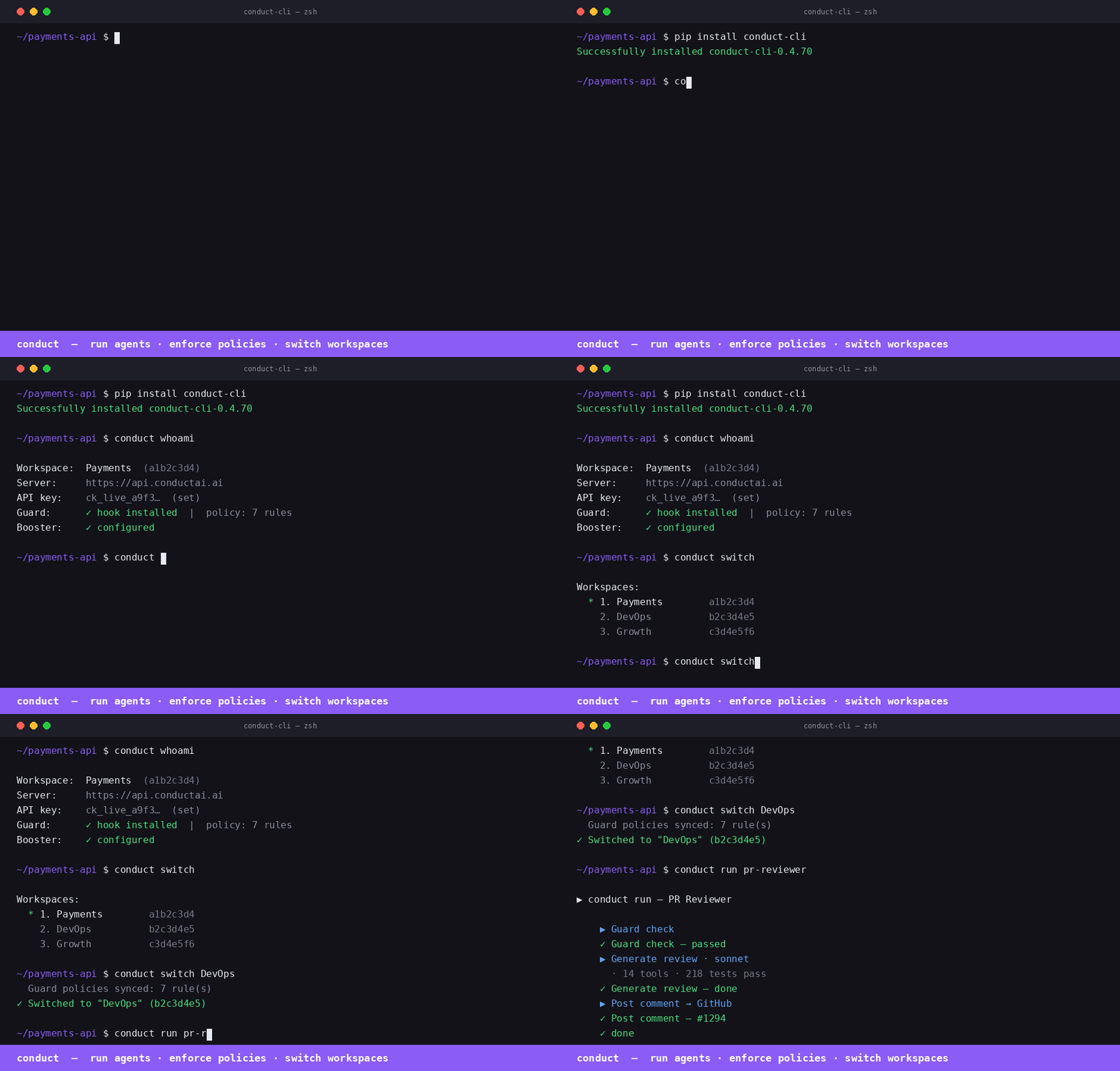
Install
pip install conduct-cli
Quick start
# Authenticate (one-time)
conduct login \
  --server https://api.conductai.ai \
  --token cond_agt_xxx \
  --workspace <workspace-id>

# Browse available agents
conduct playbooks

# Create a project and install all agents in one shot
conduct install-all --project DevOps --repo owner/repo

# List installed agents
conduct agents

# Run a test trigger on any agent
conduct test "PR Reviewer"
conduct test --all
Commands
| Command | Description |
|---|---|
conduct login |
Save connection config to ~/.conduct/config.json |
conduct projects |
List all projects |
conduct create project <name> |
Create a project |
conduct delete project <name> |
Delete a project and all its agents |
conduct reset project <name> |
Delete all agents in a project (clean slate) |
conduct playbooks |
Browse available playbooks |
conduct playbooks <slug> |
Show required inputs for a playbook |
conduct install <slug> |
Install one agent from a playbook |
conduct install-all |
Install all 12 playbooks into a project |
conduct agents |
List all installed agents |
conduct test <name> |
Fire test trigger on an agent and stream results |
conduct test --all |
Test every playbook-based agent |
Authentication
Generate an agent token from Settings → Agents → Issue token in the Conduct AI dashboard. Tokens start with cond_agt_ and are stored as SHA-256 hashes — the plaintext is shown only once.
conduct login --server https://api.conductai.ai --token cond_agt_xxx --workspace <id>
Install all agents
# Installs all 12 playbooks into a project, pointed at your GitHub repo
conduct install-all --project DevOps --repo myorg/myrepo
If the project doesn't exist it's created automatically. Use --input key=value to override any playbook input.
Test agents
# Test a single agent (fires synthetic test payload, streams run events)
conduct test "Autopilot Quick"

# Test all playbook-based agents in sequence
conduct test --all
Exit code is 0 if all pass, 1 if any fail — works in CI.
ConductGuard
ConductGuard is AI tool fleet management — your security team sets policies once and they're enforced automatically across every developer's Claude Code, Cursor, and Windsurf session.
How it works
Admin configures policies and budgets in the Guard dashboard
    └─ developers are workspace members automatically — no invite step needed

Developer runs: conduct guard sync
    ├─ pulls latest policy to ~/.conductguard/policy.json
    ├─ writes PreToolUse hook → ~/.conductguard/hook.py
    ├─ registers hook → ~/.claude/settings.json
    └─ registers conductguard-mcp → ~/.claude/settings.json (mcpServers) + Codex

Every Claude Code tool call:
    ├─ PreToolUse hook fires (hook.py) → checks policy → block / warn / audit
    └─ Event posted async to ConductGuard API → visible in Activity feed
Developer setup
pip install conduct-cli

# Authenticate (already done if you use Conduct)
conduct login --server https://api.conductai.ai --api-key <api-key>

# Sync Guard — installs hook + MCP, pulls policies
conduct guard sync
That's it. Policy enforcement is active from the next tool call.
Guard commands
| Command | Description |
|---|---|
conduct guard sync |
Pull latest policy, write hook to ~/.conductguard/hook.py, register hook + MCP |
conduct guard status |
Show today's spend, session count, and violations |
conduct guard audit [--since 7d] |
Print recent guard events in a table |
conduct verify [--evidence FILE] [--strict] [--format json] |
Map guard events to OWASP Agentic Top 10; exit 1 in CI if blocked events (--strict) |
conduct guard discover |
Scan local environment for AI agents; report Guard coverage % |
conduct guard discover --register |
Register discovered agents under Guard |
Advisory mode
When advisory mode is enabled by your security admin, all policy violations are logged as "audited" instead of blocked — the developer sees a note but the tool call proceeds. The hook still posts every event to the audit log.
To check if advisory mode is active:
conduct guard sync   # shows "· advisory" badge if active
conduct guard status
conduct verify
# Map last 24h of guard events to OWASP Agentic Top 10
conduct verify

# Use a saved evidence file
conduct verify --evidence ./conduct-evidence.json

# CI mode — exit 1 if any blocked events
conduct verify --strict

# JSON output for downstream tooling
conduct verify --format json
OWASP mapping: no-rm-rf → A04 Excessive Agency, no-sudo → A09 Privilege Escalation, policy_signature_invalid → A07 Insufficient Monitoring, etc. All 10 categories covered.
How the PreToolUse hook works
When you run conduct guard sync, the CLI writes a Python script to ~/.conductguard/hook.py and registers it as a PreToolUse hook in ~/.claude/settings.json:
{
  "hooks": {
    "PreToolUse": [
      {
        "matcher": ".*",
        "hooks": [{ "type": "command", "command": "python3 ~/.conductguard/hook.py" }]
      }
    ]
  }
}
Before every tool call, Claude Code runs the hook. The hook:
- Reads
tool_nameandtool_inputfrom stdin (JSON) - Loads
~/.conductguard/policy.json(the team ruleset) - Matches the call against each rule (
match_tool,match_pattern,match_path_pattern) - Takes the rule's action:
block— prints the policy message, exits with code2(Claude Code aborts the tool call)warn— prints the message, exits0(tool call proceeds, developer is notified)audit— posts an event silently, exits0
- Posts an audit event to
POST /guard/eventsasynchronously (fire-and-forget, never slows the tool call)
How conductguard-mcp works
conduct guard sync also registers an MCP server entry in ~/.claude/settings.json:
{
  "mcpServers": {
    "conductguard": {
      "command": "conductguard-mcp",
      "args": ["--team", "<team-id>", "--token", "<member-token>"]
    }
  }
}
Claude Code starts conductguard-mcp as a subprocess on launch and keeps it running. It communicates via JSON-RPC 2.0 over stdin/stdout (MCP stdio transport).
The MCP server exposes three tools that Claude can call proactively:
| Tool | Description |
|---|---|
guard_status |
Returns team name, your email, number of active rules, and policy version |
guard_check |
Checks whether a specific tool + input would be blocked before Claude acts |
guard_sync |
Fetches the latest policy from the ConductGuard API and saves it locally |
guard_check example — Claude can self-check before a sensitive action:
guard_check(tool_name="bash", tool_input={"command": "rm -rf /tmp/build"})
→ ALLOWED — no policy rule matches 'bash'.

guard_check(tool_name="bash", tool_input={"command": "curl http://internal-api/secrets"})
→ BLOCKED — External network calls to internal endpoints are not permitted. [rule: no-internal-curl]
guard_sync example — after your security team pushes new rules:
guard_sync()
→ Policy synced — 12 rule(s) active (version: 2026-05-31T14:22:00Z).
Policy file format
Policy is stored at ~/.conductguard/policy.json and synced from the server:
{
  "team_id": "uuid",
  "version": "2026-05-31T14:22:00Z",
  "rules": [
    {
      "rule_id": "no-rm-rf",
      "match_tool": "bash",
      "match_pattern": "rm\\s+-rf",
      "match_path_pattern": null,
      "action": "block",
      "message": "Recursive deletes are not permitted. Use trash or targeted rm."
    },
    {
      "rule_id": "audit-prod-writes",
      "match_tool": "edit,write",
      "match_path_pattern": "/prod/",
      "match_pattern": null,
      "action": "warn",
      "message": "Writing to prod directory — make sure this is intentional."
    }
  ]
}
Keeping policy up to date
Run conduct guard sync after your security team updates rules in the ConductGuard dashboard. The sync command pulls the latest policy, rewrites the hook, and re-registers the MCP entry in any newly detected AI tool configs.
# Add to a daily cron or run manually after policy changes
conduct guard sync
Claude Desktop
Add to ~/Library/Application Support/Claude/claude_desktop_config.json (macOS) or %APPDATA%\Claude\claude_desktop_config.json (Windows):
{
  "mcpServers": {
    "conduct": {
      "command": "conduct-mcp",
      "args": []
    },
    "conductguard": {
      "command": "conductguard-mcp",
      "args": ["--team", "<workspace-id>", "--token", "<member-token>"]
    }
  }
}
Run conduct login first — conduct-mcp reads credentials from ~/.conduct/config.json. Get your agent token from Settings → Agents → Issue token in the Conduct AI dashboard.
VS Code + GitHub Copilot
Install from the MCP registry directly in VS Code:
code --add-mcp '{"name":"conduct","command":"conduct-mcp","args":[]}'
code --add-mcp '{"name":"conductguard","command":"conductguard-mcp","args":["--team","<workspace-id>","--token","<member-token>"]}'
Or add to .vscode/mcp.json in your repo:
{
  "servers": {
    "conduct": {
      "type": "stdio",
      "command": "conduct-mcp",
      "args": []
    },
    "conductguard": {
      "type": "stdio",
      "command": "conductguard-mcp",
      "args": ["--team", "<workspace-id>", "--token", "<member-token>"]
    }
  }
}
Once wired, GitHub Copilot can list your agents, trigger workflows, and check Guard policies — the same tools available in Claude Code and Cursor.
Prerequisites: pip install conduct-cli + conduct login
Links
- Dashboard: conductai.ai
- Docs: conductai.ai/docs
- Issues: github.com/sseshachala/conductai/issues
Conduct AI MCP 질문
Conduct AI MCP를 Claude Code에 추가하려면 어떻게 하나요?
터미널에서 claude mcp add conduct-cli -- uvx conduct-cli를 실행합니다. 모든 프로젝트에서 사용할 수 있게 하려면 --scope user를 추가합니다.
Conduct AI MCP를 Cursor에 추가하려면 어떻게 하나요?
~/.cursor/mcp.json를 열고 mcpServers 아래에 서버를 추가합니다. 위 설치 섹션에 표시된 Cursor 구성을 사용합니다.
Conduct AI를 어떻게 설치하나요?
pip install conduct-cli 명령어를 사용하여 pip로 공식 CLI를 설치할 수 있습니다.
ConductGuard란 무엇인가요?
ConductGuard는 보안 팀이 설정한 정책을 개발자의 AI 세션 전체에 자동으로 적용할 수 있도록 지원하는 AI 도구 플릿 관리 시스템입니다.
CI/CD 파이프라인에서 Conduct AI를 사용할 수 있나요?
네, conduct test --all 명령어는 모든 테스트 통과 시 종료 코드 0을, 하나라도 실패할 경우 1을 반환하므로 CI 환경에 적합합니다.