
agent-board MCP server
2026년 10월 25일 커밋AI agent가 MCP를 통해 작업을 공유하고, 진행 상황을 추적하며, 협업 작업 내역을 유지할 수 있도록 지원하는 셀프 호스팅 방식의 Kanban 보드를 제공합니다.
다른 이름 Slayer1Dev/agent-board
- 스타
- 1
- Tools
- 9
- 다운로드, 30일
- —
- 최신 버전
- —
- 마지막 커밋
- 2026년 10월 25일
- 라이선스
- MIT
agent-board MCP란?
agent-board은(는) MCP server입니다. AI agent가 MCP를 통해 작업을 공유하고, 진행 상황을 추적하며, 협업 작업 내역을 유지할 수 있도록 지원하는 셀프 호스팅 방식의 Kanban 보드를 제공합니다. 9개 도구를 제공합니다. 예: contexto_sessao, ver_quadro, ver_card.
프로젝트 README에서 생성된 요약
agent-board MCP server 정보
agent-board는 Claude Code 또는 Codex와 같은 도구를 사용하는 개발자가 여러 AI 코딩 세션 간에 공유 작업을 관리할 수 있도록 돕습니다. 공유 상태 역할을 하는 셀프 호스팅 Kanban 보드를 제공하여, 서로 다른 agent 세션이 동일한 작업 목록을 읽고 쓸 수 있게 합니다. 이를 통해 agent는 새로운 세션이 시작될 때마다 처음부터 다시 시작하지 않고, 현재 진행 중인 작업과 이전의 결정 사항을 검토할 수 있습니다.
이 시스템은 단일 SQLite 파일을 사용하여 로컬 머신에서 실행되므로 클라우드 계정이나 외부 서비스가 필요하지 않습니다. 웹 브라우저를 통해 카드를 드래그하거나 제공되는 MCP 도구, REST API 또는 CLI를 사용하여 보드와 상호작용할 수 있습니다. agent를 위해 구축되었기 때문에 도구 이름과 API 경로는 포르투갈어로 되어 있지만, 웹 인터페이스는 영어를 지원합니다. 데이터 덮어쓰기를 방지하기 위한 낙관적 잠금(optimistic locking), 자동 일일 백업, 어떤 agent가 각 작업을 수행했는지 기록하는 카드별 히스토리 등의 기능을 포함하고 있습니다.
활용 사례
- 1서로 다른 agent 간의 작업 동기화AI agent가 현재 보드 상태를 읽어 다른 세션에서 이미 완료한 작업이 무엇인지 파악할 수 있습니다.
- 2반복적인 agent 리마인더 관리세션 시작 시 기한이 되었거나 지난 작업을 확인하도록 agent에게 지시할 수 있습니다.
- 3로컬 작업 데이터베이스 유지제3자 클라우드 제공업체에 의존하지 않고 모든 프로젝트 작업을 자신의 하드웨어에 있는 단일 SQLite 파일에 보관할 수 있습니다.
프로젝트의 README를 바탕으로 작성되었습니다. 모든 활용 사례는 해당 내용의 인용문과 대조하여 확인합니다.
agent-board MCP 도구 9
README에서 감지됨contexto_sessaover_quadrover_cardcriar_cardmover_cardatualizar_cardcomentar_cardatividade_recentelembretes_pendentes
| contexto_sessao | — | |
| ver_quadro | — | |
| ver_card | — | |
| criar_card | — | |
| mover_card | — | |
| atualizar_card | — | |
| comentar_card | — | |
| atividade_recente | — | |
| lembretes_pendentes | — |
구성
AGENT_BOARD_AUTHORAGENT_BOARD_URL
| 이름 | 설명 | 유형 |
|---|---|---|
| AGENT_BOARD_AUTHOR | — | |
| AGENT_BOARD_URL | — |
자동 검사
2026년 11월 14일에 실행됨전체 보고서 →아직 인증되지 않았습니다. 서버는 80점 이상의 점수, 심각한 결함 없음, 그리고 검사에 충분한 데이터를 갖추어야 합니다. 검사 방식 · 점수를 높이기 위해 수정할 항목

- 소스 저장소 연결 및 접근 가능slayer1dev/agent-board is public and reachablegithub.com/slayer1dev/agent-board ↗통과
- 패키지가 이 저장소를 소스로 명시검사되지 않음
- 빌드 출처(Sigstore 증명)검사되지 않음
- 오픈 소스 라이선스 (OSI)MITspdx.org/licenses/MIT.html ↗통과
- 최근 1년 내 커밋 또는 릴리스Last commit or release 2026-10-25github.com/slayer1dev/agent-board ↗통과
- OpenSSF Scorecard검사되지 않음
- 패키지 이름이 인기 패키지와 유사하지 않음검사되지 않음
- 패키지 및 해당 종속성에 중요한 보안 권고 없음검사되지 않음
- 모델에 대한 숨겨진 지침 없음9 tool descriptions and the README read; no override phrases, credential paths or hidden characters통과
- 파괴적인 도구에 라벨 표시됨No tool named like delete, drop or exec통과
- 원격 엔드포인트가 MCP 핸드셰이크에 응답검사되지 않음
README
GitHub에서 보기agent-board
A self-hosted Kanban board for AI coding agents, with an MCP server built in.


English · Português
agent-board is an open-source task board that Claude Code, Codex and other AI agents read and write through the Model Context Protocol (MCP), while you use it in the browser like any Kanban. It gives every agent session the same task list and a history of who did what, and it runs on your own machine: one SQLite file, no cloud account.
When several AI sessions work on the same projects, each one starts from zero. None of them knows what the others did, what is in progress, or why a decision was made. This board is the shared state: you drag cards in the browser, and Claude Code, Codex and other agents read and write the same cards through MCP, a REST API or a small CLI. Every change is recorded with its author, so opening a card shows which session did what.
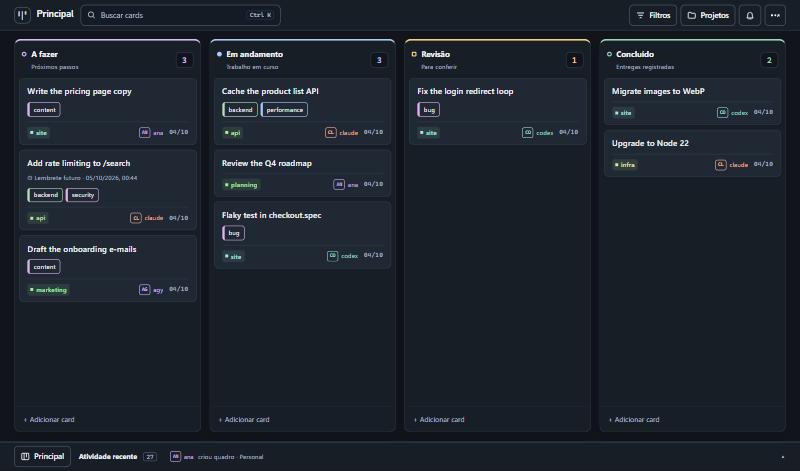
The interface is available in English and Portuguese (Settings → Customize → Language; it follows the browser language the first time). The API routes, the MCP tool names and the default column names are in Portuguese, because agents refer to them by name. The tool descriptions are self-explanatory to an AI agent; see CONTRIBUTING.md to add another language.
What it does
- Kanban with authorship. Columns, drag and drop, comments, and a per-card history that says who did each thing.
- For agents. 30+ MCP tools over HTTP, a REST API, and a dependency-free CLI. All three share one core, so they cannot drift apart.
- Finding things. Search across titles, descriptions, comments and tags (Ctrl+K), combinable filters kept in the URL, tags, and a project list with counts.
- Several boards, each with its own columns.
- Reminders and recurring tasks. Agents can ask for "reminders due today" when a session starts.
- Safe to operate. Archive instead of delete, undo (Ctrl+Z), and optimistic locking so two sessions do not overwrite each other.
- Three themes (dark, light, glass) and wallpapers stored on the server.
- English and Portuguese interface, switched in the settings.
- Small. SQLite in a single file, no external services, few dependencies.
Quick start
Requires Node.js 20 or newer. better-sqlite3 compiles native code on install; on Linux you may need build-essential and python3.
git clone https://github.com/Slayer1Dev/agent-board.git
cd agent-board

# Terminal 1: API and MCP on http://127.0.0.1:8078
cd server && npm install && npm run dev

# Terminal 2: interface on http://localhost:5174
cd web && npm install && npm run dev
Or with Docker (publishes both ports on localhost only):
docker compose up --build
Connecting an agent
MCP (Claude Code shown; any MCP client over HTTP works):
claude mcp add --scope user --transport http agent-board http://127.0.0.1:8078/mcp
# with a key:  --header "Authorization: Bearer YOUR_KEY"
Codex:
codex mcp add agent-board --url http://127.0.0.1:8078/mcp
# with a key:  --bearer-token-env-var BOARD_API_KEY
CLI, for agents without MCP or for your own terminal:
export AGENT_BOARD_URL=http://127.0.0.1:8078/api
export AGENT_BOARD_AUTHOR=claude

node cli/agent-board.mjs ver
node cli/agent-board.mjs criar "Fix the login redirect" --projeto site --coluna "A fazer"
node cli/agent-board.mjs mover 1a2b3c4d "Em andamento"
node cli/agent-board.mjs comentar 1a2b3c4d "Root cause was the cookie domain."
node cli/agent-board.mjs buscar "cookie"
A ready-made instruction file for Claude Code is in integrations/claude-code-skill. Tell every agent to identify itself: the autor field is required on every write.
The full list of routes and tools, with an example for each, is in docs/API.md.
Configuration
| Variable | Default | Purpose |
|---|---|---|
BOARD_DB |
~/.agent-board/board.db |
SQLite file |
BOARD_DADOS |
folder of BOARD_DB |
Where uploaded wallpapers are stored |
BOARD_PORT |
8078 |
Port |
BOARD_HOST |
127.0.0.1 |
Network interface to listen on |
BOARD_API_KEY |
(empty) | When set, every request needs Authorization: Bearer <key> |
BOARD_HOSTS |
(empty) | Extra host names accepted when there is no key (comma separated) |
BOARD_CORS_ORIGENS |
(empty) | Browser origins allowed to call the API from another address |
BOARD_PERMITIR_ABERTO |
(empty) | 1 lets the server listen outside localhost without a key |
BOARD_FUSO |
America/Sao_Paulo |
Time zone used to decide whether a reminder is "today" |
BOARD_BACKUP_DIR |
backups inside BOARD_DADOS |
Where automatic backups are written |
BOARD_BACKUP_HORAS |
24 |
Hours between automatic backups. 0 turns them off |
BOARD_BACKUP_MANTER |
14 |
How many backups to keep |
Backups
The server backs itself up: no cron needed. Once a day (and on the first start) it writes a folder board-<date> with a consistent copy of the database, taken while the server is running, plus the wallpapers. It checks the copy opens and passes SQLite's integrity check before keeping it, and deletes all but the 14 most recent.
- Where:
backups/next to the database by default. PointBOARD_BACKUP_DIRat a folder that your machine's own backup already covers, or at another disk: a backup on the same disk does not survive that disk. - See them: the settings menu shows the last one;
node cli/agent-board.mjs backupslists them; agents havever_backups. - Make one now: "Back up now" in the settings menu,
node cli/agent-board.mjs backup, or thefazer_backuptool. Worth doing before loading many cards at once. - Restore: stop the server, copy
board.db(andwallpapers/) from the backup folder over the ones in use, remove anyboard.db-walandboard.db-shmleft beside the old file, start the server.
Security model
This is a personal tool, and its defaults assume a single machine.
- Without a key the server only accepts calls made to its own localhost address. It rejects unknown
Hostheaders and requests coming from other websites, so a page open in your browser cannot read or change your board. - To reach it from other machines, set
BOARD_API_KEY. The server refuses to start on a non-local interface without one, unless you setBOARD_PERMITIR_ABERTO=1because the port is already protected some other way (a VPN, a firewall). - Do not put the key in the web build. Serve the interface through a proxy that adds the header: web/vite.proxy.example.mjs does exactly that.
autoris declared, not verified. It is a history, not access control. Anyone with access to the API can write under any name.
See SECURITY.md to report a vulnerability.
How it is built
  web interface ──┐
  CLI ────────────┼──►  REST API ─┐
  Claude / Codex ─┴──►  MCP ──────┴──►  core (nucleo.ts)  ──►  SQLite
                                              │
                                    history with authorship
- One core.
server/src/nucleo.tsholds all the rules; REST and MCP are thin layers over it. - SQLite, not Postgres: one file, backup with
cp, nothing to keep running. - Stateless MCP. Each request creates its own transport; there is no session to expire.
- Float positions with a gap of 1000, so reordering is an average between neighbours.
- Native HTML5 drag and drop, no library.
- 4-second polling with a signature check, so the board only re-renders when something changed.
Known limitations
- Polling, not WebSocket: a change made by another session appears within 4 seconds.
- No user accounts. See the security model above.
- API routes, MCP tool names and server error messages are in Portuguese only. The interface translates the default board and column names for display, but agents still use the Portuguese names ("A fazer", "Revisão").
- Reminders are shown in the board and available to agents; nothing is pushed to phone or e-mail.
Tool names in English
The tool and route names are in Portuguese. An AI agent reads them without trouble; this table is for people.
| Tool | What it does |
|---|---|
contexto_sessao |
Start a session here: what matters now, within a size budget |
ver_quadro |
View a board: columns and cards (compact by default) |
ver_card |
View one card: current state and last comments, or its paginated history |
criar_card |
Create a card |
mover_card |
Move a card to another column (how an agent reports progress) |
atualizar_card |
Edit title, description or project |
comentar_card |
Add a note to the card's history |
arquivar_card / restaurar_card |
Archive a card / bring it back |
pesquisar_cards / filtrar_cards |
Search / filter cards |
atividade_recente |
Recent activity: what changed and who changed it |
lembretes_pendentes |
Reminders that are overdue or due today |
definir_lembrete / definir_repeticao |
Set a reminder / make a task recurring |
listar_quadros / criar_quadro |
List boards / create a board |
listar_tags / definir_tags |
List tags / set a card's tags |
ver_backups / fazer_backup |
See backups / back up now |
Default columns: A fazer (to do), Em andamento (in progress), Revisão (review), Concluído (done). The complete list is in docs/API.md.
FAQ
How do I make Claude Code and Codex share the same task list?
Run agent-board, add its MCP endpoint to both (see Connecting an agent), and tell each agent to read the board when a session starts and to move its card when it starts and finishes a task. Both now see the same cards, and each change is signed with the agent's name.
How is this different from Trello, Linear or GitHub Projects?
Those are built for people and reached by agents through an integration. agent-board is built the other way round: every operation an agent needs is an MCP tool, every write must say who made it, and the whole thing is one process and one SQLite file on your machine, with no account, no API quota and no data leaving your network. It has far fewer features than those products, on purpose.
How is this different from a TODO.md file in the repository?
A file works for one agent in one repository. agent-board covers several projects at once, keeps a history per card (who created, moved and commented), lets two sessions write at the same time without overwriting each other, and gives you a board to look at and drag.
Does it give AI agents memory between sessions?
It gives them shared, explicit memory of work: what is to do, what is in progress, what was decided and why, written in cards and comments that the next session reads. It does not store conversation transcripts and does no embedding or semantic search.
Which agents and clients work with it?
Any client that speaks MCP over HTTP (streamable HTTP). It is used daily with Claude Code and Codex. Agents without MCP can use the REST API or the CLI in cli/agent-board.mjs, which needs only Node.js.
Can I use it with a team or over the internet?
It is designed for one person and their agents on a private network. There are no user accounts: an API key protects the server, and the author of each change is declared, not verified. Read the security model before exposing it beyond localhost or a VPN.
What does it need to run?
Node.js 20 or newer, or Docker. No database server, no external service.
Contributing
Issues and pull requests are welcome. Read CONTRIBUTING.md first; if you work with an AI agent, point it to AGENTS.md.
License
agent-board MCP 질문
agent-board MCP는 어떤 도구를 제공하나요?
9개 도구를 제공합니다. 예: contexto_sessao, ver_quadro, ver_card, criar_card, mover_card.
Claude Code와 Codex가 동일한 작업 목록을 공유하게 하려면 어떻게 해야 하나요?
agent-board를 실행하고 두 agent 모두에 MCP 엔드포인트를 추가합니다. 그 다음 세션 시작 시 보드를 읽고 진행 상황에 따라 카드를 이동하도록 지시하면 됩니다.
Trello, Linear 또는 GitHub Projects와 무엇이 다른가요?
사람을 위해 만들어진 도구와 달리, agent-board는 agent를 위해 특별히 설계되었습니다. 모든 작업에 대해 MCP 도구를 제공하며, 모든 쓰기 작업에는 작성자 정보가 필요합니다.
AI agent에게 세션 간 메모리를 제공하나요?
카드와 댓글을 통해 작업에 대한 공유된 명시적 메모리를 제공합니다. 다만 대화 기록을 저장하거나 시맨틱 검색을 수행하지는 않습니다.
팀 단위로 사용하거나 인터넷을 통해 사용할 수 있나요?
개인 사용자와 해당 사용자의 agent가 프라이빗 네트워크에서 사용하는 용도로 설계되었습니다. 사용자 계정 기능은 없으며 API key를 통해 보호합니다.