
AI 클라이언트가 텍스트 스크립트를 조작하여 비디오 파일을 전사하고 편집할 수 있도록 지원하며, 추임새 제거 및 일시 정지 구간 단축 기능을 포함합니다.
다른 이름 SilverNine/trimscript
- 스타
- 0
- Tools
- —
- 다운로드, 30일
- 85
- 최신 버전
- 0.1.0
- 마지막 커밋
- 2026년 10월 10일
- 라이선스
- MIT
TrimScript MCP란?
TrimScript은(는) MCP server입니다. AI 클라이언트가 텍스트 스크립트를 조작하여 비디오 파일을 전사하고 편집할 수 있도록 지원하며, 추임새 제거 및 일시 정지 구간 단축 기능을 포함합니다.
프로젝트 README에서 생성된 요약
TrimScript MCP server 정보
텍스트 스크립트를 조작하여 비디오 파일을 편집하는 것이 TrimScript의 핵심 기능입니다. 팟캐스트, 튜토리얼, 강연과 같은 구어체 콘텐츠 제작자를 위해 설계된 이 도구는 불필요한 구간을 제거하고, um이나 uh와 같은 추임새를 잘라내며, 긴 일시 정지 구간을 단축할 수 있습니다. whisper.cpp와 ffmpeg를 사용하여 로컬 머신에서 실행되므로, 원격 서버에 파일을 업로드하거나 계정을 만들 필요 없이 미디어를 비공개로 유지할 수 있습니다.
개발자는 이 server를 Claude Code 또는 Codex와 같은 MCP 클라이언트에 통합하여 편집 프로세스를 자동화할 수 있습니다. 연결 시 AI agent가 스크립트를 읽고 특정 컷이나 텍스트 수정을 제안할 수 있습니다. 이러한 편집 사항은 자동으로 적용되지 않고 편집기에 제안 형태로 나타나며, 사용자의 승인을 거쳐 적용됩니다. 시스템은 MP4, WAV, SRT/VTT 자막을 비롯하여 Final Cut Pro나 DaVinci Resolve의 전문 워크플로우를 위한 FCPXML 등 다양한 내보내기 형식을 지원합니다.
활용 사례
- 1불필요한 비디오 구간 제거AI agent에게 다시 시작된 도입부나 반복된 데모 구간을 찾아 제거하도록 요청합니다.
- 2추임새 제거 자동화단일 명령으로 녹음 파일에서 um, uh와 같은 모든 추임새를 제거합니다.
- 3전사 오류 수정음성 인식기가 잘못 들은 특정 단어를 수정하도록 코딩 agent에게 지시합니다.
- 4어색한 침묵 구간 단축명령어를 적용하여 1초 이상의 모든 일시 정지 구간을 줄임으로써 영상의 흐름을 매끄럽게 유지합니다.
프로젝트의 README를 바탕으로 작성되었습니다. 모든 활용 사례는 해당 내용의 인용문과 대조하여 확인합니다.
TrimScript MCP 설치 방법
형식 확인: 2026년 11월 10일Cursor에 추가Goose에 추가Claude Code에 TrimScript MCP 설치
$ claude mcp add trimscript -- uvx trimscriptCursor에 TrimScript MCP 설치
~/.cursor/mcp.json
{
  "mcpServers": {
    "trimscript": {
      "command": "uvx",
      "args": [
        "trimscript"
      ]
    }
  }
}VS Code에 TrimScript MCP 설치
.vscode/mcp.json
{
  "servers": {
    "trimscript": {
      "type": "stdio",
      "command": "uvx",
      "args": [
        "trimscript"
      ]
    }
  }
}VS Code CLI에 TrimScript MCP 설치
$ code --add-mcp '{"name":"trimscript","type":"stdio","command":"uvx","args":["trimscript"]}'Claude Desktop에 TrimScript MCP 설치
claude_desktop_config.json
{
  "mcpServers": {
    "trimscript": {
      "command": "uvx",
      "args": [
        "trimscript"
      ]
    }
  }
}Codex에 TrimScript MCP 설치
$ codex mcp add trimscript -- uvx trimscriptCodex config.toml에 TrimScript MCP 설치
~/.codex/config.toml
[mcp_servers.trimscript]
command = "uvx"
args = ["trimscript"]
Gemini CLI에 TrimScript MCP 설치
$ gemini mcp add -s user trimscript uvx -- trimscriptGemini settings.json에 TrimScript MCP 설치
~/.gemini/settings.json
{
  "mcpServers": {
    "trimscript": {
      "command": "uvx",
      "args": [
        "trimscript"
      ]
    }
  }
}자동 검사
2026년 11월 15일에 실행됨전체 보고서 →자동 검사를 통과했습니다. 이는 보안 감사가 아닙니다. 코드를 직접 읽고 서버에 필요한 최소한의 권한만 부여하십시오. 검사 방식

- 소스 저장소 연결 및 접근 가능silvernine/trimscript is public and reachablegithub.com/silvernine/trimscript ↗통과
- 패키지가 이 저장소를 소스로 명시trimscript names silvernine/trimscript as sourcepypi.org/project/trimscript/ ↗통과
- 빌드 출처(Sigstore 증명)Sigstore attestation for trimscriptpypi.org/project/trimscript/ ↗통과
- 오픈 소스 라이선스 (OSI)MITspdx.org/licenses/MIT.html ↗통과
- 최근 1년 내 커밋 또는 릴리스Last commit or release 2026-10-10github.com/silvernine/trimscript ↗통과
- OpenSSF Scorecard검사되지 않음
- 패키지 이름이 인기 패키지와 유사하지 않음No popular package one edit away from trimscript통과
- 패키지 및 해당 종속성에 중요한 보안 권고 없음53 resolved dependencies checked; no critical advisoryosv.dev ↗통과
- 모델에 대한 숨겨진 지침 없음0 tool descriptions and the README read; no override phrases, credential paths or hidden characters통과
- 파괴적인 도구에 라벨 표시됨검사되지 않음
- 원격 엔드포인트가 MCP 핸드셰이크에 응답검사되지 않음
README
GitHub에서 보기TrimScript

Edit video by editing the transcript. Runs on your machine. Free and open source. AI edits arrive as suggestions you approve.
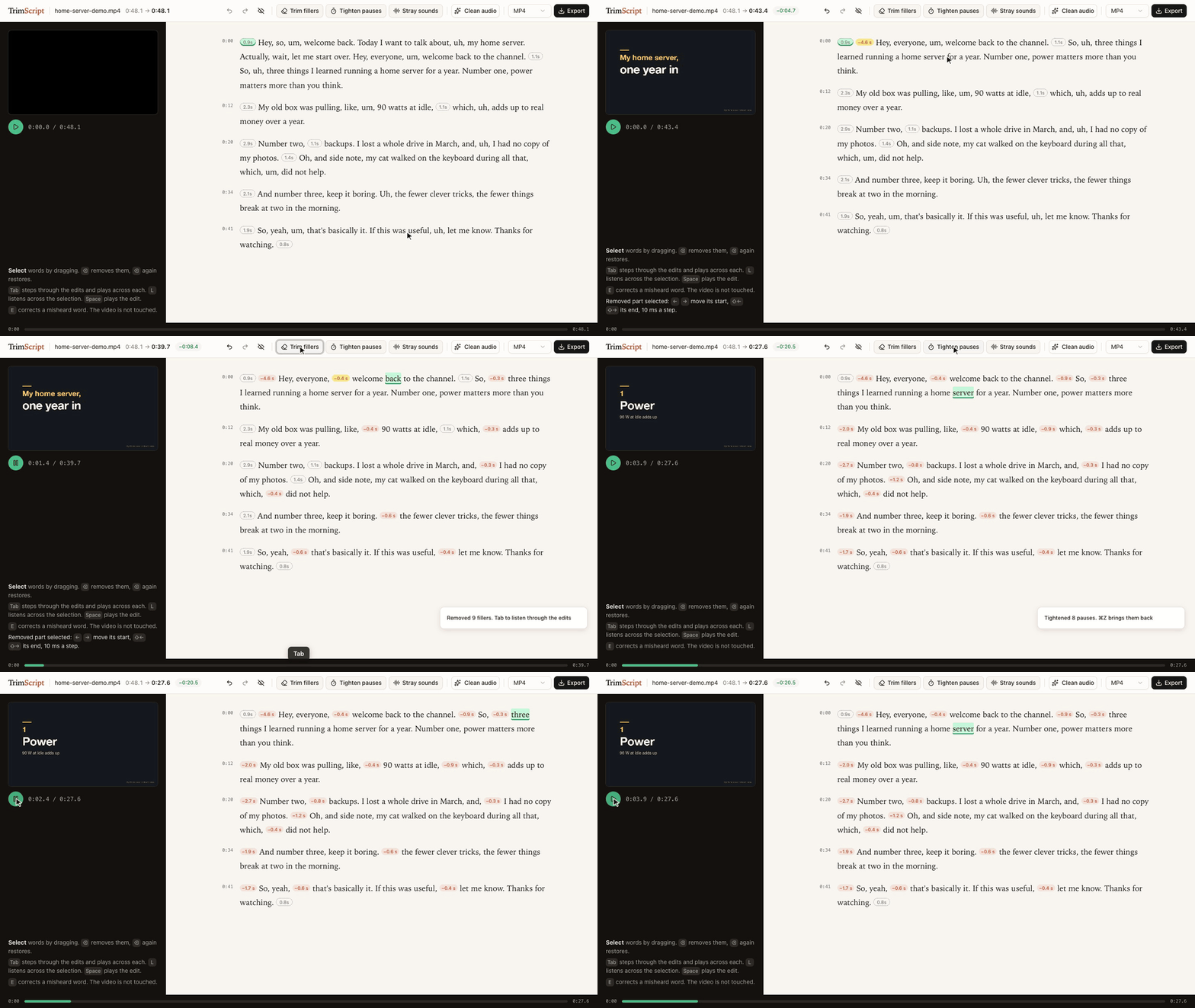
Delete the restarted intro, Trim fillers, Tab through the edits to listen, Tighten pauses: 48.1 s down to 27.6 s. The demo talk is synthetic: script and slides written for this demo, voice generated with Dia.
▶ Watch the 50-second demo: the same edit, then Claude Code suggesting cuts through the MCP server.
uvx trimscript open my-video.mp4
Needs uv and ffmpeg (brew install ffmpeg, apt install ffmpeg, winget install ffmpeg). Transcription, editing and export run on your machine: no account, no upload. If you connect a coding agent, that agent (and the model service behind it) reads the transcript.
Status: early. Developed on macOS with Apple Silicon. CI runs every push end to end on macOS, Linux and Windows (transcribe, remove, export); the editor itself has only been used on macOS so far.
What it does
- Transcribes locally with whisper.cpp, prompted to keep every "um" and "uh" instead of tidying them away. English only for now. The first run downloads the model (about 470 MB).
- Delete text, and the video skips it. Select words, press ⌫. The removed part folds into a small label with the seconds it saves, so the page reads like the finished edit. Select the label and press ⌫ to bring it back, or show all removed text with one switch. The preview skips removed parts as it plays.
- Trim fillers removes every um and uh in one go, and Tighten pauses shortens every pause over a second, keeping a little silence. Then press Tab to step through the edits and hear a second and a half on either side of each; ⌫ brings one back, ⌘Z brings them all back.
- Stray sounds jumps to voice between words that has no word in the transcript (a sound the recognizer skipped, a breath, half a word) and plays it. You listen and decide.
- Fine-tune any join by 10 ms with the arrow keys, listening across it each time.
- Clean audio: noise, level, gentle compression and loudness to -14 LUFS in one switch. The recording length never changes.
- Fix misheard words (E) without touching the media. Captions use the corrected text.
- Export MP4, WAV, SRT/VTT captions, or FCPXML to keep editing in Final Cut Pro or DaVinci Resolve with every edit point still adjustable.
- Nothing is destroyed. Your edit is one readable JSON file next to the video. The original file is never modified, and exports never overwrite it.
Use it with your coding agent
TrimScript ships an MCP server, so Claude Code, Codex or any MCP client can read the transcript and propose edits. Agent edits never apply silently: they show up in the open editor as suggestions with a reason, and you decide.
claude mcp add trimscript -- uvx trimscript mcp
Then ask things like:
- "In my-video.mp4 I restart the demo halfway through. Suggest removing the first attempt."
- "The speaker's product is called Acme, fix it wherever the transcript misheard it."
Tools: transcribe, get_transcript, suggest_removal, correct_text, list_edits, withdraw, enhance_voice, export.
The same actions are on the command line:
trimscript transcribe talk.mp4
trimscript show talk.mp4 --words      # transcript with item ids
trimscript remove talk.mp4 w120 w188 --reason "repeats the intro"
trimscript fillers talk.mp4            # remove every um and uh
trimscript pauses talk.mp4             # tighten pauses over a second
trimscript accept talk.mp4             # accept the agent's suggestions
trimscript export talk.mp4 -o talk-edit.mp4
Keyboard
| Key | Does |
|---|---|
| drag, Shift+click | select words |
| ⌫ | remove the selection, or restore it if it is already removed |
| Space | play the edit |
| double-click | play from that word |
| Tab / Shift+Tab | next / previous suggestion (or edit, when none wait), and listen across it |
| Enter / Shift+Enter | accept / reject the selected suggestion; a selection accepts every suggestion inside it |
| L | listen across the selection or a removed part |
| ← → / Shift+← → | move the start / end of a selected removed part by 10 ms |
| E | correct the text of the selection |
| ⌘Z / Shift+⌘Z | undo / redo |
How it works
- Every removed part covers a run of transcript items (words, fillers, pauses). The time to remove is derived from the words, so the preview and the export always agree.
- Edit points land midway between words, or keep a little silence when they meet a pause. Recognizers tend to stretch the last word of a sentence over the silence after it; TrimScript pulls word edges back to where the voice actually ends.
- Exports split on whole video frames and slice audio to about a millisecond, so sound never drifts from picture however many edits there are.
- The editor, the CLI and the MCP server all read and write the same project file. Edit from anywhere; the open editor updates live. Undo in the editor only reverts the editor's own change.
Tested on real talks
Three single-speaker talks from 38C3. For each: transcribe, trim fillers, tighten pauses, export with Clean audio on, then transcribe the export again with a larger model (Whisper large-v3-turbo) to check what is left.
| LoRa mesh | ACE up the sleeve | Going Long | |
|---|---|---|---|
| length | 32.9 min | 40.2 min | 36.2 min |
| removed (fillers trimmed, pauses tightened) | 5.2 min | 3.4 min | 6.5 min |
| fillers still heard in the export | 9 | 11 | 31 |
| export length vs. plan | -0.20 s | -0.16 s | -0.10 s |
| loudness | -14.1 LUFS | -14.3 LUFS | -14.3 LUFS |
| transcription | 1.2 min | 1.8 min | 1.7 min |
- 582 fillers trimmed across the three talks; 51 could still be heard after export. Filler counts are what the recognizer heard, not a judgment of any speaker.
- 3.0 to 4.5% of kept words read differently in the second transcript. Most of them sit away from any edit point: two different recognizers hearing jargon differently, not edits clipping words.
- Measured on an M1 Pro. Method and raw numbers: spikes/e2e-real.
Talks: "Building Your First LoRa Mesh Network From Scratch" by WillCrash, "ACE up the sleeve: Hacking into Apple's new USB-C Controller" by stacksmashing, and "Going Long! Sending weird signals over long haul optical networks" by Ben Cartwright-Cox. Recorded by the C3VOC at 38C3 and published on media.ccc.de under CC BY 4.0. The recordings are not part of this repository and were not modified; only measurements are reported. The speakers have not reviewed or endorsed TrimScript.
Scope
Editing recorded speech through its transcript is a long-standing idea, in research since at least Whittaker and Amento's "Semantic Speech Editing" (CHI 2004) and Berthouzoz, Li and Agrawala's "Tools for Placing Cuts and Transitions in Interview Video" (SIGGRAPH 2012), and in many editors since. TrimScript is a small, independent, local take on it for spoken-word recordings: talks, tutorials, podcasts, interviews.
It has no multitrack timeline, screen recorder, voice cloning or collaboration. Export FCPXML when you need a full editor.
Credits
- whisper.cpp and the Whisper small.en weights by OpenAI, MIT, run through pywhispercpp, MIT
- Optional: Parakeet TDT 0.6B v2 by NVIDIA, CC BY 4.0, in the MLX conversion by mlx-community, run through parakeet-mlx, Apache 2.0 (
trimscript[parakeet],--engine parakeet) - noisereduce, MIT
- FFmpeg, called as a separate program and not distributed with TrimScript
- Editor UI: React, shadcn/ui components on Radix UI, Tailwind CSS, Sonner, clsx and tailwind-merge (MIT), class-variance-authority (Apache 2.0), Lucide icons (ISC, some derived from Feather, MIT). Full license texts ship with the package in THIRD_PARTY_NOTICES.md and
src/trimscript/static/THIRD_PARTY_LICENSES.txt. - Demo voice: Dia by Nari Labs, Apache 2.0
Trademarks
Final Cut Pro is a trademark of Apple Inc. DaVinci Resolve is a trademark of Blackmagic Design. Claude Code is a trademark of Anthropic. Codex is a trademark of OpenAI. They are named only to say what TrimScript works with. TrimScript is an independent project and is not affiliated with, sponsored by or endorsed by any of these companies.
License
MIT. See LICENSE.
TrimScript MCP 질문
TrimScript MCP를 Claude Code에 추가하려면 어떻게 하나요?
터미널에서 claude mcp add trimscript -- uvx trimscript를 실행합니다. 모든 프로젝트에서 사용할 수 있게 하려면 --scope user를 추가합니다.
TrimScript MCP를 Cursor에 추가하려면 어떻게 하나요?
~/.cursor/mcp.json를 열고 mcpServers 아래에 서버를 추가합니다. 위 설치 섹션에 표시된 Cursor 구성을 사용합니다.
AI 편집 프로세스는 어떻게 작동하나요?
Agent 편집 사항은 편집기에 이유와 함께 제안 형태로 표시되며, 사용자가 이를 수동으로 승인하거나 거부할 수 있습니다.
TrimScript는 비디오를 클라우드에 업로드하나요?
아니요, 전사, 편집 및 내보내기 작업은 모두 로컬 머신에서 실행되므로 계정 생성이나 파일 업로드가 필요하지 않습니다.
어떤 파일 형식으로 내보낼 수 있나요?
편집된 결과물을 MP4, WAV, SRT/VTT 자막 또는 Final Cut Pro나 DaVinci Resolve와 같은 전문 편집기에서 사용할 수 있는 FCPXML 형식으로 내보낼 수 있습니다.
Claude Code와 함께 사용할 수 있나요?
네, TrimScript는 Claude Code 또는 다른 MCP 클라이언트가 스크립트를 읽고 편집을 제안할 수 있도록 하는 MCP server를 제공합니다.