
37Studio MCP server
2026년 11월 13일 커밋브랜드 정체성에 맞는 영상을 제작, 편집 및 여러 플랫폼에 게시할 수 있는 AI 비디오 스튜디오이자 소셜 미디어 관리 도구입니다.
다른 이름 Shaitrish/37studio
- 스타
- 164
- Tools
- —
- 다운로드, 30일
- —
- 최신 버전
- —
- 마지막 커밋
- 2026년 11월 13일
- 라이선스
- MIT
37Studio MCP란?
37Studio은(는) MCP server입니다. 브랜드 정체성에 맞는 영상을 제작, 편집 및 여러 플랫폼에 게시할 수 있는 AI 비디오 스튜디오이자 소셜 미디어 관리 도구입니다.
프로젝트 README에서 생성된 요약
37Studio MCP server 정보
37studio는 로컬 데스크톱에서 브랜드 영상 제작과 소셜 미디어 활동을 관리할 수 있게 해줍니다. 이 도구를 사용하면 웹사이트나 폴더로부터 브랜드 라이브러리와 지식 베이스를 구축할 수 있으며, 이를 기반으로 에디터 에이전트가 애니메이션 HyperFrames 구성을 생성합니다. Anthropic, OpenAI, ElevenLabs와 같은 제공업체의 API 키를 직접 가져와 사용하는 로컬 우선(local-first) 스튜디오 방식으로 작동하므로, 월간 구독료 추가 없이 제공업체에 직접 비용을 지불합니다.
개발자와 크리에이터는 MCP server를 통해 전체 워크플로우를 제어하고 Claude Code, Claude Desktop 또는 Cursor와 같은 클라이언트에 연결할 수 있습니다. 이러한 통합을 통해 채팅 인터페이스만으로 브랜드, 캠페인, 영상 및 게시 일정을 관리할 수 있습니다. 시스템은 faster-whisper를 이용한 긴 녹음 파일의 전사부터 YouTube, TikTok, Instagram을 포함한 9개 플랫폼에 콘텐츠를 게시하는 작업까지 모든 과정을 처리합니다. 또한 소셜 미디어 참여 활동을 단일 인박스로 중앙 집중화하여 댓글과 메시지를 효율적으로 관리할 수 있습니다.
활용 사례
- 1중앙 집중식 커뮤니티 관리다양한 소셜 네트워크에서 들어오는 메시지와 댓글을 하나의 통합된 위치에서 관리합니다.
- 2롱폼 영상의 재가공긴 영상 녹화물을 여러 개의 짧고 매력적인 소셜 미디어 클립으로 변환합니다.
프로젝트의 README를 바탕으로 작성되었습니다. 모든 활용 사례는 해당 내용의 인용문과 대조하여 확인합니다.
자동 검사
2026년 11월 14일에 실행됨전체 보고서 →아직 인증되지 않았습니다. 서버는 80점 이상의 점수, 심각한 결함 없음, 그리고 검사에 충분한 데이터를 갖추어야 합니다. 검사 방식 · 점수를 높이기 위해 수정할 항목

- 소스 저장소 연결 및 접근 가능shaitrish/37studio is public and reachablegithub.com/shaitrish/37studio ↗통과
- 패키지가 이 저장소를 소스로 명시검사되지 않음
- 빌드 출처(Sigstore 증명)검사되지 않음
- 오픈 소스 라이선스 (OSI)MITspdx.org/licenses/MIT.html ↗통과
- 최근 1년 내 커밋 또는 릴리스Last commit or release 2026-11-12github.com/shaitrish/37studio ↗통과
- OpenSSF Scorecard검사되지 않음
- 패키지 이름이 인기 패키지와 유사하지 않음검사되지 않음
- 패키지 및 해당 종속성에 중요한 보안 권고 없음검사되지 않음
- 모델에 대한 숨겨진 지침 없음0 tool descriptions and the README read; no override phrases, credential paths or hidden characters통과
- 파괴적인 도구에 라벨 표시됨검사되지 않음
- 원격 엔드포인트가 MCP 핸드셰이크에 응답검사되지 않음
README
GitHub에서 보기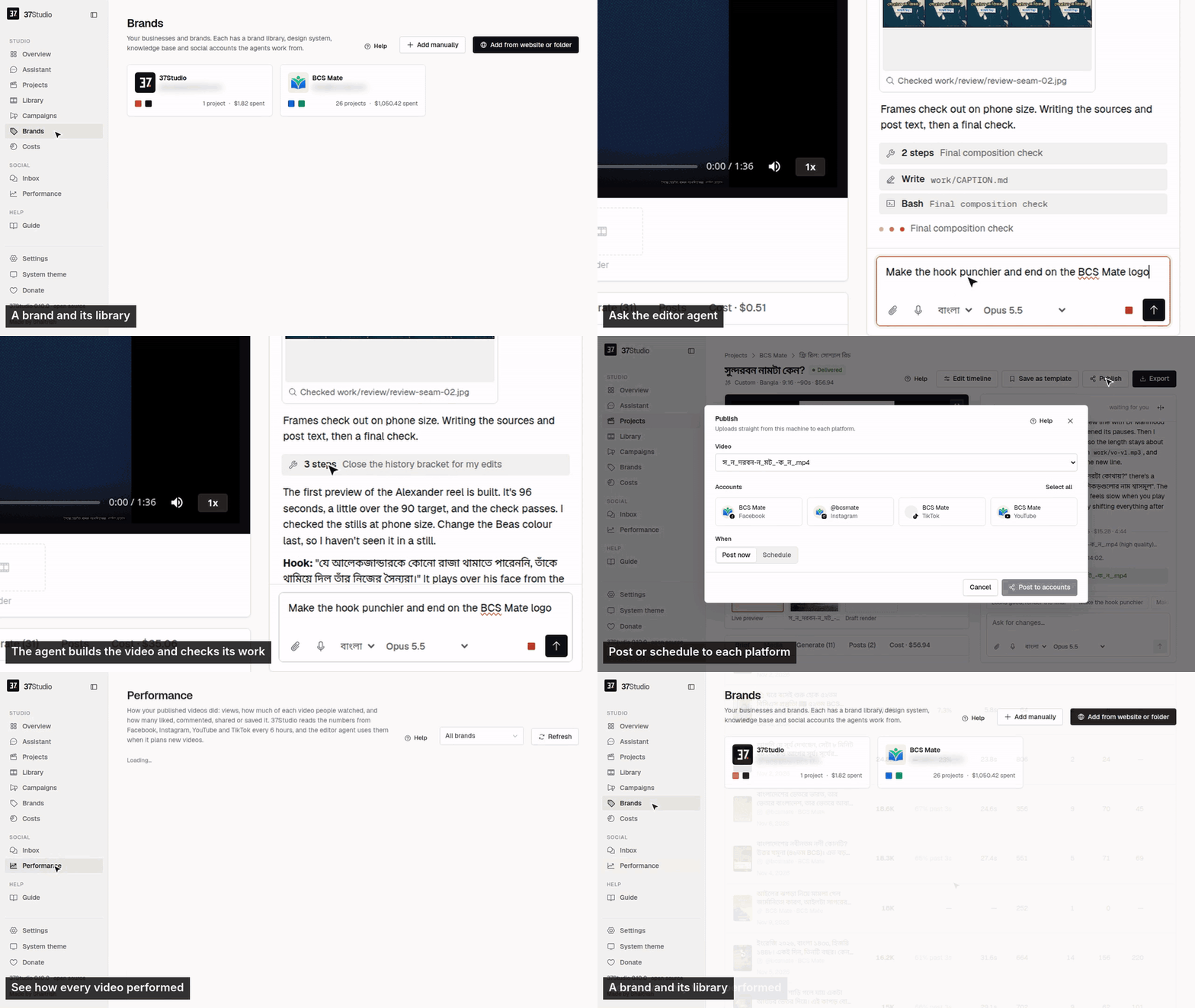
37Studio makes videos for a business and runs its social accounts, from one app on your own computer. Add a brand from its website and it builds a brand library and a knowledge base. Brief a video and Claude Code, the editor agent, builds it as a HyperFrames composition in that brand, checks its own frames and renders it on your machine. Publish it to the brand's accounts with a caption written for each platform, now, on a schedule or on Autopilot. Messages and comments land in one inbox with replies drafted from the knowledge base.
You bring your own keys (a Claude plan or an Anthropic API key; optionally OpenAI, xAI, OpenRouter, Gemini, fal.ai or ElevenLabs) and pay the providers directly. It is free and open source under the MIT License, made by Shaitrish in Dhaka.
Install
Desktop app (Windows 10/11 and Linux). Download it from studio.shaitrish.com/desktop:
- Windows: open the installer. It needs no admin rights and adds 37Studio to the Start menu and desktop. Windows may say it protected your PC, because the app isn't signed yet: More info → Run anyway.
- Ubuntu 24.04+ / Debian 13+:
sudo apt install ./37studio_*_amd64.deb(it brings ffmpeg and Python).
Then install the tools the agent uses. Overview → Finish setup in the app lists anything missing:
winget install Git.Git Gyan.FFmpeg OpenJS.NodeJS.LTS Python.Python.3.13   # Windows only
npm install -g @anthropic-ai/claude-code    # Node.js 22+; on Linux with sudo
docs/desktop.md covers other Linux, the .zip, building it yourself and troubleshooting.
Docker (macOS, or a server). Every tool comes bundled. On your computer, install Docker Desktop, unzip 37studio.zip and double-click start.bat, start.command or start.sh. For a team, or replies and Autopilot around the clock, run it on a Linux server with HTTPS and a password. docs/docker.md has both, plus building from source and every setting.
One-Click Deploy

First steps
- Add your Claude key in Settings → AI services (an Anthropic API key, or a Claude plan token from
claude setup-token). - Add a brand from its website or a folder. In 5 to 10 minutes its library, design system and knowledge base are ready.
- Make a video. New video asks what to make; the agent builds it while you watch, and takes changes in plain words.
- Connect accounts on the brand's Social tab (how), then Publish now, on a schedule, or with Autopilot.
The user guide, also inside the app as Guide, covers every screen.
What it does
- Brand library from a website or folder. Paste a URL, or pick the brand's own project folder, and get its logos, people, photos, fonts and exact colours sorted and captioned, plus a design system (
design.md) and a knowledge base (knowledge.md). - An editor agent. Claude Opus 5.5 builds each video as an animated HyperFrames composition, checks its own frames and takes changes in plain words. Edit by hand on a real timeline when you want to.
- Many kinds of output. Hook reels, captioned clips, motion-graphics explainers, podcast clips, promo ads, square and portrait posts, and thumbnails. Save any finished video as a template for the next one.
- Long recordings into many videos. A 2-hour class becomes ten reels. Transcription runs locally with faster-whisper: free, private, about 100 languages. YouTube and Google Drive links import directly.
- Generated media. Gemini images; video clips from Gemini or, through fal.ai, Seedance, Kling, Veo, Wan and others; ElevenLabs voiceover, sound effects and music. Each brand can keep its own voices, cloned from a short recording of the founder or presenter, with a default per language; ask the agent for a voice by name, or to switch a finished video to it. The agent asks before media on one project costs more than the limit in Settings → Spending, and keeps a person or product consistent by reusing one reference image across shots. The agent uses them only when the footage and brand library can't do the job, and says what it made.
- Publishing and Autopilot. Post to any mix of a brand's accounts on nine platforms now or on a schedule, or let a content plan make a fresh video before every slot and wait for one-click approval.
- One inbox. Messenger, Instagram and WhatsApp messages and Facebook and Instagram comments, with replies drafted in the customer's language, following the brand's own rules. Off, drafts to approve, or fully automatic, per brand.
- Performance. Views, how much of each video people watched, likes, comments, shares, saves and engagement for every video on the brand's Facebook, Instagram, YouTube and TikTok, best and worst on top. The editor agent reads the same numbers before it plans the next video.
- Assistant and MCP. Run everything by chatting with the Assistant in the sidebar, or from your own AI agent (Claude Code, Claude Desktop, Cursor) through 37Studio's MCP server: brands, campaigns, videos, publishing, Autopilot, settings and connections.
- Real costs. Every project, campaign and brand shows its AI spend in your currency. No markup: you pay the AI providers directly.
Platforms
| Platform | Publishes | Inbox | You connect with |
|---|---|---|---|
| Facebook Pages | Reels and Page videos | Messenger, comments | Facebook Login through your own Meta app |
| Instagram (Business or Creator) | Reels | Messages, comments | The same sign-in as Facebook |
| YouTube | Videos | Your own Google OAuth client | |
| TikTok | Videos, or to the creator's drafts | Your own TikTok app | |
| Videos to your profile; company Pages with LinkedIn's approval | Your own LinkedIn app | ||
| X | Video posts | Your own X app | |
| Video Pins, on the boards you pick | Your own Pinterest app | ||
| Bluesky | Video posts | Handle and an app password | |
| Mastodon | Video posts | Server URL and an access token | |
| Messages | A WhatsApp Business API number and a Cloudflare Tunnel to your copy (or your own relay) |
Not possible: Threads (its API only takes a video from a public URL, which a local-first app doesn't have), Facebook Groups and personal profiles (Meta removed it), Reddit and Snapchat (no usable public video-posting API). Setup for each one: docs/platforms.md.
How it works
Browser ──► 37studio (Go, one binary) ──► SQLite + data/ (brands, projects, encrypted tokens and keys)
             ├─ claude -p, the editor agent ──► ffmpeg · npx hyperframes · 37studio gen / transcribe / clip
             ├─ hyperframes render (Chrome + ffmpeg) ──► out/*.mp4, *.png
             ├─ post queue ──► Facebook · Instagram · YouTube · TikTok · LinkedIn · X · Pinterest · Bluesky · Mastodon
             └─ inbox loop ──► Messenger, Instagram (Graph API) · WhatsApp (webhook through your tunnel, or your own relay)
Claude Code does the editing, HyperFrames renders, Go serves and React is the UI. Any MCP client (Claude Code, Claude Desktop, Cursor) can run the whole app through its MCP server at http://localhost:8080/mcp: claude mcp add --transport http 37studio http://localhost:8080/mcp. docs/architecture.md has the job flow, the agent harness, a code map and the release process.
What leaves my computer? Calls to the AI providers you set up, uploads to the platforms you connect, and the update check (GitHub Releases). Nothing is sent to Shaitrish. Questions and problems: the guide's Troubleshooting, or open an issue.
Support the project
37Studio is free and stays free. If it saves you time, you can donate by US bank transfer or bKash, star the repo, or share what you made with it. Want it set up for you? Shaitrish does paid setup over a screen share: message us on WhatsApp.
Contributing
Bug reports, ideas and pull requests are welcome: CONTRIBUTING.md covers running it from source and the checks to run. Report security problems privately, as SECURITY.md describes.
License
MIT © Shaitrish. The open-source tools 37Studio bundles (HyperFrames, ffmpeg, faster-whisper and others) keep their own licenses. Claude Code is Anthropic's software, used under Anthropic's terms.
37Studio MCP 질문
어떤 플랫폼에 게시할 수 있나요?
Facebook, Instagram, YouTube, TikTok, LinkedIn, X, Pinterest, Bluesky, Mastodon에 게시할 수 있습니다.
자신의 AI 모델을 사용할 수 있나요?
네, Claude, OpenAI, xAI, OpenRouter, Gemini, fal.ai 또는 ElevenLabs의 API 키를 직접 사용할 수 있습니다.
소셜 미디어 메시지도 관리할 수 있나요?
네, Messenger, Instagram, WhatsApp의 메시지와 댓글을 관리할 수 있는 통합 인박스를 제공하며 답장 초안 작성 기능도 포함되어 있습니다.