
Shellby MCP server
2026년 10월 21일 커밋ChatGPT Web을 지속 가능한 셸, 직접적인 파일 편집, macOS Computer Use 기능을 갖춘 로컬 코딩 에이전트로 변환합니다.
다른 이름 serbyte-development/shellby-mcp
- 스타
- 17
- Tools
- —
- 다운로드, 30일
- —
- 최신 버전
- —
- 마지막 커밋
- 2026년 10월 21일
- 라이선스
- MIT
Shellby MCP란?
Shellby은(는) MCP server입니다. ChatGPT Web을 지속 가능한 셸, 직접적인 파일 편집, macOS Computer Use 기능을 갖춘 로컬 코딩 에이전트로 변환합니다.
프로젝트 README에서 생성된 요약
Shellby MCP server 정보
Shellby MCP는 macOS 사용자가 ChatGPT Web을 로컬 코딩 에이전트로 변환할 수 있게 해줍니다. 이 MCP server는 웹 인터페이스와 로컬 머신 사이의 가교 역할을 하며, 권한을 부여받은 ChatGPT 호출자가 지속 가능한 셸에서 명령을 실행하고, 네이티브 apply_patch 바이너리를 사용하여 파일을 편집하며, Computer Use 기능을 통해 운영체제와 상호작용할 수 있도록 지원합니다. 이 도구는 AI가 하드웨어에서 직접 복잡하고 다단계적인 작업을 수행해야 하는 개발자를 위해 설계되었습니다.
이 서버를 사용하려면 Developer Mode가 활성화된 ChatGPT Plus 이상의 계정, 보안 터널링을 위한 ngrok 계정, 그리고 Node.js 22.18.0 이상의 버전이 필요합니다. 설정 과정에서는 macOS에서 서버를 로컬로 실행해야 하며, 실행 후 ChatGPT가 연결할 수 있는 공개 URL이 노출됩니다. 또한 전용 Google Chrome 프로필을 통해 브라우저 기반의 서브 에이전트를 관리할 수 있으며, 워크스페이스에 저장된 동적 SKILL을 통해 재사용 가능한 워크플로를 실행할 수 있습니다.
활용 사례
- 1지속적인 개발 환경 유지개발자는 AI에게 장시간 실행되는 프로세스를 구동하거나 여러 번의 상호작용 동안 특정 디렉토리 컨텍스트를 유지하도록 지시할 수 있습니다.
- 2직접적인 파일 수정 수행AI 에이전트는 셸 명령에만 의존하지 않고 로컬 파일에 특정 코드 변경 사항을 적용할 수 있습니다.
- 3복잡한 조사 작업 위임에이전트는 분리된 서브 에이전트를 생성하여 동시 웹 검색을 수행하고 결과를 가져올 수 있습니다.
프로젝트의 README를 바탕으로 작성되었습니다. 모든 활용 사례는 해당 내용의 인용문과 대조하여 확인합니다.
구성
PM2_HOME
| 이름 | 설명 | 유형 |
|---|---|---|
| PM2_HOME | — |
자동 검사
2026년 11월 14일에 실행됨전체 보고서 →아직 인증되지 않았습니다. 서버는 80점 이상의 점수, 심각한 결함 없음, 그리고 검사에 충분한 데이터를 갖추어야 합니다. 검사 방식 · 점수를 높이기 위해 수정할 항목

- 소스 저장소 연결 및 접근 가능serbyte-development/shellby-mcp is public and reachablegithub.com/serbyte-development/shellby-mcp ↗통과
- 패키지가 이 저장소를 소스로 명시검사되지 않음
- 빌드 출처(Sigstore 증명)검사되지 않음
- 오픈 소스 라이선스 (OSI)MITspdx.org/licenses/MIT.html ↗통과
- 최근 1년 내 커밋 또는 릴리스Last commit or release 2026-10-21github.com/serbyte-development/shellby-mcp ↗통과
- OpenSSF Scorecard검사되지 않음
- 패키지 이름이 인기 패키지와 유사하지 않음검사되지 않음
- 패키지 및 해당 종속성에 중요한 보안 권고 없음검사되지 않음
- 모델에 대한 숨겨진 지침 없음0 tool descriptions and the README read; no override phrases, credential paths or hidden characters통과
- 파괴적인 도구에 라벨 표시됨검사되지 않음
- 원격 엔드포인트가 MCP 핸드셰이크에 응답검사되지 않음
README
GitHub에서 보기[!CAUTION] Shellby MCP runs with the full permissions of your local macOS user. An authorized ChatGPT caller can run commands, edit files, fetch webpages, and control supported applications.
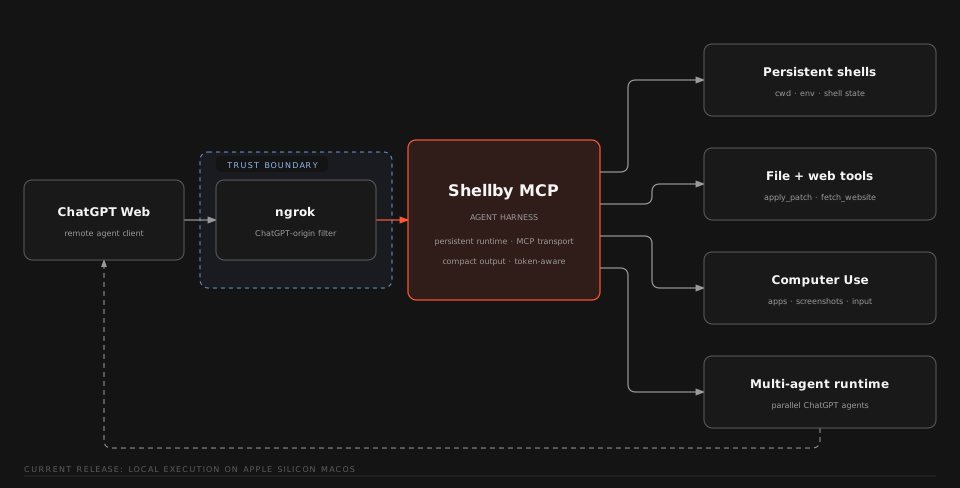
Capabilities
| Capability | Description |
|---|---|
| Persistent shells | Named login shells retain cwd, environment, processes, and command history across MCP calls. |
Native apply_patch |
Native ChatGPT apply_patch binary used to edit files independently of shell state. |
| Computer Use | Focused macOS observation and interaction backed by Peekaboo. |
| Browser subagents | Detached ChatGPT Web conversations with follow-up context and concurrent result retrieval. |
| Web and images | Rendered webpage extraction, bounded document pagination, and native image transport. |
| Dynamic skills | Reusable workflows loaded from <workspace>/skills/*/SKILL.md. |
Requirements
- macOS on Apple Silicon or Intel
- Node.js 22.18.0 or newer
- npm
- An ngrok account and CLI
- A ChatGPT Plus or Higher account with Developer Mode turned on
Google Chrome is optional and is used for browser-backed subagents. Computer Use is optional and uses the Peekaboo package installed with this repository.
Quick start
Install with your coding agent
skills/install-shellby-mcp/SKILL.md
Manual install
[!TIP] The manual install process should be ran from Terminal.app for the best macOS permission context.
-
Install ngrok, clone the repository, and install dependencies:
brew install --cask ngrok git clone https://github.com/Serbyte-Development/shellby-mcp.git cd shellby-mcp npm ci -
Authenticate ngrok:
ngrok config add-authtoken <your-token>Get an authtoken from the ngrok dashboard if needed.
-
Create the active Shellby config:
npm run setup -- --config-onlyReview
.shellby/config.tomland edit any values you want to customize. The generated file shows every supported setting: defaults are active, and settings without defaults are commented examples. -
Run guided setup:
npm run setupSetup checks the machine, prepares the workspace, and builds Shellby MCP. It also checks Computer Use and prepares the dedicated ChatGPT Chrome profile when those tool groups are enabled.
-
Run the first managed start from Terminal.app:
npm startThis creates or reuses the repository-local PM2 runtime, starts Shellby MCP and ngrok, launches the configured ChatGPT browser when agent tools are enabled, waits for local health, and prints the public
/mcpURL. Starting from Terminal.app gives the managed process tree the intended macOS permission context for Computer Use. -
In ChatGPT Developer Mode, create a custom MCP app with the printed
https://.../mcpURL and select No Auth.
[!IMPORTANT] The first trusted remote tool call binds the installation to that ChatGPT subject. Use
npm run auth:resetonly when you intend to clear that binding.
Verify the installation
npm run status
curl -fsS http://127.0.0.1:3333/healthz
npm run print-url
The default local MCP endpoint is http://127.0.0.1:3333/mcp; root port in .shellby/config.toml changes the listener and health-check port.
Optional capabilities
Shellby ships a package-local Peekaboo CLI build that matches its Computer Use adapter. Check or grant permissions with:
npm run setup:computer
Screen Recording enables observation. Accessibility and Event Synthesizing enable actions. Shellby always uses its bundled Peekaboo executable so the adapter and CLI stay on the tested version together.
See Computer Use for runtime details.
[!WARNING] Browser-backed ChatGPT subagents automate ChatGPT Web and may conflict with OpenAI's Terms of Use. Disable them with
tools.subagents = falsein.shellby/config.toml. Use these features at your own risk.
Run the dedicated browser setup when Chrome was unavailable during initial setup or when you want to configure it later:
npm run setup:chatgpt
This creates a dedicated Chrome profile under <state_dir>/chatgpt-chrome and attaches over CDP at 127.0.0.1:9222. state_dir defaults to ~/.shellby. Sign into ChatGPT once in that profile. Future npm start runs launch it automatically while subagent tools are enabled.
Conversation URL and turn count are persisted for reused agent_id values. Use npm run reset-agents to forget those local mappings.
See Browser ChatGPT Subagents for lifecycle details.
Operations
| Command | Purpose |
|---|---|
npm start |
Build and start or reload Shellby MCP, ngrok, and enabled supporting services. |
npm run restart |
Rebuild, clear the audit log, and reload services using the existing PM2 daemon. |
npm run restart -- --hard |
Rebuild and recreate Shellby's PM2 daemon from a healthy Terminal.app session. |
npm run status |
Show PM2 process state. |
npm run logs |
Follow PM2 logs. |
npm run pm2 -- <args> |
Run a PM2 command against Shellby's dedicated daemon. |
npm run print-url |
Print the active public /mcp URL. |
npm run stop |
Stop the managed Shellby MCP and ngrok processes. |
npm run auth:reset |
Clear the bound remote ChatGPT subject after confirmation. |
npm run reset-agents |
Forget persisted subagent conversation mappings. |
npm run ui:phone |
Expose only the built dashboard UI/API on LAN port 6001; /mcp stays local. |
PM2 is installed as a repository dependency. All Shellby PM2 commands use <state_dir>/pm2 for their daemon, sockets, logs, and process state. state_dir defaults to ~/.shellby. This is separate from the default ~/.pm2 daemon used by other projects; use npm run pm2 -- <args> for direct access to Shellby's daemon.
Use npm run restart for routine code or config changes, including from shell_run. It keeps the PM2 daemon, reloads ngrok, then reloads MCP. The initiating shell and MCP connection may close; after services return, make a fresh tool call. Build failures leave running services and the audit log intact. The authenticated ChatGPT Chrome profile is reused.
For macOS permission or service-context problems, run npm run restart -- --hard from a healthy Terminal.app session. This also recreates Shellby's dedicated PM2 daemon. Hard restart refuses to run inside Shellby because stopping that daemon would kill the command responsible for starting its replacement.
If Shellby was previously running under the default shared daemon, move it once from Terminal.app before using the new commands:
PM2_HOME="$HOME/.pm2" ./node_modules/.bin/pm2 delete shellby-mcp shellby-ngrok
npm run restart
The first command removes only Shellby's old app entries, leaving the shared daemon and other projects running. If an older installation still has a shellby-cursor-host entry in that daemon, delete that entry there too. The migration briefly interrupts Shellby; it does not erase authentication or browser profiles. Future restarts need only npm run restart.
Update an existing installation
git pull
npm ci
npm run setup -- --config-only
npm start
Configuration
Shellby's public configuration is the gitignored .shellby/config.toml. npm run setup creates a config showing every supported setting for new installations, with defaults active and the optional ngrok.url shown as a commented example. Uncomment and customize that URL to use a reserved ngrok endpoint; leaving it commented lets ngrok assign the public URL. Existing files are left untouched, preserving their values, comments, and formatting. Missing settings use defaults automatically. Invalid values produce a warning and fall back individually; unknown keys warn and are ignored. Valid TOML formatting—including reordered sections, dotted keys, and inline tables—is accepted. Malformed TOML syntax still needs correction; errors show the location and never rewrite your file.
The TOML surface currently owns the runtime state directory, workspace, shell path, ChatGPT CDP/project routing, MCP tool-output format, and startup-static tool groups. state_dir controls machine-local Shellby state such as authentication, subagent persistence, the dedicated Chrome profile, and the PM2 daemon; it defaults to ~/.shellby. The generated config enables every tool group and defaults tool output to compact. Setting a group to false removes those tools from tools/list after Shellby restarts and skips its supporting runtime service where one exists. start_here is always published. For example, this customization disables browser-backed agents and Computer Use:
state_dir = "~/.shellby"
workspace = "~/Desktop/agent-workspace"

[shell]
path = "/bin/zsh"
rtk = false

[chatgpt]
cdp_endpoint = "http://127.0.0.1:9222"
project_url = "https://chatgpt.com/"
max_delegated_agents = 3

[mcp]
tool_output = "compact"

[tools]
review = true
shell = true
apply_patch = true
subagents = false
web = true
skills = true
image = true
computer = false
chatgpt.max_delegated_agents sets the maximum number of subagent IDs per main-agent session. It defaults to 3; invalid values warn and fall back to 3. Set a positive integer to override it. Saved agents and in-flight creations count toward the limit; existing IDs remain reusable even if the limit is lowered. The per-call batch limit remains three. Older configs can omit this field. To override it, add it under [chatgpt], then restart Shellby after changing its value.
mcp.tool_output controls the representation used for ordinary tool results. compact is optimized for model context and omits public output schemas; structured preserves each tool's structured result and output schema for MCP clients that use them. Computer Use and image_view keep their native MCP content in either mode. Changing this setting requires a Shellby restart.
agent-commands.yaml records tool usage. Failed entries include a bounded error: line with the original cause's code and message, returned failure details, or captured shell failure output. npm run logs follows the existing PM2 process logs.
shell.rtk defaults to false, so RTK is not required to install or run Shellby. To enable transparent RTK command rewriting, install RTK Token Killer with brew install rtk, set shell.rtk = true, and restart Shellby. Shellby resolves that executable from startup PATH, then uses the resolved absolute path for supported rewrites regardless of the shell command's cwd. Unsupported rewrites and RTK failures fall back to the original command. Shellby keeps the caller's original command for request identity, auditing, and command previews, and disables RTK's separate failure tee, telemetry, and persistent history for Shellby-launched commands while still loading normal RTK filtering/exclusion configuration.
Shellby does not use a repository .env file. User-configurable Shellby settings come only from .shellby/config.toml; external tools use their normal machine-level configuration. In particular, ngrok is resolved from PATH and authentication is configured with ngrok config add-authtoken. Chrome is discovered in the normal macOS application locations, and Shellby uses its bundled Peekaboo build. The loopback host and internal runtime limits remain code-owned in src/config.ts.
Running two copies
Give each repository copy its own state directory, MCP port, and ChatGPT CDP port when agent tools are enabled. Copies using ngrok also need separate ngrok API ports and public URLs. Changing only state_dir separates saved state and PM2, but does not prevent port collisions. In the second copy's .shellby/config.toml, merge these values into the existing root and sections:
state_dir = "~/.shellby-second"
port = 3334

[ngrok]
api_port = 4041
url = "https://your-second-reserved-domain.ngrok.app"
pooling_enabled = false

[chatgpt]
cdp_endpoint = "http://127.0.0.1:9223"
Use a real, distinct ngrok URL available to your account. Keep pooling disabled for independent copies. If your config is missing, run npm run setup -- --config-only first, then edit it before full setup or startup. Run npm run setup in the new copy, sign into its dedicated Chrome profile if agent tools are enabled, then run npm start from Terminal.app. Run npm run print-url in each repository to get that copy's connector URL.
Each copy's PM2 commands, including hard restart, target its configured state directory. Authentication, subagent mappings, and Chrome profiles stay separate. ngrok credentials remain in its native user config; Shellby writes only an API-address overlay at <state_dir>/ngrok-agent.json. The dashboard uses the copy's MCP port (http://127.0.0.1:3334/ui/ for this example); the Vite development proxy also reads that port. Workspace files and the macOS desktop are still shared unless you select a separate workspace; Computer Use still controls the same desktop.
Local-only MCP
To run without ngrok, add or update this setting in .shellby/config.toml:
[ngrok]
enabled = false
Then use the usual npm start or npm run restart. PM2, enabled tool services, Chrome startup, and the optional dashboard still work. Setup and preflight skip ngrok installation/authentication checks. Startup removes any existing shellby-ngrok process from this instance's PM2 daemon before reloading MCP; a cleanup failure stops startup. Separately managed tunnels are outside this setting's scope.
npm run print-url prints http://127.0.0.1:<port>/mcp for your local MCP client. A new installation can run npm run setup -- --config-only, set ngrok.enabled = false, then run full setup without installing ngrok. The setting defaults to true, so existing configurations retain their behavior. Reserved URL and pooling values remain saved for later re-enabling. Local-only copies do not need a separate ngrok API port or public URL.
Troubleshooting
If the endpoint stays offline after restarting, check npm run status and npm run logs from Terminal.app. Run npm start if services are stopped. npm run print-url reports the active ngrok endpoint; an offline reserved URL does not by itself mean your config changed. Routine restart through shell_run may disconnect its own call while PM2 brings MCP back.
Run:
npm run preflight
npm run status
npm run logs
preflight checks the supported macOS/Node environment, local dependencies, ngrok installation, and ngrok authentication. If /healthz does not become available after startup, inspect PM2 status and logs first.
Run npm run setup:computer from Terminal.app and follow Peekaboo's permission guidance. Keep the managed Shellby process associated with the same intended Terminal permission context.
Run npm run restart -- --hard from a newly opened Terminal.app session. This recreates Shellby's dedicated PM2 daemon as well as Shellby MCP and ngrok. A stale macOS session inherited by PM2 can cause Chromium to abort before navigation and DNS lookups to fail even while MCP remains reachable. Ordinary restart retains the daemon's session and cannot repair that context. Daemon isolation does not make PM2 independent of Terminal's macOS session; keep Terminal.app running until PM2 is managed through a macOS LaunchAgent.
More startup and recovery details are in Configuration and Startup.
Security
- The checked-in ngrok traffic policy exposes the local MCP endpoint to ChatGPT.
- Direct localhost MCP access is unauthenticated. Do not expose the local endpoint through another untrusted proxy.
- Trusted remote tool calls are bound to the first ChatGPT subject stored in
<state_dir>/auth.json. - The dedicated authenticated Chrome profile is part of the trust boundary for browser subagents.
agent-commands.yamlcan contain sensitive tool inputs. It is gitignored and permission-restricted and should be treated as private.
See SECURITY.md for reporting and scope.
Development
npm run dev
npm run ui:dev
npm run lint
npm run typecheck
npm test
npm run build
npm run ui:build
Run npm run ui:install once after cloning to install the dashboard dependencies. Use npm run inspect for the MCP inspector and npm run schemas to print the published tool schemas. Authenticated browser tests are excluded from CI. See Build and Test.
Documentation
The maintainer wiki contains implementation and operational details:
- Project Overview
- Architecture Map
- Configuration and Startup
- Computer Use
- MCP Tool Surface
- Build and Test
- Open Questions and Risks
Contributing
Read CONTRIBUTING.md before opening a pull request. Run the development validation commands above for code changes.
License
MIT. The vendored apply_patch binary retains its upstream OpenAI Codex license and notices under vendor/apply-patch/.
Shellby MCP is created and maintained by Serbyte Development.
Shellby MCP 질문
Shellby를 사용하려면 어떤 운영체제가 필요한가요?
Shellby는 Apple Silicon 또는 Intel 기반의 macOS가 필요합니다.
Shellby가 파일을 직접 편집할 수 있나요?
네, 네이티브 apply_patch 바이너리를 사용하여 셸 상태와 독립적으로 파일을 편집합니다.
Shellby가 지속적인 터미널 세션을 지원하나요?
네, MCP 호출 간에도 현재 작업 디렉토리, 환경, 프로세스 및 명령 기록을 유지하는 이름 지정 로그인 셸을 제공합니다.
Shellby를 ChatGPT에 어떻게 연결하나요?
ChatGPT Developer Mode에서 서버가 제공하는 공개 URL을 사용하여 커스텀 MCP 앱을 생성하고 'No Auth'를 선택하십시오.