
Screen Browser MCP server
2026년 11월 13일 커밋생성된 워크스루 가이드를 따라 웹 애플리케이션의 내레이션 데모 및 튜토리얼 영상을 기록하여 코딩 에이전트에게 제공합니다.
다른 이름 screenbrowser/skill, skill
- 스타
- 3
- Tools
- —
- 다운로드, 30일
- —
- 최신 버전
- 1.3.18
- 마지막 커밋
- 2026년 11월 13일
- 라이선스
- MIT
Screen Browser MCP란?
Screen Browser은(는) MCP server입니다. 생성된 워크스루 가이드를 따라 웹 애플리케이션의 내레이션 데모 및 튜토리얼 영상을 기록하여 코딩 에이전트에게 제공합니다.
프로젝트 README에서 생성된 요약
Screen Browser MCP server 정보
Screen Browser는 코딩 에이전트가 웹 애플리케이션의 내레이션 비디오 튜토리얼 및 데모를 생성할 수 있도록 지원합니다. 에이전트는 로컬 코드베이스를 읽어 버튼과 필드의 실제 텍스트를 사용하는 워크스루 가이드를 작성할 수 있습니다. 그런 다음 서버는 배포된 URL을 대상으로 이 지침을 따르는 실제 브라우저 세션을 기록하여 자막, 챕터, 화면 효과가 포함된 MP4 파일을 생성합니다.
이 서비스는 Claude Code, Cursor, Codex, GitHub Copilot을 포함한 다양한 MCP 클라이언트와 함께 작동합니다. 사용자는 브라우저 기반 OAuth 흐름이나 API 키를 bearer token으로 제공하여 인증할 수 있습니다. 서버는 mcp.screenbrowser.com에서 호스팅되며 프로젝트 생성, 가이드 업로드, 실행 시작, 완료된 비디오 가져오기 등의 작업을 관리합니다. iPhone, Android, iPad 등 다양한 기기에 대해 다양한 화면 비율로 녹화를 지원합니다.
이를 사용하려면 배포된 URL과 이메일 및 비밀번호 인증을 사용하는 데모 사용자 계정을 제공해야 합니다. 에이전트는 UI를 이해하기 위해 로컬에서 저장소를 읽지만, 생성된 가이드 텍스트만 서버로 전송합니다. 비디오 길이는 최대 5분으로 제한됩니다.
활용 사례
- 1기능 튜토리얼 생성코딩 에이전트에게 애플리케이션의 특정 신규 기능에 대한 비디오 워크스루를 만들도록 요청하세요.
- 2문서 업데이트 자동화애플리케이션 코드가 변경되면 단 한 줄을 수정하는 것만으로 비디오 가이드를 빠르게 업데이트할 수 있습니다.
- 3워크스루 단계 검증전체 비디오 녹화를 진행하기 전에 작성된 가이드 지침을 무료로 확인하세요.
프로젝트의 README를 바탕으로 작성되었습니다. 모든 활용 사례는 해당 내용의 인용문과 대조하여 확인합니다.
Screen Browser MCP 설치 방법
형식 확인: 2026년 11월 10일Cursor에 추가Goose에 추가Claude Code에 Screen Browser MCP 설치
$ claude mcp add --transport http skill https://mcp.screenbrowser.com/Cursor에 Screen Browser MCP 설치
~/.cursor/mcp.json
{
  "mcpServers": {
    "skill": {
      "url": "https://mcp.screenbrowser.com/"
    }
  }
}VS Code에 Screen Browser MCP 설치
.vscode/mcp.json
{
  "servers": {
    "skill": {
      "type": "http",
      "url": "https://mcp.screenbrowser.com/"
    }
  }
}VS Code CLI에 Screen Browser MCP 설치
$ code --add-mcp '{"name":"skill","type":"http","url":"https://mcp.screenbrowser.com/"}'Codex에 Screen Browser MCP 설치
$ codex mcp add skill --url https://mcp.screenbrowser.com/Codex config.toml에 Screen Browser MCP 설치
~/.codex/config.toml
[mcp_servers.skill]
url = "https://mcp.screenbrowser.com/"
Gemini CLI에 Screen Browser MCP 설치
$ gemini mcp add -s user --transport http skill https://mcp.screenbrowser.com/Gemini settings.json에 Screen Browser MCP 설치
~/.gemini/settings.json
{
  "mcpServers": {
    "skill": {
      "url": "https://mcp.screenbrowser.com/",
      "type": "http"
    }
  }
}자동 검사
2026년 11월 14일에 실행됨전체 보고서 →아직 인증되지 않았습니다. 서버는 80점 이상의 점수, 심각한 결함 없음, 그리고 검사에 충분한 데이터를 갖추어야 합니다. 검사 방식 · 점수를 높이기 위해 수정할 항목

- 소스 저장소 연결 및 접근 가능screenbrowser/skill is public and reachablegithub.com/screenbrowser/skill ↗통과
- 패키지가 이 저장소를 소스로 명시검사되지 않음
- 빌드 출처(Sigstore 증명)검사되지 않음
- 오픈 소스 라이선스 (OSI)MITspdx.org/licenses/MIT.html ↗통과
- 최근 1년 내 커밋 또는 릴리스Last commit or release 2026-11-13github.com/screenbrowser/skill ↗통과
- OpenSSF Scorecard검사되지 않음
- 패키지 이름이 인기 패키지와 유사하지 않음검사되지 않음
- 패키지 및 해당 종속성에 중요한 보안 권고 없음검사되지 않음
- 모델에 대한 숨겨진 지침 없음0 tool descriptions and the README read; no override phrases, credential paths or hidden characters통과
- 파괴적인 도구에 라벨 표시됨검사되지 않음
- 원격 엔드포인트가 MCP 핸드셰이크에 응답HTTPS endpoint answered 401 (sign-in required)통과
README
GitHub에서 보기Screen Browser skill
Narrated demo and tutorial videos of your web app, from a guide or your coding agent.
Ask the agent that knows your codebase for a tutorial video of a feature. It writes the walkthrough in the words your buttons and fields use, Screen Browser records a real browser following it against your deployed app, narrates it, adds the on-screen effects, and the agent hands you the MP4 with a GIF, subtitles and chapters. When the app changes, edit a line and ask again.
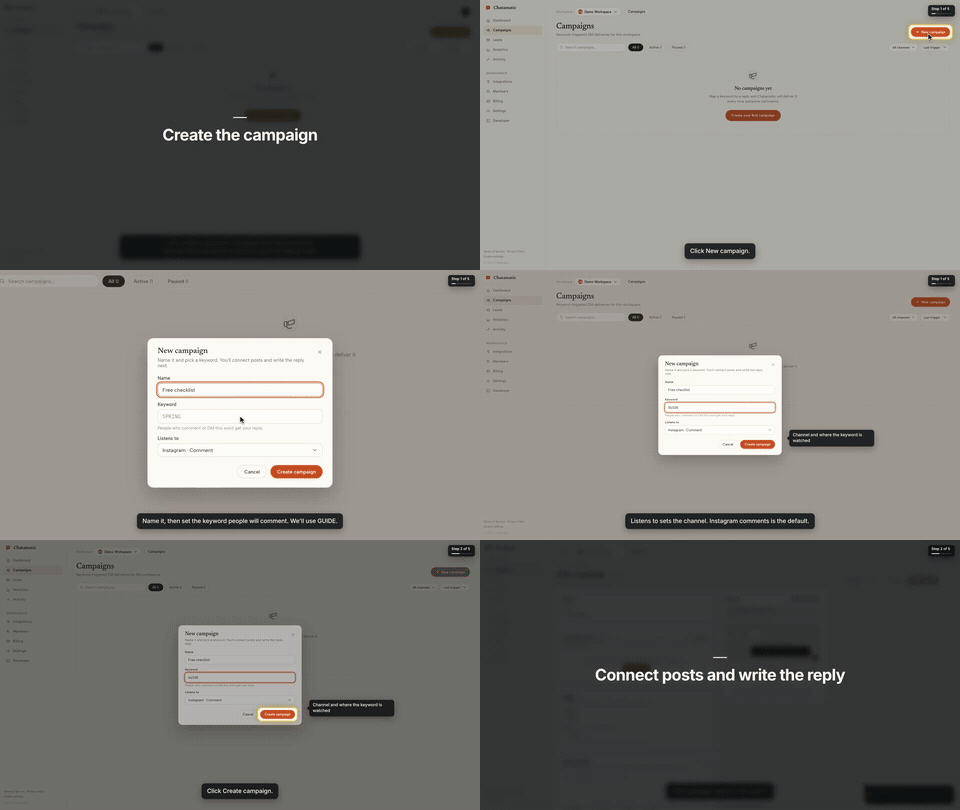
That is the first chapter of a 66-second video made from the request "make a tutorial video of creating a campaign". The whole session, from that sentence to the finished video with the exact prompt and every screen along the way, is in the Claude Code guide.
This repository gives your agent two things:
- The
screenbrowserskill — how to read your codebase and write the two guides Screen Browser needs (the login flow and the walkthrough), which effect fits which moment, how to check a guide for free before recording, and how to review the video before handing it over. - The MCP server configuration — the tools the agent calls: create the project, upload guides,
check them, start the run, poll it, fetch the video. The server itself is part of your Screen
Browser account at
https://mcp.screenbrowser.com.
Claude Code, Codex, Cursor or any MCP client can use it. Sign-in happens in the browser; there is no key to paste.
Install (Claude Code)
Add this repository as a plugin marketplace and install the plugin:
claude plugin marketplace add screenbrowser/skill
claude plugin install screenbrowser@screenbrowser
The first time the agent reaches for a Screen Browser tool, Claude Code opens your browser: sign in
to Screen Browser, approve the connection, and you are done. Nothing to copy. (If it does not
prompt, run /mcp and pick screenbrowser → Authenticate.)
Without the plugin system, register the server yourself and copy the skill:
claude mcp add --transport http screenbrowser https://mcp.screenbrowser.com
cp -r skills/screenbrowser ~/.claude/skills/
With an API key instead
If your agent cannot open a browser to sign in, create a key under Settings → API keys in Screen Browser and pass it as a bearer token:
claude mcp add --transport http screenbrowser https://mcp.screenbrowser.com \
  --header "Authorization: Bearer <your API key>"
Any MCP client works the same way: Streamable HTTP at https://mcp.screenbrowser.com, OAuth 2.1 with
dynamic client registration for interactive sign-in, or Authorization: Bearer <key>.
Other agents
The skill is a plain SKILL.md in the open Agent Skills format, and the server is standard MCP over
HTTP, so the same two pieces work outside Claude Code.
Cursor, VS Code, GitHub Copilot and other Agent Plugins clients — this repository is also an
Agent Plugins package (plugin.json, mcp.json, skills/), so
install it as a plugin from the repository URL and sign in when the client offers. Cursor without
the plugin: add the server to .cursor/mcp.json (or the global one in Cursor settings), click
Sign in next to it, and copy the skill into .cursor/skills/:
{
  "mcpServers": {
    "screenbrowser": { "url": "https://mcp.screenbrowser.com" }
  }
}
mkdir -p .cursor/skills && cp -r skills/screenbrowser .cursor/skills/
OpenAI Codex CLI — add the server to ~/.codex/config.toml, sign in once, and copy the skill
into Codex's skills folder:
[mcp_servers.screenbrowser]
url = "https://mcp.screenbrowser.com"
codex mcp login screenbrowser
mkdir -p ~/.codex/skills && cp -r skills/screenbrowser ~/.codex/skills/
Anything else (Gemini CLI, Windsurf, a custom agent) — register an HTTP MCP server with the URL
the way that tool documents it; a client that supports OAuth will sign you in, one that does not
takes the API key as an Authorization: Bearer header. Give the agent skills/screenbrowser/SKILL.md
as instructions (paste it, or point the tool's rules file at it). The MCP server itself also carries
the guide syntax as a resource and a write-tutorial-guide prompt, so a client with MCP prompts can
work without the skill file at all.
Use
Videos can be recorded on the desktop or as a phone or tablet (device: iphone, android, ipad,
…), in a phone frame on a vertical 9:16 or widescreen 16:9 canvas or as the bare screen; one run is
one device.
Open your app's repository in Claude Code and ask:
Make a tutorial video of creating a campaign.
The agent will check credits, create the project (it will ask you for the deployed URL, a demo user, and the legal attestation), write the guides from your routes and templates, validate them, show them to you, start the run, and give you the video link a few minutes later.
The MCP server also ships a get_guide_instructions tool with the same writing rules, for clients
without this skill, a write-tutorial-guide prompt that walks any client through the same flow, and
two resources: screenbrowser://guide-syntax and screenbrowser://example-guides.
What your app needs
- A demo user that signs in with email and password: no OAuth, no 2FA, no captcha. Seed it with realistic data.
- The deployed URL to record (staging is fine) and every host the app talks to (API subdomain, auth provider, CDN). An app that only runs on your computer works through a tunnel: ngrok or Cloudflare Tunnel (how).
- Confirmation that you are allowed to record the app (yours, a client's with permission, or an internal tool).
What it sends, and where
Everything the plugin does goes to one place: the Screen Browser MCP server at
https://mcp.screenbrowser.com, over HTTPS, signed in with your Screen Browser account. The
skill itself is instructions for the agent; it runs nothing on your machine and fetches nothing.
What the agent sends to Screen Browser when you ask for a video:
- the project's settings: your app's URL, the hosts it talks to, the sign-in check, narration language and voice;
- the guides it writes from your code: plain sentences naming buttons and fields as they appear on screen. Read them before they are saved; the agent shows them to you;
- the demo user's credentials, as project variables. Screen Browser stores them encrypted, uses them only to sign in during a recording, and never returns them through any tool. Values you give the agent pass through its conversation; to keep them out of chat, set them on the project's page in the Screen Browser dashboard instead;
- run commands: start, poll, cancel, and, only if you agree, a failure report with the recorder's screenshot and logs of a run that failed on Screen Browser's side.
It never sends your source code. The agent reads your repository locally to learn the labels; only the guide text leaves the machine. Nothing is sent to any other service. What Screen Browser keeps, and for how long, is in the privacy policy.
What it costs
Plans start at $49 a month, sized in minutes of finished video. Checking a guide before recording is free, and a run that fails is not charged. Videos are capped at five minutes. There is no free plan, but the first 100 accounts get 10 free minutes with no card. Current prices are on the pricing page.
Layout
plugin.json                        Agent Plugins manifest (Cursor, VS Code, Copilot, …)
mcp.json                           Agent Plugins MCP config (the URL; sign-in is OAuth)
.claude-plugin/plugin.json         Claude Code plugin manifest
.claude-plugin/marketplace.json    lets this repo act as its own Claude Code marketplace
.mcp.json                          Claude Code MCP server config
skills/screenbrowser/SKILL.md      the skill
skills/screenbrowser/references/   guide syntax reference, worked example
examples/chatamatic/               a real auth guide + main guide pair
What a guide looks like
Plain language, one step per line, naming things as they appear on screen. Screen Browser turns it into the script — the narration, the highlights, the pacing — and resolves each step against the live page:
Go to https://app.acme.test/campaigns
"Let's create a spring promotion."
Click "New campaign"
Type "Spring promo" into the Name field
Click "Save"
Confirm text "Campaign created" is visible
Ids and name= attributes are allowed when a step needs precision; class names generated by a build
tool are refused. The full reference, including the optional effect directives, is in
skills/screenbrowser/references/guide-syntax.md.
Documentation index for AI agents
The skill carries everything an agent needs to write a guide and run a recording. For anything else — prerequisites, costs, limitations, the API — https://screenbrowser.com/llms.txt is a Markdown index of the public documentation, and https://screenbrowser.com/docs/agents/ is the reference for this integration.
Support
Issues and ideas about the skill are welcome in this repository. Anything about your account or a particular recording: use the contact form at https://screenbrowser.com/contact/.
License
MIT. Screen Browser itself is a hosted service; this repository contains only the agent-facing skill, configuration and examples.
Screen Browser MCP 질문
Screen Browser MCP를 Claude Code에 추가하려면 어떻게 하나요?
터미널에서 claude mcp add --transport http skill https://mcp.screenbrowser.com/를 실행합니다. 모든 프로젝트에서 사용할 수 있게 하려면 --scope user를 추가합니다.
Screen Browser MCP를 Cursor에 추가하려면 어떻게 하나요?
~/.cursor/mcp.json를 열고 mcpServers 아래에 서버를 추가합니다. 위 설치 섹션에 표시된 Cursor 구성을 사용합니다.
서버가 제 소스 코드를 Screen Browser로 전송하나요?
아니요, 에이전트는 레이블을 학습하기 위해 로컬에서 저장소를 읽지만, 소스 코드를 서비스로 전송하지는 않습니다.
웹 애플리케이션의 요구 사항은 무엇인가요?
이메일/비밀번호 로그인이 가능한 데모 사용자가 있어야 하며(2FA 또는 캡차 불가), 배포된 URL이 필요합니다. 또한 모든 관련 호스트(API, auth, CDN)에 접근할 수 있어야 합니다.
무료 플랜이 있나요?
영구적인 무료 플랜은 없지만, 처음 100개 계정에는 10분의 무료 시간이 제공되며, 녹화 전 가이드를 확인하는 것은 무료입니다.