
150개 이상의 SAP HANA 데이터베이스 도구를 AI 어시스턴트에 제공하여 명령줄을 통해 데이터베이스, 클라우드 서비스 및 개발 작업을 관리합니다.
다른 이름 SAP-samples/hana-developer-cli-tool-example, hana-developer-cli-tool-example, hana-cli
- 스타
- 115
- Tools
- —
- 다운로드, 30일
- —
- 최신 버전
- 4.202607.1
- 마지막 커밋
- 2026년 10월 11일
- 라이선스
- Apache-2.0
SAP HANA CLI MCP란?
SAP HANA CLI은(는) MCP server입니다. 150개 이상의 SAP HANA 데이터베이스 도구를 AI 어시스턴트에 제공하여 명령줄을 통해 데이터베이스, 클라우드 서비스 및 개발 작업을 관리합니다.
프로젝트 README에서 생성된 요약
SAP HANA CLI MCP server 정보
이 도구는 개발자가 AI 어시스턴트 내에서 SAP HANA 데이터베이스와 클라우드 서비스를 관리할 수 있도록 지원합니다. 복잡한 명령어를 단순화하고 일반적으로 여러 개의 별도 스크립트가 필요한 공통 개발 작업을 그룹화하도록 설계된 150개 이상의 도구를 제공합니다. 이 서버는 VSCode를 이용한 로컬 개발, SAP HANA Express, 또는 Google Cloud Shell, AWS Cloud9, SAP Business Application Studio와 같은 클라우드 기반 쉘을 포함한 다양한 환경에서 작동하도록 구축되었습니다.
사용자는 원격 SAP HANA 인스턴스, SAP BTP 서비스 또는 SAP HANA Cloud에 연결할 수 있습니다. 이 도구는 Node.js 런타임을 기반으로 하며 연결을 위해 default-env.json 파일을 활용할 수 있습니다. SAP Business Technology Platform 리소스를 관리하는 사용자의 경우, 이 도구는 SAP BTP Command Line Interface와 통합되어 기능을 확장합니다. 또한 관리자 자격 증명, .cdsrc-private.json 파일, 환경 변수 또는 특정 연결 파라미터를 확인하는 정교한 연결 해제 시스템을 제공하여 데이터베이스 환경에 대한 안전하고 유연한 액세스를 보장합니다.
활용 사례
- 1데이터베이스 뷰 목록 조회특정 스키마 또는 컨테이너 내의 모든 뷰 목록을 요청합니다.
- 2BTP 리소스 관리통합된 BTP CLI 기능을 사용하여 글로벌 계정, 서브계정 및 서비스 인스턴스를 관리합니다.
- 3클라우드 개발 수행클라우드 쉘 환경에서 데이터베이스 관리 작업을 직접 실행합니다.
- 4원격 데이터베이스 연결로컬 설정 파일을 사용하여 원격 HANA 인스턴스에 연결을 설정합니다.
프로젝트의 README를 바탕으로 작성되었습니다. 모든 활용 사례는 해당 내용의 인용문과 대조하여 확인합니다.
SAP HANA CLI MCP 설치 방법
형식 확인: 2026년 11월 10일Cursor에 추가Goose에 추가Claude Code에 SAP HANA CLI MCP 설치
$ claude mcp add hana-developer-cli-tool-example -- npx -y hana-cliCursor에 SAP HANA CLI MCP 설치
~/.cursor/mcp.json
{
  "mcpServers": {
    "hana-developer-cli-tool-example": {
      "command": "npx",
      "args": [
        "-y",
        "hana-cli"
      ]
    }
  }
}VS Code에 SAP HANA CLI MCP 설치
.vscode/mcp.json
{
  "servers": {
    "hana-developer-cli-tool-example": {
      "type": "stdio",
      "command": "npx",
      "args": [
        "-y",
        "hana-cli"
      ]
    }
  }
}VS Code CLI에 SAP HANA CLI MCP 설치
$ code --add-mcp '{"name":"hana-developer-cli-tool-example","type":"stdio","command":"npx","args":["-y","hana-cli"]}'Claude Desktop에 SAP HANA CLI MCP 설치
claude_desktop_config.json
{
  "mcpServers": {
    "hana-developer-cli-tool-example": {
      "command": "npx",
      "args": [
        "-y",
        "hana-cli"
      ]
    }
  }
}Codex에 SAP HANA CLI MCP 설치
$ codex mcp add hana-developer-cli-tool-example -- npx -y hana-cliCodex config.toml에 SAP HANA CLI MCP 설치
~/.codex/config.toml
[mcp_servers.hana-developer-cli-tool-example]
command = "npx"
args = ["-y", "hana-cli"]
Gemini CLI에 SAP HANA CLI MCP 설치
$ gemini mcp add -s user hana-developer-cli-tool-example npx -- -y hana-cliGemini settings.json에 SAP HANA CLI MCP 설치
~/.gemini/settings.json
{
  "mcpServers": {
    "hana-developer-cli-tool-example": {
      "command": "npx",
      "args": [
        "-y",
        "hana-cli"
      ]
    }
  }
}자동 검사
2026년 11월 13일에 실행됨전체 보고서 →자동 검사를 통과했습니다. 이는 보안 감사가 아닙니다. 코드를 직접 읽고 서버에 필요한 최소한의 권한만 부여하십시오. 검사 방식

- 소스 저장소 연결 및 접근 가능통과
- 오픈 소스 라이선스 (OSI)통과
- 최근 1년 내 커밋 또는 릴리스통과
- 패키지 이름이 인기 패키지와 유사하지 않음통과
- 원격 엔드포인트가 HTTPS 사용검사되지 않음
- 파괴적인 도구에 라벨 표시됨검사되지 않음
- 모델에 대한 숨겨진 지침 없음통과
- 패키지 및 해당 종속성에 중요한 보안 권고 없음통과
README
GitHub에서 보기SAP HANA Developer Command Line Interface
⚠️ Important Notice - Major Updates (Feb/March 2026)
Version 4.x introduces significant changes including Express 5 migration, refactored database connection handling, and major performance improvements. While we've tested extensively, please be aware of potential issues in your specific environment.
If you encounter problems:
-
Report Issues: Please open an issue on our GitHub Issues page with details about your environment and the problem you're experiencing.
-
Rollback to Stable Version: If you need to quickly revert to the last stable release before these major changes, you can install version 3.202601.0 (January 2026):
npm install -g hana-cli@3.202601.0
What's Changed: The change log describes all notable changes including Express 5 migration, database connection refactoring, CLI startup performance optimization (60-77% faster), expanded test coverage (85%+ coverage), and the new VitePress documentation site.
📚 Documentation
Complete documentation is available in the docs/ folder and organized with VitePress. This README will maintain a high-level overview and quick links to the most important sections of the documentation but over time expect that more and more detailed documentation will be added to the docs folder as the project evolves.
Quick Links:
- Getting Started - Installation and setup
- Command Reference - All 20+ commands with examples
- Features Guide - CLI, API, MCP, and more
- API Reference - REST API documentation
- FAQ - Frequently asked questions
- Troubleshooting - Common issues and solutions
Run Documentation Locally
cd docs
npm install
npm run docs:dev
# Open http://localhost:5173
Build For Production
cd docs
npm run docs:build
npm run docs:serve
See docs/README.md for complete documentation setup details.
Description
This sample is intended to shown how one could build a developer-centric SAP HANA command line tool, particularly designed to be used when performing local SAP HANA development in non-SAP tooling (like VSCode). It utilizes the default-env.json that is often used in local development for connectivity to a remote SAP HANA DB (although it can of course be used with a local SAP HANA, express edition instance as well). There is no intention to replacing the hdbsql tool as a generic SQL console. Instead this sample will focus on simplifying and grouping common and complex commands that otherwise might a lot of separate scripts.
Introduction Video: https://youtu.be/dvVQfi9Qgog
However the tool isn't limited to only local development. It also works well when developing in the cloud. The hana-cli tool can also run well from a cloud shell in the SAP Business Application Studio, Google Cloud Shell, AWS Cloud9, etc. We can also run against a SAP HANA service for SAP BTP or SAP HANA Cloud instance. This demonstrates that the tool can run just about anywhere you can get a command line that has access to the Node.js Runtime. We can also connect to a remote HANA instance even if it isn't running in the same cloud environment in which we are performing our development tasks.
Supported Environments
graph TD
    A["SAP HANA CLI Tool"] --> B{Development Environment}
    B --> C["Local Development"]
    B --> D["Cloud Development"]

    C --> C1["VSCode"]
    C --> C2["Local SAP HANA Express"]
    C --> C3["Remote SAP HANA"]

    D --> D1["SAP Business App Studio"]
    D --> D2["Google Cloud Shell"]
    D --> D3["AWS Cloud9"]
    D --> D4["SAP BTP HANA Service"]
    D --> D5["SAP HANA Cloud"]

    style A fill:#0070C0
    style B fill:#FF6B6B
    style C fill:#51CF66
    style D fill:#FFD93D
Running in Cloud Shells Video: https://youtu.be/L7QyVLvAIIQ
Requirements / Download and Installation
If you would rather just access the tool directly, it is now available in npm as well. You can install via:
npm install -g hana-cli
Installation Methods
graph LR
    A["SAP HANA CLI Tool"] --> B{Installation Method}

    B --> B1["NPM Package<br/>Quick Install"]
    B1 --> B1a["npm install -g hana-cli"]
    B1a --> B1b["✅ Ready to Use"]

    B --> B2["Clone & Build<br/>From Source"]
    B2 --> B2a["Clone Repository<br/>from GitHub"]
    B2a --> B2b["Run npm install"]
    B2b --> B2c["Run npm link"]
    B2c --> B2d["✅ Ready to Use"]

    style B1 fill:#0070C0,color:#fff
    style B2 fill:#FF6B6B,color:#fff
    style B1b fill:#51CF66,color:#fff
    style B2d fill:#51CF66,color:#fff
Otherwise you can also run it from the sources as described here:
-
Install Node.js on your development machine https://nodejs.org/en/download/. Version 22 or later is required; Node.js 24 (LTS) is highly recommended, following the SAP CAP 10 recommendation.
-
Clone the repository from https://github.com/SAP-samples/hana-developer-cli-tool-example
git clone https://github.com/SAP-samples/hana-developer-cli-tool-example
- Run NPM install from the root of the hana-developer-cli-tool-example project you just cloned to download dependencies
npm install
- Run NPM link from the cloned project root to make the hana-cli command available from everywhere https://docs.npmjs.com/cli/link
npm link

BTP CLI Installation
The hana-cli tool includes several commands that interact with SAP Business Technology Platform (BTP) services. All BTP-related functionality in this tool relies on the SAP BTP Command Line Interface (btp CLI) being installed and available in your system's PATH.
About the BTP CLI
The btp CLI is SAP's official command-line tool for managing resources and services on the SAP Business Technology Platform. It provides capabilities for managing global accounts, directories, subaccounts, entitlements, service instances, and more. The hana-cli tool wraps and extends many of these capabilities with developer-friendly commands.
Installing the BTP CLI with install-btp.sh
For Linux and macOS users, this repository includes a convenient installation script install-btp.sh that automates the installation of the BTP CLI.
The script performs the following actions:
- Downloads the latest BTP CLI installer from the SAP Development Tools download page
- Makes the installer executable and runs it with automatic confirmation
- Configures shell aliases for easier BTP CLI usage
- Adds the BTP CLI binary location to your PATH
To use the installation script:
chmod +x scripts/install-btp.sh
./scripts/install-btp.sh
After running the script, you may need to restart your terminal or run source ~/.bashrc to apply the PATH changes.
Note: Windows users should download the BTP CLI from the SAP Development Tools page and follow the platform-specific instructions there.
Verifying the Installation
Once installed, you can verify the BTP CLI is available by running:
btp --version
You can also use the hana-cli tool itself to check your BTP CLI configuration:
hana-cli btp
This will display your current BTP target information including global account, directory, and subaccount if configured.
Security
This application primarily uses the default-env.json that is often used in local development for connectivity to a remote HANA DB (although it can of course be used with a local SAP HANA, express edition instance as well). For more details on how the default-env.json works, see the readme.md of the @sap/xsenv package or the @sap/hdi-deploy package.
Connection Configuration Resolution Order
The tool doesn't simply look for a default-env.json file in the current directory however. There are numerous options and places it will look for the connection parameters. Here is the order in which it checks:
graph TD
    A["Connection Resolution<br/>Started"] --> B{Admin Mode<br/>Enabled?}
    B -->|YES| B1["Look for<br/>default-env-admin.json"]
    B -->|NO| C{.cdsrc-private.json<br/>Found?}

    B1 --> B2{Found?}
    B2 -->|YES| Z1["Use Admin Credentials"]
    B2 -->|NO| C

    C -->|YES| C1["Use CAP cds bind<br/>Dynamic Lookup"]
    C -->|NO| D{.env File<br/>Found?}

    C1 --> Z2["Secure Lookup<br/>from CF/K8s"]

    D -->|YES| D1{Contains<br/>VCAP_SERVICES?}
    D1 -->|YES| Z3["Use VCAP Services"]
    D1 -->|NO| E
    D -->|NO| E

    E{--conn Parameter<br/>Specified?} -->|YES| E1["Look for specified<br/>connection file"]
    E1 --> E2{Local or<br/>Home Found?}
    E2 -->|YES| Z4["Use Specified File"]
    E2 -->|NO| F
    E -->|NO| F

    F["Look for<br/>default-env.json<br/>in current/parent dirs"]
    F --> G{Found?}
    G -->|YES| Z5["Use default-env.json"]
    G -->|NO| H["Last Resort:<br/>Look for default.json<br/>in HOME/.hana-cli/"]

    H --> I{Found?}
    I -->|YES| Z6["Use default.json"]
    I -->|NO| Z7["❌ No Connection<br/>Configuration Found"]

    style Z1 fill:#51CF66
    style Z2 fill:#51CF66
    style Z3 fill:#51CF66
    style Z4 fill:#51CF66
    style Z5 fill:#51CF66
    style Z6 fill:#51CF66
    style Z7 fill:#FF6B6B
- First we look for the Admin option and use a default-env-admin.json - this overrides all other parameters
- If no admin option or if there was an admin option but no default-env-admin.json could be found in this directory or 5 parent directories, then look for
.cdsrc-private.jsonin this directory or 5 parent directories and usecds bindfunctionality to lookup the credentials securely. This is the most secure option, but please note: this will make each command take a few seconds longer as credentials are no longer stored locally but looked up from cf or k8s dynamically with each command - If no
.cdsrc-private.jsonfound in this directory or 5 parent directories, then look for a .env file in this directory or up to 5 parent directories - No .env file found or it doesn't contain a VCAP_SERVICES section, then check to see if the --conn parameter was specified. If so check for that file in the current directory or up to 5 parent directories
- If the file specified via the --conn parameter wasn't found locally then check for it in the ${homedir}/.hana-cli/ folder
- If no specific configuration file was was found then look for a file named default-env.json in the current directory or up to 5 parent directories
- Last resort if nothing has been found up to this point - look for a file named default.json in the ${homedir}/.hana-cli/ folder
Examples
A lot of the functionality of this tool revolves around typical tasks you face while doing HANA database development. For example you might want to get a list of all views in your current schema/container:
C:\github\hana-xsa-opensap-hana7\user_db>hana-cli views
Schema: OPENSAP_HANA_USER, View: *
SCHEMA_NAME        VIEW_NAME                                    VIEW_OID  COMMENTS
-----------------  -------------------------------------------  --------  ------------
OPENSAP_HANA_USER  user.models::USER_DETAILS                    171133    USER_DETAILS
OPENSAP_HANA_USER  user.models::USER_DETAILS/hier/USER_DETAILS  171139    null
Then perhaps you want to inspect a view to see the columns and their data types:
C:\github\hana-xsa-opensap-hana7\user_db>hana-cli view * user.models::USER_DETAILS
Schema: %, View: user.models::USER_DETAILS
{ SCHEMA_NAME: 'OPENSAP_HANA_USER',
  VIEW_NAME: 'user.models::USER_DETAILS',
  VIEW_OID: 171133,
  COMMENTS: 'USER_DETAILS',
  IS_COLUMN_VIEW: 'TRUE',
  VIEW_TYPE: 'CALC',
  HAS_STRUCTURED_PRIVILEGE_CHECK: 'TRUE',
  HAS_PARAMETERS: 'TRUE',
  HAS_CACHE: 'NONE',
  CREATE_TIME: '2019-07-30 13:14:15.594000000' }


SCHEMA_NAME        VIEW_NAME                  VIEW_OID  COLUMN_NAME  POSITION  DATA_TYPE_NAME  OFFSET  LENGTH  SCALE  IS_NULLABLE  DEFAULT_VALUE  CS_DATA_TYPE_NAME  COLUMN_ID  COMMENTS
-----------------  -------------------------  --------  -----------  --------  --------------  ------  ------  -----  -----------  -------------  -----------------  ---------  ---------
OPENSAP_HANA_USER  user.models::USER_DETAILS  171133    EMAIL        1         NVARCHAR        0       255     null   TRUE         null           STRING             171135     Email
OPENSAP_HANA_USER  user.models::USER_DETAILS  171133    FIRSTNAME    2         NVARCHAR        0       40      null   TRUE         null           STRING             171136     FirstName
OPENSAP_HANA_USER  user.models::USER_DETAILS  171133    LASTNAME     3         NVARCHAR        0       40      null   TRUE         null           STRING             171137     LastName
OPENSAP_HANA_USER  user.models::USER_DETAILS  171133    USERID       4         INTEGER         0       10      0      TRUE         null           INT                171138     UserId
But there are multiple output options for inspection. Perhaps you are using Cloud Application Programming Model and need to create a proxy entity in CDS for a view. This tool will read the catalog metadata and convert it to CDS:
C:\github\hana-xsa-opensap-hana7\user_db>hana-cli view OPENSAP_HANA_USER user.models::USER_DETAILS -o cds
Schema: OPENSAP_HANA_USER, View: user.models::USER_DETAILS
@cds.persistence.exists
Entity user_modelsUSER_DETAILS {
 key    "EMAIL": String(255) null  @title: 'EMAIL: Email' ;
key     "FIRSTNAME": String(40) null  @title: 'FIRSTNAME: FirstName' ;
key     "LASTNAME": String(40) null  @title: 'LASTNAME: LastName' ;
key     "USERID": Integer null  @title: 'USERID: UserId' ;
}
Or maybe you are service enabling this view and you want to see it converted to EDMX:
C:\github\hana-xsa-opensap-hana7\user_db>hana-cli view OPENSAP_HANA_USER user.models::USER_DETAILS -o edmx
Schema: OPENSAP_HANA_USER, View: user.models::USER_DETAILS
<?xml version="1.0" encoding="utf-8"?>
<edmx:Edmx Version="1.0" xmlns:edmx="http://schemas.microsoft.com/ado/2007/06/edmx" xmlns:m="http://schemas.microsoft.com/ado/2007/08/dataservices/metadata" xmlns:sap="http://www.sap.com/Protocols/SAPData">
  <edmx:Reference Uri="https://wiki.scn.sap.com/wiki/download/attachments/448470974/Common.xml?api=v2" xmlns:edmx="http://docs.oasis-open.org/odata/ns/edmx">
    <edmx:Include Alias="Common" Namespace="com.sap.vocabularies.Common.v1"/>
  </edmx:Reference>
  <edmx:DataServices m:DataServiceVersion="2.0">
    <Schema Namespace="HanaCli" xmlns="http://schemas.microsoft.com/ado/2008/09/edm">
      <EntityContainer Name="EntityContainer" m:IsDefaultEntityContainer="true">
        <EntitySet Name="user_modelsUSER_DETAILS" EntityType="HanaCli.user_modelsUSER_DETAILS"/>
      </EntityContainer>
      <EntityType Name="user_modelsUSER_DETAILS">
        <Key>
          <PropertyRef Name="EMAIL"/>
          <PropertyRef Name="FIRSTNAME"/>
          <PropertyRef Name="LASTNAME"/>
          <PropertyRef Name="USERID"/>
        </Key>
        <Property Name="EMAIL" Type="Edm.String" MaxLength="255"/>
        <Property Name="FIRSTNAME" Type="Edm.String" MaxLength="40"/>
        <Property Name="LASTNAME" Type="Edm.String" MaxLength="40"/>
        <Property Name="USERID" Type="Edm.Int32"/>
      </EntityType>
      <Annotations Target="HanaCli.user_modelsUSER_DETAILS/EMAIL" xmlns="http://docs.oasis-open.org/odata/ns/edm">
        <Annotation Term="Common.Label" String="EMAIL: Email"/>
      </Annotations>
      <Annotations Target="HanaCli.user_modelsUSER_DETAILS/FIRSTNAME" xmlns="http://docs.oasis-open.org/odata/ns/edm">
        <Annotation Term="Common.Label" String="FIRSTNAME: FirstName"/>
      </Annotations>
      <Annotations Target="HanaCli.user_modelsUSER_DETAILS/LASTNAME" xmlns="http://docs.oasis-open.org/odata/ns/edm">
        <Annotation Term="Common.Label" String="LASTNAME: LastName"/>
      </Annotations>
      <Annotations Target="HanaCli.user_modelsUSER_DETAILS/USERID" xmlns="http://docs.oasis-open.org/odata/ns/edm">
        <Annotation Term="Common.Label" String="USERID: UserId"/>
      </Annotations>
    </Schema>
  </edmx:DataServices>
</edmx:Edmx>
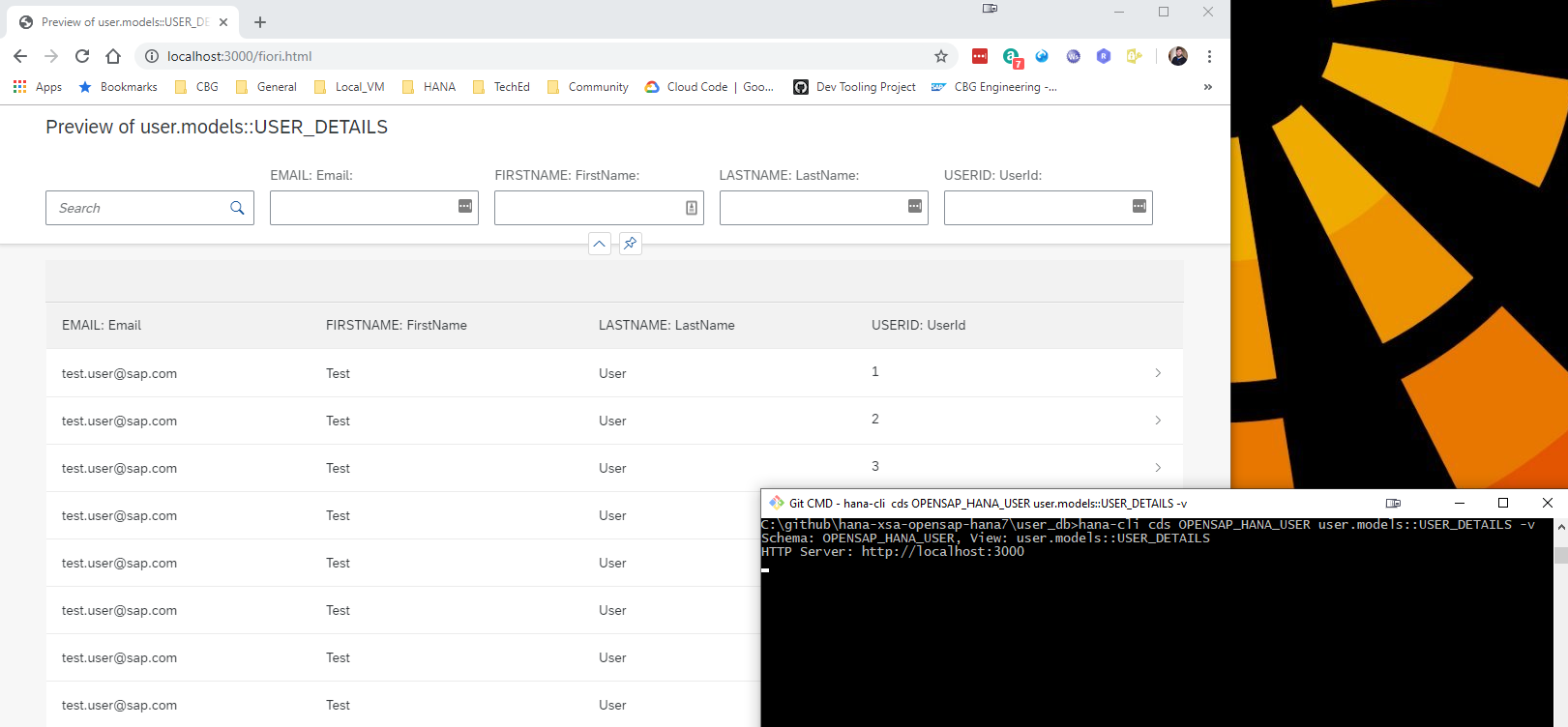
This tool will even create a temporary OData V4 service for any existing table, view or Calculation View and launch a test Fiori Ui locally.
Project Structure and Documentation
Utils Documentation
For developers looking to understand or extend the internal utilities used by this CLI tool, comprehensive documentation is available in the utils/README.md file. This documentation covers:
- Core Utilities: base module, connection management, database inspection, SQL injection protection
- CLI Integration: BTP, Cloud Foundry, and XSA CLI integration utilities
- Database Abstraction: Multi-database support (HANA, PostgreSQL, SQLite) with factory pattern
- Usage Examples: Practical examples for using the utility modules
The utils folder contains reusable modules that provide the foundation for all CLI commands, including database connectivity, terminal UI components, security utilities, and internationalization support.
HTTP Routes Documentation
The hana-cli tool includes a built-in web server that exposes all CLI functionality through RESTful HTTP endpoints. Detailed documentation for all HTTP routes is available in the routes/README.md file. This documentation covers:
- Base Configuration Endpoints: GET/PUT operations for managing CLI prompts and settings
- HANA Database Endpoints: Complete API for listing and inspecting HANA database objects (tables, views, schemas, containers, etc.)
- Documentation Endpoints: Access to README and CHANGELOG as HTML
- WebSocket Support: Real-time communication for long-running operations
- Static Resources: UI5 application and DFA integration
The web server is automatically started when using certain CLI commands with the -w or --web flag, making all hana-cli functionality accessible via HTTP requests at http://localhost:3010 (configurable port).
Swagger/OpenAPI Documentation
The hana-cli web server now includes comprehensive Swagger/OpenAPI 3.0 documentation for all REST API endpoints. This provides an interactive interface for exploring and testing all HTTP APIs, making it easier to integrate hana-cli functionality into your own applications.
Key Features:
- Interactive API Documentation: Browse all 27+ documented endpoints with full request/response schemas
- Try-It-Out Functionality: Test any API endpoint directly from the browser
- Auto-Generated Specification: Documentation automatically generated from JSDoc comments in route files
- OpenAPI 3.0 Standard: Industry-standard specification for maximum compatibility
- Organized Categories: Endpoints grouped into 10 logical categories (Configuration, HANA System, HANA Objects, HDI, Cloud Services, etc.)
- Export Support: Download the raw OpenAPI JSON specification for client SDK generation
Accessing Swagger UI:
# Start the UI server
hana-cli ui

# Open browser to Swagger UI
http://localhost:3010/api-docs

# Get raw OpenAPI JSON specification
http://localhost:3010/api-docs.json
For complete implementation details, usage examples, and customization options, see the SWAGGER_IMPLEMENTATION.md documentation.
Web Applications (Fiori Launchpad UI)
The hana-cli tool includes a complete browser-based interface built with SAP UI5 and the Fiori Launchpad, providing a graphical alternative to the command-line interface. This web interface offers an intuitive, tile-based navigation system for all database operations.
graph TB
    CLI["hana-cli<br/>Command Line<br/>Interface"]

    CLI -->|--web flag| Server["Web Server<br/>Port 3010"]

    Server --> UI["Fiori Launchpad UI<br/>SAP UI5 Application"]

    UI --> DB["Database<br/>Operations"]
    UI --> Cloud["Cloud Services<br/>BTP/CF Integration"]
    UI --> Admin["Admin<br/>Functions"]

    DB --> T["Tables,<br/>Views,<br/>Schemas"]
    DB --> I["Indexes,<br/>Functions,<br/>Procedures"]

    Cloud --> HDI["HDI<br/>Containers"]
    Cloud --> SBSS["SBSS<br/>Services"]
    Cloud --> Store["SecureStore<br/>& Schema"]

    Admin --> Conv["Mass<br/>Conversion"]
    Admin --> Monitor["System<br/>Monitoring"]
    Admin --> API["REST API"]

    API --> Swagger["Swagger/OpenAPI<br/>Documentation<br/>27+ Endpoints"]

    style CLI fill:#0070C0,color:#fff
    style Server fill:#FF6B6B,color:#fff
    style UI fill:#FFD93D,color:#000
    style Swagger fill:#51CF66,color:#000
Key Features:
- Fiori Launchpad Interface: Modern, responsive UI with organized tile groups
- Multiple UI5 Applications: Specialized apps for listing, inspecting, and managing database objects
- Real-Time Operations: WebSocket-based communication for live updates and long-running tasks
- Mass Conversion Tool: Bulk convert tables to CDS, HDBTable, or HDBMigrationTable formats
- System Information Dashboard: View connection details, version info, and system status
- Database Object Browser: Interactive exploration of tables, views, schemas, functions, indexes, and more
- Cloud Foundry Integration: Manage HDI, SBSS, Schema, and SecureStore service instances
- Theme Support: Automatic light/dark mode detection and customization
- Integrated Help: SAP Digital Foundation Adapter (DFA) with contextual assistance
Quick Start:
hana-cli tables -w    # Launch web interface with tables view
hana-cli serve        # Start the web server standalone
The web UI runs on http://localhost:3010 by default and provides access to all CLI functionality through an easy-to-use graphical interface. For complete documentation of all web applications, UI5 components, configuration, and development guides, see the app/README.md file.
SAP HANA CLI MCP 질문
SAP HANA CLI MCP를 Claude Code에 추가하려면 어떻게 하나요?
터미널에서 claude mcp add hana-developer-cli-tool-example -- npx -y hana-cli를 실행합니다. 모든 프로젝트에서 사용할 수 있게 하려면 --scope user를 추가합니다.
SAP HANA CLI MCP를 Cursor에 추가하려면 어떻게 하나요?
~/.cursor/mcp.json를 열고 mcpServers 아래에 서버를 추가합니다. 위 설치 섹션에 표시된 Cursor 구성을 사용합니다.
SAP HANA CLI의 용도는 무엇인가요?
VSCode와 같은 비 SAP 도구를 사용할 때 복잡한 SAP HANA 개발 명령어를 단순화하고 일반적인 명령어를 그룹화하도록 설계된 개발자 중심의 명령줄 도구입니다.
클라우드 환경에서도 사용할 수 있나요?
네, SAP Business Application Studio, Google Cloud Shell, AWS Cloud9과 같은 클라우드 쉘에서 작동하며 SAP HANA Cloud 인스턴스에 연결할 수 있습니다.
도구를 어떻게 설치하나요?
npm install -g hana-cli 명령어를 사용하여 npm을 통해 전역으로 설치할 수 있습니다.